Tag: jetty

  • If Virtual Threads are the solution, what is the problem?

    Java’s Virtual Threads (aka Project Loom or JEP 444) have arrived as a full platform feature in Java 21, which has generated considerable interest and many projects (including Eclipse Jetty) are adding support.

    I have previously been somewhat skeptical about how significant any advantages Virtual Threads actually have over Platform Threads (aka Native Threads). I’ve also pointed out that cheap Threads can do expensive things, so that using Virtual Threads may not be a universal panacea for concurrent programming.

    However, even with those doubts, it is clear that Virtual Threads do have advantages in memory utilization and speed of startup. In this blog we look at what kinds of applications may benefit from those advantages.

    In short we investigate what scalability problems are Virtual Threads the solution for.

    Axioms

    Firstly let’s agree on what is accepted about Virtual Thread usage:

    • Writing asynchronous code is extraordinary difficult. “Yeah I know” you say… yeah but no, it is harder than that! Avoiding the need to write application logic in asynchronous style is key to improving the quality and stability of an application. This blog is not generally advocating you write your applications in an asynchronous style.
    • Virtual Threads are very cheap to create. From a performance perspective there is no reason to pool already started Virtual Threads and such pools are considered an anti pattern. If a Virtual Thread is needed, then just create a new one.
    • Virtual Threads use less memory. This is accepted, but with some significant caveats. Specifically the memory saving is achieved because Virtual Threads only allocate stack memory as needed, whilst Platform Threads provision stack size based on a worst case maximal usage. This is not exactly an apples vs oranges comparison.

    If some are good, are more even better?

    Consider a blocking style application is running on a traditional application server that is not scaling sufficiently. On inspection you see that all the Threads in the pool (default size 200) are allocated and that there are no Threads available to do more work!

    Would making more Threads available be the solution to this scalability problem? Perhaps 2000 Platform Threads will help? Still slow? Let’s try 10,000 Platform Threads! Running out of memory? Then perhaps unlimited Virtual Threads will solve the scalability problems?

    What if on further inspection it is found that the pool Threads are mostly blocked waiting for a JDBC Database connection from the JDBC Connection Pool (default size 8) and that as a result the Thread pool is exhausted.

    If every request needs the database, then any additional Threads will all just block on the same JDBC pool, thus more Threads will not make a more Scalable solution.

    Alternatively, if only some requests need to use the database, then having more Threads would allow request that do not need the database to proceed to completion. However, a fraction of requests would still end up blocked on the JBDC pool. Thus any limited Platform Thread pool could still become exhausted.

    With unlimited Virtual Threads there is no effective limit on the number of Threads, so non database requests could always continue, but the queue of Threads waiting on JBDC would also be unlimited as would the total of any resources held by those Threads whilst waiting. Thus the application would only scale for some types of request, whilst giving JDBC dependent requests the same poor Quality of Service as before.

    Finite Resources

    If an application’s scalability is constrained by access to a finite resource, then it is unlikely that “more Threads” is the solution to any scalability problems. Just like you can’t solve traffic by adding cars to a congested road, adding Threads to an already busy server may make things worse.

    Some common examples of finite resources that applications can encounter are:

    • CPU: If the server CPU is near 100% utilization, then the existing number of Threads are sufficient to keep it fully loaded. More and/or faster CPUs are needed before any increase in Threads could be beneficial.
    • Database: Many database technologies cannot handle many concurrent requests, so parallelism is restricted. If the bottleneck is the database, then it needs to be re-engineered rather than laid siege to by more concurrent Threads.
    • Local Network: An application may block reading or writing data because it has reached the limit on the local network. In such cases, more Threads will not increase throughput, but they might improve latency if some threads can progress reading new requests and have responses ready to write once network becomes less congested. However there is a cost in waiting (see below).
    • Locks: Parallel applications often use some form of lock or mutual exclusion to serialize access to common data structures. Contention on those locks can limit parallelism and require redesign rather than just more Threads.
    • Caches: CPU, memory, file system and object caches are key tools in speeding up execution. However, if too many different tasks are executed concurrently, the capacity of these caches to hold relevant data may be exceeded and execution with a cold cache can be very slow. Sometimes it is better to do less things concurrently and serialize the excess so that caches can be more effective that trying to do everything at once.

    If an application’s lack of scalability is due to Threads waiting for finite resources, then any additional Threads (Platform or Virtual) are unlikely to help and may make your application less stable. At best, careful redesign is needed before Thread counts can be increased in any advantageous way.

    Infinite (OK Scalable) Resources

    Not all resources are finite and some can be considered infinite, at least for some purposes. But let’s call them “Scalable” rather than infinite. Examples of scalable resources that an application may block on include:

    • Database: Not all databases are created equal and some types of database have scalability in excess of the request rates experienced by a server. However, such scalability often comes at a latency cost as the database may be remote and/or distributed, thus applications may block waiting for the database, even if it has capacity to handle more requests in parallel.
    • Micro services: A scalable database is really just a specific example of a micro service that may be provided by a remote and/or distributed system that has effectively infinite capacity at the cost of some latency. Applications can often find themselves waiting on one or more such services.
    • Remote Networks: Local data center networks are often very VERY fast and in many situations they can outstrip even the combined capacity of many client systems. An application sending/receiving larger content may may block writing/reading them due to a slow client, but still have enough local network capacity to communicate with many other clients in parallel.
    • Local Filesystems: Typically file systems are faster than networks, but slower than CPU. They also may have significant latency vs throughput tradeoffs (less so now that drives seldom need to spin physical disks). Thus Threads may block on local IO even though there is additional capacity available.

    Applications that lack scalability due to Threads waiting for such scalable resources may benefit from more Threads. Whilst some Threads are waiting for the a database, micro service, slow client network or file system, it is likely that other Threads can progress even if they need to access the same types of resources.

    Platform Threads pools can easily be increased to many 1000’s or more before typical servers will have memory issues. If scalability is needed beyond that, then Virtual Threads can offer practically unlimited additional Thread, but see the caveats below.

    Furthermore, the fast starting Virtual Threads can be of significant benefit in situations where small jobs with long latency can be carried out in parallel. Consider an application that processes request using data from several micro services, each with some access latency. If these are done serially, then the total request latency is the summation of all. Sometimes asynchronous code is used to execute micro service request in parallel, but spinning up a couple of Virtual Threads in this situation is simpler, less error prone and applicable to more APIs.

    Too Much of a Good Thing?

    There is also some concern with low latency scalable resources that seldom block with Virtual Threads. Since Virtual Threads are not preempted, there can be starvation and/or fairness problems if they are not blocked by slow resources. This is probably a good problem to have, but will need some management on extreme scales for some applications.

    The Cost of Waiting

    We have identified that there are indeed scalable resources on which an application may wait with many Threads. However, there is no such thing as a free lunch and waiting Threads may have a significant cost, even if they are Virtual. Specifically how/where an application waits can greatly affect resource usage.

    Consider a traditional application server with a limited Thread pool that is running near capacity, but with additional demand. While the 200 odd Threads are busy handling 200 concurrent request, there are additional request waiting to be handled. However, in an asynchronous server like Jetty, those additional requests can be cheaply parked and may be represented just be a single set bit in a selector or perhaps a tiny entry in a queue that holds only a reference to a connection that is ready to be read.
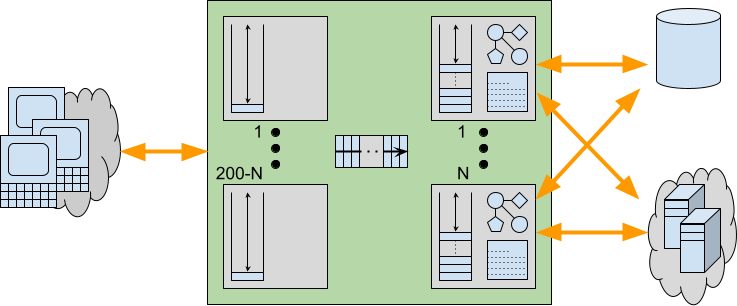
    Now consider if requests were serviced by Virtual Threads instead of waiting for a pooled Platform Thread to become available. Pending requests would be allowed to proceed to some blocking point in the application. Waiting like this within the application can have additional expenses including:

    • An input buffer will be allocated to read the request and any content it has.
    • A read is performed into the input buffer, thus removing network back pressure so a client is enabled to send more request/data even if the server is unable to handle them.
    • An object representation of the request will be built, containing at least the meta data and frequently some application data if there is an XML or JSON payload
    • Sessions may be activated and brought into memory from caches or passivation stores.
    • The allocated Thread runs deep inside the application code, potentially reaching near maximal stack depth.
    • Application objects created on the heap are held in memory with references from the stack.
    • An output buffer may be allocated, along with additional character conversion resources.

    When request handling blocks within the application, all these additional resources may be allocated and held during that wait. Worse still, because of the lack of back pressure, a client may send more request/data resulting in more Threads and associated resources being allocated and also being held whilst the application waits for some resource.
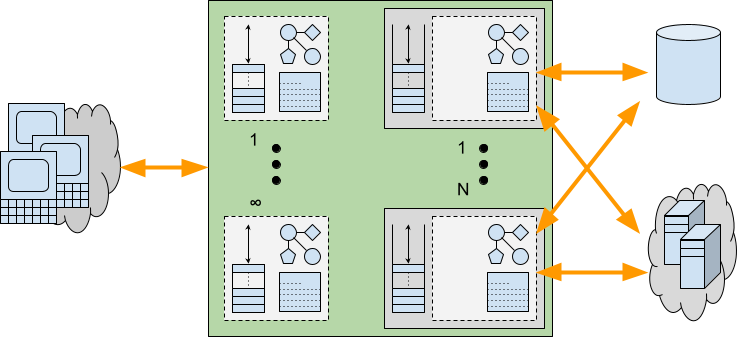
    Provisioning for the Worst Case

    We have seen that there are indeed applications that may benefit from having additional Threads available to service requests. But we have also seen that such additional Threads may incur additional costs beyond just the stack size. Waiting/Blocking within an application will typically be done with a deep stack and other resources allocated. Whilst Virtual Threads might be effectively infinite, it is unlikely that these other required resources are equally scalable.

    When an application experiences a worst case peak in load, then ultimately some resource will run out. To provide good Quality of Service, it is vital that such resource exhaustion is handled gracefully, allowing some request handling to continue rather than suffering catastrophic failure.

    With traditional Platform Thread based pools, stack memory is already provisioned for worst case stacks for all Threads and the thread pool sized limit is also an indirect limit on the number of concurrent resources used. Threads have sufficient resources available to complete there handling whilst any excess requests suffer latency whilst waiting cheaply for an available Thread. Furthermore, the back pressure resulting from not reading all offered requests can prevent additional load from sent by the clients. Thread limits are imperfect resource limits, but at least they are some kind of limit that can provide some graceful degradation under load.

    Alternatively, an application using Virtual Threads that has no explicit resource management will be likely to exhaust some of the resources used by those Threads. This can result in an OutOfMemoryException or similar, as the unlimited Virtual Threads each allocate deep stacks and other resources needed for request handling. The cost of average memory savings may be insufficient provisioning for the worst case resulting in catastrophic failure rather than graceful degradation. An analogy is that building more roads can actually make traffic worse if the added cars overwhelm other infrastructure.

    Many applications are written without explicit resource limitations/management. Instead they rely on the imperfect Thread pool for at least some minimal protection. If that is removed, then some form of explicit resource limitation/management is likely to be needed in its place. Stable servers need to be provisioned for the worst case, not the average one.

    Conclusion

    There are applications that can scale better if more Threads are available, but it is not all applications (at least not without significant redesign). Consideration needs to be given to what will limit the worst case load for a server/application if it is not to be Threads. Specifically, the costs of waiting within the application may be such that scalability is likely to have a limit that will not be enforced by practically infinite Virtual Threads.

    It may be that resources have limitations well within the capacity of large but limited Platform Thread pools, which are perfectly capable of scaling to many thousands of threads. So experiments with scaling a Platform Thread pool should first be used to see what limits do apply to an application.

    If no upper limit is found before Platform Threads exhaust kernel memory, then Virtual Threads will allow scaling beyond that limit until some other limit is found. Thus the ultimate resource limit will need to be explicitly managed if catastrophic failure is to be avoided (but, to be fair, applications using Thread pools should also do some explicit resource limit management rather than rely just on the course limits of a Thread pool).

    Recommendation

    If Virtual Threads are not the general solution to scalability then what is? There is no one-size-fits-all solution, but I believe many applications that are limited by blocking on the network would benefit from being deployed in a server like Eclipse Jetty, that can do much of the handling for them asynchronously. Let Jetty read your requests asynchronously and prepare the content as parsed JSON, XML, or form data. Only then allocate a Thread (Virtual or Platform) with a large output buffer so the application can be written in blocking style, but will not block on either reading the request or writing the response. Finally, once the response is prepared, then let Jetty flush it to the network asynchronously. Jetty has always somewhat supported this model (e.g. by delaying dispatch to a Servlet until the first packet of data arrives), but with Jetty-12 we are adding more mechanisms to asynchronously prepare requests and flush responses, whilst leaving the application written in blocking style. More to come on this in future blogs!
  • Security Audit with Trail of Bits

    Several months ago, the Eclipse Foundation approached the Eclipse Jetty project with the offer of a security audit. The effort was being supported through a collaboration with the Open Source Technology Improvement Fund (OSTIF), with the actual funding coming from the Alpha-Omega Project.

    Upon reflection, this collaboration could not have come at a better time for the Jetty open-source project. Completing this security audit before the first release of Jetty 12 was serendipitous. While the collaboration results with Trail of Bits are just now being published, the work has primarily been completed for a couple of months. 

    When we started this audit effort, Jetty 12 was quickly shaping up to be one of the most exciting releases we have ever worked on in the history of Jetty. Support for protocols like HTTP/3 further refined the internals of Jetty to be a modern, scalable network component. Coupling that with a refactoring of the internals to remove strict dependency on Servlet Request and Response objects, the core of Jetty became a more general server component with scalable and performant applications being able to be developed directly in Jetty without the strict requirement for Servlets. This ultimately allowed us to add a new Environment concept that supports multiple versions of the Servlet API on the same Jetty server simultaneously; mixing javax.servlet and jakarta.servlet on the same server allows for many exciting options for our users.

    However, these changes and exciting new features mean that quite a bit has changed, and when many moving parts are evolving, there is always a risk of unwanted behaviors.

    Our committers had low expectations of what this engagement would lead to, as our previous experience with various code analysis tooling often resulted in too many false positives.  Part of the prep work to start this review required us to draw an appropriate-sized box around the Jetty project code where we felt a review was most warranted. It should come as no surprise that much of this code is some of the more nuanced and complex with Jetty. So, throwing caution to the wind, we prepared and submitted the paperwork.

    We could not have been more pleased with how the engagement proceeded from here. Trail of Bits was chosen as the company to perform the review, and it met and exceeded our expectations by far. Sitting down with their engineers, it was apparent they were excited to be working on an open-source project of Jetty’s maturity, and when their work was completed, they demonstrated a much more complete understanding of the reviewed code than the Jetty team expected.

    Ultimately, we could not have been happier with how this effort was executed. The Eclipse Jetty project members are very thankful to the Eclipse Foundation, OSTIF, and Trail of Bits for making this collaboration a resounding success!

    Other References

  • New Jetty 12 Maven Coordinates

    Now that Jetty 12.0.1 is released to Maven Central, we’ve started to get a few questions about where some artifacts are, or when we intend to release them (as folks cannot find them).

    Things have change with Jetty, starting with the 12.0.0 release.

    First, is that our historical versioning of <servlet_support>.<major>.<minor> is no longer being used.

    With Jetty 12, we are now using a more traditional <major>.<minor>.<patch> versioning scheme for the first time.

    Also new in Jetty 12 is that the Servlet layer has been separated away from the Jetty Core layer.

    The Servlet layer has been moved to the new Environments concept introduced with Jetty 12.

    EnvironmentJakarta EEServletJakarta NamespaceJetty GroupID
    ee8EE84javax.servletorg.eclipse.jetty.ee8
    ee9EE95jakarta.servletorg.eclipse.jetty.ee9
    ee10EE106jakarta.servletorg.eclipse.jetty.ee10
    Jetty Environments

    This means the old Servlet specific artifacts have been moved to environment specific locations both in terms of Java namespace and also their Maven Coordinates.

    Example:

    Jetty 11 – Using Servlet 5
    Maven Coord: org.eclipse.jetty:jetty-servlet
    Java Class: org.eclipse.jetty.servlet.ServletContextHandler

    Jetty 12 – Using Servlet 6
    Maven Coord: org.eclipse.jetty.ee10:jetty-ee10-servlet
    Java Class: org.eclipse.jetty.ee10.servlet.ServletContextHandler

    We have a migration document which lists all of the migrated locations from Jetty 11 to Jetty 12.

    This new versioning and environment features built into Jetty means that new major versions of Jetty are not as common as they have been in the past.


  • Jetty 12 – Virtual Threads Support

    Executive Summary

    Virtual Threads, introduced in Java 19, are supported in Jetty 12, as they have been in Jetty 10 and Jetty 11 since 10.0.12 and 11.0.12, respectively.

    When virtual threads are supported by the JVM and enabled in Jetty (see embedded usage and standalone usage), applications are invoked using a virtual thread, which allows them to use simple blocking APIs, but with the scalability benefits of virtual threads.

    Introduction

    Virtual threads were introduced as a preview feature in Java 19 via JEP 425 and in Java 20 via JEP 436, and finally integrated as an official feature in Java 21 via JEP 444.

    Historically, the APIs provided to application developers, especially web application developers, were blocking APIs based on InputStream and OutputStream, or based on JDBC.
    These APIs are very simple to use, so applications are simple to develop, understand and troubleshoot.

    However, these APIs come with a cost: when a thread blocks, typically waiting for I/O or a contended lock, all the resources associated with that thread are retained, waiting for the thread to unblock and continue processing: the native thread and its native memory are retained, as well as network buffers, lock structures, etc.

    This means that blocking APIs are less scalable because they retain the resources they use.
    For example, if you have configured your server thread pool with 256 threads, and all are blocked, your server cannot process other requests until one of the blocked threads unblocks, limiting the server’s scalability.

    Furthermore, if you increase the server thread pool capacity, you will use more memory and likely require bigger hardware.

    Asynchronous/Reactive

    For these reasons, non-blocking asynchronous and reactive APIs have been introduced. The primary examples are the asynchronous I/O APIs introduced in Servlet 3.1 and reactive APIs provided by libraries such as RxJava and Spring’s Project Reactor, based on Reactive Streams.
    Unfortunately, REST APIs such as JAX-RS or Jakarta RESTful Web Services have not been (fully) updated with non-blocking APIs, so web applications that use REST are stuck with blocking APIs and scalability problems.

    Essential to note is that asynchronous and reactive APIs are more difficult to use, understand, and troubleshoot than blocking APIs, but are more scalable and typically achieve similar performances at a fraction of the resources. We have seen web applications that, when switched from blocking APIs to non-blocking APIs, reduced the threads usage from 1000+ to 10+.

    Virtual threads aim to be the best of both worlds: simple-to-use blocking APIs for developers, with the scalability of non-blocking APIs provided by the JVM.

    Jetty 12 Architecture

    The Jetty 12 architecture, at its core, is completely non-blocking and uses an AdaptiveExecutionStrategy (formerly known as “eat what you kill” which was covered in previous blogs here and here) to determine how to consume tasks.

    The key feature of AdaptiveExecutionStrategy is that it has a strong preference for consuming tasks in the same thread that produces them, so they are executed with a hot CPU cache, without parallel slowdown and no context-switch latency, yet avoids the risk of the server exhausting its thread pool.

    Simplifying a bit, each task is marked either as blocking or non-blocking; AdaptiveExecutionStrategy looks at the task and at how many threads are available to decide how to consume the task.

    If the task is non-blocking, the current thread runs it immediately.
    Otherwise, if no other threads are available to continue producing tasks, the current thread takes over the production of tasks and gives the tasks to an Executor, where they are likely queued and executed later by different threads.

    Virtual Threads Integration

    This architecture made it easy to integrate virtual threads in Jetty: when virtual threads are supported by the JVM and Jetty’s virtual threads support is enabled (see embedded usage and standalone usage), AdaptiveExecutionStrategy consumes a blocking task by offering the task to the virtual thread Executor rather than the native thread Executor, so that a newly spawned virtual thread runs the blocking task.

    That’s it.

    As a Servlet Container implementation, Jetty calls Servlets assuming they will use blocking APIs, so the task that invokes the Servlet is a blocking task.
    When virtual threads are supported and enabled, the thread that calls Servlet Filters and eventually the HttpServlet.service(...) method is a virtual thread.

    For non-blocking tasks, it is more efficient to have them run by the same native thread that created them; it is only for blocking tasks that you may want to use virtual threads.

    Conclusions

    Jetty’s AdaptiveExecutionStrategy allows the best of all worlds.
    Jetty provides a fast scalable asynchronous implementation, which avoids any possible limitations of virtual threads, whilst giving applications the full benefits of virtual threads. 

    Jetty deals with complex asynchronous concerns, so you don’t have to!

  • Introducing Jetty Load Generator

    The Jetty Project just released the Jetty Load Generator, a Java 11+ library to load-test any HTTP server, that supports both HTTP/1.1 and HTTP/2.
    The project was born in 2016, with specific requirements. At the time, very few load-test tools had support for HTTP/2, but Jetty’s HttpClient did. Furthermore, few tools supported web-page like resources, which were important to model in order to compare the multiplexed HTTP/2 behavior (up to ~100 concurrent HTTP/2 streams on a single connection) against the HTTP/1.1 behavior (6-8 connections). Lastly, we were more interested in measuring quality of service, rather than throughput.
    The Jetty Load Generator generates requests asynchronously, at a specified rate, independently from the responses. This is the Jetty Load Generator core design principle: we wanted the request generation to be constant, and measure response times independently from the request generation. In this way, the Jetty Load Generator can impose a specific load on the server, independently of the network round-trip and independently of the server-side processing time. Adding more load generators (on the same machine if it has spare capacity, or using additional machines) will allow the load against the server to increase linearly.
    Using this core principle, you can setup the load testing by having N load generator loaders that impose the load on the server, and 1 load generator probe that imposes a very light load and measures response times.
    For example, you can have 4 loaders that impose 20 requests/s each, for a total of 80 requests/s seen by the server. With this load on the server, what would be the experience, in terms of response times, of additional users that make requests to the server? This is exactly what the probe measures.
    If the load on the server is increased to 160 requests/s, what would the probe experience? The same response times? Worse? And what are the probe response times if the load on the server is increased to 240 requests/s?
    Rather than trying to measure some form of throughput (“what is the max number of requests/s the server can sustain?”), the Jetty Load Generator measures the quality of service seen by the probe, as the load on the server increases. This is, in practice, what matters most for HTTP servers: knowing that, when your server has a load of 1024 requests/s, an additional user can still see response times that are acceptable. And knowing how the quality of service changes as the load increases.
    The Jetty Load Generator builds on top of Jetty’s HttpClient features, and offers:

    • A builder-style Java API, to embed the load generator into your own code and to have full access to all events emitted by the load generator
    • A command-line tool, similar to Apache’s ab or wrk2, with histogram reporting, for ease of use, scripting, and integration with CI servers.

    Download the latest command-line tool uber-jar from: https://repo1.maven.org/maven2/org/mortbay/jetty/loadgenerator/jetty-load-generator-starter/

    $ cd /tmp
    $ curl -O https://repo1.maven.org/maven2/org/mortbay/jetty/loadgenerator/jetty-load-generator-starter/1.0.2/jetty-load-generator-starter-1.0.2-uber.jar
    

    Use the --help option to display the available command line options:

    $ java -jar jetty-load-generator-starter-1.0.2-uber.jar --help
    

    Then run it, for example:

    $ java -jar jetty-load-generator-starter-1.0.2-uber.jar --scheme https --host your_server --port 443 --resource-rate 1 --iterations 60 --display-stats
    

    You will obtain an output similar to the following:

    ----------------------------------------------------
    -------------  Load Generator Report  --------------
    ----------------------------------------------------
    https://your_server:443 over http/1.1
    resource tree     : 1 resource(s)
    begin date time   : 2021-02-02 15:38:39 CET
    complete date time: 2021-02-02 15:39:39 CET
    recording time    : 59.657 s
    average cpu load  : 3.034/1200
    histogram:
    @                     _  37 ms (0, 0.00%)
    @                     _  75 ms (0, 0.00%)
    @                     _  113 ms (0, 0.00%)
    @                     _  150 ms (0, 0.00%)
    @                     _  188 ms (0, 0.00%)
    @                     _  226 ms (0, 0.00%)
    @                     _  263 ms (0, 0.00%)
    @                     _  301 ms (0, 0.00%)
                       @  _  339 ms (46, 76.67%) ^50%
       @                  _  376 ms (7, 11.67%) ^85%
      @                   _  414 ms (5, 8.33%) ^95%
    @                     _  452 ms (1, 1.67%)
    @                     _  489 ms (0, 0.00%)
    @                     _  527 ms (0, 0.00%)
    @                     _  565 ms (0, 0.00%)
    @                     _  602 ms (0, 0.00%)
    @                     _  640 ms (0, 0.00%)
    @                     _  678 ms (0, 0.00%)
    @                     _  715 ms (0, 0.00%)
    @                     _  753 ms (1, 1.67%) ^99% ^99.9%
    response times: 60 samples | min/avg/50th%/99th%/max = 303/335/318/753/753 ms
    request rate (requests/s)  : 1.011
    send rate (bytes/s)        : 189.916
    response rate (responses/s): 1.006
    receive rate (bytes/s)     : 41245.797
    failures          : 0
    response 1xx group: 0
    response 2xx group: 60
    response 3xx group: 0
    response 4xx group: 0
    response 5xx group: 0
    ----------------------------------------------------
    

    Use the Jetty Load Generator for your load testing, and report comments and issues at https://github.com/jetty-project/jetty-load-generator. Enjoy!

  • Do Looms Claims Stack Up? Part 2: Thread Pools?

    “Project Loom aims to drastically reduce the effort of writing, maintaining, and observing high-throughput concurrent applications that make the best use of available hardware. … The problem is that the thread, the software unit of concurrency, cannot match the scale of the application domain’s natural units of concurrency — a session, an HTTP request, or a single database operation. …  Whereas the OS can support up to a few thousand active threads, the Java runtime can support millions of virtual threads. Every unit of concurrency in the application domain can be represented by its own thread, making programming concurrent applications easier. Forget about thread-pools, just spawn a new thread, one per task.” – Ron Pressler, State of Loom, May 2020

    In this series of blogs, we are examining the new Loom virtual thread features now available in OpenJDK 16 early access releases. In part 1 we saw that Loom’s claim of 1,000,000 virtual threads was true, but perhaps a little misleading, as that only applies to threads with near-empty stacks.  If threads actually have deep stacks, then the achieved number of virtual threads is bound by memory and is back to being the same order of magnitude as kernel threads.  In this part, we will further examine the claims and ramifications of Project Loom, specifically if we can now forget about Thread Pools. Spoiler: Cheap threads can do expensive things!
    All the code from this blog is available in our loom-trial project and has been run on my dev machine (Intel® Core™ i7-6820HK CPU @ 2.70GHz × 8, 32GB memory,  Ubuntu 20.04.1 LTS 64-bit, OpenJDK Runtime Environment (build 16-loom+9-316)) with no specific tuning and default settings unless noted otherwise. 

    Matching the scale?

    Project Loom makes the claim that applications need threads because kernel threads “cannot match the scale of the application domain’s natural units of concurrency”!
    Really???  We’ve seen that without tuning, we can achieve 32k of either type of thread on my laptop.  We think it would be fair to assume that with careful tuning, that could be stretched to beyond 100k for either technology.  Is this really below the natural scale of most applications?  How many applications have a natural scale of more than 32k simultaneous parallel tasks?  Don’t get me wrong, there are many apps that do exceed those scales and Jetty has users that put an extra 0 on that, but they are the minority and in reality very few applications are ever going to see that demand for concurrency.
    So if the vast majority of applications would be covered by blocking code with a concurrency of 32k, then what’s the big deal? Why do those apps need Loom? Or, by the same argument, why would they need to be written in asynchronous style?
    The answer is that you rarely see any application deployed with 10,000s of threads; instead, threads are limited by a thread pool, typically to 100s or 1000s of threads.  The default thread pool size in jetty is 200, which we sometimes see increased to 1000s, but we have never seen a 32k thread pool even though my un-tuned laptop could supposedly support it!
    So what’s going on? Why are thread pools typically so limited and what about the claim that Loom means we can “Forget about thread pools”?

    Why Thread Pools?

    One reason we are told that thread pools are used is because kernel threads are slow to start, thus having a bunch of them pre-started, waiting for a task in a pool improves latency.  Loom claims their virtual threads are much faster to start, so let’s test that with StartThreads, which reports:

    kStart(ns) ave:137,903 from:1,000 min:47,466 max:6,048,540
    vStart(ns) ave: 10,881 from:1,000 min: 4,648 max:  486,078

    So that claim checks out. Virtual threads start an order of magnitude faster than kernel threads.  If start time was the only reason for thread pools, then Loom’s claim of forgetting about thread pools would hold.
    But start time only explains why we have thread pools, but it doesn’t explain why thread pools are frequently sized far below the systems capacity for threads: 100s instead of 10,000s?  What is the reason that thread pools are sized as they are?

    Why Small Thread Pools?

    Giving a thread a task to do is a resource commitment. It is saying that a flow of control may proceed to consume CPU, memory and other resources that will be needed to run to completion or at least until a blocking point, where it can wait for those resources.  Most of those resources are not on the stack,  thus limiting the number of available threads is a way to limit a wide range of resource consumption and give quality of service:

    • If your back-end services can only handle 100s of simultaneous requests, then a thread pool with 100s of threads will avoid swamping them with too much load. If your JDBC driver only has 100 pooled connections, then 1,000,000 threads hammering on those connections or other locks are going to have a lot of contention.
    • For many applications a late response is a wrong response, thus it may well be better to handle 1000 tasks in a timely way with the 1001st task delayed, rather than to try to run all 1001 tasks together and have them all risk being late.
    • Graceful degradation under excess load.  Processing a task will need to use heap memory and if too much memory is demanded an OutOfMemeoryException is fatal for all java applications.  Limiting the number of threads is a coarse grained way of limiting a class of heap usage.  Indeed in part 1, we saw that it was heap memory that limited the number of virtual threads.

    Having a limited thread pool allows an application to be tested to that limit so that it can be proved that an application has the memory and other resources necessary to service all of those threads.  Traditional thinking has been that if the configured number of threads is insufficient for the load presented, then either the excess load must wait, or the application should start using asynchronous techniques to more efficiently use those threads (rather than increase the number of threads beyond the resource capacity of the machine).
    A limited thread pool is a coarse grained limit on all resources, not only threads.  Limiting the number of threads puts a limit on concurrent lock contention, memory consumption and CPU usage.

    Virtual Threads vs Thread Pool

    Having established that there might be some good reasons to use thread pools, let’s see if Loom gives us any good reasons not to use them?   So we have created a FakeDataBase class which simulates a JDBC connection pool of 100 connections with a semaphore and then in ManyTasks we run 100,000 tasks that do 2 selects and 1 insert to the database, with a small amount of CPU consumed both with and without the semaphore acquired.   The core of the thread pool test is:

     for (int i = 0; i < tasks; i++)
       pool.execute(newTask(latch));

    and this is compared against the Loom virtual thread code of:

     for (int i = 0 ; i < tasks; i++)
       Thread.builder().virtual().task(newTask(latch)).start();

    And the results are…. drum roll… pretty much the same for both types of thread:

    Pooled  K Threads 33,729ms
    Spawned V Threads 34,482ms

    The pooled kernel thread does appear to be consistently a little bit better, but this test is not that rigorous so let’s call it the same, which is kind of expected as the total duration is pretty much going to be primarily constrained by the concurrency of the database.
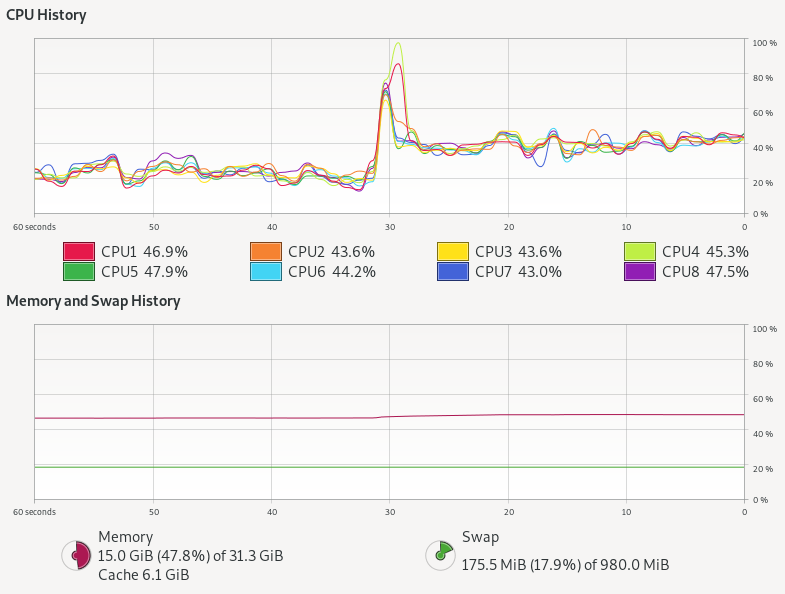
    So were there any difference at all?  Here is the system monitor graph during both runs: kernel threads with a pool are the left hand first period (60-30s) and then virtual threads after a change over peak (30s – 0s):

    Kernel threads with thread pool do not stress the CPU at all, but virtual threads alone use almost twice as much CPU! There is also a hint of more memory being used.
    The thread pool has 100k tasks in the thread pool queue, 100 kernel threads that take tasks, 100 at a time, and each task takes one of 100 semaphores permits 3 times, with little or no contention.
    The Loom approach has 100k independent virtual threads that each contend 3 times for the 100 semaphore permits, with up to 99,900 threads needing to be added then removed 3 times from the semaphore’s wake up queue.  The extra queuing for virtual threads could easily explain the excess CPU needed, but more investigation is needed to be definitive.
    However, tasks limited by a resource like JDBC are not really the highly concurrent tasks that Loom is targeted at.  To truly test Loom (and async), we need to look at a type of task that just won’t scale with blocking threads dispatched from a thread pool.

    Virtual Threads vs Async APIs

    One highly concurrent work load that we often see on Jetty is chat room style interaction (or games) written on CometD and/or WebSocket.  Such applications often have many 10,000s or even 100,000s of connections to the server that are mostly idle, waiting for a message to receive or an event to send. Currently we achieve these scales only by asynchronous threadless waiting, with all its ramifications of complex async APIs into the application needing async callbacks.  Luckily, CometD was originally written when there was only async servlets and not async IO, thus it still has the option to be deployed using blocking I/O reads and writes.  This gives it good potential to be a like for like comparison between async pooled kernel threads vs blocking virtual threads.
    However, we still have a concern that this style of application/load will not be suitable for Loom because each message to a chat room will fan out to the 10s, 100s or even 1000s of other users waiting in that room.  Thus a single read could result in many blocking write operations, which are typically done with deep stacks (parsing, framework, handling, marshalling, then writing) and other resources (buffers, locks etc). You can see in the following flame graph from a CometD load test using Loom virtual threads, that even with a fast client the biggest block of time is spent in the blue peak on the left, that is writing with deep stacks. It is this part of the graph that needs to scale if we have either more and/or slower clients:

    Jetty with CometD chat on Loom

    To fairly test Loom, it is not sufficient to just replace the limited pool of kernel threads with infinite virtual threads.  Jetty goes to lots of effort with its eat what you kill scheduling using reserved threads to ensure that whenever a selector thread calls a potentially blocking task, another selector thread has been executed.  We can’t just put Loom virtual threads on top of this, else it will be paying the cost and complexity of core Jetty plus the overheads of Loom.  Moreover, we have also learnt the risk of Thread Starvation that can result in highly concurrent applications if you defer important tasks (e.g. HTTP/2 flow control).  Since virtual threads can be postponed (potentially indefinitely) by CPU bound applications or the use of non-Loom-aware locks (such as the synchronized keyword), they are not suitable for all tasks within Jetty.
    Thus we think a better approach is to keep the core of Jetty running on kernel threads, but to spawn a virtual thread to do the actual work of reading, parsing, and calling the application and writing the response.  If we flag those tasks with InvocationType.NON_BLOCKING, then they will be called directly by the selector thread, with no executor overhead. These tasks can then spawn a new virtual thread to proceed with the reading, parsing,  handling, marshalling, writing and blocking.  Thus we have created the jetty-10.0.x-loom branch, to use this approach and hopefully give a good basis for fair comparisons.
    Our initial runs with our CometD benchmark with just 20 clients resulted in long GCs followed by out of memory failures! This is due to the usage of ThreadLocal for gathering latency statistics and each virtual thread was creating a latency capture data structure, only to use it once and then throw it away!  While this problem is solvable by changing the CometD benchmark code, it reaffirms that threads use resources other than stack and that Loom virtual threads are not a drop in replacement for kernel threads.
    We are aware that the handling of ThreadLocal is a well known problem in Loom, but until solved it may be a surprisingly hard problem to cope with, since you don’t typically know if a library your application depends on uses ThreadLocal or not.
    With the CometD benchmark modified to not use ThreadLocal, we can now take Loom/Jetty/CometD to a moderate number of clients (1000 which generated the flame graph above) with the following results:

    CLIENT: Async Jetty/CometD server
    ========================================
    Testing 1000 clients in 100 rooms, 10 rooms/client
    Sending 1000 batches of 10x50 bytes messages every 10000 µs
    Elapsed = 10015 ms
    - - - - - - - - - - - - - - - - - - - -
    Outgoing: Rate = 990 messages/s - 99 batches/s - 12.014 MiB/s
    Incoming: Rate = 99829 messages/s - 35833 batches/s(35.89%) - 26.352 MiB/s
                    @     _  3,898 µs (112993, 11.30%)
                       @  _  7,797 µs (141274, 14.13%)
                       @  _  11,696 µs (136440, 13.65%)
                       @  _  15,595 µs (139590, 13.96%) ^50%
                       @  _  19,493 µs (142883, 14.29%)
                      @   _  23,392 µs (130493, 13.05%)
                    @     _  27,291 µs (112283, 11.23%) ^85%
            @             _  31,190 µs (59810, 5.98%) ^95%
      @                   _  35,088 µs (12968, 1.30%)
     @                    _  38,987 µs (4266, 0.43%) ^99%
    @                     _  42,886 µs (2150, 0.22%)
    @                     _  46,785 µs (1259, 0.13%)
    @                     _  50,683 µs (910, 0.09%)
    @                     _  54,582 µs (752, 0.08%)
    @                     _  58,481 µs (567, 0.06%)
    @                     _  62,380 µs (460, 0.05%) ^99.9%
    @                     _  66,278 µs (365, 0.04%)
    @                     _  70,177 µs (232, 0.02%)
    @                     _  74,076 µs (82, 0.01%)
    @                     _  77,975 µs (13, 0.00%)
    @                     _  81,873 µs (2, 0.00%)
    Messages - Latency: 999792 samples
    Messages - min/avg/50th%/99th%/max = 209/15,095/14,778/35,815/78,184 µs
    Messages - Network Latency Min/Ave/Max = 0/14/78 ms
    SERVER: Async Jetty/CometD server
    ========================================
    Operative System: Linux 5.8.0-33-generic amd64
    JVM: Oracle Corporation OpenJDK 64-Bit Server VM 16-ea+25-1633 16-ea+25-1633
    Processors: 12
    System Memory: 89.26419% used of 31.164349 GiB
    Used Heap Size: 73.283676 MiB
    Max Heap Size: 2048.0 MiB
    - - - - - - - - - - - - - - - - - - - -
    Elapsed Time: 10568 ms
       Time in Young GC: 5 ms (2 collections)
       Time in Old GC: 0 ms (0 collections)
    Garbage Generated in Eden Space: 3330.0 MiB
    Garbage Generated in Survivor Space: 4.227936 MiB
    Average CPU Load: 397.78314/1200
    ========================================
    Jetty Thread Pool:
        threads:                174
        tasks:                  302146
        max concurrent threads: 34
        max queue size:         152
        queue latency avg/max:  0/11 ms
        task time avg/max:      1/3316 ms


    CLIENT: Loom Jetty/CometD server
    ========================================
    Testing 1000 clients in 100 rooms, 10 rooms/client
    Sending 1000 batches of 10x50 bytes messages every 10000 µs
    Elapsed = 10009 ms
    - - - - - - - - - - - - - - - - - - - -
    Outgoing: Rate = 990 messages/s - 99 batches/s - 13.774 MiB/s
    Incoming: Rate = 99832 messages/s - 41201 batches/s(41.27%) - 27.462 MiB/s
                     @    _  2,718 µs (99690, 9.98%)
                       @  _  5,436 µs (116281, 11.64%)
                       @  _  8,155 µs (115202, 11.53%)
                       @  _  10,873 µs (108572, 10.87%)
                      @   _  13,591 µs (106951, 10.70%) ^50%
                       @  _  16,310 µs (117139, 11.72%)
                       @  _  19,028 µs (114531, 11.46%)
                    @     _  21,746 µs (94080, 9.42%) ^85%
                @         _  24,465 µs (71479, 7.15%)
          @               _  27,183 µs (34358, 3.44%) ^95%
      @                   _  29,901 µs (11526, 1.15%) ^99%
     @                    _  32,620 µs (4513, 0.45%)
    @                     _  35,338 µs (2123, 0.21%)
    @                     _  38,056 µs (988, 0.10%)
    @                     _  40,775 µs (562, 0.06%)
    @                     _  43,493 µs (578, 0.06%) ^99.9%
    @                     _  46,211 µs (435, 0.04%)
    @                     _  48,930 µs (187, 0.02%)
    @                     _  51,648 µs (31, 0.00%)
    @                     _  54,366 µs (27, 0.00%)
    @                     _  57,085 µs (1, 0.00%)
    Messages - Latency: 999254 samples
    Messages - min/avg/50th%/99th%/max = 192/12,630/12,476/29,704/54,558 µs
    Messages - Network Latency Min/Ave/Max = 0/12/54 ms
    SERVER: Loom Jetty/CometD server
    ========================================
    Operative System: Linux 5.8.0-33-generic amd64
    JVM: Oracle Corporation OpenJDK 64-Bit Server VM 16-loom+9-316 16-loom+9-316
    Processors: 12
    System Memory: 88.79622% used of 31.164349 GiB
    Used Heap Size: 61.733116 MiB
    Max Heap Size: 2048.0 MiB
    - - - - - - - - - - - - - - - - - - - -
    Elapsed Time: 10560 ms
       Time in Young GC: 23 ms (8 collections)
       Time in Old GC: 0 ms (0 collections)
    Garbage Generated in Eden Space: 8068.0 MiB
    Garbage Generated in Survivor Space: 3.6905975 MiB
    Average CPU Load: 413.33084/1200
    ========================================
    Jetty Thread Pool:
        threads:                14
        tasks:                  0
        max concurrent threads: 0
        max queue size:         0
        queue latency avg/max:  0/0 ms
        task time avg/max:      0/0 ms
    

    The results here are a bit mixed, but there are some positives for Loom:

    • Both approaches easily achieved the 1000 msg/s sent to the server and 99.8k msg/s received from the server (messages have an average fan-out of a factor 100).
    • The Loom version broke up those messages into 41k responses/s whilst the async version used bigger batches at 35k responses/s, which each response carrying more messages. We need to investigate why, but we think Loom is faster at starting to run the task (no time in the thread pool queue, no time to “wake up” an idle thread).
    • Loom had better latency, both average (~12.5 ms vs ~14.8 ms) and max (~54.6 ms vs ~78.2 ms)
    • Loom used more CPU: 413/1200 vs 398/1200 (4% more)
    • Loom generated more garbage: ~8068.0 MiB vs ~3330.0 MiB and less objects made it to survivor space.

    This is an interesting but inconclusive result.  It is at a low scale on a fast loopback network with a client unlikely to cause blocking, so not really testing either approach.  We now need to scale this test to many 10,000s of clients on a real network, which will require multiple load generation machines and careful measurement.  This will be the subject of part 3 (probably some weeks away).

    Conclusion (part 2) – Cheap threads can do expensive things

    It is good that Project Loom adds inexpensive and fast spawning/blocking virtual threads to the JVM.  But cheap threads can do expensive things!
    Having 1,000,000 concurrent application entities is going to take memory, CPU and other resources, no matter if they block or use async callbacks. It may be that entirely different programming styles are needed for Loom, as is suggested by Loom Structured Concurrency, however we have not yet seen anything that provides limitations on resources that can be used by unlimited spawning of virtual threads. There are also indications that Loom’s flexible stack management comes with a CPU cost.   However, it has been moderately simple to update Jetty to experiment with using Loom to call a blocking application and we’d very much encourage others to load test their application on the jetty-10.0.x-loom branch.
    Many of Loom’s claims have stacked up: blocking code is much easier to write, virtual threads are very fast to start and cheap to block. However, other key claims either do not hold up or have yet to be substantiated: we do not think virtual threads give natural scaling as threads themselves are not the limiting factor, rather it is the resources that are used that determines the scaling.  The suggestion to “Forget about thread-pools, just spawn a new thread…” feels like an invitation to create unstable applications unless other substantive resource management strategies are put into place.
    Given that Duke’s “new clothes” woven by Loom are not one-size-fits-all, it would be a mistake to stop developing asynchronous APIs for things such as DNS and JDBC on the unsubstantiated suggestion that Loom virtual threads will make them unnecessary.

  • CometD 5.0.3, 6.0.0 and 7.0.0

    Following the releases of Eclipse Jetty 10.0.0 and 11.0.0, the CometD project has released versions 5.0.3, 6.0.0 and 7.0.0.

    CometD 5.0.x Series

    CometD 5.0.x, of which the latest is the newly released 5.0.3, require at least Java 8 and it is based on Jetty 9.4.x.
    This version will be maintained as long as Jetty 9.4.x is maintained, likely many more years, to allow migration away from Java 8.

    CometD 6.0.x Series

    CometD 6.0.x, with the newly released 6.0.0, requires at least Java 11 and it is based on Jetty 10.0.x.
    In turn, Jetty 10.0.x is based on Java EE 8 / Jakarta EE 8, which provide Servlet and WebSocket APIs under the javax.* packages.
    This version of CometD provides a smooth transition from CometD 5 (or earlier) to Java 11 and Jetty 10.
    In this way, you can leverage new Java 11 language features in your application source code, as well as the few new APIs made available in the Servlet 4.0 Specification without having to change much of your code, since you will still be using javax.* Servlet and WebSocket APIs (see the next section on CometD 7.0.x for the migration to the jakarta.* APIs).
    However, server-side CometD applications should not depend much on Servlet or WebSocket APIs, so the migration from CometD 5 (or earlier) should be pretty straightforward.
    CometD 6.0.x, as Jetty 10.0.x, are transition releases to the new Jakarta EE 9 APIs in the jakarta.* packages.
    CometD 6.0.x will be maintained as long as Jetty 10.0.x is maintained.
    Since CometD applications do not depend much on Servlet or WebSocket APIs, consider moving directly to CometD 7.0.x if you don’t depend on other libraries (for example, Spring) that require javax.* classes.

    CometD 7.0.x Series

    CometD 7.0.x, with the newly released 7.0.0, requires at least Java 11 and it is based on Jetty 11.0.x.
    In turn, Jetty 11.0.x is based on Jakarta EE 9, which provide Servlet and WebSocket APIs under the jakarta.* packages.
    Migrating from CometD 6.0.x (or earlier) to CometD 7.0.x should be very easy if your applications depend mostly on the CometD APIs (few or no changes there) and depend very little on the Servlet or WebSocket APIs.
    Dependencies on the javax.* APIs should be migrated to the jakarta.* APIs.
    If your applications depend on third-party libraries, you need to make sure to update the third-party library to a version that supports — if necessary — jakarta.* APIs.
    Migrating to CometD 7.0.x allows you to leverage Java 11 language features and the benefit that you can base your applications on the new Jakarta EE Specifications, therefore abandoning the now-dead Java EE Specifications.
    This migration keeps your applications up-to-date with the current state-of-the-art of EE Specifications, reducing the technical debt to a minimum.
    CometD 7.0.x will be maintained as long as Jetty 11.0.x is maintained.
    The evolution of the Jakarta EE Specifications will be implemented by future Jetty versions, and future CometD versions will keep the pace.

    Which CometD Series Do I Use?

    If your applications depend on third-party libraries that use or depend on Jetty 9.4.x (such as Spring / Spring Boot), use CometD 5.0.x and Jetty 9.4.x until the third party libraries update to newer Jetty versions.
    If your applications depend on third-party libraries that depend on javax.* APIs and that have not been updated to Jakarta EE 9 yet (and therefore to jakarta.* APIs), use CometD 6.0.x and Jetty 10.0.x until the third party libraries update to Jakarta EE 9.
    If your applications depend on third-party libraries that have already been updated to use Jakarta EE 9 APIs, for example, Jakarta Restful Web Services (previously known as JAX-RS) using Eclipse Jersey 3.0, use CometD 7.0.x and Jetty 11.0.x.
    If you are migrating from earlier CometD versions, skip entirely CometD 6.0.x: for example move from CometD 5.0.x and Jetty 9.4.x directly to CometD 7.0.x and Jetty 11.0.x.

  • Reactive HttpClient 1.1.5, 2.0.0 and 3.0.0

    Following the releases of Eclipse Jetty 10.0.0 and 11.0.0, the Reactive HttpClient project — introduced back in 2017 — has released versions 1.1.5, 2.0.0 and 3.0.0.

    Reactive HttpClient 1.1.x Series

    Reactive HttpClient Versions 1.1.x, of which the latest is the newly released 1.1.5, requires at least Java 8 and it is based on Jetty 9.4.x.
    This version will be maintained as long as Jetty 9.4.x is maintained, likely many more years, to allow migration away from Java 8.

    Reactive HttpClient 2.0.x Series

    Reactive HttpClient Versions 2.0.x, with the newly released 2.0.0, requires at least Java 11 and it is based on Jetty 10.0.x.
    The Reactive HttpClient 2.0.x series is incompatible with the 1.1.x series, since the Jetty HttpClient APIs changed between Jetty 9.4.x and Jetty 10.0.x.
    This means that projects such as Spring WebFlux, at the time of this writing, are not compatible with the 2.0.x series of Reative HttpClient.

    Reactive HttpClient 3.0.x Series

    Reactive HttpClient Versions 3.0.x, with the newly released 3.0.0, requires at least Java 11 and it is based on Jetty 11.0.x.
    In turn, Jetty 11.0.x is based on the Jakarta EE 9 Specifications, which means jakarta.servlet and not javax.servlet.
    The Reactive HttpClient 3.0.x series is fundamentally identical to the 2.0.x series, apart from the Jetty dependency.
    While the HttpClient APIs do not change between Jetty 10 and Jetty 11, if you are using Jakarta EE 9 it will be more convenient to use the Reactive HttpClient 3.0.x series.
    For example when using Reactive HttpClient to call a third party service from within a REST service, it will be natural to use Reactive HttpClient 2.0.x if you use javax.ws.rs, and Reactive HttpClient 3.0.x if you use jakarta.ws.rs.
    Enjoy the new releases and tell us which series you use by adding a comment here!
    For further information, refer to the project page on GitHub.

  • Jetty, ALPN & Java 8u252

    Introduction

    The Jetty Project provided to the Java community support for NPN first (the precursor of ALPN) in Java 7, and then support for ALPN in Java 8.
    The ALPN support was implemented by modifying sun.security.ssl classes, and this required that the modified classes were prepended to the bootclasspath, so the command line would like like this:

    java -Xbootclasspath/p:/path/to/alpn-boot-8.1.13.v20181017.jar ...

    However, every different OpenJDK version could require a different version of the alpn-boot jar. ALPN support is there, but cumbersome to use.
    Things improved a bit with the Jetty ALPN agent. The agent could detect the Java version and redefine on-the-fly the sun.security.ssl classes (using the alpn-boot jars). However, a new OpenJDK version could generate a new alpn-boot jar, which in turn generates a new agent version, and therefore for every new OpenJDK version applications needed to verify whether the agent version needed to be updated. A bit less cumbersome, but still another hoop to jump through.

    OpenJDK ALPN APIs in Java 9

    The Jetty Project worked with the OpenJDK project to introduce proper ALPN APIs, and this was introduced in Java 9 with JEP 244.

    ALPN APIs backported to Java 8u252

    On April 14th 2020, OpenJDK 8u252 released (the Oracle version is named 8u251, and it may be equivalent to 8u252, but there is no source code available to confirm this; we will be referring only to the OpenJDK version in the following sections).
    OpenJDK 8u252 contains the ALPN APIs backported from Java 9.
    This means that for OpenJDK 8u252 the alpn-boot jar is no longer necessary, because it’s no longer necessary to modify sun.security.ssl classes as now the official OpenJDK ALPN APIs can be used instead of the Jetty ALPN APIs.
    The Jetty ALPN agent version 2.0.10 does not perform class redefinition if it detects that the OpenJDK version is 8u252 or later. It can still be left in the command line (although we recommend not to), but will do nothing.

    Changes for libraries/applications directly using Jetty ALPN APIs

    Libraries or applications that are directly using the Jetty ALPN APIs (the org.eclipse.jetty.alpn.ALPN and related classes) should now be modified to detect whether the backported OpenJDK ALPN APIs are available. If the backported OpenJDK ALPN APIs are available, libraries or applications must use them; otherwise they must fall back to use the Jetty ALPN APIs (like they were doing in the past).
    For example, the Jetty project is using the Jetty ALPN APIs in artifact jetty-alpn-openjdk8-[client|server]. The classes in that Jetty artifact have been changed like described above, starting from Jetty version 9.4.28.v20200408.

    Changes for applications indirectly using ALPN

    Applications that are using Java 8 and that depend on libraries that provide ALPN support (such as the jetty-alpn-openjdk8-[client|server] artifact described above) must modify the way they are started.
    For an application that is still using an OpenJDK version prior to 8u252, the typical command line requires the alpn-boot jar in the bootclasspath and a library that uses the Jetty ALPN APIs (here as an example, jetty-alpn-openjdk8-server) in the classpath:

    /opt/openjdk-8u242/bin/java -Xbootclasspath/p:/path/to/alpn-boot-8.1.13.v20181017.jar -classpath jetty-alpn-openjdk8-server-9.4.27.v20200227:...

    For the same application that wants to use OpenJDK 8u252 or later, the command line becomes:

    /opt/openjdk-8u252/bin/java -classpath jetty-alpn-openjdk8-server-9.4.28.v20200408:...

    That is, the -Xbootclasspath option must be removed and the library must be upgraded to a version that supports the backported OpenJDK ALPN APIs.
    Alternatively, applications can switch to use the Jetty ALPN agent as described below.

    Frequently Asked Questions

    Was the ALPN APIs backport a good idea?

    Yes, because Java vendors are planning to support Java 8 until (at least) 2030 and this would have required to provide alpn-boot for another 10 years.
    Now instead, applications and libraries will be able to use the official OpenJDK ALPN APIs provided by Java for as long as Java 8 is supported.

    Can I use OpenJDK 8u252 with an old version of Jetty?

    Yes, if your application does not need ALPN (in particular, it does not need artifacts jetty-alpn-openjdk8-[client|server]).
    No, if your application needs ALPN (in particular, it needs artifacts jetty-alpn-openjdk8-[client|server]). You must upgrade to Jetty 9.4.28.v20200402 or later.

    Can I use OpenJDK 8u252 with library X, which depends on the Jetty ALPN APIs?

    You must verify that library X has been updated to OpenJDK 8u252.
    In practice, library X must detect whether the backported OpenJDK ALPN APIs are available; if so, it must use the backported OpenJDK ALPN APIs; otherwise, it must use the Jetty ALPN APIs.

    I don’t know what OpenJDK version my application will be run with!

    You need to make a version of your application that works with OpenJDK 8u252 and earlier, see the previous question.
    For example, if you depend on Jetty, you need to depend on jetty-alpn-openjdk8-[client|server]-9.4.28.v20200402 or later.
    Then you must add the Jetty ALPN agent to the command line, since it supports all Java 8 versions.

    /opt/openjdk-8u242/bin/java -javaagent:/path/to/jetty-alpn-agent-2.0.10.jar -classpath jetty-alpn-openjdk8-server-9.4.28.v20200408:...
    /opt/openjdk-8u252/bin/java -javaagent:/path/to/jetty-alpn-agent-2.0.10.jar -classpath jetty-alpn-openjdk8-server-9.4.28.v20200408:...

    The command lines are identical apart the Java version.
    In this way, if your application is run with with OpenJDK 8u242 or earlier, the Jetty ALPN agent will apply the sun.security.ssl class redefinitions, and jetty-alpn-openjdk8-[client|server]-9.4.28.v20200402 will use the Jetty ALPN APIs.
    Otherwise your application is run with OpenJDK 8u252 or later, the Jetty ALPN agent will do nothing (no class redefinition is necessary), and the jetty-alpn-openjdk8-[client|server]-9.4.28.v20200402 will use the OpenJDK ALPN APIs.

  • Eat What You Kill without Starvation!

    Jetty 9 introduced the Eat-What-You-Kill[n]The EatWhatYouKill strategy is named after a hunting proverb in the sense that one should only kill to eat. The use of this phrase is not an endorsement of hunting nor killing of wildlife for food or sport.[/n] execution strategy to apply mechanically sympathetic techniques to the scheduling of threads in the producer-consumer pattern that are used for core capabilities in the server. The initial implementations proved vulnerable to thread starvation and Jetty-9.3 introduced dual scheduling strategies to keep the server running, which in turn suffered from lock contention on machines with more than 16 cores.  The Jetty-9.4 release now contains the latest incarnation of the Eat-What-You-Kill scheduling strategy which provides mechanical sympathy without the risk of thread starvation in a single strategy.  This blog is an update of the original post with the latest refinements.

    Parallel Mechanical Sympathy

    Parallel computing is a “false friend” for many web applications. The textbooks will tell you that parallelism is about decomposing large tasks into smaller ones that can be executed simultaneously by different computing engines to complete the task faster. While this is true, the issue is that for web application containers there is not an agreement on what is the “large task” that needs to be decomposed.

    From the applications point of view the large task to be solved is how to render a complex page for a user, combining multiple requests and resources, using many services for authentication and perhaps RESTful access to a data model on multiple back end servers. For the application, parallelism can improve quality of service of rendering a single page by spreading the decomposed tasks over all the available CPUs of the server.

    However, a web application container has a different large task to solve: how to provide service to hundreds or thousands, maybe even hundreds of thousands of simultaneous users. Unfortunately, for the container, the way to optimally allocate its this decomposed task to CPUs is completely opposite to how the application would like it’s decomposed tasks to be executed.

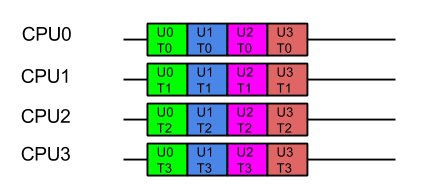
    Consider a server with 4 CPUs serving 4 users each which each have 4 tasks. The applications ideal view of parallel decomposition looks like:

    Label UxTy represent Task y for User x. Tasks for the same user are coloured alike

    This view suggests that each user’s combined task will be executed in minimum time. However some users must wait for prior users tasks to complete before their execution can start, so average latency is higher.

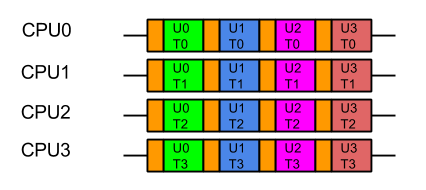
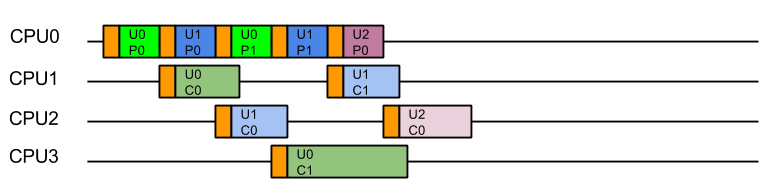
    Furthermore, we know from Mechanical Sympathy that such ideal execution is rarely possible, especially if there is data shared between tasks. Each CPU needs time to load its cache and register with data before it can be acted on. If that data is specific to the problem each user is trying to solve, then the real view of the parallel execution looks more like the following, the orange blocks indicating the time taken to load the CPU cache with user and task related data:

    Label UxTy represent Task y for User x. Tasks for the same user are coloured alike. Orange blocks represent cache load time.

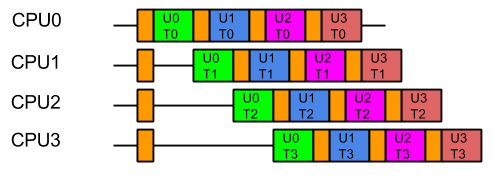
    So from the containers point of view, the last thing it wants is the data from one users large problem spread over all its CPUs, because that means that when it executes the next task, it will have a cold cache and it must be reloaded with the data of the next user.  Furthermore, executing tasks for the same user on different CPUs risks Parallel Slowdown, where the cost of mutual exclusion, synchronisation and communication between CPUs can increase the total time needed to execute the tasks to more than serial execution.  If the tasks are fully mutually excluded on user data (unlikely but a bounding case), then the execution could look like:

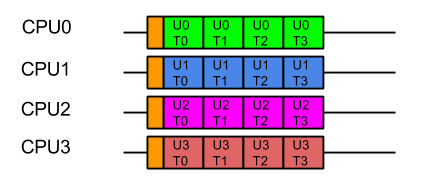
    For optimal execution from the containers point of view it is far better if tasks from each user, which use common data, are kept on the same CPU so the cache only needs to be loaded once and there is no mutual exclusion on user data:

    While this style of execution does not achieve the minimal latency and throughput of the idealised application view, in reality it is the fairest and most optimal execution, with all users receiving similar quality of service and the optimal average latency.

    In summary, when scheduling the execution of parallel tasks, it is best to keep tasks that share data on the same CPU so that they may benefit from a hot cache (the original blog contains some micro benchmark results that quantifies the benefit).

    Produce Consume (PC)

    In order to facilitate the decomposition of large problems into smaller ones, the Jetty container uses the Producer-Consumer pattern:

    • The NIO Selector produces IO events that need to be consumed by reading, parsing and handling the data.
    • A multiplexed HTTP/2 connection produces Frames that need to be consumed by calling the Servlet Container. Note that the producer of HTTP/2 frames is itself a consumer of IO events!

    The producer-consumer pattern adds another way that tasks can be related by data. Not only might they be for the same user, but consuming a task will share the data that results from producing the task. A simple implementation can achieve this by using only a single CPU to both produce and consume the tasks:

    while (true)
    {
      Runnable task = _producer.produce();
      if (task == null)
        break;
       task.run();
    }

    The resulting execution pattern has good mechanical sympathy characteristics:

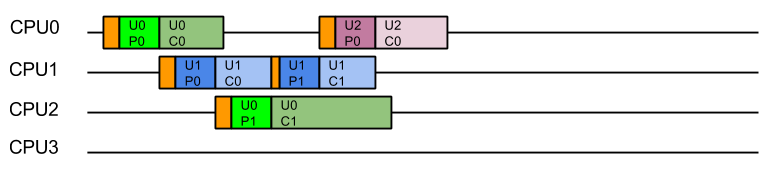
    Label UxPy represent Produce Task y for User x, Label UxCy represent Consume Task y for User x. Tasks for the same user are coloured in similar tones. Orange blocks are cache load times.

    Here all the produced tasks are immediately consumed on the same CPU with a hot cache!  Cache load times are minimised, but the cost is that server will suffer from Head of Line (HOL) Blocking, where the serial execution of task from a queue means that execution of tasks are forced to wait for the completion of unrelated tasks.  In this case tasks for U1C0 need not wait for U0C0 and U2C0 tasks need not wait for U1C1 or U0C1 etc. There is no parallel execution and thus this is not an optimal usage of the server resources.

    Produce Execute Consume (PEC)

    To solve the HOL blocking problem, multiple CPUs must be used so that produced tasks can be executed in parallel and even if one is slow or blocks, the other CPU can progress the other tasks.  To achieve this, a typical solution is to have one Thread executing on a CPU that will only produce tasks, which are then placed in a queue of tasks to be executed by Threads running on other CPUs.   Typically the task queue is abstracted into an Executor:

    while (true)
    {
        Runnable task = _producer.produce();
        if (task == null)
            break;
        _executor.execute(task);
    }

    This strategy could be considered the canonical solution to the producer consumer problem, where producers are separated from consumers by a queue and is at the heart of architectures such as SEDA. This strategy well solves the head of line blocking issue, since all tasks produced can complete independently in different Threads on different CPUs:

    This represents a good improvement in throughput and average latency over the simple Produce Consume, solution, but the cost is that every consumed task is executed on a different Thread (and thus likely a different CPU) from the one that produced the task.  While this may appear like a small cost for avoiding HOL blocking, our experience is that CPU cache misses significantly reduced the performance of early Jetty 9 releases.

    Eat What You Kill (EWYK) AKA Execute Produce Consume (EPC)

    To achieve good mechanical sympathy and avoid HOL blocking, Jetty has developed the Execute Produce Consume strategy, that we have nicknamed Eat What You Kill (EWYK) after the expression which states a hunter should only kill an animal they intend to eat. Applied to the producer consumer problem this policy says that a thread should only produce (kill) a task if it intends to consume (eat) it[n]The EatWhatYouKill strategy is named after a hunting proverb in the sense that one should only kill to eat. The use of this phrase is not an endorsement of hunting nor killing of wildlife for food or sport.[/n]. A task queue is still used to achieve parallel execution, but it is the producer that is dispatched rather than the produced task:

        while (true)
        {
            Runnable task = _producer.produce();
            if (task == null)
                break;
            _executor.execute(this); // dispatch production
            task.run(); // consume the task ourselves
        }

    The result is that a task is consumed by the same Thread, and thus likely the same CPU, that produced it, so that consumption is always done with a hot cache:

    Moreover, because any thread that completes consuming a task will immediately attempt to produce another task, there is the possibility of a single Thread/CPU executing multiple produce/consume cycles for the same user. The result is improved average latency and reduced total CPU time.

    Starvation!

    Unfortunately, a pure implementation of EWYK suffers from a fatal flaw! Since any thread producing a task will go on to consume that task,  it is possible for all threads/CPU to be consuming at once.   This was initially seen as a feature as it exerted good back pressure on the network as a busy server used all its resources consuming existing tasks rather than producing new tasks. However, in an application server consuming a task may be a blocking process that waits for more data/frames to be produced. Unfortunately if every thread/CPU ends up consuming such a blocking task, then there are no threads left available to produce the tasks to unblock them. Dead lock!

    A real example of this occurred with HTTP/2, when every Thread from the pool was blocked in a HTTP/2 request because it had used up its flow control window. The windows can be expanded by flow control frames from the other end, but there were no threads available to process the flow control frames!

    Thus the EWYK execution strategy used in Jetty is now adaptive and it can can use the most appropriate of the three strategies outlined above, ensuring there is always at least one thread/CPU producing so that starvation does not occur. To be adaptive, Jetty uses two mechanisms:

    • Tasks that are produced can be interrogated via the Invocable interface to determine if they are nonblocking, blocking or can be run in either mode.  NON_BLOCKING or EITHER tasks can be directly consumed by PC model.
    • The thread pools used by Jetty implement the TryExecutor interface which supports the method boolean tryExecute(Runnable task)which allows the scheduler to know if a thread was available to continue producing and thus allows EWYK/EPC mode, otherwise the task must be passed to an executor to be consumed in PEC mode.  To implement this semantic, Jetty maintains a dynamically sized pool of reserved threads that can respond to tryExecute(Runnable)calls.

    Thus the simple produce consume (PC) model is used for non-blocking tasks; for blocking tasks the EWYK, aka Execute Produce Consume (EPC) mode is used if a reserved thread is available, otherwise the SEDA style Produce Execute Consume (PEC) model is used.

    The adaptive EWYK strategy can be written as :

        while (true)
        {
            Runnable task = _producer.produce();
            if (task == null)
                break;
            if (Invocable.getInvocationType(task)==NON_BLOCKING)
                task.run();                     // Produce Consume
            else if (executor.tryExecute(this)) // recruit a new producer?
                task.run();                     // Execute Produce Consume (EWYK!)
            else
                executor.execute(task);         // Produce Execute Consume
        }
    

    Chained Execution Strategies

    As stated above, in the Jetty use-case it is common for the execution strategy used by the IO layer to call tasks that are themselves an execution strategy for producing and consuming HTTP/2 frames.  Thus EWYK strategies can be chained and by knowing some information about the mode in which the prior  strategy has executed them the strategies can be even more adaptive.

    The adaptable chainable EWYK strategy is outlined here:

      while (true) {
        Runnable task = _producer.produce();
        if (task == null)
          break;
        if (thisThreadIsNonBlocking())
        {
          switch(Invocable.getInvocationType(task))
          {
            case NON_BLOCKING:
              task.run();                 // Produce Consume
              break;
            case BLOCKING:
              executor.execute(task);     // Produce Execute Consume
              break;
            case EITHER:
              executeAsNonBlocking(task); // Produce Consume break;
           }
        }
        else
        {
          switch(Invocable.getInvocationType(task))
          {
            case NON_BLOCKING:
              task.run();                   // Produce Consume
              break;
            case BLOCKING:
              if (_executor.tryExecute(this))
                task.run();                 // Execute Produce Consume (EWYK!)
              else
                executor.execute(task);     // Produce Execute Consume
              break;
            case EITHER:
              if (_executor.tryExecute(this))
                task.run();                 // Execute Produce Consume (EWYK!)
              else
                executeAsNonBlocking(task); // Produce Consume
                break;
           }
        }

    An example of how the chaining works is that the HTTP/2 task declares itself as invocable EITHER in blocking on non blocking mode. If IO strategy is operating in PEC mode, then the HTTP/2 task is in its own thread and free to block, so it can itself use EWYK and potentially execute a blocking task that it produced.

    However, if the IO strategy has no reserved threads it cannot risk queuing an important Flow Control frame in a job queue. Instead it can execute the HTTP/2 as a non blocking task in the PC mode.  So even if the last available thread was running the IO strategy, it can use PC mode to execute HTTP/2 tasks in non blocking mode. The HTTP/2 strategy is then always able to handle flow control frames as they are non-blocking tasks run as PC and all other frames that may block are queued with PEC.

    Conclusion

    The EWYK execution strategy has been implemented in Jetty to improve performance through mechanical sympathy, whilst avoiding the issues of Head of Line blocking, Thread Starvation and Parallel Slowdown.   The team at Webtide continue to work with our clients and users to analyse and innovate better solutions to serve high performance real world applications.