The auto discovery features of the Servlet specification can make deployments slow and uncertain. Working in collaboration with Google AppEngine, the Jetty team has developed the Jetty quick start mechanism that allows rapid and consistent starting of a Servlet server. Google AppEngine has long used Jetty for it’s footprint and flexibility, and now fast and predictable starting is a new compelling reason to use jetty in the cloud. As Google App Engine is specifically designed with highly variable, bursty workloads in mind – rapid start up time leads directly to cost-efficient scaling.
Servlet Container Discovery Features
The last few iterations of the Servlet 3.x specification have added a lot of features related to making development easier by auto discovery and configuration of Servlets, Filters and frameworks:
Slow Discovery
Auto discovery of Servlet configuration can be useful during the development of a webapp as it allows new features and frameworks to be enabled simply by dropping in a jar file. However, for deployment, the need to scan the contents of many jars can have a significant impact of the start time of a webapp. In the cloud, where server instances are often spun up on demand, having a slow start time can have a big impact on the resources needed.
Consider a cluster under load that determines that an extra node is desirable, then every second the new node spends scanning its own classpath for configuration is a second that the entire cluster is overloaded and giving less than optimal performance. To counter the inability to quickly bring on new instances, cluster administrators have to provision more idle capacity that can handle a burst in load while more capacity is brought on line. This extra idle capacity is carried for all time while the application is running and thus a slowly starting server increases costs over the whole application deployment.
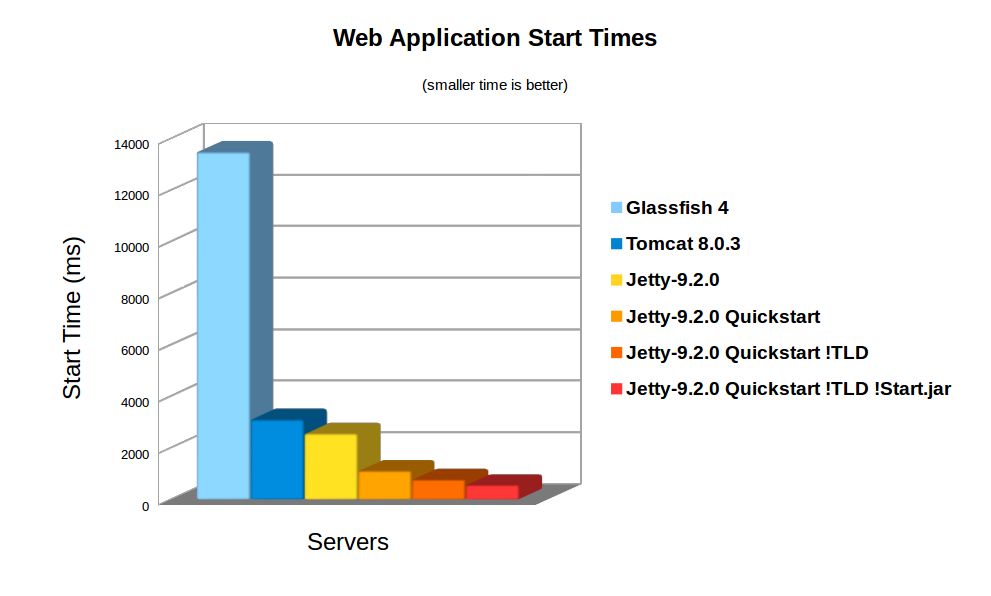
On average server hardware, a moderate webapp with 36 jars (using spring, jersey & jackson) took over 3,158ms to deploy on Jetty 9. Now this is pretty fast and some Servlet containers (eg Glassfish) take more time to initialise their logging. However 3s is still over a reasonable thresh hold for making a user wait whilst dynamically starting an instance. Also many webapps now have over 100 jar dependencies, so scanning time can be a lot longer.
Using the standard meta-data complete option does not significantly speed up start times, as TLDs and HandlersTypes classes still must be discovered even with meta data complete. Unpacking the war file saves a little more time, but even with both of these, Jetty still takes 2,747ms to start.
Unknown Deployment
Another issue with discovery is that the exact configuration of the a webapp is not fully known until runtime. New Servlets and frameworks can be accidentally deployed if jar files are upgraded without their contents being fully investigated. This give some deployers a large headache with regards to security audits and just general predictability.
It is possible to disable some auto discovery mechanisms by using the meta-data-complete setting within web.xml, however that does not disable the scanning of HandlesTypes so it does not avoid the need to scan, nor avoid auto deployment of accidentally included types and annotations.
Jetty 9 Quickstart
From release 9.2.0 of Jetty, we have included the quickstart module that allows a webapp to be pre-scanned and preconfigured. This means that all the scanning is done prior to deployment and all configuration is encoded into an effective web.xml, called WEB-INF/quickstart-web.xml, which can be inspected to understand what will be deployed before deploying.
Not only does the quickstart-web.xml contain all the discovered Servlets, Filters and Constraints, but it also encodes as context parameters all discovered:
- ServletContainerInitializers
- HandlesTypes classes
- Taglib Descriptors
With the quickstart mechanism, jetty is able to entirely bypass all scanning and discovery modes and start a webapp in a predictable and fast way.
Using Quickstart
To prepare a jetty instance for testing the quickstart mechanism is extremely simple using the jetty module system. Firstly, if JETTY_HOME is pointing to a jetty distribution >= 9.2.0, then we can prepare a Jetty instance for a normal deployment of our benchmark webapp:
> JETTY_HOME=/opt/jetty-9.2.0.v20140526
> mkdir /tmp/demo
> cd /tmp/demo
> java -jar $JETTY_HOME/start.jar
  --add-to-startd=http,annotations,plus,jsp,deploy
> cp /tmp/benchmark.war webapps/
and we can see how long this takes to start normally:
> java -jar $JETTY_HOME/start.jar
2014-03-19 15:11:18.826:INFO::main: Logging initialized @255ms
2014-03-19 15:11:19.020:INFO:oejs.Server:main: jetty-9.2.0.v20140526
2014-03-19 15:11:19.036:INFO:oejdp.ScanningAppProvider:main: Deployment monitor [file:/tmp/demo/webapps/] at interval 1
2014-03-19 15:11:21.708:INFO:oejsh.ContextHandler:main: Started o.e.j.w.WebAppContext@633a6671{/benchmark,file:/tmp/jetty-0.0.0.0-8080-benchmark.war-_benchmark-any-8166385366934676785.dir/webapp/,AVAILABLE}{/benchmark.war}
2014-03-19 15:11:21.718:INFO:oejs.ServerConnector:main: Started ServerConnector@21fd3544{HTTP/1.1}{0.0.0.0:8080}
2014-03-19 15:11:21.718:INFO:oejs.Server:main: Started @2579ms
So the JVM started and loaded the core of jetty in 255ms, but another 2324 ms were needed to scan and start the webapp.
To quick start this webapp, we need to enable the quickstart module and use an example context xml file to configure the benchmark webapp to use it:
> java -jar $JETTY_HOME/start.jar --add-to-startd=quickstart
> cp $JETTY_HOME/etc/example-quickstart.xml webapps/benchmark.xml
> vi webapps/benchmark.xml
The benchmark.xml file should be edited to point to the benchmark.war file:
<?xml version="1.0"  encoding="ISO-8859-1"?>
<!DOCTYPE Configure PUBLIC "-//Jetty//Configure//EN" "http://www.eclipse.org/jetty/configure_9_0.dtd">
<Configure class="org.eclipse.jetty.quickstart.QuickStartWebApp">
  <Set name="autoPreconfigure">true</Set>
  <Set name="contextPath">/benchmark</Set>
  <Set name="war"><Property name="jetty.webapps" default="."/>/benchmark.war</Set>
</Configure>
Now the next time the webapp is run, it will be preconfigured (taking a little bit longer than normal start):
> java -jar $JETTY_HOME/start.jar
2014-03-19 15:21:16.442:INFO::main: Logging initialized @237ms
2014-03-19 15:21:16.624:INFO:oejs.Server:main: jetty-9.2.0.v20140526
2014-03-19 15:21:16.642:INFO:oejdp.ScanningAppProvider:main: Deployment monitor [file:/tmp/demo/webapps/] at interval 1
2014-03-19 15:21:16.688:INFO:oejq.QuickStartWebApp:main: Quickstart Extract file:/tmp/demo/webapps/benchmark.war to file:/tmp/demo/webapps/benchmark
2014-03-19 15:21:16.733:INFO:oejq.QuickStartWebApp:main: Quickstart preconfigure: o.e.j.q.QuickStartWebApp@54318a7a{/benchmark,file:/tmp/demo/webapps/benchmark,null}(war=file:/tmp/demo/webapps/benchmark.war,dir=file:/tmp/demo/webapps/benchmark)
2014-03-19 15:21:19.545:INFO:oejq.QuickStartWebApp:main: Quickstart generate /tmp/demo/webapps/benchmark/WEB-INF/quickstart-web.xml
2014-03-19 15:21:19.879:INFO:oejsh.ContextHandler:main: Started o.e.j.q.QuickStartWebApp@54318a7a{/benchmark,file:/tmp/demo/webapps/benchmark,AVAILABLE}
2014-03-19 15:21:19.893:INFO:oejs.ServerConnector:main: Started ServerConnector@63acac21{HTTP/1.1}{0.0.0.0:8080}
2014-03-19 15:21:19.894:INFO:oejs.Server:main: Started @3698ms
After preconfiguration, on all subsequent starts it will be quick started:
> java -jar $JETTY_HOME/start.jar
2014-03-19 15:21:26.069:INFO::main: Logging initialized @239ms
2014-03-19 15:21:26.263:INFO:oejs.Server:main: jetty-9.2.0-SNAPSHOT
2014-03-19 15:21:26.281:INFO:oejdp.ScanningAppProvider:main: Deployment monitor [file:/tmp/demo/webapps/] at interval 1
2014-03-19 15:21:26.941:INFO:oejsh.ContextHandler:main: Started o.e.j.q.QuickStartWebApp@559d6246{/benchmark,file:/tmp/demo/webapps/benchmark/,AVAILABLE}{/benchmark/}
2014-03-19 15:21:26.956:INFO:oejs.ServerConnector:main: Started ServerConnector@4a569e9b{HTTP/1.1}{0.0.0.0:8080}
2014-03-19 15:21:26.956:INFO:oejs.Server:main: Started @1135ms
So quickstart has reduced the start time from 3158ms to approx 1135ms!
More over, the entire configuration of the webapp is visible in webapps/benchmark/WEB-INF/quickstart-web.xml. This file can be examine and all the deployed elements can be easily audited.
Starting Faster!
Avoiding TLD scans
The jetty 9.2 distribution switched to using the apache Jasper JSP implementation from the glassfish JSP engine. Unfortunately this JSP implementation will always scan for TLDs, which turns out takes a significant time during startup. So we have modified the standard JSP initialisation to skip TLD parsing altogether if the JSPs have been precompiled.
To let the JSP implementation know that all JSPs have been precompiled, a context attribute needs to be set in web.xml:
<context-param>
  <param-name>org.eclipse.jetty.jsp.precompiled</param-name>
  <param-value>true</param-value>
</context-param>
This is done automagically if you use the Jetty Maven JSPC plugin. Now after the first run, the webapp starts in 797ms:
> java -jar $JETTY_HOME/start.jar
2014-03-19 15:30:26.052:INFO::main: Logging initialized @239ms
2014-03-19 15:30:26.245:INFO:oejs.Server:main: jetty-9.2.0.v20140526
2014-03-19 15:30:26.260:INFO:oejdp.ScanningAppProvider:main: Deployment monitor [file:/tmp/demo/webapps/] at interval 1
2014-03-19 15:30:26.589:INFO:oejsh.ContextHandler:main: Started o.e.j.q.QuickStartWebApp@414fabe1{/benchmark,file:/tmp/demo/webapps/benchmark/,AVAILABLE}{/benchmark/}
2014-03-19 15:30:26.601:INFO:oejs.ServerConnector:main: Started ServerConnector@50473913{HTTP/1.1}{0.0.0.0:8080}
2014-03-19 15:30:26.601:INFO:oejs.Server:main: Started @797ms
Bypassing start.jar
The jetty start.jar is a very powerful and flexible mechanism for constructing a classpath and executing a configuration encoded in jetty XML format. However, this mechanism does take some time to build the classpath. The start.jar mechanism can be bypassed by using the –dry-run option to generate and reuse a complete command line to start jetty:
> RUN=$(java -jar $JETTY_HOME/start.jar --dry-run)
> eval $RUN
2014-03-19 15:53:21.252:INFO::main: Logging initialized @41ms
2014-03-19 15:53:21.428:INFO:oejs.Server:main: jetty-9.2.0.v20140526
2014-03-19 15:53:21.443:INFO:oejdp.ScanningAppProvider:main: Deployment monitor [file:/tmp/demo/webapps/] at interval 1
2014-03-19 15:53:21.761:INFO:oejsh.ContextHandler:main: Started o.e.j.q.QuickStartWebApp@7a98dcb{/benchmark,file:/tmp/demo/webapps/benchmark/,AVAILABLE}{file:/tmp/demo/webapps/benchmark/}
2014-03-19 15:53:21.775:INFO:oejs.ServerConnector:main: Started ServerConnector@66ca206e{HTTP/1.1}{0.0.0.0:8080}
2014-03-19 15:53:21.776:INFO:oejs.Server:main: Started @582ms
Classloading?
With the quickstart mechanism, the start time of the jetty server is dominated by classloading, with over 50% of the CPU being profiled within URLClassloader, and the next hot spot is 4% in XML Parsing. Thus a small gain could be made by pre-parsing the XML into byte code calls, but any more significant progress will probably need examination of the class loading mechanism itself. We have experimented with combining all classes to a single jar or a classes directory, but with no further gains.
Conclusion
The Jetty-9 quick start mechanism provides almost an order of magnitude improvement is start time. This allows fast and predictable deployment, making Jetty the ideal server to be used in dynamic clouds such as Google App Engine.