Blog

  • HTTP/2 on Google Compute Engine with Jetty

    Now that HTTP/2 is a published standard (RFC 7540) and Jetty-9.3.0 has been released with HTTP/2.0, It’s time to start running this new protocol in your deployments. So let’s look at how you can run HTTP/2 on Google Compute Engine!

    Selecting an Google Compute Image

    The main requirement of a image to use is that it can run Java-8, which is pretty much any recent image and I’ve used the ubuntu-1504-vivid-v20150616a stock image provided by Google. Provision an image of this following googles documentation, then login to that image with SSH.

    Installing Jetty

    Jetty 9.3 is not currently available as deb, so it is simplest to download and install directly it in /opt:

    $ cd /opt
    $ sudo curl http://download.eclipse.org/jetty/9.3.0.v20150612/dist/jetty-distribution-9.3.0.v20150612.tar.gz | tar xfz -
    $ export JETTY_HOME=/opt/jetty-distribution-9.3.0.v20150612

    You can now make a base directory to configure a jetty instance:

    $ mkdir $HOME/demo
    $ cd $HOME/demo
    $ java -jar $JETTY_HOME/start.jar --add-to-startd=http,https,deploy

    This enables a HTTP connector on port 8080 and a HTTPS connector on port 8443.  To access remotely on the standard ports, you need to add some redirections:

    $ sudo /sbin/iptables -t nat -I PREROUTING -p tcp --dport 80 -j REDIRECT --to-port 8080
    $ sudo /sbin/iptables -t nat -I PREROUTING -p tcp --dport 443 -j REDIRECT --to-port 8443

    These iptables commands should be put into /etc/rc.local (or similar) to persist over restarts of the virtual machine.

    Enabling HTTP/2

    Unfortunately the normal steps to enable HTTP/2 on jetty will fail on Google computer engine with the following error:

    org.eclipse.jetty.start.graph.GraphException: Missing referenced dependency: alpn-impl/alpn-1.8.0_45-internal

    This is because the Google image is not using a standard release of java, but rather an internally modified one. Because HTTP/2 requires ALPN support to be added to the boot path of the JVM, the jetty distribution is unable to do this by default for this JVM.  However, it is a trivial matter to make a module for the internal JVM, in the demo directory:

    $ mkdir -p modules/alpn-impl
    $ cp $JETTY_HOME/modules/alpn-impl/alpn-1.8.0_45.mod modules/alpn-impl/alpn-1.8.0_45-internal.mod

    The normal command to enable HTTP/2 can now be run and the server started:

    $ java -jar $JETTY_HOME/start.jar --add-to-startd=http2
    $ java -jar $JETTY_HOME/start.jar
    

    The server is now running and you can point your browser to the external IP address. If you use a https URL and your browser supports HTTP/2, then you will now be speaking HTTP/2 to Google Compute Engine!

  • HTTP/2 with HAProxy and Jetty

    HTTP/2 is now the official RFC 7540, and it’s about time to deploy your website on HTTP/2, to get the numerous benefits that HTTP/2 brings.
    A very typical deployment is to have Apache (or Nginx) working as a reverse proxy to a Servlet Container such as Jetty or Tomcat.
    This configuration cannot be used for HTTP/2, because Apache does not support yet HTTP/2 (nor does Nginx).
    We want to propose an alternative deployment replacing Apache (or Nginx) with HAProxy, so that we can leverage Jetty’s 9.3.0 HTTP/2 support, and retain most if not all the features that Apache (or Nginx) were providing as reverse proxy.
    For those that don’t know HAProxy, it’s a very fast load balancer and proxy that powers quite a number of the world’s most visited sites, see here.
    What you will get is a very efficient TLS offloading (performed by HAProxy via OpenSSL), and Jetty HTTP/2 support, including HTTP/2 Push.
    The setup to make HAProxy + Jetty + HTTP/2 work is fairly simple, and documented in detail here.
    Don’t wait years to update your website to HTTP/2: whether you run a JEE web application, or a PHP application like WordPress, HAProxy and Jetty can speed up your website considerably, and many studies have shown that this results in more business.
    Browsers like Firefox and Chrome already support HTTP/2, so you will get more than half of the world potentially accessing your website with HTTP/2.
    Contact us if you want to know more about HTTP/2 and how we can help you to speed up your website.

  • Introduction to HTTP2 in Jetty

    Jetty 9.3 supports HTTP/2 as defined by RFC7540 and it is extremely simple to enable and get started using this new protocol that is available in most current browsers.

    Getting started with Jetty 9.3

    Before we can run HTTP/2, we need to setup Jetty for HTTP/1.1 (strictly speaking this is not required, but makes for an easy narrative):

    $ cd /tmp
    $ wget http://repo1.maven.org/maven2/org/eclipse/jetty/jetty-distribution/9.3.0.RC1/jetty-distribution-9.3.0.RC1.tar.gz
    $ tar xfz jetty-distribution-9.3.0.RC1.tar.gz
    $ export JETTY_HOME=/tmp/jetty-distribution-9.3.0.RC1
    $ mkdir demo
    $ cd demo
    $ java -jar $JETTY_HOME/start.jar --add-to-startd=http,https,deploy
    $ cp $JETTY_HOME/demo-base/webapps/async-rest.war webapps/ROOT.war
    $ java -jar $JETTY_HOME/start.jar

    The result of these commands is to:

    • Download the RC1 release of Jetty 9.3 and unpack it to the /tmp directory
    • Create a demo directory and set it up as a jetty base.
    • Enable the HTTP and HTTPS connectors
    • Deploy a demo web application
    • Start the server!

    Now you are running Jetty and you can see the demo application deployed by pointing your browser at http://localhost:8080 or https://localhost:8443 (you may have to accept the self signed SSL certificate)!

    In the console output, I’ll draw your attention to the following two INFO lines that should have been logged:

    Started ServerConnector@490ab905{HTTP/1.1,[http/1.1]}{0.0.0.0:8080}
    Started ServerConnector@69955f9a{SSL,[ssl, http/1.1]}{0.0.0.0:8443}

    These lines indicate that the server is listening on ports 8080 and 8443 and lists the default and optional protocols that are support on each of those connections.  So you can see that port 8080 supports HTTP/1.1 (which by specification supports HTTP/1.0) and port 8443 supports SSL plus HTTP/1.1 (which is HTTPS!).

    Enabling HTTP/2

    Now you can stop the Jetty server by hitting CTRL+C on the terminal, and the following command is all that is needed to enable HTTP/2 on both of these ports and to start the server:

    $ java -jar $JETTY_HOME/start.jar --add-to-startd=http2,http2c
    $ java -jar $JETTY_HOME/start.jar

    This does not create/enable new connectors/ports, but adds the HTTP/2 protocol to the supported protocols of the existing connectors on ports 8080 and 8443.

    To access the demo web application with HTTP/2 you will need to point a recent browser to https://localhost:8443/.  You can verify whether your browser supports HTTP/2 here, add extensions to your browser to display an icon in the address bar (see this extension for Firefox). Firefox also sets a fake response header: X-Firefox-Spdy: h2.

    How does it work?

    If you now look at the console logs you will see that additional protocols have been added to both existing connectors on 8080 and 8443:

    Started ServerConnector@4bec1f0c{HTTP/1.1,[http/1.1, h2c, h2c-17, h2c-14]}{0.0.0.0:8080}
    Started ServerConnector@5bc63d63{SSL,[ssl, alpn, h2, h2-17, h2-14, http/1.1]}{0.0.0.0:8443}

    The name ‘h2’ is the official abbreviation for HTTP/2 over TLS  and ‘h2c’ is the abbreviation for unencrypted HTTP/2 (they really wanted to save every bite in the protocol!).   So you can see that port 8080 is now listening by default for HTTP/1.1, but can also talk h2c (and the draft versions of that).   Port 8443 now by defaults talks SSL, then uses ALPN to negotiate a protocol from: ‘h2’, ‘h2-17’, ‘h2-14’ or ‘http/1.1’ in that priority order.

    When you point your browser at https://localhost:8443/ it will establish a TLS connection and then use the ALPN extension to negotiate the next protocol.  If both the client and server speak the same version of HTTP/2, then it will be selected, otherwise the connection falls back to HTTP/1.1.

    For port 8080, the use of ‘h2c’ is a little more complex.  Firstly there is the problem of finding a client that speaks plain text HTTP/2, as none of the common browsers will use the protocol on plain text connections.  The cUrl utility does support h2c, as of does the Jetty HTTP/2 client.

    The default protocol on port 8080 is still HTTP/1.1, so that the initial connection will be expected to speak that protocol. To use the HTTP/2 protocol a connection may send a HTTP/1.1 request that carries  an Upgrade header, which the server may accept and upgrade to any of the other protocols listed against the connector (eg ‘h2’, ‘h2-17’ etc.) by sending a 101 switching protocols response!   If the server does not wish to accept the upgrade, it can respond to the HTTP/1.1 request and continue normally.

    However, clients are also allowed to assume that a known server does speak HTTP/2 and can attempt to make a connection to port 8080 and immediately start talking HTTP/2.   Luckily the protocol has been designed with a preamble that looks a bit like a HTTP/1.1 request:

    PRI * HTTP/2.0
    SM

    Jetty’s HTTP/1.1 implementation is able to detect that preamble and if the connector also supports ‘h2c’, then the connection is upgraded without the need for a 101 Switching Protocols response!

    HTTP/2 Configuration

    Configuration of HTTP/2 can be considered in the following parts

    Properties Configuration File Purpose
    start.d $JETTY_HOME/etc
    ssl.ini jetty-ssl.xml Connector configuration (eg port) common to HTTPS and HTTP/2
    ssl.ini jetty-ssl-context.xml Keystore  configuration common to HTTPS and HTTP/2
    https.ini jetty-https.xml HTTPS Protocol configuraton
    http2.ini jetty-http2.xml HTTP/2 Protocol configuration
  • Jetty-9.3 Features!

    Jetty 9.3.0 is almost ready and Release Candidate 1 is available for download and testing!  So this is just a quick blog to introduce you to what is new and encourage you to try it out!

    HTTP2

    The headline feature in Jetty-9.3 is HTTP/2 support. This protocol is now a proposed standard from the IETF and described in RFC7540. The Jetty team has been closely involved with the development of this standard, and while we have some concerns about the result, we believe that there are significant quality of service gains to be had by deploying HTTP/2.   The protocol has features that can greatly reduce the time to render a web page, which is good for clients; plus it has some good economies in using a fewer connections, which is good for servers.

    Jetty has comprehensive support for HTTP/2: Client, Server with negotiated, upgraded and direct connections and the protocol is already supported by the majority of current browsers. Since HTTP2 is substantially based on the SPDY protocol, we have dropped SPDY support from Jetty-9.3.

    Deploying HTTP/2 in the server is just the same as configuring a https connector : java -jar $JETTY_HOME/start.jar --add-to-startd=http2 will get you going (more blogs and doco coming)!

    Webtide is actively seeking users interested in deploying HTTP2 and collaborating on analysis of load, latency, configuration and optimisations.

    ALPN

    To support standard based negotiation of protocols over new connections (eg. to select HTTP2 or HTTPS),  Jetty-9.3 supports the Application Layer Protocol Negotiation mechanism which replaces our previous support for NPN.

    ALPN will automatically be enabled when HTTP2 is enable with start.jar, which downloads a non-eclipse jar containing our own extension to Open JVM and is not covered by the eclipse licenses.

    SNI

    Jetty-9.3 also supports Server Name Indications during TLS/SSL negotiation.  This allows the key store to contain multiple server certificates that have a specific or wild card domain(s) encoded in their distinguished name or by the Subject Alternate Name X.509 extension.     This allows a server with many virtual hosts/contexts to pick the appropriate TLS/SSL certificate for a connection.

    Enabling SNI support is a simple as adding the multiple certificates to your keystore file!

    Java 8

    Jetty-9.3 is built and targeted for Java 8.  This change was prompted by the SNI extension reliance on a Java 8 API and the HTTP2 specification need for TLS ciphers that are only available in Java 8.  It is possible to build Jetty-9.3 for Java 7 and we were considering releasing it as such with a few configuration tricks to enable the few classes that require java 8, however we decided that since java 7 is end-of-life is was not worth the complication to support it directly in the release.   If you really need java 7, then please speak to Webtide about a build of 9.3 for 7.

    Eat What You Kill

    It is impossible to change the protocol as server speaks without dramatic changes on how it is optimized to scale to high loads and low through puts.  The support of HTTP2 requires some fundamental changes to the core scheduling strategies, specifically with regards to the challenge of handling multiplexed requests from a single connection.   Jetty 9.3 contains a new scheduling strategy nicked named Eat What You Kill that makes 9.3 faster out of the box and gives us the opportunity to continue to improve throughput and latency as we tune the algorithm.

    Reactive Asynchronous IO Flows?

    Jetty 9.2 already supports the Servlet Asynchronous IO API and Asynchronous Servlets.  However, in Jetty 9.3 that support has been made even more fundamental and all IO in Jetty is now fundamentally asynchronous from the connector to the servlet streams and robust under arbitrary access from non container managed threads.

    So Jetty-9.3 is a good basis on which to develop with the servlet asynchronous APIs, however as we have some concerns with the complexity of those APIs, we are actively experimenting with better APIs based on Reactive Programming and specifically on the Flow abstraction developed by Doug Lea as a candidate class for Java 9.   We have a working prototype that runs on Jetty-9.3 which we hope to release soon.  Please contact us if you are interested in  participating in this development, as real use-cases are required to test these abstractions!

  • Simple Jetty HelloWorld Webapp

    With the jetty-maven-plugin and Servlet Annotations, it has never been simpler to start developing with Jetty! While we have not quiet achieved the terseness of some convention over configuration environments/frameworks/languages, it is getting close and only 2 files are needed to run a web application!

    Maven pom.xml

    A minimal maven pom.xml is need to declare a dependency on the Servlet API and use the jetty-maven-plugin.   A test project and pom.xml can be created with:

    $ mkdir demo-webapp
    $ cd demo-webapp
    $ gedit pom.xml

    The pom.xml file is still a little verbose and the minimal file needs to be at least:

    <project xmlns="http://maven.apache.org/POM/4.0.0" xmlns:xsi="http://www.w3.org/2001/XMLSchema-instance" xsi:schemaLocation="http://maven.apache.org/POM/4.0.0 http://maven.apache.org/maven-v4_0_0.xsd">
       <modelVersion>4.0.0</modelVersion>
       <packaging>war</packaging>
       <groupId>org.eclipse.jetty.demo</groupId>
       <artifactId>jetty-helloworld-webapp</artifactId>
       <version>1.0</version>
       <dependencies>
         <dependency>
           <groupId>javax.servlet</groupId>
           <artifactId>javax.servlet-api</artifactId>
           <version>3.1.0</version>
           <scope>provided</scope>
         </dependency>
       </dependencies>
       <build>
         <plugins>
           <plugin>
             <groupId>org.eclipse.jetty</groupId>
             <artifactId>jetty-maven-plugin</artifactId>
             <version>9.4.5.v20170502</version>
           </plugin>
           <plugin>
             <groupId>org.apache.maven.plugins</groupId>
             <artifactId>maven-war-plugin</artifactId>
             <version>3.0.0</version>
             <configuration>
               <failOnMissingWebXml>false</failOnMissingWebXml>
             </configuration>
           </plugin>
         </plugins>
       </build>
    </project>

    Annotated HelloWorld Servlet

    Maven conventions for Servlet development are satisfied by creating the Servlet code in following source directory:

    $ mkdir -p src/main/java/com/example
    $ gedit src/main/java/com/example/HelloWorldServlet.java

    Annotations allows for a very simple Servlet file that is mostly comprised of imports:

    package com.example;
    import javax.servlet.annotation.WebServlet;
    import javax.servlet.http.HttpServlet;
    import javax.servlet.http.HttpServletRequest;
    import javax.servlet.http.HttpServletResponse;
    import java.io.IOException;
    @WebServlet(urlPatterns = {"/*"}, loadOnStartup = 1)
    public class HelloWorldServlet extends HttpServlet
    {
     @Override
     public void doGet(HttpServletRequest request, HttpServletResponse response)
     throws IOException
     {
     response.getOutputStream().print("Hello World");
     }
    }

    Running the Web Application

    All that is left to do is to run the web application:

    $ mvn jetty:run
    

    You can then point your browser at http://localhost:8080/ to see your web application!

    Next Steps

    OK, not the most exciting web application, but it is a start.  From here you could:

    • Clone this demo from github.
    • Add more Servlets or some Filters
    • Add static content in the src/main/webapp directory
    • Create a web deployment descriptor in src/main/webapp/WEB-INF/web.xml
    • Build a war file with mvn install
  • G1 Garbage Collector at GeeCON 2015

    I had the pleasure to speak at the GeeCON 2015 Conference in Kraków, Poland, where I presented a HTTP/2 session and a new session about the G1 garbage collector (slides below).

    I have to say that GeeCON has become one of my favorite conferences, along with the Codemotion Conference.
    While Codemotion is bigger and spans more themes (Java, JavaScript/WebUI/WebUX, IoT, Makers and Embedded), GeeCON is smaller and more focused on Java and Scala.
    The GeeCON organizers have made a terrific effort, and the results are, in my opinion, superb.
    The conference venue is a bit far from the center of Kraków (where most speaker hotels were), but easily reachable by bus. When the conference is over, you still have a couple of hours of light to visit the city center, which is gorgeous.
    The sessions I followed were very interesting and the speakers top quality.
    The accommodation was good, food and beverages at the conference were excellent, and on the second day there was a party for all conference attendees in a huge beer bar, with a robo war tournament for those that like to flip someone else’s table robot. Fantastic !
    Definitely mark GeeCON on your calendars for the next year.
    The slides about the G1 session aim at explaining some of the less known areas of G1 and present tuning advices along with a real-world use case of migration from CMS to G1.
    Contact us if you want to tune the GC behavior of your Jetty applications, either deployed to a standalone Jetty server or coded using Jetty embedded.

  • Jetty HTTP/2 cleartext upgrade

    With the approach of the release candidate for Jetty 9.3.0 in the next days, we have implemented support for HTTP/2 cleartext upgrade mechanism, on server side, resolving issue #465857.
    This means that you can configure a Jetty server to speak cleartext HTTP/1.1 and cleartext HTTP/2 on the same server port.
    This feature is mostly useful for server data centers, where nodes communicate with each other via HTTP/2 using a Java client (for example Jetty’s HttpClient using the HTTP/2 transport) because you want to leverage the HTTP/2 protocol advantages, in particular multiplexing, for a more efficient communication.
    This scenario is typical for microservices deployed using embedded Jetty (just run them via java -jar my_microservice.jar) or, in general, for HTTP services (REST or similar) that reside on different nodes and that are coordinated by a façade service.
    In such scenario, the Java client knows before hand that the server port it is connecting to speaks HTTP/2, so the server needs to be configured to speak cleartext HTTP/2 on that port.
    However, it is also common during development/troubleshooting of REST services to point a browser to a particular node, craft the right URL with the expected path and/or query parameters, and obtain back the result of the processing (or the error) of your service request.
    But browsers don’t speak cleartext HTTP/2 (at the time of this blog, no browser is supporting cleartext HTTP/2, neither directly nor via the standard HTTP/1.1 upgrade mechanism to a different protocol, and there are no known plans for browsers to support this feature in the future), so they will speak HTTP/1.1 to a server port that is configured to speak HTTP/2.
    Before the implementation of issue #465857, this scenario resulted in a communication failure between the browser and the server.
    Sure, you can configure two different ports, one that speaks HTTP/2 for Java clients, and one that speaks HTTP/1.1 for browsers, but that is cumbersome.
    With the resolution of issue #465857, you can now configure Jetty to speak HTTP/1.1 and HTTP/2 on the same server port:

    public static void main(String[] args) throws Exception
    {
      // The Jetty Server.
      Server server = new Server();
      // Common HTTP configuration.
      HttpConfiguration config = new HttpConfiguration();
      // HTTP/1.1 support.
      HttpConnectionFactory http1 = new HttpConnectionFactory(config);
      // HTTP/2 cleartext support.
      HTTP2CServerConnectionFactory http2c = new HTTP2CServerConnectionFactory(config);
      ServerConnector connector = new ServerConnector(server, http1, http2c);
      connector.setPort(8080);
      server.addConnector(connector);
      // Here configure contexts / servlets / etc.
      server.start();
    }
    

    If a browser speaking HTTP/1.1 connects to the server, Jetty will speak HTTP/1.1.
    If a Java client speaking HTTP/2 connects to the server, Jetty will detect that and internally upgrade the connection from HTTP/1.1 to HTTP/2, so that the Java client will benefit of the HTTP/2 protocol advantages.
    Jetty also supports the standard HTTP/1.1 upgrade mechanism (on the server side, not yet on HttpClient), so that if you are using tools like nghttp you will be able to speak to a Jetty server either using directly HTTP/2, or by sending a HTTP/1.1 upgrade request to HTTP/2:

    # Direct HTTP/2
    $ nghttp -v http://localhost:8080/
    # Upgrade from HTTP/1.1 to HTTP/2
    $ nghttp -vu http://localhost:8080/
    

    If you are interested in how you can benefit from HTTP/2, contact Webtide, and you will have all our expertise at your hands.

  • Eat What You Kill

    A producer consumer pattern for Jetty HTTP/2 with mechanical sympathy

    Developing scalable servers in Java now requires careful consideration of mechanical sympathetic issues to achieve both high throughput and low latency.  With the introduction of HTTP/2 multiplexed semantics to Jetty, we have taken the opportunity to introduce a new execution strategy, named  “eat what you kill”[n]The EatWhatYouKill strategy is named after a hunting proverb in the sense that one should only kill to eat. The use of this phrase is not an endorsement of hunting nor killing of wildlife for food or sport.[/n], which is: avoiding dispatch latency; running tasks with hot caches; reducing contention and parallel slowdown; reducing memory footprint and queue depth.

    The problem

    The problem we are trying to solve is the producer consumer pattern, where one process produces tasks that need to be run to be consumed. This is a common pattern with two key examples in the Jetty Server:

    • a NIO Selector produces connection IO events that need to be consumed
    • a multiplexed HTTP/2 connection produces HTTP requests that need to be consumed by calling the Servlet Container

    For the purposes of this blog, we will consider the problem in general, with the producer represented by following interface:

    public interface Producer
    {
        Runnable produce();
    }

    The optimisation task that we trying to solve is how to handle potentially many producers, each producing many tasks to run, and how to run the tasks that they produce so that they are consumed in a timely and efficient manner.

    Produce Consume

    The simplest solution to this pattern is to iteratively produce and consume as follows:

    while (true)
    {
        Runnable task = _producer.produce();
        if (task == null)
            break;
        task.run();
    }

    This strategy iteratively produces and consumes tasks in a single thread per Producer:

    Threading-PCIt has the advantage of simplicity, but suffers the fundamental flaw of head-of-line blocking (HOL):  If one of the tasks blocks or executes slowly (e.g. task C3 above), then subsequent tasks will be held up. This is actually good for a HTTP/1 connection where responses must be produced in the order of request, but is unacceptable for HTTP/2 connections where responses must be able to return in arbitrary order and one slow request cannot hold up other fast ones. It is also unacceptable for the NIO selection use-case as one slow/busy/blocked connection must not prevent other connections from being produced/consumed.

    Produce Execute Consume

    To solve the HOL blocking problem, multiple threads must be used so that produced tasks can be executed in parallel and even if one is slow or blocks, the other threads can progress the other tasks. The simplest application of threading is to place every task that is produced onto a queue to be consumed by an Executor:

    while (true)
    {
        Runnable task = _producer.produce();
        if (task == null)
            break;
        _executor.execute(task);
    }

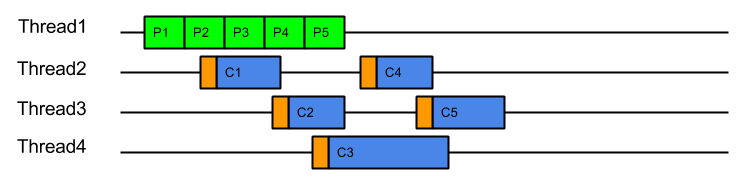
    This strategy could be considered the canonical solution to the producer consumer problem, where producers are separated from consumers by a queue and is at the heart of architectures such as SEDA. This strategy solves well the head of line blocking issue, since all tasks produced can complete independently in different threads (or cached threads):
    Threading-PEC

    However, while it solves the HOL blocking issue, it introduces a number of other significant issues:

    • Tasks are produced by one thread and then consumed by another thread. This means that tasks are consumed on CPU cores with cold caches and that extra CPU time is required (indicated above in orange) while the cache loads the task related data. For example, when producing a HTTP request, the parser will identify the request method, URI and fields, which will be in the CPU’s cache. If the request is consumed by a different thread, then all the request data must be loaded into the new CPU cache. This is an aspect of Parallel Slowdown which Jetty has needed to avoid previously as it can cause a considerable impact on the server throughput.
    • Slow consumers may cause an arbitrarily large queue of tasks to build up as the producers may just keep adding to the queue faster than tasks can be consumed.  This means that no back pressure is given to the production of tasks and out of memory problems can result. Conversely, if the queue size is limited with a blocking queue, then HOL blocking problems can re-emerge as producers are prevented for queuing tasks that could be executed.
    • Every task produced will experience a dispatch latency as it is passed to a new thread to be consumed. While extra latency does not necessarily reduce the throughput of the server, it can represent a reduction in the quality of service.  The diagram above shows the total 5 tasks completing sooner than ProduceConsume, but if the server was busy then tasks may need to wait some time in the queue before being allocated a thread.
    • Another aspect of parallel slowdown is the contention between related tasks which a single producer may produce. For example a single HTTP/2 connection is likely to produce requests for the same client session, accessing the same user data. If multiple requests from the same connection are executed in parallel on different CPU cores, then they may contend for the same application locks and data and therefore be less efficient.  Another way to think about this is that if a 4 core machine is handling 8 connections that each produce 4 requests, then each core will handle 8 requests.  If each core can handle 4 requests from each of 2 connections then there will be no contention between cores.  However, if each core handles 1 requests from each of 8 connections, then the chances of contention will be high.  It is far better for total throughput for a single connections load to not be spread over all the systems cores.

    Thus the ProduceExecuteConsume strategy has solved the HOL blocking concern but at the expense of very poor performance on both latency (dispatch times) and execution (cold caches), as well as introducing concerns of contention and back pressure. Many of these additional concerns involve the concept of Mechanical Sympathy, where the underlying mechanical design (i.e. CPU cores and caches) must be considered when designing scalable software.

    How Bad Is It?

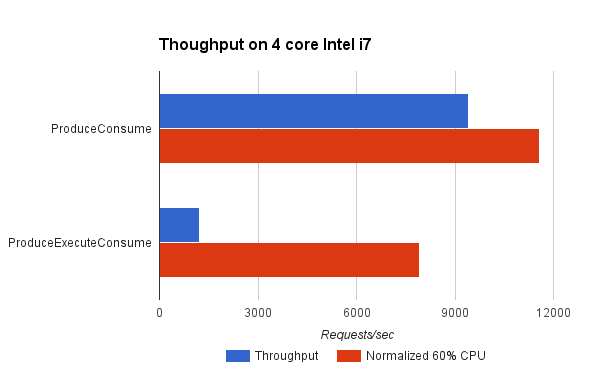
    Pretty Bad! We have written a benchmark project that compares the Produce Consume and Produce Execute Consume strategies (both described above). The Test Connection used simulates a typical HTTP request handling load where the production of the task equates to parsing the request and created the request object and the consumption of the task equates to handling the request and generating a response.
    ewyk1

    It can be seen that the ProduceConsume strategy achieves almost 8 times the throughput of the ProduceExecuteConsume strategy.   However in doing so, the ProduceExecuteConsume strategy is using a lot less CPU (probably because it is idle during the dispatch delays). Yet even when the throughput is normalised to what might be achieved if 60% of the available CPU was used, then this strategy reduces throughput by 30%!  This is most probably due to the processing inefficiencies of cold caches and contention between tasks in the ProduceExecuteConsume strategy. This clearly shows that to avoid HOL blocking, the ProduceExecuteConsume strategy is giving up significant throughput when you consider either achieved or theoretical measures.

    What Can Be Done?

    Disruptor ?

    Consideration of the SEDA architecture led to the development of the Disruptor pattern, which self describes as a “High performance alternative to bounded queues for exchanging data between concurrent threads”.  This pattern attacks the problem by replacing the queue between producer and consumer with a better data structure that can greatly improve the handing off of tasks between threads by considering the mechanical sympathetic concerns that affect the queue data structure itself.

    While replacing the queue with a better mechanism may well greatly improve performance, our analysis was that it in Jetty it was the parallel slowdown of sharing the task data between threads that dominated any issues with the queue mechanism itself. Furthermore, the problem domain of a full SEDA-like architecture, whilst similar to the Jetty use-cases is not similar enough to take advantage of some of the more advanced semantics available with the disruptor.

    Even with the most efficient queue replacement, the Jetty use-cases will suffer from some dispatch latency and parallel slow down from cold caches and contending related tasks.

    Work Stealing ?

    Another technique for avoiding parallel slowdown is a Work Stealing scheduling strategy:

    In a work stealing scheduler, each processor in a computer system has a queue of work items to perform…. New items are initially put on the queue of the processor executing the work item. When a processor runs out of work, it looks at the queues of other processors and “steals” their work items.

    This concept initially looked very promising as it appear that it would allow related tasks to stay on the same CPU core and avoid the parallel slowdown issues described above.
    It would require the single task queue to be broken up in to multiple queues, but there are suitable candidates for finer granularity queues available (e.g. the connection).

    Unfortunately, several efforts to implement it within Jetty failed to find an elegant solution because it is not generally possible to stick a queue or thread to a processor and the interaction of task queues vs thread pool queues added an additional level of complexity. More over, because the approach still involves queues it does not solve the back pressure issues and the execution of tasks in a queue may flush the cache between production and consumption.

    However consideration of the principles of Work Stealing inspired the creation of a new scheduling strategy that attempt to achieve the same result but without any queues.

    Eat What You Kill!

    The “Eat What You Kill”[n]The EatWhatYouKill strategy is named after a hunting proverb in the sense that one should only kill to eat. The use of this phrase is not an endorsement of hunting nor killing of wildlife for food or sport.[/n] strategy (which could have been more prosaicly named ExecuteProduceConsume) has been designed to get the best of both worlds of the strategies presented above. It is nick named after the hunting movement that says a hunter should only kill an animal they intend to eat. Applied to the producer consumer problem this policy says that a thread must only produce (kill) a task if it intends to consume (eat) it immediately. However, unlike the ProduceConsume strategy that adheres to this principle, EatWhatYouKill still performs dispatches, but only to recruit new threads (hunters) to produce and consume more tasks while the current thread is busy eating !

    private volatile boolean _threadPending;
    private AtomicBoolean _producing = new AtomicBoolean(false);
    ...
        _threadPending = false;
        while (true)
        {
            if (!_producing.compareAndSet(false, true))
                break;
            Runnable task;
            try
            {
                task = _producer.produce();
            }
            finally
            {
                _producing.set(false);
            }
            if (task == null)
              break;
            if (!_threadPending)
            {
                _threadPending = true;
                _executor.execute(this);
            }
             
            task.run();
        }

    This strategy can still operate like ProduceConsume using a loop to produce and consume tasks with a hot cache. A dispatch is performed to recruit a new thread to produce and consume, but on a busy server where the delay in dispatching a new thread may be large, the extra thread may arrive after all the work is done. Thus the extreme case on a busy server is that this strategy can behave like ProduceConsume with an extra noop dispatch:

    Threading-EPC-busy

    Serial queueless execution like this is optimal for a servers throughput:  There is not queue of produced tasks wasting memory, as tasks are only produced when needed; tasks are always consumed with hot caches immediately after production.  Ideally each core and/or thread in a server is serially executing related tasks in this pattern… unless of course one tasks takes too long to execute and we need to avoid HOL blocking.

    EatWhatYouKill avoids HOL blocking as it is able to recruit additional threads to iterate on production and consumption if the server is less busy and the dispatch delay is less than the time needed to consume a task.  In such cases, a new threads will be recruited to assist with producing and consuming, but each thread will consume what they produced using a hot cache and tasks can complete out of order:

    Threading-EPCOn a mostly idle server, the dispatch delay may always be less than the time to consume a task and thus every task may be produced and consumed in its own dispatched thread:
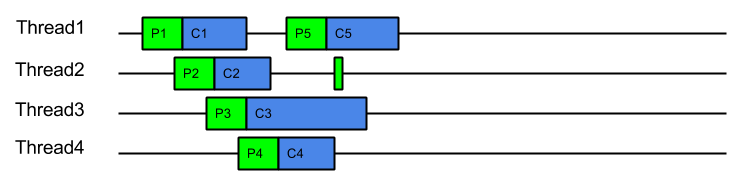
    Threading-EPC-idleIn this idle case there is a dispatch for every task, which is exactly the same dispatch cost of ProduceExecuteConsume.  However this is only the worst case dispatch overhead for EatWhatYouKill and only happens on a mostly idle server, which has spare CPU. Even with the worst case dispatch case, EatWahtYouKill still has the advantage of always consuming with a hot cache.

    An alternate way to visualise this strategy is to consider it like ProduceConsume, but that it dispatches extra threads to work steal production and consumption. These work stealing threads will only manage to steal work if the server is has spare capacity and the consumption of a task is risking HOL blocking.

    This strategy has many benefits:

    • A hot cache is always used to consume a produced task.
    • Good back pressure is achieved by making production contingent on either another thread being available or prior consumption being completed.
    • There will only ever be one outstanding dispatch to the thread pool per producer which reduces contention on the thread pool queue.
    • Unlike ProduceExecuteConsume, which always incurs the cost of a dispatch for every task produced, ExecuteProduceConsume will only dispatch additional threads if the time to consume exceeds the time to dispatch.
    • On systems where the dispatch delay is of the same order of magnitude as consuming a task (which is likely as the dispatch delay is often comprised of the wait for previous tasks to complete), then this strategy is self balancing and will find an optimal number of threads.
    • While contention between related tasks can still occur, it will be less of a problem on busy servers because related task will tend to be consumed iteratively, unless one of them blocks or executes slowly.

    How Good Is It ?

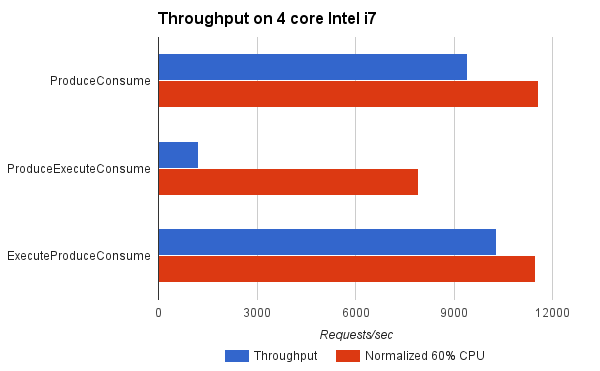
    Indications from the benchmarks is that it is very good !
    ewyk2

    For the benchmark, ExecuteProduceConsume achieved better throughput than ProduceConsume because it was able to use more CPU cores when appropriate. When normalised for CPU load, it achieved near identical results to ProduceConsume, which is to be expected since both consume tasks with hot caches and ExecuteProduceConsume only incurs in dispatch costs when they are productive.

    This indicates that you can kill your cake and eat it too! The same efficiency of  ProduceConsume can be achieved with the same HOL blocking prevention of ProduceExecuteConsume.

    Conclusion

    The EatWhatYouKill (aka ExecuteProduceConsume) strategy has been integrated into Jetty-9.3 for both NIO selection and HTTP/2 request handling. This makes it possible for the following sequence of events to occur within a single thread of execution:

    1. A selector thread T1 wakes up because it has detected IO activity.
    2. (T1) An ExecuteProduceConsume strategy processes the selected keys set.
    3. (T1) An EndPoint with input pending is produced from the selected keys set.
    4. Another thread T2 is dispatched to continue producing from the selected keys set.
    5. (T1) The EndPoint with input pending is consumed by running the HTTP/2 connection associated with it.
    6. (T1) An ExecuteProduceConsume strategy processes the I/O for the HTTP/2 connection.
    7. (T1) A HTTP/2 frame is produced by the HTTP/2 connection.
    8. Another thread T3 is dispatched to continue producing HTTP/2 frames from the HTTP/2 connection.
    9. (T1) The frame is consumed by possibly invoking the application to produce a response.
    10. (T1) The thread returns from the application and attempts to produce more frames from the HTTP/2 connection, if there is I/O left to process.
    11. (T1) The thread returns from HTTP/2 connection I/O processing and attempts to produce more EndPoints from the selected keys set, if there is any left.

    This allows a single thread with hot cache to handle a request from I/O selection, through frame parsing to response generation with no queues or dispatch delays. This offers maximum efficiency of handling while avoiding the unacceptable HOL blocking.

    Early indications are that Jetty-9.3 is indeed demonstrating a significant step forward in both low latency and high throughput.   This site has been running on EWYK Jetty-9.3 for some months.  We are confident that with this new execution strategy, Jetty will provide the most performant and scalable HTTP/2 implementation available in Java.

  • HTTP/2 Push Demo

    I have recently presented “HTTP/2 and Java: Current Status” at a few conferences (slides below).

    The HTTP/2 protocol has two big benefits over HTTP/1.1: Multiplexing and HTTP/2 Push.
    The first feature, Multiplexing, gives an edge to modern web sites that perform ~100 requests per page to one or more domains.
    With HTTP/1.1 these web sites had to open 6-8 connections to a domain, and then send only 6-8 requests at a time.
    With a network roundtrip of 150ms, it takes ~15 roundtrips to perform ~100 requests, or 15 * 150ms = 2250ms, in the best conditions and without taking into account the download time.
    With HTTP/2 Multiplexing, those ~100 requests can be sent all at once to the server, reducing the roundtrip time from 2250ms to ideally just 150ms.
    The second feature, HTTP/2 Push, allows the server to preemptively push to clients not only the primary resource that has been requested (typically an HTML page), but also secondary resources associated with it (typically CSS files, JavaScript files, image files, etc.).
    HTTP/2 Push complements Multiplexing by saving the roundtrips needed to fetch all resources required to render a page.
    The net result of these two features is a vastly improved web site performance which, following well known studies, can be directly related to more page views, and eventually to more revenue for your business.
    The Jetty Project first implemented these features in SPDY in 2012, and improved them in HTTP/2.
    We are now promoting this work to become part of the Servlet 4.0 specification.
    If you are interested in speeding up your web site (even if it is in PHP – Jetty can host any PHP site, including WordPress), contact us.
    The presentation I gave at conferences includes a demo that shows an example of HTTP/2 versus HTTP/1.1, available at GitHub.

  • Last NPN & ALPN Update for JDK 7

    As you may know already, Oracle has announced that OpenJDK 7, with its last 7u80 release, has reached end of life as of today.
    In March 2012, the Jetty project announced that it had implemented the SPDY protocol and, along with it, the first pure Java NPN implementation that was required to implement SPDY.
    Because the NPN implementation required to modify OpenJDK classes, we maintained the NPN implementation for every JDK release, importing OpenJDK changes when required into a new release of the NPN library.
    NPN has been superseded by ALPN, for which the Jetty project also created a pure Java implementation, required to implement HTTP/2.
    Like NPN, also the ALPN implementation modifies OpenJDK classes and the ALPN library needs to be matched with the corresponding OpenJDK version.
    With the end of public OpenJDK 7 releases, the Jetty project will therefore stop updating the NPN and ALPN implementations for OpenJDK 7.
    Only ALPN (and not NPN) will be maintained for OpenJDK 8 releases.
    If you need support for ALPN or NPN beyond OpenJDK 7u80, please contact us.
    As for the future, ALPN is scheduled to be part of OpenJDK 9 (JEP 244), so we will eventually phase out the Jetty ALPN implementation in favour of OpenJDK 9’s one. OpenJDK 9 is scheduled for the end of 2016, so expect the Jetty ALPN library for OpenJDK 8 to be alive and updated for a while.