Category: Webtide

  • End of Life: Changes to Eclipse Jetty and CometD

    Webtide (https://webtide.com) is the company behind the open-source Jetty and CometD projects. Since 2006, Webtide has fully funded the Jetty and CometD projects through services and support, including migration assistance, production support, developer assistance, and CVE resolution. 

    First, the change.

    Starting January 1, 2026, Webtide will no longer publish releases for Jetty 9, Jetty 10, and Jetty 11, as well as CometD 5, 6, and 7 to Maven Central or other public repositories. 

    Take a look at the primary announcement if you’re interested. 

    So, the motivation.

    Why we are in this situation now harks back to the beginnings of Webtide. Briefly, Greg Wilkins founded the Jetty project in 1995 as part of a contest created by Sun Microsystems for a new language called Java. For a decade, he and Jan Bartel carefully stewarded the project as part of their consulting company Mort Bay Consulting. Around the Jetty 6 timeframe, in 2006, Webtide was founded as an LLC to evolve the project further commercially. Still, at its core, the goal was to support the incredible community that had developed over the years. When I joined in 2007, we began working to join the Eclipse Foundation. We took steps to formalize our development processes, aiming to add more commercial predictability to the open-source project. Joining the Eclipse Foundation also meant adhering to their rigorous IP policy for both the Jetty codebase and its dependencies, an essential step in improving corporate uptake.

    This was also the time for the project to handle the end-of-life process for Jetty 6, while establishing Jetty 7 and Jetty 8. This was the opportunity that Webtide needed to support the project’s development by offering commercial services and support for EOL Jetty 6, while focusing on supporting and funding the future of Jetty 7 and Jetty 8. 

    It was the crux; after careful consideration, we decided that all commercial support releases would be open-source for the benefit of all. While not a traditional business decision, it aligned with our values and dedication to the community, which was rewarded as the community continued to grow its usage of Jetty.

    This worked wonderfully for almost 20 years.

    Something shifted…

    We started to notice a shift in the community a few years ago. For almost 20 years, the companies we spoke with valued how our support could help them become more successful, with many ultimately becoming customers who truly understood the benefits of supporting open-source. Every single one of them saw the value in releasing EOL releases freely. When I became CEO a decade ago and Webtide became 100% developer-owned and operated, we were able to continue operating in this commercial environment with ease, to such an extent that the future of Webtide and the Jetty project is assured for many years to come.

    So what changed? The tone of many companies we spoke to. Increasingly, while explaining the model that served Webtide well for so many years, where I used to hear ‘That makes so much sense, this works great!’, I now hear “So it’s just free? Great, I need to check a box.” Followed up with the galling question “Could you put this policy of yours in writing on your company letterhead?”.

    And today?

    Twenty years ago, things were different; Maven 2 dominance was emerging, and Maven Central was gaining ubiquity. Managing transitive dependencies was novel in many circles. Managing CVEs in a corporate setting was in its infancy, particularly with Java developer software stacks. 

    Now, build tooling is diverse, Maven Central is a global central repository system, and corporations should have their own caching repository servers, or they really should! Even JavaEE was rebranded as Jakarta at the Eclipse Foundation. So much change, but the one I’ll highlight is the emergence of business units focused on corporate software policies, complete with BOM files containing ever more metadata and checkboxes to click, managing CVE risks associated with software developed internally. Developers, the primary people Webtide has interacted with over the years, are increasingly far removed from software maintenance activities. 

    Now our approach to endlessly updating EOL releases seems remarkably outdated. Look at Jetty 9, which we have been releasing since 2013. It turns out our approach of making things as easy as possible for the community, for software that should have officially gone EOL years ago, was a benefit to many, but also enabled far more to grow complacent. Instead of scheduling migrations and updating to more recent versions, we inadvertently provided an environment that allowed companies to deploy onto software well over a decade old, when newer, more performant options were readily available. Then, when security postures started changing and businesses began looking deeper into their dependencies, they realized they were using outdated software, three or more major versions behind. Then, to our shock, many are perfectly fine with that so long as it is free and someone tells them it is ok. 

    If we have learned one thing within this time, it is that the EOL policy needs to be so much clearer, using established industry terminology. Looking back, we have been guilty of inventing terminology and inadvertently exacerbating the situation.

    What is heartening is seeing other organizations work to address EOL as well; notably, MITRE has been developing changes to the CVE system to support EOL concepts fully. If you have ever seen the text “Unsupported When Assigned” in a CVE, then you have encountered the early efforts for EOL in a CVE.

    You have to applaud the efforts of businesses to prioritize security and sane open-source policies.

    However, this is also a call to open-source projects like Jetty, as we are operating in a different world. Everyone understands that ‘End-of-Life’ does not mean ‘End-of-Use’. Clearly, the system for many companies has changed from a Developer Support perspective to a Security Support perspective. EOL Software support is purchased differently now. There are companies, like Sonar (formerly Tidelift), that exist to manage security metadata about open-source software, enabling companies to manage their software risk more effectively. 

    EOL Jetty and CometD by Webtide

    To address this industry evolution, Webtide has launched a partnership program that enables businesses relying on EOL Jetty and CometD versions to obtain CVE resolutions officially and predictably. 

    Webtide continues to resolve CVEs and issues for EOL Jetty and CometD in support of our commercial customers. However, the resulting binaries are now distributed directly to our commercial support customers and through our partnership network. No longer are we calling software EOL but deploying to Maven Central with a nod and a wink.

    Our partners are established leaders in the open-source EOL landscape, creating products that directly address the problems the security and business industries are facing. 

    This synergy works perfectly with Webtide, as we are the company that offers services and support on Jetty and CometD. Migrations, developer assistance, production support, and performance are the things that directly influence the ongoing development of the open-source projects we steward. We can continue to focus on our strengths, and our partners can focus on theirs.

    At last, the partners!

    We are pleased to announce two partnerships. With these partners, you will be able to build a secure EOL solution for your software stack, not just for your usage of Jetty or CometD. Best yet, if you are interested in Webtide’s Lifecycle Support, you can use these partner versions in conjunction with our support!


    TuxCare secures the open-source software the world builds on. Today, we protect over 1.2 million workloads – keeping them secure, compliant, and unstoppable at scale. From operating systems to development libraries and production applications, we power your open-source stack with enterprise-grade security and support, including endless lifecycle extensions for out-of-support software versions, rebootless patching for every major Linux distribution, enterprise-optimized support for community Linux, and our Linux-first vulnerability scanner that cuts through the noise.


    HeroDevs provides secure, long-term maintenance for open-source frameworks that have reached End-of-Life. Through our Never-Ending Support (NES) initiative, we deliver continuous CVE remediation and compliance-grade updates, allowing your team to migrate at your own pace. Our engineers monitor upstream changes, backport verified fixes, and publish fully tested binaries for seamless drop-in replacement. With NES for Jetty and NES for CometD, you can stay secure, stable, and compliant—without refactoring or rushing a migration.

    If your business is interested in our partner program, please direct inquiries to partnership@webtide.com.

    Wrapping it up.

    One important thing to note is that Webtide will continue to support the Jetty Project with a standard open-source release process, ensuring that older versions are released to provide the community with ample time to update to newer versions through a transition period. When Jetty 13 is released, Jetty 12.1 will continue to receive updates for a period, just as Jetty 12.0 does currently. If that is six months or a year, it remains to be seen. Once we finalize this release strategy with timelines, we will make sure the community is well-informed.

    Fundamentally, the change coming is that the End of Life versions for Jetty and CometD will no longer be an empty EOL notice and quiet deployments to Maven Central. It will mean EOL and provide established industry solutions to address those who need additional support.
  • Introducing Jetty-12

    For the last 18 months, Webtide engineers have been working on the most extensive overhaul of the Eclipse Jetty HTTP server and Servlet container since its inception in 1995. The headline for the release of Jetty 12.0.0 could be “Support for the Servlet 6.0 API from Jakarta EE 10“, but the full story is of a root and branch overhaul and modernization of the project to set it up for yet more decades of service.

    This blog is an introduction to the features of Jetty 12, many of which will be the subject of further deep-dive blogs.

    Servlet API independent

    In order to support the Servlet 6.0 API, we took the somewhat counter intuitive approach of making Jetty Servlet API independent.  Specifically we have removed any dependency on the Servlet API from the core Jetty HTTP server and handler architecture.    This is taking Jetty back to it’s roots as it was Servlet API independent for the first decade of the project.

    The Servlet API independent approach has the following benefits:

    • There is now a set of jetty-core modules that provide a high performance and scalable HTTP server.  The jetty-core modules are usable directly when there is no need for the Servlet API and the overhead introduced by it’s features and legacy.
    • For projects like Jetty, support must be maintained for multiple versions of the Servlet APIs.  We are currently supporting branches for Servlet 3.1 in Jetty 9.4.x;  Servlet 4.0 in Jetty 10.0.x; and Servlet 5.0 in Jetty 11.0.x. Adding a fourth branch to maintain would have been intolerable.  With Jetty 12, our ongoing support for Servlet 4.0, 5.0 and 6.0 will be based on the same core HTTP server in the one branch. 
    • The Servlet APIs have many deprecated features that are no longer best practise. With Servlet 6.0, some of these were finally removed from the specification (e.g. Object Wrapper Identity). Removing these features from the Jetty core modules allows for better performance and cleaner implementations of the current APIs.

    Multiple EE Environments

    To support the Servlet APIs (and related Jakarta EE APIs) on top of the jetty-core, Jetty 12 uses an Environment abstraction that introduces another tier of class loading and configuration. Each Environment holds the applicable Jakarta EE APIs needed to provide Servlet support (but not the full suite of EE APIs).

    Multiple environments can be run simultaneously on the same server and Jetty-12 supports:

    • EE8 (Servlet 4.0) in the java.* namespace,
    • EE9 (Servlet 5.0) in the jakarta.* namespace with deprecated features
    • EE10 (Servlet 6.0) in the jakarta.* namespace without deprecated features.
    • Core environments with no Servlet support or overhead.
    The implementation of EE8 & EE9 environments are substantially from the current Jetty-10 and Jetty-11 releases, so that applications that are dependent on those can be deployed on Jetty-12 with minimal risk of changes in behaviour (i.e. they are somewhat “bug for bug compatible”). Even if there is no need to simultaneously run different environments, the upgrading of applications to current and future releases of the Jakarta EE specifications, will be simpler as it is decoupled from a major release of the server itself. For example, it is planned that EE 11 support (probably with Servlet 6.1) will be made available in a Jetty 12.1.0 release rather than in a major upgrade to a 13.0.0 release.

    Core Environment

    As mentioned above, the jetty-core modules are now available for direct support of HTTP without the need for the overhead and legacy of the Servlet API. As part of this effort many API’s have been updated and refined:
    • The core Sessions are now directly usable
    • A core Security model has been developed, that is used to implement the Servlet security model, but avoids some of the bizarre behaviours (I’m talking about you exposed methods!).
    • The Jetty Websocket API has been updated and can be used over the top of the core Websocket APIs
    • The Jetty HttpClient APIs have been updated.

    Performance

    Jetty 12 has achieved significant performance improvements. Our continuous performance tracking indicates that we have equal or better CPU utilisation for given load with lower latency and no long tail of quality of service. 

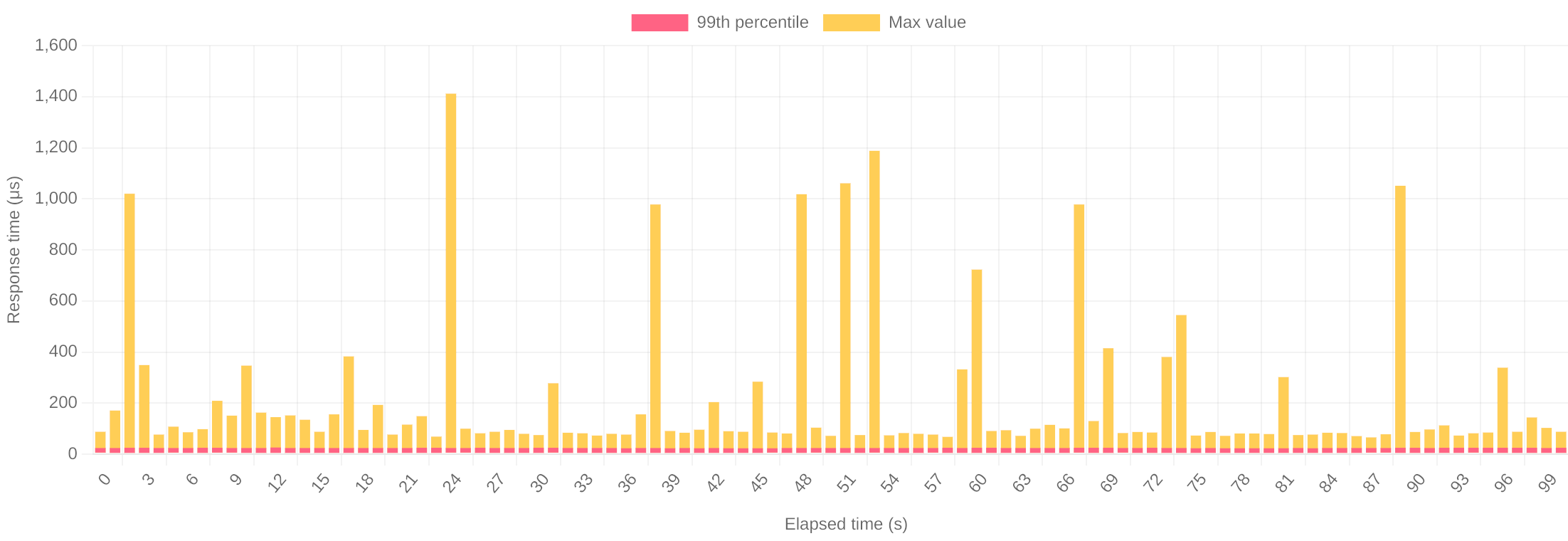
    Our tests currently offer 240,000 requests per second and then measure quality of service by latency (99th percentile and maximum). Below is the plot of latency for Jetty 11: 

    This shows that the orange 99th percentile latency is almost too small in the plot to see (at 24.1 µs average), and all you do see is the yellow plot of the maximal latency (max 1400 µs). Whilst these peaks look large, the scale is in micro seconds, so the longest maximal delay is just over 1.4 milliseconds and 99% of requests are handled in 0.024ms!

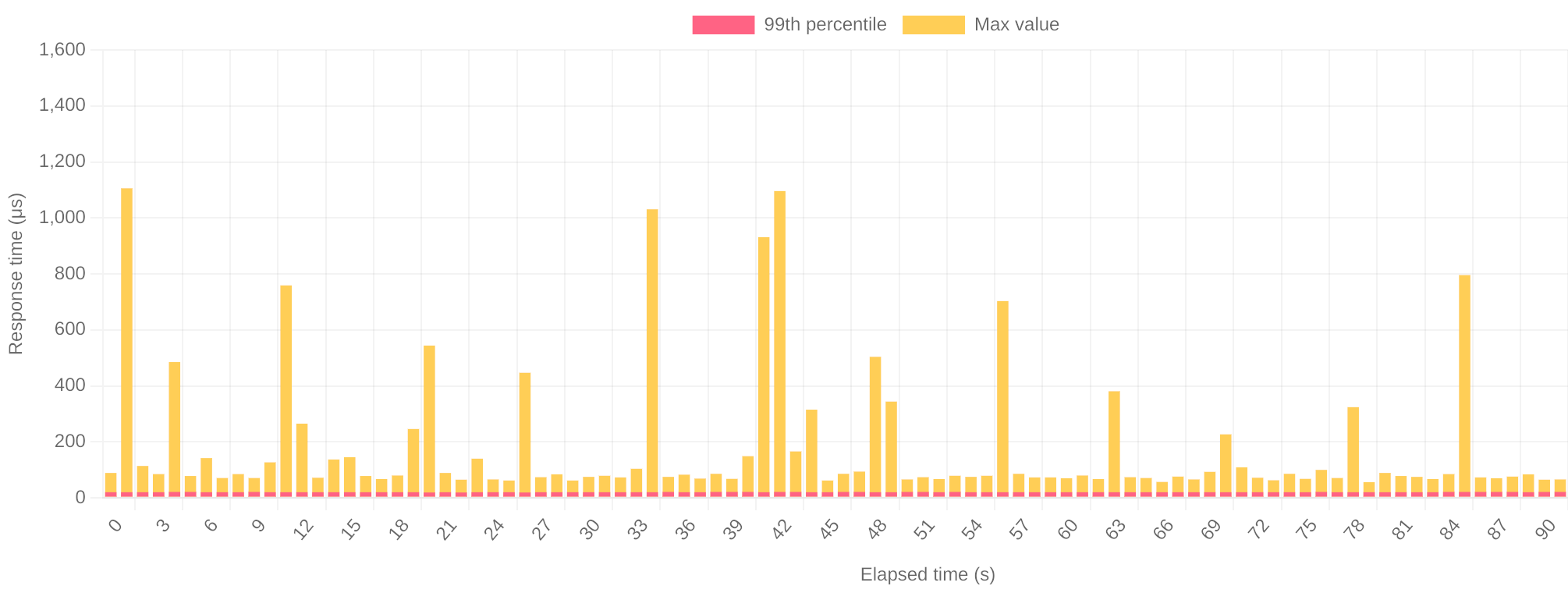
    Below is the same plot of latency for Jetty 12 handling 240,000 requests per second:

    The 99th percentile latency is now only 20.2 µs and the peaks are less frequent and rarely over 1 ms, with the maximum of 1100µs.   

    You can see the latest continuous performance testing of jetty-12 here.

    New Asynchronous IO abstraction

    In the jetty-core is a new asynchronous abstraction that is a significant evolution of the asynchronous approaches developed in Jetty over many previous releases.

    But “Loom” I hear some say. Why be asynchronous if “Loom” will solve all your problems. Firstly, Loom is not a silver bullet, and we have seen no performance benefits of adopting Loom in the core of Jetty. If we were to adopt loom in the core we’d lose the significant benefits of our advanced execution strategy (which ensures that tasks have a good chance of being executed on a CPU core with a hot cache filled with the relevant data).

    However, there are definitely applications that will benefit from the simple scaling offered by Loom’s virtual Threads, thus Jetty has taken the approach to stay asynchronous in the core, but to have optional support of Loom in our Execution strategy. Virtual threads may be used by the execution strategy, rather than submitting blocking jobs to a thread pool.  This is a best of both worlds approach as it let’s us deal with the highly complex but efficient/scaleable asynchronous core, whilst letting applications be written in blocking style but can still scale.

      But I hear other say: “why yet another async abstraction when there are already so many: reactive, Flow, NIO, servlet, etc”? Adopting a simple but powerful core async abstraction allows us to simply adapt to support many other abstractions: specifically Servlet asynchronous IO, Flow and blocking InputStream/OutputStream are trivial to implement. Other features of the abstraction are:

      • Input side can be used iteratively, avoiding deep stacks and needless dispatches. Borrowed from Servlet API.
      • Demand API simplified from Flow/Reactive
      • Retainable ByteBuffers for zero copy handling
      • Content abstraction to simply handle errors and trailers inline.

      The asynchronous APIs are available to be used directly in jetty-core, or applications may simply wrap them in alternative asynchronous or blocking APIs, or simply use Servlets and never see them (but benefit from them). 

      Below is an example of using the new APIs to asynchronously read content from a Content.Source into a string:

      public static class FutureString extends CompletableFuture<String> {
      private final CharsetStringBuilder text;
      private final Content.Source source;

      public FutureString(Content.Source source, Charset charset) {
      this.source = source;
      this.text = CharsetStringBuilder.forCharset(charset);
      source.demand(this::onContentAvailable);
      }

      private void onContentAvailable() {
      while (true) {
      Content.Chunk chunk = source.read();
      if (chunk == null) {
      source.demand(this::onContentAvailable);
      return;
      }

      try {
      if (Content.Chunk.isFailure(chunk))
      throw chunk.getFailure();

      if (chunk.hasRemaining())
      text.append(chunk.getByteBuffer());

      if (chunk.isLast() && complete(text.build()))
      return;
      } catch (Throwable e) {
      completeExceptionally(e);
      } finally {
      chunk.release();
      }
      }
      }
      }

      The asynchronous abstraction will be explained in detail in a later blog, but we will note about the code above here:

      • there are no data copies into buffers (as if often needed with read(byte[]buffer)style APIs.  The chunk may be a slice of a buffer that was read directly from the network and there are retain() and release()to allow references to be kept if need be.
      • All data and meta flows via pull style calls to the Content.Source.read() method, including bytes of content, failures and EOF indication. Even HTTP trailers are sent as Chunks.  This avoids the mutual exclusion that can be needed if there are onData and onError style callbacks. 
      • The read style is iterative, so there is no less need to break down code into multiple callback methods. 
      • The only callback is to the  onContentAvailable method that is passed to Content.Source#demand(Runnable) and is called back when demand is met (i.e. read can be called with a non null return).

      Handler,  Request & Response design

      The core building block of a Jetty Server are the Handler, Request and Response interfaces. These have been significantly revised in Jetty 12 to:

      • Fully embrace and support the asynchronous abstraction. The previous Handler design predated asynchronous request handling and thus was not entirely suitable for purpose.
      • The Request is now immutable, which solves many issues (see “Mutable Request” in Less is More Servlet API) and allows for efficiencies and simpler asynchronous implementations.
      • Duplication has been removed from the API’s so that wrapping requests and responses is now simpler and less error prone. (e.g. There is no longer the need to wrap both a sendError and setStatus method to capture the response status).

      Here is an example Handler that asynchronously echos all a request content back to the response, including any Trailers:

      public boolean handle(Request request, Response response, Callback callback) {
        response.setStatus(200);
        long contentLength = -1;
        for (HttpField field : request.getHeaders()) {
          if (field.getHeader() != null) {
            switch (field.getHeader()) {
              case CONTENT_LENGTH -> {
        response.getHeaders().add(field);
        contentLength = field.getLongValue();
            }
              case CONTENT_TYPE -> response.getHeaders().add(field);
              case TRAILER -> response.setTrailersSupplier(HttpFields.build());
              case TRANSFER_ENCODING -> contentLength = Long.MAX_VALUE;
      }
      }
      } 
      if
      (contentLength > 0)
      Content.copy(request, response, Response.newTrailersChunkProcessor(response), callback);
        else
          callback.succeeded();
        return true;
      }

      Security

      With sponsorship from the Eclipse Foundation and the Open Source Technology Improvement Fund, Webtide was able to engage Trail of Bits for a significant security collaboration. There have been 25 issues of various severity discovered, including several which have resulted in CVEs against the previous Jetty releases.  The Jetty project has a good security record and this collaboration is proving a valuable way to continue that.  

      Big update & cleanup

      Jetty is a 28 year old project. A bit of cruft and legacy has accumulated over that time, not to mention that many RFCs have been obsoleted (several times over) in that period. 

      The new architecture of Jetty 12, together with the name space break of jakarta.* and the removal of deprecated features in Servlet 6.0, has allowed for a big clean out of legacy implementations and updates to the latest RFCs.

      Legacy support is still provided where possible, either by compliance modes selecting older implementations or just by using the EE8/EE9 Environments.

      Conclusion

      The Webtide team is really excited to bring Jetty 12 to the market. It is so much more than just a Servlet 6.0 container, offering a fabulous basis for web development for decades more to come.  

    • A story about Unix, Unicode, Java, filesystems, internationalization and normalization

      Recently, I’ve been investigating some test failures that I only experienced on my own machine, which happens to run some flavor of Linux. Investigating those failures, I ran down a rabbit hole that involves Unix, Unicode, Java, filesystems, internationalization and normalization. Here is the story of what I found down at the very bottom.

      A story about Unix internationalization

      One test that was failing is testAccessUniCodeFile, with the following exception:

      java.nio.file.InvalidPathException: Malformed input or input contains unmappable characters: swedish-å.txt
      	at java.base/sun.nio.fs.UnixPath.encode(UnixPath.java:145)
      	at java.base/sun.nio.fs.UnixPath.(UnixPath.java:69)
      	at java.base/sun.nio.fs.UnixFileSystem.getPath(UnixFileSystem.java:279)
      	at java.base/java.nio.file.Path.resolve(Path.java:515)
      	at org.eclipse.jetty.util.resource.FileSystemResourceTest.testAccessUniCodeFile(FileSystemResourceTest.java:335)
      	...
      

      This test asserts that Jetty can read files with non-ASCII characters in their names. But the failure happens in Path.resolve, when trying to create the file, before any Jetty code is executed. But why?
      When accessing a file, the JVM has to deal with Unix system calls. The Unix system call typically used to create a new file or open an existing one is int open(const char *path, int oflag, …); which accepts the file name as its first argument.
      In this test, the file name is "swedish-å.txt" which is a Java String. But that String isn’t necessarily encoded in memory in a way that the Unix system call expects. After all, a Java String is not the same as a C const char * so some conversion needs to happen before the C function can be called.
      We know the Java String is represented by a UTF-8-encoded byte[] internally. But how is the C const char * actually is supposed to be represented? Well, that depends. The Unix spec specifies that internationalization depends on environment variables. So the encoding of the C const char * depends on the LANG, LC_CTYPE and LC_ALL environment variables and the JVM has to transform the Java String to a format determined by these environment variables.
      Let’s have a look at those in a terminal:

      $ echo "LANG=\"$LANG\" LC_CTYPE=\"$LC_CTYPE\" LC_ALL=\"$LC_ALL\""
      LANG="C" LC_CTYPE="" LC_ALL=""
      $
      

      C is interpreted as a synonym of ANSI_X3.4-1968 by the JVM which itself is a synonym of US-ASCII.
      I’ve explicitly set this variable in my environment as some commands use it for internationalization and I appreciate that all the command line tools I use strictly stick to English. For instance:

      $ sudo LANG=C apt-get remove calc
      ...
      Do you want to continue? [Y/n] n
      Abort.
      $ sudo LANG=fr_BE.UTF-8 apt-get remove calc
      Do you want to continue? [O/n] n
      Abort.
      $
      

      Notice the prompt to the question Do you want to continue? that is either [Y/n] (C locale) or [O/n] (Belgian-French locale) depending on the contents of this variable. Up until now, I didn’t know that it also impacted what files the JVM could create or open!
      Knowing that, it is now obvious why the file cannot be created: it is not possible to convert the "swedish-å.txt" Java String to an ASCII C const char * simply because there is no way to represent the å character in ASCII.
      Changing the LANG environment variable to en_US.UTF-8 allowed the JVM to successfully make that Java-to-C string conversion which allowed that test to pass.
      Our build has now been changed to force the LC_ALL environment variable (as it is the one that overrides the other ones) to en_US.UTF-8 before running our tests to make sure this test passes even on environments with non-unicode locales.

      A story about filesystem Unicode normalization

      There was an extra pair of failing tests, that reported the following error:

      java.lang.AssertionError:
      Expected: is <404>
           but: was <200>
      Expected :is <404>
      Actual   :<200>
      

      For the context, those tests are about creating a file with a non-ASCII name encoded in some way and trying to serve it over HTTP with a request to the same non-ASCII name encoded in a different way. This is needed because Unicode supports different forms of encoding, notably Normalization Form Canonical Composition (NFC) and Normalization Form Canonical Decomposition (NFD). For our example string “swedish-å.txt”, this means there are two ways to encode the letter “å”: either U+00e5 LATIN SMALL LETTER A WITH RING ABOVE (NFC) or U+0061 LATIN SMALL LETTER A followed by U+030a COMBINING RING ABOVE (NFD).
      Both are canonically equivalent, meaning that a unicode string with the letter “å” encoded either as NFC or NFD should be considered the same. Is that true in practice?
      The failing tests are about creating a file whose name is NFC-encoded then trying to serve it over HTTP with the file name encoded in the URL as NFD and vice-versa.
      When running those tests on MacOS on APFS, the encoding never matters and MacOS will find the file with a NFC-encoded filename when you try to open it with a NFD-encoded canonically equivalent filename and vice-versa.
      When running those tests on Linux on ext4 or Windows on NTFS, the encoding always matters and Linux/Windows will not find the file with a NFC-encoded filename when you try to open it with a NFD-encoded canonically equivalent filename and vice-versa.
      And this is exactly what the tests expect:

      if (OS.MAC.isCurrentOs())
        assertThat(response.getStatus(), is(HttpStatus.OK_200));
      else
        assertThat(response.getStatus(), is(HttpStatus.NOT_FOUND_404));
      

      What I discovered is that when running those tests on Linux on ZFS, the encoding sometimes matters and Linux may find the file with a NFC-encoded filename when you try to open it with a NFD-encoded canonically equivalent filename and vice-versa, depending upon the ZFS normalization property; quoting the manual:

      normalization = none | formC | formD | formKC | formKD
          Indicates whether the file system should perform a unicode normalization of file names whenever two file names are compared, and which normalization algorithm should be used. File names are always stored unmodified, names are normalized as part of any comparison process. If this property is set to a legal value other than none, and the utf8only property was left unspecified, the utf8only property is automatically set to on. The default value of the normalization property is none. This property cannot be changed after the file system is created.
      

      So if we check the normalization of the filesystem upon which the test is executed:

      $ zfs get normalization /
      NAME                      PROPERTY       VALUE          SOURCE
      rpool/ROOT/nabo5t         normalization  formD          -
      $
      

      we can understand why the tests fail: due to the normalization done by ZFS, Linux can open the file given canonically equivalent filenames, so the test mistakenly assumes that Linux cannot serve this file. But if we create a new filesystem with no normalization property:

      $ zfs get normalization /unnormalized/test/directory
      NAME                      PROPERTY       VALUE          SOURCE
      rpool/unnormalized        normalization  none           -
      $
      

      and run a copy of the tests from it, the tests succeed.
      So we’ve adapted both tests to make them detect if the filesystem supports canonical equivalence and basing the assertion on that detection instead of hardcoding which OS behaves in which way.

    • Renaming Jetty from javax.* to jakarta.*

      The Issue

      The Eclipse Jakarta EE project has not obtained the rights from Oracle to extend the Java EE APIs living in the javax.* package. As such, the Java community is faced with a choice between continuing to use the frozen javax.* APIs or transitioning to a new jakarta.* namespace where these specifications could continue to be evolved and/or significantly changed.
      This name change is now a “fait accompli” (a.k.a. “done deal”), so it will happen no matter what. However, how the Eclipse Jakarta EE specification process handles the transition and how vendors like Webtide respond are yet to be determined.   
      This blog discusses some of the options for how Webtide can evolve the Jetty project to deal with this renaming.

      Jakarta EE Roadmap

      Jakarta EE 8

      A release of Jakarta EE 8 will happen first, and that will include:

      • An update to Licensing
      • An update to Naming (to limit the use of the trademarked term “Java”)
      • An update to the Maven GroupID Coordinate Space in Maven Central
      • No change to the Java packaging of the old Java EE 8 classes; they still retain their javax.* namespace.

      For example, the current Maven coordinates for the Servlet jar are (groupId:artifactId:version):
      javax.servlet:javax.servlet-api:4.0.1
      With Jakarta EE 8, these coordinates will change to:
      jakarta.servlet:jakarta.servlet-api:4.0.2
      The content of these 2 jars will be identical: both will contain javax.servlet.Servlet.

      Jakarta EE 9

      The Eclipse Jakarta EE project is currently having a debate about what the future of Jakarta looks like. Options include:

      Jakarta EE “Big Bang” Rename Option

      Jakarta EE 9 would rename every API and implementation to use the jakarta.* namespace API.
      This means that javax.servlet.Servlet will become jakarta.servlet.Servlet.
      No other significant changes would be made (including not removing any deprecated methods or behaviours). This requires applications to update the package imports from javax.* to jakarta.* en mass to update possible dependencies to versions that use the jakarta.* APIs (e.g. REST frameworks, etc.) and recompile the application.
      Alternatively, backward compatibility would be required (provided by Containers) in some form so that legacy javax.* code could be deployed (at least initially) with static and/or dynamic translation and/or adaption.
      For example, Container vendors could provide tools that pre-process your javax.* application, transforming it into a jakarta.* application. Exact details of how these tools will work (or even exist) are still uncertain.

      Jakarta EE Incremental Change

      Jakarta EE 9 would maintain any javax.* API that did not require any changes. Only those APIs that have been modified/updated/evolved/replaced would be in the jakarta.* namespace.
      For example, if the Servlet 4.0 Specification is not updated, it will remain in the javax.* package.
      However, if the Servlet Specification leaders decide to produce a Servlet 5.0 Specification, it will be in the jakarta.* package.


      The Current State of Servlet Development

      So far, there appears very little user demand for iterations on the Servlet API.
      The current stable Jetty release series, 9.4.x, is on Servlet 3.1, which has not changed since 2013.
      Even though Servlet 4.0 was released in 2017, we have yet to finalize our Jetty 10 release using it, in part waiting for new eclipse Jakarta artifacts for the various EE specs, eg: servlet-api, jsp-api, el-api, websocket-api, and mail-api.  Despite being 2 years late with Servlet 4.0, we have not received a single user request asking for Servlet 4.0 features or a release date.
      On the other hand, there has been interest from our users in more significant changes, some of which we have already started supporting in Jetty specific APIs:

      • JPMS integration/support
      • Asynchronously filter input/output streams without request/response wrapping
      • Reactive style asynchronous I/O
      • Minimal startup times (avoiding discovery mechanisms) to facilitate fast spin-up of new cloud instances
      • Micro deployments of web functions
      • Asynchronous/background consumption of complex request content: XML, JSON, form parameters, multipart uploads etc.

      Jetty Roadmap

      Jetty 10

      Jetty 10, implementing the Servlet 4.0 Specification, will be released once the frozen Jakarta EE 8 artifacts are available. These artifacts will have a Maven groupId of jakarta.*, but will contain classes in the javax.* packages.
      It is envisioned that Jetty 10 will soon after become our primary stable release of Jetty and will be enhanced for several years and maintained for many more. In the mid-term, it is not Webtide’s intention to force any user to migrate to the new jakarta.* APIs purely due to the lack of availability of a javax.* implementation.  Any innovations or developments done in Jetty 10 will have to be non standard extensions. 
      However, we are unable to commit to long term support for the external dependencies bundled with a Jetty release that use the javax.* package (eg. JSP, JSTL, JNDI, etc.) unless we receive such commitments from their developers.

      Jetty 11

      Jetty 11 would be our first release that uses the Jakarta EE 9 APIs. These artifacts will have a Maven groupId of jakarta.* and contain classes also in the jakarta.* packages.
      We are currently evaluating if we will simply do a rename (aka Big Bang) or instead take the opportunity to evolve the server to be able to run independently of the EE APIs and thus be able to support both javax.* and jakarta.*

      Jetty Options with Jakarta EE “Big Bang”

      If the Eclipse foundation determines that the existing javax.* APIs are to be renamed to jakarta.* APIs at once and evolved, then the following options are available for the development of future Jetty versions.
      Note that current discussions around this approach will not change anything about the functionality present in the existing APIs (eg: no removal of deprecated methods or functions. no cleanup or removal of legacy behaviors. no new functionality, etc)

      Option 0. Do Nothing

      We keep developing Jetty against the javax.* APIs which become frozen in time.
      We would continue to add new features but via Jetty specific APIs. The resources that would have otherwise been used supporting the rename to jakarta.* will be used to improve and enhance Jetty instead.
      For users wishing to stay with javax.* this is what we plan to do with Jetty 10 for many years, so “Do Nothing” will be an option for some time. That said, if Jetty is to continue to be a standards-based container, then we do need to explore additional options.

      Option 1. “Big Bang” Static Rename

      Jetty 11 would be created by branching Jetty 10 and renaming all javax.* code to use jakarta.* APIs from Jakarta EE9. Any users wishing to run javax.* code would need to do so on a separate instance of Jetty 10 as Jetty 11 would only run the new APIs.
      New features implemented in future releases of Jakarta EE APIs would only be available in Jetty 11 or beyond. Users that wish to use the latest Jetty would have to do the same rename in their entire code base and in all their dependencies.
      The transition to the new namespace would be disruptive but is largely a one-time effort. However, significant new features in the APIs would be delayed by the transition and then constrained by the need to start from the existing APIs.

      Option 2. “Big Bang” Static Rename with Binary Compatibility

      This option is essentially the same as Option 1, except that Jetty 11 would include tools/features to dynamically rename (or adapt – the technical details to be determined) javax.* code usage, either as it is deployed or via pre-deployment tooling. This would allow existing code to run on the new Jetty 11 releases. However, as the Jakarta APIs evolve, there is no guarantee that this could continue to be done, at least not without some runtime cost. The Jakarta EE project is currently discussing backward compatibility modes and how (or if) these will be specified.
      This approach minimizes the initial impact of transitioning, as it allows legacy code to continue to be deployed. The downside, however, is that these impacts may be experienced for many years until that legacy code is refactored. These effects will include the lost opportunities for new features to be developed as development resources are consumed implementing and maintaining the binary compatibility feature.

      Option 3. Core Jetty

      We could take the opportunity forced on us by the renaming to make the core of Jetty 11 independent of any Jakarta EE APIs.
      A new modern lightweight core Jetty server would be developed, based on the best parts of Jetty 10, but taking the opportunity to update, remove legacy concerns, implement current best practices and support new features.
      Users could develop to this core API as they do now for embedded Jetty usage. Current embedded Jetty code would need to be ported to the new API (as it would with any javax.* rename to jakarta.* ).
      Standard-based deployments would be supported by adaption layers providing the servlet container and implementations would be provided for both javax.* and jakarta.*. A single server would be able to run both old and new APIs, but within a single context, the APIs would not be able to be mixed.
      This is a significant undertaking for the Jetty Project but potentially has the greatest reward as we will obtain new features, not just a rename.

      Jetty Options with Jakarta EE Incremental Change

      These are options if the Eclipse foundation determines that the jakarta.*  package will be used only for new or enhanced APIs.

      Option 4. Jakarta Jetty

      This option is conceptually similar to Option 3, except that the new Jetty core API will be standardized by Jakarta EE 9 (which will hopefully be a lightweight core) to current best practices and include new features.
      Users could develop to this new standard API. Legacy deployments would be supported by adaption layers providing the javax.* servlet container, which may also be able to see new APIs and thus mix development.

      Option 5.  Core Jetty

      This option is substantially the same as Option 3 as Jetty 11 would be based around an independent lightweight core API.
      Users could develop to this core API as they do now for embedded Jetty usage. Standard-based deployments would be supported by adaption layers providing the servlet container and implementations would be provided for both javax.* and jakarta.*.

      How You Can Get Involved

      As with any large-scale change, community feedback is paramount. We invite all users of Jetty, regardless of how you consume it, to make your voice heard on this issue.
      For Jetty-specific feedback, we have opened messages on both the jetty-users and jetty-dev mailing lists. These discussions can be found below:
      https://www.eclipse.org/lists/jetty-users/msg08908.html
      https://www.eclipse.org/lists/jetty-dev/msg03307.html
      To provide feedback on the broader change from the javax.* to jakarta.* namespace, you can find a discussion on the jakartaee-platform-dev mailing list:
      https://www.eclipse.org/lists/jakartaee-platform-dev/msg00029.html

    • Java Updates, Jetty, and the Future

      There has been a tremendous amount of information, and a fair amount of disinformation, coming out over the last several months with regards to Java versioning, the effects of modularization, and how projects like Jetty may or may not respond to them. In light of that, we wanted to more comprehensively explain what we have seen thus far, where things are going, and what we are planning to do with Jetty. We are also interested in any feedback from our clients as to what their expectations might be as well as any trials and tribulations you might be having.
      With that in mind, here we go!

      Oracle’s new JDK Release Schedule

      Oracle has published an updated JDK release schedule.
      Oracle will make JDK 8 updates for critical bugs or security fixes publicly available until January 2019. After that, you need to purchase Oracle support for the JDK if you want to continue to use JDK 8 and receive the latest bugs and security fixes.
      As part of their revamped Support Roadmap, Oracle has introduced the term “Long Term Support” for certain JDK releases. However, the term may be confusing, as it practically refers only to customers that purchase Oracle support for the JDK.
      Therefore, if you don’t purchase Oracle support for the JDK, then:

      • JDK 8 will be updated up to January 2019; after that, the supported JDK version will be JDK 11.
      • JDK 9 will not be updated.
      • JDK 10 will be updated up to September 2018; after that, the supported JDK version will be JDK 11.
      • JDK 11 will be updated up to March 2019; after that, the supported JDK version will be JDK 12.
      • JDK 12 will be updated up to September 2019; after that, the supported JDK version will be JDK 13.
      • And so on.

      In different words, those that did not purchase Oracle support for the JDK will have “Long Term Support” by moving to a new JDK version every 6 months.
      Alternatively, it is possible to stay on JDK 11 for more than 6 months by purchasing Oracle support for the JDK, as outlined in the JDK release schedule linked above.

      Oracle’s JavaFX Support

      Oracle’s JavaFX support is outlined in this blog post.
      JavaFX was previously bundled with the JDK, but starting in JDK 11 this will no longer be the case, and JavaFX will be available as a separate download.

      Jetty and JDK versions

      Jetty 9.4.x will be supported on publicly available releases of the JDK from JDK 8 or later. However, we strongly encourage Jetty users to keep pace with JDK releases, to benefit from critical bug fixes, security fixes and new features. At the time of writing Jetty 9.4.x already builds and runs on JDK 8, JDK 9, JDK 10 and early access builds of JDK 11.
      JDK 11 will remove classes previously available in the JDK, as detailed in this issue on GitHub. Jetty does not need those classes, but often applications do.
      Standalone Jetty users will have the choice of either adding the jars containing those classes to their applications (for example in the WEB-INF/lib directory of a web application) or to write a custom Jetty module that exposes those classes to all web applications deployed to Jetty.
      Embedded Jetty users will need to add the jars containing those classes to the classpath.
      If you have questions as to what jars are available for your specific need that may be removed we encourage you to reach out to us early!

      Recommended JDK version migration plan

      We strongly recommend to start planning an upgrade to a JDK version greater than 8 (at this time, JDK 10) right nowMoving from JDK 8 to JDK 11 in September 2018, when JDK 11 will be out, will likely be a too big of a change and too risky.
      In particular, the update from JDK 8 to JDK 9 resulted in a possibly large number of incompatibilities, among which include:

      • Removal of tools.jar
      • Removal of JavaDB
      • Removal of the endorsed directory mechanism
      • Removal of the extension directory mechanism
      • Classloading implementation changes
      • A new Java version string scheme – leads to issues when parsing the Java version string
      • Removal of non-critical internal APIs – for example sun.misc.Base64Decoder
      • URLStreamHandler mechanism changes
      • Removal of many (50+) JVM startup options – the JVM refuses to start if a removed option is specified on the command line
      • New format for the JVM logging – big impact on GC logging

      The main problem is that many of these issues may impact your application and all the libraries your application depends on. Your application may not perform classloading, or lookup the system property “java.version”, but the libraries your application depends on may do so. Most of the issues listed above will only manifest at runtime, perhaps while executing an if statement branch that may only be entered under rare conditions.
      The changes listed above impact not only the development of your applications but also their build and their deployment. In some cases, development and deployment are the responsibility of different departments throughout a company, and it may take time to coordinate the changes.
      The best approach for the development side is to update both your build tools (for example, Maven and Maven Plugins) and your library dependencies to their latest versions.
      After that, it is a process of trial and error to make sure that your application works correctly in every possible scenario. A good test suite helps tremendously in this case, as you will be able to test most if not all of your code.
      The update from JDK 9 to JDK 10 should instead be really smooth, typically just a matter of updating the JDK: if your application works in JDK 9, most probably will work in JDK 10 without changes. The update from JDK 10 to JDK 11 may again have issues because of the classes removed from JDK 11, as discussed above.
      In light of the large number of changes that happened with JDK 9, and considering that the changes may affect your application and the libraries your application depends on (which you may need to update, or ask their maintainers to update), and further considering that the changes affect the build, development and the deployment of your applications, we strongly suggest that you start planning for these changes right now, as putting it off any longer may be too late. If you cannot finish the migration from JDK 8 to JDK 11 by January 2019, you risk running on an outdated JDK 8 release that may contain critical bugs or security issues.

      JDK Vendors

      Since OpenJDK is an open source project, many vendors have licensed the Java Test Compatibility Kit (TCK) and will produce OpenJDK builds that have passed the TCK and therefore are suitable for production use.
      Among these vendors there are:

      These vendors, excluding LJC, will offer free OpenJDK builds that are TCK-tested for the current JDK version and commercial support for previous JDK versions.
      Azul System has nicely summarized both Oracle’s and their own support plans for JDK 8 through JDK 19 in the graphs at this page.
      LJC is providing free OpenJDK builds that are TCK-tested at this page: https://adoptopenjdk.net/LJC “support” is just to build and TCK-test the tags of the OpenJDK project.
      For example:
      You decide to use JDK 9; the current version is JDK 10; a JDK security issue is discovered. Then:

      • The issue will be fixed in the OpenJDK 10 project and a new OpenJDK 10 tag will be created.
      • Oracle will issue a new micro version of JDK 10 (e.g. 10.0.2).
      • LJC will provide an OpenJDK 10 build for the newly created OpenJDK 10 tag.
      • If the issue is backported to OpenJDK 9 (and a new OpenJDK 9 tag created), then:
        • Oracle will not provide any support (will ask you to move to JDK 10.0.2)
        • Azul will provide a JDK 9 build, but only to its paying customers
        • LJC should provide a free OpenJDK 9 build for the newly created OpenJDK 9 tag.

      JakartaEE and JavaEE

      In addition to the efforts by Oracle to plot a more rapid release environment for the JDK, they have donated the entire JavaEE platform to the Eclipse Foundation. JavaEE has been subsequently rebranded as JakartaEE and is currently under the process of being migrated and re-released with the same version number. That is JavaEE 8 will be released as JakartaEE 8 once that migration process has been completed. One interesting note is there is as this point no API changes nor functionality changes for JakartaEE 8 which will carry with it the same minimal JDK 8 version.
      A point of interest, Webtide has members who are serving as co-leads on both the Servlet and Websocket specifications as well as Architecture Council representation within the Foundation itself.

      What everything means!

      The Jetty team has already, and will continue to, do the work of migrating and making sure the Jetty code base is compatible with the most up-to-date JDK versions. In addition, we will endeavor to support the minimal version of JDK that is required for the forthcoming JakartaEE specifications. As new JDK versions are released, we are constantly updating and reviewing them to guarantee Jetty remains stable and ready for consumption.
      This means that for now, it is our intention to support JDK 8, 9, 10, and 11 for Jetty 9.4.x releases. We have yet to begin Jetty 10.0.x releases due in large part to the upheaval associated with the JakartaEE code donation coupled with this relatively new accelerated JDK release schedule. We anticipate a different approach to new Jetty 10.0.x releases as they relate to JDK releases but nothing is set in stone in this regard. One approach may be to support the minimal version required by the JakartaEE version and the most current two JDK releases. It seems an untenable situation to pledge support for a minimal version like JDK 8 and every version of the JDK between official LTS versions (JDK 11 through JDK 17!).
      Regardless, we are always available to assist our clients with any questions or migration issues may come across related to this situation. If you have internal plans for how you intend to update JDK versions in the future or expectations on how Jetty will interact with future JDK releases we encourage you to share with us to help manage expectations.

    • Testing JDK 9 with Dynamic Module Switching

      If you have been following Jetty’s adoption of Java 9, you might have read that builds using JDK 9 have started being produced. As the release of JDK 9 looms, developers are no doubt already doing everything they can to test their current implementations and platforms against the available early-access builds.
      Here at Webtide, we are no different. We’ve been testing our website on JDK 9 and are happy to report positive results. That said, switching back and forth between JDKs was not as straight forward as you might think, notably when it comes to setting JVM arguments.
      Consider the following jvm.mod file (a custom module located in our jetty.base/modules directory). We use this module to set JVM arguments when starting a Jetty standalone server.

      [exec]
      -Xms512m
      -Xmx512m
      -XX:+PrintGCDetails
      -Xloggc:logs/gc.log
      

      The problem is that -XX:+PrintGCDetails is no longer valid in JDK 9. Similarly, the -Xloggc:logs/gc.log has been deprecated (and the new format is not valid for JDK 8).
      While we could change the jvm.mod file to accept the new values for JDK 9, it does not allow for quick switching back to JDK 8 without editing the module file each time, or copy/pasting in a new module file every time we change JVM version.
      To combat this, we created a a dynamic module file that loads a dependent module based on what version of the JVM is found at startup using the Jetty java.version.platform property.
      We still define the module as normal in our jetty.base/start.ini file:

      ...
      --module=jvm
      ...
      

      But if we examine our jvm.mod file we now have:

      [depend]
      jvm${java.version.platform}
      

      On startup, once it is determined which version of the Java platform we are running (8 or 9 in this case), it will load one of two module files, either jetty.base/modules/jvm8.mod or jetty.base/modules/jvm9.mod. Our jvm8.mod file is identical to the file we used at the start of this example. The jvm9.mod file substitutes in the correct values for JDK 9 so that we do not face errors on startup:

      [exec]
      -Xms512m
      -Xmx512m
      -Xlog:gc*:file=logs/gc.log
      

      In this way we were able to switch back and forth between JDK 8 and JDK 9 without having to manually change arguments each time.
      We hope this helps you with your own testing!

    • Contributing to Open Source (and Jetty !)

      Andres Almiray (aalmiray) interviewed me at the JCrete unconference.
      We spoke about the history of the Jetty project (which is 22 years old – like Java itself), how Jetty has been able to stay on the edge all these years, how contribution to Open Source Projects works these days, and what is the simplest thing that a person can do to contribute to an Open Source Project.
      Enjoy the video interview (about 16 mins):

    • CometD and NodeJS, part 2

      In our previous blog, we presented the case of a Webtide customer, Genesys, that needed to integrate CometD in NodeJS and how we developed a CometD client capable of running in the NodeJS environment.
      In this article we present the other side of the solution, that is, how we implemented the CometD NodeJS Server. Leveraging this, Genesys was able to use the standard CometD JavaScript Client in the browser front-end application to talk to the CometD NodeJS server application, which in turn used the CometD NodeJS Client to talk to the Java CometD server application.
      The CometD NodeJS Server is based on the same CometD concepts present in the CometD Java server.
      In particular, there is a central object, the CometDServer, that handles HTTP requests and responses provided by the NodeJS environment. The CometDServer object is also a repository for sessions and channels, that are the two primary concepts used in a server-side CometD application. Both sessions and channels emit events that an application can listen to in order to implement the required business logic.
      Installing the CometD NodeJS Server is easy:

      npm install cometd-nodejs-server
      

      The minimal setup of a CometD NodeJS Server application is the following:

      var http = require('http');
      var cometd = require('cometd-nodejs-server');
      var cometdServer = cometd.createCometDServer();
      var httpServer = http.createServer(cometdServer.handle);
      httpServer.listen(0, 'localhost', function() {
          // Business logic here.
      });
      

      Now you can use the CometD NodeJS Server APIs to be notified when a message arrives on a certain channel:

      var channel = cometdServer.createServerChannel('/service/chat');
      channel.addListener('message', function(session, channel, message, callback) {
          // Your message handling here.
          // Invoke the callback to signal that handling is complete.
          callback();
      });
      

      Further examples of API usages can be found at the CometD NodeJS Server project.
      With the CometD NodeJS Client and Server projects, Genesys was able to leverage CometD throughout the whole process chain, from the browser to NodeJS to the Java CometD server. This allowed Genesys the use of a consistent API throughout the whole architecture, with the same concepts and a very smooth learning curve for developers.

    • CometD and NodeJS, part 1

      In addition to our Lifecycle Support offerings, Webtide is also committed to helping develop new functionality to meet customer needs for the open source projects Webtide supports, CometD and Eclipse Jetty.
      Recently Genesys, a global leader in customer experience solutions and one of Webtide’s customers, reached out regarding their usage of CometD, looking for help integrating CometD with NodeJS.
      Their architecture had a browser front-end application talking to a NodeJS server application, which in turn talked to a Java CometD server application. Server-side events emitted by the CometD application needed to travel through NodeJS all the way down to the front-end, and the front-end needed a way to register interest for those events.
      At the time the CometD project did not have any NodeJS integration, so Genesys partnered with Webtide to develop the integration as a sponsored effort, leveraging our knowledge as the experts behind CometD.
      This resulted in two new CometD sub-projects, CometD NodeJS Client and CometD NodeJS Server, and in publishing CometD artifacts in NPM.
      The first step was to publish the CometD JavaScript Client to NPM. Starting with CometD 3.1.0, you can now do:

      npm install cometd

      and have the CometD JavaScript Client available for developing your front-end applications.
      However, the CometD JavaScript Client does not run in NodeJS because it assumes a browser environment. In particular it assumes the existence of the window global object, and of the XMLHttpRequest APIs and functionalities such as HTTP cookie handling.
      Initially, rewriting a pure NodeJS CometD client was considered, but discarded as it would have duplicated a lot of code written with years of field experience. It turned out that implementing the parts of the browser environment needed by the CometD JavaScript Client was simpler, and the CometD NodeJS Client was born.
      The CometD NodeJS Client implements the minimum requirements to run the CometD JavaScript Client inside a NodeJS environment. It uses the NodeJS HTTP facilities to implement XMLHttpRequest, exposes a window global object and few other functionalities present in a browser environment such as timers (window.setTimeout(...)) and logging (window.console).
      Writing a CometD NodeJS client application is now very simple. First, install the CometD client libraries:

      npm install cometd-nodejs-client
      npm install cometd
      

      Second, write your application:

      require('cometd-nodejs-client').adapt();
      var lib = require('cometd');
      var cometd = new lib.CometD();
      ...
      

      Following this framework, Genesys was able to utilize CometD from within NodeJS to talk to the Java CometD server application and vice-versa.
      In the next blog we will take a look at the CometD NodeJS Server which allows the front-end application to talk to the NodeJS server application, therefore using CometD from the front-end application through NodeJS to the Java CometD server.

    • Jetty 7 and Jetty 8 – End of Life

      Five years ago we migrated the Jetty project from The Codehaus to the Eclipse Foundation. In that time we have pushed out 101 releases of Jetty 7 and Jetty 8, double that if you count the artifacts that had to remain at the Codehaus for the interim.

      Four years ago we ceased open source support for Jetty 6.

      Two years ago we released the first milestone of Jetty 9 and there have been 34 releases since. Jetty 9 has been very well received and feedback on it has been overwhelmingly positive from both our client community and the broader open source community. We will continue to improve upon Jetty 9 for years to come and we are very excited to see how innovative features like HTTP/2 support play out as these rather fundamental changes take root. Some additional highlights for Jetty 9 are: Java 7+, Servlet 3.1+, JSR 356 WebSocket, and SPDY!  You can read more about Jetty 9.2 from the release blog here.  Additionally we will have Jetty 9.3 releasing soon which contains support for HTTP/2!

      This year will mark the end of our open source support for Jetty 7 and Jetty 8. Earlier this week we pushed out a maintenance release that only had a handful of issues resolved over the last five months so releases have obviously slowed to a trickle. Barring any significant security related issue it is unlikely we will see more then a release or two remaining on Jetty 7 and Jetty 8.  We recommend users update their Jetty versions to Jetty 9 as soon as they are able to work it into their schedule.  For most people we work with, the migration has been trivial, certainly nothing on the scale of the migration between foundations.

      Important to note is that this is strictly regarding open source support.  Webtide is the professional services arm of the Jetty Project and there will always be active professional developer and production support available for clients on Jetty 7 and Jetty 8.  We even have clients with Jetty 6 support who have been unable to migrate for a host of other reasons.  The services and support we provide through Webtide are what fund the ongoing development of the Jetty platform.  We have no licensed version of Jetty that we try and sell through to enterprise users, the open source version of Jetty is the professional version.   Feel free to explore the rest of this site to learn more about Webtide and if you have any questions feel free to comment, post to the message to the mailing lists, or fill out the contact form on this site (and I will follow up!).