Category: Uncategorized

  • On JDK 7's asynchronous I/O

    I have been working lately with the new JDK 7’s Async I/O APIs (“AIO” from here), and I would like to summarize here my findings, for future reference (mostly my own).
    My understanding is that the design of the AIO API aimed at simplifying non-blocking operations, and it does: what in AIO requires 1-5 lines of code, in JDK 1.4’s non-blocking APIs (“NIO” from here) requires 50+ lines of code, and a careful threading design of those.
    The context I work in is that of scalable network servers, so this post is mostly about AIO seen from my point of view and from the point of view of API design.
    Studying AIO served as a great stimulus to review ideas for Jetty and learn something new.

    Introduction

    Synchronous API are simple: ServerSocketChannel.accept() blocks until a channel is accepted; SocketChannel.read(ByteBuffer) blocks until some bytes are read, and SocketChannel.write(ByteBuffer) is guaranteed to write everything from the buffer and return only when the write has completed.
    With asynchronous I/O (and therefore both AIO and NIO), the blocking guarantee is gone, and this alone complicates things a lot more, and I mean a lot.

    AIO Accept

    To accept a connection with AIO, the application needs to call:

    <A> AsynchronousServerSocketChannel.accept(A attachment, CompletionHandler<AsynchronousSocketChannel, ? super A> handler)

    As you can see, the CompletionHandler is parametrized, and the parameters are an AsynchronousSocketChannel (the channel that will be accepted), and a generic attachment (that can be whatever you want).
    This is a typical implementation of the CompletionHandler for accept():

    class AcceptHandler implements CompletionHandler<AsynchronousSocketChannel, Void>
    {
        public void completed(AsynchronousSocketChannel channel, Void attachment)
        {
            // Call accept() again
            AsynchronousServerSocketChannel serverSocket = ???
            serverSocket.accept(attachment, this);
            // Do something with the accepted channel
            ...
        }
        ...
    }

    Note that Void it is used as attachment, because in general, there is not much to attach for the accept handler.
    But nevertheless the attachment feature is a powerful idea.
    It turns out immediately that the code needs the AsynchronousServerSocketChannel reference (see the ??? in above code snippet) because it needs to call AsynchronousServerSocketChannel.accept() again (otherwise no further connections will be accepted).
    Unfortunately the signature of the CompletionHandler does not contain any reference to the AsynchronousServerSocketChannel that the code needs.
    Ok, no big deal, it can be referenced with other means.
    At the end it is the application code that creates both the AsynchronousServerSocketChannel and the CompletionHandler, so the application can certainly pass the AsynchronousServerSocketChannel reference to the CompletionHandler.
    Or the class can be implemented as anonymous inner class, and therefore will have the AsynchronousServerSocketChannel reference in lexical scope.
    It is even possible to use the attachment to pass the AsynchronousServerSocketChannel reference, instead of using Void.
    I do not like this design of recovering needed references with application intervention; my reasoning is as follows: if the API forces me to do something, in this case call AsynchronousServerSocketChannel.accept(), should not have been better that the AsynchronousServerSocketChannel reference was passed as a parameter of CompletionHandler.completed(...) ?
    You will see how this lack is the tip of the iceberg in the following sections.
    Let’s move on for now, and see how you can connect with AIO.

    AIO Connect

    To connect using AIO, the application needs to call:

    <A> AsynchronousSocketChannel.connect(SocketAddress remote, A attachment, CompletionHandler<Void, ? super A> handler);

    The CompletionHandler is parametrized, but this time the first parameter is forcefully Void.
    The first thing to notice is the absence of a timeout parameter.
    AIO solves the connect timeout problem in the following way: if the application wants a timeout for connection attempts, it has to use the blocking version:

    channel.connect(address).get(10, TimeUnit.SECONDS);

    The application can either block and have an optional timeout by calling get(...), or can be non-blocking and hope that the connection succeeds or fails, because there is no mean to time it out.
    This is a problem, because it is not uncommon that opening a connection takes few hundreds of milliseconds (or even seconds), and if an application wants to open 5-10 connections concurrently, then the right way to do it would be to use a non-blocking API (otherwise it has to open the first, wait, then open the second, wait, etc.).
    Alas, it starts to appear that some facility (a “framework”) is needed on top of AIO, to provide additional useful features like asynchronous connect timeouts.
    This is a typical implementation of the CompletionHandler for connect(...):

    class ConnectHandler implements CompletionHandler<Void, Void>
    {
        public void completed(Void result, Void attachment)
        {
            // Connected, now must read
            ByteBuffer buffer = ByteBuffer.allocate(8192);
            AsynchronousSocketChannel channel = ???
            channel.read(buffer, null, readHandler);
        }
    }

    Like before, Void it is used as attachment (it is not evident what I need to attach to a connect handler), so the signature of completed() takes two Void parameters. Uhm.
    It turns out that after connecting, most often the application needs to signal its interest in reading from the channel and therefore needs to call AsynchronousSocketChannel.read(...).
    Like before, the AsynchronousSocketChannel reference is not immediately available from the API as parameter (and like before, the solutions for this problem are similar).
    The important thing to note here is that the API forces the application to allocate a ByteBuffer in order to call AsynchronousSocketChannel.read(...).
    This is a problem because it wastes resources: imagine what happens if the application has 20k connections opened, but none is actually reading: it has 20k * 8KiB = 160 MiB of buffers allocated, for nothing.
    Most, if not all, scalable network servers out there use some form of buffer pooling (Jetty certainly does), and can serve 20k connection with a very small amount of allocated buffer memory, leveraging the fact that not all connections are active exactly at the same time.
    This optimization is very similar to what it is done with thread pooling: in asynchronous I/O, in general, threads are pooled and there is no need to allocate one thread per connection. You can happily run a busy server with very few threads, and ditto for buffers.
    But in AIO, it is the API that forces the application to allocate a buffer even if there may be nothing (yet) to read, because you have to pass that buffer as a parameter to AsynchronousSocketChannel.read(...) to signal your interest to read.
    All right, 160 MiB is not that much with modern computers (my laptop has 8GiB), but differently from the connect timeout problem, there is not much that a “framework” on top of AIO can do here to reduce memory footprint. Shame.

    AIO Read

    Both accept and connect operations will normally need to read just after having completed their operation.
    To read using AIO, the application needs to call:

    <A> AsynchronousSocketChannel.read(ByteBuffer buffer, A attachment, CompletionHandler<Integer, ? super A> handler)

    This is a typical implementation of the CompletionHandler for read(...):

    class ReadHandler implements CompletionHandler<Integer, ReadContext>
    {
        public void completed(Integer read, ReadContext readContext)
        {
            // Read some byte, process them, and read more
            if (read < 0)
            {
                // Connection closed by the other peer
                ...
            }
            else
            {
                // Process the bytes read
                ByteBuffer buffer = ???
                ...
                // Read more bytes
                AsynchronousSocketChannel channel = ???
                channel.read(buffer, readContext, this);
            }
        }
    }

    This is where things get really… weird: the application, in the read handler, is supposed to process the bytes just read, but it has no reference to the buffer that is supposed to contain those bytes.
    And, as before, the application will need a reference to the channel in order to call again read(...) (to read more data), but that also is missing.
    Like before, the application has the burden to pack the buffer and the channel into some sort of read context (shown in the code above using the ReadContext class), and pass it as the attachment (or be able to reference those from the lexical scope).
    Again, a “framework” could take care of this step, which is always required, and it is required because of the way the AIO APIs have been designed.
    The reason why the number of bytes read is passed as first parameter of completed(...) is that it can be negative when the connection is closed by the remote peer.
    If it is non-negative this parameter is basically useless, since the buffer must be available in the completion handler and one can figure out how many bytes were read from the buffer itself.
    In my humble opinion, it is a vestige from the past that the application has to read to know whether the other end has closed the connection or not. The I/O subsystem should do this, and notify the application of a remote close event, not of a read event. It will also save the application to always do the check on the number of bytes read to test if it is negative or not.
    I sorely missed this remote close event in NIO, and I am missing it in AIO too.
    As before, a “framework” on top of AIO could take care of this.
    Differently from the connect operation, asynchronous reads may take a timeout parameter (which makes the absence of this parameter in connect(...) look like an oversight).
    Fortunately, there cannot be concurrent reads for the same connection (unless the application really messes up badly with threads), so the read handler normally stays quite simple, if you can bear the if statement that checks if you read -1 bytes.
    But things get more complicated with writes.

    AIO Write

    To write bytes in AIO, the application needs to call:

    <A> AsynchronousSocketChannel.write(ByteBuffer buffer, A attachment, CompletionHandler<Integer, ? super A> handler)

    This is a naive, non-thread safe, implementation of the CompletionHandler for write(...):

    class WriteHandler implements CompletionHandler<Integer, WriteContext>
    {
        public void completed(Integer written, WriteContext writeContext)
        {
            ByteBuffer buffer = ???
            // Decide whether all bytes have been written
            if (buffer.hasRemaining())
            {
                // Not all bytes have been written, write again
                AsynchronousSocketChannel channel = ???
                channel.write(buffer, writeContext, this);
            }
            else
            {
                // All bytes have been written
                ...
            }
        }
    }

    Like before, the write completion handler is missing the required references to do its work, in particular the write buffer and the AsynchronousSocketChannel to call write(...).
    The completion handler parameters provide the number of bytes written, that may be different from the number of bytes that were requested to be written, determined by the remaining bytes at the time
    of the call to AsynchronousSocketChannel.write(...).
    This leads to partial writes: to fully write a buffer you may need multiple partial writes, and the application has the burden to pack the some sort of write context (referencing the buffer and the channel) like it had to do for reads.
    But the main problem here is that this write completion handler is not safe for concurrent writes, and applications – in general – may write concurrently.
    What happens if one thread starts a write, but this write cannot be fully completed (and hence only some of the bytes in the buffer are written), and another thread concurrently starts another write ?
    There are two cases: the first case happens when the second thread starts concurrently a write while the first thread is still writing, and in this case a WritePendingException is thrown to the second thread; the second case happens when the second write starts after the first thread has completed a partial write but not yet started writing the remaining, and in this case the output will be garbled (will be a mix of the bytes of the two writes), but no errors will be reported.
    Asynchronous writes are hard, because each write must be fully completed before starting the next one, and differently from reads, writes can – and often are – concurrent.
    What AIO provides is a guard against concurrent partial writes (by throwing WritePendingException), but not against interleaved partial writes.
    While in principles there is nothing wrong with this scheme (apart being complex to use), my opinion is that it would have been better for the AIO API to have a “fully written” semantic such that CompletionHandlers were invoked when the write was fully completed, not for every partial write.
    How can you allow applications to do concurrent asynchronous writes ?
    The typical solution is that the application must buffer concurrent writes by maintaining a queue of buffers to be written and by using the completion handler to dequeue the next buffer when a write is fully completed.
    This is pretty complicated to get right (the enqueuing/dequeuing mechanism must be thread safe, fast and memory-leak free), and it is entirely a burden that the AIO APIs put on the application.
    Furthermore, buffer queuing opens up for more issues, like deciding if the queue can have an infinite size (or, if it is bounded, decide what to do when the limit is reached), like deciding the exact lifecycle of the buffer, which impacts the buffer pooling strategy, if present (since buffers are enqueued, the application cannot assume they have been written and therefore cannot reuse them), like deciding if you can tolerate the extra latency due to the permanence of the buffer in the queue before it is written, etc.
    Like before, the buffer queuing can be taken care of by a “framework” on top of AIO.

    AIO Threading

    AIO performs the actual reads and writes and invokes completion handlers via threads that are part of a AsynchronousChannelGroup.
    If I/O operations are requested by a thread that is not belonging to the group, it is scheduled to be executed by a group thread, with the consequent context switch.
    Compare this with NIO, where there is only one thread that runs the selector loop waiting for I/O events and upon an I/O event, depending on the pattern used, the selector thread may perform the I/O operation and call the application or another thread may be tasked to perform the I/O operation and invoke the application freeing the selector thread.
    In the NIO model, it is easy to block the I/O system by using the selector thread to invoke the application, and then having the application performing a blocking call (for example, a JDBC query that lasts minutes): since there is only one thread doing I/O (the selector thread) and this thread is now blocked in the JDBC call, it cannot listen for other I/O events and the system blocks.
    The AIO model “powers up” the NIO model because now there are multiple threads (the ones belonging to the group) that take care of I/O events, perform I/O operations and invoke the application (that is, the completion handlers).
    This model is flexible and allows the configuration of the thread pool for the AsynchronousChannelGroup, so it is really matter for the application to decide the size of the thread pool, whether to have it bounded or not, etc.

    Conclusions

    JDK 7’s AIO API are certainly an improvement over NIO, but my impression is that they are still too low level for the casual user (lack of remote close event, lack of an asynchronous connect timeout, lack of full write semantic), and potentially scale less than a good framework built on top of NIO, due to the lack of buffer pooling strategies and less control over threading.
    Applications will probably need to write some sort of framework on top of AIO, which defeats a bit what I think was one of the main goals of this new API: to simplify usage of asynchronous I/O.
    For me, the glass is half empty because I had higher expectations.
    But if you want to write a quick small program that does network I/O asynchronously, and you don’t want any library dependency, by all means use AIO and forget about NIO.
  • Jetty 9.1 in Techempower benchmarks

    Jetty 9.1.0 has entered round 8 of the Techempower’s Web Framework Benchmarks. These benchmarks are a comparison of over 80 framework & server stacks in a variety of load tests. I’m the first one to complain about unrealistic benchmarks when Jetty does not do well, so before crowing about our good results I should firstly say that these benchmarks are primarily focused at frameworks and are unrealistic benchmarks for server performance as they suffer from many of the failings that I have highlighted previously (see Truth in Benchmarking and Lies, Damned Lies and Benchmarks).

    But I don’t want to bury the lead any more than I have already done, so I’ll firstly tell you how Jetty did before going into detail about what we did and what’s wrong with the benchmarks.

    What did Jetty do?

    Jetty has initially entered the JSON and Plaintext benchmarks:

    • Both tests are simple requests and trivial requests with just the string “Hello World” encode either as JSON or plain text.
    • The JSON test has a maximum concurrency of 256 connections with zero delay turn around between a response and the next request.
    • The plaintext test has a maximum concurrency of 16,384 and uses pipelining to run these connections at what can only be described as a pathological work load!

    How did Jetty go?

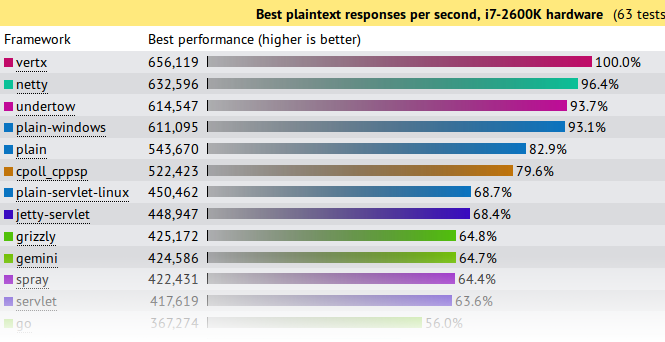
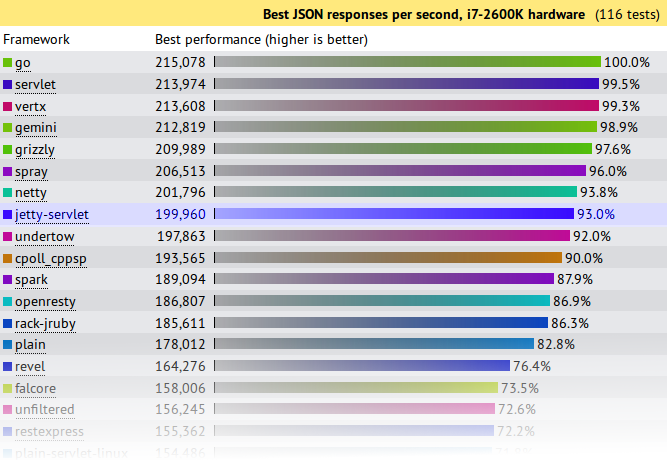
    At first glance at the results, Jetty look to have done reasonably well, but on deeper analysis I think we did awesomely well and an argument can be made that Jetty is the only server tested that has demonstrated truly scalable results.

    JSON Results

    json-tp

    Jetty came 8th from 107 and achieved 93% (199,960 req/s) of the first place throughput.   A good result for Jetty, but not great. . . . until you plot out the results vs concurrency:

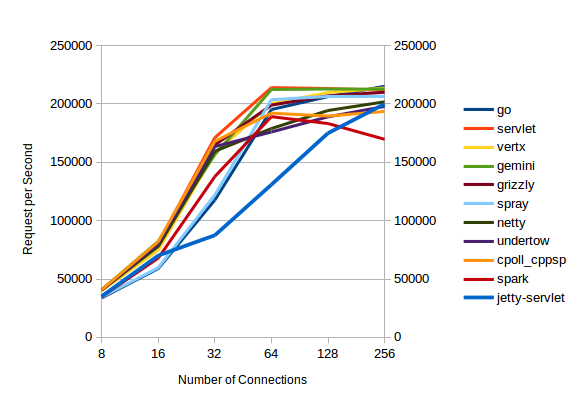
    json-trend

    All the servers with high throughputs have essentially maxed out at between 32 and 64 connections and the top  servers are actually decreasing their throughput as concurrency scales from 128 to 256 connections.

    Of the top throughput servlets, it is only Jetty that displays near linear throughput growth vs concurrency and if this test had been extended to 512 connections (or beyond) I think you would see Jetty coming out easily on top.  Jetty is investing a little more per connection, so that it can handle a lot more connections.

    Plaintext Results

    plain-tp

    First glance again is not so great and we look like we are best of the rest with only 68.4% of the seemingly awesome 600,000+ requests per second achieved by the top 4.    But throughput is not the only important metric in a benchmark and things look entirely different if you look at the latency results:

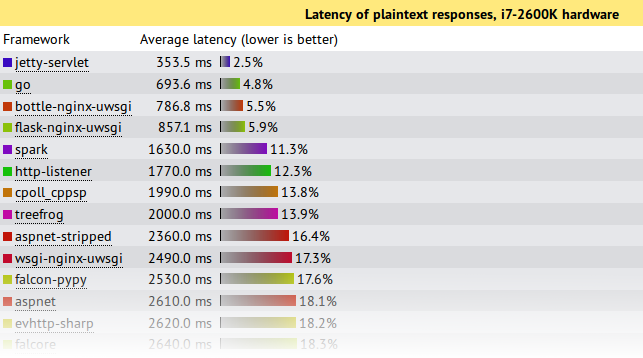
    plain-lat

    This shows that under this pathological load test, Jetty is the only server to send responses with an acceptable latency during the onslaught.  Jetty’s 353.5ms is a workable latency to receive a response, while the next best of 693ms is starting to get long enough for users to register frustration.  All the top throughput servers have average latencies  of 7s or more!, which is give up and go make a pot of coffee time for most users, specially as your average web pages needs >10 requests to display!

    Note also that these test runs were only over 15s, so servers with 7s average latency were effectively not serving any requests until the onslaught was over and then just sent all the responses in one great big batch.  Jetty is the only server to actually make a reasonable attempt at sending responses during the period that a pathological request load was being received.

    If your real world load is anything vaguely like this test, then Jetty is the only server represented in the test that can handle it!

    What did Jetty do?

    The jetty entry into these benchmarks has done nothing special.  It is out of the box configuration with trivial implementations based on the standard servlet API.  More efficient internal Jetty API  have not been used and there has been no fine tuning of the configuration for these tests.  The full source is available, but is presented in summary below:

    public class JsonServlet extends GenericServlet
    {
      private JSON json = new JSON();
      public void service(ServletRequest req, ServletResponse res)
        throws ServletException, IOException
      {
        HttpServletResponse response= (HttpServletResponse)res;
        response.setContentType("application/json");
        Map<String,String> map =
          Collections.singletonMap("message","Hello, World!");
        json.append(response.getWriter(),map);
      }
    }

    The JsonServlet uses the Jetty JSON mapper to convert the trivial instantiated map required of the tests.  Many of the other frameworks tested use Jackson which is now marginally faster than Jetty’s JSON, but we wanted to have our first round with entirely Jetty code.

    public class PlaintextServlet extends GenericServlet
    {
      byte[] helloWorld = "Hello, World!".getBytes(StandardCharsets.ISO_8859_1);
      public void service(ServletRequest req, ServletResponse res)
        throws ServletException, IOException
      {
        HttpServletResponse response= (HttpServletResponse)res;
        response.setContentType(MimeTypes.Type.TEXT_PLAIN.asString());
        response.getOutputStream().write(helloWorld);
      }
    }

    The PlaintextServlet makes a concession to performance by pre converting the string array to bytes, which is then simply written out the output stream for each response.

    public final class HelloWebServer
    {
      public static void main(String[] args) throws Exception
      {
        Server server = new Server(8080);
        ServerConnector connector = server.getBean(ServerConnector.class);
        HttpConfiguration config = connector.getBean(HttpConnectionFactory.class).getHttpConfiguration();
        config.setSendDateHeader(true);
        config.setSendServerVersion(true);
        ServletContextHandler context =
          new ServletContextHandler(ServletContextHandler.NO_SECURITY|ServletContextHandler.NO_SESSIONS);
        context.setContextPath("/");
        server.setHandler(context);
        context.addServlet(org.eclipse.jetty.servlet.DefaultServlet.class,"/");
        context.addServlet(JsonServlet.class,"/json");
        context.addServlet(PlaintextServlet.class,"/plaintext");
        server.start();
        server.join();
      }
    }

    The servlets are run by an embedded server.  The only configuration done to the server is to enable the headers required by the test and all other settings are the out-of-the-box defaults.

    What’s wrong with the Techempower Benchmarks?

    While Jetty has been kick-arse in these benchmarks, let’s not get carried away with ourselves because the tests are far from perfect, specially for  these two tests which are not testing framework performance (the primary goal of the techempower benchmarks) :

    • Both have simple requests that have no information in them that needs to be parsed other than a simple URL.  Realistic web loads often have session and security cookies as well as request parameters that need to be decoded.
    • Both have trivial responses that are just the string “Hello World” with minimal encoding. Realistic web load would have larger more complex responses.
    • The JSON test has a maximum concurrency of 256 connections with zero delay turn around between a response and the next request.  Realistic scalable web frameworks must deal with many more mostly idle connections.
    • The plaintext test has a maximum concurrency of 16,384 (which is a more realistic challenge), but uses pipelining to run these connections at what can only be described as a pathological work load! Pipelining is rarely used in real deployments.
    • The tests appear to run only for 15s. This is insufficient time to reach steady state and it is no good your framework performing well for 15s if it is immediately hit with a 10s garbage collection starting on the 16th second.

    But let me get off my benchmarking hobby-horse, as I’ve said it all before:  Truth in Benchmarking,  Lies, Damned Lies and Benchmarks.

    What’s good about the Techempower Benchmarks?

    • There are many frameworks and servers in the comparison and whatever the flaws are, then are the same for all.
    • The test appear to be well run on suitable hardware within a controlled, open and repeatable process.
    • Their primary goal is to test core mechanism of web frameworks, such as object persistence.  However, jetty does not provide direct support for such mechanisms so we have initially not entered all the benchmarks.

    Conclusion

    Both the JSON and plaintext tests are busy connection tests and the JSON test has only a few connections.  Jetty has always prioritized performance for the more realistic scenario of many mostly idle connections and this has shown that even under pathological loads, jetty is able to fairly and efficiently share resources between all connections.

    Thus it is an impressive result that even when tested far outside of it’s comfort zone, Jetty-9.1.0 has performed at the top end of this league table and provided results that if you look beyond the headline throughput figures, presents the best scalability results.   While the tested loads are far from realistic, the results do indicate that jetty has very good concurrency and low contention.

    Finally remember that this is a .0 release aimed at delivering the new features of Servlet 3.1 and we’ve hardly even started optimizing jetty 9.1.x

  • Jetty-9 goes fast with Mechanical Sympathy

    Since we discovered how to make Jetty-9 avoid parallel slowdown, we’ve been continuing to work with micro benchmarks and consideration of Mechanical Sympathy to further optimise Jetty-9.  As we now about to go to release candidate for Jetty-9, I thought I’d give a quick report on the excellent results we’ve had so far.

    False Sharing in Queues

    Queuing is a very important operation in servers like Jetty and our QueuedThreadPool is a key element to Jetty’s great performance.   While it implements the JVMs Executor interface, even the Jetty-8 implementations has far superior performance to the executors provided by the JVM.   This queue is based on our BlockingArrayQueue that separates the locks for the head and tail and only supports blocking for take operations.

    However because of the layout in memory of the class, it turned out that the head and tail pointers and locks were all within a single CPU cache row.  This is bad because when different threads running on different cores are trying to independently work on the head and tail, it turns out that they are both hitting the same area of memory and are thus repeatedly invalidating each others caches in a pattern called false sharing.

    The solution is to be aware of the memory layout of the class when considering what threads will be accessing which fields and to space them out so that you can avoid this false sharing of cache rows.  The results have given us a significant boost in our micro benchmarks (see below).

    Time and Space Efficient Trie

    Looking up string values is probably one of the most common activities in a HTTP server, as header lines are parsed and the semantic meaning interpreted from the text headers.  A simple hash map look up of a string can be moderately efficient in both space and time, but it assumes that you have a String instance in the first place.  When parsing HTTP, we just have bytes in a buffer and it is costly to have to create a String from these bytes just to lookup what string it is.  Furthermore we need case insensitivity, which is not well supported by the standard JVM hash maps.

    In Jetty-9 we introduced a Trie abstraction that allowed us to experiment with various implementations of string lookups which could operate directly from a slice of the IO buffers without any copies or object creation.

    For our well known string (eg. HTTP header names and values) we initially implemented a simple TreeTrie that stored each character as a node object in a tree.   This was moderately fast, but it suffered from poor locality of reference as each character had to look up a new object that could be located anywhere in the heap.

    Thus we developed an ArrayTrie implementation that stores the tree as index references within a large char[].  This had the huge benefit that once the a portion of the char[] was loaded into cache for one character in the lookup, it is highly likely that subsequent character lookups are already in the cache.  This again gave us a significant boost in our micro benchmarks! But we wanted more

    Look ahead Trie

    The Trie abstraction was initially just used for looking up known strings such as “Host”, “Content-Type”, “User-Agent”, “Connection”, “close” etc. which is very useful as you parse a HTTP header token by token.  However, HTTP is a very repetitive protocol and for a given client you will frequently see well known combinations of tokens such as:

    Connection: close
    Connection: keep-alive
    Accept-Encoding: gzip
    Accept: */*

    The simple parsing strategy is to look for ‘:’ and CRLF to identify tokens and then lookup those strings in the Trie.  But if you are able to look up the combinations of  tokens in a Trie, then the Trie you save effort parsing as well as being able to lookup shared instances of common fields (eg Connection: keep-alive).    Thus we modified our Trie interface to support a best match lookup that given the entire buffer will attempt to match an entire header line.

    For many well known fields combinations like the ones listed above, our ArrayTrie was a good solution. While it is a bit memory hungry, the number of field combinations is not large, is statically known and is shared between all connections to the server.  But unfortunately, not all fields are well known in advance and some of the longest repeated fields look like:

    User-Agent: Mozilla/5.0 (X11; Ubuntu; Linux x86_64; rv:18.0) Gecko/20100101 Firefox/18.0
    Cookie: __utma=1598342155.164253763.123423536.1359602604.1359611604.283; __utmz=12352155.135234604.383.483.utmcsr=google.com.au|utmccn=(referral)|utmcmd=referral|utmcct=/ig; __utmc=4234112; __utmb=4253.1.10.1423
    Accept-Language: en-US,en;q=0.5,it;q=0.45

    Such fields are not statically know but will frequently repeat, either from the same client or from a class of client for a give period of time while a particular version is current.  Thus having a static field Trie is insufficient and we needed to be able to create dynamic per connection Tries to lookup such repeated fields.   ArrayTrie worked, but is massively memory hungry and unsuitable to handle the hundreds of thousands of connections that Jetty can terminate.

    The theory of Tries suggested that a Ternary Tree is a good memory structure with regards to memory consumption, but the problem is that it gave up our locality of reference and worse still created a lot of node garbage as trees are built and discarded.   The solution is to combine the two approaches and we came up with our ArrayTernaryTrie, which is a ternary tree structure stored in a fixed size char[] (which also gives the benefit of protection from DOS attacks).  This data structure has proved quick to build, quick to lookup, efficient on memory and cheap to GC.  It’s another winner in the micro benchmarks.

    Branchless Code

    Supporting many versions of a protocol and the many different semantics that it can carry results in code with lots of if statements.  When a modern CPU encounters a conditional, it tries to guess which way the branch will go and fills the CPU pipeline with instructions from that branch.  This means you either want your branches to be predictable or you want to avoid branches altogether so as to avoid breaking the CPU pipeline.

    This can result in some very fast, but slightly unreadable code. The following branchless code:

    byte b = (byte)((c & 0x1f) + ((c >> 6) * 0x19) - 0x10);

    Converts a hex digit to an byte value without the need for branchful code like:

    if (c>='A' && c<='F')
      b=10+c-'A';
    ...

    Results

    The results have been great, albeit with my normal disclaimer that these are just micro benchmarks and don’t represent any realistic load and please wait for a full server benchmarks before getting too excited.

    For a single connection handling 1,000,000 pipelined requests, Jetty-8 achieved the following results:

    ========================================
    Statistics Started at Thu Jan 31 15:27:11 EST 2013
    Operative System: Linux 3.5.0-22-generic amd64
    JVM : Oracle Corporation Java HotSpot(TM) 64-Bit Server VM runtime 23.3-b01 1.7.0_07-b10
    Processors: 8
    System Memory: 97.034004% used of 7.7324257 GiB
    Used Heap Size: 5.117325 MiB
    Max Heap Size: 1023.25 MiB
    Young Generation Heap Size: 340.5625 MiB
    - - - - - - - - - - - - - - - - - - - -
    /stop/ Pipeline Requests 1000000 of 1000000
    - - - - - - - - - - - - - - - - - - - -
    Statistics Ended at Thu Jan 31 15:28:00 EST 2013
    Elapsed time: 48636 ms
        Time in JIT compilation: 1 ms
        Time in Young Generation GC: 7 ms (9 collections)
        Time in Old Generation GC: 0 ms (0 collections)
    Garbage Generated in Young Generation: 2914.1484 MiB
    Garbage Generated in Survivor Generation: 0.4375 MiB
    Garbage Generated in Old Generation: 0.046875 MiB
    Average CPU Load: 99.71873/800
    ----------------------------------------

    This style of benchmark is a reasonable test of:

    • The raw speed of the IO layer
    • The efficiency of the HTTP parsing and generating
    • The memory footprint of the server
    • The garbage produced by the server

    For the same benchmark, Jetty-9 achieved the following results:

    ========================================
    Statistics Started at Thu Jan 31 15:30:14 EST 2013
    Operative System: Linux 3.5.0-22-generic amd64
    JVM : Oracle Corporation Java HotSpot(TM) 64-Bit Server VM runtime 23.3-b01 1.7.0_07-b10
    Processors: 8
    System Memory: 94.26746% used of 7.7324257 GiB
    Used Heap Size: 5.7408752 MiB
    Max Heap Size: 1023.25 MiB
    Young Generation Heap Size: 340.5625 MiB
    - - - - - - - - - - - - - - - - - - - -
    /stop/ Pipeline Requests 1000000 of 1000000
    - - - - - - - - - - - - - - - - - - - -
    Statistics Ended at Thu Jan 31 15:30:47 EST 2013
    Elapsed time: 33523 ms
        Time in JIT compilation: 2 ms
        Time in Young Generation GC: 4 ms (4 collections)
        Time in Old Generation GC: 0 ms (0 collections)
    Garbage Generated in Young Generation: 1409.474 MiB
    Garbage Generated in Survivor Generation: 0.1875 MiB
    Garbage Generated in Old Generation: 0.046875 MiB
    Average CPU Load: 99.959854/800
    ----------------------------------------

    Thus for a small increase in static heap usage (0.5MB in the static Tries), jetty-9 out performs jetty-8 by 30% faster (33.5s vs 48.6s) and 50% less YG garbage (1409MB vs 2914MB) which trigger less than half the YG collections.

    Release Candidate 0 of Jetty-9 will be released in the next few days, so I hope you’ll join us and start giving it some more realistic loads and testing and report the results.

  • Avoiding Parallel Slowdown in Jetty-9 with CPU Cache analysis.

    How can the sum of fast parts be slower than the sum of slower parts?   This is one of the conundrums we faced as we have been benchmarking the latest Jetty-9 releases. The explanation is good insight into modern CPUs and an indication of how software engineers need to be somewhat aware of the hardware when creating high performance software that scales.

    Jetty-9 Performance Expectations

    With the development of Jetty-9, we have refactored and/or refined many of the core components to take advantage of newer JVMs, new protocols and more experience. The result has been that the IO layer, HTTP parser, HTTP generator, buffer pools and other components all micro-benchmark much better than their predecessors in Jetty-8.  They use less heap, produce less garbage, have less code and run faster.   For example a micro benchmark of the Jetty-8 HTTP Parser gave the following results:

    Jetty-8 HttpParser+HttpFields
    ========================================
    Operative System: Linux 3.5.0-19-generic amd64
    JVM : Java HotSpot(TM) 64-Bit Server 23.3-b01 1.7.0_07-b10
    Processors: 8
    System Memory: 89.56941% used of 7.7324257 GiB
    Used/Max Heap Size: 8.314537/981.375 MiB
    - - - - - - - - - - - - - - - - - - - -
    tests    10000000
    requests 10000000
    headers  60000000
    - - - - - - - - - - - - - - - - - - - -
    Elapsed time: 60600 ms
        Time in JIT compilation: 0 ms
        Time in Young Generation GC: 26 ms (26 collections)
        Time in Old Generation GC: 0 ms (0 collections)
    Garbage Generated in Young Generation: 7795.7827 MiB
    Garbage Generated in Survivor Generation: 0.28125 MiB
    Garbage Generated in Old Generation: 0.03125 MiB
    Average CPU Load: 99.933975/800
    ----------------------------------------

    The same task done by the Jetty-9 HTTP parser gave  better results as it executed faster and produced almost half the garbage:

    Jetty-9 HttpParser+HttpFields
    ========================================
    Operative System: Linux 3.5.0-19-generic amd64
    JVM : Java HotSpot(TM) 64-Bit Server 23.3-b01 1.7.0_07-b10
    Processors: 8
    System Memory: 88.25224% used of 7.7324257 GiB
    Used/Max Heap Size: 8.621246/981.375 MiB
    - - - - - - - - - - - - - - - - - - - -
    tests    10000000
    requests 10000000
    headers  60000000
    - - - - - - - - - - - - - - - - - - - -
    Statistics Ended at Mon Dec 17 10:00:04 EST 2012
    Elapsed time: 57701 ms
    	Time in JIT compilation: 0 ms
    	Time in Young Generation GC: 18 ms (15 collections)
    	Time in Old Generation GC: 0 ms (0 collections)
    Garbage Generated in Young Generation: 4716.9775 MiB
    Garbage Generated in Survivor Generation: 0.34375 MiB
    Garbage Generated in Old Generation: 0.0234375 MiB
    Average CPU Load: 99.92787/800
    ----------------------------------------

    Another example of an improved component in Jetty-9 is the IO layer. The following example is an test that simply echoes a 185 bytes HTTP message between the client and  server a million times:

    Jetty-8 Echo Connection Server
    ========================================
     Used/Max Heap Size: 20.490265/981.375 MiB
     - - - - - - - - - - - - - - - - - - - -
     Filled 185000000 bytes in 1000000 fills
     - - - - - - - - - - - - - - - - - - - -
     Elapsed time: 67778 ms
         Time in Young Generation GC: 12 ms (14 collections)
     Garbage Generated in Young Generation: 4169.701 MiB
     Average CPU Load: 118.37115/800
     ----------------------------------------
    Jetty-9 Echo Connection Server
    ========================================
    Used/Max Heap Size: 11.668541,981.375 MiB
    - - - - - - - - - - - - - - - - - - - -
    Filled 185000000 bytes in 1000000 fills
    - - - - - - - - - - - - - - - - - - - -
    Elapsed time: 66846 ms
        Time in Young Generation GC: 2 ms (2 collections)
    Garbage Generated in Young Generation: 653.2649 MiB
    Average CPU Load: 111.07558/800
    ----------------------------------------

    Jetty-9 is using half the heap, generating 85% less garbage, forcing less GCs, using less CPU and achieving the same throughput.  Surely the CPU and memory freed by such an improvement would be well used to improve the total performance of the server?

    Jetty-9 Disappointment

    Our expectation for the jetty-9 as a server built from a combination of these improved components, was that it would be much faster than jetty-8.

    Thus we were amazed to discover that for our initial benchmarks, jetty-9 was significantly slower and more resource hungry than jetty-8!!! The test this was most apparent in was a single connection driven with as many pipelined requests that could be fed to it (note that this is preciously the kind of non realistic benchmark load that I argue against in Truth in Benchmarking and Lies, DamnLies and Benchmarks, but so long as you know what you are testing the results are interesting none the less):

    jetty-8 pipeline:
    ========================================
    Used/Max Heap Size: 3.0077057/1023.625 MiB
    - - - - - - - - - - - - - - - - - - - -
    Pipeline Requests 1000000 of 1000000
    - - - - - - - - - - - - - - - - - - - -
    Elapsed time: 37696 ms
            Time in Young Generation GC: 7 ms (9 collections)
            Time in Old Generation GC: 0 ms (0 collections)
    Garbage Generated in Young Generation: 2886.1907 MiB
    Average CPU Load: 100.009384/800
    ----------------------------------------

    Jetty-8 achieves a healthy 26,525 requests per second on a single connection and core! Jetty-9 disappointed:

    jetty-9 pipeline:
    ========================================
    Used/Max Heap Size: 3.406746/1023.6875 MiB
    - - - - - - - - - - - - - - - - - - - -
    Pipeline Requests 1000000 of 1000000
    - - - - - - - - - - - - - - - - - - - -
    Elapsed time: 47212 ms
            Time in Young Generation GC: 6 ms (10 collections)
            Time in Old Generation GC: 0 ms (0 collections)
    Garbage Generated in Young Generation: 3225.3438 MiB
    Average CPU Load: 133.77675/800
    ----------------------------------------

    Only 21,181 requests per second and 1.3 cores were needed to produce those results! That’s 25% slower with 30% more CPU!?!?!? How could this be so?  All the jetty 9 components when tested individually were faster yet when run together, there were slower!

    Benchmark analysis – Parallel Slowdown.

    We profiled the benchmarks using various profiling tools, there were a few minor hot spots and garbage producers identified.  These were easily found and fixed (eg replaced StringMap usage with a new Trie implementation), but only gave us about a 10% improvement leaving another 15% to be found just to break even!

    But profiling revealed no really significant hot spots and no stand out methods that obviously needed to be improved and no tasks being done that were not done by jetty-8.  The 15% was not going to be found in a few methods, it looked like we had to find 0.015% from 1000 methods ie it looked like every bit of the code was running a little bit slower than it should do.

    The clue that helped us was that jetty-9 was using more than 1 core for a single connection.  Thus we started suspecting that it was an issue with how we were using threads and perhaps with CPU caches. Jetty-9 makes a fair bit more usage of Atomics than Jetty-8, in an effort to support even more asynchronous behaviour.  Investigating this led us to the excellent blog of Marc Brooker where he investigates the performance implications of CPU caching on integer incrementing.

    While it turned out that there is nothing wrong with our usage of Atomics, the analysis tools that Marc describes (linux perf) revealed our smoking gun.  The Linux perf tool gives access to the CPU and kernel performance counters so that you can glimpse what is going on within the hardware of a modern multicore machine.   For my i7 CPU I worked out that the following command gave the extra information needed:

    perf stat
     -e task-clock
     -e cycles
     -e instructions
     -e LLC-loads
     -e LLC-load-misses
     -e cache-references
     -e cache-misses
     -e L1-dcache-loads
     -e L1-dcache-load-misses
     -e L1-icache-loads
     -e L1-icache-load-misses
     --pid $JETTY_PID

    Running this against a warmed up Jetty-8 server for the entire pipeline test gave the following results:

    Performance counter stats for process id 'jetty-8':
       27751.967126 task-clock        #  0.867 CPUs utilized          
     53,963,171,579 cycles            #  1.944 GHz                     [28.67%]
     49,404,471,415 instructions      #  0.92  insns per cycle        
        204,217,265 LLC-loads         #  7.359 M/sec                   [36.56%]
         15,167,562 LLC-misses        #  7.43% of all LL-cache hits    [ 7.21%]
        567,593,065 cache-references  # 20.452 M/sec                   [14.50%]
         17,518,855 cache-misses      #  3.087 % of all cache refs     [21.66%]
     16,405,099,776 L1-dcache-loads   #591.133 M/sec                   [28.46%]
        782,601,144 L1-dcache-misses  #  4.77% of all L1-dcache hits   [28.41%]
     22,585,255,808 L1-icache-loads   #813.825 M/sec                   [28.57%]
      4,010,843,274 L1-icache-misses  # 17.76% of all L1-icache hits   [28.57%]

    The key number in all this gritty detail is the instructions per cycle figure.  In Jetty-8, the CPU was able to execute 0.92 instructions every clock tick, with the remainder of the time being spent waiting for data from slow memory to fill either the instruction or the data caches. The same test for jetty-9 reveals the full horror of what was going on:

    Performance counter stats for process id 'jetty-9-M3':
       77452.678481 task-clock        #  1.343 CPUs utilized          
    116,033,902,536 cycles            #  1.498 GHz                     [28.35%]
     62,939,323,536 instructions      #  0.54  insns per cycle        
        891,494,480 LLC-loads         # 11.510 M/sec                   [36.59%]
        124,466,009 LLC-misses        # 13.96% of all LL-cache hits    [ 6.97%]
      2,341,731,228 cache-references  # 30.234 M/sec                   [14.03%]
         29,223,747 cache-misses      #  1.248 % of all cache refs     [21.25%]
     20,644,743,623 L1-dcache-loads   #266.547 M/sec                   [28.39%]
      2,290,512,202 L1-dcache-misses  # 11.09% of all L1-dcache hits   [28.15%]
     34,515,836,027 L1-icache-loads   #445.638 M/sec                   [28.12%]
      6,685,624,757 L1-icache-misses  # 19.37% of all L1-icache hits   [28.34%]

    Jetty-9 was only able to execute 0.54 instructions per tick, so almost half the CPU time was spent waiting for data from memory.  Worse still, this caused so little load on the CPU that the power governor only felt the need to clock the CPU at 1.498GHz rather than the 1.944GHz achieve by jetty-8 (Note that some recommend to peg CPU frequencies during benchmarks, but I believe that unless you do that in your data centre and pay the extra power/cooling charges, then don’t do it in your benchmarks. Your code must be able to drive the CPU governors to dynamically increase the clock speed as needed).

    The cause of this extra time waiting for memory is revealed by the cache figures.  The L1 caches were being hit a little bit more often and missing a lot more often!  This flowed through to the LLC cache that had to do 4 times more loads with 8 times more cache misses! This is a classic symptom of Parallel Slowdown, because Jetty-9 was attempting to use multiple cores to handle a job best done by a single core (ie a serial sequence of requests on single connection), it was wasting more time in sharing data between cores than it was gaining by increased computing power.

    Where Jetty-9-M3 got it wrong!

    One of the changes that we had made in Jetty-9 was an attempt to better utilize the selector thread so to reduce unnecessary dispatches to the thread pool.   By default, we configure jetty with an NIO selector and selector thread for each available CPU core. In Jetty-8 when the selector detects a connection that is readable, it dispatched the endpoint to a thread from the pool, which would do the IO read, parse the HTTP request, call the servlet container and flush the response.

    In Jetty-9, we realized that it is only when calling the application in the servlet container that there is a possibility that the thread might block and that it would thus be safe to let the selector thread do the IO read and HTTP parsing without a dispatch to a thread.  Only once the HTTP parser had received an entire HTTP request, would a dispatch be done to an application handler to handle the request (probably via a servlet).  This seemed like a great idea at the time that at worst would cost nothing, but may save some dispatches for slow clients.

    Our retrospect-a-scope now tells us that is is a very bad idea to have a different thread do the HTTP parsing and the handling.  The issue is that once one thread had finished parsing a HTTP request, then it’s caches are full of all the information just parsed. The method, URI and request object holding them,  are all going to be in or near to the L1 cache.   Dispatching the handling to another thread just creates the possibility that another core will execute the thread and will need to fill it’s cache from main memory with all the parsed parts of the request.

    Luckily with the flexible architecture of jetty, we were able to quickly revert the dispatching model to dispatch on IO selection rather than HTTP request completion and we were instantly rewarded with another 10% performance gain.   But we were still a little slower than jetty-8 and still using 1.1 cores rather than 1.0.  Perf again revealed that we were still suffering from some parallel slowdown, which turned out to be the way Jetty-9 was handling pipelined requests.  Previously Jetty’s IO handling thread had looped until all read data was consumed or until an upgrade or request suspension was done.  Those “or”s made for a bit of complex code, so to simplify the code base, Jetty-9 always returned from the handling thread after handling a request and it was the completion callback that dispatched a new thread to handle any pipelined requests.  This new thread might then execute on a different core, requiring its cache to be loaded with the IO buffer and the connection, request and other objects before the next request can be parsed.

    Testing pipelines is more of an exercise for interest rather than handling something likely to be encountered in real productions, but it is worth while to handle them well if at least to deal with such simple unrealistic benchmarks.    Thus we have reverted to the previous behaviour and found another huge gain in performance.

    Jetty-9 getting it right

    With the refactored components, the minor optimizations found from profiling, and the reversion to the jetty-8 threading model, jetty-9 is now meeting our expectations and out performing jetty-8.  The perf numbers now look much better:

    Performance counter stats for process id 'jetty-9-SNAPSHOT':
       25495.319407 task-clock        #  0.928 CPUs utilized          
     62,342,095,246 cycles            #  2.445 GHz                     [33.50%]
     45,949,661,990 instructions      #  0.74  insns per cycle  
        349,576,707 LLC-loads         # 13.711 M/sec                   [42.14%]
         18,734,441 LLC-misses        #  5.36% of all LL-cache hits    [ 8.37%]
        946,308,800 cache-references  # 37.117 M/sec                   [16.79%]
         18,683,743 cache-misses      #  1.974 % of all cache refs     [25.14%]
     15,146,280,274 L1-dcache-loads   #594.081 M/sec                   [33.43%]
      1,313,578,215 L1-dcache-misses  #  8.67% of all L1-dcache hits   [33.31%]
     21,215,554,821 L1-icache-loads   #832.135 M/sec                   [33.27%]
      4,130,760,394 L1-icache-misses  # 19.47% of all L1-icache hits   [33.27%]

    The CPU is now executing 0.74 instructions per tick, not as good as jetty-8, but a good improvement.  Most importantly, the macro benchmark numbers now indicate that parallel slowdown is not having an effect and the improved jetty-9 components are now able to do their stuff and provide some excellent results:

    Jetty-9-SNAPSHOT Pipeline:
    ========================================
    Processors: 8
    Used/Max Heap Size: 4.152527,1023.6875 MiB
    - - - - - - - - - - - - - - - - - - - -
    Pipeline Requests 1000000 of 1000000
    - - - - - - - - - - - - - - - - - - - -
    Statistics Ended at Mon Dec 17 13:03:54 EST 2012
    Elapsed time: 29172 ms
        Time in Young Generation GC: 3 ms (4 collections)
        Time in Old Generation GC: 0 ms (0 collections)
    Garbage Generated in Young Generation: 1319.1224 MiB
    Average CPU Load: 99.955666/800
    ----------------------------------------

    This is 34,280 requests per second (29% better that Jetty-8), using only half the heap and generating 83% less garbage!     If this was in anyway a realistic benchmark working with a load profile in any way resembling a real world load, then these numbers would be absolutely AWESOME!

    But this is just a single connection pipeline test, nothing like the load profile that 99.999% of servers will encounter.  So while these results are very encouraging, I’ll wait until we do some tuning against some realistic load benchmarks before I get too excited.  Also I believe that the perf numbers are showing that there may also be room for even more improvement with jetty-9 and the same tools can also be used to get significant results by improving (or avoiding) branch prediction.

    The code for the benchmarks used is available at git@github.com:jetty-project/jetty-bench.git.

  • The new Jetty 9 HTTP client

    Introduction

    One of the big refactorings in Jetty 9 is the complete rewrite of the HTTP client.
    The reasons behind the rewrite are many:

    • We wrote the codebase several years ago; while we have actively maintained, it was starting to show its age.
    • The HTTP client guarded internal data structures from multithreaded access using the synchronized keyword, rather than using non-blocking data structures.
    • We exposed as main concept the HTTP exchange that, while representing correctly what an HTTP request/response cycle is,  did not match user expectations of a request and a response.
    • HTTP client did not have out of the box features such as authentication, redirect and cookie support.
    • Users somehow perceived the Jetty HTTP client as cumbersome to program.

    The rewrite takes into account many community inputs, requires JDK 7 to take advantage of the latest programming features, and is forward-looking because the new API is JDK 8 Lambda-ready (that is, you can use Jetty 9’s HTTP client with JDK 7 without Lambda, but if you use it in JDK 8 you can use lambda expressions to specify callbacks; see examples below).

    Programming with Jetty 9’s HTTP Client

    The main class is named, as in Jetty 7 and Jetty 8, org.eclipse.jetty.client.HttpClient (although it is not backward compatible with the same class in Jetty 7 and Jetty 8).
    You can think of an HttpClient instance as a browser instance.
    Like a browser, it can make requests to different domains, it manages redirects, cookies and authentications, you can configure it with a proxy, and it provides you with the responses to the requests you make.
    You need to configure an HttpClient instance and then start it:

    HttpClient httpClient = new HttpClient();
    // Configure HttpClient here
    httpClient.start();
    

    Simple GET requests require just  one line:

    ContentResponse response = httpClient
            .GET("http://domain.com/path?query")
            .get();
    

    Method HttpClient.GET(...) returns a Future<ContentResponse> that you can use to cancel the request or to impose a total timeout for the request/response conversation.
    Class ContentResponse represents a response with content; the content is limited by default to 2 MiB, but you can configure it to be larger.
    Simple POST requests also require just one line:

    ContentResponse response = httpClient
            .POST("http://domain.com/entity/1")
            .param("p", "value")
            .send()
            .get(5, TimeUnit.SECONDS);
    

    Jetty 9’s HttpClient automatically follows redirects, so automatically handles the typical web pattern POST/Redirect/GET, and the response object contains the content of the response of the GET request. Following redirects is a feature that you can enable/disable on a per-request basis or globally.
    File uploads also require one line, and make use of JDK 7’s java.nio.file classes:

    ContentResponse response = httpClient
            .newRequest("http://domain.com/entity/1")
            .file(Paths.get("file_to_upload.txt"))
            .send()
            .get(5, TimeUnit.SECONDS);
    

    Asynchronous Programming

    So far we have shown how to use HttpClient in a blocking style, that is the thread that issues the request blocks until the request/response conversation is complete. However, to unleash the full power of Jetty 9’s HttpClient you should look at its non-blocking (asynchronous) features.
    Jetty 9’s HttpClient fully supports the asynchronous programming style. You can write a simple GET request in this way:

    httpClient.newRequest("http://domain.com/path")
            .send(new Response.CompleteListener()
            {
                @Override
                public void onComplete(Result result)
                {
                    // Your logic here
                }
            });
    

    Method send(Response.CompleteListener) returns void and does not block; the Listener provided as a parameter is notified when the request/response conversation is complete, and the Result parameter  allows you to access the response object.
    You can write the same code using JDK 8’s lambda expressions:

    httpClient.newRequest("http://domain.com/path")
            .send((result) -> { /* Your logic here */ });
    

    HttpClient uses Listeners extensively to provide hooks for all possible request and response events, and with JDK 8’s lambda expressions they’re even more fun to use:

    httpClient.newRequest("http://domain.com/path")
            // Add request hooks
            .onRequestQueued((request) -> { ... })
            .onRequestBegin((request) -> { ... })
            // More request hooks available
            // Add response hooks
            .onResponseBegin((response) -> { ... })
            .onResponseHeaders((response) -> { ... })
            .onResponseContent((response, buffer) -> { ... })
            // More response hooks available
            .send((result) -> { ... });
    

    This makes Jetty 9’s HttpClient suitable for HTTP load testing because, for example, you can accurately time every step of the request/response conversation (thus knowing where the request/response time is really spent).

    Content Handling

    Jetty 9’s HTTP client provides a number of utility classes off the shelf to handle request content and response content.
    You can provide request content as String, byte[], ByteBuffer, java.nio.file.Path, InputStream, and provide your own implementation of ContentProvider. Here’s an example that provides the request content using an InputStream:

    httpClient.newRequest("http://domain.com/path")
            .content(new InputStreamContentProvider(
                getClass().getResourceAsStream("R.properties")))
            .send((result) -> { ... });
    

    HttpClient can handle Response content in different ways:
    The most common is via blocking calls that return a ContentResponse, as shown above.
    When using non-blocking calls, you can use a BufferingResponseListener in this way:

    httpClient.newRequest("http://domain.com/path")
            // Buffer response content up to 8 MiB
            .send(new BufferingResponseListener(8 * 1024 * 1024)
            {
                @Override
                public void onComplete(Result result)
                {
                    if (!result.isFailed())
                    {
                        byte[] responseContent = getContent();
                        // Your logic here
                    }
                }
            });
    

    To be efficient and avoid copying to a buffer the response content, you can use a Response.ContentListener, or a subclass:

    ContentResponse response = httpClient
            .newRequest("http://domain.com/path")
            .send(new Response.Listener.Empty()
            {
                @Override
                public void onContent(Response r, ByteBuffer b)
                {
                    // Your logic here
                }
            });
    

    To stream the response content, you can use InputStreamResponseListener in this way:

    InputStreamResponseListener listener =
            new InputStreamResponseListener();
    httpClient.newRequest("http://domain.com/path")
            .send(listener);
    // Wait for the response headers to arrive
    Response response = listener.get(5, TimeUnit.SECONDS);
    // Look at the response
    if (response.getStatus() == 200)
    {
        InputStream stream = listener.getInputStream();
        // Your logic here
    }
    

    Cookies Support

    HttpClient stores and accesses HTTP cookies through a CookieStore:

    Destination d = httpClient
            .getDestination("http", "domain.com", 80);
    CookieStore c = httpClient.getCookieStore();
    List cookies = c.findCookies(d, "/path");
    

    You can add cookies that you want to send along with your requests (if they match the domain and path and are not expired), and responses containing cookies automatically populate the cookie store, so that you can query it to find the cookies you are expecting with your responses.

    Authentication Support

    HttpClient suports HTTP Basic and Digest authentications, and other mechanisms are pluggable.
    You can configure authentication credentials in the HTTP client instance as follows:

    String uri = "http://domain.com/secure";
    String realm = "MyRealm";
    String u = "username";
    String p = "password";
    // Add authentication credentials
    AuthenticationStore a = httpClient.getAuthenticationStore();
    a.addAuthentication(
        new BasicAuthentication(uri, realm, u, p));
    ContentResponse response = httpClient
            .newRequest(uri)
            .send()
            .get(5, TimeUnit.SECONDS);
    

    HttpClient tests authentication credentials against the challenge(s) the server issues, and if they match it automatically sends the right authentication headers to the server for authentication. If the authentication is successful, it caches the result and reuses it for subsequent requests for the same domain and matching URIs.

    Proxy Support

    You can also configure HttpClient  with a proxy:

    httpClient.setProxyConfiguration(
        new ProxyConfiguration("proxyHost", proxyPort);
    ContentResponse response = httpClient
            .newRequest(uri)
            .send()
            .get(5, TimeUnit.SECONDS);
    

    Configured in this way, HttpClient makes requests to the proxy (for plain-text HTTP requests) or establishes a tunnel via HTTP CONNECT (for encrypted HTTPS requests).

    Conclusions

    The new Jetty 9  HTTP client is easier to use, has more features and it’s faster and better than Jetty 7’s or Jetty 8’s.
    The Jetty project continues to lead the way when it’s about the Web: years ago with Jetty Continuations, then with Jetty WebSocket, recently with Jetty SPDY and now with the first complete, ready to use, JDK 8’s Lambda -ready HTTP client.
    Go get it while it’s hot !
    Maven coordinates:

    
        org.eclipse.jetty
        jetty-client
        9.0.0.M3


    Direct Downloads:
    Main jar: jetty-client.jar
    Dependencies: jetty-http.jar, jetty-io.jar, jetty-util.jar

  • Jetty, SPDY and HAProxy

    The SPDY protocol will be the next web revolution.
    The HTTP-bis working group has been rechartered to use SPDY as the basis for HTTP 2.0, so network and server vendors are starting to update their offerings to include SPDY support.
    Jetty has a long story of staying cutting edge when it is about web features and network protocols.

    • Jetty first implemented web continuations (2005) as a portable library, deployed them successfully for years to customers, until web continuations eventually become part of the Servlet 3.0 standard.
    • Jetty first supported the WebSocket protocol within the Servlet model (2009), deployed it successfully for years to customers, and now the WebSocket APIs are in the course of becoming a standard via JSR 356.

    Jetty is the first and today practically the only Java server that offers complete SPDY support, with advanced features that we demonstrated at JavaOne (watch the demo if you’re not convinced).
    If you have not switched to Jetty yet, you are missing the revolutions that are happening on the web, you are probably going to lose technical ground to your competitors, and lose money upgrading too late when it will cost (or already costs) you a lot more.
    Jetty is open source, released with friendly licenses, and with full commercial support in case you need our expertise about developer advice, training, tuning, configuring and using Jetty.
    While SPDY is now well supported by browsers and its support is increasing in servers, it is still lagging a bit behind in intermediaries such as load balancers, proxies and firewalls.
    To exploit the full power of SPDY, you want not only SPDY in the communication between the browser and the load balancer, but also between the load balancer and the servers.
    We are actively opening discussion channels with the providers of such products, and one of them is HAProxy. With the collaboration of Willy Tarreau, HAProxy mindmaster, we have recently been able to perform a full SPDY communication between a SPDY client (we tested latest Chrome, latest Firefox and Jetty’s Java SPDY client) through HAProxy to a Jetty SPDY server.
    This sets a new milestone in the adoption of the SPDY protocol because now large deployments can leverage the goodness of HAProxy as load balancer *and* leverage the goodness of SPDY as well as provided by Jetty SPDY servers.
    The HAProxy SPDY features are available in the latest development snapshots of HAProxy. A few details will probably be subject to changes (in particular the HAProxy configuration keywords), but SPDY support in HAProxy is there.
    The Jetty SPDY features are already available in Jetty 7, 8 and 9.
    If you are interested in knowing how you can use SPDY in your deployments, don’t hesitate to contact us. Most likely, you will be contacting us using the SPDY protocol from your browser to our server 🙂

  • Why detecting concurrent issues can be difficult

    Jetty 9’s NIO code is  a nearly complete rewrite with improved architecture, cleaner and clearer code base and best of all it’ll be even faster and more efficient than jetty 7/8’s NIO layer. Detecting concurrent code issues is usually not a trivial thing. In today’s blog I will describe how it took us 4 days to resolve a single concurrent issue in our brand new NIO code. The Fix is in jetty 9 Milestone 1.
    I will try to keep this blog entry as general as possible and won’t go too much into detail of this single issue or the jetty code, but describe how I usually try to resolve concurrent code issues and what I’ve done to debug this issue.
    However doing NIO right is not a trivial thing to do. As well as writing code that is absolutely thread safe during highly concurrent executions. We’ve been pleased how well the new NIO code has been working from scratch. That was due to good test coverage and the great skills of the people who wrote it (Simone Bordet and Greg Wilkins mainly). However last week we found a spdy load test failing occasionally.
    Have a look at the test if you’re interested in the details. For this blog it’s sufficient to know, that there’s a client that opens a spdy connection to the server and then will open a huge amount of spdy streams to the server and send some data back and forth. The streams are opened by 50 concurrent threads as fast as possible.
    Most of the time the test runs just fine. Occasionally it got completely stuck at a certain point and timed out.
    When debugging such concurrent issues you should always try first to get the test fail more consistently. If you manage to get that done, then it’s way easier to determine if a fix you try is successful or not. If only every 10th run fails, you do a fix and then the test runs fine for twenty runs it might have been your fix or you’ve just made 20 lucky runs. So once you think you’ve fixed a concurrent code issue that happens intermittently, make sure you run the test in a loop until it either fails or the test has run often enough that you can be sure it succeeded.
    This is the bash one-liner I usually use:

    export x=0 ; while [ $? -eq "0" ] ; do ((x++)) ; echo $x ; mvn -Dtest=SynDataReplyDataLoadTest test ; done
    

    It’ll run the test in a loop until an error occurs or you stop it. I leave it running until I’m totally sure that the problem is fixed.
    For my specific issue I raised the test iterations from 500 to 1500 and that made the test fail about every 2nd run which is pretty good for debugging. Sometimes you’re not able to make the test fail more often and you’ve to rely on running the test often enough as described above.
    Then whenever something gets stuck, you should get a few thread dumps of the JVM while it’s stuck and have a look if there’s something as obvious as a deadlock or a thread busy looping, etc. For this case, everything looked fine.
    Next thing you usually should do is to carefully add some debug output to gain more information about the cause of the problem. I say carefully, because every change you do and especially expensive operations like writing a log message might affect the timing of your concurrent code execution and make the problem occur less often or in worst case it doesn’t occur at all. So simply turning on debug loglevel solved the problem once for all. Tried to convince Greg that we simply have to ship jetty with DEBUG enabled and blame customers who turn it off… 😉
    Even a single log message printed for each iteration affected the timing enough to let the problem occur way less often. Too much logging and the problem doesn’t occur at all.
    Instead of logging the information I needed, we’ve tried to keep the desired information in memory by adding some fields and make them accessible from the test to print them at a later stage.
    I suspected that we might miss a call to flush() in our spdy StandardSession.java which will write DataFrames from a queue through Jetty’s NIO layer to the tcp layer. So for debugging I’ve stored some information about the last calls to append(), prepend(), flush(), write(), completed(). Most important for me was to know who the last callers to those methods was, the state of StandardSession.flushing(), the queue size, etc.
    Simone told me the trick to have a scheduled task running in parallel to the thread which can then print all the additional information once the test goes stuck. Usually you know how long a normal test run takes. Then you add some time to be safe and have the scheduled task executed printing the desired information after enough time passed to be sure that the test is stuck. In my case it was about 50s when I could be sure that the test usually should have finished. I’ve raised the timeouts (2*50seconds for example) to make sure that the test is stuck  long enough before the scheduled task is executed. But even collecting too much data this way made the test fail less often giving me a hard time to debug this. Having to do 10 test runs which all take about 2 min. before one failed already wastes 20 min. …
    I’ve had a thesis: “Missing call to flush()” and thus everything stuck in the server’s spdy queue. And the information I collected as described above seem to have proofed my thesis. I found:
    – pretty big queue size on the server
    – server stuck sending spdy dataframes
    Everything looked obvious. But at the end this is concurrent code. I double checked the code in StandardSession.java to make sure that the code is really threadsafe and that we do not miss a call to flush in every concurrent scenario. Code looked good for me, but concurrent code issues are rarely obvious. Triple checked it, nothing. So lets proof the thesis by doing a call to flush() from my scheduled task once the test is stuck and this should get the StandardSession back to send the queued data frames. However, it didn’t. So my thesis was wrong.
    I’ve added some more debug information about the state StandardSession was in. And I could figure out that it is stuck sending a spdy frame to the client. StandardSession commits a single frame to the underlying NIO code and will wait until the NIO code calls a callback (StandardSession.completed()) before it flushes the next spdy frame. However completed() has not been called by the NIO layer indicating a single frame being stuck somewhere between the NIO layer of the server and the client. I was printing some debug information for the client as well and I could see that the last frame successfully sent by the server has not reached the spdy layer of the client. In fact the client usually was about 10.000 to 30.000 frames behind?!
    So I used wireshark + spdyshark to investigate some network traces to see which frames are on the wire. We’ve compared several tcp packets and it’s hex encoded spdy frame bytes on the server and client with what we see in our debug output. And it looked like that the server didn’t even send the 10k-30k frames which are missing on the client. Again indicating an issue on the server side.
    So I went through the server code and tried to identify why so many frames might not have been written and if we queue them somewhere I was not aware of. We don’t. As described above StandardSession commits a single spdy frame to the wire and waits until completed() is being called. completed() is only called if the dataframe has been committed to the tcp stack of the OS.
    After a couple of hours of finding nothing, I went back to investigate the tcp dumps. In the dumps I’ve seen several tcp zerowindow and tcp windowfull flags being set by client and server indicating that the sender of the flag has a full RX (receive) buffer. See the wireshark wiki for details. As long as the client/server are updating the window size once they have read from the RX buffer and freed up some space everything’s good. As I’ve seen that this happens, I didn’t care too much on those as this is pretty normal behavior especially taking into account that the new NIO layer is pretty fast in sending/receiving data.
    Now it was time to google a bit for jdk issues causing this behavior. And hey, I’ve found a problem which looked pretty similar to ours:
    https://forums.oracle.com/forums/thread.jspa?messageID=10379569
    Only problem is, I’ve had no idea how setting -Djava.net.preferIPv4Stack=true could affect an existing IPv4 connection and that the solution didn’t help. 🙂
    As I’ve had no more better ideas on what to investigate, I’ve spend some more hours on investigating the wireshark traces I’ve collected. And with the help of some filters, etc. and looking at the traces from the last successfully transferred frame to the top, I figured that at a certain point the client stopped updating it’s RX window. That means that the client’s RX buffer was full and the client stopped reading from the buffer. Thus the server was not allowed to write to the tcp stack and thus the server got stuck writing, but not because of a problem on the server side. The problem was on the client!
    Giving that information Simone finally found the root cause of the problem (dang, wasn’t me who finally found the cause! Still I’m glad Simone found it).
    Now a short description of the problem for the more experienced developers of concurrent code. The problem was a non threadsafe update to a variable (_interestOps):

    private void updateLocalInterests(int operation, boolean add)
    {
      int oldInterestOps = _interestOps;
      int newInterestOps;
      if (add)
        newInterestOps = oldInterestOps | operation;
      else
        newInterestOps = oldInterestOps & ~operation;
      if (isInputShutdown())
        newInterestOps &= ~SelectionKey.OP_READ;
      if (isOutputShutdown())
        newInterestOps &= ~SelectionKey.OP_WRITE;
      if (newInterestOps != oldInterestOps)
      {
        _interestOps = newInterestOps;
        LOG.debug("Local interests updated {} -> {} for {}", oldInterestOps, newInterestOps, this);
        _selector.submit(_updateTask);
      }
      else
      {
        LOG.debug("Ignoring local interests update {} -> {} for {}", oldInterestOps, newInterestOps, this);
      }
    }
    

    There’s multiple threads calling updateLocalInterestOps() in parallel. The problem is caused by Thread A calling:

    updateLocalInterestOps(1, true)
    

    trying to set/add read interest to the underlying NIO connection. And Thread B returning from a write on the connection trying to reset write interest by calling:

    updateLocalInterestOps(4, false)
    

    at the same time.
    If Thread A gets preempted by Thread B in the middle of it’s call to updateLocalInterestOps() at the right line of code, then Thread B might overwrite Thread A’s update to _interestOps in this line

    newInterestOps &= ~SelectionKey.OP_WRITE;
    

    which does a bitwise negate operation.
    This is definitely not an obvious issue and one that happens to the best programmers when writing concurrent code. And this proofs that it is very important to have a very good test coverage of any concurrent code. Testing concurrent code is not trivial as well. And often enough you can’t write tests that reproduce a concurrent issue in 100% of the cases. Even running 50 parallel threads each doing 500 iterations revealed the issue in only about every 5th to 10th run. Running other stuff in the background of my macbook made the test fail less often as it affected the timing by making the whole execution a bit slower. Overall I’ve spent 4 days on a single issue and many hours have been spent together with Simone on skype calls investigating it together.
    Simone finally fixed it by making the method threadsafe with a well known non-blocking algorithm (see Brian Goetz – Java Concurrency In Practise chapter 15.4 if you have no idea how the fix works):
    http://git.eclipse.org/c/jetty/org.eclipse.jetty.project.git/commit/?h=jetty-9&id=39fb81c4861d4d88436539ce9675d8f3d8b7be74
    I’ve seen in numerous projects that if such problems occur on production servers you’ll definitely gonna have a hard time finding the root cause. In production environments these kind of issues will happen rarely. Maybe you get something in the logs, maybe a customer complains. You investigate, everything looks good. You ignore it. Then another customer complains, etc.
    In tests you limit the area of code you have to investigate. Still it can and most of the times will be hard to debug concurrent code issues. In production code it will be way more difficult to isolate the problem or get a test written afterwards.
    If you write concurrent code, make sure you test it very well and that you take extra care about thread safety. Think about every variable, state, etc. twice and then a third time. Is this really threadsafe?
    Conclusions: Detecting concurrent code issues is not trivial (well I knew that before), I need a faster macbook (filtering 500k packets in wireshark is cpu intensive), Jetty 9’s NIO layer written by Greg and Simone is great and Simone Bordet is a concurrent code rockstar (well I knew that before as well)!
    Cheers,
    Thomas

  • SPDY Push Demo from JavaOne 2012

    Simone Bordet and I spoke at JavaOne this year about the evolution of web protocol and how HTTP is being replaced by WebSocket (for new semantics) and by SPDY (for better efficiency).

    The demonstration of SPDY Push is particularly good at showing how SPDY can greatly improve the latency of serving your web applications.   The video of the demo is below:

    But SPDY is about more than improving load times for the user.  It also has some huge benefits for scalability on the server side.   To find out more, you can see the full presentation via the presentations link on webtide.com (which is already running SPDY so users of Chrome or the latest FF that follow that link will be making a SPDY request).

    SPDY is already available as a connector type in Jetty-7, 8 and 9.   For assistance getting your website SPDY enabled please contact info@webtide.com. Our software is free open source and we provide commercial developer advice and production support.

  • Jetty 9 – Updated WebSocket API

    Build Your Magic HereCreating WebSockets in Jetty is even easier with Jetty 9!
    While the networking gurus in Jetty have been working on the awesome improvements to the I/O layers in core Jetty 9, the WebSocket fanatics in the community have been working on making writing WebSockets even easier.
    The initial WebSocket implementation in Jetty was started back in November of 2009, well before the WebSocket protocol was finalized.
    It has grown in response to Jetty’s involvement with the WebSocket draft discussions to the finalization of RFC6455, and onwards into the changes being influenced on our design as a result of WebSocket extensions drafts such as x-webkit-perframe-deflate, permessage-deflate, fragment, and ongoing mux discussions.
    The Jetty 7.x and Jetty 8.x codebases provided WebSockets to developers required a complex set of knowledge about how WebSockets work and how Jetty implemented WebSockets.  This complexity was as a result of this rather organic growth of WebSocket knowledge around intermediaries and WebSocket Extensions impacted the original design.
    With Jetty 9.x we were given an opportunity to correct our mistakes.

    The new WebSockets API in Jetty 9.x

    Note: this information represents what is in the jetty-9 branch on git, which has changed in small but important ways since 9.0.0.M0 was released.

    With the growing interest in next generation protocols like SPDY and HTTP/2.0, along with evolving standards being tracked for Servlet API 3.1 and Java API for WebSockets (JSR-356), the time Jetty 9.x was at hand.  We dove head first into cleaning up the codebase, performing some needed refactoring, and upgrading the codebase to Java 7.
    Along the way, Jetty 9.x started to shed the old blocking I/O layers, and all of the nasty logic surrounding it, resulting on a Async I/O focused Jetty core.  We love this new layer, and we expect you will to, even if you don’t see it directly.  This change benefits Jetty with a smaller / cleaner / easier to maintain and test codebase, along with various performance improvements such as speed, CPU use, and even less memory use.
    In parallel, the Jetty WebSocket codebase changed to soak up the knowledge gained in our early adoption of WebSockets and also to utilize the benefits of the new Jetty Async I/O layers better.   It is important to note that Jetty 9.x WebSockets is NOT backward compatible with prior Jetty versions.
    The most significant changes:

    • Requires Java 7
    • Only supporting WebSocket version 13 (RFC-6455)
    • Artifact Split

    The monolithic jetty-websocket artifact has been to split up the various websocket artifacts so that developers can pick and choose what’s important to them.

    The new artifacts are all under the org.eclipse.jetty.websocket groupId on maven central.

    • websocket-core.jar – where the basic API classes reside, plus internal implementation details that are common between server & client.
    • websocket-server.jar – the server specific classes
    • websocket-client.jar – the client specific classes
    • Only 1 Listener now (WebSocketListener)
    • Now Supports Annotated WebSocket classes
    • Focus is on Messages not Frames

    In our prior WebSocket API we assumed, incorrectly, that developers would want to work with the raw WebSocket framing.   This change brings us in line with how every other WebSocket API behaves, working with messages, not frames.

    • WebSocketServlet only configures for a WebSocketCreator

    This subtle change means that the Servlet no longer creates websockets of its own, and instead this work is done by the WebSocketCreator of your choice (don’t worry, there is a default creator).
    This is important to properly support the mux extensions and future Java API for WebSockets (JSR-356)

    Jetty 9.x WebSockets Quick Start:

    Before we get started, some important WebSocket Basics & Gotchas

    1. A WebSocket Frame is the most fundamental part of the protocol, however it is not really the best way to read/write to websockets.
    2. A WebSocket Message can be 1 or more frames, this is the model of interaction with a WebSocket in Jetty 9.x
    3. A WebSocket TEXT Message can only ever be UTF-8 encoded. (it you need other forms of encoding, use a BINARY Message)
    4. A WebSocket BINARY Message can be anything that will fit in a byte array.
    5. Use the WebSocketPolicy (available in the WebSocketServerFactory) to configure some constraints on what the maximum text and binary message size should be for your socket (to prevent clients from sending massive messages or frames)

    First, we need the servlet to provide the glue.
    We’ll be overriding the configure(WebSocketServerFactory) here to configure a basic MyEchoSocket to run when an incoming request to upgrade occurs.

    package examples;
    import org.eclipse.jetty.websocket.server.WebSocketServerFactory;
    import org.eclipse.jetty.websocket.server.WebSocketServlet;
    public class MyEchoServlet extends WebSocketServlet
    {
        @Override
        public void configure(WebSocketServerFactory factory)
        {
            // register a socket class as default
            factory.register(MyEchoSocket.class);
        }
    }

    The responsibility of your WebSocketServlet class is to configure the WebSocketServerFactory.     The most important aspect is describing how WebSocket implementations are to be created when request for new sockets arrive.  This is accomplished by configuring an appropriate WebSocketCreator object.  In the above example, the default WebSocketCreator is being used to register a specific class to instantiate on each new incoming Upgrade request.
    If you wish to use your own WebSocketCreator implementation, you can provide it during this configure step.
    Check the examples/echo to see how this is done with factory.setCreator() and EchoCreator.
    Note that request for new websockets can arrive from a number of different code paths, not all of which will result in your WebSocketServlet being executed.  Mux for example will result in a new WebSocket request arriving as a logic channel within the MuxExtension itself.
    As for implementing the MyEchoSocket, you have 3 choices.

    1. Implementing Listener
    2. Using an Adapter
    3. Using Annotations

    Choice 1: implementing WebSocketListener interface.

    Implementing WebSocketListener is the oldest and most fundamental approach available to you for working with WebSocket in a traditional listener approach (be sure you read the other approaches below before you settle on this approach).
    It is your responsibility to handle the connection open/close events appropriately when using the WebSocketListener. Once you obtain a reference to the WebSocketConnection, you have a variety of NIO/Async based write() methods to write content back out the connection.

    package examples;
    import java.io.IOException;
    import org.eclipse.jetty.util.Callback;
    import org.eclipse.jetty.util.FutureCallback;
    import org.eclipse.jetty.websocket.core.api.WebSocketConnection;
    import org.eclipse.jetty.websocket.core.api.WebSocketException;
    import org.eclipse.jetty.websocket.core.api.WebSocketListener;
    public class MyEchoSocket implements WebSocketListener
    {
        private WebSocketConnection outbound;
        @Override
        public void onWebSocketBinary(byte[] payload, int offset,
                                      int len)
        {
            /* only interested in text messages */
        }
        @Override
        public void onWebSocketClose(int statusCode, String reason)
        {
            this.outbound = null;
        }
        @Override
        public void onWebSocketConnect(WebSocketConnection connection)
        {
            this.outbound = connection;
        }
        @Override
        public void onWebSocketException(WebSocketException error)
        {
            error.printStackTrace();
        }
        @Override
        public void onWebSocketText(String message)
        {
            if (outbound == null)
            {
                return;
            }
            try
            {
                String context = null;
                Callback callback = new FutureCallback<>();
                outbound.write(context,callback,message);
            }
            catch (IOException e)
            {
                e.printStackTrace();
            }
        }
    }

    Choice 2: extending from WebSocketAdapter

    Using the provided WebSocketAdapter, the management of the Connection is handled for you, and access to a simplified WebSocketBlockingConnection is also available (as well as using the NIO based write signature seen above)

    package examples;
    import java.io.IOException;
    import org.eclipse.jetty.websocket.core.api.WebSocketAdapter;
    public class MyEchoSocket extends WebSocketAdapter
    {
        @Override
        public void onWebSocketText(String message)
        {
            if (isNotConnected())
            {
                return;
            }
            try
            {
                // echo the data back
                getBlockingConnection().write(message);
            }
            catch (IOException e)
            {
                e.printStackTrace();
            }
        }
    }

    Choice 3: decorating your POJO with @WebSocket annotations.

    This the easiest WebSocket you can create, and you have some flexibility in the parameters of the methods as well.

    package examples;
    import java.io.IOException;
    import org.eclipse.jetty.util.FutureCallback;
    import org.eclipse.jetty.websocket.core.annotations.OnWebSocketMessage;
    import org.eclipse.jetty.websocket.core.annotations.WebSocket;
    import org.eclipse.jetty.websocket.core.api.WebSocketConnection;
    @WebSocket(maxTextSize = 64 * 1024)
    public class MyEchoSocket
    {
        @OnWebSocketMessage
        public void onText(WebSocketConnection conn, String message)
        {
            if (conn.isOpen())
            {
                return;
            }
            try
            {
                conn.write(null,new FutureCallback(),message);
            }
            catch (IOException e)
            {
                e.printStackTrace();
            }
        }
    }

    The annotations you have available:
    @OnWebSocketMessage: To receive websocket message events.
    Examples:

      @OnWebSocketMessage
      public void onTextMethod(String message) {
         // simple TEXT message received
      }
      @OnWebSocketMessage
      public void onTextMethod(WebSocketConnection connection,
                               String message) {
         // simple TEXT message received, with Connection
         // that it occurred on.
      }
      @OnWebSocketMessage
      public void onBinaryMethod(byte data[], int offset,
                                 int length) {
         // simple BINARY message received
      }
      @OnWebSocketMessage
      public void onBinaryMethod(WebSocketConnection connection,
                                 byte data[], int offset,
                                 int length) {
         // simple BINARY message received, with Connection
         // that it occurred on.
      }

    @OnWebSocketConnect: To receive websocket connection connected event (will only occur once).
    Example:

      @OnWebSocketConnect
      public void onConnect(WebSocketConnection connection) {
         // WebSocket is now connected
      }

    @OnWebSocketClose: To receive websocket connection closed events (will only occur once).
    Example:

      @OnWebSocketClose
      public void onClose(int statusCode, String reason) {
         // WebSocket is now disconnected
      }
      @OnWebSocketClose
      public void onClose(WebSocketConnection connection,
                          int statusCode, String reason) {
         // WebSocket is now disconnected
      }

    @OnWebSocketFrame: To receive websocket framing events (read only access to the raw Frame details).
    Example:

      @OnWebSocketFrame
      public void onFrame(Frame frame) {
         // WebSocket frame received
      }
      @OnWebSocketFrame
      public void onFrame(WebSocketConnection connection,
                          Frame frame) {
         // WebSocket frame received
      }

    One More Thing … The Future

    We aren’t done with our changes to Jetty 9.x and the WebSocket API, we are actively working on the following features as well…

    • Mux Extension

    The multiplex extension being drafted will allow for multiple virtual WebSocket connections over a single physical TCP/IP connection.  This extension will allow browsers to better utilize their connection limits/counts, and allow web proxy intermediaries to bundle multiple websocket connections to a server together over a single physical connection.

    • Streaming APIs

    There has been some expressed interest in providing read and write of text or binary messages using the standard Java IO Writer/Reader (for TEXT messages) and OutputStream/InputStream (for BINARY messages) APIs.

    Current plans for streamed reading includes new @OnWebSocketMessage interface patterns.

      // In the near future, we will have the following some Streaming
      // forms also available.  This is a delicate thing to
      // implement and currently does not work properly, but is
      // scheduled.
      @OnWebSocketMessage
      public void onTextMethod(Reader stream) {
         // TEXT message received, and reported to your socket as a
         // Reader. (can handle 1 message, regardless of size or
         // number of frames)
      }
      @OnWebSocketMessage
      public void onTextMethod(WebSocketConnection connection,
                               Reader stream) {
         // TEXT message received, and reported to your socket as a
         // Reader. (can handle 1 message, regardless of size or
         // number of frames).  Connection that message occurs
         // on is reported as well.
      }
      @OnWebSocketMessage
      public void onBinaryMethod(InputStream stream) {
         // BINARY message received, and reported to your socket
         // as a InputStream. (can handle 1 message, regardless
         // of size or number of frames).
      }
      @OnWebSocketMessage
      public void onBinaryMethod(WebSocketConnection connection,
                                 InputStream stream) {
         // BINARY message received, and reported to your socket
         // as a InputStream. (can handle 1 message, regardless
         // of size or number of frames).  Connection that
         // message occurs on is reported as well.
      }

    And for streaming writes, we plan to provide Writer and OutputStream implementations that simply wrap the provided WebSocketConnection.

    • Android Compatible Client Library

    While Android is currently not Java 7 compatible, a modified websocket-client library suitable for use with Android is on our TODO list.

    • Support Java API for WebSocket API (JSR356)

    We are actively tracking the work being done with this JSR group, it is coming, but is still some way off from being a complete and finished API (heck, the current EDR still doesn’t support extensions). Jetty 9.x will definitely support it, and we have tried to build our Jetty 9.x WebSocket API so that the the Java API for WebSockets can live above it.

  • Jetty 9 – Features

    Jetty 9 milestone 0 has landed! We are very excited about getting this release of jetty out and into the hands of everyone. A lot of work as gone into reworking fundamentals and this is going to be the best version of jetty yet!

    Anyway, as promised a few weeks back, here is a list of some of the big features in jetty-9. By no means an authoritative list of things that have changed, these are many of the high points we think are worthy of a bit of initial focus in jetty-9. One of the features will land in a subsequent milestone releases (pluggable modules) as that is still being refined somewhat, but the rest of them are largely in place and working in our initial testing.
    We’ll blog in depth on some of these features over the course of the next couple of months. We are targeting a November official release of Jetty 9.0.0 so keep an eye out. The improved documentation is coming along well and we’ll introduce that shortly. In the meantime, give the initial milestones a whirl and give us feedback on the mailing lists, on twitter (#jettyserver hashtag pls) or directly at some of the conferences we’ll be attending over the next couple of months.
    Next Generation Protocols – SPDY, WebSockets, MUX and HTTP/2.0 are actively replacing the venerable HTTP/1.1 protocol. Jetty directly supports these protocols as equals and first class siblings to HTTP/1.1. This means a lighter faster container that is simpler and more flexible to deal with the rapidly changing mix of protocols currently being experienced as HTTP/1.1 is replaced.
    Content Push – SPDY v3 supporting including content push within both the client and server. This is a potentially huge optimization for websites that know what a browser will need in terms of javascript files or images, instead of waiting for a browser to ask first.
    Improved WebSocket Server and Client

    • Fast websocket implementation
    • Supporting classic Listener approach and @WebSocket annotations
    • Fully compliant to RFC6455 spec (validated via autobahn test suite http://autobahn.ws/testsuite)
    • Support for latest versions of Draft WebSocket extensions (permessage-compression, and fragment)

    Java 7 – We have removed some areas of abstraction within jetty in order to take advantage of improved APIs in the JVM regarding concurrency and nio, this leads to a leaner implementation and improved performance.
    Servlet 3.1 ready – We actively track this developing spec and will be with support, in fact much of the support is already in place.
    Asynchronous HTTP client – refactored to simplify API, while retaining the ability to run many thousands of simultaneous requests, used as a basis for much of our own testing and http client needs.
    Pluggable Modules – one distribution with integration with libraries, third party technologies, and web applications available for download through a simple command line interface
    Improved SSL Support – the proliferation of mobile devices that use SSL has manifested in many atypical client implementations, support for these edge cases in SSL has been thoroughly refactored such that support is now understandable and maintainable by humans
    Lightweight – Jetty continues its history of having a very small memory footprint while still being able to scale to many ten’s of thousands of connections on commodity hardware.
    Eminently Embeddable – Years of embedding support pays off in your own application, webapp, or testing. Use embedded jetty to unit test your web projects. Add a web server to your existing application. Bundle your web app as a standalone application.