Category: Jetty12

  • Google App Engine Performance Improvements

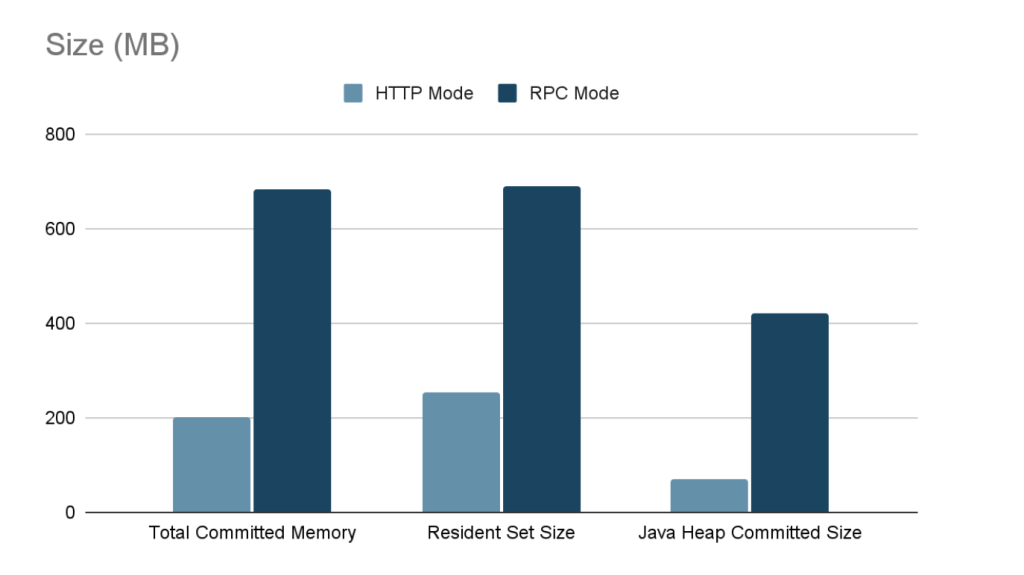
    Over the past few years, Webtide has been working closely with Google to improve the usage of Jetty in the App Engine Java Standard Runtime. We have updated the GAE Java21 Runtime to use Jetty 12 with support for both EE8 and EE10 environments. In addition, a new HttpConnector mode has been added to increase the performance of all Java Runtimes, this is expected to result in significant cost savings from less memory and CPU usage.

    Bypassing RPC Layer with HttpConnector Mode

    Recently, we implemented a new mode for the Java Runtimes which bypasses the legacy gRPC layer which was previously needed to support the GEN1 runtimes. This legacy code path allowed support of the GEN1 and GEN2 Runtimes simultaneously, but had significant overhead; it used two separate Jetty Servers, one for parsing HTTP requests and converting to RPC, and another using a custom Jetty Connector to allow RPC requests to be processed by Jetty. It also required the full request and response content to be buffered which further increased memory usage.

    The new HttpConnector mode completely bypasses this RPC layer, thereby avoiding the overhead of buffering full request and response contents. Additionally, it removes the necessity of starting a separate Jetty Server, further reducing overheads and streamlining the request-handling process.

    Benchmarks

    Benchmarks conducted on the new HttpConnector mode have demonstrated significant performance improvements. Detailed results and documentation of these benchmarks can be found here.
    Usage

    To take advantage of the new HttpConnector mode, developers can set the appengine.use.HttpConnector system property in their appengine-web.xml file.

    <system-properties>
        <property name="appengine.use.httpconnector" value="true"/>
    </system-properties>

    By adopting this configuration, developers can leverage the enhanced performance and efficiency offered by the new HttpConnector mode. This is available for all Java Runtimes from Java8 to Java21.

    This mode is currently an optional configuration but future plans are to make this the default for all applications.
  • Back to the Future with Cross-Context Dispatch

    Cross-Context Dispatch reintroduced to Jetty-12

    With the release of Jetty 12.0.8, we’re excited to announce the (re)implementation of a somewhat maligned and deprecated feature: Cross-Context Dispatch. This feature, while having been part of the Servlet specification for many years, has seen varied levels of use and support. Its re-introduction in Jetty 12.0.8, however, marks a significant step forward in our commitment to supporting the diverse needs of our users, especially those with complex legacy and modern web applications.

    Understanding Cross-Context Dispatch

    Cross-Context Dispatch allows a web application to forward requests to or include responses from another web application within the same Jetty server. Although it has been available as part of the Servlet specification for an extended period, it was deemed optional with Servlet 6.0 of EE10, reflecting its status as a somewhat niche feature.

    Initially, Jetty 12 moved away from supporting Cross-Context Dispatch, driven by a desire to simplify the server architecture amidst substantial changes, including support for multiple environments (EE8, EE9, and EE10). These updates mean Jetty can now deploy web applications using either the javax namespace (EE8) or the jakarta namespace (EE9 and EE10), all using the latest optimized jetty core implementations of HTTP: v1, v2 or v3.

    Reintroducing Cross-Context Dispatch

    The decision to reintegrate Cross-Context Dispatch in Jetty 12.0.8 was influenced significantly by the needs of our commercial clients, some who still leveraging this feature in their legacy applications. Our commitment to supporting our clients’ requirements, including the need to maintain and extend legacy systems, remains a top priority.

    One of the standout features of the newly implemented Cross-Context Dispatch is its ability to bridge applications across different environments. This means a web application based on the javax namespace (EE8) can now dispatch requests to, or include responses from, a web application based on the jakarta namespace (EE9 or EE10). This functionality opens up new pathways for integrating legacy applications with newer, modern systems.

    Looking Ahead

    The reintroduction of Cross-Context Dispatch in Jetty 12.0.8 is more than just a nod to legacy systems; it can be used as a bridge to the future of Java web development. By allowing for seamless interactions between applications across different Servlet environments, Jetty-12 opens the possibility of incremental migration away from legacy web applications.

  • Security Audit with Trail of Bits

    Several months ago, the Eclipse Foundation approached the Eclipse Jetty project with the offer of a security audit. The effort was being supported through a collaboration with the Open Source Technology Improvement Fund (OSTIF), with the actual funding coming from the Alpha-Omega Project.

    Upon reflection, this collaboration could not have come at a better time for the Jetty open-source project. Completing this security audit before the first release of Jetty 12 was serendipitous. While the collaboration results with Trail of Bits are just now being published, the work has primarily been completed for a couple of months. 

    When we started this audit effort, Jetty 12 was quickly shaping up to be one of the most exciting releases we have ever worked on in the history of Jetty. Support for protocols like HTTP/3 further refined the internals of Jetty to be a modern, scalable network component. Coupling that with a refactoring of the internals to remove strict dependency on Servlet Request and Response objects, the core of Jetty became a more general server component with scalable and performant applications being able to be developed directly in Jetty without the strict requirement for Servlets. This ultimately allowed us to add a new Environment concept that supports multiple versions of the Servlet API on the same Jetty server simultaneously; mixing javax.servlet and jakarta.servlet on the same server allows for many exciting options for our users.

    However, these changes and exciting new features mean that quite a bit has changed, and when many moving parts are evolving, there is always a risk of unwanted behaviors.

    Our committers had low expectations of what this engagement would lead to, as our previous experience with various code analysis tooling often resulted in too many false positives.  Part of the prep work to start this review required us to draw an appropriate-sized box around the Jetty project code where we felt a review was most warranted. It should come as no surprise that much of this code is some of the more nuanced and complex with Jetty. So, throwing caution to the wind, we prepared and submitted the paperwork.

    We could not have been more pleased with how the engagement proceeded from here. Trail of Bits was chosen as the company to perform the review, and it met and exceeded our expectations by far. Sitting down with their engineers, it was apparent they were excited to be working on an open-source project of Jetty’s maturity, and when their work was completed, they demonstrated a much more complete understanding of the reviewed code than the Jetty team expected.

    Ultimately, we could not have been happier with how this effort was executed. The Eclipse Jetty project members are very thankful to the Eclipse Foundation, OSTIF, and Trail of Bits for making this collaboration a resounding success!

    Other References

  • New Jetty 12 Maven Coordinates

    Now that Jetty 12.0.1 is released to Maven Central, we’ve started to get a few questions about where some artifacts are, or when we intend to release them (as folks cannot find them).

    Things have change with Jetty, starting with the 12.0.0 release.

    First, is that our historical versioning of <servlet_support>.<major>.<minor> is no longer being used.

    With Jetty 12, we are now using a more traditional <major>.<minor>.<patch> versioning scheme for the first time.

    Also new in Jetty 12 is that the Servlet layer has been separated away from the Jetty Core layer.

    The Servlet layer has been moved to the new Environments concept introduced with Jetty 12.

    EnvironmentJakarta EEServletJakarta NamespaceJetty GroupID
    ee8EE84javax.servletorg.eclipse.jetty.ee8
    ee9EE95jakarta.servletorg.eclipse.jetty.ee9
    ee10EE106jakarta.servletorg.eclipse.jetty.ee10
    Jetty Environments

    This means the old Servlet specific artifacts have been moved to environment specific locations both in terms of Java namespace and also their Maven Coordinates.

    Example:

    Jetty 11 – Using Servlet 5
    Maven Coord: org.eclipse.jetty:jetty-servlet
    Java Class: org.eclipse.jetty.servlet.ServletContextHandler

    Jetty 12 – Using Servlet 6
    Maven Coord: org.eclipse.jetty.ee10:jetty-ee10-servlet
    Java Class: org.eclipse.jetty.ee10.servlet.ServletContextHandler

    We have a migration document which lists all of the migrated locations from Jetty 11 to Jetty 12.

    This new versioning and environment features built into Jetty means that new major versions of Jetty are not as common as they have been in the past.


  • Jetty 12 performance figures

    TL;DR

    This is a quick blog to share the performance figures of Jetty 12 and to compare them to Jetty 11, updated for the release of 12.0.2. The outcome of our benchmarks is that Jetty 12 with EE10 Servlet-6.0 is 5% percent faster than Jetty 11 EE9 Servlet-5.0. The Jetty-12 Core API is 22% faster.

    These percentages are calculated from the P99 integrals, which is the total latency excluding the 1% slowest requests from each of the 180 sample periods. The max latency for the 1% slowest requests in each sample shows a modest improvement for Jetty-12 servlets and a significant improvement for core.

    Introduction

    We use one server (powered by a 16 cores Intel Core i9-7960X) connected with a 10GbE link to a dedicated switch, upon which four clients are connected with a single 1GbE link each. The server runs a single instance of the Jetty Server running with the default of 200 threads and a 32 GB heap managed by ZGC, and the clients each run a single instance of the Jetty Load Generator running with an 8 GB heap also managed by ZGC. This is all automated, and the source of this benchmark is public too.

    Each client applies a load of 60,000 requests per second for a total of 240,000 requests per second that the server handles alone. We make sure there is no saturation anywhere: CPU consumption, network links, RAM, JVM heap, HTTP response status are monitored to ensure this is the case. We also make sure no errors are reported in HTTP response statuses or on the network interface.

    We collect all processing times of the Jetty Server (i.e.: the time it takes from reading the 1st byte of the request from the socket to writing the last byte of the response to the socket) in histograms from which we then graph the minimum, P99, and maximum latencies, and calculate integrals (i.e.: the sum of all measurements) for latter two.

    Jetty 12

    In the following three benchmarks, the CPU consumption of the server machine stayed around 40%.

    Below are plots of the maximum (graph in yellow), minimum to P99 (graph in red) processing times for Jetty 12:

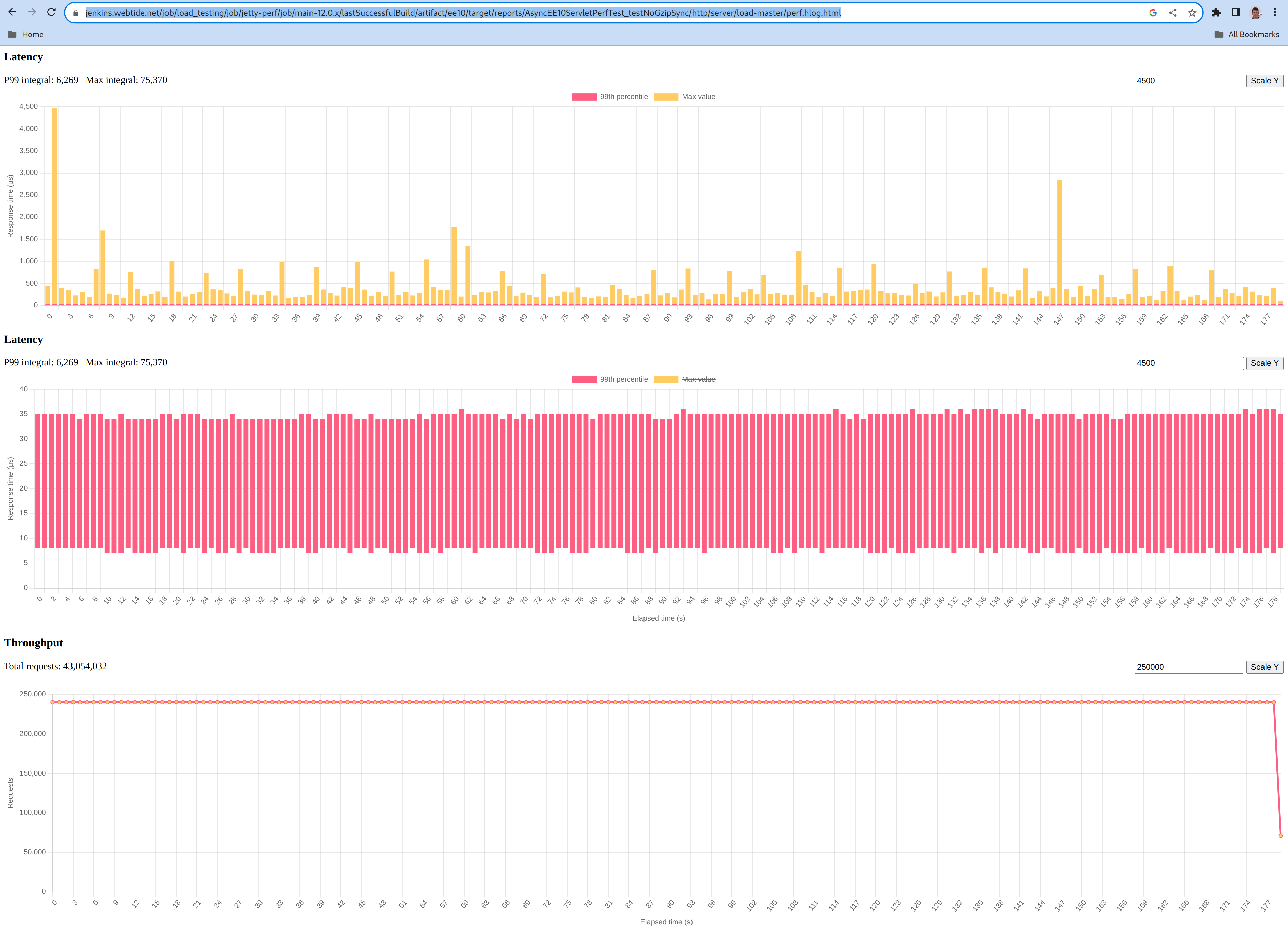
    ee10

    The yellow graph shows a single early peak at 4500 µs, and then most peaks at less than 1000µs and an average sample peak of 434µs.

    The red graph shows a minimum processing time of 7 µs, a P99 processing time of 34.8 µs.

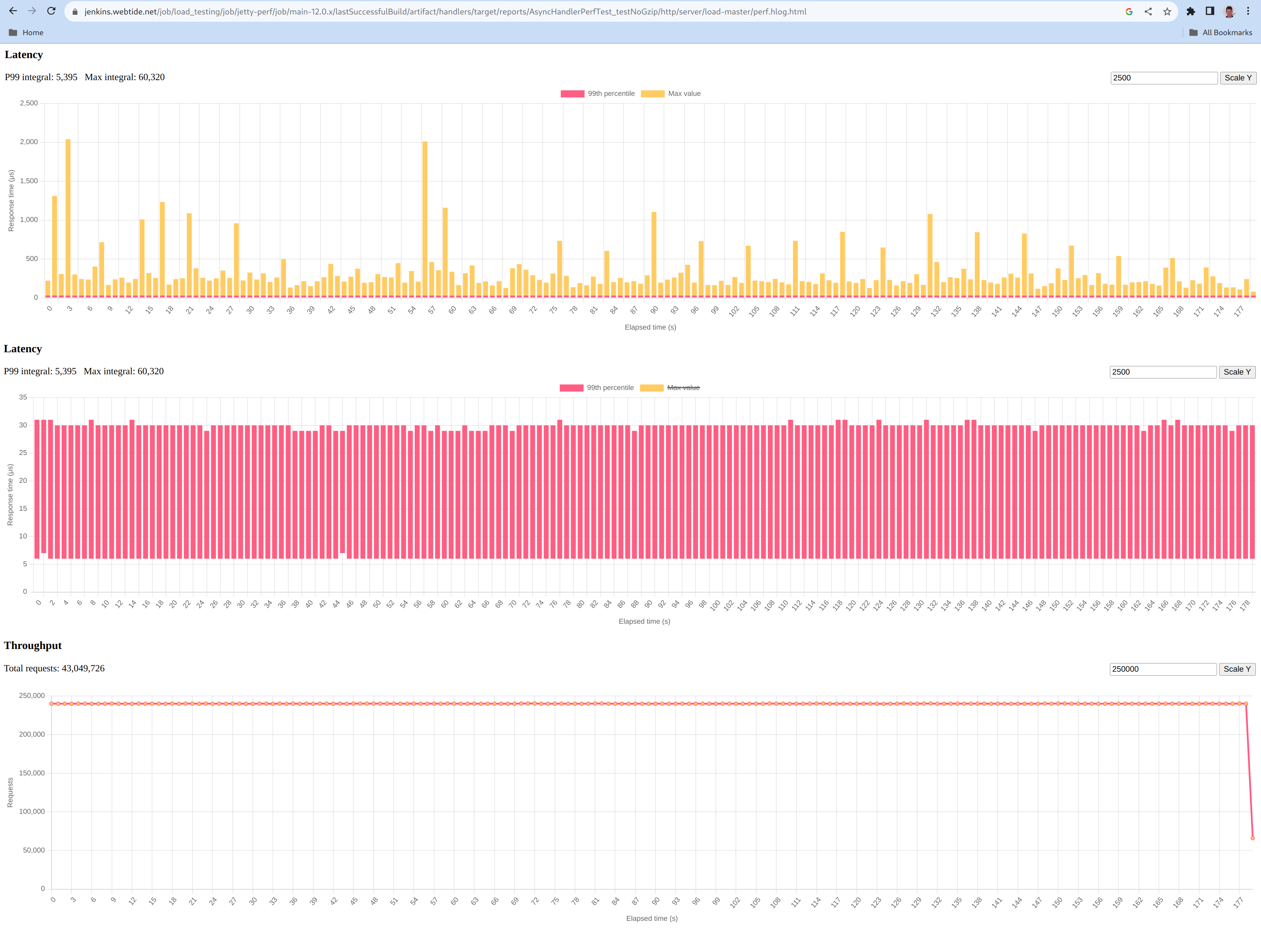
    core

    The yellow graph shows a few peaks at a 2000 µs with the average sample peak being 335µs.

    The red graph shows a minimum processing time of 6 µs, a P99 processing time of 30.0 µs.

    Comparing to Jetty 11

    Comparing apples to apples required us to slightly modify our benchmark to:

    In the following benchmark, the CPU consumption of the server machine stayed around 40%, like with Jetty 12.

    Below are the same plots of the maximum (graph in yellow), minimum to P99 (graph in red) processing times for Jetty 11:

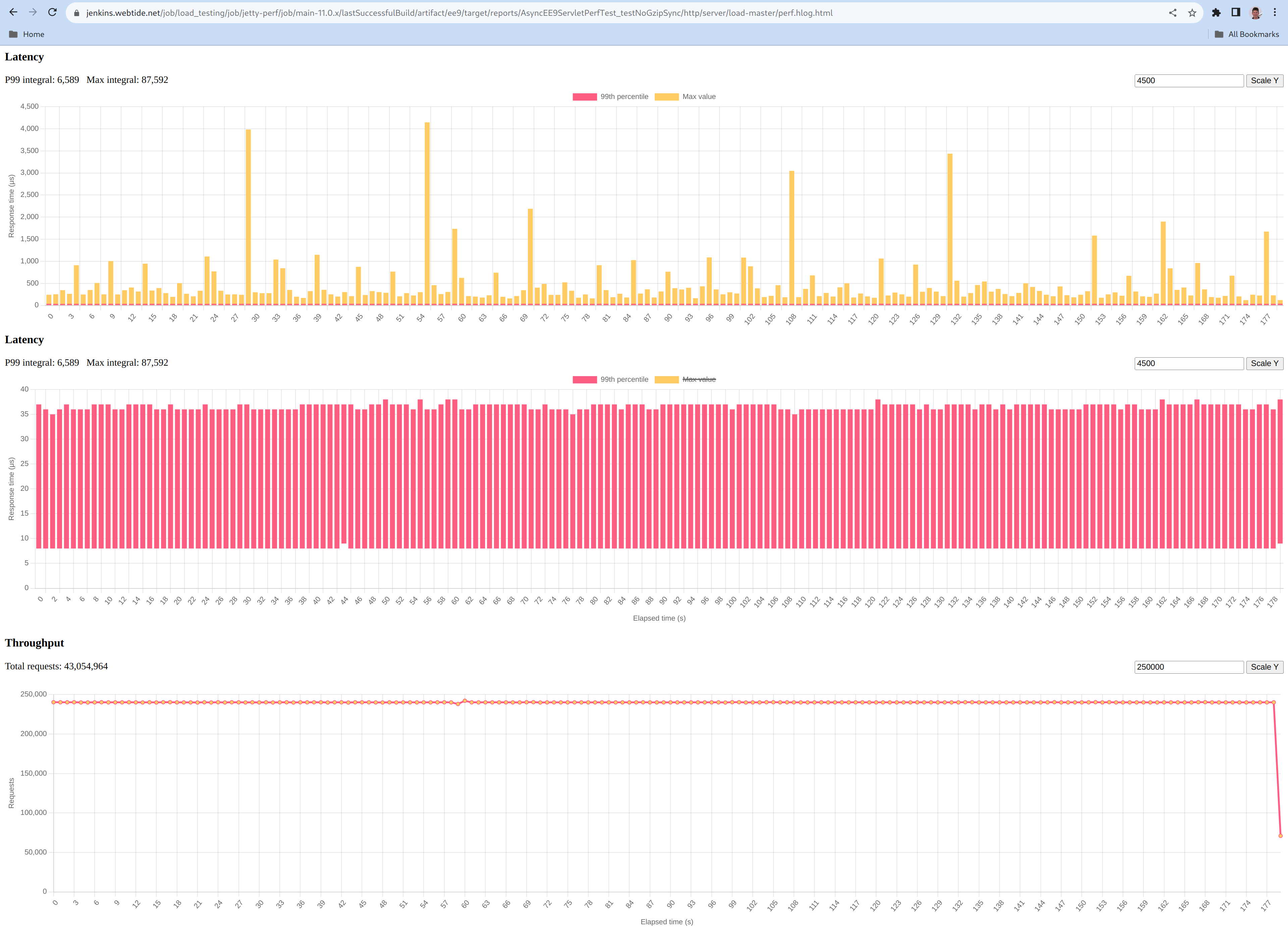
    The yellow graph shows a few peaks at a 4000µs with an average sample peak of 487µs.

    The red graph shows a minimum processing time of 8 µs, a P99 processing time of 36.6 µs.