Category: Jetty

  • How to install JIRA 6.1 in Jetty 9.1

    Atlassian JIRA is a very good issue tracking system. Many open source projects use it, including our own CometD project and most notably OpenJDK.
    While Atlassian supports JIRA on Tomcat, JIRA runs in Jetty as well, and can benefit of Jetty’s support for SPDY.
    Below you can find the instructions on how to setup JIRA 6.1.5 in Jetty 9.1.0 with HTTP and SPDY support on Linux.

    1. Download JIRA’s WAR version

    JIRA can be downloaded in two versions: the distro installer version (the default download from JIRA’s website), and the distro WAR version. You need to download the distro WAR version by clicking on “All JIRA Download Options” on the download page.

    2. Build the JIRA WAR

    Unpack the JIRA distro WAR file. It will create a directory called atlassian-jira-<version>-war referred to later as $JIRA_DISTRO_WAR.

    2.1 Specify the JIRA HOME directory

    $ cd $JIRA_DISTRO_WAR/edit-webapp/WEB-INF/classes/
    $ vi jira-application.properties
    

    The jira-application.properties file contains just one property:

    jira.home =
    

    You need to specify the full path of your JIRA home directory, for example:

    jira.home = /var/jira
    

    2.2 Change the JNDI name for UserTransaction

    The JIRA configuration files come with a non standard JNDI name for the UserTransaction object.
    This non standard name works in Tomcat, but it’s wrong for any other compliant Servlet container, so it must be modified to the standard name to work in Jetty.

    $ cd $JIRA_DISTRO_WAR/edit-webapp/WEB-INF/classes/
    $ vi entityengine.xml
    

    You need to search in the entityengine.xml file for two lines inside the <transaction-factory> element:

    <transaction-factory class="org.ofbiz.core.entity.transaction.JNDIFactory">
        <user-transaction-jndi jndi-server-name="default" jndi-name="java:comp/env/UserTransaction"/>    <-- First line to change
        <transaction-manager-jndi jndi-server-name="default" jndi-name="java:comp/env/UserTransaction"/> <-- Second line to change
    </transaction-factory>
    

    You need to change the jndi-name attribute from the non standard name java:comp/env/UserTransaction to the standard name java:comp/UserTransaction. You have to remove the /env part in the JNDI name in both lines.

    2.3 Execute the build

    At this point you need to build the JIRA WAR file, starting from the JIRA distro WAR file:

    $ cd $JIRA_DISTRO_WAR
    $ ./build.sh
    

    When the build completes, it generates a file called $JIRA_DISTRO_WAR/dist-generic/atlassian-jira-<version>.war. The build also generates a Tomcat version, but you need to use the generic version of the WAR.

    3. Install Jetty 9.1

    Download Jetty 9.1 and unpack it in the directory of your choice, for example /opt, so that Jetty will be installed in a directory such as /opt/jetty-distribution-9.1.0.v20131115 referred to later as $JETTY_HOME.
    We will not modify any file in this directory, but only refer to it to start Jetty.

    4. Setup the database

    JIRA requires a relational database to work. Follow the instructions on how to setup a database for JIRA.
    When you run JIRA for the first time, it will ask you for the database name, user name and password.

    5. Setup the Jetty Base

    Jetty 9.1 introduced a mechanism to separate the Jetty installation directory ($JETTY_HOME) from the directory where you configure your web applications, referred to as $JETTY_BASE. The documentation offers more information about this mechanism.
    Create the Jetty base directory in the location you prefer, for example /var/www/jira, referred to later as $JETTY_BASE.

    $ mkdir -p /var/www/jira
    

    5.1 Setup the transaction manager

    JIRA requires a transaction manager to work, and Jetty does not provide one out of the box. However, it’s not difficult to provide support for it.
    You will use Atomikos’ TransactionsEssentials, an open source transaction manager released under the Apache 2 License.
    For a transaction manager to work, you need the transaction manager jars (in this case Atomikos’) and you need to instruct Jetty to bind a UserTransaction object in JNDI.

    5.1.1 Create the Jetty module definition

    You can use a Jetty module to define the transaction manager support in Jetty following these instructions:

    $ cd $JETTY_BASE
    $ mkdir modules
    $ vi modules/atomikos.mod
    

    Create a file in the modules directory called atomikos.mod with this content:

    # Atomikos Module
    [depend]
    plus
    resources
    [lib]
    lib/atomikos/*.jar
    [xml]
    etc/jetty-atomikos.xml
    

    This file states that the atomikos module depends on Jetty’s built-in plus and resources modules, that requires all the jars in the $JETTY_BASE/lib/atomikos directory in the classpath, and that it is configured by a file in the $JETTY_BASE/etc directory called jetty-atomikos.xml.

    5.1.2 Download the module dependencies

    Create the lib/atomikos directory:

    $ cd $JETTY_BASE
    $ mkdir -p lib/atomikos
    

    and save into it the following files, downloaded from Maven Central from this location (at the time of this writing the latest Atomikos version is 3.9.1):

    • atomikos-util.jar
    • transactions-api.jar
    • transactions.jar
    • transactions-jta.jar
    • transactions-jdbc.jar

    5.1.3 Create the module XML file

    Create the etc directory:

    $ cd $JETTY_BASE
    $ mkdir etc
    $ vi etc/jetty-atomikos.xml
    

    Create a file in the etc directory called jetty-atomikos.xml with this content:

    <?xml version="1.0"?>
    <!DOCTYPE Configure PUBLIC "-//Jetty//Configure//EN" "http://www.eclipse.org/jetty/configure_9_0.dtd">
    <Configure id="Server" class="org.eclipse.jetty.server.Server">
        <New class="org.eclipse.jetty.plus.jndi.Transaction">
            <Arg>
                <New class="com.atomikos.icatch.jta.UserTransactionImp" />
            </Arg>
        </New>
    </Configure>
    

    5.1.4 Create the jta.properties file

    Create the resources directory:

    $ cd $JETTY_BASE
    $ mkdir resources
    $ vi resources/jta.properties
    

    Create a file in the resources directory called jta.properties with this content:

    com.atomikos.icatch.service = com.atomikos.icatch.standalone.UserTransactionServiceFactory
    

    This file configures the Atomikos transaction manager; you can read about other supported properties in the Atomikos documentation, but the one specified above is sufficient.

    5.2 Setup the JDBC driver

    JIRA is able to autoconfigure the database connectivity during the first run, but it requires the JDBC driver to be available.
    Create the lib/ext directory:

    $ cd $JETTY_BASE
    $ mkdir -p lib/ext
    

    Download the JDBC driver and copy it in the $JETTY_BASE/lib/ext directory.
    For example, if you use MySQL you would copy the JDBC driver as $JETTY_BASE/lib/ext/mysql-connector-java-5.1.27.jar.

    5.3 Deploy the JIRA WAR

    Create the webapps directory:

    $ cd $JETTY_BASE
    $ mkdir webapps
    

    Copy the JIRA generic WAR created at step 2.3 in the webapps directory:

    $ cd $JETTY_BASE
    $ cp $JIRA_DISTRO_WAR/dist-generic/atlassian-jira-<version>.war webapps/
    

    5.5 Create the Jetty start.ini file

    Jetty 9.1 uses the $JETTY_BASE/start.ini file to configure the modules that will be activated when Jetty starts. You need:

    • the atomikos module that you created above
    • Jetty’s built-in ext module, to have the JDBC driver in classpath
    • Jetty’s built-in deploy module, to deploy web applications present in the webapps directory
    • Jetty’s built-in jsp module, for JSP support required by JIRA
    • Jetty’s built-in http module, to have Jetty listen for HTTP requests

    Create the start.ini file:

    $ cd $JETTY_BASE
    $ vi start.ini
    

    with the following content:

    --module=atomikos
    --module=ext
    --module=deploy
    --module=jsp
    --module=http
    jetty.port=8080
    

    The last property instructs Jetty to listen on port 8080 for HTTP requests.

    6. Start Jetty

    At this point you are ready to start Jetty.
    If you are using JDK 7, JIRA requires a larger than default permanent generation, and a larger than default heap as well to work properly.
    Start Jetty in the following way:

    $ cd $JETTY_BASE
    $ java -Xmx1g -XX:MaxPermSize=256m -jar $JETTY_HOME/start.jar
    

    Be patient, JIRA may be slow to start up.

    7. SPDY support

    In order to enable SPDY support, you need to deploy your site over SSL. In order to do so, you need to have a valid X509 certificate for your site.
    Follow the SSL documentation for details about how to configure SSL for your site.
    If you want to just try SPDY locally on your computer, you can use a self-signed certificate stored in a keystore.

    7.1 Create the keystore

    Create a keystore with a self-signed certificate:

    $ cd $JETTY_BASE
    $ keytool -genkeypair -keystore etc/keystore -keyalg RSA -dname "cn=localhost" -storepass <password> -keypass <password>
    

    The certificate must be stored in the $JETTY_BASE/etc/keystore file so that it will be automatically picked up by Jetty (this is configurable via the jetty.keystore property if you prefer a different location).

    7.2 Setup the NPN jar

    SPDY also requires the NPN jar, that depends on the JDK version you are using.
    Please refer to the NPN versions table to download the right NPN jar for your JDK.
    Create the lib/npn directory:

    $ cd $JETTY_BASE
    $ mkdir -p lib/npn
    

    Download the right version of the NPN boot jar from this location and save it in the $JETTY_BASE/lib/npn directory.

    7.3 Modify the start.ini file

    Modify the $JETTY_BASE/start.ini file to have the following content:

    --module=atomikos
    --module=ext
    --module=deploy
    --module=jsp
    --module=spdy
    spdy.port=8443
    jetty.keystore.password=<password>
    jetty.keymanager.password=<password>
    jetty.truststore.password=<password>
    

    The http module has been replaced by the spdy module, and so has the configuration property for the port to listen to.
    There are new properties that specifies the password you used to create the keystore in various ways to obfuscate them to avoid that they appear in clear in configuration files.

    7.4 Start Jetty with SPDY support

    $ cd $JETTY_BASE
    $ java -Xbootclasspath/p:lib/npn/npn-boot-<version>.jar -Xmx1g -XX:MaxPermSize=256m -jar $JETTY_HOME/start.jar
    

    Conclusions

    We have seen how JIRA 6.1 can be deployed to Jetty 9.1 following the steps above.
    The advantage of using Jetty are the support for SPDY, which will improve the performance of the website, the high scalability of Jetty and the flexibility of Jetty in defining modules and starting only the modules needed by your web applications, and no more.
    One disadvantage over Tomcat is the lack of out-of-the-box support for a transaction manager. While the step to add this support are not complicated, we recognize that it will be great if the transaction manager module would be available out-of-the-box.
    We are working on providing such feature to improve Jetty, so stay tuned !

  • Jetty-9 Iterating Asynchronous Callbacks

    While Jetty has internally used asynchronous IO since 7.0, Servlet 3.1 has added asynchronous IO to the application API and Jetty-9.1 now supports asynchronous IO in an unbroken chain from application to socket. Asynchronous APIs can often look intuitively simple, but there are many important subtleties to asynchronous programming and this blog looks at one important pattern used within Jetty.  Specifically we look at how an iterating callback pattern is used to avoid deeps stacks and unnecessary thread dispatches.

    Asynchronous Callback

    Many programmers wrongly believe that asynchronous programming is about Futures. However Futures are a mostly broken abstraction and could best be described as a deferred blocking API rather than an Asynchronous API.    True asynchronous programming is about callbacks, where the asynchronous operation calls back the caller when the operation is complete.  A classic example of this is the NIO AsynchronousByteChannel write method:

    <A> void write(ByteBuffer src,
                   A attachment,
                   CompletionHandler<Integer,? super A> handler);
    public interface CompletionHandler<V,A>
    {
      void completed(V result, A attachment);
      void failed(Throwable exc, A attachment);
    }

    With an NIO asynchronous write, a CompletionHandler instance is pass that is called back once the write operation has completed or failed.   If the write channel is congested, then no calling thread is held or blocked whilst the operation waits for the congestion to clear and the callback will be invoked by a thread typically taken from a thread pool.

    The Servlet 3.1 Asynchronous IO API is syntactically very different, but semantically similar to NIO. Rather than have a callback when a write operation has completed the API has a WriteListener API that is called when a write operation can proceed without blocking:

    public interface WriteListener extends EventListener
    {
        public void onWritePossible() throws IOException;
        public void onError(final Throwable t);
    }

    Whilst this looks different to the NIO write CompletionHandler, effectively a write is possible only when the previous write operation has completed, so the callbacks occur on essentially the same semantic event.

    Callback Threading Issues

    So that asynchronous callback concept looks pretty simple!  How hard could it be to implement and use!   Let’s consider an example of asynchronously writing the data obtained from an InputStream.  The following WriteListener can achieve this:

    public class AsyncWriter implements WriteListener
    {
      private InputStream in;
      private ServletOutputStream out;
      private AsyncContext context;
      public AsyncWriter(AsyncContext context,
                         InputStream in,
                         ServletOutputStream out)
      {
        this.context=context;
        this.in=in;
        this.out=out;
      }
      public void onWritePossible() throws IOException
      {
        byte[] buf = new byte[4096];
        while(out.isReady())
        {
          int l=in.read(buf,0,buf.length);
          if (l<0)
          {
            context.complete();
            return;
          }
          out.write(buf,0,l);
        }
      }
      ...
    }

    Whenever a write is possible, this listener will read some data from the input and write it asynchronous to the output. Once all the input is written, the asynchronous Servlet context is signalled that the writing is complete.

    However there are several key threading issues with a WriteListener like this from both the caller and callee’s point of view.  Firstly this is not entirely non blocking, as the read from the input stream can block.  However if the input stream is from the local file system and the output stream is to a remote socket, then the probability and duration of the input blocking is much less than than of the output, so this is substantially non-blocking asynchronous code and thus is reasonable to include in an application.  What this means for asynchronous operations providers (like Jetty), is that you cannot trust any code you callback to not block and thus you cannot use an important thread (eg one iterating over selected keys from a Selector) to do the callback, else an application may inadvertently block other tasks from proceeding.  Thus Asynchronous IO Implementations thus must often dispatch a thread to perform a callback to application code.

    Because dispatching threads is expensive in both CPU and latency, Asynchronous IO implementations look for opportunities to optimise away thread dispatches to callbacks.  There Servlet 3.1 API has by design such an optimisation with the out.isReady() call that allows iteration of multiple operations within the one callback. A dispatch to onWritePossible only happens when it is required to avoid a blocking write and often many write iterations can proceed within a single callback. An NIO CompletionHandler based implementation of the same task is only able to perform one write operation per callback and must wait for the invocation of the complete handler for that operation before proceeding:

    public class AsyncWriter implements CompletionHandler<Integer,Void>
    {
      private InputStream in;
      private AsynchronousByteChannel out;
      private CompletionHandler<Void,Void> complete;
      private byte[] buf = new byte[4096];
      public AsyncWriter(InputStream in,
                         AsynchronousByteChannel out,
                         CompletionHandler<Void,Void> complete)
      {
        this.in=in;
        this.out=out;
        this.complete=complete;
        completed(0,null);
      }
      public void completed(Integer w,Void a) throws IOException
      {
        int l=in.read(buf,0,buf.length);
        if (l<0)
          complete.completed(null,null);
        else
          out.write(ByteBuffer.wrap(buf,0,l),this);
      }
      ...
    }

    Apart from an unrelated significant bug (left as an exercise for the reader to find), this version of the AsyncWriter has a significant threading challenge.  If the write can trivially completes without blocking, should the callback to CompletionHandler be dispatched to a new thread or should it just be called from the scope of the write using the caller thread?  If a new thread is always used, then many many dispatch delays will be incurred and throughput will be very low.  But if the callback is invoked from the scope of the write call, then if the callback does a re-entrant call to write, it may call a callback again which calls write again etc. etc. and a very deep stack will result and often a stack overflow can occur.

    The JVM’s implementation of NIO resolves this dilemma by doing both!  It performs the callback in the scope of the write call until it detects a deep stack, at which time it dispatches the callback to a new thread.    While this does work, I consider it a little bit of the worst of both worlds solution: you get deep stacks and you get dispatch latency.  Yet it is an accepted pattern and Jetty-8 uses this approach for callbacks via our ForkInvoker class.

    Jetty-9 IO Callbacks

    For Jetty-9, we wanted the best of all worlds.  We wanted to avoid deep re entrant stacks and to avoid dispatch delays.  In a similar way to Servlet 3.1 WriteListeners, we wanted to substitute iteration for reentrancy when ever possible.    Thus Jetty does not use NIO asynchronous IO channel APIs, but rather implements our own asynchronous IO pattern using the NIO Selector to implement our own EndPoint abstraction and a simple Callback interface:

    public interface EndPoint extends Closeable
    {
      ...
      void write(Callback callback, ByteBuffer... buffers)
        throws WritePendingException;
      ...
    }
    public interface Callback
    {
      public void succeeded();
      public void failed(Throwable x);
    }

    One key feature of this API is that it supports gather writes, so that there is less need for either iteration or re-entrancy when writing multiple buffers (eg headers, chunk and/or content).  But other than that it is semantically the same as the NIO CompletionHandler and if used incorrectly could also suffer from deep stacks and/or dispatch latency.

    Jetty Iterating Callback

    Jetty’s technique to avoid deep stacks and/or dispatch latency is to use the IteratingCallback class as the basis of callbacks for tasks that may take multiple IO operations:

    public abstract class IteratingCallback implements Callback
    {
      protected enum State
        { IDLE, SCHEDULED, ITERATING, SUCCEEDED, FAILED };
      private final AtomicReference<State> _state =
        new AtomicReference<>(State.IDLE);
      abstract protected void completed();  
      abstract protected State process() throws Exception;
      public void iterate()
      {
        while(_state.compareAndSet(State.IDLE,State.ITERATING))
        {
          State next = process();
          switch (next)
          {
            case SUCCEEDED:
              if (!_state.compareAndSet(State.ITERATING,State.SUCCEEDED))
                throw new IllegalStateException("state="+_state.get());
              completed();
              return;
            case SCHEDULED:
              if (_state.compareAndSet(State.ITERATING,State.SCHEDULED))
                return;
              continue;
            ...
          }
        }
        public void succeeded()
        {
          loop: while(true)
          {
            switch(_state.get())
            {
              case ITERATING:
                if (_state.compareAndSet(State.ITERATING,State.IDLE))
                  break loop;
                continue;
              case SCHEDULED:
                if (_state.compareAndSet(State.SCHEDULED,State.IDLE))
                  iterate();
                break loop;
              ...
            }
          }
        }

    IteratingCallback is itself an example of another pattern used extensively in Jetty-9:  it is a lock-free atomic state machine implemented with an AtomicReference to an Enum.  This pattern allows very fast and efficient lock free thread safe code to be written, which is exactly what asynchronous IO needs.

    The IteratingCallback class iterates on calling the abstract process() method until such time as it returns the SUCCEEDED state to indicate that all operations are complete.  If the process() method is not complete, it may return SCHEDULED to indicate that it has invoked an asynchronous operation (such as EndPoint.write(...)) and passed the IteratingCallback as the callback.

    Once scheduled, there are two possible outcomes for a successful operation. In the case that the operations completed trivially it will have called back succeeded() within the scope of the write, thus the state will have been switched from ITERATING to IDLE so that the while loop in iterate will fail to set the SCHEDULED state and continue to switch from IDLE to ITERATING, thus calling process() again iteratively.

    In the case that the schedule operation does not complete within the scope of process, then the iterate while loop will succeed in setting the SCHEDULED state and break the loop. When the IO infrastructure subsequently dispatches a thread to callback succeeded(), it will switch from SCHEDULED to IDLE state and itself call the iterate() method to continue to iterate on calling process().

    Iterating Callback Example

    A simplified example of using an IteratingCallback to implement the AsyncWriter example from above is given below:

    private class AsyncWriter extends IteratingCallback
    {
      private final Callback _callback;
      private final InputStream _in;
      private final EndPoint _endp;
      private final ByteBuffer _buffer;
      public AsyncWriter(InputStream in,EndPoint endp,Callback callback)
      {
        _callback=callback;
        _in=in;
        _endp=endp;
        _buffer = BufferUtil.allocate(4096);
      }
      protected State process() throws Exception
      {     
        int l=_in.read(_buffer.array(),
                       _buffer.arrayOffset(),
                       _buffer.capacity());
        if (l<0)
        {
           _callback.succeeded();
           return State.SUCCEEDED;
        }
        _buffer.position(0);
        _buffer.limit(len);
        _endp.write(this,_buffer);
        return State.SCHEDULED;
      }

    Several production quality examples of IteratingCallbacks can be seen in the Jetty HttpOutput class, including a real example of asynchronously writing data from an input stream.

    Conclusion

    Jetty-9 has had a lot of effort put into using efficient lock free patterns to implement a high performance scalable IO layer that can be seamlessly extended all the way into the servlet application via the Servlet 3.1 asynchronous IO.   Iterating callback and lock free state machines are just some of the advanced techniques Jetty is using to achieve excellent scalability results.

  • WordPress & Jetty: perfect fit

    I posted a while back about the capability of Jetty 9.1’s HttpClient to speak HTTP over different transports: by default HTTP, but we also provide a SPDY implementation, where the HTTP requests and responses are carried using the SPDY transport rather than the HTTP transport.
    Another transport that is able to carry HTTP requests and responses is FastCGI.
    The neat feature about FastCGI is that it is the default way to deploy PHP applications: fire up a proxy server (usually Apache or Nginx) in the front and proxy requests/responses to the FastCGI server (usually the PHP FastCGI Process Manager, or php-fpm).
    In this way you can deploy the most used PHP frameworks like WordPress, Drupal and others.
    And you are not limited to PHP: FastCGI allows you to easily deploy other dynamic web languages and frameworks such as Django (Python-based), Rails (Ruby-based) and others.
    We are happy to announce that Jetty 9.1 can now proxy to FastCGI, enabling deployment of PHP frameworks.
    Why this is good, and how different it is from having – say – Apache or Nginx in the front instead of Jetty ?
    The first and foremost reason is that Jetty is the only server that supports SPDY Push.
    SPDY Push is the biggest performance improvement you can make to your website, without a single change to the application being served, be it a Java web application or WordPress.
    Watch our video that shows how the SPDY Push feature that Jetty provides makes a big performance difference.
    The second reason is that SPDY version 2 is being deprecated really fast in favor of SPDY version 3 or greater.
    Browsers will not speak SPDY/2 anymore, basically reverting your website to HTTPS behaviour, losing all the SPDY benefits if your server does not support SPDY 3 or greater.
    As of the time of this writing, only servers like Apache or Jetty implement SPDY version 3 or later of the SPDY protocol, while Nginx only implements SPDY version 2.
    At the Jetty Project we like to eat our own dogfood, so the blog site you are reading is WordPress served via Jetty.
    If you’re using Firefox or Chrome, just open the browser network console, and you will see something like this:
    jetty-wordpress
    As you can see from the response headers, the response is served by Jetty (Server: Jetty(9.1.0.v20131115)) from PHP (X-Powered-By: PHP/5.5.3-1ubuntu2).
    Of course, since both Jetty 9.1’s server and HttpClient are fully asynchronous, you have a very scalable solution for your PHP-enabled website: currently the JVM that runs this very website only uses 25 MiB of heap.
    And of course you get all the SPDY performance improvements over HTTP, along with Jetty’s unique SPDY Push features.
    This is good for cloud vendors too, since they can run Jetty and expose PHP applications with a minimal amount of resources, high scalability, and unique features like SPDY Push.
    FastCGI for Jetty is sponsored by Intalio. If you are interested in knowing more about how Jetty can speed up your website or how to setup your PHP web application in Jetty, contact us or send an email to Jesse McConnell.

  • Speaking at Devoxx 2013

    Thomas Becker and I will be speaking at Devoxx, presenting two BOFs: HTTP 2.0/SPDY and Jetty in depth and The Jetty Community BOF.
    The first is a more technical session devoted to the internals of SPDY and HTTP 2.0, while the second is more an interactive session about Jetty 9.x new features and improvements (and we have many) with the audience about how people use Jetty, what feature they like most (or least), so it will be fun.
    As far as I understand, BOF sessions are free and informal: anyone can attend even if does not have a Devoxx Conference Pass (very interesting if you live in the area).
    If you’re attending Devoxx, please stop by even just to say “Hi!” 🙂
    See you there !

  • Pluggable Transports for Jetty 9.1's HttpClient

    In Jetty 9, the HttpClient was completely rewritten, as we posted a while back.
    In Jetty 9.1, we took one step forward and we made Jetty’s HttpClient polyglot. This means that now applications can use the HTTP API and semantic (“I want to GET the resource at the http://host/myresource URI”) but can now choose how this request is carried over the network.
    Currently, three transports are implemented: HTTP, SPDY and FastCGI.
    The usage is really simple; the following snippet shows how to setup HttpClient with the default HTTP transport:

    // Default transport uses HTTP
    HttpClient httpClient = new HttpClient();
    httpClient.start();
    

    while the next snippet shows how to setup HttpClient with the SPDY transport:

    // Using the SPDY transport in clear text
    // Create the SPDYClient factory
    SPDYClient.Factory spdyClientFactory = new SPDYClient.Factory();
    spdyClientFactory.start();
    // Create the SPDYClient
    SPDYClient spdyClient = spdyClientFactory.newSPDYClient(SPDY.V3);
    // Create the HttpClient transport
    HttpClientTransport transport = new HttpClientTransportOverSPDY(spdyClient);
    // HTTP over SPDY !
    HttpClient httpSPDYClient = new HttpClient(transport, null);
    httpSPDYClient.start();
    // Send request, receive response
    ContentResponse response = httpSPDYClient.newRequest("http://host/path")
            .method("GET")
            .send();
    

    This last snippet allows the application to still use the HTTP API, but have the request and the response transported via SPDY, rather than HTTP.
    Why this is useful ?
    First of all, more and more websites are converting to SPDY because it offers performance improvements (and if you use Jetty as the server behind your website, the performance improvements can be stunning, check out this video).
    This means that with a very simple change in the HttpClient configuration, your client application connecting to servers can benefit of the performance boost that SPDY provides.
    If you are using HttpClient for server-to-server communication, you can use SPDY in clear text (rather than encrypted) to achieve even more efficiency because there is no encryption involved. Jetty is perfectly capable of speaking SPDY in clear text, so this could be a major performance win for your applications.
    Furthermore, you can parallelize HTTP requests thanks to SPDY’s multiplexing rather than opening multiple connections, saving network resources.
    I encourage you to try out these features and report your feedback here in the comments or on the Jetty mailing list.

  • Servlet 3.1 Asynchronous IO and Jetty-9.1

    One of the key features added in the Servlet 3.1 JSR 340 is asynchronous (aka non-blocking) IO.   Servlet 3.0 introduced asynchronous servlets, which could suspend request handling to asynchronously handle server-side events.  Servlet 3.1 now adds IO with the request/response content as events that can be handled by an asynchronous servlet or filter.

    The Servlet 3.1 API is available in the Jetty-9.1 branch and this blog shows how to use the API and also some Jetty extensions are shown that further increase the efficiency of asynchronous IO. Finally an full example is given that shows how asynchronous IO can be used to limit the bandwidth used by any one request.

    Why use Asynchronous IO?

    The key objective of being asynchronous is to avoid blocking.  Every blocked thread represents wasted resources as the memory allocated to each thread is significant and is essentially idle whenever it blocks.

    Blocking also makes your server vulnerable to thread starvation. Consider a server with 200 threads in it’s thread pool.  If 200 requests for large content are received from slow clients, then the entire server thread pool may be consumed by threads blocking to write content to those slow clients.    Asynchronous IO allows the threads to be reused to handle other requests while the slow clients are handled with minimal resources.

    Jetty has long used such asynchronous IO when serving static content and now Servlet 3.1 makes this feature available to standards based applications as well.

    How do you use Asynchronous IO?

    New methods to activate Servlet 3.1 asynchronous IO have been added to the ServletInputStream and ServletOutputStream interfaces that allow listeners to be added to the streams that receive asynchronous callbacks.  The listener interfaces are WriteListener and ReadListener.

    Setting up a WriteListener

    To activate asynchronous writing, it is simply a matter of starting asynchronous mode on the request and then adding your listener to the output stream.  The following example shows how this can be done to server static content obtained from the ServletContext:

    @Override
    protected void doGet(HttpServletRequest request, HttpServletResponse response)
      throws ServletException, IOException
    {
      // Get the path of the static resource to serve.
      String info=request.getPathInfo();
      // Set the mime type of the response
      response.setContentType(getServletContext().getMimeType(info));        
      // Get the content as an input stream
      InputStream content = getServletContext().getResourceAsStream(info);
      if (content==null)
      {
        response.sendError(404);
        return;
      }
      // Prepare the async output
      AsyncContext async = request.startAsync();
      ServletOutputStream out = response.getOutputStream();
      out.setWriteListener(new StandardDataStream(content,async,out));
    }

    Note how this method does not actually write any output, it simple finds the content and sets up a WriteListener instance to do the actually writing asynchronously.

    Implementing a WriteListener

    Once added to the OutputStream, the WriteListener method onWritePossible is called back as soon as some data can be written and no other container thread is dispatched to handle the request or any async IO for it. The later condition means that the first call to onWritePossible is deferred until the thread calling doGet returns.

    The actual writing of data is done via the onWritePossible callback and we can see this in the StandardDataStream implementation used in the above example:

    private final class StandardDataStream implements WriteListener
    {
      private final InputStream content;
      private final AsyncContext async;
      private final ServletOutputStream out;
      private StandardDataStream(InputStream content, AsyncContext async, ServletOutputStream out)
      {
        this.content = content;
        this.async = async;
        this.out = out;
      }
      public void onWritePossible() throws IOException
      {
        byte[] buffer = new byte[4096];
        // while we are able to write without blocking
        while(out.isReady())
        {
          // read some content into the copy buffer
          int len=content.read(buffer);
          // If we are at EOF then complete
          if (len < 0)
          {
            async.complete();
            return;
          }
          // write out the copy buffer. 
          out.write(buffer,0,len);
        }
      }
      public void onError(Throwable t)
      {
          getServletContext().log("Async Error",t);
          async.complete();
      }
    }

    When called, the onWritePossible() method loops reading content from the resource input stream and writing it to the response output stream as long as the call to isReady() indicates that the write can proceed without blocking.    The ‘magic’ comes when isReady() returns false and breaks the loop, as in that situation the container will call onWritePossible() again once writing can proceed and thus to loop picks up from where it broke to avoid blocking.

    Once the loop has written all the content, it calls the AsyncContext.complete() method to finalize the request handling.    And that’s it! The content has now been written without blocking (assuming the read from the resource input stream does not block!).

    Byte Arrays are so 1990s!

    So while the asynchronous APIs are pretty simply and efficient to use, they do suffer from one significant problem.  JSR 340 missed the opportunity to move away from byte[] as the primary means for writing content!  It would have been a big improvement to add an write(ByteBuffer) method to ServletOutputStream.

    Without a ByteBuffer API, the content data to be written has to be copied into a buffer and then written out.   If a direct ByteBuffer could be used for this copy, then at least this data would not enter user space and would avoid an extra copies by the operating system.  Better yet, a file mapped buffer could be used and thus the content could be written without the need to copy any data at all!

    So while this method was not added to the standard, Jetty does provide it if you are willing to down caste to our HttpOutput class.  Here is how the above example can be improved using this method and no data copying at all:

    protected void doGet(HttpServletRequest request, HttpServletResponse response) throws ServletException, IOException
    {
      String info=request.getPathInfo();                
      response.setContentType(getServletContext().getMimeType(info));
      File file = new File(request.getPathTranslated());
      response.setContentLengthLong(file.length());
      // Look for a file mapped buffer in the cache
      ByteBuffer mapped=cache.get(path);
      if (mapped==null)
      {
        try (RandomAccessFile raf = new RandomAccessFile(file, "r"))
        {
          ByteBuffer buf = raf.getChannel().map(MapMode.READ_ONLY,0,raf.length());
          mapped=cache.putIfAbsent(path,buf);
          if (mapped==null)
            mapped=buf;
        }
      }
      // write the buffer asynchronously
      final ByteBuffer content=mapped.asReadOnlyBuffer();
      final ServletOutputStream out = response.getOutputStream();
      final AsyncContext async=request.startAsync();
      out.setWriteListener(new WriteListener()
      {
         public void onWritePossible() throws IOException
         {            
           while(out.isReady())
           {
             if (!content.hasRemaining())
             {              
               async.complete();
               return;
             }
             out.write(content);
          }
          public void onError(Throwable t)
          {
            getServletContext().log("Async Error",t);
            async.complete();
          }
      });
    }

    Note how the file mapped buffers are stored in a ConcurrentHashMap cache to be shared between multiple requests.  The call to asReadOnlyBuffer() only creates a position/limit indexes and does not copy the underlying data, which is written directly by the operating system from the file system to the network.

    Managing Bandwidth – Limiting Data Rate.

    Now that we have seen how we can break up the writing of large content into asynchronous writes that do not block, we can consider some other interesting use-cases for asynchronous IO.

    Another problem frequently associated with large uploads and downloads is the data rate.  Often you do not wish to transfer data for a single request at the full available bandwidth for reasons such as:

    • The large content is a streaming movie and there is no point paying the cost of sending all of the data if the viewer ends up stopping the video 30 seconds in.  With streaming video, it is ideal to send the data at just over the rate that it is consumed by a viewer.
    • Large downloads running at full speed may consume a large proportion of the available bandwidth within a data centre and can thus impact other traffic.  If the large downloads are low priority it can be beneficial to limit their bandwidth.
    • Large uploads or requests for large downloads can be used as part of a DOS attack as they are requests that can consume significant resources. Limiting bandwidth can reduce the impact of such attacks and cost the attacker more resources/time themselves.

    We have added the DataRateLimitedServlet to Jetty-9.1 as an example of how asynchronous writes can be slowed down with a scheduler to limit the data rate allocated to any one requests.  The servlet uses both the standard byte[] API and the extended Jetty ByteBuffer API.   Currently it should be considered example code, but we are planning on developing it into a good utility servlet as Jetty-9.1 is release in the next few months.

  • Jetty SPDY push improvements

    After having some discussions on spdy-dev and having some experience with our current push implementation, we’ve decided to change a few things to the better.
    Jetty now sends all push resources non interleaved to the client. That means that the push resources are being sent sequentially to the client one after the other.
    The ReferrerPushStrategy which automatically detects which resources need to be pushed for a specific main resource. See SPDY – we push! for details. Previously we’ve just send the push resources in random order back to the client. However with the change to sequentially send the resources, it’s best to keep the order that the first browser client requested those resources. So we changed the implementation of ReferrerPushStrategy accordingly.
    This all aims at improving the time needed for rendering the page in the browser by sending the data to the browser as the browser needs them.

  • Jetty SPDY to HTTP Proxy

    We have SPDY to SPDY and HTTP to SPDY proxy functionality implemented in Jetty for a while now.
    An important and very common use case however is a SPDY to HTTP proxy. Imagine a network architecture where network components like firewalls need to inspect application layer contents. If those network components are not SPDY aware and able to read the binary protocol you need to terminate SPDY before passing the traffic through those components. Same counts for other network components like loadbalancers, etc.
    Another common use case is that you might not be able to migrate your legacy application from an HTTP connector to SPDY. Maybe because you can’t use Jetty for your application or your application is not written in Java.
    Quite a while ago, we’ve implemented a SPDY to HTTP proxy functionality in Jetty. We just didn’t blog about it yet. Using that proxy it’s possible to gain all the SPDY benefits where they really count…on the slow internet with high latency, while terminating SPDY on the frontend and talking plain HTTP to your backend components.
    Here’s the documentation to setup a SPDY to HTTP proxy:
    http://www.eclipse.org/jetty/documentation/current/spdy-configuring-proxy.html#spdy-to-http-example-config

  • Asynchronous Rest with Jetty-9

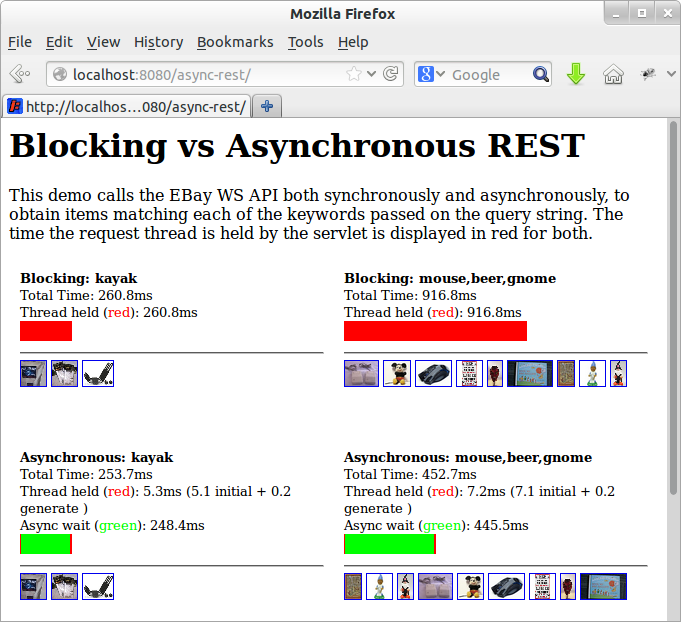
    This blog is an update for jetty-9 of one published for Jetty 7 in 2008 as an example web application  that uses Jetty asynchronous HTTP client and the asynchronoous servlets 3.0 API, to call an eBay restful web service. The technique combines the Jetty asynchronous HTTP client with the Jetty servers ability to suspend servlet processing, so that threads are not held while waiting for rest responses. Thus threads can handle many more requests and web applications using this technique should obtain at least ten fold increases in performance.

    Screenshot from 2013-04-19 09:15:19

    The screen shot above shows four iframes calling either a synchronous or the asynchronous demonstration servlet, with the following results:

    Synchronous Call, Single Keyword
    A request to lookup ebay auctions with the keyword “kayak” is handled by the synchronous implementation. The call takes 261ms and the servlet thread is blocked for the entire time. A server with a 100 threads in a pool would be able to handle 383 requests per second.
    Asynchronous Call, Single Keyword
    A request to lookup ebay auctions with the keyword “kayak” is handled by the asynchronous implementation. The call takes 254ms, but the servlet request is suspended so the request thread is held for only 5ms. A server with a 100 threads in a pool would be able to handle 20,000 requests per second (if not constrained by other limitations)
    Synchronous Call, Three Keywords
    A request to lookup ebay auctions with keywords “mouse”, “beer” and “gnome” is handled by the synchronous implementation. Three calls are made to ebay in series, each taking approx 306ms, with a total time of 917ms and the servlet thread is blocked for the entire time. A server with a 100 threads in a pool would be able to handle only 109 requests per second!
    Asynchronous Call, Three Keywords
    A request to lookup ebay auctions with keywords “mouse”, “beer” and “gnome” is handled by the asynchronous implementation. The three calls can be made to ebay in parallel, each taking approx 300ms, with a total time of 453ms and the servlet request is suspended, so the request thread is held for only 7ms. A server with a 100 threads in a pool would be able to handle 14,000 requests per second (if not constrained by other limitations).

    It can be seen by these results that asynchronous handling of restful requests can dramatically improve both the page load time and the capacity by avoiding thread starvation.
    The code for the example asynchronous servlet is available from jetty-9 examples and works as follows:

    1. The servlet is passed the request, which is detected as the first dispatch, so the request is suspended and a list to accumulate results is added as a request attribute:
      // If no results, this must be the first dispatch, so send the REST request(s)
      if (results==null) {
          final Queue> resultsQueue = new ConcurrentLinkedQueue<>();
          request.setAttribute(RESULTS_ATTR, results=resultsQueue);
          final AsyncContext async = request.startAsync();
          async.setTimeout(30000);
          ...
    2. After suspending, the servlet creates and sends an asynchronous HTTP exchange for each keyword:
      for (final String item:keywords) {
        _client.newRequest(restURL(item)).method(HttpMethod.GET).send(
          new AsyncRestRequest() {
            @Override
            void onAuctionFound(Map<String,String> auction) {
              resultsQueue.add(auction);
            }
            @Override
            void onComplete() {
              if (outstanding.decrementAndGet()<=0)
                async.dispatch();
            }
          });
      }
    3. All the rest requests are handled in parallel by the eBay servers and when each of them completes, the call back on the exchange object is called. The code (shown above) extracts auction information in the base class from the JSON response and adds it to the results list in the onAuctionFound method.  In the onComplete method, the count of expected responses is then decremented and when it reaches 0, the suspended request is resumed by a call to dispatch.
    4. After being resumed (dispatched), the request is re-dispatched to the servlet. This time the request is not initial and has results, so the results are retrieved from the request attribute and normal servlet style code is used to generate a response:
      List> results = (List>) request.getAttribute(CLIENT_ATTR);
      response.setContentType("text/html");
      PrintWriter out = response.getWriter();
      out.println("");
      for (Map m : results){
        out.print("");
      ...
      out.println("");
      
    5. The example does lack some error and timeout handling.

    This example shows how the Jetty asynchronous client can easily be combined with the asynchronous servlets of Jetty-9 (or the Continuations of Jetty-7) to produce very scalable web applications.

  • Jetty, SPDY, PHP and WordPress

    Having discussed the business case for Jetty 9 and SPDY, this blog presents a simple tutorial for runing PHP web applications like WordPress on Jetty with SPDY.

    Get Jetty

    First you’ll need a distribution of Jetty, which you can download, unpack and run with the following (I use wget to download from the command line, or you can just download with a browser from here):

    wget -U none http://repo1.maven.org/maven2/org/eclipse/jetty/jetty-distribution/9.0.2.v20130417/jetty-distribution-9.0.2.v20130417.zip
    unzip jetty-distribution-9.0.2.v20130417.zip
    cd jetty-distribution-9.0.2.v20130417
    java -jar start.jar

    You can point your browser at http://localhost:8080/ to verify that Jetty is running (Just ctrl-C jetty when you want to stop it).

    Configure SPDY

    Next you’ll need to download NPN (for SPDY protocol negotiation) from  here and save in the lib directory:

    wget -O lib/npn-boot-1.1.5.v20130313.jar
    -U none
    http://repo1.maven.org/maven2/org/mortbay/jetty/npn/npn-boot/1.1.5.v20130313/npn-boot-1.1.5.v20130313.jar

    To configure SPDY create the file start.d/spdy.ini with the following content:

    --exec
    -Xbootclasspath/p:lib/npn-boot-1.1.5.v20130313.jar
    OPTIONS=spdy
    jetty.spdy.port=8443
    jetty.secure.port=8443
    etc/jetty-ssl.xml
    etc/jetty-spdy.xml

    Restart jetty (java -jar start.jar) and you can now verify that you are running SPDY by pointing a recent Chrome or Firefox browser at https://localhost:8443/.  You may have to accept the security exception for the self signed certificate that is bundled with the jetty distro.    FF indicates that they are using SPDY with a little green lightening symbol in the address bar.

    Enable PHP

    There are several ways to PHP enable Jetty, but the one I’m using for this demonstration is php-java-bridge, which you can download in a complete WAR file from here.   To install and test in a context ready for wordpress:

    mkdir webapps/wordpress
    cd webapps/wordpress
    unzip /tmp/JavaBridgeTemplate621.war
    cd ../..
    java -jar start.jar

    You can then test that PHP is working by browsing to http://localhost:8080/wordpress/test.php and you can test that PHP is working under SPDY by browsing https://localhost:8443/wordpress/test.php.

    Install WordPress

    You now have a Jetty SPDY server serving PHP, so let’s install WordPress as an example of PHP webapplication. You can download WordPress from here and install it as follows:

    cd webapps
    rm index.php
    unzip /tmp/wordpress-3.5.1.zip
    cd ..
    java -jar start.jar

    You can browse to WordPress at http://localhost:8080/wordpress/ where you should see a screen inviting you to “Create a Configuration File”.   You’ll need a MYSQL database instance to proceed and 2 screens later you are running WordPress over HTTP.

    You’ll note that if you try immediately to access wordpress with SPDY, you get badly redirected back to the 8080 port with the https protocol!  This is just WordPress being a bit dumb when it comes to SSL and I suggest you google WordPress SSL and have a read of some of the configuration and plugin options available. Take special note of how you can easily lock yourself out of the admin pages!  Which you will do if you simply update the wordpress URL under general settings to https://localhost:8443/wordpress.   You’ll also need to read up on running WordPress on non standard ports, but this is not a blog about wordpress, so I wont go into the options here, other than to say that difficulties with the next few steps are the SPDY as they are for SSL (and that the wordpress guys should really read up on using the host header)!  If you want a quick demonstration, just change the home URI in general settings and you’ll be able to see the main site under SPDY at https://localhost:8443/wordpress/,  but will be locked out of the admin pages.

    Conclusion

    That’s it! A few simple steps are all you need to run a complex PHP site under Jetty with SPDY!        Of course if you want help with setting this up and tuning it, then please consider the Intalio’s migration, performance and/or production support services.