Category: Jetty

  • Eat What You Kill without Starvation!

    Jetty 9 introduced the Eat-What-You-Kill[n]The EatWhatYouKill strategy is named after a hunting proverb in the sense that one should only kill to eat. The use of this phrase is not an endorsement of hunting nor killing of wildlife for food or sport.[/n] execution strategy to apply mechanically sympathetic techniques to the scheduling of threads in the producer-consumer pattern that are used for core capabilities in the server. The initial implementations proved vulnerable to thread starvation and Jetty-9.3 introduced dual scheduling strategies to keep the server running, which in turn suffered from lock contention on machines with more than 16 cores.  The Jetty-9.4 release now contains the latest incarnation of the Eat-What-You-Kill scheduling strategy which provides mechanical sympathy without the risk of thread starvation in a single strategy.  This blog is an update of the original post with the latest refinements.

    Parallel Mechanical Sympathy

    Parallel computing is a “false friend” for many web applications. The textbooks will tell you that parallelism is about decomposing large tasks into smaller ones that can be executed simultaneously by different computing engines to complete the task faster. While this is true, the issue is that for web application containers there is not an agreement on what is the “large task” that needs to be decomposed.

    From the applications point of view the large task to be solved is how to render a complex page for a user, combining multiple requests and resources, using many services for authentication and perhaps RESTful access to a data model on multiple back end servers. For the application, parallelism can improve quality of service of rendering a single page by spreading the decomposed tasks over all the available CPUs of the server.

    However, a web application container has a different large task to solve: how to provide service to hundreds or thousands, maybe even hundreds of thousands of simultaneous users. Unfortunately, for the container, the way to optimally allocate its this decomposed task to CPUs is completely opposite to how the application would like it’s decomposed tasks to be executed.

    Consider a server with 4 CPUs serving 4 users each which each have 4 tasks. The applications ideal view of parallel decomposition looks like:
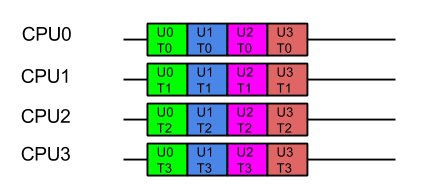
    Label UxTy represent Task y for User x. Tasks for the same user are coloured alike

    This view suggests that each user’s combined task will be executed in minimum time. However some users must wait for prior users tasks to complete before their execution can start, so average latency is higher.

    Furthermore, we know from Mechanical Sympathy that such ideal execution is rarely possible, especially if there is data shared between tasks. Each CPU needs time to load its cache and register with data before it can be acted on. If that data is specific to the problem each user is trying to solve, then the real view of the parallel execution looks more like the following, the orange blocks indicating the time taken to load the CPU cache with user and task related data:
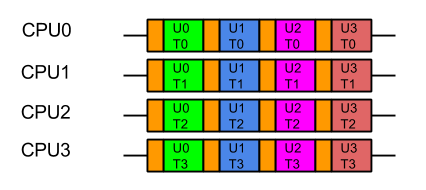
    Label UxTy represent Task y for User x. Tasks for the same user are coloured alike. Orange blocks represent cache load time.

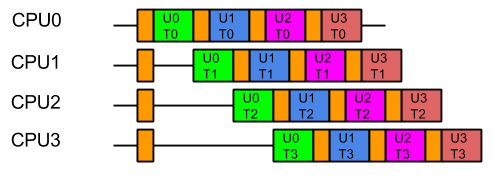
    So from the containers point of view, the last thing it wants is the data from one users large problem spread over all its CPUs, because that means that when it executes the next task, it will have a cold cache and it must be reloaded with the data of the next user.  Furthermore, executing tasks for the same user on different CPUs risks Parallel Slowdown, where the cost of mutual exclusion, synchronisation and communication between CPUs can increase the total time needed to execute the tasks to more than serial execution.  If the tasks are fully mutually excluded on user data (unlikely but a bounding case), then the execution could look like:
    For optimal execution from the containers point of view it is far better if tasks from each user, which use common data, are kept on the same CPU so the cache only needs to be loaded once and there is no mutual exclusion on user data:
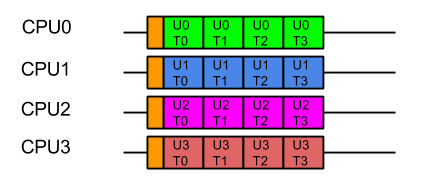
    While this style of execution does not achieve the minimal latency and throughput of the idealised application view, in reality it is the fairest and most optimal execution, with all users receiving similar quality of service and the optimal average latency.

    In summary, when scheduling the execution of parallel tasks, it is best to keep tasks that share data on the same CPU so that they may benefit from a hot cache (the original blog contains some micro benchmark results that quantifies the benefit).

    Produce Consume (PC)

    In order to facilitate the decomposition of large problems into smaller ones, the Jetty container uses the Producer-Consumer pattern:

    • The NIO Selector produces IO events that need to be consumed by reading, parsing and handling the data.
    • A multiplexed HTTP/2 connection produces Frames that need to be consumed by calling the Servlet Container. Note that the producer of HTTP/2 frames is itself a consumer of IO events!

    The producer-consumer pattern adds another way that tasks can be related by data. Not only might they be for the same user, but consuming a task will share the data that results from producing the task. A simple implementation can achieve this by using only a single CPU to both produce and consume the tasks:

    while (true)
    {
      Runnable task = _producer.produce();
      if (task == null)
        break;
       task.run();
    }

    The resulting execution pattern has good mechanical sympathy characteristics:

    Label UxPy represent Produce Task y for User x, Label UxCy represent Consume Task y for User x. Tasks for the same user are coloured in similar tones. Orange blocks are cache load times.

    Here all the produced tasks are immediately consumed on the same CPU with a hot cache!  Cache load times are minimised, but the cost is that server will suffer from Head of Line (HOL) Blocking, where the serial execution of task from a queue means that execution of tasks are forced to wait for the completion of unrelated tasks.  In this case tasks for U1C0 need not wait for U0C0 and U2C0 tasks need not wait for U1C1 or U0C1 etc. There is no parallel execution and thus this is not an optimal usage of the server resources.

    Produce Execute Consume (PEC)

    To solve the HOL blocking problem, multiple CPUs must be used so that produced tasks can be executed in parallel and even if one is slow or blocks, the other CPU can progress the other tasks.  To achieve this, a typical solution is to have one Thread executing on a CPU that will only produce tasks, which are then placed in a queue of tasks to be executed by Threads running on other CPUs.   Typically the task queue is abstracted into an Executor:

    while (true)
    {
        Runnable task = _producer.produce();
        if (task == null)
            break;
        _executor.execute(task);
    }

    This strategy could be considered the canonical solution to the producer consumer problem, where producers are separated from consumers by a queue and is at the heart of architectures such as SEDA. This strategy well solves the head of line blocking issue, since all tasks produced can complete independently in different Threads on different CPUs:
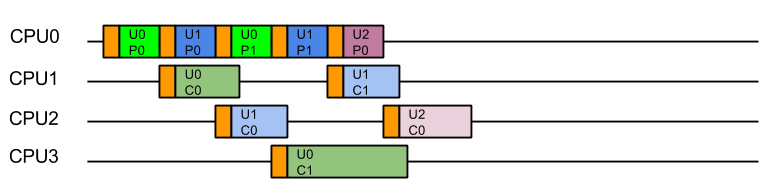
    This represents a good improvement in throughput and average latency over the simple Produce Consume, solution, but the cost is that every consumed task is executed on a different Thread (and thus likely a different CPU) from the one that produced the task.  While this may appear like a small cost for avoiding HOL blocking, our experience is that CPU cache misses significantly reduced the performance of early Jetty 9 releases.

    Eat What You Kill (EWYK) AKA Execute Produce Consume (EPC)

    To achieve good mechanical sympathy and avoid HOL blocking, Jetty has developed the Execute Produce Consume strategy, that we have nicknamed Eat What You Kill (EWYK) after the expression which states a hunter should only kill an animal they intend to eat. Applied to the producer consumer problem this policy says that a thread should only produce (kill) a task if it intends to consume (eat) it[n]The EatWhatYouKill strategy is named after a hunting proverb in the sense that one should only kill to eat. The use of this phrase is not an endorsement of hunting nor killing of wildlife for food or sport.[/n]. A task queue is still used to achieve parallel execution, but it is the producer that is dispatched rather than the produced task:

        while (true)
        {
            Runnable task = _producer.produce();
            if (task == null)
                break;
            _executor.execute(this); // dispatch production
            task.run(); // consume the task ourselves
        }

    The result is that a task is consumed by the same Thread, and thus likely the same CPU, that produced it, so that consumption is always done with a hot cache:
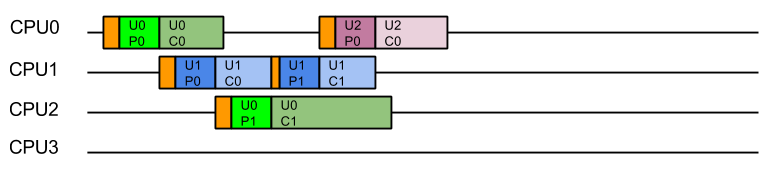
    Moreover, because any thread that completes consuming a task will immediately attempt to produce another task, there is the possibility of a single Thread/CPU executing multiple produce/consume cycles for the same user. The result is improved average latency and reduced total CPU time.

    Starvation!

    Unfortunately, a pure implementation of EWYK suffers from a fatal flaw! Since any thread producing a task will go on to consume that task,  it is possible for all threads/CPU to be consuming at once.   This was initially seen as a feature as it exerted good back pressure on the network as a busy server used all its resources consuming existing tasks rather than producing new tasks. However, in an application server consuming a task may be a blocking process that waits for more data/frames to be produced. Unfortunately if every thread/CPU ends up consuming such a blocking task, then there are no threads left available to produce the tasks to unblock them. Dead lock!

    A real example of this occurred with HTTP/2, when every Thread from the pool was blocked in a HTTP/2 request because it had used up its flow control window. The windows can be expanded by flow control frames from the other end, but there were no threads available to process the flow control frames!

    Thus the EWYK execution strategy used in Jetty is now adaptive and it can can use the most appropriate of the three strategies outlined above, ensuring there is always at least one thread/CPU producing so that starvation does not occur. To be adaptive, Jetty uses two mechanisms:

    • Tasks that are produced can be interrogated via the Invocable interface to determine if they are nonblocking, blocking or can be run in either mode.  NON_BLOCKING or EITHER tasks can be directly consumed by PC model.
    • The thread pools used by Jetty implement the TryExecutor interface which supports the method boolean tryExecute(Runnable task)which allows the scheduler to know if a thread was available to continue producing and thus allows EWYK/EPC mode, otherwise the task must be passed to an executor to be consumed in PEC mode.  To implement this semantic, Jetty maintains a dynamically sized pool of reserved threads that can respond to tryExecute(Runnable)calls.

    Thus the simple produce consume (PC) model is used for non-blocking tasks; for blocking tasks the EWYK, aka Execute Produce Consume (EPC) mode is used if a reserved thread is available, otherwise the SEDA style Produce Execute Consume (PEC) model is used.

    The adaptive EWYK strategy can be written as :

        while (true)
        {
            Runnable task = _producer.produce();
            if (task == null)
                break;
            if (Invocable.getInvocationType(task)==NON_BLOCKING)
                task.run();                     // Produce Consume
            else if (executor.tryExecute(this)) // recruit a new producer?
                task.run();                     // Execute Produce Consume (EWYK!)
            else
                executor.execute(task);         // Produce Execute Consume
        }
    

    Chained Execution Strategies

    As stated above, in the Jetty use-case it is common for the execution strategy used by the IO layer to call tasks that are themselves an execution strategy for producing and consuming HTTP/2 frames.  Thus EWYK strategies can be chained and by knowing some information about the mode in which the prior  strategy has executed them the strategies can be even more adaptive.

    The adaptable chainable EWYK strategy is outlined here:

      while (true) {
        Runnable task = _producer.produce();
        if (task == null)
          break;
        if (thisThreadIsNonBlocking())
        {
          switch(Invocable.getInvocationType(task))
          {
            case NON_BLOCKING:
              task.run();                 // Produce Consume
              break;
            case BLOCKING:
              executor.execute(task);     // Produce Execute Consume
              break;
            case EITHER:
              executeAsNonBlocking(task); // Produce Consume break;
           }
        }
        else
        {
          switch(Invocable.getInvocationType(task))
          {
            case NON_BLOCKING:
              task.run();                   // Produce Consume
              break;
            case BLOCKING:
              if (_executor.tryExecute(this))
                task.run();                 // Execute Produce Consume (EWYK!)
              else
                executor.execute(task);     // Produce Execute Consume
              break;
            case EITHER:
              if (_executor.tryExecute(this))
                task.run();                 // Execute Produce Consume (EWYK!)
              else
                executeAsNonBlocking(task); // Produce Consume
                break;
           }
        }

    An example of how the chaining works is that the HTTP/2 task declares itself as invocable EITHER in blocking on non blocking mode. If IO strategy is operating in PEC mode, then the HTTP/2 task is in its own thread and free to block, so it can itself use EWYK and potentially execute a blocking task that it produced.

    However, if the IO strategy has no reserved threads it cannot risk queuing an important Flow Control frame in a job queue. Instead it can execute the HTTP/2 as a non blocking task in the PC mode.  So even if the last available thread was running the IO strategy, it can use PC mode to execute HTTP/2 tasks in non blocking mode. The HTTP/2 strategy is then always able to handle flow control frames as they are non-blocking tasks run as PC and all other frames that may block are queued with PEC.

    Conclusion

    The EWYK execution strategy has been implemented in Jetty to improve performance through mechanical sympathy, whilst avoiding the issues of Head of Line blocking, Thread Starvation and Parallel Slowdown.   The team at Webtide continue to work with our clients and users to analyse and innovate better solutions to serve high performance real world applications.

  • OpenJDK 11 and TLS 1.3 issues

    At the Jetty Project we have been getting reports from the community as well as seeing random failures of load tests and benchmarks that were using TLS, and the failures were only happening with Java 11 (any version up to 11.0.2).

    Jetty users also saw TLS failures in their environments and opened issues about these failure, most notably issue #2939. Following that Jetty issue, OpenJDK issue JDK-8213202 was reported by @rraptorr (kudos for that!).

    The bad news is that JDK-8213202 is not fixed in Java 11.0.2, but it has been fixed in Java 12 (since jdk-12+21), and it has been backported to the OpenJDK 11 repository (and therefore will eventually be part of a future OpenJDK 11.0.x release – hopefully 11.0.3).

    The good news is that the issue can be worked around, while waiting for a Java 11 release that fixes it.

    It may be possible that you have been running Java 11 with TLS 1.3 without any problem for months, as JDK-8213202 is difficult to reproduce and we have only seen it trigger under moderate load and even in that case not all the times.

    Upgrade to Java 12 Solution

    If you can upgrade to Java 12 (at the time of this writing Java 12 is in Release Candidate status), that will solve JDK-8213202. The upgrade to Java 12 should be a drop-in from Java 11, but we recommend you test the upgrade thoroughly.

    Stay on Java 11 Solution

    If you must/want to stay on Java 11 – it is a long-term supported release – then you can work around JDK-8213202 by disabling TLS 1.3, which is used by default in Java 11 or greater, and use TLS 1.2.

    If you are using Jetty embedded you can use this code:

    SslContextFactory sslContextFactory = new SslContextFactory();
    sslContextFactory.setExcludeProtocols("TLSv1.3");

    If you are using Jetty standalone, you can create file $JETTY_BASE/etc/disable-tls13.xml as follows:

    
    <!DOCTYPE Configure PUBLIC "-" "http://www.eclipse.org/jetty/configure_9_3.dtd">
    <Configure id="sslContextFactory" class="org.eclipse.jetty.util.ssl.SslContextFactory">
      <Call name="addExcludeProtocols">
        <Arg>
         <Array type="java.lang.String">
           <Item>TLSv1.3
         </Array>
        </Arg>
      </Call>
    </Configure>

    Then you can start the Jetty standalone server in this way (from directory $JETTY_BASE):

    $ java -jar ../start.jar etc/disable-tls13.xml

    Alternatively, you can add the XML file to $JETTY_BASE/start.ini:

    ... # The existing content of your start.ini
    etc/disable-tls13.xml

    Java 11 Remarks

    Java 11.0.3 will hopefully contain the fix for JDK-8213202. It is unclear if Oracle will build a binary of OpenJDK 11.0.3 since OpenJDK 12 is due soon.

    If you have a support contract with an OpenJDK vendor, you will be able to obtain OpenJDK 11.0.3 through your vendor.

    If you don’t have a support contract with an OpenJDK vendor, you will still be able to obtain OpenJDK 11.0.3, for example through the AdoptOpenJDK Project.

    We will keep you up-to-date about the progress of this issue on this blog and on the @JettyProject Twitter account.


  • Running Jetty on the JPMS module-path

    Jetty and the Java Module System.

    Java 9 introduced the arguably biggest change in the Java platform since its inception, the Java Module System (a.k.a. Project Jigsaw, or Java Platform Module System – JPMS).
    The Java Module System primarily targets the modularization of the JDK itself, but can also be used to write modularized applications.
    Historically, Jetty has been often used to write applications that needed to embed an HTTP server without having too many dependencies. The fact that Jetty itself is a highly modular set of components allows you to use only the Jetty components that you need, reducing the dependencies and keeping your single application jar small.
    For example, you may need to embed Jetty as an HTTP server only, without the need for JSPs, without support for WebSocket, without HTTP/2: Jetty allows you to do that.
    You will be able to mix and match Jetty features by simply adding dependencies on the Jetty modules you need.
    Since Jetty is already modularized into Jetty modules, it would be great if a JPMS application could reference Jetty modules as JPMS modules.
    This is now possible since Jetty 9.4.14.

    JPMS modules for Jetty 9.4.x and Jetty 10.0.x

    To make Jetty modules available as JPMS modules we have taken a two-steps approach.
    First, the Jetty 9.4.x series now include the entryAutomatic-Module-Name in the fileMANIFEST.MF of each jar representing a Jetty module.
    This allowed us to lock down the definition of the Jetty JPMS module names, in the form of org.eclipse.jetty.* names.
    For example, the jetty-util Jetty module has a JPMS module name of org.eclipse.jetty.util, and so forth for other Jetty modules.
    Second, the Jetty 10.0.x series will include a proper module-info.java JPMS module file for each Jetty module. This will allow us to take advantage of the JPMS module system and hiding implementation classes that we don’t want to expose.
    With stable Jetty JPMS module names, JPMS applications that use proper module-info.java JPMS module files can reliably reference JPMS Jetty modules by name, and little will change when they will update their Jetty version from 9.4.x to 10.0.x (where Jetty will also use proper module-info.java JPMS module files).

    Running Jetty standalone on the module-path

    But Jetty is also a great standalone server!
    It is now possible to run Jetty as a standalone server on the module-path rather than on the class-path as it has always been.
    To run Jetty as a standalone server on the module-path, you just need to add an additional command line option, namely --jpms:

    # Create a new JETTY_BASE directory.
    $ mkdir jetty-base
    $ cd jetty-base
    # Configure the HTTP module.
    $ java -jar $JETTY_HOME/start.jar --add-to-start=http
    # Start Jetty on the module-path.
    $ java -jar $JETTY_HOME/start.jar --jpms
    

    That is all!
    Note that this will run the Jetty server on the module path.
    Web applications deployed to Jetty will not take advantage of the JPMS module system (yet).
    Making Web application take advantage of the JPMS module system is a matter for the Eclipse EE4J effort, but we may anticipate that effort in Jetty 10.0.x with some experiments on our own (if you are interested, follow this Jetty enhancement issue).
    We recommend using Java 11 to run Jetty on the module-path.
    Follow the Jetty JPMS documentation if you want to know more details about how to customize Jetty modules so that they are JPMS friendly, and let us know what you think!

  • Java Updates, Jetty, and the Future

    There has been a tremendous amount of information, and a fair amount of disinformation, coming out over the last several months with regards to Java versioning, the effects of modularization, and how projects like Jetty may or may not respond to them. In light of that, we wanted to more comprehensively explain what we have seen thus far, where things are going, and what we are planning to do with Jetty. We are also interested in any feedback from our clients as to what their expectations might be as well as any trials and tribulations you might be having.
    With that in mind, here we go!

    Oracle’s new JDK Release Schedule

    Oracle has published an updated JDK release schedule.
    Oracle will make JDK 8 updates for critical bugs or security fixes publicly available until January 2019. After that, you need to purchase Oracle support for the JDK if you want to continue to use JDK 8 and receive the latest bugs and security fixes.
    As part of their revamped Support Roadmap, Oracle has introduced the term “Long Term Support” for certain JDK releases. However, the term may be confusing, as it practically refers only to customers that purchase Oracle support for the JDK.
    Therefore, if you don’t purchase Oracle support for the JDK, then:

    • JDK 8 will be updated up to January 2019; after that, the supported JDK version will be JDK 11.
    • JDK 9 will not be updated.
    • JDK 10 will be updated up to September 2018; after that, the supported JDK version will be JDK 11.
    • JDK 11 will be updated up to March 2019; after that, the supported JDK version will be JDK 12.
    • JDK 12 will be updated up to September 2019; after that, the supported JDK version will be JDK 13.
    • And so on.

    In different words, those that did not purchase Oracle support for the JDK will have “Long Term Support” by moving to a new JDK version every 6 months.
    Alternatively, it is possible to stay on JDK 11 for more than 6 months by purchasing Oracle support for the JDK, as outlined in the JDK release schedule linked above.

    Oracle’s JavaFX Support

    Oracle’s JavaFX support is outlined in this blog post.
    JavaFX was previously bundled with the JDK, but starting in JDK 11 this will no longer be the case, and JavaFX will be available as a separate download.

    Jetty and JDK versions

    Jetty 9.4.x will be supported on publicly available releases of the JDK from JDK 8 or later. However, we strongly encourage Jetty users to keep pace with JDK releases, to benefit from critical bug fixes, security fixes and new features. At the time of writing Jetty 9.4.x already builds and runs on JDK 8, JDK 9, JDK 10 and early access builds of JDK 11.
    JDK 11 will remove classes previously available in the JDK, as detailed in this issue on GitHub. Jetty does not need those classes, but often applications do.
    Standalone Jetty users will have the choice of either adding the jars containing those classes to their applications (for example in the WEB-INF/lib directory of a web application) or to write a custom Jetty module that exposes those classes to all web applications deployed to Jetty.
    Embedded Jetty users will need to add the jars containing those classes to the classpath.
    If you have questions as to what jars are available for your specific need that may be removed we encourage you to reach out to us early!

    Recommended JDK version migration plan

    We strongly recommend to start planning an upgrade to a JDK version greater than 8 (at this time, JDK 10) right nowMoving from JDK 8 to JDK 11 in September 2018, when JDK 11 will be out, will likely be a too big of a change and too risky.
    In particular, the update from JDK 8 to JDK 9 resulted in a possibly large number of incompatibilities, among which include:

    • Removal of tools.jar
    • Removal of JavaDB
    • Removal of the endorsed directory mechanism
    • Removal of the extension directory mechanism
    • Classloading implementation changes
    • A new Java version string scheme – leads to issues when parsing the Java version string
    • Removal of non-critical internal APIs – for example sun.misc.Base64Decoder
    • URLStreamHandler mechanism changes
    • Removal of many (50+) JVM startup options – the JVM refuses to start if a removed option is specified on the command line
    • New format for the JVM logging – big impact on GC logging

    The main problem is that many of these issues may impact your application and all the libraries your application depends on. Your application may not perform classloading, or lookup the system property “java.version”, but the libraries your application depends on may do so. Most of the issues listed above will only manifest at runtime, perhaps while executing an if statement branch that may only be entered under rare conditions.
    The changes listed above impact not only the development of your applications but also their build and their deployment. In some cases, development and deployment are the responsibility of different departments throughout a company, and it may take time to coordinate the changes.
    The best approach for the development side is to update both your build tools (for example, Maven and Maven Plugins) and your library dependencies to their latest versions.
    After that, it is a process of trial and error to make sure that your application works correctly in every possible scenario. A good test suite helps tremendously in this case, as you will be able to test most if not all of your code.
    The update from JDK 9 to JDK 10 should instead be really smooth, typically just a matter of updating the JDK: if your application works in JDK 9, most probably will work in JDK 10 without changes. The update from JDK 10 to JDK 11 may again have issues because of the classes removed from JDK 11, as discussed above.
    In light of the large number of changes that happened with JDK 9, and considering that the changes may affect your application and the libraries your application depends on (which you may need to update, or ask their maintainers to update), and further considering that the changes affect the build, development and the deployment of your applications, we strongly suggest that you start planning for these changes right now, as putting it off any longer may be too late. If you cannot finish the migration from JDK 8 to JDK 11 by January 2019, you risk running on an outdated JDK 8 release that may contain critical bugs or security issues.

    JDK Vendors

    Since OpenJDK is an open source project, many vendors have licensed the Java Test Compatibility Kit (TCK) and will produce OpenJDK builds that have passed the TCK and therefore are suitable for production use.
    Among these vendors there are:

    These vendors, excluding LJC, will offer free OpenJDK builds that are TCK-tested for the current JDK version and commercial support for previous JDK versions.
    Azul System has nicely summarized both Oracle’s and their own support plans for JDK 8 through JDK 19 in the graphs at this page.
    LJC is providing free OpenJDK builds that are TCK-tested at this page: https://adoptopenjdk.net/LJC “support” is just to build and TCK-test the tags of the OpenJDK project.
    For example:
    You decide to use JDK 9; the current version is JDK 10; a JDK security issue is discovered. Then:

    • The issue will be fixed in the OpenJDK 10 project and a new OpenJDK 10 tag will be created.
    • Oracle will issue a new micro version of JDK 10 (e.g. 10.0.2).
    • LJC will provide an OpenJDK 10 build for the newly created OpenJDK 10 tag.
    • If the issue is backported to OpenJDK 9 (and a new OpenJDK 9 tag created), then:
      • Oracle will not provide any support (will ask you to move to JDK 10.0.2)
      • Azul will provide a JDK 9 build, but only to its paying customers
      • LJC should provide a free OpenJDK 9 build for the newly created OpenJDK 9 tag.

    JakartaEE and JavaEE

    In addition to the efforts by Oracle to plot a more rapid release environment for the JDK, they have donated the entire JavaEE platform to the Eclipse Foundation. JavaEE has been subsequently rebranded as JakartaEE and is currently under the process of being migrated and re-released with the same version number. That is JavaEE 8 will be released as JakartaEE 8 once that migration process has been completed. One interesting note is there is as this point no API changes nor functionality changes for JakartaEE 8 which will carry with it the same minimal JDK 8 version.
    A point of interest, Webtide has members who are serving as co-leads on both the Servlet and Websocket specifications as well as Architecture Council representation within the Foundation itself.

    What everything means!

    The Jetty team has already, and will continue to, do the work of migrating and making sure the Jetty code base is compatible with the most up-to-date JDK versions. In addition, we will endeavor to support the minimal version of JDK that is required for the forthcoming JakartaEE specifications. As new JDK versions are released, we are constantly updating and reviewing them to guarantee Jetty remains stable and ready for consumption.
    This means that for now, it is our intention to support JDK 8, 9, 10, and 11 for Jetty 9.4.x releases. We have yet to begin Jetty 10.0.x releases due in large part to the upheaval associated with the JakartaEE code donation coupled with this relatively new accelerated JDK release schedule. We anticipate a different approach to new Jetty 10.0.x releases as they relate to JDK releases but nothing is set in stone in this regard. One approach may be to support the minimal version required by the JakartaEE version and the most current two JDK releases. It seems an untenable situation to pledge support for a minimal version like JDK 8 and every version of the JDK between official LTS versions (JDK 11 through JDK 17!).
    Regardless, we are always available to assist our clients with any questions or migration issues may come across related to this situation. If you have internal plans for how you intend to update JDK versions in the future or expectations on how Jetty will interact with future JDK releases we encourage you to share with us to help manage expectations.

  • Getting Started with Jetty and JDK 9

    It’s finally here! Java 9 has officially been released and includes a whole host of changes and new functionality. Jetty, too, has been built with Java 9 over the past few releases as we ramp up support for the new JDK. It’s important to note that while Jetty is being built with Java 9, it currently does not support the entire suite of changes that came with it. To be clear – Jetty does not currently support Java 9 modules.
    Being that JDK 9 is still so new, Jetty’s support for it is still evolving. As such, it is imperative that users wishing to get the most out of JDK 9 and Jetty remain up-to-date as releases become available. Below is a summary of common problem areas that Jetty has resolved in the most recent releases.

    Annotation scanning

    Prior to Jetty 9.4.7,  multi-release jar files will produce exceptions trying to scan “module-info.class” for annotations. It will also not scan a multi-release jar for the correct versions of classes (i.e. Jetty will scan everything in the root and also everything in META-INF/versions).
    If any of your 3rd party jars (multi-release or not) use Java 9 APIs, then you will need to use Jetty 9.4.8 to get the updated version of ASM capable of parsing those classes.

    Classpath issues

    Pertinent only to embedded uses, prior to Jetty 9.4.8 Jetty was unable to find jars to scan for annotations, or for META-INF information such as web-fragments, resources and tag libs from the container classpath when running with Java 9. This did not apply to executing Jetty via the distribution or via the Jetty Maven Plugin.

    Compilation

    Since Jetty 9.4.7, JDK 9 is used to build Jetty (although it can still be built using JDK 8).
    JDK 9 incorporates a new switch in the javac compiler (–release) that allows to easily compile against previous JDK versions, as defined by JEP 247.
    This new compiler switch is supported by the Maven Compiler Plugin, and we use it while building Jetty with JDK 9, with the configuration –release=8, which allows Jetty to run in JDK 8.
    Only few modules (namely those that use new JDK 9 APIs, such as the jetty-alpn-java-[client|server] modules) are compiled with –release=9.
    With this compiler configuration it is less likely that usages of JDK 9 classes and/or APIs can accidentally slip into modules that are meant to be JDK 8 compliant.

    ALPN Support

    Jetty 9.4.6 only supports ALPN via the alpn-boot mechanism, which requires the alpn-boot jar to be in the bootclasspath.
    Since Jetty 9.4.7, ALPN is also supported using JDK 9 specific APIs without the need of the alpn-boot mechanism. This only works when Jetty is run using JDK 9.
    Since Jetty 9.4.8, ALPN is also supported via the Conscrypt provider, which binds natively to OpenSSL. This is supported for both JDK 8 and JDK 9.
    The advantage of using the Conscrypt provider rather than the default JDK provider is increased performance and increased ease of configuration (since there is no need for the alpn-boot mechanism).
     
    As Java continues to roll out updates and as Jetty continues to bring them into the fold, we will keep you up-to-date on how your implementations might be affected and how best to implement them into your environment.

  • Jetty ReactiveStreams HTTP Client

    ReactiveStreams has gained a lot of attention recently, especially because of its inclusion in JDK 9 in the Flow class.
    A number of libraries have been written on top of ReactiveStreams that provide a functional-style API that makes asynchronous processing of a data stream very easy.
    Notable examples of such libraries are RxJava 2 and Spring Reactor. ReactiveStreams provides a common API for all these libraries so that they are interoperable, and interoperable with any library that offers a ReactiveStreams API.
    It is not uncommon that applications (especially REST applications) need to interact with a HTTP client to either consume or produce a stream of data. The typical example is an application making REST calls to a server and obtaining response content that needs to be transformed using ReactiveStreams APIs.
    Another example is having a stream of data that you need to upload to a server using a REST call.
    It’s evident that it would be great if there was a HTTP client that provides ReactiveStreams API, and this is what we have done with the Jetty ReactiveStreams HttpClient.
    Maven coordinates:

    <dependency>
      <groupId>org.eclipse.jetty</groupId>
      <artifactId>jetty-reactive-httpclient</artifactId>
      <version>0.9.0</version>
    </dependency>
    

    The Jetty ReactiveStreams HttpClient is a tiny wrapper over Jetty’s HttpClient; Jetty’s HttpClient was already fully non-blocking and already had full support for backpressure, so wrapping it with the ReactiveStreams API was fairly simple.
    You can find detailed usage examples at the project page on GitHub.

  • Building Jetty with JDK 9

    The Jetty Project has been trying to to build Jetty using JDK 9 for some time now.
    We still have a number of things to fix (a few test cases and integration with ASM for class scanning), but overall we have reached a point where we can build Jetty with JDK 9 and will start using JDK 9 to build Jetty releases.
    This process started with our first attempts using older JDK 9 releases, and the results were ugly. Until recently the Maven Plugins required to build Jetty were not updated to work with JDK 9, so trying to build Jetty with JDK 9 was not possible. After most of the Maven Plugins released versions compatible with JDK 9, fiddling with MAVEN_OPTS and adding a number of --add-opens we had our first success, but it was not pretty.
    Fast forward to the JDK 9 release candidate (JDK 9+181) and we could build Jetty without too much effort, mostly thanks to the latest changes applied to the JDK module system. Below is a report of what we had to do, which will hopefully be of use to others.
    The Jetty Project is a multi-module Maven project where we want to maintain JDK 8 compatibility, but we also want to build 2 modules that are JDK 9-specific (the client and server JDK 9 ALPN implementations).
    First and foremost, you’ll want to use the latest versions of the Maven Plugins, especially the maven-compiler-plugin (as of today at 3.6.2) and the maven-javadoc-plugin (as of today at 3.0.0-M1). Make sure you have them all declared in a <pluginManagement> section, so that you specify their version only there (and only once).
    It’s fairly easy to build a module only when building with JDK 9:

    <project ...>
      ...
      <profiles>
        <profile>
          <id>jdk9</id>
          <activation>
            <jdk>[1.9,)</jdk>
          </activation>
          <modules>
            <module>jdk9-specific-module</module>
          </modules>
        </profile>
      </profiles>
    </project
    

    Next, we want to target JDK 8 for all other modules. This is typically done by configuring the maven-compiler-plugin, specifying <target>1.8</target>.
    It turns out that this is not enough though, because while the JDK 9 compiler will produce class files compatible with JDK 8, it will compile against a JDK 9 runtime with the risk that a JDK 9 only class or method was used by mistake in the source code. Even if you are careful and you don’t use JDK 9 classes or methods in your source code, you can still hit binary incompatibilities that exist between JDK 8 and JDK 9.
    Take, for example, the class java.nio.ByteBuffer.
    In JDK 8 it inherits method limit(int) from the parent class, java.nio.Buffer, and the exact signature is:

    public final Buffer limit(int newLimit)
    

    In JDK 9 this has changed; method limit(int) is now overridden in java.nio.ByteBuffer to covariantly return java.nio.ByteBuffer, so the signature is now:

    public ByteBuffer limit(int newLimit)
    

    The difference in return type causes a binary incompatibility, so that if you compile a class that uses ByteBuffer.limit(int) with JDK 9 and try to run with JDK 8 it fails with:

    java.lang.NoSuchMethodError: java.nio.ByteBuffer.limit(I)Ljava/nio/ByteBuffer;
    

    Indeed, JDK 8 does not have that method with that specific signature.
    Luckily, the JDK 9 compiler has a new switch, --release, that allows to easily target previous JDKs (as specified by JEP 247).
    JDK 9 comes with a file ($JDK_HOME/lib/ct.sym) that is a zipped file (you can view its content in a normal file manager) containing directories for the supported target platforms (JDK 6, 7, 8 and 9), and each directory contains all the symbols for that specific JDK platform.
    The latest maven-compiler-plugin supports this new compiler switch, so compiling correctly is now just a matter of simple configuration:

    <project ...>
      <pluginManagement>
        <plugins>
          <plugin>
            <artifactId>maven-compiler-plugin</artifactId>
            <version>3.6.2</version>
            <configuration>
              <source>1.8</source>
              <target>1.8</target>
            </configuration>
          </plugin>
        </plugins>
      </pluginManagement>
      <profiles>
        <profile>
          <id>jdk9</id>
          <activation>
            <jdk>[1.9,)</jdk>
          </activation>
          <build>
            <plugins>
              <plugin>
                <artifactId>maven-compiler-plugin</artifactId>
                <configuration>
                  <release>8</release>
                </configuration>
              </plugin>
            </plugins>
          </build>
        </profile>
      </profiles>
    </project>
    

    In the <pluginManagement> section, we configure the maven-compiler-plugin with source and target to be JDK 8. This section will be taken into account when compiling using JDK 8.
    In the profile, activated only when compiling using JDK 9, we configure the maven-compiler-plugin with release to be JDK 8, so that the JDK 9 compiler generates the right class files using the symbols for JDK 8 contained in ct.sym.
    Finally, we uncovered a strange issue that we think is a Javadoc bug, apparently also hit by the Lucene Project (see https://github.com/eclipse/jetty.project/issues/1741). For us the workaround was simple, just converting an anonymous inner class into a named inner class, but your mileage may vary.
    Hopefully this blog will help you build your projects with Maven and JDK 9.

  • Contributing to Open Source (and Jetty !)

    Andres Almiray (aalmiray) interviewed me at the JCrete unconference.
    We spoke about the history of the Jetty project (which is 22 years old – like Java itself), how Jetty has been able to stay on the edge all these years, how contribution to Open Source Projects works these days, and what is the simplest thing that a person can do to contribute to an Open Source Project.
    Enjoy the video interview (about 16 mins):

  • Jetty, Cookies and RFC6265 Compliance

    Starting with patch 9.4.3, Jetty will be fully compliant with RFC6265, which presents changes to cookies which may have significant impact for some users.
    Up until now Jetty has supported Version=1 cookies defined in RFC2109 (and continued in RFC2965) which allows for special/reserved characters (control, separator, et al) to be enclosed within double quotes when declared in a Set-Cookie response header:
    Example:

    Set-Cookie: foo="bar;baz";Version=1;Path="/secur"
    

    Which was added to the HTTP Response headers using the following calls.

    Cookie cookie = new Cookie("foo", "bar;baz");
    cookie.setPath("/secur");
    response.addCookie(cookie);

    This allowed for normally non-permitted characters (such as the ; separator found in the example above) to be used as part of a cookie value. With the introduction of RFC6265 (replacing the now obsolete RFC2965 and RFC2109) , this use of Double Quotes to enclose special characters is no longer possible.
    This change was made as a reaction to the strict RFC6265 validation rules present in Chrome/Chromium.
    As such, users are now required to encode their cookie values to use these characters.
    Utilizing javax.servlet.http.Cookie, this can be done as:

    Cookie cookie = new Cookie("foo", URLEncoder.encode("bar;baz", "utf-8"));

    Starting with Jetty 9.4.3, we will now validate all cookie names and values when being added to the HttpServletResponse via the addCookie(Cookie) method.  If there is something amiss, Jetty will throw an IllegalArgumentException with the details.
    Of note, this new addCookie(Cookie) validation will be applied via the ServerConnector, and will work on HTTP/1.0, HTTP/1.1, and HTTP/2.0
    Additionally, Jetty has added a CookieCompliance property to the HttpConfiguration object which can be utilized to define which cookie policy the ServerConnectors will adhere to. By default, this will be set to RFC6265.
    In the standard Jetty Distribution, this can be found in the server’s jetty.xml as:

    <Set name="cookieCompliance">
      <Call class="org.eclipse.jetty.http.CookieCompliance" name="valueOf">
        <Arg><Property name="jetty.httpConfig.cookieCompliance" default="RFC6265"/></Arg>
      </Call>
    </Set>

    Or if you are utilizing the module system in the Jetty distribution, you can set the jetty.httpConfig.cookieCompliance property in the appropriate start INI for your${jetty.base} (such as ${jetty.base}/start.ini or ${jetty.base}/start.d/server.ini):

    ## Cookie compliance mode of: RFC6265
    # jetty.httpConfig.cookieCompliance=RFC6265

    Or, for older Version=1 Cookies, use:

    ## Cookie compliance mode of: RFC2965
    # jetty.httpConfig.cookieCompliance=RFC2965


  • Thread Starvation with Eat What You Kill

    This is going to be a blog of mixed metaphors as I try to explain how we avoid thread starvation when we use Jetty’s eat-what-you-kill[n]The EatWhatYouKill strategy is named after a hunting proverb in the sense that one should only kill to eat. The use of this phrase is not an endorsement of hunting nor killing of wildlife for food or sport.[/n] scheduling strategy.
    Jetty has several instances of a computing pattern called ProduceConsume, where a task is run that produces other tasks that need to be consumed. An example of a Producer is the HTTP/1.1 Connection, where the Producer task looks for IO activity on any connection. Each IO event detected is a Consumer task which will read the handle the IO event (typically a HTTP request). In Java NIO terms, the Producer in this example is running the NIO Selector and the Consumers are handling the HTTP protocol and the applications Servlets. Note that the split between Producing and Consuming can be rather arbitrary and we have tried to have the HTTP protocol as part of the Producer, but as we have previously blogged, that split has poor mechanical sympathy. So the key abstract about the Producer Consumer pattern for Jetty is that we use it when the tasks produced can be executed in any order or in parallel: HTTP requests from different connections or HTTP/2 frames from different streams.

    Eat What You Kill

    Mechanical Sympathy not only affects where the split is between producing and consuming, but also how the Producer task and Consumer tasks should be executed (typically by a thread pool) and such considerations can have a dramatic effect on server performance. For example, if one thread produced a task then it is likely that the CPU’s cache is now hot with all the data relating to that task, and so it is best that the same CPU consumes that task using the hot cache. This could be achieved with complex core locking mechanism, but it is far more straight-forward to consume the task using the same thread.
    Jetty has an ExecutionStrategy called Eat-What-You-Kill (EWYK), that has excellent mechanical sympathy properties. We have previously explained  this strategy in detail, but in summary it follows the hunters ethic[n]The EatWhatYouKill strategy is named after a hunting proverb in the sense that one should only kill to eat. The use of this phrase is not an endorsement of hunting nor killing of wildlife for food or sport.[/n] that one should only kill (produce) something that you intend to eat (consume). This strategy allows a thread to only run the producing task if it is immediately able to run any consumer task that is produced (using the hot CPU cache). In order to allow other consumer task to run in parallel, another thread (if available) is dispatched to do more producing and consuming.

    Thread Starvation

    EWYK is an excellent execution strategy that has given Jetty significant better throughput and reduced latency. That said, it is susceptible to thread starvation when it bites off more than it can chew.
    The issue is that EWYK works by using the same thread that produced a task to immediately consume the task and it is possible (even likely) that the consumer task will block as it is often calling application code which may do blocking IO or which is set to wait for some other event. To ensure this does not block the entire server, EWYK will dispatch another task to the thread pool that will do more producing.
    The problem is that if the thread pool is empty (because all the threads are in blocking application code) then the last non-blocked producing thread may produce a task which it then calls and also blocks. A task to do more producing will have been dispatched to the thread pool, but as it was generated from the last available thread, the producing task will be waiting in the job queue for an available thread. All the threads are blocking and it may be that they are all blocking on IO operations that will only be unblocked if some data is read/written.  Unless something calls the NIO Selector, the read/write will not been seen. Since the Selector is called by the Producer task, and that is waiting in the queue, and the queue is stalled because of all the threads blocked waiting for the selector the server is now dead locked by thread starvation!

    Always two there are!

    Jetty’s clever solution to this problem is to not only run our EWYK execution strategy, but to also run the alternative ProduceExecuteConsume strategy, where one thread does all the producing and always dispatches any produced tasks to the thread pool. Because this is not mechanically sympathetic, we run the producer task at low priority. This effectively reserves one thread from the thread pool to always be a producer, but because it is low priority it will seldom run unless the server is idle – or completely stalled due to thread starvation. This means that Jetty always has a thread available to Produce, thus there is always a thread available to run the NIO Selector and any IO events that will unblock any threads will be detected. This needs one more trick to work – the producing task must be able to tell if a detected IO task is non-blocking (i.e. a wakeup of a blocked read or write), in which case it executes it itself rather than submitting the task to any execution strategy. Jetty uses the InvocationType interface to tag such tasks and thus avoid thread starvation.
    This is a great solution when a thread can be dedicated to always Producing (e.g. NIO Selecting). However Jetty has other Producer-Consumer patterns that cannot be threadful. HTTP/2 Connections are consumers of IO Events, but are themselves producers of parsed HTTP/2 frames which may be handled in parallel due to the multiplexed nature of HTTP/2. So each HTTP/2 connection is itself a Produce-Consume pattern, but we cannot allocate a Producer thread to each connection as a server may have many tens of thousands connections!
    Yet, to avoid thread starvation, we must also always call the Producer task for HTTP/2. This is done as it may parse HTTP/2 flow control frames that are necessary to unblock the IO being done by applications threads that are blocked and holding all the available threads from the pool.
    Even if there is a thread reserved as the Producer/Selector by a connector, it may detect IO on a HTTP/2 connection and use the last thread from the thread pool to Consume that IO. If it produces a HTTP/2 frame and EWYK strategy is used, then the last thread may Consume that frame and it too may block in application code. So even if the reserved thread detects more IO, there are no more available threads to consume them!
    So the solution in HTTP/2 is similar to the approach with the Connector. Each HTTP/2 connection has two executions strategies – EWYK, which is used when the calling thread (the Connector’s consumer) is allowed to block, and the traditional ProduceExecuteConsume strategy, which is used when the calling thread is not allowed to block. The HTTP/2 Connection then advertises itself as an InvocationType of EITHER to the Connector. If the Connector is running normally a EWYK strategy will be used and the HTTP/2 Connection will do the same. However, if the Connector is running the low priority ProduceExecutionConsume strategy, it invokes the HTTP/2 connection as non-blocking. This tells the HTTP/2 Connection that when it is acting as a Consumer of the Connectors task, it must not block – so it uses its own ProduceExecuteConsume strategy, as it knows the Production will parse the HTTP/2 frame and not perform the Consume task itself (which may block).
    The final part is that the HTTP/2 frame Producer can look at the frames produced. If they are not frames that will block when handled (i.e. Flow Control) they are handled by the Producer and not submitted to any strategy to be Consumed. Thus, even if the Server is on it’s last thread, Flow Control frames will be detected, parsed and handled – unblocking other threads and avoiding starvation!