Category: Java

  • G1 Garbage Collector at GeeCON 2015

    I had the pleasure to speak at the GeeCON 2015 Conference in Kraków, Poland, where I presented a HTTP/2 session and a new session about the G1 garbage collector (slides below).

    I have to say that GeeCON has become one of my favorite conferences, along with the Codemotion Conference.
    While Codemotion is bigger and spans more themes (Java, JavaScript/WebUI/WebUX, IoT, Makers and Embedded), GeeCON is smaller and more focused on Java and Scala.
    The GeeCON organizers have made a terrific effort, and the results are, in my opinion, superb.
    The conference venue is a bit far from the center of Kraków (where most speaker hotels were), but easily reachable by bus. When the conference is over, you still have a couple of hours of light to visit the city center, which is gorgeous.
    The sessions I followed were very interesting and the speakers top quality.
    The accommodation was good, food and beverages at the conference were excellent, and on the second day there was a party for all conference attendees in a huge beer bar, with a robo war tournament for those that like to flip someone else’s table robot. Fantastic !
    Definitely mark GeeCON on your calendars for the next year.
    The slides about the G1 session aim at explaining some of the less known areas of G1 and present tuning advices along with a real-world use case of migration from CMS to G1.
    Contact us if you want to tune the GC behavior of your Jetty applications, either deployed to a standalone Jetty server or coded using Jetty embedded.

  • Jetty-9 Iterating Asynchronous Callbacks

    While Jetty has internally used asynchronous IO since 7.0, Servlet 3.1 has added asynchronous IO to the application API and Jetty-9.1 now supports asynchronous IO in an unbroken chain from application to socket. Asynchronous APIs can often look intuitively simple, but there are many important subtleties to asynchronous programming and this blog looks at one important pattern used within Jetty.  Specifically we look at how an iterating callback pattern is used to avoid deeps stacks and unnecessary thread dispatches.

    Asynchronous Callback

    Many programmers wrongly believe that asynchronous programming is about Futures. However Futures are a mostly broken abstraction and could best be described as a deferred blocking API rather than an Asynchronous API.    True asynchronous programming is about callbacks, where the asynchronous operation calls back the caller when the operation is complete.  A classic example of this is the NIO AsynchronousByteChannel write method:

    <A> void write(ByteBuffer src,
                   A attachment,
                   CompletionHandler<Integer,? super A> handler);
    public interface CompletionHandler<V,A>
    {
      void completed(V result, A attachment);
      void failed(Throwable exc, A attachment);
    }

    With an NIO asynchronous write, a CompletionHandler instance is pass that is called back once the write operation has completed or failed.   If the write channel is congested, then no calling thread is held or blocked whilst the operation waits for the congestion to clear and the callback will be invoked by a thread typically taken from a thread pool.

    The Servlet 3.1 Asynchronous IO API is syntactically very different, but semantically similar to NIO. Rather than have a callback when a write operation has completed the API has a WriteListener API that is called when a write operation can proceed without blocking:

    public interface WriteListener extends EventListener
    {
        public void onWritePossible() throws IOException;
        public void onError(final Throwable t);
    }

    Whilst this looks different to the NIO write CompletionHandler, effectively a write is possible only when the previous write operation has completed, so the callbacks occur on essentially the same semantic event.

    Callback Threading Issues

    So that asynchronous callback concept looks pretty simple!  How hard could it be to implement and use!   Let’s consider an example of asynchronously writing the data obtained from an InputStream.  The following WriteListener can achieve this:

    public class AsyncWriter implements WriteListener
    {
      private InputStream in;
      private ServletOutputStream out;
      private AsyncContext context;
      public AsyncWriter(AsyncContext context,
                         InputStream in,
                         ServletOutputStream out)
      {
        this.context=context;
        this.in=in;
        this.out=out;
      }
      public void onWritePossible() throws IOException
      {
        byte[] buf = new byte[4096];
        while(out.isReady())
        {
          int l=in.read(buf,0,buf.length);
          if (l<0)
          {
            context.complete();
            return;
          }
          out.write(buf,0,l);
        }
      }
      ...
    }

    Whenever a write is possible, this listener will read some data from the input and write it asynchronous to the output. Once all the input is written, the asynchronous Servlet context is signalled that the writing is complete.

    However there are several key threading issues with a WriteListener like this from both the caller and callee’s point of view.  Firstly this is not entirely non blocking, as the read from the input stream can block.  However if the input stream is from the local file system and the output stream is to a remote socket, then the probability and duration of the input blocking is much less than than of the output, so this is substantially non-blocking asynchronous code and thus is reasonable to include in an application.  What this means for asynchronous operations providers (like Jetty), is that you cannot trust any code you callback to not block and thus you cannot use an important thread (eg one iterating over selected keys from a Selector) to do the callback, else an application may inadvertently block other tasks from proceeding.  Thus Asynchronous IO Implementations thus must often dispatch a thread to perform a callback to application code.

    Because dispatching threads is expensive in both CPU and latency, Asynchronous IO implementations look for opportunities to optimise away thread dispatches to callbacks.  There Servlet 3.1 API has by design such an optimisation with the out.isReady() call that allows iteration of multiple operations within the one callback. A dispatch to onWritePossible only happens when it is required to avoid a blocking write and often many write iterations can proceed within a single callback. An NIO CompletionHandler based implementation of the same task is only able to perform one write operation per callback and must wait for the invocation of the complete handler for that operation before proceeding:

    public class AsyncWriter implements CompletionHandler<Integer,Void>
    {
      private InputStream in;
      private AsynchronousByteChannel out;
      private CompletionHandler<Void,Void> complete;
      private byte[] buf = new byte[4096];
      public AsyncWriter(InputStream in,
                         AsynchronousByteChannel out,
                         CompletionHandler<Void,Void> complete)
      {
        this.in=in;
        this.out=out;
        this.complete=complete;
        completed(0,null);
      }
      public void completed(Integer w,Void a) throws IOException
      {
        int l=in.read(buf,0,buf.length);
        if (l<0)
          complete.completed(null,null);
        else
          out.write(ByteBuffer.wrap(buf,0,l),this);
      }
      ...
    }

    Apart from an unrelated significant bug (left as an exercise for the reader to find), this version of the AsyncWriter has a significant threading challenge.  If the write can trivially completes without blocking, should the callback to CompletionHandler be dispatched to a new thread or should it just be called from the scope of the write using the caller thread?  If a new thread is always used, then many many dispatch delays will be incurred and throughput will be very low.  But if the callback is invoked from the scope of the write call, then if the callback does a re-entrant call to write, it may call a callback again which calls write again etc. etc. and a very deep stack will result and often a stack overflow can occur.

    The JVM’s implementation of NIO resolves this dilemma by doing both!  It performs the callback in the scope of the write call until it detects a deep stack, at which time it dispatches the callback to a new thread.    While this does work, I consider it a little bit of the worst of both worlds solution: you get deep stacks and you get dispatch latency.  Yet it is an accepted pattern and Jetty-8 uses this approach for callbacks via our ForkInvoker class.

    Jetty-9 IO Callbacks

    For Jetty-9, we wanted the best of all worlds.  We wanted to avoid deep re entrant stacks and to avoid dispatch delays.  In a similar way to Servlet 3.1 WriteListeners, we wanted to substitute iteration for reentrancy when ever possible.    Thus Jetty does not use NIO asynchronous IO channel APIs, but rather implements our own asynchronous IO pattern using the NIO Selector to implement our own EndPoint abstraction and a simple Callback interface:

    public interface EndPoint extends Closeable
    {
      ...
      void write(Callback callback, ByteBuffer... buffers)
        throws WritePendingException;
      ...
    }
    public interface Callback
    {
      public void succeeded();
      public void failed(Throwable x);
    }

    One key feature of this API is that it supports gather writes, so that there is less need for either iteration or re-entrancy when writing multiple buffers (eg headers, chunk and/or content).  But other than that it is semantically the same as the NIO CompletionHandler and if used incorrectly could also suffer from deep stacks and/or dispatch latency.

    Jetty Iterating Callback

    Jetty’s technique to avoid deep stacks and/or dispatch latency is to use the IteratingCallback class as the basis of callbacks for tasks that may take multiple IO operations:

    public abstract class IteratingCallback implements Callback
    {
      protected enum State
        { IDLE, SCHEDULED, ITERATING, SUCCEEDED, FAILED };
      private final AtomicReference<State> _state =
        new AtomicReference<>(State.IDLE);
      abstract protected void completed();  
      abstract protected State process() throws Exception;
      public void iterate()
      {
        while(_state.compareAndSet(State.IDLE,State.ITERATING))
        {
          State next = process();
          switch (next)
          {
            case SUCCEEDED:
              if (!_state.compareAndSet(State.ITERATING,State.SUCCEEDED))
                throw new IllegalStateException("state="+_state.get());
              completed();
              return;
            case SCHEDULED:
              if (_state.compareAndSet(State.ITERATING,State.SCHEDULED))
                return;
              continue;
            ...
          }
        }
        public void succeeded()
        {
          loop: while(true)
          {
            switch(_state.get())
            {
              case ITERATING:
                if (_state.compareAndSet(State.ITERATING,State.IDLE))
                  break loop;
                continue;
              case SCHEDULED:
                if (_state.compareAndSet(State.SCHEDULED,State.IDLE))
                  iterate();
                break loop;
              ...
            }
          }
        }

    IteratingCallback is itself an example of another pattern used extensively in Jetty-9:  it is a lock-free atomic state machine implemented with an AtomicReference to an Enum.  This pattern allows very fast and efficient lock free thread safe code to be written, which is exactly what asynchronous IO needs.

    The IteratingCallback class iterates on calling the abstract process() method until such time as it returns the SUCCEEDED state to indicate that all operations are complete.  If the process() method is not complete, it may return SCHEDULED to indicate that it has invoked an asynchronous operation (such as EndPoint.write(...)) and passed the IteratingCallback as the callback.

    Once scheduled, there are two possible outcomes for a successful operation. In the case that the operations completed trivially it will have called back succeeded() within the scope of the write, thus the state will have been switched from ITERATING to IDLE so that the while loop in iterate will fail to set the SCHEDULED state and continue to switch from IDLE to ITERATING, thus calling process() again iteratively.

    In the case that the schedule operation does not complete within the scope of process, then the iterate while loop will succeed in setting the SCHEDULED state and break the loop. When the IO infrastructure subsequently dispatches a thread to callback succeeded(), it will switch from SCHEDULED to IDLE state and itself call the iterate() method to continue to iterate on calling process().

    Iterating Callback Example

    A simplified example of using an IteratingCallback to implement the AsyncWriter example from above is given below:

    private class AsyncWriter extends IteratingCallback
    {
      private final Callback _callback;
      private final InputStream _in;
      private final EndPoint _endp;
      private final ByteBuffer _buffer;
      public AsyncWriter(InputStream in,EndPoint endp,Callback callback)
      {
        _callback=callback;
        _in=in;
        _endp=endp;
        _buffer = BufferUtil.allocate(4096);
      }
      protected State process() throws Exception
      {     
        int l=_in.read(_buffer.array(),
                       _buffer.arrayOffset(),
                       _buffer.capacity());
        if (l<0)
        {
           _callback.succeeded();
           return State.SUCCEEDED;
        }
        _buffer.position(0);
        _buffer.limit(len);
        _endp.write(this,_buffer);
        return State.SCHEDULED;
      }

    Several production quality examples of IteratingCallbacks can be seen in the Jetty HttpOutput class, including a real example of asynchronously writing data from an input stream.

    Conclusion

    Jetty-9 has had a lot of effort put into using efficient lock free patterns to implement a high performance scalable IO layer that can be seamlessly extended all the way into the servlet application via the Servlet 3.1 asynchronous IO.   Iterating callback and lock free state machines are just some of the advanced techniques Jetty is using to achieve excellent scalability results.

  • Pluggable Transports for Jetty 9.1's HttpClient

    In Jetty 9, the HttpClient was completely rewritten, as we posted a while back.
    In Jetty 9.1, we took one step forward and we made Jetty’s HttpClient polyglot. This means that now applications can use the HTTP API and semantic (“I want to GET the resource at the http://host/myresource URI”) but can now choose how this request is carried over the network.
    Currently, three transports are implemented: HTTP, SPDY and FastCGI.
    The usage is really simple; the following snippet shows how to setup HttpClient with the default HTTP transport:

    // Default transport uses HTTP
    HttpClient httpClient = new HttpClient();
    httpClient.start();
    

    while the next snippet shows how to setup HttpClient with the SPDY transport:

    // Using the SPDY transport in clear text
    // Create the SPDYClient factory
    SPDYClient.Factory spdyClientFactory = new SPDYClient.Factory();
    spdyClientFactory.start();
    // Create the SPDYClient
    SPDYClient spdyClient = spdyClientFactory.newSPDYClient(SPDY.V3);
    // Create the HttpClient transport
    HttpClientTransport transport = new HttpClientTransportOverSPDY(spdyClient);
    // HTTP over SPDY !
    HttpClient httpSPDYClient = new HttpClient(transport, null);
    httpSPDYClient.start();
    // Send request, receive response
    ContentResponse response = httpSPDYClient.newRequest("http://host/path")
            .method("GET")
            .send();
    

    This last snippet allows the application to still use the HTTP API, but have the request and the response transported via SPDY, rather than HTTP.
    Why this is useful ?
    First of all, more and more websites are converting to SPDY because it offers performance improvements (and if you use Jetty as the server behind your website, the performance improvements can be stunning, check out this video).
    This means that with a very simple change in the HttpClient configuration, your client application connecting to servers can benefit of the performance boost that SPDY provides.
    If you are using HttpClient for server-to-server communication, you can use SPDY in clear text (rather than encrypted) to achieve even more efficiency because there is no encryption involved. Jetty is perfectly capable of speaking SPDY in clear text, so this could be a major performance win for your applications.
    Furthermore, you can parallelize HTTP requests thanks to SPDY’s multiplexing rather than opening multiple connections, saving network resources.
    I encourage you to try out these features and report your feedback here in the comments or on the Jetty mailing list.

  • The Need For SPDY and why upgrade to Jetty 9?

    So you are not Google!  Your website is only taking a few 10’s or maybe 100’s of requests a second and your current server is handling it without a blip.  So you think you don’t need a faster server and it’s only something you need to consider when you have 10,000 or more simultaneous users!  WRONG!   All websites need to be concerned about speed in one form or another and this blog explains why and how Jetty with SPDY can help improve your  business no matter how large or small you are!

    TagMan conversion rate study for Glasses Direct

    Speed is Relative

    What does it mean to say your web site is fast? There are many different ways of measuring speed and while some websites are concerned with all of them, many if not most need only be concerned with some aspects of speed.

    Requests per Second

    The first measure of speed that many web developers think about is throughput, or how many requests per second can your web site handle?  For large web business with millions of users this is indeed a very important measure, but for many/most websites, requests per second is just not an issue.  Most servers will be able to handle thousands of requests per second, which represents 10’s of thousands of simultaneous users and far exceeds the client base and/or database transaction capacity of small to medium enterprises.     Thus having a server and/or protocol that will allow even greater requests per second is just not a significant concern for most  [ But if it is, then Jetty is still the server for you, but just not for the reasons this blog explains] .

    Request Latency

    Another speed measure is request latency, which is the time it takes a server to parse a request and generate a response.   This can range from a few milliseconds to many seconds depending on the type of the request and complexity of the application.  It can be a very important measure for some websites, specially web service or REST style servers that  handling a transaction per message.   But as an individual measure it is dominated by network latency (10-500 ms) and application processing (1-30000ms), then the time the server spends (1-5ms) handling a request/response is typically not an important driver when selecting a server.

    Page Load Speed

    The speed measure that is most apparent to users of your website is how long a page takes to load.  For a typical website, this involves fetching on average 85 resources (HTML, images, CSS, javascript, etc.) in many HTTP requests over multiple connections. Study summaries below, show that page load time is a metric that can greatly affect the effectiveness of a web site. Page load times have typically been primarily influenced by page design and the server had little ability to speed up page loads.  But with the SPDY protocol, there are now ways to greatly improve page load time, which we will see is a significant business advantage regardless of the size of your website and client base.

    The Business case for Page Load Speed

    The Book Of Speed presents the business benefits of reduced page load speed as determined by many studies summaries below:

    • A study at Microsofts live.com found that slowing page loads by 500ms reduced revenue per user by 1.2%. This increased to 2.8% at 1000ms delay and 4.3% at 2000ms, mostly because of a reduced click through rate.
    • Google found that the negative effect on business of slow pages got worse the longer users were exposed to a slow site.
    • Yahoo found that a slowdown of 400ms was enough to drop the completed page loads by between 5% and 9%. So users were clicking away from the page rather than waiting for it to load.
    • AOL’s studied several of its web properties and found a strong correlation between page load time and the number of page view per user visit. Faster sites retained their visitors for more pages.
    • When Mozilla improved the speed of their Internet Explorer landing page by 2.2s, they increase their rate of conversions by 15.4%
    • Shopzilla reduce their page loads from 6s to 1.2s and increased their sales conversion by 7-12% and also reduced their operation costs due to reduced infrastructure needs.

    These studies clearly show that page load speed should be a significant consideration for all web based businesses and they are backed up by many more such as:

    If that was not enough, Google have also confirmed that they use page load speed as one of the key factors when ranking search results to display.  Thus a slow page can do double damage of reducing the users that visit and reducing the conversion rate of those that do.

    Hopefully you are getting the message now, that page load speed is very important and the sooner you do something about it, the better it will be.   So what can you do about it?

    Web Optimization

    The traditional approach to improving has been to look at Web Performance Optimization, to improve the structure and technical implementation of your web pages using techniques including:

    • Cache Control
    • GZip components
    • Component ordering
    • Combine multiple CSS and javascript components
    • Minify CSS and javascript
    • Inline images, CSS Sprites and image maps
    • Content Delivery Networks
    • Reduce DOM elements in documents
    • Split content over domains
    • Reduce cookies

    These are all great things to do and many will provide significant speed ups.  However, most of these techniques are very intrusive and can be at odds with good software engineer; development speed and separation of concerns between designers and developers.    It can be a considerable disruption to a development effort to put in aggressive optimization goals along side functionality, design and time to market concerns.

    SPDY for Page Load Speed

    The SPDY protocol is being developed primarily by Google to replace HTTP with a particular focus on improving page load latency.  SPDY is already deployed on over 50% of browsers and is the basis of the first draft of the HTTP/2.0 specification being developed by the IETF.    Jetty was the first java server to implement SPDY and Jetty-9 has been re-architected specifically to better handle the multi protocol, TLS, push and multiplexing features of SPDY.

    Most importantly, because SPDY is an improvement in the network transport layer, it can greatly improve page load times without making any changes at all to a web application.  It is entirely transparent to the web developers and does not intrude into the design or development!

    SPDY Multiplexing

    One of the biggest contributors to web page load latency is the inability of the HTTP to efficiently use connection.  A HTTP connection can have only 1 outstanding request and browsers have a low limit (typically 6) to the number of connections that can be used in parallel.  This means that if your page requires 85 resources to render (which is the average), it can only fetch them 6 at a time and it will take at least 14 round trips over the network before the page is rendered.  With network round trip time often hundreds of ms, this can add seconds to page load times!

    SPDY resolves this issue by supporting multiplexed requests over a single connection with no limit on the number of parallel requests.  Thus if a page needs 85 resources to load, SPDY allows all 85 to be requested in parallel and thus only a single round trip latency imposed and content can be delivered at the network capacity.

    More over, because the single connection is used and reused, then the TCP/IP slow start window is rapidly expanded and the effective network capacity available to the browser is thus increased.

    SPDY Push

    Multiplexing is key to reducing round trips, but unfortunately it cannot remove them all because browser has to receive and parse the HTML before it knows the CSS resources to fetch; and those CSS resources have to be fetched and parsed before any image links in them are known and fetch.  Thus even with multiplexing, a page might take 2 or 3 network round trips just to identify all the resources associated with a page.

    But SPDY has another trick up it’s sleeve.  It allows a server to push resources to a browser in anticipation of requests that might come.  Jetty was the first server to implement this mechanism and uses relationships learnt from previous requests to create a map of associated resources so that when a page is requested, all it’s associated resources can immediately be pushed and no additional network round trips are incurred.

    SPDY Demo

    The following demonstration was given and Java One 2012 and clearly shows the SPDY page load latency improvements for a simple page with 25 images blocks over a simulated 200ms network:

    How do I get SPDY?

    To get the business benefits of speed for your web application, you simply need to deploy it on Jetty and enable SPDY with an SSL Certificate for your site.  Standard java web applications can be deployed without modification on Jetty and there are simple solutions to run sites built with PHP, Ruby, GWT etc on Jetty as well.

    If you want assistance setting up Jetty and SPDY, why not look at the affordable Jetty Migration Services available from Intalio.com and get the Jetty experts help power your web site.

  • Jetty 9.1 in Techempower benchmarks

    Jetty 9.1.0 has entered round 8 of the Techempower’s Web Framework Benchmarks. These benchmarks are a comparison of over 80 framework & server stacks in a variety of load tests. I’m the first one to complain about unrealistic benchmarks when Jetty does not do well, so before crowing about our good results I should firstly say that these benchmarks are primarily focused at frameworks and are unrealistic benchmarks for server performance as they suffer from many of the failings that I have highlighted previously (see Truth in Benchmarking and Lies, Damned Lies and Benchmarks).

    But I don’t want to bury the lead any more than I have already done, so I’ll firstly tell you how Jetty did before going into detail about what we did and what’s wrong with the benchmarks.

    What did Jetty do?

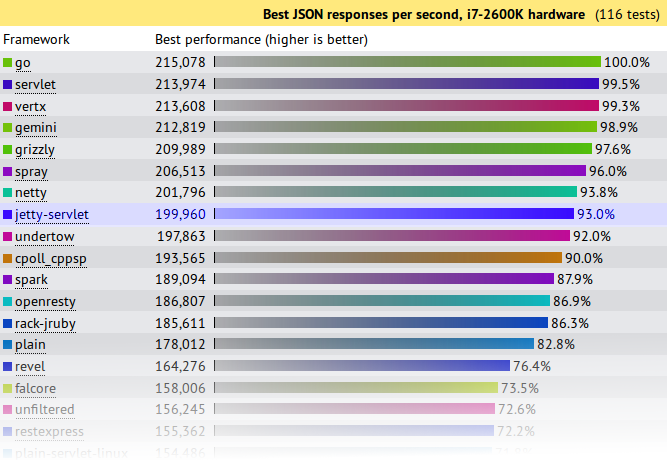
    Jetty has initially entered the JSON and Plaintext benchmarks:

    • Both tests are simple requests and trivial requests with just the string “Hello World” encode either as JSON or plain text.
    • The JSON test has a maximum concurrency of 256 connections with zero delay turn around between a response and the next request.
    • The plaintext test has a maximum concurrency of 16,384 and uses pipelining to run these connections at what can only be described as a pathological work load!

    How did Jetty go?

    At first glance at the results, Jetty look to have done reasonably well, but on deeper analysis I think we did awesomely well and an argument can be made that Jetty is the only server tested that has demonstrated truly scalable results.

    JSON Results

    json-tp

    Jetty came 8th from 107 and achieved 93% (199,960 req/s) of the first place throughput.   A good result for Jetty, but not great. . . . until you plot out the results vs concurrency:

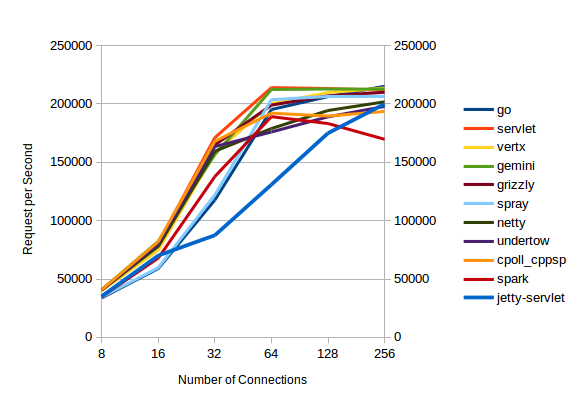
    json-trend

    All the servers with high throughputs have essentially maxed out at between 32 and 64 connections and the top  servers are actually decreasing their throughput as concurrency scales from 128 to 256 connections.

    Of the top throughput servlets, it is only Jetty that displays near linear throughput growth vs concurrency and if this test had been extended to 512 connections (or beyond) I think you would see Jetty coming out easily on top.  Jetty is investing a little more per connection, so that it can handle a lot more connections.

    Plaintext Results

    plain-tp

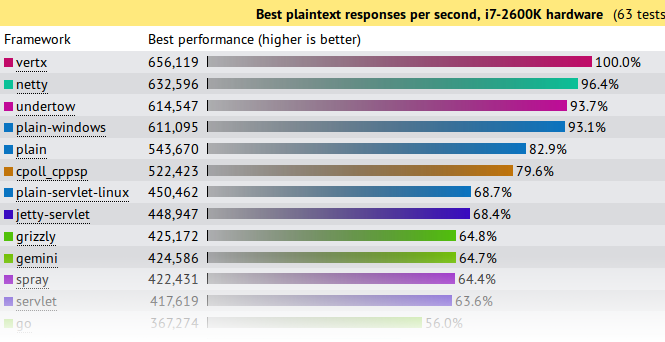
    First glance again is not so great and we look like we are best of the rest with only 68.4% of the seemingly awesome 600,000+ requests per second achieved by the top 4.    But throughput is not the only important metric in a benchmark and things look entirely different if you look at the latency results:

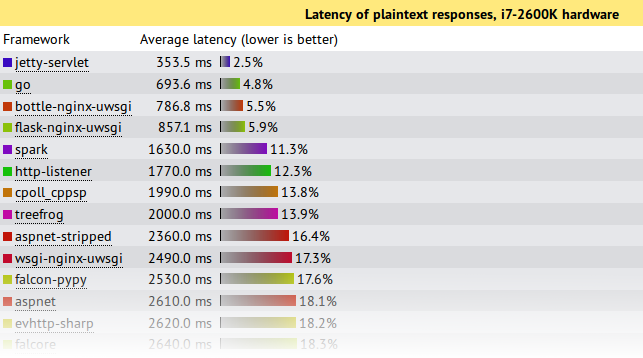
    plain-lat

    This shows that under this pathological load test, Jetty is the only server to send responses with an acceptable latency during the onslaught.  Jetty’s 353.5ms is a workable latency to receive a response, while the next best of 693ms is starting to get long enough for users to register frustration.  All the top throughput servers have average latencies  of 7s or more!, which is give up and go make a pot of coffee time for most users, specially as your average web pages needs >10 requests to display!

    Note also that these test runs were only over 15s, so servers with 7s average latency were effectively not serving any requests until the onslaught was over and then just sent all the responses in one great big batch.  Jetty is the only server to actually make a reasonable attempt at sending responses during the period that a pathological request load was being received.

    If your real world load is anything vaguely like this test, then Jetty is the only server represented in the test that can handle it!

    What did Jetty do?

    The jetty entry into these benchmarks has done nothing special.  It is out of the box configuration with trivial implementations based on the standard servlet API.  More efficient internal Jetty API  have not been used and there has been no fine tuning of the configuration for these tests.  The full source is available, but is presented in summary below:

    public class JsonServlet extends GenericServlet
    {
      private JSON json = new JSON();
      public void service(ServletRequest req, ServletResponse res)
        throws ServletException, IOException
      {
        HttpServletResponse response= (HttpServletResponse)res;
        response.setContentType("application/json");
        Map<String,String> map =
          Collections.singletonMap("message","Hello, World!");
        json.append(response.getWriter(),map);
      }
    }

    The JsonServlet uses the Jetty JSON mapper to convert the trivial instantiated map required of the tests.  Many of the other frameworks tested use Jackson which is now marginally faster than Jetty’s JSON, but we wanted to have our first round with entirely Jetty code.

    public class PlaintextServlet extends GenericServlet
    {
      byte[] helloWorld = "Hello, World!".getBytes(StandardCharsets.ISO_8859_1);
      public void service(ServletRequest req, ServletResponse res)
        throws ServletException, IOException
      {
        HttpServletResponse response= (HttpServletResponse)res;
        response.setContentType(MimeTypes.Type.TEXT_PLAIN.asString());
        response.getOutputStream().write(helloWorld);
      }
    }

    The PlaintextServlet makes a concession to performance by pre converting the string array to bytes, which is then simply written out the output stream for each response.

    public final class HelloWebServer
    {
      public static void main(String[] args) throws Exception
      {
        Server server = new Server(8080);
        ServerConnector connector = server.getBean(ServerConnector.class);
        HttpConfiguration config = connector.getBean(HttpConnectionFactory.class).getHttpConfiguration();
        config.setSendDateHeader(true);
        config.setSendServerVersion(true);
        ServletContextHandler context =
          new ServletContextHandler(ServletContextHandler.NO_SECURITY|ServletContextHandler.NO_SESSIONS);
        context.setContextPath("/");
        server.setHandler(context);
        context.addServlet(org.eclipse.jetty.servlet.DefaultServlet.class,"/");
        context.addServlet(JsonServlet.class,"/json");
        context.addServlet(PlaintextServlet.class,"/plaintext");
        server.start();
        server.join();
      }
    }

    The servlets are run by an embedded server.  The only configuration done to the server is to enable the headers required by the test and all other settings are the out-of-the-box defaults.

    What’s wrong with the Techempower Benchmarks?

    While Jetty has been kick-arse in these benchmarks, let’s not get carried away with ourselves because the tests are far from perfect, specially for  these two tests which are not testing framework performance (the primary goal of the techempower benchmarks) :

    • Both have simple requests that have no information in them that needs to be parsed other than a simple URL.  Realistic web loads often have session and security cookies as well as request parameters that need to be decoded.
    • Both have trivial responses that are just the string “Hello World” with minimal encoding. Realistic web load would have larger more complex responses.
    • The JSON test has a maximum concurrency of 256 connections with zero delay turn around between a response and the next request.  Realistic scalable web frameworks must deal with many more mostly idle connections.
    • The plaintext test has a maximum concurrency of 16,384 (which is a more realistic challenge), but uses pipelining to run these connections at what can only be described as a pathological work load! Pipelining is rarely used in real deployments.
    • The tests appear to run only for 15s. This is insufficient time to reach steady state and it is no good your framework performing well for 15s if it is immediately hit with a 10s garbage collection starting on the 16th second.

    But let me get off my benchmarking hobby-horse, as I’ve said it all before:  Truth in Benchmarking,  Lies, Damned Lies and Benchmarks.

    What’s good about the Techempower Benchmarks?

    • There are many frameworks and servers in the comparison and whatever the flaws are, then are the same for all.
    • The test appear to be well run on suitable hardware within a controlled, open and repeatable process.
    • Their primary goal is to test core mechanism of web frameworks, such as object persistence.  However, jetty does not provide direct support for such mechanisms so we have initially not entered all the benchmarks.

    Conclusion

    Both the JSON and plaintext tests are busy connection tests and the JSON test has only a few connections.  Jetty has always prioritized performance for the more realistic scenario of many mostly idle connections and this has shown that even under pathological loads, jetty is able to fairly and efficiently share resources between all connections.

    Thus it is an impressive result that even when tested far outside of it’s comfort zone, Jetty-9.1.0 has performed at the top end of this league table and provided results that if you look beyond the headline throughput figures, presents the best scalability results.   While the tested loads are far from realistic, the results do indicate that jetty has very good concurrency and low contention.

    Finally remember that this is a .0 release aimed at delivering the new features of Servlet 3.1 and we’ve hardly even started optimizing jetty 9.1.x

  • The new Jetty 9 HTTP client

    Introduction

    One of the big refactorings in Jetty 9 is the complete rewrite of the HTTP client.
    The reasons behind the rewrite are many:

    • We wrote the codebase several years ago; while we have actively maintained, it was starting to show its age.
    • The HTTP client guarded internal data structures from multithreaded access using the synchronized keyword, rather than using non-blocking data structures.
    • We exposed as main concept the HTTP exchange that, while representing correctly what an HTTP request/response cycle is,  did not match user expectations of a request and a response.
    • HTTP client did not have out of the box features such as authentication, redirect and cookie support.
    • Users somehow perceived the Jetty HTTP client as cumbersome to program.

    The rewrite takes into account many community inputs, requires JDK 7 to take advantage of the latest programming features, and is forward-looking because the new API is JDK 8 Lambda-ready (that is, you can use Jetty 9’s HTTP client with JDK 7 without Lambda, but if you use it in JDK 8 you can use lambda expressions to specify callbacks; see examples below).

    Programming with Jetty 9’s HTTP Client

    The main class is named, as in Jetty 7 and Jetty 8, org.eclipse.jetty.client.HttpClient (although it is not backward compatible with the same class in Jetty 7 and Jetty 8).
    You can think of an HttpClient instance as a browser instance.
    Like a browser, it can make requests to different domains, it manages redirects, cookies and authentications, you can configure it with a proxy, and it provides you with the responses to the requests you make.
    You need to configure an HttpClient instance and then start it:

    HttpClient httpClient = new HttpClient();
    // Configure HttpClient here
    httpClient.start();
    

    Simple GET requests require just  one line:

    ContentResponse response = httpClient
            .GET("http://domain.com/path?query")
            .get();
    

    Method HttpClient.GET(...) returns a Future<ContentResponse> that you can use to cancel the request or to impose a total timeout for the request/response conversation.
    Class ContentResponse represents a response with content; the content is limited by default to 2 MiB, but you can configure it to be larger.
    Simple POST requests also require just one line:

    ContentResponse response = httpClient
            .POST("http://domain.com/entity/1")
            .param("p", "value")
            .send()
            .get(5, TimeUnit.SECONDS);
    

    Jetty 9’s HttpClient automatically follows redirects, so automatically handles the typical web pattern POST/Redirect/GET, and the response object contains the content of the response of the GET request. Following redirects is a feature that you can enable/disable on a per-request basis or globally.
    File uploads also require one line, and make use of JDK 7’s java.nio.file classes:

    ContentResponse response = httpClient
            .newRequest("http://domain.com/entity/1")
            .file(Paths.get("file_to_upload.txt"))
            .send()
            .get(5, TimeUnit.SECONDS);
    

    Asynchronous Programming

    So far we have shown how to use HttpClient in a blocking style, that is the thread that issues the request blocks until the request/response conversation is complete. However, to unleash the full power of Jetty 9’s HttpClient you should look at its non-blocking (asynchronous) features.
    Jetty 9’s HttpClient fully supports the asynchronous programming style. You can write a simple GET request in this way:

    httpClient.newRequest("http://domain.com/path")
            .send(new Response.CompleteListener()
            {
                @Override
                public void onComplete(Result result)
                {
                    // Your logic here
                }
            });
    

    Method send(Response.CompleteListener) returns void and does not block; the Listener provided as a parameter is notified when the request/response conversation is complete, and the Result parameter  allows you to access the response object.
    You can write the same code using JDK 8’s lambda expressions:

    httpClient.newRequest("http://domain.com/path")
            .send((result) -> { /* Your logic here */ });
    

    HttpClient uses Listeners extensively to provide hooks for all possible request and response events, and with JDK 8’s lambda expressions they’re even more fun to use:

    httpClient.newRequest("http://domain.com/path")
            // Add request hooks
            .onRequestQueued((request) -> { ... })
            .onRequestBegin((request) -> { ... })
            // More request hooks available
            // Add response hooks
            .onResponseBegin((response) -> { ... })
            .onResponseHeaders((response) -> { ... })
            .onResponseContent((response, buffer) -> { ... })
            // More response hooks available
            .send((result) -> { ... });
    

    This makes Jetty 9’s HttpClient suitable for HTTP load testing because, for example, you can accurately time every step of the request/response conversation (thus knowing where the request/response time is really spent).

    Content Handling

    Jetty 9’s HTTP client provides a number of utility classes off the shelf to handle request content and response content.
    You can provide request content as String, byte[], ByteBuffer, java.nio.file.Path, InputStream, and provide your own implementation of ContentProvider. Here’s an example that provides the request content using an InputStream:

    httpClient.newRequest("http://domain.com/path")
            .content(new InputStreamContentProvider(
                getClass().getResourceAsStream("R.properties")))
            .send((result) -> { ... });
    

    HttpClient can handle Response content in different ways:
    The most common is via blocking calls that return a ContentResponse, as shown above.
    When using non-blocking calls, you can use a BufferingResponseListener in this way:

    httpClient.newRequest("http://domain.com/path")
            // Buffer response content up to 8 MiB
            .send(new BufferingResponseListener(8 * 1024 * 1024)
            {
                @Override
                public void onComplete(Result result)
                {
                    if (!result.isFailed())
                    {
                        byte[] responseContent = getContent();
                        // Your logic here
                    }
                }
            });
    

    To be efficient and avoid copying to a buffer the response content, you can use a Response.ContentListener, or a subclass:

    ContentResponse response = httpClient
            .newRequest("http://domain.com/path")
            .send(new Response.Listener.Empty()
            {
                @Override
                public void onContent(Response r, ByteBuffer b)
                {
                    // Your logic here
                }
            });
    

    To stream the response content, you can use InputStreamResponseListener in this way:

    InputStreamResponseListener listener =
            new InputStreamResponseListener();
    httpClient.newRequest("http://domain.com/path")
            .send(listener);
    // Wait for the response headers to arrive
    Response response = listener.get(5, TimeUnit.SECONDS);
    // Look at the response
    if (response.getStatus() == 200)
    {
        InputStream stream = listener.getInputStream();
        // Your logic here
    }
    

    Cookies Support

    HttpClient stores and accesses HTTP cookies through a CookieStore:

    Destination d = httpClient
            .getDestination("http", "domain.com", 80);
    CookieStore c = httpClient.getCookieStore();
    List cookies = c.findCookies(d, "/path");
    

    You can add cookies that you want to send along with your requests (if they match the domain and path and are not expired), and responses containing cookies automatically populate the cookie store, so that you can query it to find the cookies you are expecting with your responses.

    Authentication Support

    HttpClient suports HTTP Basic and Digest authentications, and other mechanisms are pluggable.
    You can configure authentication credentials in the HTTP client instance as follows:

    String uri = "http://domain.com/secure";
    String realm = "MyRealm";
    String u = "username";
    String p = "password";
    // Add authentication credentials
    AuthenticationStore a = httpClient.getAuthenticationStore();
    a.addAuthentication(
        new BasicAuthentication(uri, realm, u, p));
    ContentResponse response = httpClient
            .newRequest(uri)
            .send()
            .get(5, TimeUnit.SECONDS);
    

    HttpClient tests authentication credentials against the challenge(s) the server issues, and if they match it automatically sends the right authentication headers to the server for authentication. If the authentication is successful, it caches the result and reuses it for subsequent requests for the same domain and matching URIs.

    Proxy Support

    You can also configure HttpClient  with a proxy:

    httpClient.setProxyConfiguration(
        new ProxyConfiguration("proxyHost", proxyPort);
    ContentResponse response = httpClient
            .newRequest(uri)
            .send()
            .get(5, TimeUnit.SECONDS);
    

    Configured in this way, HttpClient makes requests to the proxy (for plain-text HTTP requests) or establishes a tunnel via HTTP CONNECT (for encrypted HTTPS requests).

    Conclusions

    The new Jetty 9  HTTP client is easier to use, has more features and it’s faster and better than Jetty 7’s or Jetty 8’s.
    The Jetty project continues to lead the way when it’s about the Web: years ago with Jetty Continuations, then with Jetty WebSocket, recently with Jetty SPDY and now with the first complete, ready to use, JDK 8’s Lambda -ready HTTP client.
    Go get it while it’s hot !
    Maven coordinates:

    
        org.eclipse.jetty
        jetty-client
        9.0.0.M3


    Direct Downloads:
    Main jar: jetty-client.jar
    Dependencies: jetty-http.jar, jetty-io.jar, jetty-util.jar

  • Jetty, SPDY and HAProxy

    The SPDY protocol will be the next web revolution.
    The HTTP-bis working group has been rechartered to use SPDY as the basis for HTTP 2.0, so network and server vendors are starting to update their offerings to include SPDY support.
    Jetty has a long story of staying cutting edge when it is about web features and network protocols.

    • Jetty first implemented web continuations (2005) as a portable library, deployed them successfully for years to customers, until web continuations eventually become part of the Servlet 3.0 standard.
    • Jetty first supported the WebSocket protocol within the Servlet model (2009), deployed it successfully for years to customers, and now the WebSocket APIs are in the course of becoming a standard via JSR 356.

    Jetty is the first and today practically the only Java server that offers complete SPDY support, with advanced features that we demonstrated at JavaOne (watch the demo if you’re not convinced).
    If you have not switched to Jetty yet, you are missing the revolutions that are happening on the web, you are probably going to lose technical ground to your competitors, and lose money upgrading too late when it will cost (or already costs) you a lot more.
    Jetty is open source, released with friendly licenses, and with full commercial support in case you need our expertise about developer advice, training, tuning, configuring and using Jetty.
    While SPDY is now well supported by browsers and its support is increasing in servers, it is still lagging a bit behind in intermediaries such as load balancers, proxies and firewalls.
    To exploit the full power of SPDY, you want not only SPDY in the communication between the browser and the load balancer, but also between the load balancer and the servers.
    We are actively opening discussion channels with the providers of such products, and one of them is HAProxy. With the collaboration of Willy Tarreau, HAProxy mindmaster, we have recently been able to perform a full SPDY communication between a SPDY client (we tested latest Chrome, latest Firefox and Jetty’s Java SPDY client) through HAProxy to a Jetty SPDY server.
    This sets a new milestone in the adoption of the SPDY protocol because now large deployments can leverage the goodness of HAProxy as load balancer *and* leverage the goodness of SPDY as well as provided by Jetty SPDY servers.
    The HAProxy SPDY features are available in the latest development snapshots of HAProxy. A few details will probably be subject to changes (in particular the HAProxy configuration keywords), but SPDY support in HAProxy is there.
    The Jetty SPDY features are already available in Jetty 7, 8 and 9.
    If you are interested in knowing how you can use SPDY in your deployments, don’t hesitate to contact us. Most likely, you will be contacting us using the SPDY protocol from your browser to our server 🙂

  • Why detecting concurrent issues can be difficult

    Jetty 9’s NIO code is  a nearly complete rewrite with improved architecture, cleaner and clearer code base and best of all it’ll be even faster and more efficient than jetty 7/8’s NIO layer. Detecting concurrent code issues is usually not a trivial thing. In today’s blog I will describe how it took us 4 days to resolve a single concurrent issue in our brand new NIO code. The Fix is in jetty 9 Milestone 1.
    I will try to keep this blog entry as general as possible and won’t go too much into detail of this single issue or the jetty code, but describe how I usually try to resolve concurrent code issues and what I’ve done to debug this issue.
    However doing NIO right is not a trivial thing to do. As well as writing code that is absolutely thread safe during highly concurrent executions. We’ve been pleased how well the new NIO code has been working from scratch. That was due to good test coverage and the great skills of the people who wrote it (Simone Bordet and Greg Wilkins mainly). However last week we found a spdy load test failing occasionally.
    Have a look at the test if you’re interested in the details. For this blog it’s sufficient to know, that there’s a client that opens a spdy connection to the server and then will open a huge amount of spdy streams to the server and send some data back and forth. The streams are opened by 50 concurrent threads as fast as possible.
    Most of the time the test runs just fine. Occasionally it got completely stuck at a certain point and timed out.
    When debugging such concurrent issues you should always try first to get the test fail more consistently. If you manage to get that done, then it’s way easier to determine if a fix you try is successful or not. If only every 10th run fails, you do a fix and then the test runs fine for twenty runs it might have been your fix or you’ve just made 20 lucky runs. So once you think you’ve fixed a concurrent code issue that happens intermittently, make sure you run the test in a loop until it either fails or the test has run often enough that you can be sure it succeeded.
    This is the bash one-liner I usually use:

    export x=0 ; while [ $? -eq "0" ] ; do ((x++)) ; echo $x ; mvn -Dtest=SynDataReplyDataLoadTest test ; done
    

    It’ll run the test in a loop until an error occurs or you stop it. I leave it running until I’m totally sure that the problem is fixed.
    For my specific issue I raised the test iterations from 500 to 1500 and that made the test fail about every 2nd run which is pretty good for debugging. Sometimes you’re not able to make the test fail more often and you’ve to rely on running the test often enough as described above.
    Then whenever something gets stuck, you should get a few thread dumps of the JVM while it’s stuck and have a look if there’s something as obvious as a deadlock or a thread busy looping, etc. For this case, everything looked fine.
    Next thing you usually should do is to carefully add some debug output to gain more information about the cause of the problem. I say carefully, because every change you do and especially expensive operations like writing a log message might affect the timing of your concurrent code execution and make the problem occur less often or in worst case it doesn’t occur at all. So simply turning on debug loglevel solved the problem once for all. Tried to convince Greg that we simply have to ship jetty with DEBUG enabled and blame customers who turn it off… 😉
    Even a single log message printed for each iteration affected the timing enough to let the problem occur way less often. Too much logging and the problem doesn’t occur at all.
    Instead of logging the information I needed, we’ve tried to keep the desired information in memory by adding some fields and make them accessible from the test to print them at a later stage.
    I suspected that we might miss a call to flush() in our spdy StandardSession.java which will write DataFrames from a queue through Jetty’s NIO layer to the tcp layer. So for debugging I’ve stored some information about the last calls to append(), prepend(), flush(), write(), completed(). Most important for me was to know who the last callers to those methods was, the state of StandardSession.flushing(), the queue size, etc.
    Simone told me the trick to have a scheduled task running in parallel to the thread which can then print all the additional information once the test goes stuck. Usually you know how long a normal test run takes. Then you add some time to be safe and have the scheduled task executed printing the desired information after enough time passed to be sure that the test is stuck. In my case it was about 50s when I could be sure that the test usually should have finished. I’ve raised the timeouts (2*50seconds for example) to make sure that the test is stuck  long enough before the scheduled task is executed. But even collecting too much data this way made the test fail less often giving me a hard time to debug this. Having to do 10 test runs which all take about 2 min. before one failed already wastes 20 min. …
    I’ve had a thesis: “Missing call to flush()” and thus everything stuck in the server’s spdy queue. And the information I collected as described above seem to have proofed my thesis. I found:
    – pretty big queue size on the server
    – server stuck sending spdy dataframes
    Everything looked obvious. But at the end this is concurrent code. I double checked the code in StandardSession.java to make sure that the code is really threadsafe and that we do not miss a call to flush in every concurrent scenario. Code looked good for me, but concurrent code issues are rarely obvious. Triple checked it, nothing. So lets proof the thesis by doing a call to flush() from my scheduled task once the test is stuck and this should get the StandardSession back to send the queued data frames. However, it didn’t. So my thesis was wrong.
    I’ve added some more debug information about the state StandardSession was in. And I could figure out that it is stuck sending a spdy frame to the client. StandardSession commits a single frame to the underlying NIO code and will wait until the NIO code calls a callback (StandardSession.completed()) before it flushes the next spdy frame. However completed() has not been called by the NIO layer indicating a single frame being stuck somewhere between the NIO layer of the server and the client. I was printing some debug information for the client as well and I could see that the last frame successfully sent by the server has not reached the spdy layer of the client. In fact the client usually was about 10.000 to 30.000 frames behind?!
    So I used wireshark + spdyshark to investigate some network traces to see which frames are on the wire. We’ve compared several tcp packets and it’s hex encoded spdy frame bytes on the server and client with what we see in our debug output. And it looked like that the server didn’t even send the 10k-30k frames which are missing on the client. Again indicating an issue on the server side.
    So I went through the server code and tried to identify why so many frames might not have been written and if we queue them somewhere I was not aware of. We don’t. As described above StandardSession commits a single spdy frame to the wire and waits until completed() is being called. completed() is only called if the dataframe has been committed to the tcp stack of the OS.
    After a couple of hours of finding nothing, I went back to investigate the tcp dumps. In the dumps I’ve seen several tcp zerowindow and tcp windowfull flags being set by client and server indicating that the sender of the flag has a full RX (receive) buffer. See the wireshark wiki for details. As long as the client/server are updating the window size once they have read from the RX buffer and freed up some space everything’s good. As I’ve seen that this happens, I didn’t care too much on those as this is pretty normal behavior especially taking into account that the new NIO layer is pretty fast in sending/receiving data.
    Now it was time to google a bit for jdk issues causing this behavior. And hey, I’ve found a problem which looked pretty similar to ours:
    https://forums.oracle.com/forums/thread.jspa?messageID=10379569
    Only problem is, I’ve had no idea how setting -Djava.net.preferIPv4Stack=true could affect an existing IPv4 connection and that the solution didn’t help. 🙂
    As I’ve had no more better ideas on what to investigate, I’ve spend some more hours on investigating the wireshark traces I’ve collected. And with the help of some filters, etc. and looking at the traces from the last successfully transferred frame to the top, I figured that at a certain point the client stopped updating it’s RX window. That means that the client’s RX buffer was full and the client stopped reading from the buffer. Thus the server was not allowed to write to the tcp stack and thus the server got stuck writing, but not because of a problem on the server side. The problem was on the client!
    Giving that information Simone finally found the root cause of the problem (dang, wasn’t me who finally found the cause! Still I’m glad Simone found it).
    Now a short description of the problem for the more experienced developers of concurrent code. The problem was a non threadsafe update to a variable (_interestOps):

    private void updateLocalInterests(int operation, boolean add)
    {
      int oldInterestOps = _interestOps;
      int newInterestOps;
      if (add)
        newInterestOps = oldInterestOps | operation;
      else
        newInterestOps = oldInterestOps & ~operation;
      if (isInputShutdown())
        newInterestOps &= ~SelectionKey.OP_READ;
      if (isOutputShutdown())
        newInterestOps &= ~SelectionKey.OP_WRITE;
      if (newInterestOps != oldInterestOps)
      {
        _interestOps = newInterestOps;
        LOG.debug("Local interests updated {} -> {} for {}", oldInterestOps, newInterestOps, this);
        _selector.submit(_updateTask);
      }
      else
      {
        LOG.debug("Ignoring local interests update {} -> {} for {}", oldInterestOps, newInterestOps, this);
      }
    }
    

    There’s multiple threads calling updateLocalInterestOps() in parallel. The problem is caused by Thread A calling:

    updateLocalInterestOps(1, true)
    

    trying to set/add read interest to the underlying NIO connection. And Thread B returning from a write on the connection trying to reset write interest by calling:

    updateLocalInterestOps(4, false)
    

    at the same time.
    If Thread A gets preempted by Thread B in the middle of it’s call to updateLocalInterestOps() at the right line of code, then Thread B might overwrite Thread A’s update to _interestOps in this line

    newInterestOps &= ~SelectionKey.OP_WRITE;
    

    which does a bitwise negate operation.
    This is definitely not an obvious issue and one that happens to the best programmers when writing concurrent code. And this proofs that it is very important to have a very good test coverage of any concurrent code. Testing concurrent code is not trivial as well. And often enough you can’t write tests that reproduce a concurrent issue in 100% of the cases. Even running 50 parallel threads each doing 500 iterations revealed the issue in only about every 5th to 10th run. Running other stuff in the background of my macbook made the test fail less often as it affected the timing by making the whole execution a bit slower. Overall I’ve spent 4 days on a single issue and many hours have been spent together with Simone on skype calls investigating it together.
    Simone finally fixed it by making the method threadsafe with a well known non-blocking algorithm (see Brian Goetz – Java Concurrency In Practise chapter 15.4 if you have no idea how the fix works):
    http://git.eclipse.org/c/jetty/org.eclipse.jetty.project.git/commit/?h=jetty-9&id=39fb81c4861d4d88436539ce9675d8f3d8b7be74
    I’ve seen in numerous projects that if such problems occur on production servers you’ll definitely gonna have a hard time finding the root cause. In production environments these kind of issues will happen rarely. Maybe you get something in the logs, maybe a customer complains. You investigate, everything looks good. You ignore it. Then another customer complains, etc.
    In tests you limit the area of code you have to investigate. Still it can and most of the times will be hard to debug concurrent code issues. In production code it will be way more difficult to isolate the problem or get a test written afterwards.
    If you write concurrent code, make sure you test it very well and that you take extra care about thread safety. Think about every variable, state, etc. twice and then a third time. Is this really threadsafe?
    Conclusions: Detecting concurrent code issues is not trivial (well I knew that before), I need a faster macbook (filtering 500k packets in wireshark is cpu intensive), Jetty 9’s NIO layer written by Greg and Simone is great and Simone Bordet is a concurrent code rockstar (well I knew that before as well)!
    Cheers,
    Thomas

  • Jetty 9 – Features

    Jetty 9 milestone 0 has landed! We are very excited about getting this release of jetty out and into the hands of everyone. A lot of work as gone into reworking fundamentals and this is going to be the best version of jetty yet!

    Anyway, as promised a few weeks back, here is a list of some of the big features in jetty-9. By no means an authoritative list of things that have changed, these are many of the high points we think are worthy of a bit of initial focus in jetty-9. One of the features will land in a subsequent milestone releases (pluggable modules) as that is still being refined somewhat, but the rest of them are largely in place and working in our initial testing.
    We’ll blog in depth on some of these features over the course of the next couple of months. We are targeting a November official release of Jetty 9.0.0 so keep an eye out. The improved documentation is coming along well and we’ll introduce that shortly. In the meantime, give the initial milestones a whirl and give us feedback on the mailing lists, on twitter (#jettyserver hashtag pls) or directly at some of the conferences we’ll be attending over the next couple of months.
    Next Generation Protocols – SPDY, WebSockets, MUX and HTTP/2.0 are actively replacing the venerable HTTP/1.1 protocol. Jetty directly supports these protocols as equals and first class siblings to HTTP/1.1. This means a lighter faster container that is simpler and more flexible to deal with the rapidly changing mix of protocols currently being experienced as HTTP/1.1 is replaced.
    Content Push – SPDY v3 supporting including content push within both the client and server. This is a potentially huge optimization for websites that know what a browser will need in terms of javascript files or images, instead of waiting for a browser to ask first.
    Improved WebSocket Server and Client

    • Fast websocket implementation
    • Supporting classic Listener approach and @WebSocket annotations
    • Fully compliant to RFC6455 spec (validated via autobahn test suite http://autobahn.ws/testsuite)
    • Support for latest versions of Draft WebSocket extensions (permessage-compression, and fragment)

    Java 7 – We have removed some areas of abstraction within jetty in order to take advantage of improved APIs in the JVM regarding concurrency and nio, this leads to a leaner implementation and improved performance.
    Servlet 3.1 ready – We actively track this developing spec and will be with support, in fact much of the support is already in place.
    Asynchronous HTTP client – refactored to simplify API, while retaining the ability to run many thousands of simultaneous requests, used as a basis for much of our own testing and http client needs.
    Pluggable Modules – one distribution with integration with libraries, third party technologies, and web applications available for download through a simple command line interface
    Improved SSL Support – the proliferation of mobile devices that use SSL has manifested in many atypical client implementations, support for these edge cases in SSL has been thoroughly refactored such that support is now understandable and maintainable by humans
    Lightweight – Jetty continues its history of having a very small memory footprint while still being able to scale to many ten’s of thousands of connections on commodity hardware.
    Eminently Embeddable – Years of embedding support pays off in your own application, webapp, or testing. Use embedded jetty to unit test your web projects. Add a web server to your existing application. Bundle your web app as a standalone application.

  • Jetty 9 – it's coming!

    Development on Jetty-9 has been chugging along for quite some time now and it looks like we’ll start releasing milestones in around the end of September.  This is exciting because we have a lot of cool improvements and features coming that I’ll leave to others to blog about in specific on over the next couple of months and things come closer to release.
    What I wanted to highlight in this blog post are the plans moving forward for jetty version wise pinpointed with a bit of context where appropriate.

    • Jetty-9 will require java 1.7

    While Oracle has relented a couple of times now about when the EOL is of java 1.6, it looks like it will be over within the next few months and since native support for SPDY (more below) is one of the really big deals about jetty-9 and SPDY requires java 1.7 that is going to be the requirement.

    • Jetty-9 will be servlet-api 3.0

    We had planned on jetty-9 being servlet-api 3.1 but since that api release doesn’t appear to be coming anytime soon, the current plan is to just make jetty-9 support servlet 3.0 and once servlet-api 3.1 is released we’ll make a minor release update of jetty-9 to support it.  Most of the work for supporting servlet-api 3.1 already exists in the current versions of jetty anyway so it shouldn’t be a huge deal.

    • Jetty-7 and Jetty-8 will still be supported as ‘mature’ production releases

    Jetty-9 has some extremely important changes in the IO layers that make supporting it moving forward far easier then jetty 7 and 8.  For much of the life of Java 1.6 and Java 1.7 there have been annoying ‘issues’ in the jvm NIO implementation that we (well greg to be honest) have piled on work around after work around until some of the work arounds would start to act up once the underlying jvm issue were resolved.  Most of this has been addressed in jetty-7.6.x and jetty-8.1.x releases assuming the latest jvm’s are being used (basically make sure you avoid anything in the 1.6u20-29 range).  Anyway, jetty-9 contains a heavily refactored IO layer which should make it easier to respond to these situations in the future should they arise in a more…well…deterministic fashion. 🙂

    • Jetty-9 IO is a major overhaul

    This deserves it’s own blog entry which it will get eventually I am sure, however it can’t be overstated how much the inner workings of jetty have evolved with jetty-9. Since its inception jetty has always been a very modular or component oriented http server. The key being ‘http’ server, and with Jetty-9 that is changing. Jetty-9 has been rearchitected from the IO layer up to directly support the separation of wire protocol from semantic, so it is now possible to support HTTP over HTTP, HTTP over SPDY, Websocket over SPDY, multiplexing etc with all protocols being first class citizens and no need to mock out
    inappropriate interfaces. While these are mostly internal changes, they ripple out to give many benefits to users in the form of better performance, smaller software and simpler and more appropriate configuration. For example instead of having multiples of differennt connector types, each with unique SSL and/or SPDY variants, there is now a single connector into which various connections factories are configured to support SSL, HTTP, SPDY, Websocket etc. This means moving forward jetty will be able to adapt easily and quickly to new protocols as they come onto the scene.

    • Jetty-6…for the love of god, please update

    Jetty-5 used to hold the title for ‘venerable’ but that title is really shifting to jetty-6 at this point.  I am constantly amazed with folks on places like stack overflow starting a project using jetty-6.  The linux distributions really need to update, so if you work on those and need help, please ping us.  Many other projects that embed jetty really need to update as well, looking at you Google App Engine and GWT!  If you are a company and would like help updating your jetty version or are interested in taking advantage of the newer protocols, feel free to contact webtide and we can help you make it easier.  If you’re an open source project, reach out to us on the mailing lists and we can assist there as much as time allows.  But please…add migrating to 7, 8 or 9 to your TODO list!

    • No more split production versions

    One of our more confusing situations has been releasing both jetty 7 and jetty 8 as stable production versions.  The reasons for our doing this were many and varied but with servlet 3.0 being ‘live’ for a while now we are going to shift back to the singular supported production version moving forward.  The Servlet API is backwards compatible anyway so we’ll be hopefully reducing some of the confusion on which version of jetty to use moving forward.

    • Documentation

    Finally, our goal starting with jetty-9 moving forward will be to release versioned documentation (generated with docbook)  to a common url under the eclipse.org domain as well as bundling the html and pdf to fit in the new plugin architecture we are working with.  So the days of floundering around for documentation on jetty should be coming to an end soon.
    Lots of exciting things coming in Jetty-9 that you’ll hear about in the coming weeks! Feel free to follow @jmcconnell on twitter for release updates!