Category: Java

  • Google App Engine Performance Improvements

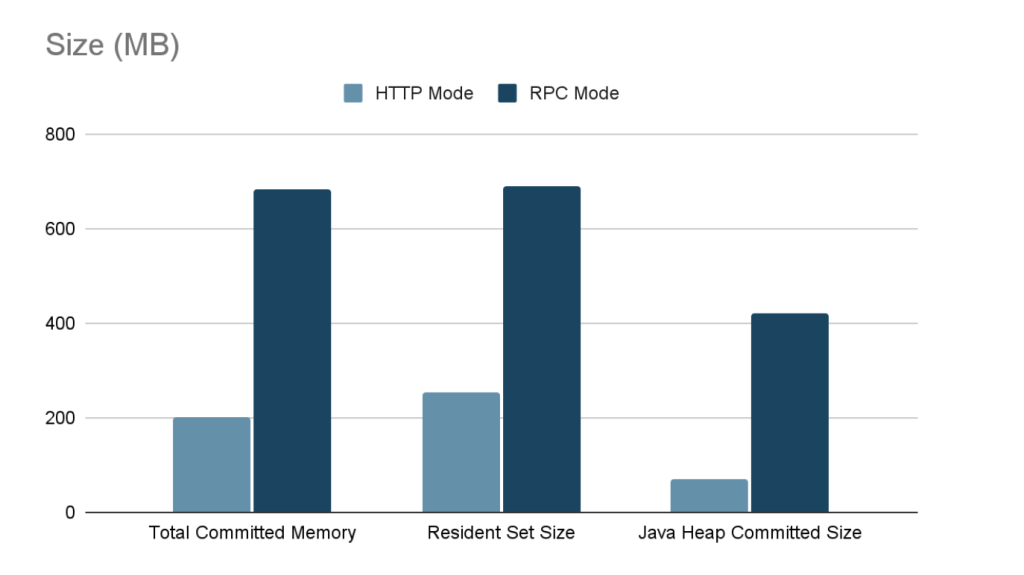
    Over the past few years, Webtide has been working closely with Google to improve the usage of Jetty in the App Engine Java Standard Runtime. We have updated the GAE Java21 Runtime to use Jetty 12 with support for both EE8 and EE10 environments. In addition, a new HttpConnector mode has been added to increase the performance of all Java Runtimes, this is expected to result in significant cost savings from less memory and CPU usage.

    Bypassing RPC Layer with HttpConnector Mode

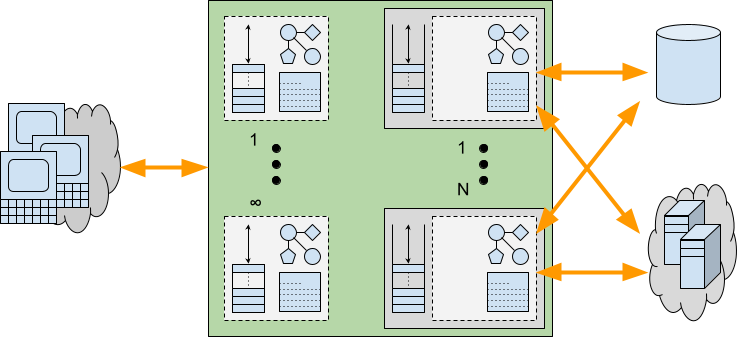
    Recently, we implemented a new mode for the Java Runtimes which bypasses the legacy gRPC layer which was previously needed to support the GEN1 runtimes. This legacy code path allowed support of the GEN1 and GEN2 Runtimes simultaneously, but had significant overhead; it used two separate Jetty Servers, one for parsing HTTP requests and converting to RPC, and another using a custom Jetty Connector to allow RPC requests to be processed by Jetty. It also required the full request and response content to be buffered which further increased memory usage.

    The new HttpConnector mode completely bypasses this RPC layer, thereby avoiding the overhead of buffering full request and response contents. Additionally, it removes the necessity of starting a separate Jetty Server, further reducing overheads and streamlining the request-handling process.

    Benchmarks

    Benchmarks conducted on the new HttpConnector mode have demonstrated significant performance improvements. Detailed results and documentation of these benchmarks can be found here.

    Usage

    To take advantage of the new HttpConnector mode, developers can set the appengine.use.HttpConnector system property in their appengine-web.xml file.

    <system-properties>
        <property name="appengine.use.httpconnector" value="true"/>
    </system-properties>

    By adopting this configuration, developers can leverage the enhanced performance and efficiency offered by the new HttpConnector mode. This is available for all Java Runtimes from Java8 to Java21.

    This mode is currently an optional configuration but future plans are to make this the default for all applications.

  • If Virtual Threads are the solution, what is the problem?

    Java’s Virtual Threads (aka Project Loom or JEP 444) have arrived as a full platform feature in Java 21, which has generated considerable interest and many projects (including Eclipse Jetty) are adding support.

    I have previously been somewhat skeptical about how significant any advantages Virtual Threads actually have over Platform Threads (aka Native Threads). I’ve also pointed out that cheap Threads can do expensive things, so that using Virtual Threads may not be a universal panacea for concurrent programming.

    However, even with those doubts, it is clear that Virtual Threads do have advantages in memory utilization and speed of startup. In this blog we look at what kinds of applications may benefit from those advantages.

    In short we investigate what scalability problems are Virtual Threads the solution for.

    Axioms

    Firstly let’s agree on what is accepted about Virtual Thread usage:

    • Writing asynchronous code is extraordinary difficult. “Yeah I know” you say… yeah but no, it is harder than that! Avoiding the need to write application logic in asynchronous style is key to improving the quality and stability of an application. This blog is not generally advocating you write your applications in an asynchronous style.
    • Virtual Threads are very cheap to create. From a performance perspective there is no reason to pool already started Virtual Threads and such pools are considered an anti pattern. If a Virtual Thread is needed, then just create a new one.
    • Virtual Threads use less memory. This is accepted, but with some significant caveats. Specifically the memory saving is achieved because Virtual Threads only allocate stack memory as needed, whilst Platform Threads provision stack size based on a worst case maximal usage. This is not exactly an apples vs oranges comparison.

    If some are good, are more even better?

    Consider a blocking style application is running on a traditional application server that is not scaling sufficiently. On inspection you see that all the Threads in the pool (default size 200) are allocated and that there are no Threads available to do more work!

    Would making more Threads available be the solution to this scalability problem? Perhaps 2000 Platform Threads will help? Still slow? Let’s try 10,000 Platform Threads! Running out of memory? Then perhaps unlimited Virtual Threads will solve the scalability problems?

    What if on further inspection it is found that the pool Threads are mostly blocked waiting for a JDBC Database connection from the JDBC Connection Pool (default size 8) and that as a result the Thread pool is exhausted.

    If every request needs the database, then any additional Threads will all just block on the same JDBC pool, thus more Threads will not make a more Scalable solution.

    Alternatively, if only some requests need to use the database, then having more Threads would allow request that do not need the database to proceed to completion. However, a fraction of requests would still end up blocked on the JBDC pool. Thus any limited Platform Thread pool could still become exhausted.

    With unlimited Virtual Threads there is no effective limit on the number of Threads, so non database requests could always continue, but the queue of Threads waiting on JBDC would also be unlimited as would the total of any resources held by those Threads whilst waiting. Thus the application would only scale for some types of request, whilst giving JDBC dependent requests the same poor Quality of Service as before.

    Finite Resources

    If an application’s scalability is constrained by access to a finite resource, then it is unlikely that “more Threads” is the solution to any scalability problems. Just like you can’t solve traffic by adding cars to a congested road, adding Threads to an already busy server may make things worse.

    Some common examples of finite resources that applications can encounter are:

    • CPU: If the server CPU is near 100% utilization, then the existing number of Threads are sufficient to keep it fully loaded. More and/or faster CPUs are needed before any increase in Threads could be beneficial.
    • Database: Many database technologies cannot handle many concurrent requests, so parallelism is restricted. If the bottleneck is the database, then it needs to be re-engineered rather than laid siege to by more concurrent Threads.
    • Local Network: An application may block reading or writing data because it has reached the limit on the local network. In such cases, more Threads will not increase throughput, but they might improve latency if some threads can progress reading new requests and have responses ready to write once network becomes less congested. However there is a cost in waiting (see below).
    • Locks: Parallel applications often use some form of lock or mutual exclusion to serialize access to common data structures. Contention on those locks can limit parallelism and require redesign rather than just more Threads.
    • Caches: CPU, memory, file system and object caches are key tools in speeding up execution. However, if too many different tasks are executed concurrently, the capacity of these caches to hold relevant data may be exceeded and execution with a cold cache can be very slow. Sometimes it is better to do less things concurrently and serialize the excess so that caches can be more effective that trying to do everything at once.

    If an application’s lack of scalability is due to Threads waiting for finite resources, then any additional Threads (Platform or Virtual) are unlikely to help and may make your application less stable. At best, careful redesign is needed before Thread counts can be increased in any advantageous way.

    Infinite (OK Scalable) Resources

    Not all resources are finite and some can be considered infinite, at least for some purposes. But let’s call them “Scalable” rather than infinite. Examples of scalable resources that an application may block on include:

    • Database: Not all databases are created equal and some types of database have scalability in excess of the request rates experienced by a server. However, such scalability often comes at a latency cost as the database may be remote and/or distributed, thus applications may block waiting for the database, even if it has capacity to handle more requests in parallel.
    • Micro services: A scalable database is really just a specific example of a micro service that may be provided by a remote and/or distributed system that has effectively infinite capacity at the cost of some latency. Applications can often find themselves waiting on one or more such services.
    • Remote Networks: Local data center networks are often very VERY fast and in many situations they can outstrip even the combined capacity of many client systems. An application sending/receiving larger content may may block writing/reading them due to a slow client, but still have enough local network capacity to communicate with many other clients in parallel.
    • Local Filesystems: Typically file systems are faster than networks, but slower than CPU. They also may have significant latency vs throughput tradeoffs (less so now that drives seldom need to spin physical disks). Thus Threads may block on local IO even though there is additional capacity available.

    Applications that lack scalability due to Threads waiting for such scalable resources may benefit from more Threads. Whilst some Threads are waiting for the a database, micro service, slow client network or file system, it is likely that other Threads can progress even if they need to access the same types of resources.

    Platform Threads pools can easily be increased to many 1000’s or more before typical servers will have memory issues. If scalability is needed beyond that, then Virtual Threads can offer practically unlimited additional Thread, but see the caveats below.

    Furthermore, the fast starting Virtual Threads can be of significant benefit in situations where small jobs with long latency can be carried out in parallel. Consider an application that processes request using data from several micro services, each with some access latency. If these are done serially, then the total request latency is the summation of all. Sometimes asynchronous code is used to execute micro service request in parallel, but spinning up a couple of Virtual Threads in this situation is simpler, less error prone and applicable to more APIs.

    Too Much of a Good Thing?

    There is also some concern with low latency scalable resources that seldom block with Virtual Threads. Since Virtual Threads are not preempted, there can be starvation and/or fairness problems if they are not blocked by slow resources. This is probably a good problem to have, but will need some management on extreme scales for some applications.

    The Cost of Waiting

    We have identified that there are indeed scalable resources on which an application may wait with many Threads. However, there is no such thing as a free lunch and waiting Threads may have a significant cost, even if they are Virtual. Specifically how/where an application waits can greatly affect resource usage.

    Consider a traditional application server with a limited Thread pool that is running near capacity, but with additional demand. While the 200 odd Threads are busy handling 200 concurrent request, there are additional request waiting to be handled. However, in an asynchronous server like Jetty, those additional requests can be cheaply parked and may be represented just be a single set bit in a selector or perhaps a tiny entry in a queue that holds only a reference to a connection that is ready to be read.

    Now consider if requests were serviced by Virtual Threads instead of waiting for a pooled Platform Thread to become available. Pending requests would be allowed to proceed to some blocking point in the application. Waiting like this within the application can have additional expenses including:

    • An input buffer will be allocated to read the request and any content it has.
    • A read is performed into the input buffer, thus removing network back pressure so a client is enabled to send more request/data even if the server is unable to handle them.
    • An object representation of the request will be built, containing at least the meta data and frequently some application data if there is an XML or JSON payload
    • Sessions may be activated and brought into memory from caches or passivation stores.
    • The allocated Thread runs deep inside the application code, potentially reaching near maximal stack depth.
    • Application objects created on the heap are held in memory with references from the stack.
    • An output buffer may be allocated, along with additional character conversion resources.

    When request handling blocks within the application, all these additional resources may be allocated and held during that wait. Worse still, because of the lack of back pressure, a client may send more request/data resulting in more Threads and associated resources being allocated and also being held whilst the application waits for some resource.

    Provisioning for the Worst Case

    We have seen that there are indeed applications that may benefit from having additional Threads available to service requests. But we have also seen that such additional Threads may incur additional costs beyond just the stack size. Waiting/Blocking within an application will typically be done with a deep stack and other resources allocated. Whilst Virtual Threads might be effectively infinite, it is unlikely that these other required resources are equally scalable.

    When an application experiences a worst case peak in load, then ultimately some resource will run out. To provide good Quality of Service, it is vital that such resource exhaustion is handled gracefully, allowing some request handling to continue rather than suffering catastrophic failure.

    With traditional Platform Thread based pools, stack memory is already provisioned for worst case stacks for all Threads and the thread pool sized limit is also an indirect limit on the number of concurrent resources used. Threads have sufficient resources available to complete there handling whilst any excess requests suffer latency whilst waiting cheaply for an available Thread. Furthermore, the back pressure resulting from not reading all offered requests can prevent additional load from sent by the clients. Thread limits are imperfect resource limits, but at least they are some kind of limit that can provide some graceful degradation under load.

    Alternatively, an application using Virtual Threads that has no explicit resource management will be likely to exhaust some of the resources used by those Threads. This can result in an OutOfMemoryException or similar, as the unlimited Virtual Threads each allocate deep stacks and other resources needed for request handling. The cost of average memory savings may be insufficient provisioning for the worst case resulting in catastrophic failure rather than graceful degradation. An analogy is that building more roads can actually make traffic worse if the added cars overwhelm other infrastructure.

    Many applications are written without explicit resource limitations/management. Instead they rely on the imperfect Thread pool for at least some minimal protection. If that is removed, then some form of explicit resource limitation/management is likely to be needed in its place. Stable servers need to be provisioned for the worst case, not the average one.

    Conclusion

    There are applications that can scale better if more Threads are available, but it is not all applications (at least not without significant redesign). Consideration needs to be given to what will limit the worst case load for a server/application if it is not to be Threads. Specifically, the costs of waiting within the application may be such that scalability is likely to have a limit that will not be enforced by practically infinite Virtual Threads.

    It may be that resources have limitations well within the capacity of large but limited Platform Thread pools, which are perfectly capable of scaling to many thousands of threads. So experiments with scaling a Platform Thread pool should first be used to see what limits do apply to an application.

    If no upper limit is found before Platform Threads exhaust kernel memory, then Virtual Threads will allow scaling beyond that limit until some other limit is found. Thus the ultimate resource limit will need to be explicitly managed if catastrophic failure is to be avoided (but, to be fair, applications using Thread pools should also do some explicit resource limit management rather than rely just on the course limits of a Thread pool).

    Recommendation

    If Virtual Threads are not the general solution to scalability then what is? There is no one-size-fits-all solution, but I believe many applications that are limited by blocking on the network would benefit from being deployed in a server like Eclipse Jetty, that can do much of the handling for them asynchronously. Let Jetty read your requests asynchronously and prepare the content as parsed JSON, XML, or form data. Only then allocate a Thread (Virtual or Platform) with a large output buffer so the application can be written in blocking style, but will not block on either reading the request or writing the response. Finally, once the response is prepared, then let Jetty flush it to the network asynchronously. Jetty has always somewhat supported this model (e.g. by delaying dispatch to a Servlet until the first packet of data arrives), but with Jetty-12 we are adding more mechanisms to asynchronously prepare requests and flush responses, whilst leaving the application written in blocking style. More to come on this in future blogs!

  • Jetty 12 – Virtual Threads Support

    Executive Summary

    Virtual Threads, introduced in Java 19, are supported in Jetty 12, as they have been in Jetty 10 and Jetty 11 since 10.0.12 and 11.0.12, respectively.

    When virtual threads are supported by the JVM and enabled in Jetty (see embedded usage and standalone usage), applications are invoked using a virtual thread, which allows them to use simple blocking APIs, but with the scalability benefits of virtual threads.

    Introduction

    Virtual threads were introduced as a preview feature in Java 19 via JEP 425 and in Java 20 via JEP 436, and finally integrated as an official feature in Java 21 via JEP 444.

    Historically, the APIs provided to application developers, especially web application developers, were blocking APIs based on InputStream and OutputStream, or based on JDBC.
    These APIs are very simple to use, so applications are simple to develop, understand and troubleshoot.

    However, these APIs come with a cost: when a thread blocks, typically waiting for I/O or a contended lock, all the resources associated with that thread are retained, waiting for the thread to unblock and continue processing: the native thread and its native memory are retained, as well as network buffers, lock structures, etc.

    This means that blocking APIs are less scalable because they retain the resources they use.
    For example, if you have configured your server thread pool with 256 threads, and all are blocked, your server cannot process other requests until one of the blocked threads unblocks, limiting the server’s scalability.

    Furthermore, if you increase the server thread pool capacity, you will use more memory and likely require bigger hardware.

    Asynchronous/Reactive

    For these reasons, non-blocking asynchronous and reactive APIs have been introduced. The primary examples are the asynchronous I/O APIs introduced in Servlet 3.1 and reactive APIs provided by libraries such as RxJava and Spring’s Project Reactor, based on Reactive Streams.
    Unfortunately, REST APIs such as JAX-RS or Jakarta RESTful Web Services have not been (fully) updated with non-blocking APIs, so web applications that use REST are stuck with blocking APIs and scalability problems.

    Essential to note is that asynchronous and reactive APIs are more difficult to use, understand, and troubleshoot than blocking APIs, but are more scalable and typically achieve similar performances at a fraction of the resources. We have seen web applications that, when switched from blocking APIs to non-blocking APIs, reduced the threads usage from 1000+ to 10+.

    Virtual threads aim to be the best of both worlds: simple-to-use blocking APIs for developers, with the scalability of non-blocking APIs provided by the JVM.

    Jetty 12 Architecture

    The Jetty 12 architecture, at its core, is completely non-blocking and uses an AdaptiveExecutionStrategy (formerly known as “eat what you kill” which was covered in previous blogs here and here) to determine how to consume tasks.

    The key feature of AdaptiveExecutionStrategy is that it has a strong preference for consuming tasks in the same thread that produces them, so they are executed with a hot CPU cache, without parallel slowdown and no context-switch latency, yet avoids the risk of the server exhausting its thread pool.

    Simplifying a bit, each task is marked either as blocking or non-blocking; AdaptiveExecutionStrategy looks at the task and at how many threads are available to decide how to consume the task.

    If the task is non-blocking, the current thread runs it immediately.
    Otherwise, if no other threads are available to continue producing tasks, the current thread takes over the production of tasks and gives the tasks to an Executor, where they are likely queued and executed later by different threads.

    Virtual Threads Integration

    This architecture made it easy to integrate virtual threads in Jetty: when virtual threads are supported by the JVM and Jetty’s virtual threads support is enabled (see embedded usage and standalone usage), AdaptiveExecutionStrategy consumes a blocking task by offering the task to the virtual thread Executor rather than the native thread Executor, so that a newly spawned virtual thread runs the blocking task.

    That’s it.

    As a Servlet Container implementation, Jetty calls Servlets assuming they will use blocking APIs, so the task that invokes the Servlet is a blocking task.
    When virtual threads are supported and enabled, the thread that calls Servlet Filters and eventually the HttpServlet.service(...) method is a virtual thread.

    For non-blocking tasks, it is more efficient to have them run by the same native thread that created them; it is only for blocking tasks that you may want to use virtual threads.

    Conclusions

    Jetty’s AdaptiveExecutionStrategy allows the best of all worlds.
    Jetty provides a fast scalable asynchronous implementation, which avoids any possible limitations of virtual threads, whilst giving applications the full benefits of virtual threads. 

    Jetty deals with complex asynchronous concerns, so you don’t have to!

  • Jetty HTTP/3 Support

    Introduction

    HTTP/3 is the next iteration of the HTTP protocol.

    HTTP/1.0 was released in 1996 and HTTP/1.1 in 1997; HTTP/1.x is a fairly simple textual protocol based on TCP, possibly wrapped in TLS, that experienced over the years a tremendous growth that was not anticipated in the late ’90s.
    With the growth, a few issues in the HTTP/1.x scalability were identified, and addressed first by the SPDY protocol (HTTP/2 precursor) and then by HTTP/2.

    The design of HTTP/2, released in 2015 (and also based on TCP), resolved many of the HTTP/1.x shortcomings and  protocol became binary and multiplexed.

    The deployment at large of HTTP/2 revealed some issues in the HTTP/2 protocol itself, mainly due a shift towards mobile devices where connectivity is less reliable and packet loss more frequent.

    Enter HTTP/3, which ditches TCP for QUIC (RFC 9000) to address the connectivity issues of HTTP/2.
    HTTP/3 and QUIC are inextricably entangled together because HTTP/3 relies heavily on QUIC features that are not provided by any other lower-level protocol.

    QUIC is based on UDP (rather than TCP) and has TLS built-in, rather than layered on top.
    This means that you cannot offload TLS in a front-end server, like with HTTP/1.x and HTTP/2, and then forward the clear-text HTTP/x bytes to back-end servers.

    Due to HTTP/3 relying heavily on QUIC features, it’s not possible anymore to separate the “carrier” protocol (QUIC) from the “semantic” protocol (HTTP). Therefor reverse proxying should either:

    • decrypt QUIC+HTTP/3, perform some proxy processing, and re-encrypt QUIC+HTTP/3 to forward to back-end servers; or
    • decrypt QUIC+HTTP/3, perform some proxy processing, and re-encode into a different protocol such as HTTP/2 or HTTP/1.x to forward to back-end servers, with the risk of losing features by using older HTTP protocol versions.

    The Jetty Project has always been on the front at implementing Web protocols and standard, and QUIC+HTTP/3 is no exception.

    Jetty’s HTTP/3 Support

    At this time, Jetty’s support for HTTP/3 is still experimental and not recommended for production use.

    We decided to use the Cloudflare’s Quiche library because QUIC’s use of TLS requires new APIs that are not available in OpenJDK; we could not implement QUIC in pure Java.

    We wrapped the native calls to Quiche with either JNA or with Java 17’s Foreign APIs (JEP 412) and retrofitted the existing Jetty’s I/O library to work with UDP as well.
    A nice side effect of this work is that now Jetty is a truly generic network server, as it can be used to implement any generic protocol (not just web protocols) on either TCP or UDP.

    HTTP/3 was implemented in Jetty 10.0.8/11.0.8 for both the client and the server.
    The implementation is quite similar to Jetty’s HTTP/2 implementation, since the protocols are quite similar as well.

    HTTP/3 on the client is available in two forms:

    • Using the high-level APIs provided by Jetty’s HttpClient with the HTTP/3 specific transport (that only speaks HTTP/3), or with the dynamic transport (that can speak multiple protocols).
    • Using the low-level HTTP/3 APIs provided by Jetty’s HTTP3Client that allow you to deal directly with HTTP/3 sessions, streams and frames.

    HTTP/3 on the server is available in two forms:

    • Using embedded code via HTTP3ServerConnector listening on a specific network port.
    • Using Jetty as a standalone server by enabling the http3 Jetty module.

    In both cases, an incoming HTTP/3 request is processed and forwarded to your standard Web Applications, or to your Jetty Handlers.

    Finally, the HTTP/3 specification at the IETF is still a draft and may change, and we prioritized a working implementation over performance.

  • Introducing Jetty Load Generator

    The Jetty Project just released the Jetty Load Generator, a Java 11+ library to load-test any HTTP server, that supports both HTTP/1.1 and HTTP/2.
    The project was born in 2016, with specific requirements. At the time, very few load-test tools had support for HTTP/2, but Jetty’s HttpClient did. Furthermore, few tools supported web-page like resources, which were important to model in order to compare the multiplexed HTTP/2 behavior (up to ~100 concurrent HTTP/2 streams on a single connection) against the HTTP/1.1 behavior (6-8 connections). Lastly, we were more interested in measuring quality of service, rather than throughput.
    The Jetty Load Generator generates requests asynchronously, at a specified rate, independently from the responses. This is the Jetty Load Generator core design principle: we wanted the request generation to be constant, and measure response times independently from the request generation. In this way, the Jetty Load Generator can impose a specific load on the server, independently of the network round-trip and independently of the server-side processing time. Adding more load generators (on the same machine if it has spare capacity, or using additional machines) will allow the load against the server to increase linearly.
    Using this core principle, you can setup the load testing by having N load generator loaders that impose the load on the server, and 1 load generator probe that imposes a very light load and measures response times.
    For example, you can have 4 loaders that impose 20 requests/s each, for a total of 80 requests/s seen by the server. With this load on the server, what would be the experience, in terms of response times, of additional users that make requests to the server? This is exactly what the probe measures.
    If the load on the server is increased to 160 requests/s, what would the probe experience? The same response times? Worse? And what are the probe response times if the load on the server is increased to 240 requests/s?
    Rather than trying to measure some form of throughput (“what is the max number of requests/s the server can sustain?”), the Jetty Load Generator measures the quality of service seen by the probe, as the load on the server increases. This is, in practice, what matters most for HTTP servers: knowing that, when your server has a load of 1024 requests/s, an additional user can still see response times that are acceptable. And knowing how the quality of service changes as the load increases.
    The Jetty Load Generator builds on top of Jetty’s HttpClient features, and offers:

    • A builder-style Java API, to embed the load generator into your own code and to have full access to all events emitted by the load generator
    • A command-line tool, similar to Apache’s ab or wrk2, with histogram reporting, for ease of use, scripting, and integration with CI servers.

    Download the latest command-line tool uber-jar from: https://repo1.maven.org/maven2/org/mortbay/jetty/loadgenerator/jetty-load-generator-starter/

    $ cd /tmp
    $ curl -O https://repo1.maven.org/maven2/org/mortbay/jetty/loadgenerator/jetty-load-generator-starter/1.0.2/jetty-load-generator-starter-1.0.2-uber.jar
    

    Use the --help option to display the available command line options:

    $ java -jar jetty-load-generator-starter-1.0.2-uber.jar --help
    

    Then run it, for example:

    $ java -jar jetty-load-generator-starter-1.0.2-uber.jar --scheme https --host your_server --port 443 --resource-rate 1 --iterations 60 --display-stats
    

    You will obtain an output similar to the following:

    ----------------------------------------------------
    -------------  Load Generator Report  --------------
    ----------------------------------------------------
    https://your_server:443 over http/1.1
    resource tree     : 1 resource(s)
    begin date time   : 2021-02-02 15:38:39 CET
    complete date time: 2021-02-02 15:39:39 CET
    recording time    : 59.657 s
    average cpu load  : 3.034/1200
    histogram:
    @                     _  37 ms (0, 0.00%)
    @                     _  75 ms (0, 0.00%)
    @                     _  113 ms (0, 0.00%)
    @                     _  150 ms (0, 0.00%)
    @                     _  188 ms (0, 0.00%)
    @                     _  226 ms (0, 0.00%)
    @                     _  263 ms (0, 0.00%)
    @                     _  301 ms (0, 0.00%)
                       @  _  339 ms (46, 76.67%) ^50%
       @                  _  376 ms (7, 11.67%) ^85%
      @                   _  414 ms (5, 8.33%) ^95%
    @                     _  452 ms (1, 1.67%)
    @                     _  489 ms (0, 0.00%)
    @                     _  527 ms (0, 0.00%)
    @                     _  565 ms (0, 0.00%)
    @                     _  602 ms (0, 0.00%)
    @                     _  640 ms (0, 0.00%)
    @                     _  678 ms (0, 0.00%)
    @                     _  715 ms (0, 0.00%)
    @                     _  753 ms (1, 1.67%) ^99% ^99.9%
    response times: 60 samples | min/avg/50th%/99th%/max = 303/335/318/753/753 ms
    request rate (requests/s)  : 1.011
    send rate (bytes/s)        : 189.916
    response rate (responses/s): 1.006
    receive rate (bytes/s)     : 41245.797
    failures          : 0
    response 1xx group: 0
    response 2xx group: 60
    response 3xx group: 0
    response 4xx group: 0
    response 5xx group: 0
    ----------------------------------------------------
    

    Use the Jetty Load Generator for your load testing, and report comments and issues at https://github.com/jetty-project/jetty-load-generator. Enjoy!

  • A story about Unix, Unicode, Java, filesystems, internationalization and normalization

    Recently, I’ve been investigating some test failures that I only experienced on my own machine, which happens to run some flavor of Linux. Investigating those failures, I ran down a rabbit hole that involves Unix, Unicode, Java, filesystems, internationalization and normalization. Here is the story of what I found down at the very bottom.

    A story about Unix internationalization

    One test that was failing is testAccessUniCodeFile, with the following exception:

    java.nio.file.InvalidPathException: Malformed input or input contains unmappable characters: swedish-å.txt
    	at java.base/sun.nio.fs.UnixPath.encode(UnixPath.java:145)
    	at java.base/sun.nio.fs.UnixPath.(UnixPath.java:69)
    	at java.base/sun.nio.fs.UnixFileSystem.getPath(UnixFileSystem.java:279)
    	at java.base/java.nio.file.Path.resolve(Path.java:515)
    	at org.eclipse.jetty.util.resource.FileSystemResourceTest.testAccessUniCodeFile(FileSystemResourceTest.java:335)
    	...
    

    This test asserts that Jetty can read files with non-ASCII characters in their names. But the failure happens in Path.resolve, when trying to create the file, before any Jetty code is executed. But why?
    When accessing a file, the JVM has to deal with Unix system calls. The Unix system call typically used to create a new file or open an existing one is int open(const char *path, int oflag, …); which accepts the file name as its first argument.
    In this test, the file name is "swedish-å.txt" which is a Java String. But that String isn’t necessarily encoded in memory in a way that the Unix system call expects. After all, a Java String is not the same as a C const char * so some conversion needs to happen before the C function can be called.
    We know the Java String is represented by a UTF-8-encoded byte[] internally. But how is the C const char * actually is supposed to be represented? Well, that depends. The Unix spec specifies that internationalization depends on environment variables. So the encoding of the C const char * depends on the LANG, LC_CTYPE and LC_ALL environment variables and the JVM has to transform the Java String to a format determined by these environment variables.
    Let’s have a look at those in a terminal:

    $ echo "LANG=\"$LANG\" LC_CTYPE=\"$LC_CTYPE\" LC_ALL=\"$LC_ALL\""
    LANG="C" LC_CTYPE="" LC_ALL=""
    $
    

    C is interpreted as a synonym of ANSI_X3.4-1968 by the JVM which itself is a synonym of US-ASCII.
    I’ve explicitly set this variable in my environment as some commands use it for internationalization and I appreciate that all the command line tools I use strictly stick to English. For instance:

    $ sudo LANG=C apt-get remove calc
    ...
    Do you want to continue? [Y/n] n
    Abort.
    $ sudo LANG=fr_BE.UTF-8 apt-get remove calc
    Do you want to continue? [O/n] n
    Abort.
    $
    

    Notice the prompt to the question Do you want to continue? that is either [Y/n] (C locale) or [O/n] (Belgian-French locale) depending on the contents of this variable. Up until now, I didn’t know that it also impacted what files the JVM could create or open!
    Knowing that, it is now obvious why the file cannot be created: it is not possible to convert the "swedish-å.txt" Java String to an ASCII C const char * simply because there is no way to represent the å character in ASCII.
    Changing the LANG environment variable to en_US.UTF-8 allowed the JVM to successfully make that Java-to-C string conversion which allowed that test to pass.
    Our build has now been changed to force the LC_ALL environment variable (as it is the one that overrides the other ones) to en_US.UTF-8 before running our tests to make sure this test passes even on environments with non-unicode locales.

    A story about filesystem Unicode normalization

    There was an extra pair of failing tests, that reported the following error:

    java.lang.AssertionError:
    Expected: is <404>
         but: was <200>
    Expected :is <404>
    Actual   :<200>
    

    For the context, those tests are about creating a file with a non-ASCII name encoded in some way and trying to serve it over HTTP with a request to the same non-ASCII name encoded in a different way. This is needed because Unicode supports different forms of encoding, notably Normalization Form Canonical Composition (NFC) and Normalization Form Canonical Decomposition (NFD). For our example string “swedish-å.txt”, this means there are two ways to encode the letter “å”: either U+00e5 LATIN SMALL LETTER A WITH RING ABOVE (NFC) or U+0061 LATIN SMALL LETTER A followed by U+030a COMBINING RING ABOVE (NFD).
    Both are canonically equivalent, meaning that a unicode string with the letter “å” encoded either as NFC or NFD should be considered the same. Is that true in practice?
    The failing tests are about creating a file whose name is NFC-encoded then trying to serve it over HTTP with the file name encoded in the URL as NFD and vice-versa.
    When running those tests on MacOS on APFS, the encoding never matters and MacOS will find the file with a NFC-encoded filename when you try to open it with a NFD-encoded canonically equivalent filename and vice-versa.
    When running those tests on Linux on ext4 or Windows on NTFS, the encoding always matters and Linux/Windows will not find the file with a NFC-encoded filename when you try to open it with a NFD-encoded canonically equivalent filename and vice-versa.
    And this is exactly what the tests expect:

    if (OS.MAC.isCurrentOs())
      assertThat(response.getStatus(), is(HttpStatus.OK_200));
    else
      assertThat(response.getStatus(), is(HttpStatus.NOT_FOUND_404));
    

    What I discovered is that when running those tests on Linux on ZFS, the encoding sometimes matters and Linux may find the file with a NFC-encoded filename when you try to open it with a NFD-encoded canonically equivalent filename and vice-versa, depending upon the ZFS normalization property; quoting the manual:

    normalization = none | formC | formD | formKC | formKD
        Indicates whether the file system should perform a unicode normalization of file names whenever two file names are compared, and which normalization algorithm should be used. File names are always stored unmodified, names are normalized as part of any comparison process. If this property is set to a legal value other than none, and the utf8only property was left unspecified, the utf8only property is automatically set to on. The default value of the normalization property is none. This property cannot be changed after the file system is created.
    

    So if we check the normalization of the filesystem upon which the test is executed:

    $ zfs get normalization /
    NAME                      PROPERTY       VALUE          SOURCE
    rpool/ROOT/nabo5t         normalization  formD          -
    $
    

    we can understand why the tests fail: due to the normalization done by ZFS, Linux can open the file given canonically equivalent filenames, so the test mistakenly assumes that Linux cannot serve this file. But if we create a new filesystem with no normalization property:

    $ zfs get normalization /unnormalized/test/directory
    NAME                      PROPERTY       VALUE          SOURCE
    rpool/unnormalized        normalization  none           -
    $
    

    and run a copy of the tests from it, the tests succeed.
    So we’ve adapted both tests to make them detect if the filesystem supports canonical equivalence and basing the assertion on that detection instead of hardcoding which OS behaves in which way.

  • Community Projects & Contributors Take on Jakarta EE 9

    With the recent release of JakartaEE9, the future for Java has never been brighter. In addition to headline projects moving forward into the new jakarta.* namespace, there has been a tremendous amount of work done throughout the community to stay at the forefront of the changing landscape. These efforts are the summation of hundreds of hours by just as many developers and highlight the vibrant ecosystem in the Jakarta workspace.
    The Jakarta EE contributors and committers came together to shape the 9 release. They chose to create a reality that benefits the entire Jakarta EE ecosystem. Sometimes, we tend to underestimate our influence and the power of our actions. Now that open source is the path of Jakarta EE, you, me, all of us can control the outcome of this technology. 
    Such examples that are worthy of emulation include the following efforts. In their own words:

    Eclipse Jetty – The Jetty project recently released Jetty 11, which has worked towards full compatibility with JakartaEE9 (Servlet, JSP, and WebSocket). We are driven by a mission statement of “By Developers, For Developers”, and the Jetty team has worked since the announcement of the so-called “Big Bang” approach to move Jetty entirely into the jakarta.* namespace. Not only did this position Jetty as a platform for other developers to push their products into the future, but also allowed the project to quickly adapt to innovations that are sure to come.

    [Michael Redich] The Road to Jakarta EE 9, an InfoQ news piece, was published this past October to highlight the efforts by Kevin Sutter, Jakarta EE 9 Release Lead at IBM, and to describe the progress made this past year in making this new release a reality. The Java community should be proud of their contributions to Jakarta EE 9, especially implementing the “big bang,” and discussions have already started for Jakarta EE 9.1 and Jakarta EE 10. The Q&A with Kevin Sutter in the news piece includes the certification and voting process for all the Jakarta EE specifications, plans for upcoming releases of Jakarta EE, and how Java developers can get involved in contributing to Jakarta EE. Personally, I am happy to have been involved in Jakarta EE having authored 14 Jakarta EE-related InfoQ news items for the three years, and I look forward to taking my Jakarta EE contributions to the next level. I have committed to contributing to the Jakarta NoSQL specification which is currently under development. The Garden State Java User Group (in which I serve as one of its directors) has also adopted Jakarta NoSQL. I challenge anyone who still thinks that the Java programming language is dead because these past few years have been an exciting time to be part of this amazing Java community!

    WildFly 22 Beta1 contains a tech preview EE 9 variant called WildFly Preview that you can download from the WildFly download page.  The WildFly team is still working on passing the needed (Jakarta EE 9) TCKs (watch for updates via the wildfly.org site.)  WildFly Preview includes a mix of native EE 9 APIs and implementations (i.e. ones that use the  jakarta.* namespace) along with many APIs and implementations from EE 8 (i.e. ones that use the  java.* namespace). This mix of namespaces is made possible by using the Eclipse community’s excellent Eclipse Transformer project to bytecode transformer legacy EE 8 artifacts to EE 9 when the server is provisioned. Applications that are written for EE 8 can also run on WildFly Preview, as a similar transformation is performed on any deployments managed by the server.

    Apache TomEE is a Jakarta EE application server based on Apache Tomcat. The project main focus is the Web Profile up until Jakarta EE 8. However, with Jakarta EE 9 and some parts being optional or pruned, the project is considering the full platform for the future. TomEE is so far a couple of tests down (99% coverage) before it reaches compatibility with Jakarta EE 8 (See Introducing TCK Work and how it helps the community jump into the effort). For Jakarta EE 9, the Community decided to pick a slightly different path than other implementations. We have already produced a couple of Apache TomEE 9 milestones for Jakarta EE 9 based on a customised version of the Eclipse Transformer. It fully supports the new jakarta.* namespace. Not to forget, the project also implements MicroProfile.

    Open Liberty is in the process of completing a Compatible Implementation for Jakarta EE 9.  For several months, the Jakarta EE 9 implementation has been rolling out via the “monthly” Betas.  Both of the Platform and Web Profile TCK testing efforts are progressing very well with 99% success rates.  The expectation is to declare one (or more) of the early Open Liberty 2021 Betas as a Jakarta EE 9 Compatible Implementation.  Due to Open Liberty’s flexible architecture and “zero migration” goal, customers can be assured that their current Java EE 7, Java EE 8, and Jakarta EE 8 applications will continue to execute without any changes required to the application code or server configuration.  But, with a simple change to their server configuration, customers can easily start experimenting with the new “jakarta” namespace in Jakarta EE 9.

    Jelastic PaaS is the first cloud platform that has already made Jakarta EE 9 release available for the customers across a wide network of distributed hosting service providers. For the last several months Jelastic team has been actively integrating Jakarta EE 9 within the cloud platform and in December made an official release. The certified container images with the following software stacks are already updated and available for customers across over 100 data centers: Tomcat, TomEE, GlassFish, WildFly and Jetty. Jelastic PaaS provides an easy way to create environments with new Jakarta EE 9 application servers for deep testing, compatibility checks and running live production environments. It’s also possible now to redeploy existing containers with old versions to the newest ones in order to reduce the necessary migration efforts, and to expedite adoption of cutting-edge cloud native tools and products. 


    [
    Amelia Eiras] Pull Request 923- Jakarta EE 9 Contributors Card is a formidable example of eleven-Jakartees coming together to create, innovate and collaborate on an Integration-Feature that makes it so that no contributor, who helped on Jakarta EE 9 release, be forgotten in the new landing page for the EE 9 Release. Who chose those Contributors? None. That is the sole point of the existence of PR923.I chose to lead the work on the PR and worked openly by prompt communications delivered the day that Tomitribe submitted the PR – Jakarta EE Working Group message to the forum to invite other Jakartees to provide input in the creation of the new feature. With Triber Andrii, who wrote the code and the feedback of those involved, the feature is active and used in the EE 9 contributors cards, YOU ROCK WALL
    The Integration-Feature will be used in future releases.  We hope that it is also adopted by any project, community, or individual in or outside the Eclipse Foundation to say ThankYOU with actions to those who help power & maintain any community. 

    • PR logistics: 11 Jakartees came together and produced 116 exchanges that helped merge the code. Thank you, Chris (Eclipse WebMaster) for helping check the side of INFRA. The PR’s exchanges lead us to choose the activity from 2 GitHub sources: 1) https://github.com/jakartaee/specifications/pulls all merged pulls and 2)  https://github.com/eclipse-ee4j all repositories.
    • PR Timeframe: the Contributors’ work accomplished from October 31st, 2019 to November 20th, 2020, was boxed and is frozen.   The result is that the Contributor Cards highlight 6 different Jakartees at a time every 15 seconds.  A total of 171 Jakartee Contributors (committers and contributors, leveled) belong to the amazing people behind EE 9 code. While working on that PR, other necessary improvements become obvious. A good example is the visual tweaks PR #952 we submitted that improved the landing page’s formatting, cards’ visual, etc. 

    Via actions, we chose to not “wait & see”, saving the project $budget, but also enabling openness to tackle the stuff that could have been dropped into “nonsense”. 

     
    In open-source, our actions project a temporary part of ourselves, with no exceptions. Those actions affect positively or negatively any ecosystem. Thank you for taking the time to read this #SharingIsCaring blog.  
     

  • Do Looms Claims Stack Up? Part 2: Thread Pools?

    “Project Loom aims to drastically reduce the effort of writing, maintaining, and observing high-throughput concurrent applications that make the best use of available hardware. … The problem is that the thread, the software unit of concurrency, cannot match the scale of the application domain’s natural units of concurrency — a session, an HTTP request, or a single database operation. …  Whereas the OS can support up to a few thousand active threads, the Java runtime can support millions of virtual threads. Every unit of concurrency in the application domain can be represented by its own thread, making programming concurrent applications easier. Forget about thread-pools, just spawn a new thread, one per task.” – Ron Pressler, State of Loom, May 2020

    In this series of blogs, we are examining the new Loom virtual thread features now available in OpenJDK 16 early access releases. In part 1 we saw that Loom’s claim of 1,000,000 virtual threads was true, but perhaps a little misleading, as that only applies to threads with near-empty stacks.  If threads actually have deep stacks, then the achieved number of virtual threads is bound by memory and is back to being the same order of magnitude as kernel threads.  In this part, we will further examine the claims and ramifications of Project Loom, specifically if we can now forget about Thread Pools. Spoiler: Cheap threads can do expensive things!
    All the code from this blog is available in our loom-trial project and has been run on my dev machine (Intel® Core™ i7-6820HK CPU @ 2.70GHz × 8, 32GB memory,  Ubuntu 20.04.1 LTS 64-bit, OpenJDK Runtime Environment (build 16-loom+9-316)) with no specific tuning and default settings unless noted otherwise. 

    Matching the scale?

    Project Loom makes the claim that applications need threads because kernel threads “cannot match the scale of the application domain’s natural units of concurrency”!
    Really???  We’ve seen that without tuning, we can achieve 32k of either type of thread on my laptop.  We think it would be fair to assume that with careful tuning, that could be stretched to beyond 100k for either technology.  Is this really below the natural scale of most applications?  How many applications have a natural scale of more than 32k simultaneous parallel tasks?  Don’t get me wrong, there are many apps that do exceed those scales and Jetty has users that put an extra 0 on that, but they are the minority and in reality very few applications are ever going to see that demand for concurrency.
    So if the vast majority of applications would be covered by blocking code with a concurrency of 32k, then what’s the big deal? Why do those apps need Loom? Or, by the same argument, why would they need to be written in asynchronous style?
    The answer is that you rarely see any application deployed with 10,000s of threads; instead, threads are limited by a thread pool, typically to 100s or 1000s of threads.  The default thread pool size in jetty is 200, which we sometimes see increased to 1000s, but we have never seen a 32k thread pool even though my un-tuned laptop could supposedly support it!
    So what’s going on? Why are thread pools typically so limited and what about the claim that Loom means we can “Forget about thread pools”?

    Why Thread Pools?

    One reason we are told that thread pools are used is because kernel threads are slow to start, thus having a bunch of them pre-started, waiting for a task in a pool improves latency.  Loom claims their virtual threads are much faster to start, so let’s test that with StartThreads, which reports:

    kStart(ns) ave:137,903 from:1,000 min:47,466 max:6,048,540
    vStart(ns) ave: 10,881 from:1,000 min: 4,648 max:  486,078

    So that claim checks out. Virtual threads start an order of magnitude faster than kernel threads.  If start time was the only reason for thread pools, then Loom’s claim of forgetting about thread pools would hold.
    But start time only explains why we have thread pools, but it doesn’t explain why thread pools are frequently sized far below the systems capacity for threads: 100s instead of 10,000s?  What is the reason that thread pools are sized as they are?

    Why Small Thread Pools?

    Giving a thread a task to do is a resource commitment. It is saying that a flow of control may proceed to consume CPU, memory and other resources that will be needed to run to completion or at least until a blocking point, where it can wait for those resources.  Most of those resources are not on the stack,  thus limiting the number of available threads is a way to limit a wide range of resource consumption and give quality of service:

    • If your back-end services can only handle 100s of simultaneous requests, then a thread pool with 100s of threads will avoid swamping them with too much load. If your JDBC driver only has 100 pooled connections, then 1,000,000 threads hammering on those connections or other locks are going to have a lot of contention.
    • For many applications a late response is a wrong response, thus it may well be better to handle 1000 tasks in a timely way with the 1001st task delayed, rather than to try to run all 1001 tasks together and have them all risk being late.
    • Graceful degradation under excess load.  Processing a task will need to use heap memory and if too much memory is demanded an OutOfMemeoryException is fatal for all java applications.  Limiting the number of threads is a coarse grained way of limiting a class of heap usage.  Indeed in part 1, we saw that it was heap memory that limited the number of virtual threads.

    Having a limited thread pool allows an application to be tested to that limit so that it can be proved that an application has the memory and other resources necessary to service all of those threads.  Traditional thinking has been that if the configured number of threads is insufficient for the load presented, then either the excess load must wait, or the application should start using asynchronous techniques to more efficiently use those threads (rather than increase the number of threads beyond the resource capacity of the machine).
    A limited thread pool is a coarse grained limit on all resources, not only threads.  Limiting the number of threads puts a limit on concurrent lock contention, memory consumption and CPU usage.

    Virtual Threads vs Thread Pool

    Having established that there might be some good reasons to use thread pools, let’s see if Loom gives us any good reasons not to use them?   So we have created a FakeDataBase class which simulates a JDBC connection pool of 100 connections with a semaphore and then in ManyTasks we run 100,000 tasks that do 2 selects and 1 insert to the database, with a small amount of CPU consumed both with and without the semaphore acquired.   The core of the thread pool test is:

     for (int i = 0; i < tasks; i++)
       pool.execute(newTask(latch));

    and this is compared against the Loom virtual thread code of:

     for (int i = 0 ; i < tasks; i++)
       Thread.builder().virtual().task(newTask(latch)).start();

    And the results are…. drum roll… pretty much the same for both types of thread:

    Pooled  K Threads 33,729ms
    Spawned V Threads 34,482ms

    The pooled kernel thread does appear to be consistently a little bit better, but this test is not that rigorous so let’s call it the same, which is kind of expected as the total duration is pretty much going to be primarily constrained by the concurrency of the database.
    So were there any difference at all?  Here is the system monitor graph during both runs: kernel threads with a pool are the left hand first period (60-30s) and then virtual threads after a change over peak (30s – 0s):
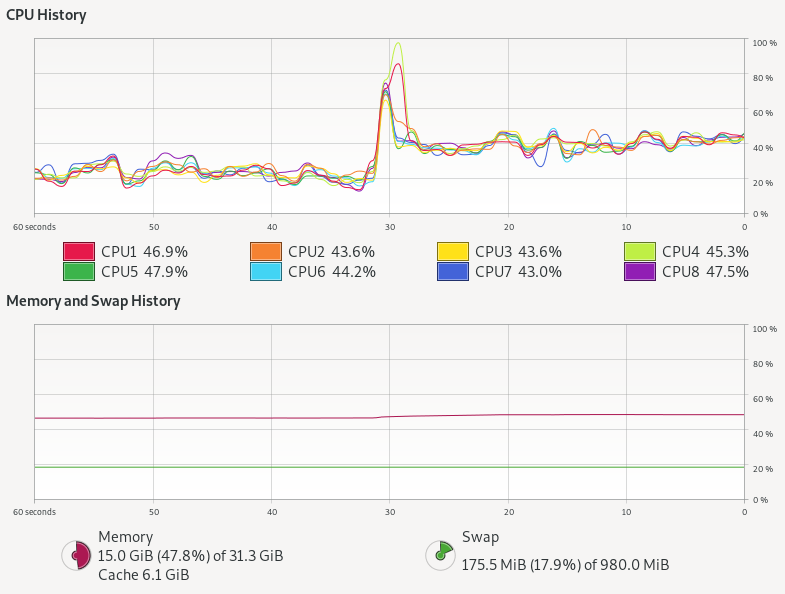
    Kernel threads with thread pool do not stress the CPU at all, but virtual threads alone use almost twice as much CPU! There is also a hint of more memory being used.
    The thread pool has 100k tasks in the thread pool queue, 100 kernel threads that take tasks, 100 at a time, and each task takes one of 100 semaphores permits 3 times, with little or no contention.
    The Loom approach has 100k independent virtual threads that each contend 3 times for the 100 semaphore permits, with up to 99,900 threads needing to be added then removed 3 times from the semaphore’s wake up queue.  The extra queuing for virtual threads could easily explain the excess CPU needed, but more investigation is needed to be definitive.
    However, tasks limited by a resource like JDBC are not really the highly concurrent tasks that Loom is targeted at.  To truly test Loom (and async), we need to look at a type of task that just won’t scale with blocking threads dispatched from a thread pool.

    Virtual Threads vs Async APIs

    One highly concurrent work load that we often see on Jetty is chat room style interaction (or games) written on CometD and/or WebSocket.  Such applications often have many 10,000s or even 100,000s of connections to the server that are mostly idle, waiting for a message to receive or an event to send. Currently we achieve these scales only by asynchronous threadless waiting, with all its ramifications of complex async APIs into the application needing async callbacks.  Luckily, CometD was originally written when there was only async servlets and not async IO, thus it still has the option to be deployed using blocking I/O reads and writes.  This gives it good potential to be a like for like comparison between async pooled kernel threads vs blocking virtual threads.
    However, we still have a concern that this style of application/load will not be suitable for Loom because each message to a chat room will fan out to the 10s, 100s or even 1000s of other users waiting in that room.  Thus a single read could result in many blocking write operations, which are typically done with deep stacks (parsing, framework, handling, marshalling, then writing) and other resources (buffers, locks etc). You can see in the following flame graph from a CometD load test using Loom virtual threads, that even with a fast client the biggest block of time is spent in the blue peak on the left, that is writing with deep stacks. It is this part of the graph that needs to scale if we have either more and/or slower clients:
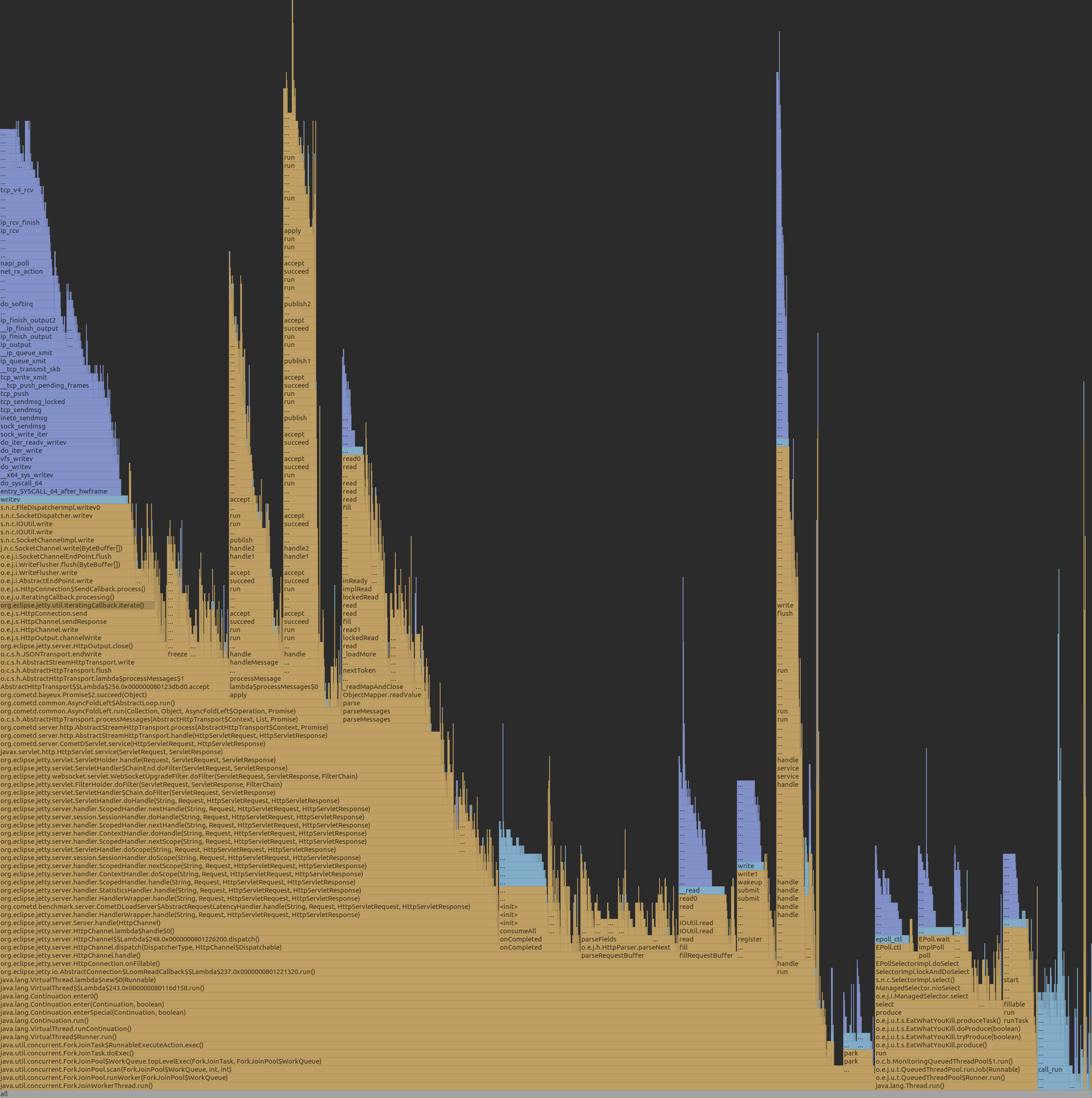
    Jetty with CometD chat on Loom

    To fairly test Loom, it is not sufficient to just replace the limited pool of kernel threads with infinite virtual threads.  Jetty goes to lots of effort with its eat what you kill scheduling using reserved threads to ensure that whenever a selector thread calls a potentially blocking task, another selector thread has been executed.  We can’t just put Loom virtual threads on top of this, else it will be paying the cost and complexity of core Jetty plus the overheads of Loom.  Moreover, we have also learnt the risk of Thread Starvation that can result in highly concurrent applications if you defer important tasks (e.g. HTTP/2 flow control).  Since virtual threads can be postponed (potentially indefinitely) by CPU bound applications or the use of non-Loom-aware locks (such as the synchronized keyword), they are not suitable for all tasks within Jetty.
    Thus we think a better approach is to keep the core of Jetty running on kernel threads, but to spawn a virtual thread to do the actual work of reading, parsing, and calling the application and writing the response.  If we flag those tasks with InvocationType.NON_BLOCKING, then they will be called directly by the selector thread, with no executor overhead. These tasks can then spawn a new virtual thread to proceed with the reading, parsing,  handling, marshalling, writing and blocking.  Thus we have created the jetty-10.0.x-loom branch, to use this approach and hopefully give a good basis for fair comparisons.
    Our initial runs with our CometD benchmark with just 20 clients resulted in long GCs followed by out of memory failures! This is due to the usage of ThreadLocal for gathering latency statistics and each virtual thread was creating a latency capture data structure, only to use it once and then throw it away!  While this problem is solvable by changing the CometD benchmark code, it reaffirms that threads use resources other than stack and that Loom virtual threads are not a drop in replacement for kernel threads.
    We are aware that the handling of ThreadLocal is a well known problem in Loom, but until solved it may be a surprisingly hard problem to cope with, since you don’t typically know if a library your application depends on uses ThreadLocal or not.
    With the CometD benchmark modified to not use ThreadLocal, we can now take Loom/Jetty/CometD to a moderate number of clients (1000 which generated the flame graph above) with the following results:

    CLIENT: Async Jetty/CometD server
    ========================================
    Testing 1000 clients in 100 rooms, 10 rooms/client
    Sending 1000 batches of 10x50 bytes messages every 10000 µs
    Elapsed = 10015 ms
    - - - - - - - - - - - - - - - - - - - -
    Outgoing: Rate = 990 messages/s - 99 batches/s - 12.014 MiB/s
    Incoming: Rate = 99829 messages/s - 35833 batches/s(35.89%) - 26.352 MiB/s
                    @     _  3,898 µs (112993, 11.30%)
                       @  _  7,797 µs (141274, 14.13%)
                       @  _  11,696 µs (136440, 13.65%)
                       @  _  15,595 µs (139590, 13.96%) ^50%
                       @  _  19,493 µs (142883, 14.29%)
                      @   _  23,392 µs (130493, 13.05%)
                    @     _  27,291 µs (112283, 11.23%) ^85%
            @             _  31,190 µs (59810, 5.98%) ^95%
      @                   _  35,088 µs (12968, 1.30%)
     @                    _  38,987 µs (4266, 0.43%) ^99%
    @                     _  42,886 µs (2150, 0.22%)
    @                     _  46,785 µs (1259, 0.13%)
    @                     _  50,683 µs (910, 0.09%)
    @                     _  54,582 µs (752, 0.08%)
    @                     _  58,481 µs (567, 0.06%)
    @                     _  62,380 µs (460, 0.05%) ^99.9%
    @                     _  66,278 µs (365, 0.04%)
    @                     _  70,177 µs (232, 0.02%)
    @                     _  74,076 µs (82, 0.01%)
    @                     _  77,975 µs (13, 0.00%)
    @                     _  81,873 µs (2, 0.00%)
    Messages - Latency: 999792 samples
    Messages - min/avg/50th%/99th%/max = 209/15,095/14,778/35,815/78,184 µs
    Messages - Network Latency Min/Ave/Max = 0/14/78 ms
    SERVER: Async Jetty/CometD server
    ========================================
    Operative System: Linux 5.8.0-33-generic amd64
    JVM: Oracle Corporation OpenJDK 64-Bit Server VM 16-ea+25-1633 16-ea+25-1633
    Processors: 12
    System Memory: 89.26419% used of 31.164349 GiB
    Used Heap Size: 73.283676 MiB
    Max Heap Size: 2048.0 MiB
    - - - - - - - - - - - - - - - - - - - -
    Elapsed Time: 10568 ms
       Time in Young GC: 5 ms (2 collections)
       Time in Old GC: 0 ms (0 collections)
    Garbage Generated in Eden Space: 3330.0 MiB
    Garbage Generated in Survivor Space: 4.227936 MiB
    Average CPU Load: 397.78314/1200
    ========================================
    Jetty Thread Pool:
        threads:                174
        tasks:                  302146
        max concurrent threads: 34
        max queue size:         152
        queue latency avg/max:  0/11 ms
        task time avg/max:      1/3316 ms


    CLIENT: Loom Jetty/CometD server
    ========================================
    Testing 1000 clients in 100 rooms, 10 rooms/client
    Sending 1000 batches of 10x50 bytes messages every 10000 µs
    Elapsed = 10009 ms
    - - - - - - - - - - - - - - - - - - - -
    Outgoing: Rate = 990 messages/s - 99 batches/s - 13.774 MiB/s
    Incoming: Rate = 99832 messages/s - 41201 batches/s(41.27%) - 27.462 MiB/s
                     @    _  2,718 µs (99690, 9.98%)
                       @  _  5,436 µs (116281, 11.64%)
                       @  _  8,155 µs (115202, 11.53%)
                       @  _  10,873 µs (108572, 10.87%)
                      @   _  13,591 µs (106951, 10.70%) ^50%
                       @  _  16,310 µs (117139, 11.72%)
                       @  _  19,028 µs (114531, 11.46%)
                    @     _  21,746 µs (94080, 9.42%) ^85%
                @         _  24,465 µs (71479, 7.15%)
          @               _  27,183 µs (34358, 3.44%) ^95%
      @                   _  29,901 µs (11526, 1.15%) ^99%
     @                    _  32,620 µs (4513, 0.45%)
    @                     _  35,338 µs (2123, 0.21%)
    @                     _  38,056 µs (988, 0.10%)
    @                     _  40,775 µs (562, 0.06%)
    @                     _  43,493 µs (578, 0.06%) ^99.9%
    @                     _  46,211 µs (435, 0.04%)
    @                     _  48,930 µs (187, 0.02%)
    @                     _  51,648 µs (31, 0.00%)
    @                     _  54,366 µs (27, 0.00%)
    @                     _  57,085 µs (1, 0.00%)
    Messages - Latency: 999254 samples
    Messages - min/avg/50th%/99th%/max = 192/12,630/12,476/29,704/54,558 µs
    Messages - Network Latency Min/Ave/Max = 0/12/54 ms
    SERVER: Loom Jetty/CometD server
    ========================================
    Operative System: Linux 5.8.0-33-generic amd64
    JVM: Oracle Corporation OpenJDK 64-Bit Server VM 16-loom+9-316 16-loom+9-316
    Processors: 12
    System Memory: 88.79622% used of 31.164349 GiB
    Used Heap Size: 61.733116 MiB
    Max Heap Size: 2048.0 MiB
    - - - - - - - - - - - - - - - - - - - -
    Elapsed Time: 10560 ms
       Time in Young GC: 23 ms (8 collections)
       Time in Old GC: 0 ms (0 collections)
    Garbage Generated in Eden Space: 8068.0 MiB
    Garbage Generated in Survivor Space: 3.6905975 MiB
    Average CPU Load: 413.33084/1200
    ========================================
    Jetty Thread Pool:
        threads:                14
        tasks:                  0
        max concurrent threads: 0
        max queue size:         0
        queue latency avg/max:  0/0 ms
        task time avg/max:      0/0 ms
    

    The results here are a bit mixed, but there are some positives for Loom:

    • Both approaches easily achieved the 1000 msg/s sent to the server and 99.8k msg/s received from the server (messages have an average fan-out of a factor 100).
    • The Loom version broke up those messages into 41k responses/s whilst the async version used bigger batches at 35k responses/s, which each response carrying more messages. We need to investigate why, but we think Loom is faster at starting to run the task (no time in the thread pool queue, no time to “wake up” an idle thread).
    • Loom had better latency, both average (~12.5 ms vs ~14.8 ms) and max (~54.6 ms vs ~78.2 ms)
    • Loom used more CPU: 413/1200 vs 398/1200 (4% more)
    • Loom generated more garbage: ~8068.0 MiB vs ~3330.0 MiB and less objects made it to survivor space.

    This is an interesting but inconclusive result.  It is at a low scale on a fast loopback network with a client unlikely to cause blocking, so not really testing either approach.  We now need to scale this test to many 10,000s of clients on a real network, which will require multiple load generation machines and careful measurement.  This will be the subject of part 3 (probably some weeks away).

    Conclusion (part 2) – Cheap threads can do expensive things

    It is good that Project Loom adds inexpensive and fast spawning/blocking virtual threads to the JVM.  But cheap threads can do expensive things!
    Having 1,000,000 concurrent application entities is going to take memory, CPU and other resources, no matter if they block or use async callbacks. It may be that entirely different programming styles are needed for Loom, as is suggested by Loom Structured Concurrency, however we have not yet seen anything that provides limitations on resources that can be used by unlimited spawning of virtual threads. There are also indications that Loom’s flexible stack management comes with a CPU cost.   However, it has been moderately simple to update Jetty to experiment with using Loom to call a blocking application and we’d very much encourage others to load test their application on the jetty-10.0.x-loom branch.
    Many of Loom’s claims have stacked up: blocking code is much easier to write, virtual threads are very fast to start and cheap to block. However, other key claims either do not hold up or have yet to be substantiated: we do not think virtual threads give natural scaling as threads themselves are not the limiting factor, rather it is the resources that are used that determines the scaling.  The suggestion to “Forget about thread-pools, just spawn a new thread…” feels like an invitation to create unstable applications unless other substantive resource management strategies are put into place.
    Given that Duke’s “new clothes” woven by Loom are not one-size-fits-all, it would be a mistake to stop developing asynchronous APIs for things such as DNS and JDBC on the unsubstantiated suggestion that Loom virtual threads will make them unnecessary.
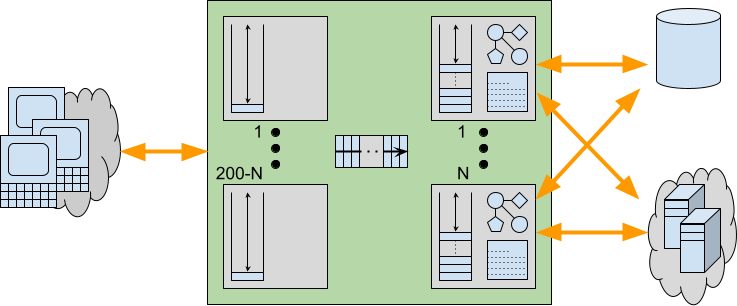
  • Do Loom’s Claims Stack Up? Part 1: Millions of Threads?

    “Project Loom aims to drastically reduce the effort of writing, maintaining, and observing high-throughput concurrent applications that make the best use of available hardware. … The problem is that the thread, the software unit of concurrency, cannot match the scale of the application domain’s natural units of concurrency — a session, an HTTP request, or a single database operation. …  Whereas the OS can support up to a few thousand active threads, the Java runtime can support millions of virtual threads. Every unit of concurrency in the application domain can be represented by its own thread, making programming concurrent applications easier. Forget about thread-pools, just spawn a new thread, one per task.” – Ron Pressler, State of Loom, May 2020

    Project Loom brings virtual threads (back) to the JVM in an effort to reduce the effort of writing high-throughput concurrent applications. Loom has generated a fair bit of interest with claims that Asynchronous APIs may no longer be necessary for things like Futures, JDBC, DNS, Reactive, etc. So since Loom is now available in OpenJDK 16 early access includes, we thought it was a good time to test out some of the amazing claims that have been made for Duke‘s new opaque clothing that has been woven by Loom!  Spoiler – Duke might not be naked, but its attire could be a tad see-through!
    All the code from this blog is available in our loom-trial project and has been run on my dev machine (Intel® Core™ i7-6820HK CPU @ 2.70GHz × 8, 32GB memory,  Ubuntu 20.04.1 LTS 64-bit, OpenJDK Runtime Environment (build 16-loom+9-316)) with no specific tuning and default settings unless noted otherwise. 

    Some History

    We started writing what would become Eclipse Jetty in 1995 on Java 0.9.  For its first decade, Jetty was a blocking server using a thread per request and then a thread per connection, and large thread pools (sometimes many thousands) were sufficient to handle almost all the loads offered.
    However, there were a few deployments that wanted more parallelism, plus the advent of virtual hosting meant that servers were often sharing physical machines with other server instances, all trying to pre-allocate max resources in their idle thread pools to handle potential load spikes.
    Thus there was some demand for async and so Jetty-6 in 2006 introduced some asynchronous I/O. Yet it was not until Jetty-9 in 2012 that we could say that Jetty was fully asynchronous through the container and to the application and we still fight with the complexity of it today.
    Through this time, Java threads were initially implemented by Green Threads and there were lots of problems of live lock, priority inversion, etc. It was a huge relief when native threads were introduced to the JVM and thus we were a little surprised at the enthusiasm expressed for Loom, which appears to be a revisit of late-stage MxN Green Threads and suffers from at least some similar limitations (e.g. the CPUBound test demonstrates that the lack of preemption makes virtual tasks unsuitable for CPU bound tasks). This paper from 2002 on Multithreading in Solaris gives an excellent background on this subject and describes the switch from the MxN threading to 1:1 native threads with terms like “better scalability”, “simplicity”, “improved quality” and that MxN had “not quite delivered the anticipated benefits”. Thus we are really interested to find out what is so different this time around.
    The Jetty team has a near-unique perspective on the history of both Java threading and the development of highly concurrent large throughput Java applications, which we can use to evaluate Loom. It’s almost like we were frozen in time for decades to bring back our evil selves from the past 🙂

    One Million Threads!

    That’s a lot of threads and it is a claim that is really easy to test!  Here is an extract from MaxVThreads:

    CountDownLatch hold = new CountDownLatch(1);
    while (threads.size() < 1_000_000)
    {
        CountDownLatch started = new CountDownLatch(1);
        Thread thread = Thread.builder().virtual().task(() ->
        {
            try
            {
                started.countDown();
                hold.await();
            }
            catch (InterruptedException e)
            {
                e.printStackTrace();
            }
        }).start();
        threads.add(thread);
        started.await();
        System.err.printf("%s: %,d%n", thread, threads.size());
    }

    Which we ran and got:

    ...
    VirtualThread[@244165d6,...]:   999,998
    VirtualThread[@6f40da3b,...]:   999,999
    VirtualThread[@1cfca01c,...]: 1,000,000

    Async is Dead!!!
    Long live Loom!!!
    Lunch is Free!!!
    Bullets are Silver!!!
    (more…)

  • CometD 5.0.3, 6.0.0 and 7.0.0

    Following the releases of Eclipse Jetty 10.0.0 and 11.0.0, the CometD project has released versions 5.0.3, 6.0.0 and 7.0.0.

    CometD 5.0.x Series

    CometD 5.0.x, of which the latest is the newly released 5.0.3, require at least Java 8 and it is based on Jetty 9.4.x.
    This version will be maintained as long as Jetty 9.4.x is maintained, likely many more years, to allow migration away from Java 8.

    CometD 6.0.x Series

    CometD 6.0.x, with the newly released 6.0.0, requires at least Java 11 and it is based on Jetty 10.0.x.
    In turn, Jetty 10.0.x is based on Java EE 8 / Jakarta EE 8, which provide Servlet and WebSocket APIs under the javax.* packages.
    This version of CometD provides a smooth transition from CometD 5 (or earlier) to Java 11 and Jetty 10.
    In this way, you can leverage new Java 11 language features in your application source code, as well as the few new APIs made available in the Servlet 4.0 Specification without having to change much of your code, since you will still be using javax.* Servlet and WebSocket APIs (see the next section on CometD 7.0.x for the migration to the jakarta.* APIs).
    However, server-side CometD applications should not depend much on Servlet or WebSocket APIs, so the migration from CometD 5 (or earlier) should be pretty straightforward.
    CometD 6.0.x, as Jetty 10.0.x, are transition releases to the new Jakarta EE 9 APIs in the jakarta.* packages.
    CometD 6.0.x will be maintained as long as Jetty 10.0.x is maintained.
    Since CometD applications do not depend much on Servlet or WebSocket APIs, consider moving directly to CometD 7.0.x if you don’t depend on other libraries (for example, Spring) that require javax.* classes.

    CometD 7.0.x Series

    CometD 7.0.x, with the newly released 7.0.0, requires at least Java 11 and it is based on Jetty 11.0.x.
    In turn, Jetty 11.0.x is based on Jakarta EE 9, which provide Servlet and WebSocket APIs under the jakarta.* packages.
    Migrating from CometD 6.0.x (or earlier) to CometD 7.0.x should be very easy if your applications depend mostly on the CometD APIs (few or no changes there) and depend very little on the Servlet or WebSocket APIs.
    Dependencies on the javax.* APIs should be migrated to the jakarta.* APIs.
    If your applications depend on third-party libraries, you need to make sure to update the third-party library to a version that supports — if necessary — jakarta.* APIs.
    Migrating to CometD 7.0.x allows you to leverage Java 11 language features and the benefit that you can base your applications on the new Jakarta EE Specifications, therefore abandoning the now-dead Java EE Specifications.
    This migration keeps your applications up-to-date with the current state-of-the-art of EE Specifications, reducing the technical debt to a minimum.
    CometD 7.0.x will be maintained as long as Jetty 11.0.x is maintained.
    The evolution of the Jakarta EE Specifications will be implemented by future Jetty versions, and future CometD versions will keep the pace.

    Which CometD Series Do I Use?

    If your applications depend on third-party libraries that use or depend on Jetty 9.4.x (such as Spring / Spring Boot), use CometD 5.0.x and Jetty 9.4.x until the third party libraries update to newer Jetty versions.
    If your applications depend on third-party libraries that depend on javax.* APIs and that have not been updated to Jakarta EE 9 yet (and therefore to jakarta.* APIs), use CometD 6.0.x and Jetty 10.0.x until the third party libraries update to Jakarta EE 9.
    If your applications depend on third-party libraries that have already been updated to use Jakarta EE 9 APIs, for example, Jakarta Restful Web Services (previously known as JAX-RS) using Eclipse Jersey 3.0, use CometD 7.0.x and Jetty 11.0.x.
    If you are migrating from earlier CometD versions, skip entirely CometD 6.0.x: for example move from CometD 5.0.x and Jetty 9.4.x directly to CometD 7.0.x and Jetty 11.0.x.