Category: HTTP

  • The Need For SPDY and why upgrade to Jetty 9?

    So you are not Google!  Your website is only taking a few 10’s or maybe 100’s of requests a second and your current server is handling it without a blip.  So you think you don’t need a faster server and it’s only something you need to consider when you have 10,000 or more simultaneous users!  WRONG!   All websites need to be concerned about speed in one form or another and this blog explains why and how Jetty with SPDY can help improve your  business no matter how large or small you are!

    TagMan conversion rate study for Glasses Direct

    Speed is Relative

    What does it mean to say your web site is fast? There are many different ways of measuring speed and while some websites are concerned with all of them, many if not most need only be concerned with some aspects of speed.

    Requests per Second

    The first measure of speed that many web developers think about is throughput, or how many requests per second can your web site handle?  For large web business with millions of users this is indeed a very important measure, but for many/most websites, requests per second is just not an issue.  Most servers will be able to handle thousands of requests per second, which represents 10’s of thousands of simultaneous users and far exceeds the client base and/or database transaction capacity of small to medium enterprises.     Thus having a server and/or protocol that will allow even greater requests per second is just not a significant concern for most  [ But if it is, then Jetty is still the server for you, but just not for the reasons this blog explains] .

    Request Latency

    Another speed measure is request latency, which is the time it takes a server to parse a request and generate a response.   This can range from a few milliseconds to many seconds depending on the type of the request and complexity of the application.  It can be a very important measure for some websites, specially web service or REST style servers that  handling a transaction per message.   But as an individual measure it is dominated by network latency (10-500 ms) and application processing (1-30000ms), then the time the server spends (1-5ms) handling a request/response is typically not an important driver when selecting a server.

    Page Load Speed

    The speed measure that is most apparent to users of your website is how long a page takes to load.  For a typical website, this involves fetching on average 85 resources (HTML, images, CSS, javascript, etc.) in many HTTP requests over multiple connections. Study summaries below, show that page load time is a metric that can greatly affect the effectiveness of a web site. Page load times have typically been primarily influenced by page design and the server had little ability to speed up page loads.  But with the SPDY protocol, there are now ways to greatly improve page load time, which we will see is a significant business advantage regardless of the size of your website and client base.

    The Business case for Page Load Speed

    The Book Of Speed presents the business benefits of reduced page load speed as determined by many studies summaries below:

    • A study at Microsofts live.com found that slowing page loads by 500ms reduced revenue per user by 1.2%. This increased to 2.8% at 1000ms delay and 4.3% at 2000ms, mostly because of a reduced click through rate.
    • Google found that the negative effect on business of slow pages got worse the longer users were exposed to a slow site.
    • Yahoo found that a slowdown of 400ms was enough to drop the completed page loads by between 5% and 9%. So users were clicking away from the page rather than waiting for it to load.
    • AOL’s studied several of its web properties and found a strong correlation between page load time and the number of page view per user visit. Faster sites retained their visitors for more pages.
    • When Mozilla improved the speed of their Internet Explorer landing page by 2.2s, they increase their rate of conversions by 15.4%
    • Shopzilla reduce their page loads from 6s to 1.2s and increased their sales conversion by 7-12% and also reduced their operation costs due to reduced infrastructure needs.

    These studies clearly show that page load speed should be a significant consideration for all web based businesses and they are backed up by many more such as:

    If that was not enough, Google have also confirmed that they use page load speed as one of the key factors when ranking search results to display.  Thus a slow page can do double damage of reducing the users that visit and reducing the conversion rate of those that do.

    Hopefully you are getting the message now, that page load speed is very important and the sooner you do something about it, the better it will be.   So what can you do about it?

    Web Optimization

    The traditional approach to improving has been to look at Web Performance Optimization, to improve the structure and technical implementation of your web pages using techniques including:

    • Cache Control
    • GZip components
    • Component ordering
    • Combine multiple CSS and javascript components
    • Minify CSS and javascript
    • Inline images, CSS Sprites and image maps
    • Content Delivery Networks
    • Reduce DOM elements in documents
    • Split content over domains
    • Reduce cookies

    These are all great things to do and many will provide significant speed ups.  However, most of these techniques are very intrusive and can be at odds with good software engineer; development speed and separation of concerns between designers and developers.    It can be a considerable disruption to a development effort to put in aggressive optimization goals along side functionality, design and time to market concerns.

    SPDY for Page Load Speed

    The SPDY protocol is being developed primarily by Google to replace HTTP with a particular focus on improving page load latency.  SPDY is already deployed on over 50% of browsers and is the basis of the first draft of the HTTP/2.0 specification being developed by the IETF.    Jetty was the first java server to implement SPDY and Jetty-9 has been re-architected specifically to better handle the multi protocol, TLS, push and multiplexing features of SPDY.

    Most importantly, because SPDY is an improvement in the network transport layer, it can greatly improve page load times without making any changes at all to a web application.  It is entirely transparent to the web developers and does not intrude into the design or development!

    SPDY Multiplexing

    One of the biggest contributors to web page load latency is the inability of the HTTP to efficiently use connection.  A HTTP connection can have only 1 outstanding request and browsers have a low limit (typically 6) to the number of connections that can be used in parallel.  This means that if your page requires 85 resources to render (which is the average), it can only fetch them 6 at a time and it will take at least 14 round trips over the network before the page is rendered.  With network round trip time often hundreds of ms, this can add seconds to page load times!

    SPDY resolves this issue by supporting multiplexed requests over a single connection with no limit on the number of parallel requests.  Thus if a page needs 85 resources to load, SPDY allows all 85 to be requested in parallel and thus only a single round trip latency imposed and content can be delivered at the network capacity.

    More over, because the single connection is used and reused, then the TCP/IP slow start window is rapidly expanded and the effective network capacity available to the browser is thus increased.

    SPDY Push

    Multiplexing is key to reducing round trips, but unfortunately it cannot remove them all because browser has to receive and parse the HTML before it knows the CSS resources to fetch; and those CSS resources have to be fetched and parsed before any image links in them are known and fetch.  Thus even with multiplexing, a page might take 2 or 3 network round trips just to identify all the resources associated with a page.

    But SPDY has another trick up it’s sleeve.  It allows a server to push resources to a browser in anticipation of requests that might come.  Jetty was the first server to implement this mechanism and uses relationships learnt from previous requests to create a map of associated resources so that when a page is requested, all it’s associated resources can immediately be pushed and no additional network round trips are incurred.

    SPDY Demo

    The following demonstration was given and Java One 2012 and clearly shows the SPDY page load latency improvements for a simple page with 25 images blocks over a simulated 200ms network:

    How do I get SPDY?

    To get the business benefits of speed for your web application, you simply need to deploy it on Jetty and enable SPDY with an SSL Certificate for your site.  Standard java web applications can be deployed without modification on Jetty and there are simple solutions to run sites built with PHP, Ruby, GWT etc on Jetty as well.

    If you want assistance setting up Jetty and SPDY, why not look at the affordable Jetty Migration Services available from Intalio.com and get the Jetty experts help power your web site.
  • Jetty 9.1 in Techempower benchmarks

    Jetty 9.1.0 has entered round 8 of the Techempower’s Web Framework Benchmarks. These benchmarks are a comparison of over 80 framework & server stacks in a variety of load tests. I’m the first one to complain about unrealistic benchmarks when Jetty does not do well, so before crowing about our good results I should firstly say that these benchmarks are primarily focused at frameworks and are unrealistic benchmarks for server performance as they suffer from many of the failings that I have highlighted previously (see Truth in Benchmarking and Lies, Damned Lies and Benchmarks).

    But I don’t want to bury the lead any more than I have already done, so I’ll firstly tell you how Jetty did before going into detail about what we did and what’s wrong with the benchmarks.

    What did Jetty do?

    Jetty has initially entered the JSON and Plaintext benchmarks:

    • Both tests are simple requests and trivial requests with just the string “Hello World” encode either as JSON or plain text.
    • The JSON test has a maximum concurrency of 256 connections with zero delay turn around between a response and the next request.
    • The plaintext test has a maximum concurrency of 16,384 and uses pipelining to run these connections at what can only be described as a pathological work load!

    How did Jetty go?

    At first glance at the results, Jetty look to have done reasonably well, but on deeper analysis I think we did awesomely well and an argument can be made that Jetty is the only server tested that has demonstrated truly scalable results.

    JSON Results

    json-tp

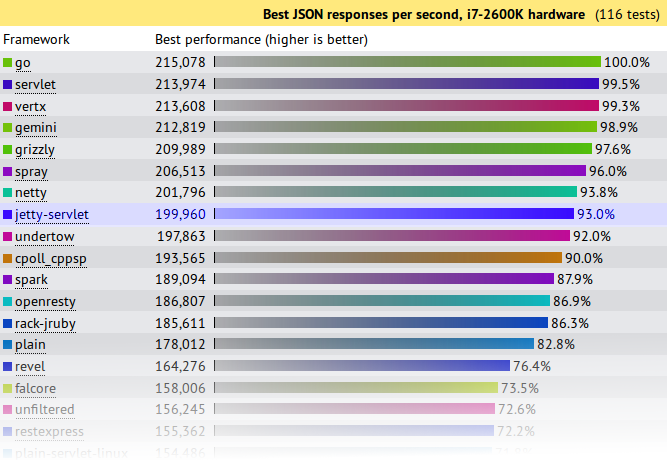
    Jetty came 8th from 107 and achieved 93% (199,960 req/s) of the first place throughput.   A good result for Jetty, but not great. . . . until you plot out the results vs concurrency:

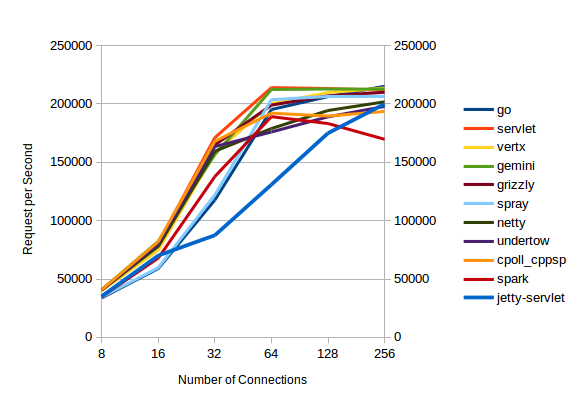
    json-trend

    All the servers with high throughputs have essentially maxed out at between 32 and 64 connections and the top  servers are actually decreasing their throughput as concurrency scales from 128 to 256 connections.

    Of the top throughput servlets, it is only Jetty that displays near linear throughput growth vs concurrency and if this test had been extended to 512 connections (or beyond) I think you would see Jetty coming out easily on top.  Jetty is investing a little more per connection, so that it can handle a lot more connections.

    Plaintext Results

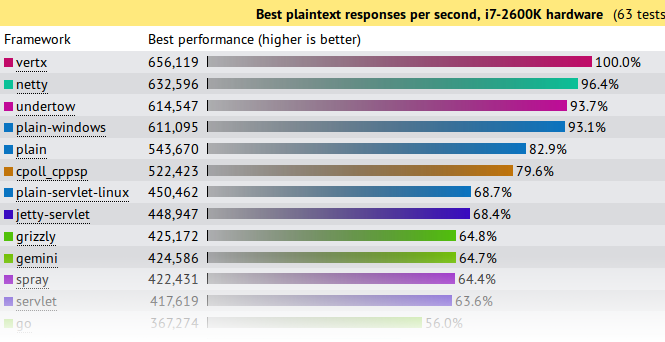
    plain-tp

    First glance again is not so great and we look like we are best of the rest with only 68.4% of the seemingly awesome 600,000+ requests per second achieved by the top 4.    But throughput is not the only important metric in a benchmark and things look entirely different if you look at the latency results:

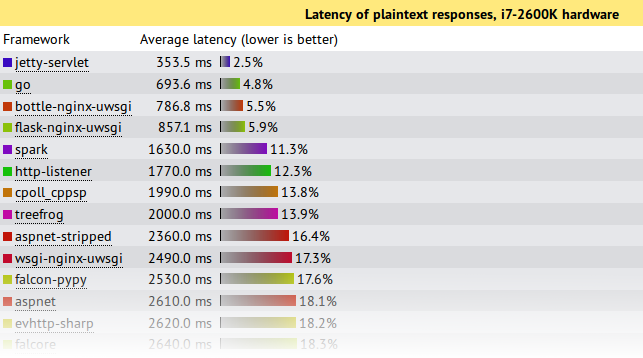
    plain-lat

    This shows that under this pathological load test, Jetty is the only server to send responses with an acceptable latency during the onslaught.  Jetty’s 353.5ms is a workable latency to receive a response, while the next best of 693ms is starting to get long enough for users to register frustration.  All the top throughput servers have average latencies  of 7s or more!, which is give up and go make a pot of coffee time for most users, specially as your average web pages needs >10 requests to display!

    Note also that these test runs were only over 15s, so servers with 7s average latency were effectively not serving any requests until the onslaught was over and then just sent all the responses in one great big batch.  Jetty is the only server to actually make a reasonable attempt at sending responses during the period that a pathological request load was being received.

    If your real world load is anything vaguely like this test, then Jetty is the only server represented in the test that can handle it!

    What did Jetty do?

    The jetty entry into these benchmarks has done nothing special.  It is out of the box configuration with trivial implementations based on the standard servlet API.  More efficient internal Jetty API  have not been used and there has been no fine tuning of the configuration for these tests.  The full source is available, but is presented in summary below:

    public class JsonServlet extends GenericServlet
    {
      private JSON json = new JSON();
      public void service(ServletRequest req, ServletResponse res)
        throws ServletException, IOException
      {
        HttpServletResponse response= (HttpServletResponse)res;
        response.setContentType("application/json");
        Map<String,String> map =
          Collections.singletonMap("message","Hello, World!");
        json.append(response.getWriter(),map);
      }
    }

    The JsonServlet uses the Jetty JSON mapper to convert the trivial instantiated map required of the tests.  Many of the other frameworks tested use Jackson which is now marginally faster than Jetty’s JSON, but we wanted to have our first round with entirely Jetty code.

    public class PlaintextServlet extends GenericServlet
    {
      byte[] helloWorld = "Hello, World!".getBytes(StandardCharsets.ISO_8859_1);
      public void service(ServletRequest req, ServletResponse res)
        throws ServletException, IOException
      {
        HttpServletResponse response= (HttpServletResponse)res;
        response.setContentType(MimeTypes.Type.TEXT_PLAIN.asString());
        response.getOutputStream().write(helloWorld);
      }
    }

    The PlaintextServlet makes a concession to performance by pre converting the string array to bytes, which is then simply written out the output stream for each response.

    public final class HelloWebServer
    {
      public static void main(String[] args) throws Exception
      {
        Server server = new Server(8080);
        ServerConnector connector = server.getBean(ServerConnector.class);
        HttpConfiguration config = connector.getBean(HttpConnectionFactory.class).getHttpConfiguration();
        config.setSendDateHeader(true);
        config.setSendServerVersion(true);
        ServletContextHandler context =
          new ServletContextHandler(ServletContextHandler.NO_SECURITY|ServletContextHandler.NO_SESSIONS);
        context.setContextPath("/");
        server.setHandler(context);
        context.addServlet(org.eclipse.jetty.servlet.DefaultServlet.class,"/");
        context.addServlet(JsonServlet.class,"/json");
        context.addServlet(PlaintextServlet.class,"/plaintext");
        server.start();
        server.join();
      }
    }

    The servlets are run by an embedded server.  The only configuration done to the server is to enable the headers required by the test and all other settings are the out-of-the-box defaults.

    What’s wrong with the Techempower Benchmarks?

    While Jetty has been kick-arse in these benchmarks, let’s not get carried away with ourselves because the tests are far from perfect, specially for  these two tests which are not testing framework performance (the primary goal of the techempower benchmarks) :

    • Both have simple requests that have no information in them that needs to be parsed other than a simple URL.  Realistic web loads often have session and security cookies as well as request parameters that need to be decoded.
    • Both have trivial responses that are just the string “Hello World” with minimal encoding. Realistic web load would have larger more complex responses.
    • The JSON test has a maximum concurrency of 256 connections with zero delay turn around between a response and the next request.  Realistic scalable web frameworks must deal with many more mostly idle connections.
    • The plaintext test has a maximum concurrency of 16,384 (which is a more realistic challenge), but uses pipelining to run these connections at what can only be described as a pathological work load! Pipelining is rarely used in real deployments.
    • The tests appear to run only for 15s. This is insufficient time to reach steady state and it is no good your framework performing well for 15s if it is immediately hit with a 10s garbage collection starting on the 16th second.

    But let me get off my benchmarking hobby-horse, as I’ve said it all before:  Truth in Benchmarking,  Lies, Damned Lies and Benchmarks.

    What’s good about the Techempower Benchmarks?

    • There are many frameworks and servers in the comparison and whatever the flaws are, then are the same for all.
    • The test appear to be well run on suitable hardware within a controlled, open and repeatable process.
    • Their primary goal is to test core mechanism of web frameworks, such as object persistence.  However, jetty does not provide direct support for such mechanisms so we have initially not entered all the benchmarks.

    Conclusion

    Both the JSON and plaintext tests are busy connection tests and the JSON test has only a few connections.  Jetty has always prioritized performance for the more realistic scenario of many mostly idle connections and this has shown that even under pathological loads, jetty is able to fairly and efficiently share resources between all connections.

    Thus it is an impressive result that even when tested far outside of it’s comfort zone, Jetty-9.1.0 has performed at the top end of this league table and provided results that if you look beyond the headline throughput figures, presents the best scalability results.   While the tested loads are far from realistic, the results do indicate that jetty has very good concurrency and low contention.

    Finally remember that this is a .0 release aimed at delivering the new features of Servlet 3.1 and we’ve hardly even started optimizing jetty 9.1.x

  • The new Jetty 9 HTTP client

    Introduction

    One of the big refactorings in Jetty 9 is the complete rewrite of the HTTP client.
    The reasons behind the rewrite are many:

    • We wrote the codebase several years ago; while we have actively maintained, it was starting to show its age.
    • The HTTP client guarded internal data structures from multithreaded access using the synchronized keyword, rather than using non-blocking data structures.
    • We exposed as main concept the HTTP exchange that, while representing correctly what an HTTP request/response cycle is,  did not match user expectations of a request and a response.
    • HTTP client did not have out of the box features such as authentication, redirect and cookie support.
    • Users somehow perceived the Jetty HTTP client as cumbersome to program.

    The rewrite takes into account many community inputs, requires JDK 7 to take advantage of the latest programming features, and is forward-looking because the new API is JDK 8 Lambda-ready (that is, you can use Jetty 9’s HTTP client with JDK 7 without Lambda, but if you use it in JDK 8 you can use lambda expressions to specify callbacks; see examples below).

    Programming with Jetty 9’s HTTP Client

    The main class is named, as in Jetty 7 and Jetty 8, org.eclipse.jetty.client.HttpClient (although it is not backward compatible with the same class in Jetty 7 and Jetty 8).
    You can think of an HttpClient instance as a browser instance.
    Like a browser, it can make requests to different domains, it manages redirects, cookies and authentications, you can configure it with a proxy, and it provides you with the responses to the requests you make.
    You need to configure an HttpClient instance and then start it:

    HttpClient httpClient = new HttpClient();
    // Configure HttpClient here
    httpClient.start();
    

    Simple GET requests require just  one line:

    ContentResponse response = httpClient
            .GET("http://domain.com/path?query")
            .get();
    

    Method HttpClient.GET(...) returns a Future<ContentResponse> that you can use to cancel the request or to impose a total timeout for the request/response conversation.
    Class ContentResponse represents a response with content; the content is limited by default to 2 MiB, but you can configure it to be larger.
    Simple POST requests also require just one line:

    ContentResponse response = httpClient
            .POST("http://domain.com/entity/1")
            .param("p", "value")
            .send()
            .get(5, TimeUnit.SECONDS);
    

    Jetty 9’s HttpClient automatically follows redirects, so automatically handles the typical web pattern POST/Redirect/GET, and the response object contains the content of the response of the GET request. Following redirects is a feature that you can enable/disable on a per-request basis or globally.
    File uploads also require one line, and make use of JDK 7’s java.nio.file classes:

    ContentResponse response = httpClient
            .newRequest("http://domain.com/entity/1")
            .file(Paths.get("file_to_upload.txt"))
            .send()
            .get(5, TimeUnit.SECONDS);
    

    Asynchronous Programming

    So far we have shown how to use HttpClient in a blocking style, that is the thread that issues the request blocks until the request/response conversation is complete. However, to unleash the full power of Jetty 9’s HttpClient you should look at its non-blocking (asynchronous) features.
    Jetty 9’s HttpClient fully supports the asynchronous programming style. You can write a simple GET request in this way:

    httpClient.newRequest("http://domain.com/path")
            .send(new Response.CompleteListener()
            {
                @Override
                public void onComplete(Result result)
                {
                    // Your logic here
                }
            });
    

    Method send(Response.CompleteListener) returns void and does not block; the Listener provided as a parameter is notified when the request/response conversation is complete, and the Result parameter  allows you to access the response object.
    You can write the same code using JDK 8’s lambda expressions:

    httpClient.newRequest("http://domain.com/path")
            .send((result) -> { /* Your logic here */ });
    

    HttpClient uses Listeners extensively to provide hooks for all possible request and response events, and with JDK 8’s lambda expressions they’re even more fun to use:

    httpClient.newRequest("http://domain.com/path")
            // Add request hooks
            .onRequestQueued((request) -> { ... })
            .onRequestBegin((request) -> { ... })
            // More request hooks available
            // Add response hooks
            .onResponseBegin((response) -> { ... })
            .onResponseHeaders((response) -> { ... })
            .onResponseContent((response, buffer) -> { ... })
            // More response hooks available
            .send((result) -> { ... });
    

    This makes Jetty 9’s HttpClient suitable for HTTP load testing because, for example, you can accurately time every step of the request/response conversation (thus knowing where the request/response time is really spent).

    Content Handling

    Jetty 9’s HTTP client provides a number of utility classes off the shelf to handle request content and response content.
    You can provide request content as String, byte[], ByteBuffer, java.nio.file.Path, InputStream, and provide your own implementation of ContentProvider. Here’s an example that provides the request content using an InputStream:

    httpClient.newRequest("http://domain.com/path")
            .content(new InputStreamContentProvider(
                getClass().getResourceAsStream("R.properties")))
            .send((result) -> { ... });
    

    HttpClient can handle Response content in different ways:
    The most common is via blocking calls that return a ContentResponse, as shown above.
    When using non-blocking calls, you can use a BufferingResponseListener in this way:

    httpClient.newRequest("http://domain.com/path")
            // Buffer response content up to 8 MiB
            .send(new BufferingResponseListener(8 * 1024 * 1024)
            {
                @Override
                public void onComplete(Result result)
                {
                    if (!result.isFailed())
                    {
                        byte[] responseContent = getContent();
                        // Your logic here
                    }
                }
            });
    

    To be efficient and avoid copying to a buffer the response content, you can use a Response.ContentListener, or a subclass:

    ContentResponse response = httpClient
            .newRequest("http://domain.com/path")
            .send(new Response.Listener.Empty()
            {
                @Override
                public void onContent(Response r, ByteBuffer b)
                {
                    // Your logic here
                }
            });
    

    To stream the response content, you can use InputStreamResponseListener in this way:

    InputStreamResponseListener listener =
            new InputStreamResponseListener();
    httpClient.newRequest("http://domain.com/path")
            .send(listener);
    // Wait for the response headers to arrive
    Response response = listener.get(5, TimeUnit.SECONDS);
    // Look at the response
    if (response.getStatus() == 200)
    {
        InputStream stream = listener.getInputStream();
        // Your logic here
    }
    

    Cookies Support

    HttpClient stores and accesses HTTP cookies through a CookieStore:

    Destination d = httpClient
            .getDestination("http", "domain.com", 80);
    CookieStore c = httpClient.getCookieStore();
    List cookies = c.findCookies(d, "/path");
    

    You can add cookies that you want to send along with your requests (if they match the domain and path and are not expired), and responses containing cookies automatically populate the cookie store, so that you can query it to find the cookies you are expecting with your responses.

    Authentication Support

    HttpClient suports HTTP Basic and Digest authentications, and other mechanisms are pluggable.
    You can configure authentication credentials in the HTTP client instance as follows:

    String uri = "http://domain.com/secure";
    String realm = "MyRealm";
    String u = "username";
    String p = "password";
    // Add authentication credentials
    AuthenticationStore a = httpClient.getAuthenticationStore();
    a.addAuthentication(
        new BasicAuthentication(uri, realm, u, p));
    ContentResponse response = httpClient
            .newRequest(uri)
            .send()
            .get(5, TimeUnit.SECONDS);
    

    HttpClient tests authentication credentials against the challenge(s) the server issues, and if they match it automatically sends the right authentication headers to the server for authentication. If the authentication is successful, it caches the result and reuses it for subsequent requests for the same domain and matching URIs.

    Proxy Support

    You can also configure HttpClient  with a proxy:

    httpClient.setProxyConfiguration(
        new ProxyConfiguration("proxyHost", proxyPort);
    ContentResponse response = httpClient
            .newRequest(uri)
            .send()
            .get(5, TimeUnit.SECONDS);
    

    Configured in this way, HttpClient makes requests to the proxy (for plain-text HTTP requests) or establishes a tunnel via HTTP CONNECT (for encrypted HTTPS requests).

    Conclusions

    The new Jetty 9  HTTP client is easier to use, has more features and it’s faster and better than Jetty 7’s or Jetty 8’s.
    The Jetty project continues to lead the way when it’s about the Web: years ago with Jetty Continuations, then with Jetty WebSocket, recently with Jetty SPDY and now with the first complete, ready to use, JDK 8’s Lambda -ready HTTP client.
    Go get it while it’s hot !
    Maven coordinates:

    
        org.eclipse.jetty
        jetty-client
        9.0.0.M3


    Direct Downloads:
    Main jar: jetty-client.jar
    Dependencies: jetty-http.jar, jetty-io.jar, jetty-util.jar

  • Jetty, SPDY and HAProxy

    The SPDY protocol will be the next web revolution.
    The HTTP-bis working group has been rechartered to use SPDY as the basis for HTTP 2.0, so network and server vendors are starting to update their offerings to include SPDY support.
    Jetty has a long story of staying cutting edge when it is about web features and network protocols.

    • Jetty first implemented web continuations (2005) as a portable library, deployed them successfully for years to customers, until web continuations eventually become part of the Servlet 3.0 standard.
    • Jetty first supported the WebSocket protocol within the Servlet model (2009), deployed it successfully for years to customers, and now the WebSocket APIs are in the course of becoming a standard via JSR 356.

    Jetty is the first and today practically the only Java server that offers complete SPDY support, with advanced features that we demonstrated at JavaOne (watch the demo if you’re not convinced).
    If you have not switched to Jetty yet, you are missing the revolutions that are happening on the web, you are probably going to lose technical ground to your competitors, and lose money upgrading too late when it will cost (or already costs) you a lot more.
    Jetty is open source, released with friendly licenses, and with full commercial support in case you need our expertise about developer advice, training, tuning, configuring and using Jetty.
    While SPDY is now well supported by browsers and its support is increasing in servers, it is still lagging a bit behind in intermediaries such as load balancers, proxies and firewalls.
    To exploit the full power of SPDY, you want not only SPDY in the communication between the browser and the load balancer, but also between the load balancer and the servers.
    We are actively opening discussion channels with the providers of such products, and one of them is HAProxy. With the collaboration of Willy Tarreau, HAProxy mindmaster, we have recently been able to perform a full SPDY communication between a SPDY client (we tested latest Chrome, latest Firefox and Jetty’s Java SPDY client) through HAProxy to a Jetty SPDY server.
    This sets a new milestone in the adoption of the SPDY protocol because now large deployments can leverage the goodness of HAProxy as load balancer *and* leverage the goodness of SPDY as well as provided by Jetty SPDY servers.
    The HAProxy SPDY features are available in the latest development snapshots of HAProxy. A few details will probably be subject to changes (in particular the HAProxy configuration keywords), but SPDY support in HAProxy is there.
    The Jetty SPDY features are already available in Jetty 7, 8 and 9.
    If you are interested in knowing how you can use SPDY in your deployments, don’t hesitate to contact us. Most likely, you will be contacting us using the SPDY protocol from your browser to our server 🙂

  • SPDY Push Demo from JavaOne 2012

    Simone Bordet and I spoke at JavaOne this year about the evolution of web protocol and how HTTP is being replaced by WebSocket (for new semantics) and by SPDY (for better efficiency).

    The demonstration of SPDY Push is particularly good at showing how SPDY can greatly improve the latency of serving your web applications.   The video of the demo is below:

    But SPDY is about more than improving load times for the user.  It also has some huge benefits for scalability on the server side.   To find out more, you can see the full presentation via the presentations link on webtide.com (which is already running SPDY so users of Chrome or the latest FF that follow that link will be making a SPDY request).

    SPDY is already available as a connector type in Jetty-7, 8 and 9.   For assistance getting your website SPDY enabled please contact info@webtide.com. Our software is free open source and we provide commercial developer advice and production support.

  • Fully functional SPDY-Proxy

    We keep pushing our SPDY implementation and with the upcoming Jetty release we provide a fully functional SPDY proxy server out of the box.
    Simply by configuration you can setup Jetty to provide a SPDY connector where clients can connect to via SPDY and will be transparently proxied to a target host speaking SPDY as well or another web protocol.
    Here’s some details about the internals. The implementation is modular and can easily be extended. There’s a HTTPSPDYProxyConnector that accepts incoming requests and forwards them to a ProxyEngineSelector. ProxyEngineSelector will forward the request to an appropiate ProxyEngine for the given target host protocol.
    Which ProxyEngine to use is determined by the configured ProxyServerInfos which hold the information about known target hosts and  the protocol they speak.
    Up to now we only have a ProxyEngine implementation for SPDY. But implementing other protocols like HTTP should be pretty straight forward and will follow. Contributions are like always highly welcome!
    https://www.webtide.com is already served through a proxy connector forwarding to a plain SPDY connector on localhost.
    For more details and an example configuration check the SPDY proxy documentation out.

  • SPDY – non representative benchmark for plain http vs. spdy+push on webtide.com

    I’ve done a quick run with the Page Benchmarker Extension on chromium to measure the difference between http and SPDY + push. Enabling benchmarks restricts chromium to SPDY draft 2 so we’ll run without flow control.
    Note that the website is not the fastest (in fact it’s pretty slow). But if these results will prove themselves valid in real benchmarks than a reduced latency of ~473ms is pretty awesome.
    Here’s the promising result:

    I’ve done several iterations of this benchmark test with ten runs each. The advantage of spdy was always between 350-550ms.
    Disclaimer: This is in no way a representative benchmark. This has neither been run in an isolated test environment, nor is webtide.com the right website to do such benchmarks! This is just a promising result, nothing more. We’ll do proper benchmarking soon, I promise.

  • SPDY – we push!

    SPDY, Google’s web protocol, is gaining momentum. Intending to improve the user’s web experience it aims at severely reducing page load times.
    We’ve blogged about the protocol and jetty’s straight forward SPDY support already: Jetty-SPDY is joining the revolution! and SPDY support in Jetty.
    No we’re taking this a step further and we push!
    SPDY push is one of the coolest features in the SPDY protocol portfolio.
    In the traditional http approach the browser will have to request a html resource (the main resource) and do subsequent requests for each sub resource. Every request/response roundtrip will add latency.
    E.g.:
    GET /index.html – wait for response before before browser can request sub resources
    GET /img.jpg
    GET /style.css – wait for response before we can request sub resources of the css
    GET /style_image.css (referenced in style.css)
    This means a single request – response roundtrip for each resource (main and sub resources). Worse some of them have to be done sequentially. For a page with lots of sub resources, the amount of connections to the server (traditionally browsers tend to open 6 connections) will also limit the amount of sub resources that can be fetched in parallel.
    Now SPDY will reduce the need to open multiple connections by multiplexing requests over a single connection and does more improvements to reduce latency as described in previous blog posts and the SPDY spec.
    SPDY push will enable the server to push resources to the browser/client without having a request for that resource. For example if the server knows that index.html contains a reference to img.jpg, style.css and that style.css contains a reference to style_image.css, the server can push those resources to the client.
    To take the previous example:
    GET /index.html
    PUSH /img.jpg
    PUSH /style.css
    PUSH /style_image.css
    That means only a single request/response roundtrip for the main resource. And the server immediately sends out the responses for all sub resources. This heavily reduces overall latency, especially for pages with high roundtrip delays (bad/busy network connections, etc.).
    We’ve written a unit test to benchmark the differences between plain http, SPDY and SPDY + push. Note that this is not a real benchmark and the roundtrip delay is emulated! Proper benchmarks are already in our task queue, so stay tuned. However, here’s the results:
    HTTP: roundtrip delay 100 ms, average = 414
    SPDY(None): roundtrip delay 100 ms, average = 213
    SPDY(ReferrerPushStrategy): roundtrip delay 100 ms, average = 160
    Sounds cool? Yes, I guess that sounds cool! 🙂
    Even better in jetty this means only exchanging a Connector with another, provide our implementation of the push strategy – done. Yes, that’s it. Only by changing some lines of jetty config you’ll get SPDY and SPDY + push without touching your application.
    Have a look at the Jetty Docs to enable SPDY. (will be updated soon on how to add a push strategy to a SPDY connector.)
    Here’s the only thing you need to configure in jetty to get your application served with SPDY + push transparently:
    <New id=”pushStrategy”>
    <Arg type=”List”>
    <Array type=”String”>
    <Item>.*.css</Item>
    <Item>.*.js</Item>
    <Item>.*.png</Item>
    <Item>.*.jpg</Item>
    <Item>.*.gif</Item>
    </Array>
    </Arg>
    <Set name=”referrerPushPeriod”>15000</Set>
    </New>
    <Call name=”addConnector”>
    <Arg>
    <New>
    <Arg>
    <Ref id=”sslContextFactory” />
    </Arg>
    <Arg>
    <Ref id=”pushStrategy” />
    </Arg>
    <Set name=”Port”>11081</Set>
    <Set name=”maxIdleTime”>30000</Set>
    <Set name=”Acceptors”>2</Set>
    <Set name=”AcceptQueueSize”>100</Set>
    <Set name=”initialWindowSize”>131072</Set>
    </New>
    </Arg>
    </Call>
    So how do we push?
    We’ve implemented a pluggable mechanism to add a push strategy to a SPDY connector. Our default strategy, called ReferrerPushStrategy is using the “referer” header to identify push resources on the first time a page is requested.
    The browser will request the main resource and quickly afterwards it usually requests all sub resources needed for that page. ReferrerPushStrategy will use the referer header used in the sub requests to identify sub resources for the main resource defined in the referer header. It will remember those sub resources and on the next request of the main resource, it’ll push all sub resources it knows about to the client.
    Now if the user will click on a link on the main resource, it’ll also contain a referer header for the main resource. However linked resources should not be pushed to the client in advance! To avoid that ReferrerPushStrategy has a configurable push period. The push strategy will only remember sub resources if they’ve been requested within that period from the very first request of the main resource since application start.
    So this is some kind of best effort strategy. It does not know which resources to push at startup, but it’ll learn on a best effort basis.
    What does best effort mean? It means that if the browser doesn’t request the sub resources fast enough (within the push period timeframe) after the initial request of the main resource it’ll never learn those sub resources. Or if the user is fast enough clicking links, it might push resources which should not be pushed.
    Now you might be wondering what happens if the browser has the resources already cached? Aren’t we sending data over the wire which the browser actually already has? Well, usually we don’t. First we use the if-modified-since header to identify if we should push sub resources or not and second the browser can refuse push streams. If the browser gets a syn for a sub resource it already has, then it can simply reset the push stream. Then the only thing that has been send is the syn frame for the push stream. Not a big drawback considering the advantages this has.
    There has to be more drawbacks?!
    Yes, there are. SPDY implementation in jetty is still experimental. The whole protocol is bleeding edge and implementations in browsers as well as the server still have some rough edges. There is already broad support amoung browsers for the SPDY protocol. Stable releases of firefox and chromium/chrome support SPDY draft2 out of the box and it already works really well. SPDY draft 3 however is only supported with more recent builds of the current browsers. SPDY push seems to work properly only with SPDY draft 3 and the latest chrome/chromium browsers. However we’re all working hard on getting the rough edges smooth and I presume SPDY draft 3 and push will be working in all stable browsers soon.
    We also had to disable push for draft 2 as this seemed to have negative effects on chromium up to regular browser crashes.
    Try it!
    As we keep eating our own dog-food, https://www.webtide.com is already updated with the latest code and has push enabled. If you want to test the push functionality get a chrome canary or a chromium nightly build and access our company’s website.
    This is how it’ll look in the developer tools and on chrome://net-internals page.
    developer-tools (note that the request has been done with an empty cache and the pushed resources are being marked as read from cache):

    net-internals (note the pushed and claimed resource count):

    Pretty exciting! We keep “pushing” for more and better SPDY support. Improve our push strategy and support getting SPDY a better protocol. Stay tuned for more stuff to come.
    Note that SPDY stuff is not in any official jetty release, yet. But most probably will be in the next release. Documentation for jetty will be updated soon as well.

  • Jetty-SPDY blogged

    Jos Dirksen has written a nice blog about Jetty-SPDY, thanks Jos !
    In the upcoming Jetty 7.6.3 and 8.1.3 (due in the next days), the Jetty-SPDY module has been enhanced with support for prioritized streams and for SPDY push (although the latter only available via the pure SPDY API), and we have fixed a few bugs that we spotted and were reported by early adopters.
    Also, we are working on making really easy for Jetty users to enable SPDY, so that the configuration changes needed to enable SPDY in Jetty will be minimal.
    After these releases we will be working on full support for SPDY/3 (currently Jetty-SPDY supports SPDY/2, with some feature of SPDY/3).
    Browsers such as Chromium and Firefox are already updating their implementations to support also SPDY/3, so we will soon have support for the new version of the SPDY protocol also in the browsers.
    Stay tuned !

  • Jetty-SPDY is joining the revolution!

    There is a revolution quietly happening on the web and if you blink you might miss it. The revolution is in the speed and latency with which some browsers can load some web pages, and what used to take 100’s of ms is now often reduced to 10’s.  The revolution is Google’s  SPDY protocol which I predict will soon replace HTTP as the primary protocol of the web, and  Jetty-SPDY is joining this revolution.

    SPDY is a fundamental rethink of how HTTP is transported over the internet, based on careful analysis of the interaction between TCP/IP, Browsers and web page design .  It does not entirely replace HTTP (it still uses HTTP GET’s and POST’s), but makes HTTP semantics available over a much more efficient wire protocol. It also opens up the possibility of new semantics that can be used on the web (eg server push/hint).  Improved latency, throughput and efficiency will improve user experience and facilitate better and cheaper services in environments like the mobile web.

    When is the revolution?

    So when is SPDY going to be available?  It already is!!! The SPDY protocol is deployed in the current Chrome browsers and on the Amazon Kindle, and it is optionally supported by firefox 11.  Thus it is already on 25% of clients and will soon be over 50%. On the server side, Google supports SPDY on all their primary services and Twitter switched on SPDY support this month.  As the webs most popular browsers and servers are talking SPDY, this is a significant shift in the way data is moved on the web.   Since Jetty 7.6.2/8.1.2, SPDY is supported in  Jetty and you can start using it without any changes to your web application!

    Is it a revolution or a coup?

    By deploying SPDY on it’s popular browser and web services, Google has used it’s market share to make a fundamental shift in the web (but not as we know it)!  and there are some rumblings that this may be an abuse of Google’s market power.  I’ve not been shy in the past of pointing out google’s failings to engage with the community in good faith, but in this case I think they have done an excellent job.  The SPDY protocol has been an open project for over two years and they have published specs and actively solicited feedback and participation.  More over, they are intending to take the protocol to the IETF for standardisation and have already submitted a draft to the httpbis working group.   Openly developing the protocol to the point of wide deployment is a good fit with the IETF’s approach of “rough consensus and working code“.

    Note also that Google are not tying any functionality to SPDY, so it is not as if they are saying that we must use their new protocol or else we can’t access their services.  We are free to disable or block SPDY on our own networks and the browsers will happily fallback to normal HTTP.  Currently SPDY is a totally transparent upgrade to the user.

    Is there a problem?

    So why would anybody be upset about Google making the web run faster?  One of the most significant changes in the SPDY protocol, is that all traffic is encrypted with TLS. For most users, this can be considered a significant security enhancement, as they will no longer need to consider if a page/form is secure enough for the transaction they are conducting.

    However, if you are the administrator of a firewall that is enforcing some kind of content filtering policy, then having all traffic be opaque to your filters will make it impossible to check content (which may be great if you are a dissident in a rogue state, but not so great if you are responsible for a primary school network).  Similarly, caching proxies will no longer be able to cache shareable content as it will also be opaque to them, which may reduce some of the latency/throughput benefits of SPDY.

    Mike Belshe, who has lead the development of SPDY, points out that SPDY does not prevent proxies, it just prevents implicit (aka transparent) proxies.  Since SPDY traffic is encrypted, the browser and any intermediaries must negotiate a session to pass TLS traffic, so the browser will need to give it’s consent before a proxy can see or modify any content.  This is probably workable for the primary school use-case, but no so much for the rouge state.

    Policy or Necessity?

    There is nothing intrinsic about the SPDY protocol that requires TLS, and there are versions of it that operate in the clear.  I believe it was a policy rather than a technical decision to required TLS only. There are some technical justification by the argument that it reduces round trips needed to negotiate a SPDY and/or HTTP connection,  but I don’t see that encryption is the only answer to those problems.  Thus I suspect that there is also a little bit of an agenda in the decision and it will probably be the most contentious aspect of SPDY going forward.  It will be interesting to see if the TLS-only policy survives the IETF process, but then I might be hard to argue for a policy change that benefits rogue states and less personal privacy.

    Other than rouge states, another victim of the TLS-only policy is eas of debugging, as highlighted by Mike’s blog, where he is having trouble working out how the kindle uses SPDY because all the traffic is encrypted.  As a developer/debugger of a HTTP server, I cannot over stress how important it is to be able to see a TCP dump of a problematic session.  This argument is one of the reasons why the IETF has historically favoured clear text protocols.  It remains to be seen if this argument will continue to prevail or if we will have to rely on better tools and browser/servers coughing up TLS sessions keys in order to debug?

    In Summary

    Google and the other contributors to the SPDY project have done great work to develop a protocol that promises to take the web a significant step forward and to open up the prospects for many new semantics and developments.  While they have done this some what unilaterally, it has been done openly and with out any evidence of any intent other than to improve user experience/privacy and to reduce server costs.

    SPDY is a great development for the web and the Jetty team is please to be a part of it.