Over the past few years, Webtide has been working closely with Google to improve the usage of Jetty in the App Engine Java Standard Runtime. We have updated the GAE Java21 Runtime to use Jetty 12 with support for both EE8 and EE10 environments. In addition, a new HttpConnector mode has been added to increase the performance of all Java Runtimes, this is expected to result in significant cost savings from less memory and CPU usage.
Bypassing RPC Layer with HttpConnector Mode
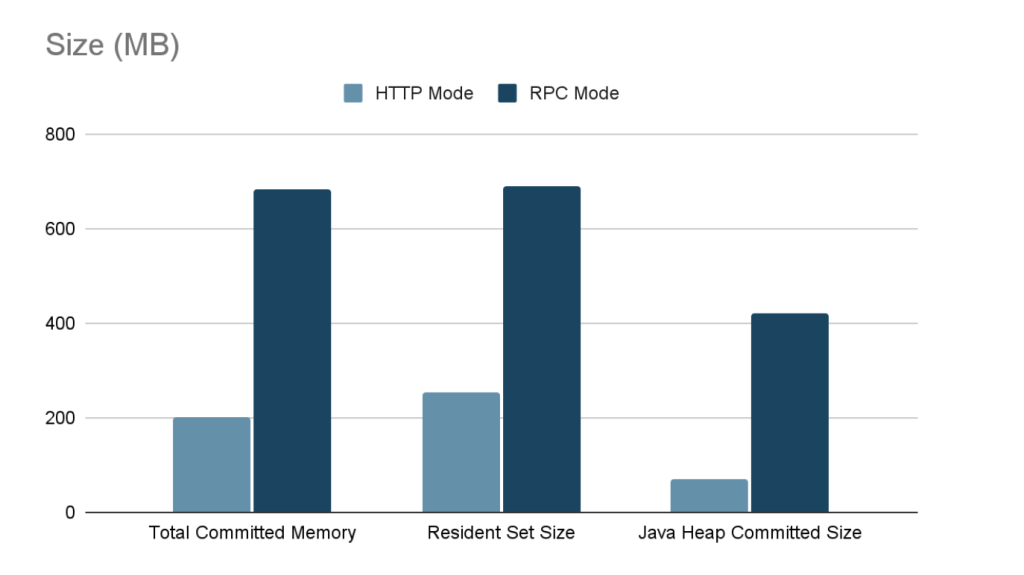
Recently, we implemented a new mode for the Java Runtimes which bypasses the legacy gRPC layer which was previously needed to support the GEN1 runtimes. This legacy code path allowed support of the GEN1 and GEN2 Runtimes simultaneously, but had significant overhead; it used two separate Jetty Servers, one for parsing HTTP requests and converting to RPC, and another using a custom Jetty Connector to allow RPC requests to be processed by Jetty. It also required the full request and response content to be buffered which further increased memory usage.
The new HttpConnector mode completely bypasses this RPC layer, thereby avoiding the overhead of buffering full request and response contents. Additionally, it removes the necessity of starting a separate Jetty Server, further reducing overheads and streamlining the request-handling process.
Benchmarks
Benchmarks conducted on the new HttpConnector mode have demonstrated significant performance improvements. Detailed results and documentation of these benchmarks can be found here.
Usage
To take advantage of the new HttpConnector mode, developers can set the appengine.use.HttpConnector system property in their appengine-web.xml file.
By adopting this configuration, developers can leverage the enhanced performance and efficiency offered by the new HttpConnector mode. This is available for all Java Runtimes from Java8 to Java21.
This mode is currently an optional configuration but future plans are to make this the default for all applications.
With the release of Jetty 12.0.8, we’re excited to announce the (re)implementation of a somewhat maligned and deprecated feature: Cross-Context Dispatch. This feature, while having been part of the Servlet specification for many years, has seen varied levels of use and support. Its re-introduction in Jetty 12.0.8, however, marks a significant step forward in our commitment to supporting the diverse needs of our users, especially those with complex legacy and modern web applications.
Understanding Cross-Context Dispatch
Cross-Context Dispatch allows a web application to forward requests to or include responses from another web application within the same Jetty server. Although it has been available as part of the Servlet specification for an extended period, it was deemed optional with Servlet 6.0 of EE10, reflecting its status as a somewhat niche feature.
Initially, Jetty 12 moved away from supporting Cross-Context Dispatch, driven by a desire to simplify the server architecture amidst substantial changes, including support for multiple environments (EE8, EE9, and EE10). These updates mean Jetty can now deploy web applications using either the javax namespace (EE8) or the jakarta namespace (EE9 and EE10), all using the latest optimized jetty core implementations of HTTP: v1, v2 or v3.
Reintroducing Cross-Context Dispatch
The decision to reintegrate Cross-Context Dispatch in Jetty 12.0.8 was influenced significantly by the needs of our commercial clients, some who still leveraging this feature in their legacy applications. Our commitment to supporting our clients’ requirements, including the need to maintain and extend legacy systems, remains a top priority.
One of the standout features of the newly implemented Cross-Context Dispatch is its ability to bridge applications across different environments. This means a web application based on the javax namespace (EE8) can now dispatch requests to, or include responses from, a web application based on the jakarta namespace (EE9 or EE10). This functionality opens up new pathways for integrating legacy applications with newer, modern systems.
Looking Ahead
The reintroduction of Cross-Context Dispatch in Jetty 12.0.8 is more than just a nod to legacy systems; it can be used as a bridge to the future of Java web development. By allowing for seamless interactions between applications across different Servlet environments, Jetty-12 opens the possibility of incremental migration away from legacy web applications.
HTTP/3 is the next iteration of the HTTP protocol.
HTTP/1.0 was released in 1996 and HTTP/1.1 in 1997; HTTP/1.x is a fairly simple textual protocol based on TCP, possibly wrapped in TLS, that experienced over the years a tremendous growth that was not anticipated in the late ’90s.
With the growth, a few issues in the HTTP/1.x scalability were identified, and addressed first by the SPDY protocol (HTTP/2 precursor) and then by HTTP/2.
The design of HTTP/2, released in 2015 (and also based on TCP), resolved many of the HTTP/1.x shortcomings and protocol became binary and multiplexed.
The deployment at large of HTTP/2 revealed some issues in the HTTP/2 protocol itself, mainly due a shift towards mobile devices where connectivity is less reliable and packet loss more frequent.
Enter HTTP/3, which ditches TCP for QUIC (RFC 9000) to address the connectivity issues of HTTP/2.
HTTP/3 and QUIC are inextricably entangled together because HTTP/3 relies heavily on QUIC features that are not provided by any other lower-level protocol.
QUIC is based on UDP (rather than TCP) and has TLS built-in, rather than layered on top.
This means that you cannot offload TLS in a front-end server, like with HTTP/1.x and HTTP/2, and then forward the clear-text HTTP/x bytes to back-end servers.
Due to HTTP/3 relying heavily on QUIC features, it’s not possible anymore to separate the “carrier” protocol (QUIC) from the “semantic” protocol (HTTP). Therefor reverse proxying should either:
decrypt QUIC+HTTP/3, perform some proxy processing, and re-encrypt QUIC+HTTP/3 to forward to back-end servers; or
decrypt QUIC+HTTP/3, perform some proxy processing, and re-encode into a different protocol such as HTTP/2 or HTTP/1.x to forward to back-end servers, with the risk of losing features by using older HTTP protocol versions.
The Jetty Project has always been on the front at implementing Web protocols and standard, and QUIC+HTTP/3 is no exception.
Jetty’s HTTP/3 Support
At this time, Jetty’s support for HTTP/3 is still experimental and not recommended for production use.
We decided to use the Cloudflare’s Quiche library because QUIC’s use of TLS requires new APIs that are not available in OpenJDK; we could not implement QUIC in pure Java.
We wrapped the native calls to Quiche with either JNA or with Java 17’s Foreign APIs (JEP 412) and retrofitted the existing Jetty’s I/O library to work with UDP as well.
A nice side effect of this work is that now Jetty is a truly generic network server, as it can be used to implement any generic protocol (not just web protocols) on either TCP or UDP.
HTTP/3 was implemented in Jetty 10.0.8/11.0.8 for both the client and the server.
The implementation is quite similar to Jetty’s HTTP/2 implementation, since the protocols are quite similar as well.
Using the high-level APIs provided by Jetty’s HttpClient with the HTTP/3 specific transport (that only speaks HTTP/3), or with the dynamic transport (that can speak multiple protocols).
Using the low-level HTTP/3 APIs provided by Jetty’s HTTP3Client that allow you to deal directly with HTTP/3 sessions, streams and frames.
UnixDomain sockets support was added in Jetty 9.4.0, back in 2015, based on the JNR UnixSocket library.
The support for UnixDomain sockets with JNR was experimental, and has remained so until now.
In Jetty 10.0.7/11.0.7 we re-implemented support for UnixDomain sockets based on JEP 380, which shipped with Java 16.
We have kept the source compatibility at Java 11 and used a little bit of Java reflection to access the new APIs introduced by JEP 380, so that Jetty 10/11 can still be built with Java 11.
However, if you run Jetty 10.0.7/11.0.7 or later with Java 16 or later, then you will be able to use UnixDomain sockets based on JEP 380.
The UnixDomain implementation from Java 16 is very stable, so we have switched our own website to use it.
The page that you are reading right now has been requested by your browser and processed on the server by Jetty using Jetty’s HttpClient to send the request via UnixDomain sockets to our local WordPress.
We have therefore deprecated the old Jetty modules based on JNR in favor of the new Jetty modules based on JEP 380.
Note that since UnixDomain sockets are an alternative to TCP network sockets, any TCP-based protocol can be carried via UnixDomain sockets: HTTP/1.1, HTTP/2 and FastCGI.
We have improved the documentation to detail how to use the new APIs introduced to support JEP 380, for the client and for the server.
If you are configuring Jetty behind a load balancer (or Apache HTTPD or Nginx) you can now use UnixDomain sockets to communicate from the load balancer to Jetty, as explained in this section of the documentation.
The Jetty Project just released the Jetty Load Generator, a Java 11+ library to load-test any HTTP server, that supports both HTTP/1.1 and HTTP/2.
The project was born in 2016, with specific requirements. At the time, very few load-test tools had support for HTTP/2, but Jetty’s HttpClient did. Furthermore, few tools supported web-page like resources, which were important to model in order to compare the multiplexed HTTP/2 behavior (up to ~100 concurrent HTTP/2 streams on a single connection) against the HTTP/1.1 behavior (6-8 connections). Lastly, we were more interested in measuring quality of service, rather than throughput.
The Jetty Load Generator generates requests asynchronously, at a specified rate, independently from the responses. This is the Jetty Load Generator core design principle: we wanted the request generation to be constant, and measure response times independently from the request generation. In this way, the Jetty Load Generator can impose a specific load on the server, independently of the network round-trip and independently of the server-side processing time. Adding more load generators (on the same machine if it has spare capacity, or using additional machines) will allow the load against the server to increase linearly.
Using this core principle, you can setup the load testing by having N load generator loaders that impose the load on the server, and 1 load generator probe that imposes a very light load and measures response times.
For example, you can have 4 loaders that impose 20 requests/s each, for a total of 80 requests/s seen by the server. With this load on the server, what would be the experience, in terms of response times, of additional users that make requests to the server? This is exactly what the probe measures.
If the load on the server is increased to 160 requests/s, what would the probe experience? The same response times? Worse? And what are the probe response times if the load on the server is increased to 240 requests/s?
Rather than trying to measure some form of throughput (“what is the max number of requests/s the server can sustain?”), the Jetty Load Generator measures the quality of service seen by the probe, as the load on the server increases. This is, in practice, what matters most for HTTP servers: knowing that, when your server has a load of 1024 requests/s, an additional user can still see response times that are acceptable. And knowing how the quality of service changes as the load increases.
The Jetty Load Generator builds on top of Jetty’s HttpClient features, and offers:
A builder-style Java API, to embed the load generator into your own code and to have full access to all events emitted by the load generator
A command-line tool, similar to Apache’s ab or wrk2, with histogram reporting, for ease of use, scripting, and integration with CI servers.
Reactive HttpClient Versions 1.1.x, of which the latest is the newly released 1.1.5, requires at least Java 8 and it is based on Jetty 9.4.x.
This version will be maintained as long as Jetty 9.4.x is maintained, likely many more years, to allow migration away from Java 8.
Reactive HttpClient 2.0.x Series
Reactive HttpClient Versions 2.0.x, with the newly released 2.0.0, requires at least Java 11 and it is based on Jetty 10.0.x.
The Reactive HttpClient 2.0.x series is incompatible with the 1.1.x series, since the Jetty HttpClient APIs changed between Jetty 9.4.x and Jetty 10.0.x.
This means that projects such as Spring WebFlux, at the time of this writing, are not compatible with the 2.0.x series of Reative HttpClient.
Reactive HttpClient 3.0.x Series
Reactive HttpClient Versions 3.0.x, with the newly released 3.0.0, requires at least Java 11 and it is based on Jetty 11.0.x.
In turn, Jetty 11.0.x is based on the Jakarta EE 9 Specifications, which means jakarta.servlet and not javax.servlet.
The Reactive HttpClient 3.0.x series is fundamentally identical to the 2.0.x series, apart from the Jetty dependency.
While the HttpClient APIs do not change between Jetty 10 and Jetty 11, if you are using Jakarta EE 9 it will be more convenient to use the Reactive HttpClient 3.0.x series.
For example when using Reactive HttpClient to call a third party service from within a REST service, it will be natural to use Reactive HttpClient 2.0.x if you use javax.ws.rs, and Reactive HttpClient 3.0.x if you use jakarta.ws.rs.
Enjoy the new releases and tell us which series you use by adding a comment here!
For further information, refer to the project page on GitHub.
The Jetty HTTP client internally uses a connection pool to recycle HTTP connections, as they are expensive to create and dispose of. This is a well-known pattern that has proved to work well.
While this pattern brings great benefits, it’s not without its shortcomings. If the Jetty client is used by concurrent threads (like it’s meant to be) then one can start seeing some contention building up onto the pool as it is a central point that all threads have to go to to get a connection.
Here’s a breakdown of what the client contains:
HttpClient
  ConcurrentMap<Origin, HttpDestination>
Origin
  scheme
  host
  port
HttpDestination
  ConnectionPool
The client contains a Map of Origin -> HttpDestination. The origin basically describes where the remote service is and the destination is a wrapper for the connection pool with bells and whistles.
So, when you ask the client to do a GET on https://www.google.com/abc the client will use the connection pool contained in the destination keyed by “https|www.google.com|443”. Asking the client to GET https://www.google.com/xyz would make it use the exact same connection pool as the origins of both URLs are the same. Asking the same client to also do a GET on https://www.facebook.com/ would make it use a different connection pool as the origin this time around is “https|www.facebook.com|443”.
It is quite common for a client to exchange with a handful, or sometimes even a single destination so it is expected that if multiple threads are using the client in parallel, they will all ask the same connection pool for a connection.
There are three important implementations of the ConnectionPool interface: DuplexConnectionPool is the default. It guarantees that a connection will never be shared among threads, i.e.: when a connection is acquired by one thread, no other thread will be able to acquire it for as long as it hasn’t been released. It also tries to maximize re-use of the connections such as only a minimal amount of connections have to be kept open. MultiplexConnectionPool This one allows up to N threads (N being configurable) to acquire the exact same connection. While this is of no use for HTTP/1 connections as HTTP/1.1 does not allow running concurrent requests, HTTP/2 does so when the Jetty client connects to an HTTP/2 server; a single connection can be used to send multiple requests in parallel. Just like DuplexConnectionPool, it also tries to maximize the re-use of connections. RoundRobinConnectionPool Similar MultiplexConnectionPool as it allows multiple threads to share the connections. But unlike it, it does not try to maximize the re-use of connections. Instead, it tries to spread the load evenly across all of them. It can be configured to not multiplex the connections so that it can also be used with HTTP/1 connections.
The Problem on the Surface
Some users are heavily using the Jetty client with many concurrent threads, and they noticed that their threads were bottlenecked in the code that tries to get a connection from the connection pool. A quick investigation later revealed the problem comes from the fact that the connection pool implementations all use a java.util.Deque protected with a java.util.concurrent.locks.ReentrantLock. A single lock + multiple threads makes it rather obvious why this bottlenecks: all threads are contending on the lock which is easily provable with a simple microbenchmark ran under a profiler.
Here is the benchmarked code:
It was quite apparent that while the benchmark was running, the reported CPU consumption never reached anything close to 100% no matter how many threads were configured to use the connection pool in parallel.
The Problem in Detail
There are two fundamental problems. The most obvious one is the lock that protects all access to the connection pool. The second is more subtle, it’s the fact that a queue is an ill-suited data structure for writing performant concurrent algorithms.
To be more precise: there are excellent concurrent queue algorithms out there that do a terrific job, and sometimes you have no choice but to use a queue to implement your logic correctly. But when you can write your concurrent code with a different data structure than a queue, you’re almost always going to win. And potentially win big.
Here is an over-simplified explanation of why:
Queue
head           tail
[c1]-[c2]-[c3]-[c4]
c1-4 are the connection objects.
All threads dequeue from the head and enqueue at the bottom, so that creates natural contention on these two spots. No matter how the queue is implemented, there is a natural set of data describing the head that must be read and modified concurrently by many threads so some form of mutual exclusion or Compare-And-Set retry loop has to be used to touch the head. Said differently: reading from a queue requires modifying the shape of the queue as you’re removing an entry from it. The same is true when writing to the queue.
Both DuplexConnectionPool and MultiplexConnectionPool exacerbate the problem because they use the queue as a stack: the re-queuing is performed at the top of the queue as these two implementations want to maximize usage of the connections. RoundRobinConnectionPool mitigates that a bit by dequeuing from the head and re-queuing at the tail to maximize load spreading over all connections.
The Solution
The idea was to come up with a data structure that does not need to modify its shape when a connection is acquired or released. So instead of directly storing the connections in the data structure, let’s wrap it in some metadata holder object (let’s call its class Entry) that can tell if the connection is in use or not. Let’s pick a base data structure that is quick and easy to iterate, like an array.
All threads iterate the array and try to reserve the visited connections up until one can be successfully reserved. The reservation is done by trying to flip the flag atomically which isn’t retried as a failure meaning you
need to try the next connection. Because of multiplexing, the free/in-use flag actually has to be a counter that can go from 0 to configured max multiplex.
Array
[e1|e2|e3|e4]
 a1 a2 a3 a4
 c1 c2 c3 c4
e1-4 are the Entry objects.
a1-4 are the "acquired" counters.
c1-4 are the connection objects.
Both DuplexConnectionPool and MultiplexConnectionPool still have some form of contention as they always start iterating at the array’s index 0. This is unavoidable if you want to maximize the usage of connections.
RoundRobinConnectionPool uses an atomic counter to figure out where to start iterating. This relieves the contention on the first elements in the array at the expense of contending on the atomic counter itself.
The results of this algorithm are speaking for themselves:
Clearly, this time we’re using all the CPU cycles we can. And we get 3 times more throughput for the multiplex pool, 5 times for the duplex pool, and 10 times for the round-robin pool.
This is quite an improvement in itself, but we can still do better.
Closing the Loop
The above explanation describes the core algorithm that the new connection pools were built upon. But this is a bit of an over-simplification as reality is a bit more complex than that.
Entries count can change dynamically. So instead of an array, a CopyOnWriteArrayList is used so that entries can be added or removed at any time while the pool is being used.
Since the Jetty client creates connections asynchronously and the pool enforces a maximum size, the mechanism to add new connections works in two steps: reserve and enable, plus a counter to track the pending connections, i.e.: those that are reserved but not yet enabled. Since it is not expected that adding or removing connections is going to happen very often, the operations that modify the CopyOnWriteArrayList happen under a lock to simplify the implementation.
The pool provides a feature with which you can set how many times a connection can be used by the Jetty client before it has to be closed and a new one opened. This usage counter needs to be updated atomically with the multiplexing counter which makes the acquire/release finite state machine more complex.
Extra #1: Caching
There is one extra step we can take that can improve the performance of the duplex and multiplex connection pools even further. In an ideal case, there are as many connections in the pool as there are threads using them. What if we could make the threads stick to the same connection every time? This can be done by storing a reference to the successfully acquired connection into a thread-local variable which could then be reused the next time(s) a connection is acquired. This way, we could bypass both the iteration of the array and contention on the “acquired” counters. Of course, life isn’t always ideal so we would still need to keep the iteration and the counters as a fallback in case we drift away from the ideal case. But the closer the usage of the pool would be from the ideal case, the more this thread-local cache would avoid iterations and contention on the counters.
Here are the results you get with this extra addition:
The duplex pool is over four times faster again, and the multiplex pool over 10 times faster. Again, the benchmark reflects the ideal case so this is really the best one can get but these improvements are certainly worth considering some tuning of the pool to try to get as much of those multipliers as possible.
Extra #2: Iteration strategy
All this logic has been moved to the org.eclipse.jetty.util.Pool class so that it can be re-used across all connection pool implementations, as well as potentially for pooling other objects. A good example is the server’s XmlConfiguration parser that uses expensive-to-create XML parsers. Another example is the Inflater and Deflater classes that are expensive to instantiate but are heavily used for compressing/decompressing requests and responses. Both are great candidates to pool objects and already are, using custom never-reused pooling code.
So we could replace those two pools with the new pool created for the Jetty client’s HTTP connection pool. Except that none of those need to maximize re-use of the pooled objects, and they don’t need to rotate through them either, so none of the two iterations discussed above do the proper job, and both come with some overhead.
Hence, StrategyType was introduced to tell the pool from where the iteration should start:
public enum StrategyType
{
 /**
  * A strategy that looks for an entry always starting from the first entry.
  * It will favour the early entries in the pool, but may contend on them more.
  */
  FIRST,
 /**
  * A strategy that looks for an entry by iterating from a random starting
  * index. No entries are favoured and contention is reduced.
  */
  RANDOM,
 /**
  * A strategy that uses the {@link Thread#getId()} of the current thread
  * to select a starting point for an entry search. Whilst not as performant as
  * using the {@link ThreadLocal} cache, it may be suitable when the pool is substantially smaller
  * than the number of available threads.
  * No entries are favoured and contention is reduced.
  */
  THREAD_ID,
 /**
  * A strategy that looks for an entry by iterating from a starting point
  * that is incremented on every search. This gives similar results to the
  * random strategy but with more predictable behaviour.
  * No entries are favoured and contention is reduced.
  */
  ROUND_ROBIN,
}
FIRST being the one used by duplex and multiplex connection pools and ROUND_ROBIN the one used, well, by the round-robin connection pool. The two new ones, RANDOM and THREAD_ID, are about spreading the load across all entries like ROUND_ROBIN, but unlike it, they use a cheap way to find that start index that does not require any form of contention.
Jetty 9 introduced the Eat-What-You-Kill[n]The EatWhatYouKill strategy is named after a hunting proverb in the sense that one should only kill to eat. The use of this phrase is not an endorsement of hunting nor killing of wildlife for food or sport.[/n] execution strategy to apply mechanically sympathetic techniques to the scheduling of threads in the producer-consumer pattern that are used for core capabilities in the server. The initial implementations proved vulnerable to thread starvation and Jetty-9.3 introduced dual scheduling strategies to keep the server running, which in turn suffered from lock contention on machines with more than 16 cores. The Jetty-9.4 release now contains the latest incarnation of the Eat-What-You-Kill scheduling strategy which provides mechanical sympathy without the risk of thread starvation in a single strategy. This blog is an update of the original post with the latest refinements.
Parallel Mechanical Sympathy
Parallel computing is a “false friend” for many web applications. The textbooks will tell you that parallelism is about decomposing large tasks into smaller ones that can be executed simultaneously by different computing engines to complete the task faster. While this is true, the issue is that for web application containers there is not an agreement on what is the “large task” that needs to be decomposed.
From the applications point of view the large task to be solved is how to render a complex page for a user, combining multiple requests and resources, using many services for authentication and perhaps RESTful access to a data model on multiple back end servers. For the application, parallelism can improve quality of service of rendering a single page by spreading the decomposed tasks over all the available CPUs of the server.
However, a web application container has a different large task to solve: how to provide service to hundreds or thousands, maybe even hundreds of thousands of simultaneous users. Unfortunately, for the container, the way to optimally allocate its this decomposed task to CPUs is completely opposite to how the application would like it’s decomposed tasks to be executed.
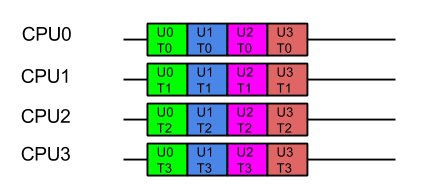
Consider a server with 4 CPUs serving 4 users each which each have 4 tasks. The applications ideal view of parallel decomposition looks like:
Label UxTy represent Task y for User x. Tasks for the same user are coloured alike
This view suggests that each user’s combined task will be executed in minimum time. However some users must wait for prior users tasks to complete before their execution can start, so average latency is higher.
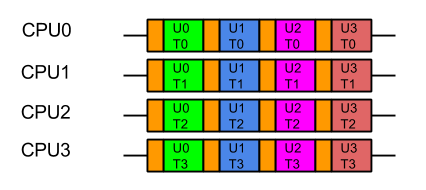
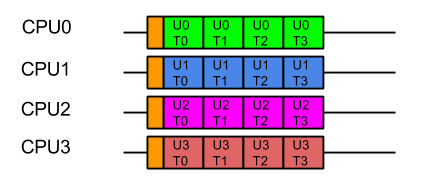
Furthermore, we know from Mechanical Sympathy that such ideal execution is rarely possible, especially if there is data shared between tasks. Each CPU needs time to load its cache and register with data before it can be acted on. If that data is specific to the problem each user is trying to solve, then the real view of the parallel execution looks more like the following, the orange blocks indicating the time taken to load the CPU cache with user and task related data:
Label UxTy represent Task y for User x. Tasks for the same user are coloured alike. Orange blocks represent cache load time.
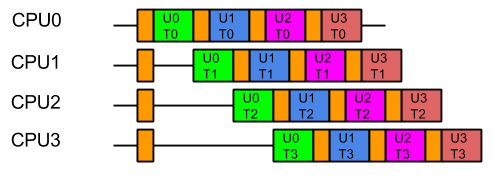
So from the containers point of view, the last thing it wants is the data from one users large problem spread over all its CPUs, because that means that when it executes the next task, it will have a cold cache and it must be reloaded with the data of the next user. Furthermore, executing tasks for the same user on different CPUs risks Parallel Slowdown, where the cost of mutual exclusion, synchronisation and communication between CPUs can increase the total time needed to execute the tasks to more than serial execution. If the tasks are fully mutually excluded on user data (unlikely but a bounding case), then the execution could look like:
For optimal execution from the containers point of view it is far better if tasks from each user, which use common data, are kept on the same CPU so the cache only needs to be loaded once and there is no mutual exclusion on user data:
While this style of execution does not achieve the minimal latency and throughput of the idealised application view, in reality it is the fairest and most optimal execution, with all users receiving similar quality of service and the optimal average latency.
In summary, when scheduling the execution of parallel tasks, it is best to keep tasks that share data on the same CPU so that they may benefit from a hot cache (the original blog contains some micro benchmark results that quantifies the benefit).
Produce Consume (PC)
In order to facilitate the decomposition of large problems into smaller ones, the Jetty container uses the Producer-Consumer pattern:
The NIO Selectorproduces IO events that need to be consumed by reading, parsing and handling the data.
A multiplexed HTTP/2 connection produces Frames that need to be consumed by calling the Servlet Container. Note that the producer of HTTP/2 frames is itself a consumer of IO events!
The producer-consumer pattern adds another way that tasks can be related by data. Not only might they be for the same user, but consuming a task will share the data that results from producing the task. A simple implementation can achieve this by using only a single CPU to both produce and consume the tasks:
while (true)
{
  Runnable task = _producer.produce();
  if (task == null)
    break;
   task.run();
}
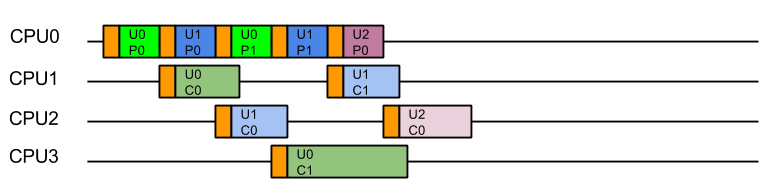
The resulting execution pattern has good mechanical sympathy characteristics:
Label UxPy represent Produce Task y for User x, Label UxCy represent Consume Task y for User x. Tasks for the same user are coloured in similar tones. Orange blocks are cache load times.
Here all the produced tasks are immediately consumed on the same CPU with a hot cache! Cache load times are minimised, but the cost is that server will suffer from Head of Line (HOL) Blocking, where the serial execution of task from a queue means that execution of tasks are forced to wait for the completion of unrelated tasks. In this case tasks for U1C0 need not wait for U0C0 and U2C0 tasks need not wait for U1C1 or U0C1 etc. There is no parallel execution and thus this is not an optimal usage of the server resources.
Produce Execute Consume (PEC)
To solve the HOL blocking problem, multiple CPUs must be used so that produced tasks can be executed in parallel and even if one is slow or blocks, the other CPU can progress the other tasks. To achieve this, a typical solution is to have one Thread executing on a CPU that will only produce tasks, which are then placed in a queue of tasks to be executed by Threads running on other CPUs. Typically the task queue is abstracted into an Executor:
while (true)
{
    Runnable task = _producer.produce();
    if (task == null)
        break;
    _executor.execute(task);
}
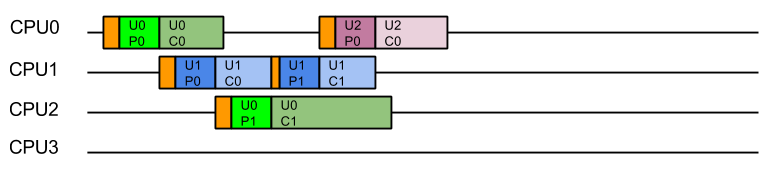
This strategy could be considered the canonical solution to the producer consumer problem, where producers are separated from consumers by a queue and is at the heart of architectures such as SEDA. This strategy well solves the head of line blocking issue, since all tasks produced can complete independently in different Threads on different CPUs:
This represents a good improvement in throughput and average latency over the simple Produce Consume, solution, but the cost is that every consumed task is executed on a different Thread (and thus likely a different CPU) from the one that produced the task. While this may appear like a small cost for avoiding HOL blocking, our experience is that CPU cache misses significantly reduced the performance of early Jetty 9 releases.
Eat What You Kill (EWYK) AKA Execute Produce Consume (EPC)
To achieve good mechanical sympathy and avoid HOL blocking, Jetty has developed the Execute Produce Consume strategy, that we have nicknamed Eat What You Kill (EWYK) after the expression which states a hunter should only kill an animal they intend to eat. Applied to the producer consumer problem this policy says that a thread should only produce (kill) a task if it intends to consume (eat) it[n]The EatWhatYouKill strategy is named after a hunting proverb in the sense that one should only kill to eat. The use of this phrase is not an endorsement of hunting nor killing of wildlife for food or sport.[/n]. A task queue is still used to achieve parallel execution, but it is the producer that is dispatched rather than the produced task:
    while (true)
    {
        Runnable task = _producer.produce();
        if (task == null)
            break;
        _executor.execute(this); // dispatch production
        task.run(); // consume the task ourselves
    }
The result is that a task is consumed by the same Thread, and thus likely the same CPU, that produced it, so that consumption is always done with a hot cache:
Moreover, because any thread that completes consuming a task will immediately attempt to produce another task, there is the possibility of a single Thread/CPU executing multiple produce/consume cycles for the same user. The result is improved average latency and reduced total CPU time.
Starvation!
Unfortunately, a pure implementation of EWYK suffers from a fatal flaw! Since any thread producing a task will go on to consume that task, it is possible for all threads/CPU to be consuming at once. This was initially seen as a feature as it exerted good back pressure on the network as a busy server used all its resources consuming existing tasks rather than producing new tasks. However, in an application server consuming a task may be a blocking process that waits for more data/frames to be produced. Unfortunately if every thread/CPU ends up consuming such a blocking task, then there are no threads left available to produce the tasks to unblock them. Dead lock!
A real example of this occurred with HTTP/2, when every Thread from the pool was blocked in a HTTP/2 request because it had used up its flow control window. The windows can be expanded by flow control frames from the other end, but there were no threads available to process the flow control frames!
Thus the EWYK execution strategy used in Jetty is now adaptive and it can can use the most appropriate of the three strategies outlined above, ensuring there is always at least one thread/CPU producing so that starvation does not occur. To be adaptive, Jetty uses two mechanisms:
Tasks that are produced can be interrogated via the Invocable interface to determine if they are nonblocking, blocking or can be run in either mode. NON_BLOCKING or EITHER tasks can be directly consumed by PC model.
The thread pools used by Jetty implement the TryExecutor interface which supports the method booleantryExecute(Runnabletask)which allows the scheduler to know if a thread was available to continue producing and thus allows EWYK/EPC mode, otherwise the task must be passed to an executor to be consumed in PEC mode. To implement this semantic, Jetty maintains a dynamically sized pool of reserved threads that can respond to tryExecute(Runnable)calls.
Thus the simple produce consume (PC) model is used for non-blocking tasks; for blocking tasks the EWYK, aka Execute Produce Consume (EPC) mode is used if a reserved thread is available, otherwise the SEDA style Produce Execute Consume (PEC) model is used.
The adaptive EWYK strategy can be written as :
    while (true)
    {
        Runnable task = _producer.produce();
        if (task == null)
            break;
        if (Invocable.getInvocationType(task)==NON_BLOCKING)
            task.run();                     // Produce Consume
        else if (executor.tryExecute(this)) // recruit a new producer?
            task.run();                     // Execute Produce Consume (EWYK!)
        else
            executor.execute(task);         // Produce Execute Consume
    }
Chained Execution Strategies
As stated above, in the Jetty use-case it is common for the execution strategy used by the IO layer to call tasks that are themselves an execution strategy for producing and consuming HTTP/2 frames. Thus EWYK strategies can be chained and by knowing some information about the mode in which the prior strategy has executed them the strategies can be even more adaptive.
The adaptable chainable EWYK strategy is outlined here:
  while (true) {
    Runnable task = _producer.produce();
    if (task == null)
      break;
    if (thisThreadIsNonBlocking())
    {
      switch(Invocable.getInvocationType(task))
      {
        case NON_BLOCKING:
          task.run();                 // Produce Consume
          break;
        case BLOCKING:
          executor.execute(task);     // Produce Execute Consume
          break;
        case EITHER:
          executeAsNonBlocking(task); // Produce Consume break;
       }
    }
    else
    {
      switch(Invocable.getInvocationType(task))
      {
        case NON_BLOCKING:
          task.run();                   // Produce Consume
          break;
        case BLOCKING:
          if (_executor.tryExecute(this))
            task.run();                 // Execute Produce Consume (EWYK!)
          else
            executor.execute(task);     // Produce Execute Consume
          break;
        case EITHER:
          if (_executor.tryExecute(this))
            task.run();                 // Execute Produce Consume (EWYK!)
          else
            executeAsNonBlocking(task); // Produce Consume
            break;
       }
    }
An example of how the chaining works is that the HTTP/2 task declares itself as invocable EITHER in blocking on non blocking mode. If IO strategy is operating in PEC mode, then the HTTP/2 task is in its own thread and free to block, so it can itself use EWYK and potentially execute a blocking task that it produced.
However, if the IO strategy has no reserved threads it cannot risk queuing an important Flow Control frame in a job queue. Instead it can execute the HTTP/2 as a non blocking task in the PC mode. So even if the last available thread was running the IO strategy, it can use PC mode to execute HTTP/2 tasks in non blocking mode. The HTTP/2 strategy is then always able to handle flow control frames as they are non-blocking tasks run as PC and all other frames that may block are queued with PEC.
Conclusion
The EWYK execution strategy has been implemented in Jetty to improve performance through mechanical sympathy, whilst avoiding the issues of Head of Line blocking, Thread Starvation and Parallel Slowdown. The team at Webtide continue to work with our clients and users to analyse and innovate better solutions to serve high performance real world applications.
ReactiveStreams has gained a lot of attention recently, especially because of its inclusion in JDK 9 in the Flow class.
A number of libraries have been written on top of ReactiveStreams that provide a functional-style API that makes asynchronous processing of a data stream very easy.
Notable examples of such libraries are RxJava 2 and Spring Reactor. ReactiveStreams provides a common API for all these libraries so that they are interoperable, and interoperable with any library that offers a ReactiveStreams API.
It is not uncommon that applications (especially REST applications) need to interact with a HTTP client to either consume or produce a stream of data. The typical example is an application making REST calls to a server and obtaining response content that needs to be transformed using ReactiveStreams APIs.
Another example is having a stream of data that you need to upload to a server using a REST call.
It’s evident that it would be great if there was a HTTP client that provides ReactiveStreams API, and this is what we have done with the Jetty ReactiveStreams HttpClient.
Maven coordinates:
The Jetty ReactiveStreams HttpClient is a tiny wrapper over Jetty’s HttpClient; Jetty’s HttpClient was already fully non-blocking and already had full support for backpressure, so wrapping it with the ReactiveStreams API was fairly simple.
You can find detailed usage examples at the project page on GitHub.
Starting with patch 9.4.3, Jetty will be fully compliant with RFC6265, which presents changes to cookies which may have significant impact for some users.
Up until now Jetty has supported Version=1 cookies defined in RFC2109 (and continued in RFC2965) which allows for special/reserved characters (control, separator, et al) to be enclosed within double quotes when declared in a Set-Cookie response header:
Example:
Set-Cookie: foo="bar;baz";Version=1;Path="/secur"
Which was added to the HTTP Response headers using the following calls.
Cookie cookie = new Cookie("foo", "bar;baz");
cookie.setPath("/secur");
response.addCookie(cookie);
This allowed for normally non-permitted characters (such as the ; separator found in the example above) to be used as part of a cookie value. With the introduction of RFC6265 (replacing the now obsolete RFC2965 and RFC2109) , this use of Double Quotes to enclose special characters is no longer possible.
This change was made as a reaction to the strict RFC6265 validation rules present in Chrome/Chromium.
As such, users are now required to encode their cookie values to use these characters.
Utilizing javax.servlet.http.Cookie, this can be done as:
Cookie cookie = new Cookie("foo", URLEncoder.encode("bar;baz", "utf-8"));
Starting with Jetty 9.4.3, we will now validate all cookie names and values when being added to the HttpServletResponse via the addCookie(Cookie) method. If there is something amiss, Jetty will throw an IllegalArgumentException with the details.
Of note, this new addCookie(Cookie) validation will be applied via the ServerConnector, and will work on HTTP/1.0, HTTP/1.1, and HTTP/2.0
Additionally, Jetty has added a CookieCompliance property to the HttpConfiguration object which can be utilized to define which cookie policy the ServerConnectors will adhere to. By default, this will be set to RFC6265.
In the standard Jetty Distribution, this can be found in the server’s jetty.xml as:
Or if you are utilizing the module system in the Jetty distribution, you can set the jetty.httpConfig.cookieCompliance property in the appropriate start INI for your${jetty.base} (such as ${jetty.base}/start.ini or ${jetty.base}/start.d/server.ini):