Category: General

  • Java Updates, Jetty, and the Future

    There has been a tremendous amount of information, and a fair amount of disinformation, coming out over the last several months with regards to Java versioning, the effects of modularization, and how projects like Jetty may or may not respond to them. In light of that, we wanted to more comprehensively explain what we have seen thus far, where things are going, and what we are planning to do with Jetty. We are also interested in any feedback from our clients as to what their expectations might be as well as any trials and tribulations you might be having.
    With that in mind, here we go!

    Oracle’s new JDK Release Schedule

    Oracle has published an updated JDK release schedule.
    Oracle will make JDK 8 updates for critical bugs or security fixes publicly available until January 2019. After that, you need to purchase Oracle support for the JDK if you want to continue to use JDK 8 and receive the latest bugs and security fixes.
    As part of their revamped Support Roadmap, Oracle has introduced the term “Long Term Support” for certain JDK releases. However, the term may be confusing, as it practically refers only to customers that purchase Oracle support for the JDK.
    Therefore, if you don’t purchase Oracle support for the JDK, then:

    • JDK 8 will be updated up to January 2019; after that, the supported JDK version will be JDK 11.
    • JDK 9 will not be updated.
    • JDK 10 will be updated up to September 2018; after that, the supported JDK version will be JDK 11.
    • JDK 11 will be updated up to March 2019; after that, the supported JDK version will be JDK 12.
    • JDK 12 will be updated up to September 2019; after that, the supported JDK version will be JDK 13.
    • And so on.

    In different words, those that did not purchase Oracle support for the JDK will have “Long Term Support” by moving to a new JDK version every 6 months.
    Alternatively, it is possible to stay on JDK 11 for more than 6 months by purchasing Oracle support for the JDK, as outlined in the JDK release schedule linked above.

    Oracle’s JavaFX Support

    Oracle’s JavaFX support is outlined in this blog post.
    JavaFX was previously bundled with the JDK, but starting in JDK 11 this will no longer be the case, and JavaFX will be available as a separate download.

    Jetty and JDK versions

    Jetty 9.4.x will be supported on publicly available releases of the JDK from JDK 8 or later. However, we strongly encourage Jetty users to keep pace with JDK releases, to benefit from critical bug fixes, security fixes and new features. At the time of writing Jetty 9.4.x already builds and runs on JDK 8, JDK 9, JDK 10 and early access builds of JDK 11.
    JDK 11 will remove classes previously available in the JDK, as detailed in this issue on GitHub. Jetty does not need those classes, but often applications do.
    Standalone Jetty users will have the choice of either adding the jars containing those classes to their applications (for example in the WEB-INF/lib directory of a web application) or to write a custom Jetty module that exposes those classes to all web applications deployed to Jetty.
    Embedded Jetty users will need to add the jars containing those classes to the classpath.
    If you have questions as to what jars are available for your specific need that may be removed we encourage you to reach out to us early!

    Recommended JDK version migration plan

    We strongly recommend to start planning an upgrade to a JDK version greater than 8 (at this time, JDK 10) right nowMoving from JDK 8 to JDK 11 in September 2018, when JDK 11 will be out, will likely be a too big of a change and too risky.
    In particular, the update from JDK 8 to JDK 9 resulted in a possibly large number of incompatibilities, among which include:

    • Removal of tools.jar
    • Removal of JavaDB
    • Removal of the endorsed directory mechanism
    • Removal of the extension directory mechanism
    • Classloading implementation changes
    • A new Java version string scheme – leads to issues when parsing the Java version string
    • Removal of non-critical internal APIs – for example sun.misc.Base64Decoder
    • URLStreamHandler mechanism changes
    • Removal of many (50+) JVM startup options – the JVM refuses to start if a removed option is specified on the command line
    • New format for the JVM logging – big impact on GC logging

    The main problem is that many of these issues may impact your application and all the libraries your application depends on. Your application may not perform classloading, or lookup the system property “java.version”, but the libraries your application depends on may do so. Most of the issues listed above will only manifest at runtime, perhaps while executing an if statement branch that may only be entered under rare conditions.
    The changes listed above impact not only the development of your applications but also their build and their deployment. In some cases, development and deployment are the responsibility of different departments throughout a company, and it may take time to coordinate the changes.
    The best approach for the development side is to update both your build tools (for example, Maven and Maven Plugins) and your library dependencies to their latest versions.
    After that, it is a process of trial and error to make sure that your application works correctly in every possible scenario. A good test suite helps tremendously in this case, as you will be able to test most if not all of your code.
    The update from JDK 9 to JDK 10 should instead be really smooth, typically just a matter of updating the JDK: if your application works in JDK 9, most probably will work in JDK 10 without changes. The update from JDK 10 to JDK 11 may again have issues because of the classes removed from JDK 11, as discussed above.
    In light of the large number of changes that happened with JDK 9, and considering that the changes may affect your application and the libraries your application depends on (which you may need to update, or ask their maintainers to update), and further considering that the changes affect the build, development and the deployment of your applications, we strongly suggest that you start planning for these changes right now, as putting it off any longer may be too late. If you cannot finish the migration from JDK 8 to JDK 11 by January 2019, you risk running on an outdated JDK 8 release that may contain critical bugs or security issues.

    JDK Vendors

    Since OpenJDK is an open source project, many vendors have licensed the Java Test Compatibility Kit (TCK) and will produce OpenJDK builds that have passed the TCK and therefore are suitable for production use.
    Among these vendors there are:

    These vendors, excluding LJC, will offer free OpenJDK builds that are TCK-tested for the current JDK version and commercial support for previous JDK versions.
    Azul System has nicely summarized both Oracle’s and their own support plans for JDK 8 through JDK 19 in the graphs at this page.
    LJC is providing free OpenJDK builds that are TCK-tested at this page: https://adoptopenjdk.net/LJC “support” is just to build and TCK-test the tags of the OpenJDK project.
    For example:
    You decide to use JDK 9; the current version is JDK 10; a JDK security issue is discovered. Then:

    • The issue will be fixed in the OpenJDK 10 project and a new OpenJDK 10 tag will be created.
    • Oracle will issue a new micro version of JDK 10 (e.g. 10.0.2).
    • LJC will provide an OpenJDK 10 build for the newly created OpenJDK 10 tag.
    • If the issue is backported to OpenJDK 9 (and a new OpenJDK 9 tag created), then:
      • Oracle will not provide any support (will ask you to move to JDK 10.0.2)
      • Azul will provide a JDK 9 build, but only to its paying customers
      • LJC should provide a free OpenJDK 9 build for the newly created OpenJDK 9 tag.

    JakartaEE and JavaEE

    In addition to the efforts by Oracle to plot a more rapid release environment for the JDK, they have donated the entire JavaEE platform to the Eclipse Foundation. JavaEE has been subsequently rebranded as JakartaEE and is currently under the process of being migrated and re-released with the same version number. That is JavaEE 8 will be released as JakartaEE 8 once that migration process has been completed. One interesting note is there is as this point no API changes nor functionality changes for JakartaEE 8 which will carry with it the same minimal JDK 8 version.
    A point of interest, Webtide has members who are serving as co-leads on both the Servlet and Websocket specifications as well as Architecture Council representation within the Foundation itself.

    What everything means!

    The Jetty team has already, and will continue to, do the work of migrating and making sure the Jetty code base is compatible with the most up-to-date JDK versions. In addition, we will endeavor to support the minimal version of JDK that is required for the forthcoming JakartaEE specifications. As new JDK versions are released, we are constantly updating and reviewing them to guarantee Jetty remains stable and ready for consumption.
    This means that for now, it is our intention to support JDK 8, 9, 10, and 11 for Jetty 9.4.x releases. We have yet to begin Jetty 10.0.x releases due in large part to the upheaval associated with the JakartaEE code donation coupled with this relatively new accelerated JDK release schedule. We anticipate a different approach to new Jetty 10.0.x releases as they relate to JDK releases but nothing is set in stone in this regard. One approach may be to support the minimal version required by the JakartaEE version and the most current two JDK releases. It seems an untenable situation to pledge support for a minimal version like JDK 8 and every version of the JDK between official LTS versions (JDK 11 through JDK 17!).
    Regardless, we are always available to assist our clients with any questions or migration issues may come across related to this situation. If you have internal plans for how you intend to update JDK versions in the future or expectations on how Jetty will interact with future JDK releases we encourage you to share with us to help manage expectations.
  • Getting Started with Jetty and JDK 9

    It’s finally here! Java 9 has officially been released and includes a whole host of changes and new functionality. Jetty, too, has been built with Java 9 over the past few releases as we ramp up support for the new JDK. It’s important to note that while Jetty is being built with Java 9, it currently does not support the entire suite of changes that came with it. To be clear – Jetty does not currently support Java 9 modules.
    Being that JDK 9 is still so new, Jetty’s support for it is still evolving. As such, it is imperative that users wishing to get the most out of JDK 9 and Jetty remain up-to-date as releases become available. Below is a summary of common problem areas that Jetty has resolved in the most recent releases.

    Annotation scanning

    Prior to Jetty 9.4.7,  multi-release jar files will produce exceptions trying to scan “module-info.class” for annotations. It will also not scan a multi-release jar for the correct versions of classes (i.e. Jetty will scan everything in the root and also everything in META-INF/versions).
    If any of your 3rd party jars (multi-release or not) use Java 9 APIs, then you will need to use Jetty 9.4.8 to get the updated version of ASM capable of parsing those classes.

    Classpath issues

    Pertinent only to embedded uses, prior to Jetty 9.4.8 Jetty was unable to find jars to scan for annotations, or for META-INF information such as web-fragments, resources and tag libs from the container classpath when running with Java 9. This did not apply to executing Jetty via the distribution or via the Jetty Maven Plugin.

    Compilation

    Since Jetty 9.4.7, JDK 9 is used to build Jetty (although it can still be built using JDK 8).
    JDK 9 incorporates a new switch in the javac compiler (–release) that allows to easily compile against previous JDK versions, as defined by JEP 247.
    This new compiler switch is supported by the Maven Compiler Plugin, and we use it while building Jetty with JDK 9, with the configuration –release=8, which allows Jetty to run in JDK 8.
    Only few modules (namely those that use new JDK 9 APIs, such as the jetty-alpn-java-[client|server] modules) are compiled with –release=9.
    With this compiler configuration it is less likely that usages of JDK 9 classes and/or APIs can accidentally slip into modules that are meant to be JDK 8 compliant.

    ALPN Support

    Jetty 9.4.6 only supports ALPN via the alpn-boot mechanism, which requires the alpn-boot jar to be in the bootclasspath.
    Since Jetty 9.4.7, ALPN is also supported using JDK 9 specific APIs without the need of the alpn-boot mechanism. This only works when Jetty is run using JDK 9.
    Since Jetty 9.4.8, ALPN is also supported via the Conscrypt provider, which binds natively to OpenSSL. This is supported for both JDK 8 and JDK 9.
    The advantage of using the Conscrypt provider rather than the default JDK provider is increased performance and increased ease of configuration (since there is no need for the alpn-boot mechanism).
     
    As Java continues to roll out updates and as Jetty continues to bring them into the fold, we will keep you up-to-date on how your implementations might be affected and how best to implement them into your environment.

  • Testing JDK 9 with Dynamic Module Switching

    If you have been following Jetty’s adoption of Java 9, you might have read that builds using JDK 9 have started being produced. As the release of JDK 9 looms, developers are no doubt already doing everything they can to test their current implementations and platforms against the available early-access builds.
    Here at Webtide, we are no different. We’ve been testing our website on JDK 9 and are happy to report positive results. That said, switching back and forth between JDKs was not as straight forward as you might think, notably when it comes to setting JVM arguments.
    Consider the following jvm.mod file (a custom module located in our jetty.base/modules directory). We use this module to set JVM arguments when starting a Jetty standalone server.

    [exec]
    -Xms512m
    -Xmx512m
    -XX:+PrintGCDetails
    -Xloggc:logs/gc.log
    

    The problem is that -XX:+PrintGCDetails is no longer valid in JDK 9. Similarly, the -Xloggc:logs/gc.log has been deprecated (and the new format is not valid for JDK 8).
    While we could change the jvm.mod file to accept the new values for JDK 9, it does not allow for quick switching back to JDK 8 without editing the module file each time, or copy/pasting in a new module file every time we change JVM version.
    To combat this, we created a a dynamic module file that loads a dependent module based on what version of the JVM is found at startup using the Jetty java.version.platform property.
    We still define the module as normal in our jetty.base/start.ini file:

    ...
    --module=jvm
    ...
    

    But if we examine our jvm.mod file we now have:

    [depend]
    jvm${java.version.platform}
    

    On startup, once it is determined which version of the Java platform we are running (8 or 9 in this case), it will load one of two module files, either jetty.base/modules/jvm8.mod or jetty.base/modules/jvm9.mod. Our jvm8.mod file is identical to the file we used at the start of this example. The jvm9.mod file substitutes in the correct values for JDK 9 so that we do not face errors on startup:

    [exec]
    -Xms512m
    -Xmx512m
    -Xlog:gc*:file=logs/gc.log
    

    In this way we were able to switch back and forth between JDK 8 and JDK 9 without having to manually change arguments each time.
    We hope this helps you with your own testing!

  • Building Jetty with JDK 9

    The Jetty Project has been trying to to build Jetty using JDK 9 for some time now.
    We still have a number of things to fix (a few test cases and integration with ASM for class scanning), but overall we have reached a point where we can build Jetty with JDK 9 and will start using JDK 9 to build Jetty releases.
    This process started with our first attempts using older JDK 9 releases, and the results were ugly. Until recently the Maven Plugins required to build Jetty were not updated to work with JDK 9, so trying to build Jetty with JDK 9 was not possible. After most of the Maven Plugins released versions compatible with JDK 9, fiddling with MAVEN_OPTS and adding a number of --add-opens we had our first success, but it was not pretty.
    Fast forward to the JDK 9 release candidate (JDK 9+181) and we could build Jetty without too much effort, mostly thanks to the latest changes applied to the JDK module system. Below is a report of what we had to do, which will hopefully be of use to others.
    The Jetty Project is a multi-module Maven project where we want to maintain JDK 8 compatibility, but we also want to build 2 modules that are JDK 9-specific (the client and server JDK 9 ALPN implementations).
    First and foremost, you’ll want to use the latest versions of the Maven Plugins, especially the maven-compiler-plugin (as of today at 3.6.2) and the maven-javadoc-plugin (as of today at 3.0.0-M1). Make sure you have them all declared in a <pluginManagement> section, so that you specify their version only there (and only once).
    It’s fairly easy to build a module only when building with JDK 9:

    <project ...>
      ...
      <profiles>
        <profile>
          <id>jdk9</id>
          <activation>
            <jdk>[1.9,)</jdk>
          </activation>
          <modules>
            <module>jdk9-specific-module</module>
          </modules>
        </profile>
      </profiles>
    </project
    

    Next, we want to target JDK 8 for all other modules. This is typically done by configuring the maven-compiler-plugin, specifying <target>1.8</target>.
    It turns out that this is not enough though, because while the JDK 9 compiler will produce class files compatible with JDK 8, it will compile against a JDK 9 runtime with the risk that a JDK 9 only class or method was used by mistake in the source code. Even if you are careful and you don’t use JDK 9 classes or methods in your source code, you can still hit binary incompatibilities that exist between JDK 8 and JDK 9.
    Take, for example, the class java.nio.ByteBuffer.
    In JDK 8 it inherits method limit(int) from the parent class, java.nio.Buffer, and the exact signature is:

    public final Buffer limit(int newLimit)
    

    In JDK 9 this has changed; method limit(int) is now overridden in java.nio.ByteBuffer to covariantly return java.nio.ByteBuffer, so the signature is now:

    public ByteBuffer limit(int newLimit)
    

    The difference in return type causes a binary incompatibility, so that if you compile a class that uses ByteBuffer.limit(int) with JDK 9 and try to run with JDK 8 it fails with:

    java.lang.NoSuchMethodError: java.nio.ByteBuffer.limit(I)Ljava/nio/ByteBuffer;
    

    Indeed, JDK 8 does not have that method with that specific signature.
    Luckily, the JDK 9 compiler has a new switch, --release, that allows to easily target previous JDKs (as specified by JEP 247).
    JDK 9 comes with a file ($JDK_HOME/lib/ct.sym) that is a zipped file (you can view its content in a normal file manager) containing directories for the supported target platforms (JDK 6, 7, 8 and 9), and each directory contains all the symbols for that specific JDK platform.
    The latest maven-compiler-plugin supports this new compiler switch, so compiling correctly is now just a matter of simple configuration:

    <project ...>
      <pluginManagement>
        <plugins>
          <plugin>
            <artifactId>maven-compiler-plugin</artifactId>
            <version>3.6.2</version>
            <configuration>
              <source>1.8</source>
              <target>1.8</target>
            </configuration>
          </plugin>
        </plugins>
      </pluginManagement>
      <profiles>
        <profile>
          <id>jdk9</id>
          <activation>
            <jdk>[1.9,)</jdk>
          </activation>
          <build>
            <plugins>
              <plugin>
                <artifactId>maven-compiler-plugin</artifactId>
                <configuration>
                  <release>8</release>
                </configuration>
              </plugin>
            </plugins>
          </build>
        </profile>
      </profiles>
    </project>
    

    In the <pluginManagement> section, we configure the maven-compiler-plugin with source and target to be JDK 8. This section will be taken into account when compiling using JDK 8.
    In the profile, activated only when compiling using JDK 9, we configure the maven-compiler-plugin with release to be JDK 8, so that the JDK 9 compiler generates the right class files using the symbols for JDK 8 contained in ct.sym.
    Finally, we uncovered a strange issue that we think is a Javadoc bug, apparently also hit by the Lucene Project (see https://github.com/eclipse/jetty.project/issues/1741). For us the workaround was simple, just converting an anonymous inner class into a named inner class, but your mileage may vary.
    Hopefully this blog will help you build your projects with Maven and JDK 9.

  • Contributing to Open Source (and Jetty !)

    Andres Almiray (aalmiray) interviewed me at the JCrete unconference.
    We spoke about the history of the Jetty project (which is 22 years old – like Java itself), how Jetty has been able to stay on the edge all these years, how contribution to Open Source Projects works these days, and what is the simplest thing that a person can do to contribute to an Open Source Project.
    Enjoy the video interview (about 16 mins):

  • HTTP/2 Last Call!

    The IETF HTTP working group has issued a last call for comments on the proposed HTTP/2 standard, which means that the process has entered the final stage of open community review before the current draft may become an RFC. Jetty has implemented the proposal already and this website is running it already! There is a lot of good in this proposed standard, but I have some deep reservations about some bad and ugly aspects of the protocol.

    The Good

    HTTP/2 is a child born of the SPDY protocol developed by Google and continues to seek the benefits that have been illuminated by that grand experiment.  Specifically:

    • The new protocol supports the same semantics as  HTTP/1.1 which was recently clarified by RFC7230.  This will allow most of the benefits of HTTP/2 to be used by applications transparently simply by upgrading client and server infrastructure, but without any application code changes.
    • HTTP/2 is a multiplexed protocol that allows multiple request/response streams to share the same TCP/IP connection. It supports out of order delivery of responses so that it does not suffer from the same Head of Line Blocking issues as HTTP/1.1 pipeline did. Clients will no longer  need multiple connections to the same origin server to ensure good quality of service when rendering a page made from many resources, which means a very significant savings in resources needed by the server and also reduces the sticky session problems for load balancers.
    • HTTP headers are very verbose and highly redundant. HTTP/2 provides an effective compression algorithm (HPACK) that is tailored to HTTP and avoids many of the security issues with using general purpose compression algorithms over TLS connections.  Reduced header size allows many requests to be sent over a newly opened TCP/IP connection without the need to wait for it’s congestion control window to grow to the capacity of the link. This significantly reduces the number of network round trips required to render a page.
    • HTTP/2 supports pushed resources, so that an origin server can anticipate requests for associated resources and push them to the clients cache, again saving further network round trips.

    You can see from these key features, that HTTP/2 is primarily focused on improving the speed to render a page, which is (as the book of speed points out) a good focus to have.  To a lesser extent, the process has also considered through put and server resources, but these have not been key drivers and indeed data rates may even suffer under HTTP/2 and servers need to commit more resources to each connection which may consume much of the savings from fewer connections.

    The Bad

    There can only be one!

    While the working groups was chartered to address the misuse of the underlying transport occurring in HTTP/1.1 (eg long polling), it did not make much of the suggestion to coordinate with other working groups regarding the possible future extension of HTTP/2.0 to carry WebSockets semantics.   While a websocket over http2 draft has been written, some of the features that draft referenced have subsequently been removed from HTTP/2 and the protocol is primarily focused on providing HTTP semantics.

    The proposed protocol does not have a clear separation between a framing layer and the HTTP semantics that can be carried by that layer.   I was expecting to see a clear multiplexed, flow controlled framing layer that could be used for many different semantics including HTTP and webSocket. Instead we have a framing protocol aimed primarily at HTTP which to quote the drafts editor:

    What we’ve actually done here is conflate some of the stream control functions with the application semantics functions in the interests of efficiency” Martin Thomson 8/May/2014

    I’m dubious there are significant efficiencies from conflating layers, but even it there are, I believe that such a design will make it much harder to carry WebSocket or other new web semantics over the http2 framing layer.   HTTP semantics are hard baked into the framing so intermediaries (routers, hubs, load balancers, firewalls etc.) will be deployed that will have HTTP semantic hard wired.   The only way that any future web semantic will be able to be transported over future networks will be to use the trick of pretending to be HTTP, which is exactly the kind of  misuse of the underlying transport, that HTTP/2 was intended to address.   I know it is difficult to generalise from one example, but today we have both HTTP and WebSocket semantics widely used on the web, so it would have been sensible to consider both examples equally when designing the next generation web framing layer.

    Meta Data Meltdown

    An early version of the draft had a header compression algorithm that was highly stateful which meant that a single streams headers had to be encoded/decoded in total before another streams headers could be encoded/decoded.   Thus a restriction was put into the protocol to prevent headers being transmitted as multiple frames interleaved with other streams frames. Furthermore, headers are excluded from the multiplexing flow control algorithm because once encoded transmission cannot be delayed without stopping all other encoding/decoding.

    The proposed standard has a less stateful compression algorithm so that it is now technically possible to interleave other frames between a fragmented header.  It is still not possible to flow control headers, but there is no technical reason that a large header should prevent other streams from progressing.  However a concern about denial of service was raised in the working group, and while I argued that it was no worse than without interleaving, the working group was unable to reach consensus to remove the interleaving restriction.

    Thus HTTP/2 has a significant incentive for applications to move large data into headers, as this data will effectively take control of the entire multiplexed connection and will be transmitted at full network speed regardless of any http2 flow control windows or other streams that may need to progress.   If applications are take up these incentives, then the quality of service offered by the multiplexed connection will suffer and the Head of Line Blocking issue that HTTP/2 was meant to address will return as large headers will hit TCP/IP flow control and stop all streams.  When this does happen, clients are likely to do exactly as they did with HTTP/1.1 and ignore any specifications about connection limits and just open multiple connections, so that requests can overtake others that are using large headers to try to take an unfair proportion of a shared connection.   This is a catastrophic scenario for servers as not only will we have the increased resource  required by HTTP/2 connections, but we will also have the multiple connections required by HTTP/1.

    I would like to think that I’m being melodramatic here and predicting a disaster that will never happen. However the history from HTTP/1.1 is that speed is king and that vendors are prepared to break the standards and stress the servers so that applications appear to run faster on their browsers, even if it is only until the other vendors adopt the same protocol abuse.   I think we are needlessly setting up the possibility of such a catastrophic protocol fail to protect against a DoS attack vector that must be defended anyway.

    The Ugly

    There are many aspect of the protocol design that can’t be described as anything but ugly.  But unfortunately even though many in the working group agree that they are indeed ugly, the IETF process does not consider aesthetic appeal and thus the current draft is seen to be without issue (even though many have argued that the ugliness means that there will be much misunderstanding and poor implementations of the protocol).  I’ll cite one prime example:

    Is this the End?

    A classic case of design ugliness is the END_STREAM flag.  The multiplexed streams are comprised of a sequence of frames, some of which can carry the END_STREAM flag to indicate that the stream is ending in that direction.  The draft captures the resulting state machine in this simple diagram:

                            +--------+
                      PP    |        |    PP
                   ,--------|  idle  |--------.
                  /         |        |         \
                 v          +--------+          v
          +----------+          |           +----------+
          |          |          | H         |          |
      ,---| reserved |          |           | reserved |---.
      |   | (local)  |          v           | (remote) |   |
      |   +----------+      +--------+      +----------+   |
      |      |          ES  |        |  ES          |      |
      |      | H    ,-------|  open  |-------.      | H    |
      |      |     /        |        |        \     |      |
      |      v    v         +--------+         v    v      |
      |   +----------+          |           +----------+   |
      |   |   half   |          |           |   half   |   |
      |   |  closed  |          | R         |  closed  |   |
      |   | (remote) |          |           | (local)  |   |
      |   +----------+          |           +----------+   |
      |        |                v                 |        |
      |        |  ES / R    +--------+  ES / R    |        |
      |        `----------->|        |<-----------'        |
      |  R                  | closed |                  R  |
      `-------------------->|        |<--------------------'
                            +--------+
         H:  HEADERS frame (with implied CONTINUATIONs)
         PP: PUSH_PROMISE frame (with implied CONTINUATIONs)
         ES: END_STREAM flag
         R:  RST_STREAM frame
    

    That looks simple enough, a stream is open until an END_STREAM flag is sent/received, at which stage it is half closed, and then when another END_STREAM flag is received/sent the stream is fully closed.  But wait there’s more! A stream can continue sending several frame types after a frame with the END_STREAM flag set and these frames may contain semantic data (trailers) or protocol actions that must be acted on (push promises) as well as frames that can just be ignored.  This introduces so much complexity that the draft requires 7 paragraphs of dense text to specify the frame handling that must be done once your in the Closed state!  It is as if TCP/IP had been specified without CLOSE_WAIT.  Worse yet, it is as if you could continue to send  urgent  data over a socket after it has been closed!

    This situation has occurred because of the conflation of HTTP semantics with the framing layer.  Instead of END_STREAM being a flag interpreted by the framing layer, the flag is actually a function of frame type and the specific frame type must be understood before the framing layer can consider any flags.  With HTTP semantics, it is only legal to end some streams on some particular frame types, so the END_STREAM flag has only been put onto some specific frame types in an attempt to partially enforce good HTTP frame type sequencing (in this case to stop a response stream ending with a push promise). It is a mostly pointless attempt to enforce legal type sequencing because there are an infinite number of illegal sequences that an implementation must still check for and making it impossible to send just some sequences has only complicated the state machine and will make future non-HTTP semantics more difficult.  It is a real WTF moment when you realise that valid meta-data can be sent in a frame after a frame with END_STREAM and that you have to interpret the specific frame type to locate the actual end of the stream.  It is impossible to write general framing code that handles streams regardless of their type.

    Don’t even think about it!

    The proposed standard allows padding to be added to some specific frame types as a “security feature“, specifically to address “attacks where compressed content includes both attacker-controlled plaintext and secret data (see for example, [BREACH])“.  The idea being that padding can be used to hide the affects of compression on sensitive data.  But as the draft says “padding is a security feature; as such, its use demands some care” and it turns out to be significant care that is required:

    • “Redundant padding could even be counterproductive.”
    • “Correct application can depend on having specific knowledge of the data that is being padded.”
    • “To mitigate attacks that rely on compression, disabling or limiting compression might be preferable to padding as a countermeasure.”
    • “Use of padding can result in less protection than might seem immediately obvious.”
    • “At best, padding only makes it more difficult for an attacker to infer length information by increasing the number of frames an attacker has to observe.”
    • “Incorrectly implemented padding schemes can be easily defeated.”

    So in short, if you are a security genius with precise knowledge of the payload then you might be able to use padding, but it will only slightly mitigate an attack.  If you are not a security genius, or you don’t know your what your application payload data is (which is just about everybody), then don’t even think of using padding as you’ll just make things worse.    Exactly how an application is meant to tunnel information about the security nature of its data down to the frame handling code of the transport layer is not indicated by the draft and there is no guidance to say what padding to apply other than to say don’t use randomized padding.

    I doubt this feature will ever be used for security, but I suspect that it will be used for smuggling illicit data through firewalls.

    What Happens Next?

    This blog is not a call others to voice support for these concerns in the working group. The IETF process does not work like that, there are no votes and weight of numbers does not count. But on the other hand don’t let me discourage you from participating if you feel you have something to contribute other than numbers.

    There has been a big effort by many  in the working group to address the concerns that I’ve described here. The process has given critics fair and ample opportunity to voice concerns and to make the case for change. But despite months of dense debate, there is no consensus in the WG that the bad/ugly concerns I have outlined here are indeed issues that need to be addressed.  We are entering a phase now where only significant new information will change the destiny of http/2, and that will probably have to be in the form of working code rather than voiced concerns (an application that exploits large headers to the detriment of other tabs/users would be good, or a DoS attack using continuation trailers).

    Finally, please note that my enthusiasm for the Good is not dimmed by my concerns for the Bad and Ugly.   The Jetty team is well skilled to deal with the Ugly for you and we’ll do our best to hide the Bad as well, so you’ll only see the benefits of the Good.    Jetty-9.3 is currently available as a development branch and currently supports draft 14 of HTTP/2  and this website is running on it!. Work is under way on the current draft 14 and that should be supported in a few days. We are reaching out to users and clients who would like to collaborate on evaluating the pros/cons of this emerging standard.

  • Jetty 9 Quick Start

    The auto discovery features of the Servlet specification can make deployments slow and uncertain. Working in collaboration with Google AppEngine, the Jetty team has developed the Jetty quick start mechanism that allows rapid and consistent starting of a Servlet server.   Google AppEngine has long used Jetty for it’s footprint and flexibility, and now fast and predictable starting is a new compelling reason to use jetty in the cloud. As Google App Engine is specifically designed with highly variable, bursty workloads in mind – rapid start up time leads directly to cost-efficient scaling.

    jetty-quickstart

    Servlet Container Discovery Features

    The last few iterations of the Servlet 3.x specification have added a lot of features related to making development easier by auto discovery and configuration of Servlets, Filters and frameworks:

    Discover / From: Selected
    Container
    Jars
    WEB-INF/
    classes/
    *
    WEB-INF/
    lib/
    *.jar
    Annotated Servlets & Filters Y Y Y
    web.xml fragments Y Y
    ServletContainerInitializers Y Y
    Classes discoverd by HandlesTypes Y Y Y
    JSP Taglib descriptors Y Y

    Slow Discovery

    Auto discovery of Servlet configuration can be useful during the development of a webapp as it allows new features and frameworks to be enabled simply by dropping in a jar file.  However, for deployment, the need to scan the contents of many jars can have a significant impact of the start time of a webapp.  In the cloud, where server instances are often spun up on demand, having a slow start time can have a big impact on the resources needed.

    Consider a cluster under load that determines that an extra node is desirable, then every second the new node spends scanning its own classpath for configuration is a second that the entire cluster is overloaded and giving less than optimal performance.  To counter the inability to quickly bring on new instances, cluster administrators have to provision more idle capacity that can handle a burst in load while more capacity is brought on line. This extra idle capacity is carried for all time while the application is running and thus a slowly starting server increases costs over the whole application deployment.

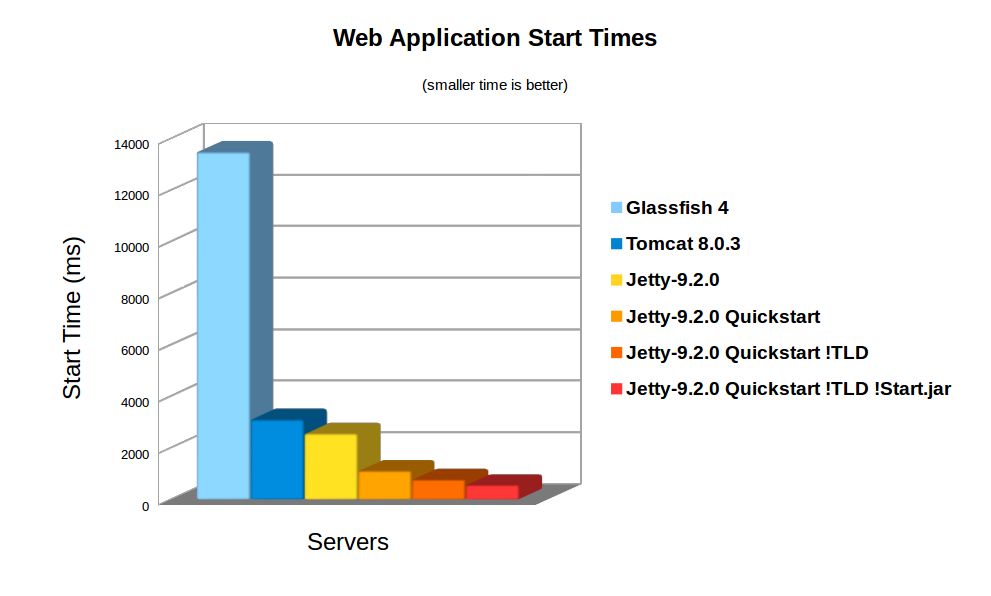
    On average server hardware, a moderate webapp with 36 jars (using spring, jersey & jackson) took over 3,158ms to deploy on Jetty 9.    Now this is pretty fast and some Servlet containers (eg Glassfish) take more time to initialise their logging.  However  3s is still over a reasonable thresh hold for making a user wait whilst dynamically starting an instance.  Also many webapps now have over 100 jar dependencies, so scanning time can be a lot longer.

    Using the standard meta-data complete option does not significantly speed up start times, as TLDs and HandlersTypes classes still must be discovered even with meta data complete.    Unpacking the war file saves a little more time, but even with both of these, Jetty still takes 2,747ms to start.

    Unknown Deployment

    Another issue with discovery is that the exact configuration of the a webapp is not fully known until runtime. New Servlets and frameworks can be accidentally deployed if jar files are upgraded without their contents being fully investigated.   This give some deployers a large headache with regards to security audits and just general predictability.

    It is possible to disable some auto discovery mechanisms by using the meta-data-complete setting within web.xml, however that does not disable the scanning of HandlesTypes so it does not avoid the need to scan, nor avoid auto deployment  of accidentally included types and annotations.

    Jetty 9 Quickstart

    From release 9.2.0 of Jetty, we have included the quickstart module that allows a webapp to be pre-scanned and preconfigured.  This means that all the scanning is done prior to deployment and all configuration is encoded into an effective web.xml, called WEB-INF/quickstart-web.xml, which can be inspected to understand what will be deployed before deploying.

    Not only does the quickstart-web.xml contain all the discovered Servlets, Filters and Constraints, but it also encodes as context parameters all discovered:

    • ServletContainerInitializers
    • HandlesTypes classes
    • Taglib Descriptors

    With the quickstart mechanism, jetty is able to entirely bypass all scanning and discovery modes and start a webapp in a predictable and fast way.

    Using Quickstart

    To prepare a jetty instance for testing the quickstart mechanism is extremely simple using the jetty module system.  Firstly, if JETTY_HOME is pointing to a jetty distribution >= 9.2.0, then we can prepare a Jetty instance for a normal deployment of our benchmark webapp:

    > JETTY_HOME=/opt/jetty-9.2.0.v20140526
    > mkdir /tmp/demo
    > cd /tmp/demo
    > java -jar $JETTY_HOME/start.jar
      --add-to-startd=http,annotations,plus,jsp,deploy
    > cp /tmp/benchmark.war webapps/

    and we can see how long this takes to start normally:

    > java -jar $JETTY_HOME/start.jar
    2014-03-19 15:11:18.826:INFO::main: Logging initialized @255ms
    2014-03-19 15:11:19.020:INFO:oejs.Server:main: jetty-9.2.0.v20140526
    2014-03-19 15:11:19.036:INFO:oejdp.ScanningAppProvider:main: Deployment monitor [file:/tmp/demo/webapps/] at interval 1
    2014-03-19 15:11:21.708:INFO:oejsh.ContextHandler:main: Started o.e.j.w.WebAppContext@633a6671{/benchmark,file:/tmp/jetty-0.0.0.0-8080-benchmark.war-_benchmark-any-8166385366934676785.dir/webapp/,AVAILABLE}{/benchmark.war}
    2014-03-19 15:11:21.718:INFO:oejs.ServerConnector:main: Started ServerConnector@21fd3544{HTTP/1.1}{0.0.0.0:8080}
    2014-03-19 15:11:21.718:INFO:oejs.Server:main: Started @2579ms

    So the JVM started and loaded the core of jetty in 255ms, but another 2324 ms were needed to scan and start the webapp.

    To quick start this webapp, we need to enable the quickstart module and use an example context xml file to configure the benchmark webapp to use it:

    > java -jar $JETTY_HOME/start.jar --add-to-startd=quickstart
    > cp $JETTY_HOME/etc/example-quickstart.xml webapps/benchmark.xml
    > vi webapps/benchmark.xml

    The benchmark.xml file should be edited to point to the benchmark.war file:

    <?xml version="1.0"  encoding="ISO-8859-1"?>
    <!DOCTYPE Configure PUBLIC "-//Jetty//Configure//EN" "http://www.eclipse.org/jetty/configure_9_0.dtd">
    <Configure class="org.eclipse.jetty.quickstart.QuickStartWebApp">
      <Set name="autoPreconfigure">true</Set>
      <Set name="contextPath">/benchmark</Set>
      <Set name="war"><Property name="jetty.webapps" default="."/>/benchmark.war</Set>
    </Configure>

    Now the next time the webapp is run, it will be preconfigured (taking a little bit longer than normal start):

    > java -jar $JETTY_HOME/start.jar
    2014-03-19 15:21:16.442:INFO::main: Logging initialized @237ms
    2014-03-19 15:21:16.624:INFO:oejs.Server:main: jetty-9.2.0.v20140526
    2014-03-19 15:21:16.642:INFO:oejdp.ScanningAppProvider:main: Deployment monitor [file:/tmp/demo/webapps/] at interval 1
    2014-03-19 15:21:16.688:INFO:oejq.QuickStartWebApp:main: Quickstart Extract file:/tmp/demo/webapps/benchmark.war to file:/tmp/demo/webapps/benchmark
    2014-03-19 15:21:16.733:INFO:oejq.QuickStartWebApp:main: Quickstart preconfigure: o.e.j.q.QuickStartWebApp@54318a7a{/benchmark,file:/tmp/demo/webapps/benchmark,null}(war=file:/tmp/demo/webapps/benchmark.war,dir=file:/tmp/demo/webapps/benchmark)
    2014-03-19 15:21:19.545:INFO:oejq.QuickStartWebApp:main: Quickstart generate /tmp/demo/webapps/benchmark/WEB-INF/quickstart-web.xml
    2014-03-19 15:21:19.879:INFO:oejsh.ContextHandler:main: Started o.e.j.q.QuickStartWebApp@54318a7a{/benchmark,file:/tmp/demo/webapps/benchmark,AVAILABLE}
    2014-03-19 15:21:19.893:INFO:oejs.ServerConnector:main: Started ServerConnector@63acac21{HTTP/1.1}{0.0.0.0:8080}
    2014-03-19 15:21:19.894:INFO:oejs.Server:main: Started @3698ms

    After preconfiguration, on all subsequent starts it will be quick started:

    > java -jar $JETTY_HOME/start.jar
    2014-03-19 15:21:26.069:INFO::main: Logging initialized @239ms
    2014-03-19 15:21:26.263:INFO:oejs.Server:main: jetty-9.2.0-SNAPSHOT
    2014-03-19 15:21:26.281:INFO:oejdp.ScanningAppProvider:main: Deployment monitor [file:/tmp/demo/webapps/] at interval 1
    2014-03-19 15:21:26.941:INFO:oejsh.ContextHandler:main: Started o.e.j.q.QuickStartWebApp@559d6246{/benchmark,file:/tmp/demo/webapps/benchmark/,AVAILABLE}{/benchmark/}
    2014-03-19 15:21:26.956:INFO:oejs.ServerConnector:main: Started ServerConnector@4a569e9b{HTTP/1.1}{0.0.0.0:8080}
    2014-03-19 15:21:26.956:INFO:oejs.Server:main: Started @1135ms

    So quickstart has reduced the start time from 3158ms to approx 1135ms!

    More over, the entire configuration of the webapp is visible in webapps/benchmark/WEB-INF/quickstart-web.xml.   This file can be examine and all the deployed elements can be easily audited.

    Starting Faster!

    Avoiding TLD scans

    The jetty 9.2 distribution switched to using the apache Jasper JSP implementation from the glassfish JSP engine. Unfortunately this JSP implementation will always scan for TLDs, which turns out takes a significant time during startup.    So we have modified the standard JSP initialisation to skip TLD parsing altogether if the JSPs have been precompiled.

    To let the JSP implementation know that all JSPs have been precompiled, a context attribute needs to be set in web.xml:

    <context-param>
      <param-name>org.eclipse.jetty.jsp.precompiled</param-name>
      <param-value>true</param-value>
    </context-param>

    This is done automagically if you use the Jetty Maven JSPC plugin. Now after the first run, the webapp starts in 797ms:

    > java -jar $JETTY_HOME/start.jar
    2014-03-19 15:30:26.052:INFO::main: Logging initialized @239ms
    2014-03-19 15:30:26.245:INFO:oejs.Server:main: jetty-9.2.0.v20140526
    2014-03-19 15:30:26.260:INFO:oejdp.ScanningAppProvider:main: Deployment monitor [file:/tmp/demo/webapps/] at interval 1
    2014-03-19 15:30:26.589:INFO:oejsh.ContextHandler:main: Started o.e.j.q.QuickStartWebApp@414fabe1{/benchmark,file:/tmp/demo/webapps/benchmark/,AVAILABLE}{/benchmark/}
    2014-03-19 15:30:26.601:INFO:oejs.ServerConnector:main: Started ServerConnector@50473913{HTTP/1.1}{0.0.0.0:8080}
    2014-03-19 15:30:26.601:INFO:oejs.Server:main: Started @797ms

    Bypassing start.jar

    The jetty start.jar  is a very powerful and flexible mechanism for constructing a classpath and executing a configuration encoded in jetty XML format.   However, this mechanism does take some time to build the classpath.    The start.jar mechanism can be bypassed by using the –dry-run option to generate and reuse a complete command line to start jetty:

    > RUN=$(java -jar $JETTY_HOME/start.jar --dry-run)
    > eval $RUN
    2014-03-19 15:53:21.252:INFO::main: Logging initialized @41ms
    2014-03-19 15:53:21.428:INFO:oejs.Server:main: jetty-9.2.0.v20140526
    2014-03-19 15:53:21.443:INFO:oejdp.ScanningAppProvider:main: Deployment monitor [file:/tmp/demo/webapps/] at interval 1
    2014-03-19 15:53:21.761:INFO:oejsh.ContextHandler:main: Started o.e.j.q.QuickStartWebApp@7a98dcb{/benchmark,file:/tmp/demo/webapps/benchmark/,AVAILABLE}{file:/tmp/demo/webapps/benchmark/}
    2014-03-19 15:53:21.775:INFO:oejs.ServerConnector:main: Started ServerConnector@66ca206e{HTTP/1.1}{0.0.0.0:8080}
    2014-03-19 15:53:21.776:INFO:oejs.Server:main: Started @582ms

    Classloading?

    With the quickstart mechanism, the start time of the jetty server is dominated by classloading, with over 50% of the CPU being profiled within URLClassloader, and the next hot spot is 4% in XML Parsing.   Thus a small gain could be made by pre-parsing the XML into byte code calls, but any more significant progress will probably need examination of the class loading mechanism itself.  We have experimented with combining all classes to a single jar or a classes directory, but with no further gains.

    Conclusion

    The Jetty-9 quick start mechanism provides almost an order of magnitude improvement is start time.   This allows fast and predictable deployment, making Jetty the ideal server to be used in dynamic clouds such as Google App Engine.

  • Jetty-9 Iterating Asynchronous Callbacks

    While Jetty has internally used asynchronous IO since 7.0, Servlet 3.1 has added asynchronous IO to the application API and Jetty-9.1 now supports asynchronous IO in an unbroken chain from application to socket. Asynchronous APIs can often look intuitively simple, but there are many important subtleties to asynchronous programming and this blog looks at one important pattern used within Jetty.  Specifically we look at how an iterating callback pattern is used to avoid deeps stacks and unnecessary thread dispatches.

    Asynchronous Callback

    Many programmers wrongly believe that asynchronous programming is about Futures. However Futures are a mostly broken abstraction and could best be described as a deferred blocking API rather than an Asynchronous API.    True asynchronous programming is about callbacks, where the asynchronous operation calls back the caller when the operation is complete.  A classic example of this is the NIO AsynchronousByteChannel write method:

    <A> void write(ByteBuffer src,
                   A attachment,
                   CompletionHandler<Integer,? super A> handler);
    public interface CompletionHandler<V,A>
    {
      void completed(V result, A attachment);
      void failed(Throwable exc, A attachment);
    }

    With an NIO asynchronous write, a CompletionHandler instance is pass that is called back once the write operation has completed or failed.   If the write channel is congested, then no calling thread is held or blocked whilst the operation waits for the congestion to clear and the callback will be invoked by a thread typically taken from a thread pool.

    The Servlet 3.1 Asynchronous IO API is syntactically very different, but semantically similar to NIO. Rather than have a callback when a write operation has completed the API has a WriteListener API that is called when a write operation can proceed without blocking:

    public interface WriteListener extends EventListener
    {
        public void onWritePossible() throws IOException;
        public void onError(final Throwable t);
    }

    Whilst this looks different to the NIO write CompletionHandler, effectively a write is possible only when the previous write operation has completed, so the callbacks occur on essentially the same semantic event.

    Callback Threading Issues

    So that asynchronous callback concept looks pretty simple!  How hard could it be to implement and use!   Let’s consider an example of asynchronously writing the data obtained from an InputStream.  The following WriteListener can achieve this:

    public class AsyncWriter implements WriteListener
    {
      private InputStream in;
      private ServletOutputStream out;
      private AsyncContext context;
      public AsyncWriter(AsyncContext context,
                         InputStream in,
                         ServletOutputStream out)
      {
        this.context=context;
        this.in=in;
        this.out=out;
      }
      public void onWritePossible() throws IOException
      {
        byte[] buf = new byte[4096];
        while(out.isReady())
        {
          int l=in.read(buf,0,buf.length);
          if (l<0)
          {
            context.complete();
            return;
          }
          out.write(buf,0,l);
        }
      }
      ...
    }

    Whenever a write is possible, this listener will read some data from the input and write it asynchronous to the output. Once all the input is written, the asynchronous Servlet context is signalled that the writing is complete.

    However there are several key threading issues with a WriteListener like this from both the caller and callee’s point of view.  Firstly this is not entirely non blocking, as the read from the input stream can block.  However if the input stream is from the local file system and the output stream is to a remote socket, then the probability and duration of the input blocking is much less than than of the output, so this is substantially non-blocking asynchronous code and thus is reasonable to include in an application.  What this means for asynchronous operations providers (like Jetty), is that you cannot trust any code you callback to not block and thus you cannot use an important thread (eg one iterating over selected keys from a Selector) to do the callback, else an application may inadvertently block other tasks from proceeding.  Thus Asynchronous IO Implementations thus must often dispatch a thread to perform a callback to application code.

    Because dispatching threads is expensive in both CPU and latency, Asynchronous IO implementations look for opportunities to optimise away thread dispatches to callbacks.  There Servlet 3.1 API has by design such an optimisation with the out.isReady() call that allows iteration of multiple operations within the one callback. A dispatch to onWritePossible only happens when it is required to avoid a blocking write and often many write iterations can proceed within a single callback. An NIO CompletionHandler based implementation of the same task is only able to perform one write operation per callback and must wait for the invocation of the complete handler for that operation before proceeding:

    public class AsyncWriter implements CompletionHandler<Integer,Void>
    {
      private InputStream in;
      private AsynchronousByteChannel out;
      private CompletionHandler<Void,Void> complete;
      private byte[] buf = new byte[4096];
      public AsyncWriter(InputStream in,
                         AsynchronousByteChannel out,
                         CompletionHandler<Void,Void> complete)
      {
        this.in=in;
        this.out=out;
        this.complete=complete;
        completed(0,null);
      }
      public void completed(Integer w,Void a) throws IOException
      {
        int l=in.read(buf,0,buf.length);
        if (l<0)
          complete.completed(null,null);
        else
          out.write(ByteBuffer.wrap(buf,0,l),this);
      }
      ...
    }

    Apart from an unrelated significant bug (left as an exercise for the reader to find), this version of the AsyncWriter has a significant threading challenge.  If the write can trivially completes without blocking, should the callback to CompletionHandler be dispatched to a new thread or should it just be called from the scope of the write using the caller thread?  If a new thread is always used, then many many dispatch delays will be incurred and throughput will be very low.  But if the callback is invoked from the scope of the write call, then if the callback does a re-entrant call to write, it may call a callback again which calls write again etc. etc. and a very deep stack will result and often a stack overflow can occur.

    The JVM’s implementation of NIO resolves this dilemma by doing both!  It performs the callback in the scope of the write call until it detects a deep stack, at which time it dispatches the callback to a new thread.    While this does work, I consider it a little bit of the worst of both worlds solution: you get deep stacks and you get dispatch latency.  Yet it is an accepted pattern and Jetty-8 uses this approach for callbacks via our ForkInvoker class.

    Jetty-9 IO Callbacks

    For Jetty-9, we wanted the best of all worlds.  We wanted to avoid deep re entrant stacks and to avoid dispatch delays.  In a similar way to Servlet 3.1 WriteListeners, we wanted to substitute iteration for reentrancy when ever possible.    Thus Jetty does not use NIO asynchronous IO channel APIs, but rather implements our own asynchronous IO pattern using the NIO Selector to implement our own EndPoint abstraction and a simple Callback interface:

    public interface EndPoint extends Closeable
    {
      ...
      void write(Callback callback, ByteBuffer... buffers)
        throws WritePendingException;
      ...
    }
    public interface Callback
    {
      public void succeeded();
      public void failed(Throwable x);
    }

    One key feature of this API is that it supports gather writes, so that there is less need for either iteration or re-entrancy when writing multiple buffers (eg headers, chunk and/or content).  But other than that it is semantically the same as the NIO CompletionHandler and if used incorrectly could also suffer from deep stacks and/or dispatch latency.

    Jetty Iterating Callback

    Jetty’s technique to avoid deep stacks and/or dispatch latency is to use the IteratingCallback class as the basis of callbacks for tasks that may take multiple IO operations:

    public abstract class IteratingCallback implements Callback
    {
      protected enum State
        { IDLE, SCHEDULED, ITERATING, SUCCEEDED, FAILED };
      private final AtomicReference<State> _state =
        new AtomicReference<>(State.IDLE);
      abstract protected void completed();  
      abstract protected State process() throws Exception;
      public void iterate()
      {
        while(_state.compareAndSet(State.IDLE,State.ITERATING))
        {
          State next = process();
          switch (next)
          {
            case SUCCEEDED:
              if (!_state.compareAndSet(State.ITERATING,State.SUCCEEDED))
                throw new IllegalStateException("state="+_state.get());
              completed();
              return;
            case SCHEDULED:
              if (_state.compareAndSet(State.ITERATING,State.SCHEDULED))
                return;
              continue;
            ...
          }
        }
        public void succeeded()
        {
          loop: while(true)
          {
            switch(_state.get())
            {
              case ITERATING:
                if (_state.compareAndSet(State.ITERATING,State.IDLE))
                  break loop;
                continue;
              case SCHEDULED:
                if (_state.compareAndSet(State.SCHEDULED,State.IDLE))
                  iterate();
                break loop;
              ...
            }
          }
        }

    IteratingCallback is itself an example of another pattern used extensively in Jetty-9:  it is a lock-free atomic state machine implemented with an AtomicReference to an Enum.  This pattern allows very fast and efficient lock free thread safe code to be written, which is exactly what asynchronous IO needs.

    The IteratingCallback class iterates on calling the abstract process() method until such time as it returns the SUCCEEDED state to indicate that all operations are complete.  If the process() method is not complete, it may return SCHEDULED to indicate that it has invoked an asynchronous operation (such as EndPoint.write(...)) and passed the IteratingCallback as the callback.

    Once scheduled, there are two possible outcomes for a successful operation. In the case that the operations completed trivially it will have called back succeeded() within the scope of the write, thus the state will have been switched from ITERATING to IDLE so that the while loop in iterate will fail to set the SCHEDULED state and continue to switch from IDLE to ITERATING, thus calling process() again iteratively.

    In the case that the schedule operation does not complete within the scope of process, then the iterate while loop will succeed in setting the SCHEDULED state and break the loop. When the IO infrastructure subsequently dispatches a thread to callback succeeded(), it will switch from SCHEDULED to IDLE state and itself call the iterate() method to continue to iterate on calling process().

    Iterating Callback Example

    A simplified example of using an IteratingCallback to implement the AsyncWriter example from above is given below:

    private class AsyncWriter extends IteratingCallback
    {
      private final Callback _callback;
      private final InputStream _in;
      private final EndPoint _endp;
      private final ByteBuffer _buffer;
      public AsyncWriter(InputStream in,EndPoint endp,Callback callback)
      {
        _callback=callback;
        _in=in;
        _endp=endp;
        _buffer = BufferUtil.allocate(4096);
      }
      protected State process() throws Exception
      {     
        int l=_in.read(_buffer.array(),
                       _buffer.arrayOffset(),
                       _buffer.capacity());
        if (l<0)
        {
           _callback.succeeded();
           return State.SUCCEEDED;
        }
        _buffer.position(0);
        _buffer.limit(len);
        _endp.write(this,_buffer);
        return State.SCHEDULED;
      }

    Several production quality examples of IteratingCallbacks can be seen in the Jetty HttpOutput class, including a real example of asynchronously writing data from an input stream.

    Conclusion

    Jetty-9 has had a lot of effort put into using efficient lock free patterns to implement a high performance scalable IO layer that can be seamlessly extended all the way into the servlet application via the Servlet 3.1 asynchronous IO.   Iterating callback and lock free state machines are just some of the advanced techniques Jetty is using to achieve excellent scalability results.

  • Jetty SPDY push improvements

    After having some discussions on spdy-dev and having some experience with our current push implementation, we’ve decided to change a few things to the better.
    Jetty now sends all push resources non interleaved to the client. That means that the push resources are being sent sequentially to the client one after the other.
    The ReferrerPushStrategy which automatically detects which resources need to be pushed for a specific main resource. See SPDY – we push! for details. Previously we’ve just send the push resources in random order back to the client. However with the change to sequentially send the resources, it’s best to keep the order that the first browser client requested those resources. So we changed the implementation of ReferrerPushStrategy accordingly.
    This all aims at improving the time needed for rendering the page in the browser by sending the data to the browser as the browser needs them.

  • Jetty SPDY to HTTP Proxy

    We have SPDY to SPDY and HTTP to SPDY proxy functionality implemented in Jetty for a while now.
    An important and very common use case however is a SPDY to HTTP proxy. Imagine a network architecture where network components like firewalls need to inspect application layer contents. If those network components are not SPDY aware and able to read the binary protocol you need to terminate SPDY before passing the traffic through those components. Same counts for other network components like loadbalancers, etc.
    Another common use case is that you might not be able to migrate your legacy application from an HTTP connector to SPDY. Maybe because you can’t use Jetty for your application or your application is not written in Java.
    Quite a while ago, we’ve implemented a SPDY to HTTP proxy functionality in Jetty. We just didn’t blog about it yet. Using that proxy it’s possible to gain all the SPDY benefits where they really count…on the slow internet with high latency, while terminating SPDY on the frontend and talking plain HTTP to your backend components.
    Here’s the documentation to setup a SPDY to HTTP proxy:
    http://www.eclipse.org/jetty/documentation/current/spdy-configuring-proxy.html#spdy-to-http-example-config