Category: CometD

  • End of Life: Changes to Eclipse Jetty and CometD

    Webtide (https://webtide.com) is the company behind the open-source Jetty and CometD projects. Since 2006, Webtide has fully funded the Jetty and CometD projects through services and support, including migration assistance, production support, developer assistance, and CVE resolution. 

    First, the change.

    Starting January 1, 2026, Webtide will no longer publish releases for Jetty 9, Jetty 10, and Jetty 11, as well as CometD 5, 6, and 7 to Maven Central or other public repositories. 

    Take a look at the primary announcement if you’re interested. 

    So, the motivation.

    Why we are in this situation now harks back to the beginnings of Webtide. Briefly, Greg Wilkins founded the Jetty project in 1995 as part of a contest created by Sun Microsystems for a new language called Java. For a decade, he and Jan Bartel carefully stewarded the project as part of their consulting company Mort Bay Consulting. Around the Jetty 6 timeframe, in 2006, Webtide was founded as an LLC to evolve the project further commercially. Still, at its core, the goal was to support the incredible community that had developed over the years. When I joined in 2007, we began working to join the Eclipse Foundation. We took steps to formalize our development processes, aiming to add more commercial predictability to the open-source project. Joining the Eclipse Foundation also meant adhering to their rigorous IP policy for both the Jetty codebase and its dependencies, an essential step in improving corporate uptake.

    This was also the time for the project to handle the end-of-life process for Jetty 6, while establishing Jetty 7 and Jetty 8. This was the opportunity that Webtide needed to support the project’s development by offering commercial services and support for EOL Jetty 6, while focusing on supporting and funding the future of Jetty 7 and Jetty 8. 

    It was the crux; after careful consideration, we decided that all commercial support releases would be open-source for the benefit of all. While not a traditional business decision, it aligned with our values and dedication to the community, which was rewarded as the community continued to grow its usage of Jetty.

    This worked wonderfully for almost 20 years.

    Something shifted…

    We started to notice a shift in the community a few years ago. For almost 20 years, the companies we spoke with valued how our support could help them become more successful, with many ultimately becoming customers who truly understood the benefits of supporting open-source. Every single one of them saw the value in releasing EOL releases freely. When I became CEO a decade ago and Webtide became 100% developer-owned and operated, we were able to continue operating in this commercial environment with ease, to such an extent that the future of Webtide and the Jetty project is assured for many years to come.

    So what changed? The tone of many companies we spoke to. Increasingly, while explaining the model that served Webtide well for so many years, where I used to hear ‘That makes so much sense, this works great!’, I now hear “So it’s just free? Great, I need to check a box.” Followed up with the galling question “Could you put this policy of yours in writing on your company letterhead?”.

    And today?

    Twenty years ago, things were different; Maven 2 dominance was emerging, and Maven Central was gaining ubiquity. Managing transitive dependencies was novel in many circles. Managing CVEs in a corporate setting was in its infancy, particularly with Java developer software stacks. 

    Now, build tooling is diverse, Maven Central is a global central repository system, and corporations should have their own caching repository servers, or they really should! Even JavaEE was rebranded as Jakarta at the Eclipse Foundation. So much change, but the one I’ll highlight is the emergence of business units focused on corporate software policies, complete with BOM files containing ever more metadata and checkboxes to click, managing CVE risks associated with software developed internally. Developers, the primary people Webtide has interacted with over the years, are increasingly far removed from software maintenance activities. 

    Now our approach to endlessly updating EOL releases seems remarkably outdated. Look at Jetty 9, which we have been releasing since 2013. It turns out our approach of making things as easy as possible for the community, for software that should have officially gone EOL years ago, was a benefit to many, but also enabled far more to grow complacent. Instead of scheduling migrations and updating to more recent versions, we inadvertently provided an environment that allowed companies to deploy onto software well over a decade old, when newer, more performant options were readily available. Then, when security postures started changing and businesses began looking deeper into their dependencies, they realized they were using outdated software, three or more major versions behind. Then, to our shock, many are perfectly fine with that so long as it is free and someone tells them it is ok. 

    If we have learned one thing within this time, it is that the EOL policy needs to be so much clearer, using established industry terminology. Looking back, we have been guilty of inventing terminology and inadvertently exacerbating the situation.

    What is heartening is seeing other organizations work to address EOL as well; notably, MITRE has been developing changes to the CVE system to support EOL concepts fully. If you have ever seen the text “Unsupported When Assigned” in a CVE, then you have encountered the early efforts for EOL in a CVE.

    You have to applaud the efforts of businesses to prioritize security and sane open-source policies.

    However, this is also a call to open-source projects like Jetty, as we are operating in a different world. Everyone understands that ‘End-of-Life’ does not mean ‘End-of-Use’. Clearly, the system for many companies has changed from a Developer Support perspective to a Security Support perspective. EOL Software support is purchased differently now. There are companies, like Sonar (formerly Tidelift), that exist to manage security metadata about open-source software, enabling companies to manage their software risk more effectively. 

    EOL Jetty and CometD by Webtide

    To address this industry evolution, Webtide has launched a partnership program that enables businesses relying on EOL Jetty and CometD versions to obtain CVE resolutions officially and predictably. 

    Webtide continues to resolve CVEs and issues for EOL Jetty and CometD in support of our commercial customers. However, the resulting binaries are now distributed directly to our commercial support customers and through our partnership network. No longer are we calling software EOL but deploying to Maven Central with a nod and a wink.

    Our partners are established leaders in the open-source EOL landscape, creating products that directly address the problems the security and business industries are facing. 

    This synergy works perfectly with Webtide, as we are the company that offers services and support on Jetty and CometD. Migrations, developer assistance, production support, and performance are the things that directly influence the ongoing development of the open-source projects we steward. We can continue to focus on our strengths, and our partners can focus on theirs.

    At last, the partners!

    We are pleased to announce two partnerships. With these partners, you will be able to build a secure EOL solution for your software stack, not just for your usage of Jetty or CometD. Best yet, if you are interested in Webtide’s Lifecycle Support, you can use these partner versions in conjunction with our support!


    TuxCare secures the open-source software the world builds on. Today, we protect over 1.2 million workloads – keeping them secure, compliant, and unstoppable at scale. From operating systems to development libraries and production applications, we power your open-source stack with enterprise-grade security and support, including endless lifecycle extensions for out-of-support software versions, rebootless patching for every major Linux distribution, enterprise-optimized support for community Linux, and our Linux-first vulnerability scanner that cuts through the noise.


    HeroDevs provides secure, long-term maintenance for open-source frameworks that have reached End-of-Life. Through our Never-Ending Support (NES) initiative, we deliver continuous CVE remediation and compliance-grade updates, allowing your team to migrate at your own pace. Our engineers monitor upstream changes, backport verified fixes, and publish fully tested binaries for seamless drop-in replacement. With NES for Jetty and NES for CometD, you can stay secure, stable, and compliant—without refactoring or rushing a migration.

    If your business is interested in our partner program, please direct inquiries to partnership@webtide.com.

    Wrapping it up.

    One important thing to note is that Webtide will continue to support the Jetty Project with a standard open-source release process, ensuring that older versions are released to provide the community with ample time to update to newer versions through a transition period. When Jetty 13 is released, Jetty 12.1 will continue to receive updates for a period, just as Jetty 12.0 does currently. If that is six months or a year, it remains to be seen. Once we finalize this release strategy with timelines, we will make sure the community is well-informed.

    Fundamentally, the change coming is that the End of Life versions for Jetty and CometD will no longer be an empty EOL notice and quiet deployments to Maven Central. It will mean EOL and provide established industry solutions to address those who need additional support.
  • Do Looms Claims Stack Up? Part 2: Thread Pools?

    “Project Loom aims to drastically reduce the effort of writing, maintaining, and observing high-throughput concurrent applications that make the best use of available hardware. … The problem is that the thread, the software unit of concurrency, cannot match the scale of the application domain’s natural units of concurrency — a session, an HTTP request, or a single database operation. …  Whereas the OS can support up to a few thousand active threads, the Java runtime can support millions of virtual threads. Every unit of concurrency in the application domain can be represented by its own thread, making programming concurrent applications easier. Forget about thread-pools, just spawn a new thread, one per task.” – Ron Pressler, State of Loom, May 2020

    In this series of blogs, we are examining the new Loom virtual thread features now available in OpenJDK 16 early access releases. In part 1 we saw that Loom’s claim of 1,000,000 virtual threads was true, but perhaps a little misleading, as that only applies to threads with near-empty stacks.  If threads actually have deep stacks, then the achieved number of virtual threads is bound by memory and is back to being the same order of magnitude as kernel threads.  In this part, we will further examine the claims and ramifications of Project Loom, specifically if we can now forget about Thread Pools. Spoiler: Cheap threads can do expensive things!
    All the code from this blog is available in our loom-trial project and has been run on my dev machine (Intel® Core™ i7-6820HK CPU @ 2.70GHz × 8, 32GB memory,  Ubuntu 20.04.1 LTS 64-bit, OpenJDK Runtime Environment (build 16-loom+9-316)) with no specific tuning and default settings unless noted otherwise. 

    Matching the scale?

    Project Loom makes the claim that applications need threads because kernel threads “cannot match the scale of the application domain’s natural units of concurrency”!
    Really???  We’ve seen that without tuning, we can achieve 32k of either type of thread on my laptop.  We think it would be fair to assume that with careful tuning, that could be stretched to beyond 100k for either technology.  Is this really below the natural scale of most applications?  How many applications have a natural scale of more than 32k simultaneous parallel tasks?  Don’t get me wrong, there are many apps that do exceed those scales and Jetty has users that put an extra 0 on that, but they are the minority and in reality very few applications are ever going to see that demand for concurrency.
    So if the vast majority of applications would be covered by blocking code with a concurrency of 32k, then what’s the big deal? Why do those apps need Loom? Or, by the same argument, why would they need to be written in asynchronous style?
    The answer is that you rarely see any application deployed with 10,000s of threads; instead, threads are limited by a thread pool, typically to 100s or 1000s of threads.  The default thread pool size in jetty is 200, which we sometimes see increased to 1000s, but we have never seen a 32k thread pool even though my un-tuned laptop could supposedly support it!
    So what’s going on? Why are thread pools typically so limited and what about the claim that Loom means we can “Forget about thread pools”?

    Why Thread Pools?

    One reason we are told that thread pools are used is because kernel threads are slow to start, thus having a bunch of them pre-started, waiting for a task in a pool improves latency.  Loom claims their virtual threads are much faster to start, so let’s test that with StartThreads, which reports:

    kStart(ns) ave:137,903 from:1,000 min:47,466 max:6,048,540
    vStart(ns) ave: 10,881 from:1,000 min: 4,648 max:  486,078

    So that claim checks out. Virtual threads start an order of magnitude faster than kernel threads.  If start time was the only reason for thread pools, then Loom’s claim of forgetting about thread pools would hold.
    But start time only explains why we have thread pools, but it doesn’t explain why thread pools are frequently sized far below the systems capacity for threads: 100s instead of 10,000s?  What is the reason that thread pools are sized as they are?

    Why Small Thread Pools?

    Giving a thread a task to do is a resource commitment. It is saying that a flow of control may proceed to consume CPU, memory and other resources that will be needed to run to completion or at least until a blocking point, where it can wait for those resources.  Most of those resources are not on the stack,  thus limiting the number of available threads is a way to limit a wide range of resource consumption and give quality of service:

    • If your back-end services can only handle 100s of simultaneous requests, then a thread pool with 100s of threads will avoid swamping them with too much load. If your JDBC driver only has 100 pooled connections, then 1,000,000 threads hammering on those connections or other locks are going to have a lot of contention.
    • For many applications a late response is a wrong response, thus it may well be better to handle 1000 tasks in a timely way with the 1001st task delayed, rather than to try to run all 1001 tasks together and have them all risk being late.
    • Graceful degradation under excess load.  Processing a task will need to use heap memory and if too much memory is demanded an OutOfMemeoryException is fatal for all java applications.  Limiting the number of threads is a coarse grained way of limiting a class of heap usage.  Indeed in part 1, we saw that it was heap memory that limited the number of virtual threads.

    Having a limited thread pool allows an application to be tested to that limit so that it can be proved that an application has the memory and other resources necessary to service all of those threads.  Traditional thinking has been that if the configured number of threads is insufficient for the load presented, then either the excess load must wait, or the application should start using asynchronous techniques to more efficiently use those threads (rather than increase the number of threads beyond the resource capacity of the machine).
    A limited thread pool is a coarse grained limit on all resources, not only threads.  Limiting the number of threads puts a limit on concurrent lock contention, memory consumption and CPU usage.

    Virtual Threads vs Thread Pool

    Having established that there might be some good reasons to use thread pools, let’s see if Loom gives us any good reasons not to use them?   So we have created a FakeDataBase class which simulates a JDBC connection pool of 100 connections with a semaphore and then in ManyTasks we run 100,000 tasks that do 2 selects and 1 insert to the database, with a small amount of CPU consumed both with and without the semaphore acquired.   The core of the thread pool test is:

     for (int i = 0; i < tasks; i++)
       pool.execute(newTask(latch));

    and this is compared against the Loom virtual thread code of:

     for (int i = 0 ; i < tasks; i++)
       Thread.builder().virtual().task(newTask(latch)).start();

    And the results are…. drum roll… pretty much the same for both types of thread:

    Pooled  K Threads 33,729ms
    Spawned V Threads 34,482ms

    The pooled kernel thread does appear to be consistently a little bit better, but this test is not that rigorous so let’s call it the same, which is kind of expected as the total duration is pretty much going to be primarily constrained by the concurrency of the database.
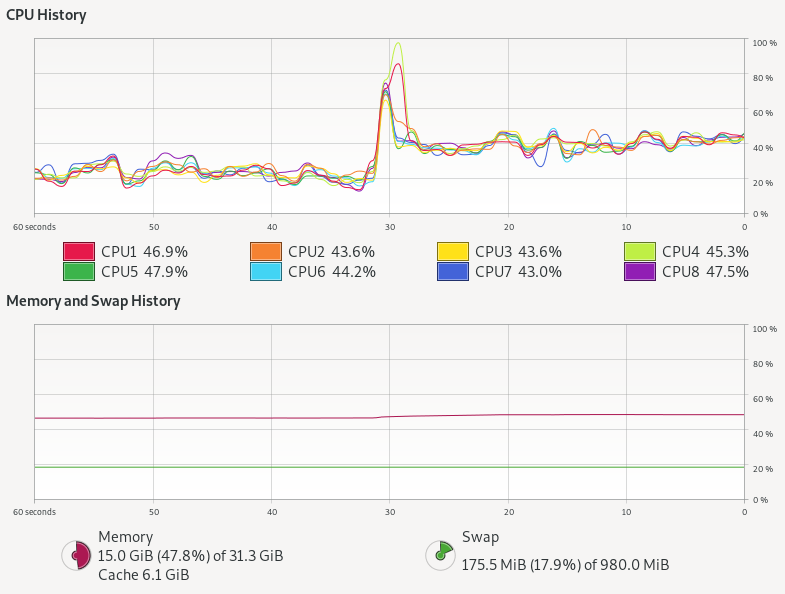
    So were there any difference at all?  Here is the system monitor graph during both runs: kernel threads with a pool are the left hand first period (60-30s) and then virtual threads after a change over peak (30s – 0s):

    Kernel threads with thread pool do not stress the CPU at all, but virtual threads alone use almost twice as much CPU! There is also a hint of more memory being used.
    The thread pool has 100k tasks in the thread pool queue, 100 kernel threads that take tasks, 100 at a time, and each task takes one of 100 semaphores permits 3 times, with little or no contention.
    The Loom approach has 100k independent virtual threads that each contend 3 times for the 100 semaphore permits, with up to 99,900 threads needing to be added then removed 3 times from the semaphore’s wake up queue.  The extra queuing for virtual threads could easily explain the excess CPU needed, but more investigation is needed to be definitive.
    However, tasks limited by a resource like JDBC are not really the highly concurrent tasks that Loom is targeted at.  To truly test Loom (and async), we need to look at a type of task that just won’t scale with blocking threads dispatched from a thread pool.

    Virtual Threads vs Async APIs

    One highly concurrent work load that we often see on Jetty is chat room style interaction (or games) written on CometD and/or WebSocket.  Such applications often have many 10,000s or even 100,000s of connections to the server that are mostly idle, waiting for a message to receive or an event to send. Currently we achieve these scales only by asynchronous threadless waiting, with all its ramifications of complex async APIs into the application needing async callbacks.  Luckily, CometD was originally written when there was only async servlets and not async IO, thus it still has the option to be deployed using blocking I/O reads and writes.  This gives it good potential to be a like for like comparison between async pooled kernel threads vs blocking virtual threads.
    However, we still have a concern that this style of application/load will not be suitable for Loom because each message to a chat room will fan out to the 10s, 100s or even 1000s of other users waiting in that room.  Thus a single read could result in many blocking write operations, which are typically done with deep stacks (parsing, framework, handling, marshalling, then writing) and other resources (buffers, locks etc). You can see in the following flame graph from a CometD load test using Loom virtual threads, that even with a fast client the biggest block of time is spent in the blue peak on the left, that is writing with deep stacks. It is this part of the graph that needs to scale if we have either more and/or slower clients:

    Jetty with CometD chat on Loom

    To fairly test Loom, it is not sufficient to just replace the limited pool of kernel threads with infinite virtual threads.  Jetty goes to lots of effort with its eat what you kill scheduling using reserved threads to ensure that whenever a selector thread calls a potentially blocking task, another selector thread has been executed.  We can’t just put Loom virtual threads on top of this, else it will be paying the cost and complexity of core Jetty plus the overheads of Loom.  Moreover, we have also learnt the risk of Thread Starvation that can result in highly concurrent applications if you defer important tasks (e.g. HTTP/2 flow control).  Since virtual threads can be postponed (potentially indefinitely) by CPU bound applications or the use of non-Loom-aware locks (such as the synchronized keyword), they are not suitable for all tasks within Jetty.
    Thus we think a better approach is to keep the core of Jetty running on kernel threads, but to spawn a virtual thread to do the actual work of reading, parsing, and calling the application and writing the response.  If we flag those tasks with InvocationType.NON_BLOCKING, then they will be called directly by the selector thread, with no executor overhead. These tasks can then spawn a new virtual thread to proceed with the reading, parsing,  handling, marshalling, writing and blocking.  Thus we have created the jetty-10.0.x-loom branch, to use this approach and hopefully give a good basis for fair comparisons.
    Our initial runs with our CometD benchmark with just 20 clients resulted in long GCs followed by out of memory failures! This is due to the usage of ThreadLocal for gathering latency statistics and each virtual thread was creating a latency capture data structure, only to use it once and then throw it away!  While this problem is solvable by changing the CometD benchmark code, it reaffirms that threads use resources other than stack and that Loom virtual threads are not a drop in replacement for kernel threads.
    We are aware that the handling of ThreadLocal is a well known problem in Loom, but until solved it may be a surprisingly hard problem to cope with, since you don’t typically know if a library your application depends on uses ThreadLocal or not.
    With the CometD benchmark modified to not use ThreadLocal, we can now take Loom/Jetty/CometD to a moderate number of clients (1000 which generated the flame graph above) with the following results:

    CLIENT: Async Jetty/CometD server
    ========================================
    Testing 1000 clients in 100 rooms, 10 rooms/client
    Sending 1000 batches of 10x50 bytes messages every 10000 µs
    Elapsed = 10015 ms
    - - - - - - - - - - - - - - - - - - - -
    Outgoing: Rate = 990 messages/s - 99 batches/s - 12.014 MiB/s
    Incoming: Rate = 99829 messages/s - 35833 batches/s(35.89%) - 26.352 MiB/s
                    @     _  3,898 µs (112993, 11.30%)
                       @  _  7,797 µs (141274, 14.13%)
                       @  _  11,696 µs (136440, 13.65%)
                       @  _  15,595 µs (139590, 13.96%) ^50%
                       @  _  19,493 µs (142883, 14.29%)
                      @   _  23,392 µs (130493, 13.05%)
                    @     _  27,291 µs (112283, 11.23%) ^85%
            @             _  31,190 µs (59810, 5.98%) ^95%
      @                   _  35,088 µs (12968, 1.30%)
     @                    _  38,987 µs (4266, 0.43%) ^99%
    @                     _  42,886 µs (2150, 0.22%)
    @                     _  46,785 µs (1259, 0.13%)
    @                     _  50,683 µs (910, 0.09%)
    @                     _  54,582 µs (752, 0.08%)
    @                     _  58,481 µs (567, 0.06%)
    @                     _  62,380 µs (460, 0.05%) ^99.9%
    @                     _  66,278 µs (365, 0.04%)
    @                     _  70,177 µs (232, 0.02%)
    @                     _  74,076 µs (82, 0.01%)
    @                     _  77,975 µs (13, 0.00%)
    @                     _  81,873 µs (2, 0.00%)
    Messages - Latency: 999792 samples
    Messages - min/avg/50th%/99th%/max = 209/15,095/14,778/35,815/78,184 µs
    Messages - Network Latency Min/Ave/Max = 0/14/78 ms
    SERVER: Async Jetty/CometD server
    ========================================
    Operative System: Linux 5.8.0-33-generic amd64
    JVM: Oracle Corporation OpenJDK 64-Bit Server VM 16-ea+25-1633 16-ea+25-1633
    Processors: 12
    System Memory: 89.26419% used of 31.164349 GiB
    Used Heap Size: 73.283676 MiB
    Max Heap Size: 2048.0 MiB
    - - - - - - - - - - - - - - - - - - - -
    Elapsed Time: 10568 ms
       Time in Young GC: 5 ms (2 collections)
       Time in Old GC: 0 ms (0 collections)
    Garbage Generated in Eden Space: 3330.0 MiB
    Garbage Generated in Survivor Space: 4.227936 MiB
    Average CPU Load: 397.78314/1200
    ========================================
    Jetty Thread Pool:
        threads:                174
        tasks:                  302146
        max concurrent threads: 34
        max queue size:         152
        queue latency avg/max:  0/11 ms
        task time avg/max:      1/3316 ms


    CLIENT: Loom Jetty/CometD server
    ========================================
    Testing 1000 clients in 100 rooms, 10 rooms/client
    Sending 1000 batches of 10x50 bytes messages every 10000 µs
    Elapsed = 10009 ms
    - - - - - - - - - - - - - - - - - - - -
    Outgoing: Rate = 990 messages/s - 99 batches/s - 13.774 MiB/s
    Incoming: Rate = 99832 messages/s - 41201 batches/s(41.27%) - 27.462 MiB/s
                     @    _  2,718 µs (99690, 9.98%)
                       @  _  5,436 µs (116281, 11.64%)
                       @  _  8,155 µs (115202, 11.53%)
                       @  _  10,873 µs (108572, 10.87%)
                      @   _  13,591 µs (106951, 10.70%) ^50%
                       @  _  16,310 µs (117139, 11.72%)
                       @  _  19,028 µs (114531, 11.46%)
                    @     _  21,746 µs (94080, 9.42%) ^85%
                @         _  24,465 µs (71479, 7.15%)
          @               _  27,183 µs (34358, 3.44%) ^95%
      @                   _  29,901 µs (11526, 1.15%) ^99%
     @                    _  32,620 µs (4513, 0.45%)
    @                     _  35,338 µs (2123, 0.21%)
    @                     _  38,056 µs (988, 0.10%)
    @                     _  40,775 µs (562, 0.06%)
    @                     _  43,493 µs (578, 0.06%) ^99.9%
    @                     _  46,211 µs (435, 0.04%)
    @                     _  48,930 µs (187, 0.02%)
    @                     _  51,648 µs (31, 0.00%)
    @                     _  54,366 µs (27, 0.00%)
    @                     _  57,085 µs (1, 0.00%)
    Messages - Latency: 999254 samples
    Messages - min/avg/50th%/99th%/max = 192/12,630/12,476/29,704/54,558 µs
    Messages - Network Latency Min/Ave/Max = 0/12/54 ms
    SERVER: Loom Jetty/CometD server
    ========================================
    Operative System: Linux 5.8.0-33-generic amd64
    JVM: Oracle Corporation OpenJDK 64-Bit Server VM 16-loom+9-316 16-loom+9-316
    Processors: 12
    System Memory: 88.79622% used of 31.164349 GiB
    Used Heap Size: 61.733116 MiB
    Max Heap Size: 2048.0 MiB
    - - - - - - - - - - - - - - - - - - - -
    Elapsed Time: 10560 ms
       Time in Young GC: 23 ms (8 collections)
       Time in Old GC: 0 ms (0 collections)
    Garbage Generated in Eden Space: 8068.0 MiB
    Garbage Generated in Survivor Space: 3.6905975 MiB
    Average CPU Load: 413.33084/1200
    ========================================
    Jetty Thread Pool:
        threads:                14
        tasks:                  0
        max concurrent threads: 0
        max queue size:         0
        queue latency avg/max:  0/0 ms
        task time avg/max:      0/0 ms
    

    The results here are a bit mixed, but there are some positives for Loom:

    • Both approaches easily achieved the 1000 msg/s sent to the server and 99.8k msg/s received from the server (messages have an average fan-out of a factor 100).
    • The Loom version broke up those messages into 41k responses/s whilst the async version used bigger batches at 35k responses/s, which each response carrying more messages. We need to investigate why, but we think Loom is faster at starting to run the task (no time in the thread pool queue, no time to “wake up” an idle thread).
    • Loom had better latency, both average (~12.5 ms vs ~14.8 ms) and max (~54.6 ms vs ~78.2 ms)
    • Loom used more CPU: 413/1200 vs 398/1200 (4% more)
    • Loom generated more garbage: ~8068.0 MiB vs ~3330.0 MiB and less objects made it to survivor space.

    This is an interesting but inconclusive result.  It is at a low scale on a fast loopback network with a client unlikely to cause blocking, so not really testing either approach.  We now need to scale this test to many 10,000s of clients on a real network, which will require multiple load generation machines and careful measurement.  This will be the subject of part 3 (probably some weeks away).

    Conclusion (part 2) – Cheap threads can do expensive things

    It is good that Project Loom adds inexpensive and fast spawning/blocking virtual threads to the JVM.  But cheap threads can do expensive things!
    Having 1,000,000 concurrent application entities is going to take memory, CPU and other resources, no matter if they block or use async callbacks. It may be that entirely different programming styles are needed for Loom, as is suggested by Loom Structured Concurrency, however we have not yet seen anything that provides limitations on resources that can be used by unlimited spawning of virtual threads. There are also indications that Loom’s flexible stack management comes with a CPU cost.   However, it has been moderately simple to update Jetty to experiment with using Loom to call a blocking application and we’d very much encourage others to load test their application on the jetty-10.0.x-loom branch.
    Many of Loom’s claims have stacked up: blocking code is much easier to write, virtual threads are very fast to start and cheap to block. However, other key claims either do not hold up or have yet to be substantiated: we do not think virtual threads give natural scaling as threads themselves are not the limiting factor, rather it is the resources that are used that determines the scaling.  The suggestion to “Forget about thread-pools, just spawn a new thread…” feels like an invitation to create unstable applications unless other substantive resource management strategies are put into place.
    Given that Duke’s “new clothes” woven by Loom are not one-size-fits-all, it would be a mistake to stop developing asynchronous APIs for things such as DNS and JDBC on the unsubstantiated suggestion that Loom virtual threads will make them unnecessary.

  • CometD 5.0.3, 6.0.0 and 7.0.0

    Following the releases of Eclipse Jetty 10.0.0 and 11.0.0, the CometD project has released versions 5.0.3, 6.0.0 and 7.0.0.

    CometD 5.0.x Series

    CometD 5.0.x, of which the latest is the newly released 5.0.3, require at least Java 8 and it is based on Jetty 9.4.x.
    This version will be maintained as long as Jetty 9.4.x is maintained, likely many more years, to allow migration away from Java 8.

    CometD 6.0.x Series

    CometD 6.0.x, with the newly released 6.0.0, requires at least Java 11 and it is based on Jetty 10.0.x.
    In turn, Jetty 10.0.x is based on Java EE 8 / Jakarta EE 8, which provide Servlet and WebSocket APIs under the javax.* packages.
    This version of CometD provides a smooth transition from CometD 5 (or earlier) to Java 11 and Jetty 10.
    In this way, you can leverage new Java 11 language features in your application source code, as well as the few new APIs made available in the Servlet 4.0 Specification without having to change much of your code, since you will still be using javax.* Servlet and WebSocket APIs (see the next section on CometD 7.0.x for the migration to the jakarta.* APIs).
    However, server-side CometD applications should not depend much on Servlet or WebSocket APIs, so the migration from CometD 5 (or earlier) should be pretty straightforward.
    CometD 6.0.x, as Jetty 10.0.x, are transition releases to the new Jakarta EE 9 APIs in the jakarta.* packages.
    CometD 6.0.x will be maintained as long as Jetty 10.0.x is maintained.
    Since CometD applications do not depend much on Servlet or WebSocket APIs, consider moving directly to CometD 7.0.x if you don’t depend on other libraries (for example, Spring) that require javax.* classes.

    CometD 7.0.x Series

    CometD 7.0.x, with the newly released 7.0.0, requires at least Java 11 and it is based on Jetty 11.0.x.
    In turn, Jetty 11.0.x is based on Jakarta EE 9, which provide Servlet and WebSocket APIs under the jakarta.* packages.
    Migrating from CometD 6.0.x (or earlier) to CometD 7.0.x should be very easy if your applications depend mostly on the CometD APIs (few or no changes there) and depend very little on the Servlet or WebSocket APIs.
    Dependencies on the javax.* APIs should be migrated to the jakarta.* APIs.
    If your applications depend on third-party libraries, you need to make sure to update the third-party library to a version that supports — if necessary — jakarta.* APIs.
    Migrating to CometD 7.0.x allows you to leverage Java 11 language features and the benefit that you can base your applications on the new Jakarta EE Specifications, therefore abandoning the now-dead Java EE Specifications.
    This migration keeps your applications up-to-date with the current state-of-the-art of EE Specifications, reducing the technical debt to a minimum.
    CometD 7.0.x will be maintained as long as Jetty 11.0.x is maintained.
    The evolution of the Jakarta EE Specifications will be implemented by future Jetty versions, and future CometD versions will keep the pace.

    Which CometD Series Do I Use?

    If your applications depend on third-party libraries that use or depend on Jetty 9.4.x (such as Spring / Spring Boot), use CometD 5.0.x and Jetty 9.4.x until the third party libraries update to newer Jetty versions.
    If your applications depend on third-party libraries that depend on javax.* APIs and that have not been updated to Jakarta EE 9 yet (and therefore to jakarta.* APIs), use CometD 6.0.x and Jetty 10.0.x until the third party libraries update to Jakarta EE 9.
    If your applications depend on third-party libraries that have already been updated to use Jakarta EE 9 APIs, for example, Jakarta Restful Web Services (previously known as JAX-RS) using Eclipse Jersey 3.0, use CometD 7.0.x and Jetty 11.0.x.
    If you are migrating from earlier CometD versions, skip entirely CometD 6.0.x: for example move from CometD 5.0.x and Jetty 9.4.x directly to CometD 7.0.x and Jetty 11.0.x.

  • CometD and NodeJS, part 2

    In our previous blog, we presented the case of a Webtide customer, Genesys, that needed to integrate CometD in NodeJS and how we developed a CometD client capable of running in the NodeJS environment.
    In this article we present the other side of the solution, that is, how we implemented the CometD NodeJS Server. Leveraging this, Genesys was able to use the standard CometD JavaScript Client in the browser front-end application to talk to the CometD NodeJS server application, which in turn used the CometD NodeJS Client to talk to the Java CometD server application.
    The CometD NodeJS Server is based on the same CometD concepts present in the CometD Java server.
    In particular, there is a central object, the CometDServer, that handles HTTP requests and responses provided by the NodeJS environment. The CometDServer object is also a repository for sessions and channels, that are the two primary concepts used in a server-side CometD application. Both sessions and channels emit events that an application can listen to in order to implement the required business logic.
    Installing the CometD NodeJS Server is easy:

    npm install cometd-nodejs-server
    

    The minimal setup of a CometD NodeJS Server application is the following:

    var http = require('http');
    var cometd = require('cometd-nodejs-server');
    var cometdServer = cometd.createCometDServer();
    var httpServer = http.createServer(cometdServer.handle);
    httpServer.listen(0, 'localhost', function() {
        // Business logic here.
    });
    

    Now you can use the CometD NodeJS Server APIs to be notified when a message arrives on a certain channel:

    var channel = cometdServer.createServerChannel('/service/chat');
    channel.addListener('message', function(session, channel, message, callback) {
        // Your message handling here.
        // Invoke the callback to signal that handling is complete.
        callback();
    });
    

    Further examples of API usages can be found at the CometD NodeJS Server project.
    With the CometD NodeJS Client and Server projects, Genesys was able to leverage CometD throughout the whole process chain, from the browser to NodeJS to the Java CometD server. This allowed Genesys the use of a consistent API throughout the whole architecture, with the same concepts and a very smooth learning curve for developers.

  • CometD and NodeJS, part 1

    In addition to our Lifecycle Support offerings, Webtide is also committed to helping develop new functionality to meet customer needs for the open source projects Webtide supports, CometD and Eclipse Jetty.
    Recently Genesys, a global leader in customer experience solutions and one of Webtide’s customers, reached out regarding their usage of CometD, looking for help integrating CometD with NodeJS.
    Their architecture had a browser front-end application talking to a NodeJS server application, which in turn talked to a Java CometD server application. Server-side events emitted by the CometD application needed to travel through NodeJS all the way down to the front-end, and the front-end needed a way to register interest for those events.
    At the time the CometD project did not have any NodeJS integration, so Genesys partnered with Webtide to develop the integration as a sponsored effort, leveraging our knowledge as the experts behind CometD.
    This resulted in two new CometD sub-projects, CometD NodeJS Client and CometD NodeJS Server, and in publishing CometD artifacts in NPM.
    The first step was to publish the CometD JavaScript Client to NPM. Starting with CometD 3.1.0, you can now do:

    npm install cometd

    and have the CometD JavaScript Client available for developing your front-end applications.
    However, the CometD JavaScript Client does not run in NodeJS because it assumes a browser environment. In particular it assumes the existence of the window global object, and of the XMLHttpRequest APIs and functionalities such as HTTP cookie handling.
    Initially, rewriting a pure NodeJS CometD client was considered, but discarded as it would have duplicated a lot of code written with years of field experience. It turned out that implementing the parts of the browser environment needed by the CometD JavaScript Client was simpler, and the CometD NodeJS Client was born.
    The CometD NodeJS Client implements the minimum requirements to run the CometD JavaScript Client inside a NodeJS environment. It uses the NodeJS HTTP facilities to implement XMLHttpRequest, exposes a window global object and few other functionalities present in a browser environment such as timers (window.setTimeout(...)) and logging (window.console).
    Writing a CometD NodeJS client application is now very simple. First, install the CometD client libraries:

    npm install cometd-nodejs-client
    npm install cometd
    

    Second, write your application:

    require('cometd-nodejs-client').adapt();
    var lib = require('cometd');
    var cometd = new lib.CometD();
    ...
    

    Following this framework, Genesys was able to utilize CometD from within NodeJS to talk to the Java CometD server application and vice-versa.
    In the next blog we will take a look at the CometD NodeJS Server which allows the front-end application to talk to the NodeJS server application, therefore using CometD from the front-end application through NodeJS to the Java CometD server.

  • CometD 3.1.0 Released

    The CometD Project is happy to announce the availability of CometD 3.1.0.
    CometD 3.1.0 builds on top of the CometD 3.0.x series, bringing improvements and new features.
    You can find a migration guide at the official CometD documentation site.

    What’s new in CometD 3.1.0

    CometD 3.1.0 now supports HTTP/2.
    HTTP/2 support should be transparent for applications, since the browser on the client-side and the server (such as Jetty) on the server-side will take care of handling HTTP/2 so that nothing changes for applications.
    However, CometD applications may now leverage the fact that the application is deployed over HTTP/2 and remove the limit of only one outstanding long poll per client.
    This means that CometD applications that are opened in multiple browser tabs and using HTTP/2 can now have each tab performing the long poll, rather than just one tab.
    CometD 3.1.0 brings support for messages containing binary data.
    Now that JavaScript has evolved and that it supports binary data types, the use case of uploading or downloading files or other binary data could be more common.
    CometD 3.1.0 allows applications to specify binary data in messages, and the CometD implementation will take care of converting the binary data into the textual format (using the Z85 encoding) required to send the message, and of converting the textual format back into binary data when the message is received.
    Binary data support is available in both the JavaScript and Java CometD libraries.
    In the JavaScript library, several changes have been made to support both the CommonJS and AMD module styles.
    CometD 3.1.0 is now also deployed to NPM and Bower.
    The package name for both NPM and Bower is cometd, please make sure you filter out all the other variants such as cometd-jquery that are not directly managed by the CometD Project.
    The CometD JavaScript library has been designed in a way that leverages bindings to JavaScript toolkits such as jQuery or Dojo.
    This is because JavaScript toolkits are really good at working around browser quirks/differences/bugs and we did not want to duplicate all those magic workarounds in CometD itself.
    In CometD 3.1.0 a new binding is available, for Angular 1. As a JavaScript toolkit, Angular 1 requires tight integration with other libraries that make XMLHttpRequest calls, and the binding architecture of the CometD JavaScript library fits in just nicely.
    You can now use CometD from within Angular 1 applications in a way that is very natural for Angular 1 users.
    The JavaScript library now supports also vanilla transports. This means that you are not bound to use bindings, but you can write applications without using any framework or toolkit, or using just the bare minimum support given by module loaders such as RequireJS or build-time tools such as Browserify or webpack.
    Supporting vanilla transports was possible since recent browsers have finally fixed all the quirks and agreed on the XMLHttpRequest events that a poor JavaScript developer should use to write portable-across-browsers code.
    A couple of new Java APIs have been added, detailed in the migration guide.

    What’s changed in CometD 3.1.0

    In the JavaScript library, browser evolution also brought support for window.sessionStorage, so now the CometD reload extension is using the SessionStorage mechanism rather than using cookies.
    You can find the details on the CometD reload extension documentation.
    It is now forbidden to invoke handshake() multiple times without disconnecting in-between, so applications need to ensure that the handshake operation is performed only once.
    In order to better support CommonJS, NPM and Bower, the location of the JavaScript files has changed.
    Applications will probably need to change paths that were referencing the CometD JavaScript files and bindings as detailed in the migration guide.
    Adding support for binary data revealed a mistake in the processing of incoming messages. While this has not been fixed in CometD 3.0.x to avoid breaking existing code, it had to be fixed in CometD 3.1.0 to support correctly binary data.
    This change affects only applications that have written custom extensions, implementing either BayeuxServer.Extension.send(...) or ServerSession.Extension.send(...). Refer to the migration guide for further details.
    CometD 3.1.0 now supports all Jetty versions from the 9.2.x, 9.3.x and 9.4.x series.
    While before only the Jetty 9.2.x series was officially supported, now we have decided to support all the above Jetty series to allow CometD users to benefit from bug fixes and performance improvements that come when upgrading Jetty.
    Do not mix Jetty versions, however. If you decide to use Jetty 9.3.15, make sure that all the Jetty libraries used in your CometD application reference that Jetty version, and not other Jetty versions.

    What’s been removed in CometD 3.1.0

    CometD 3.1.0 drops support for Jackson 1.x, since Jackson 2.x is now mainstream.
    Server-side parameter allowMultiSessionsNoBrowser has been removed, since sessions not identified by the CometD cookie are not allowed anymore for security reasons.

    Conclusions

    CometD 3.1.0 is now the mainstream CometD release, and will be the primary focus for development and bug fixes.
    CometD 3.0.x enters the maintenance mode, so that only urgent or sponsored fixes will be applied to it, possibly leading to new CometD 3.0.x releases – although these will be rare.
    Work on CometD 4.x will start soon, using issue #647 as the basis to review the CometD APIs to be fully non-blocking and investigating the possibility of adding backpressure.

  • CometD RemoteCall APIs

    CometD is a library collection that allows developers to write web messaging applications: you can send messages from servers to client, from clients to servers, from clients to other clients (via servers), and from server to server (using its clustering solution).
    I wrote about these styles of communications in a previous blog post.
    CometD 3.0.3 has been released, and it ships a new feature: a simpler API for remote calls.
    Most web messaging applications typically just need the concept of message exchanges: they don’t need a request/response paradigm (although they may require some form of acknowledgment that the message has been received by the server).
    However, for certain use cases, the application may need a way to send a message that requires a response, effectively using messages to implement remote procedure calls.
    CometD has always supported this use case through the use of service channels.
    However, applications had to write some code to correlate the request with the response and to handle timeouts and errors. Not much code, but still.
    CometD 3.0.3 introduces a new, simpler API to perform remote calls, that takes care under the hood to perform the request/response correlation and to handle timeouts and errors.
    From a JavaScript client you can now do (full docs):

    cometd.remoteCall("findContacts", { status: "online" }, 5000, function(response)
    {
        if (response.successful)
            displayContacts(response.data);
    });
    

    You specify a target for the remote call ("findContacts"), the argument object ({status:"online"}), the timeout in milliseconds for the call to complete (5000), and a function that handles the response.
    On the server side, you define a method target of the remote call using the annotation @RemoteCall (full docs):

    @Service
    public class RoomService
    {
        @RemoteCall("findContacts")
        public void findContacts(RemoteCall.Caller caller, Object data)
        {
            Map filter = (Map)data;
            ServerSession client = caller.getServerSession();
            try
            {
                List contacts = findContacts(client, filter);
                // Respond to the client with a success.
                caller.result(contacts);
            }
            catch (Exception x)
            {
                // Respond to the client with a failure.
                caller.failure(x.getMessage());
            }
        }
    }
    

    The target method may implement its logic in a different thread (this is recommended if the computation takes a long time), or even forward the request to another node via an OortService.
    The target method must respond to the caller, but it may also broadcast other messages or send to the caller additional messages along with the response.
    The possibilities are limitless.
    Contacts us if you have any question or if you want commercial support for your CometD application development and support.

  • CometD 3: RPC, PubSub, Peer-to-Peer Web Messaging

    A couple of months ago the CometD Project released its third major version, CometD 3.0.0 (announcement).
    Since then I wanted to write a blog about this major release, but work on HTTP 2 kept me busy.
    Today CometD 3.0.1 was released, so it’s time for a new CometD blog entry.
    CometD is an open source (Apache 2 licensed) project that started in 2008 under the umbrella of the Dojo Foundation, and already at the time it designed a web application messaging protocol named Bayeux.
    Similar efforts have started more recently, see for example WAMP.
    The Bayeux protocol is transport independent (works with HTTP and WebSocket) which allows CometD to easily fallback to HTTP when WebSocket, for any reason, does not work. Of course it works also with SPDY and HTTP 2.
    The Bayeux protocol supports two types of message delivery: the pubsub (broadcast) message delivery, and the peer-to-peer message delivery.
    In the pubsub style, a publisher sends a message to the server, which broadcast it to all clients that subscribed.
    In the peer-to-peer style, a sender sends a message to the server, which then decide what to do: it may broadcast the message to certain clients only, or to only one, or back to the original sender. This latter case allows for an implementation to offer RPC (remote procedure call) message delivery.
    Bayeux is also an extensible protocol, that allows to implement extensions on top of the protocol itself, so that implementations can add additional features such as time synchronization between client and server, and various grades of reliable message delivery (also called “quality of service” by MQTT).
    The CometD Project is an implementation of the Bayeux protocol, and over the years implemented not only the major features that the Bayeux protocol enables (pubsub messaging, peer-to-peer messaging, RPC messaging, message acknowledgment, etc.), but also additional features that make CometD the right choice if you have a web messaging use case.
    One such features is a clustering system, called Oort, that enables even more features such as tracking which node a client is connected to (Seti) and distributed objects and services.
    CometD 3.x leverages the standards for its implementation.
    In particular, it ships a HTTP transport based on the Servlet 3.1 Async I/O API, which makes CometD very scalable (no threads will be blocked by I/O operations).
    Furthermore, it ships a WebSocket transport based on the standard Java WebSocket API, also using asynchronous features, that make CometD even more scalable.
    If you have a web messaging use case, being it RPC style, pubsub style or peer-to-peer style, CometD is the one stop shop for you.
    Webtide provides commercial support for CometD, so you are not alone when using CometD. You don’t have to spend countless hours googling around in search of solutions when you can have the CometD committers helping you to design, deploy and scale your project.
    Contact us.

  • WebSocket over SSL in Jetty

    Jetty has always been in the front line on the implementation of the WebSocket Protocol.
    The CometD project leverages the Jetty WebSocket implementation to its maximum, to achieve great scalability and minimal latencies.
    Until now, however, support for WebSocket over SSL was lacking in Jetty.
    In Jetty 7.6.x a redesign of the connection layer allows for more pluggability of SSL encryption/decryption and of connection upgrade (from HTTP to WebSocket), and these changes combined allowed to implement very easily WebSocket over SSL.
    These changes are now merged into Jetty’s master branch, and will be shipped with the next version of Jetty.
    Developers will now be able to use the wss:// protocol in web pages in conjunction with Jetty on the server side, or just rely on the CometD framework to forget about transport details and always have the fastest, most reliable and now also confidential transport available, and concentrate in writing application logic rather than transport logic.
    WebSocket over SSL is of course also available in the Java WebSocket client provided by Jetty.
    Enjoy !

  • CometD, Dojo and XDomainRequest

    The CometD project implements various Comet techniques to implement a web messaging bus.
    You can find an introduction to CometD here.
    Web applications often need to access resources residing on different servers, making the request to access those resources a cross origin request and therefore subject to the same origin policy.
    Fortunately, all modern browsers implement the Cross Origin Resource Sharing (CORS) specification, and with the support of Jetty‘s Cross Origin Filter, it’s a breeze to write applications that allow cross origin resource sharing.
    That is, all modern browsers apart Internet Explorer 8 and 9.
    Without CORS support, CometD fallbacks to another Comet technique known as JSONP.
    While JSONP is much less efficient than a CORS request, it guarantees the CometD functionality, but it’s 2011 and JSONP should be a relic of the past.
    Microsoft’s browsers have another JavaScript object that allows to make cross origin request: XDomainRequest.
    Unfortunately this object is non-standard, and it is not, in general, supported by the JavaScript toolkits on which CometD relies for the actual communication with the server.
    I cannot really blame toolkits authors for this lack of support.
    However, I recently found a way to make XDomain request work with CometD 2.4.0 and the Dojo toolkit library.
    The solution (see this blog post for reference) is the following:
    Add this code to your JavaScript application:

    dojo.require("dojox.io.xhrPlugins");
    ...
    dojox.io.xhrPlugins.addCrossSiteXhr("http://<crossOriginHost>:<crossOriginPort>");
    

    What remains is to configure CometD with the crossOriginHost:

    dojox.cometd.configure({
        url: "http://<crossOriginHost>:<crossOriginPort>"
    });
    

    The last glitch is that XDomainRequest does not seem to allow to send the Content-Type HTTP header, so all of the above will only work in CometD 2.4.0.RC1 or greater where this improvement has been made.
    I do not particularly recommend this hack, but sometimes it’s the only way to support cross origin requests for the obsolete Internet Explorers.