Category: Ajax Comet

  • Do Looms Claims Stack Up? Part 2: Thread Pools?

    “Project Loom aims to drastically reduce the effort of writing, maintaining, and observing high-throughput concurrent applications that make the best use of available hardware. … The problem is that the thread, the software unit of concurrency, cannot match the scale of the application domain’s natural units of concurrency — a session, an HTTP request, or a single database operation. …  Whereas the OS can support up to a few thousand active threads, the Java runtime can support millions of virtual threads. Every unit of concurrency in the application domain can be represented by its own thread, making programming concurrent applications easier. Forget about thread-pools, just spawn a new thread, one per task.” – Ron Pressler, State of Loom, May 2020

    In this series of blogs, we are examining the new Loom virtual thread features now available in OpenJDK 16 early access releases. In part 1 we saw that Loom’s claim of 1,000,000 virtual threads was true, but perhaps a little misleading, as that only applies to threads with near-empty stacks.  If threads actually have deep stacks, then the achieved number of virtual threads is bound by memory and is back to being the same order of magnitude as kernel threads.  In this part, we will further examine the claims and ramifications of Project Loom, specifically if we can now forget about Thread Pools. Spoiler: Cheap threads can do expensive things!
    All the code from this blog is available in our loom-trial project and has been run on my dev machine (Intel® Core™ i7-6820HK CPU @ 2.70GHz × 8, 32GB memory,  Ubuntu 20.04.1 LTS 64-bit, OpenJDK Runtime Environment (build 16-loom+9-316)) with no specific tuning and default settings unless noted otherwise. 

    Matching the scale?

    Project Loom makes the claim that applications need threads because kernel threads “cannot match the scale of the application domain’s natural units of concurrency”!
    Really???  We’ve seen that without tuning, we can achieve 32k of either type of thread on my laptop.  We think it would be fair to assume that with careful tuning, that could be stretched to beyond 100k for either technology.  Is this really below the natural scale of most applications?  How many applications have a natural scale of more than 32k simultaneous parallel tasks?  Don’t get me wrong, there are many apps that do exceed those scales and Jetty has users that put an extra 0 on that, but they are the minority and in reality very few applications are ever going to see that demand for concurrency.
    So if the vast majority of applications would be covered by blocking code with a concurrency of 32k, then what’s the big deal? Why do those apps need Loom? Or, by the same argument, why would they need to be written in asynchronous style?
    The answer is that you rarely see any application deployed with 10,000s of threads; instead, threads are limited by a thread pool, typically to 100s or 1000s of threads.  The default thread pool size in jetty is 200, which we sometimes see increased to 1000s, but we have never seen a 32k thread pool even though my un-tuned laptop could supposedly support it!
    So what’s going on? Why are thread pools typically so limited and what about the claim that Loom means we can “Forget about thread pools”?

    Why Thread Pools?

    One reason we are told that thread pools are used is because kernel threads are slow to start, thus having a bunch of them pre-started, waiting for a task in a pool improves latency.  Loom claims their virtual threads are much faster to start, so let’s test that with StartThreads, which reports:

    kStart(ns) ave:137,903 from:1,000 min:47,466 max:6,048,540
    vStart(ns) ave: 10,881 from:1,000 min: 4,648 max:  486,078

    So that claim checks out. Virtual threads start an order of magnitude faster than kernel threads.  If start time was the only reason for thread pools, then Loom’s claim of forgetting about thread pools would hold.
    But start time only explains why we have thread pools, but it doesn’t explain why thread pools are frequently sized far below the systems capacity for threads: 100s instead of 10,000s?  What is the reason that thread pools are sized as they are?

    Why Small Thread Pools?

    Giving a thread a task to do is a resource commitment. It is saying that a flow of control may proceed to consume CPU, memory and other resources that will be needed to run to completion or at least until a blocking point, where it can wait for those resources.  Most of those resources are not on the stack,  thus limiting the number of available threads is a way to limit a wide range of resource consumption and give quality of service:

    • If your back-end services can only handle 100s of simultaneous requests, then a thread pool with 100s of threads will avoid swamping them with too much load. If your JDBC driver only has 100 pooled connections, then 1,000,000 threads hammering on those connections or other locks are going to have a lot of contention.
    • For many applications a late response is a wrong response, thus it may well be better to handle 1000 tasks in a timely way with the 1001st task delayed, rather than to try to run all 1001 tasks together and have them all risk being late.
    • Graceful degradation under excess load.  Processing a task will need to use heap memory and if too much memory is demanded an OutOfMemeoryException is fatal for all java applications.  Limiting the number of threads is a coarse grained way of limiting a class of heap usage.  Indeed in part 1, we saw that it was heap memory that limited the number of virtual threads.

    Having a limited thread pool allows an application to be tested to that limit so that it can be proved that an application has the memory and other resources necessary to service all of those threads.  Traditional thinking has been that if the configured number of threads is insufficient for the load presented, then either the excess load must wait, or the application should start using asynchronous techniques to more efficiently use those threads (rather than increase the number of threads beyond the resource capacity of the machine).
    A limited thread pool is a coarse grained limit on all resources, not only threads.  Limiting the number of threads puts a limit on concurrent lock contention, memory consumption and CPU usage.

    Virtual Threads vs Thread Pool

    Having established that there might be some good reasons to use thread pools, let’s see if Loom gives us any good reasons not to use them?   So we have created a FakeDataBase class which simulates a JDBC connection pool of 100 connections with a semaphore and then in ManyTasks we run 100,000 tasks that do 2 selects and 1 insert to the database, with a small amount of CPU consumed both with and without the semaphore acquired.   The core of the thread pool test is:

     for (int i = 0; i < tasks; i++)
       pool.execute(newTask(latch));

    and this is compared against the Loom virtual thread code of:

     for (int i = 0 ; i < tasks; i++)
       Thread.builder().virtual().task(newTask(latch)).start();

    And the results are…. drum roll… pretty much the same for both types of thread:

    Pooled  K Threads 33,729ms
    Spawned V Threads 34,482ms

    The pooled kernel thread does appear to be consistently a little bit better, but this test is not that rigorous so let’s call it the same, which is kind of expected as the total duration is pretty much going to be primarily constrained by the concurrency of the database.
    So were there any difference at all?  Here is the system monitor graph during both runs: kernel threads with a pool are the left hand first period (60-30s) and then virtual threads after a change over peak (30s – 0s):
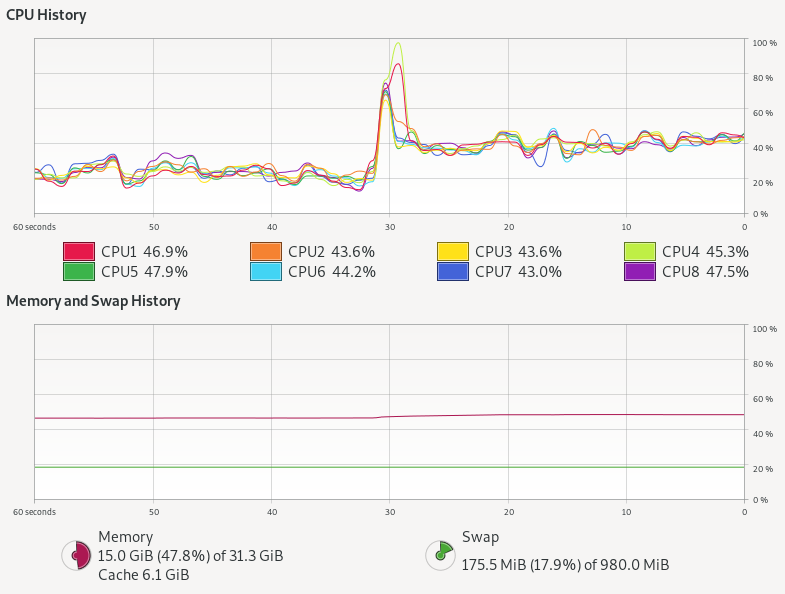
    Kernel threads with thread pool do not stress the CPU at all, but virtual threads alone use almost twice as much CPU! There is also a hint of more memory being used.
    The thread pool has 100k tasks in the thread pool queue, 100 kernel threads that take tasks, 100 at a time, and each task takes one of 100 semaphores permits 3 times, with little or no contention.
    The Loom approach has 100k independent virtual threads that each contend 3 times for the 100 semaphore permits, with up to 99,900 threads needing to be added then removed 3 times from the semaphore’s wake up queue.  The extra queuing for virtual threads could easily explain the excess CPU needed, but more investigation is needed to be definitive.
    However, tasks limited by a resource like JDBC are not really the highly concurrent tasks that Loom is targeted at.  To truly test Loom (and async), we need to look at a type of task that just won’t scale with blocking threads dispatched from a thread pool.

    Virtual Threads vs Async APIs

    One highly concurrent work load that we often see on Jetty is chat room style interaction (or games) written on CometD and/or WebSocket.  Such applications often have many 10,000s or even 100,000s of connections to the server that are mostly idle, waiting for a message to receive or an event to send. Currently we achieve these scales only by asynchronous threadless waiting, with all its ramifications of complex async APIs into the application needing async callbacks.  Luckily, CometD was originally written when there was only async servlets and not async IO, thus it still has the option to be deployed using blocking I/O reads and writes.  This gives it good potential to be a like for like comparison between async pooled kernel threads vs blocking virtual threads.
    However, we still have a concern that this style of application/load will not be suitable for Loom because each message to a chat room will fan out to the 10s, 100s or even 1000s of other users waiting in that room.  Thus a single read could result in many blocking write operations, which are typically done with deep stacks (parsing, framework, handling, marshalling, then writing) and other resources (buffers, locks etc). You can see in the following flame graph from a CometD load test using Loom virtual threads, that even with a fast client the biggest block of time is spent in the blue peak on the left, that is writing with deep stacks. It is this part of the graph that needs to scale if we have either more and/or slower clients:

    Jetty with CometD chat on Loom

    To fairly test Loom, it is not sufficient to just replace the limited pool of kernel threads with infinite virtual threads.  Jetty goes to lots of effort with its eat what you kill scheduling using reserved threads to ensure that whenever a selector thread calls a potentially blocking task, another selector thread has been executed.  We can’t just put Loom virtual threads on top of this, else it will be paying the cost and complexity of core Jetty plus the overheads of Loom.  Moreover, we have also learnt the risk of Thread Starvation that can result in highly concurrent applications if you defer important tasks (e.g. HTTP/2 flow control).  Since virtual threads can be postponed (potentially indefinitely) by CPU bound applications or the use of non-Loom-aware locks (such as the synchronized keyword), they are not suitable for all tasks within Jetty.
    Thus we think a better approach is to keep the core of Jetty running on kernel threads, but to spawn a virtual thread to do the actual work of reading, parsing, and calling the application and writing the response.  If we flag those tasks with InvocationType.NON_BLOCKING, then they will be called directly by the selector thread, with no executor overhead. These tasks can then spawn a new virtual thread to proceed with the reading, parsing,  handling, marshalling, writing and blocking.  Thus we have created the jetty-10.0.x-loom branch, to use this approach and hopefully give a good basis for fair comparisons.
    Our initial runs with our CometD benchmark with just 20 clients resulted in long GCs followed by out of memory failures! This is due to the usage of ThreadLocal for gathering latency statistics and each virtual thread was creating a latency capture data structure, only to use it once and then throw it away!  While this problem is solvable by changing the CometD benchmark code, it reaffirms that threads use resources other than stack and that Loom virtual threads are not a drop in replacement for kernel threads.
    We are aware that the handling of ThreadLocal is a well known problem in Loom, but until solved it may be a surprisingly hard problem to cope with, since you don’t typically know if a library your application depends on uses ThreadLocal or not.
    With the CometD benchmark modified to not use ThreadLocal, we can now take Loom/Jetty/CometD to a moderate number of clients (1000 which generated the flame graph above) with the following results:

    CLIENT: Async Jetty/CometD server
    ========================================
    Testing 1000 clients in 100 rooms, 10 rooms/client
    Sending 1000 batches of 10x50 bytes messages every 10000 µs
    Elapsed = 10015 ms
    - - - - - - - - - - - - - - - - - - - -
    Outgoing: Rate = 990 messages/s - 99 batches/s - 12.014 MiB/s
    Incoming: Rate = 99829 messages/s - 35833 batches/s(35.89%) - 26.352 MiB/s
                    @     _  3,898 µs (112993, 11.30%)
                       @  _  7,797 µs (141274, 14.13%)
                       @  _  11,696 µs (136440, 13.65%)
                       @  _  15,595 µs (139590, 13.96%) ^50%
                       @  _  19,493 µs (142883, 14.29%)
                      @   _  23,392 µs (130493, 13.05%)
                    @     _  27,291 µs (112283, 11.23%) ^85%
            @             _  31,190 µs (59810, 5.98%) ^95%
      @                   _  35,088 µs (12968, 1.30%)
     @                    _  38,987 µs (4266, 0.43%) ^99%
    @                     _  42,886 µs (2150, 0.22%)
    @                     _  46,785 µs (1259, 0.13%)
    @                     _  50,683 µs (910, 0.09%)
    @                     _  54,582 µs (752, 0.08%)
    @                     _  58,481 µs (567, 0.06%)
    @                     _  62,380 µs (460, 0.05%) ^99.9%
    @                     _  66,278 µs (365, 0.04%)
    @                     _  70,177 µs (232, 0.02%)
    @                     _  74,076 µs (82, 0.01%)
    @                     _  77,975 µs (13, 0.00%)
    @                     _  81,873 µs (2, 0.00%)
    Messages - Latency: 999792 samples
    Messages - min/avg/50th%/99th%/max = 209/15,095/14,778/35,815/78,184 µs
    Messages - Network Latency Min/Ave/Max = 0/14/78 ms
    SERVER: Async Jetty/CometD server
    ========================================
    Operative System: Linux 5.8.0-33-generic amd64
    JVM: Oracle Corporation OpenJDK 64-Bit Server VM 16-ea+25-1633 16-ea+25-1633
    Processors: 12
    System Memory: 89.26419% used of 31.164349 GiB
    Used Heap Size: 73.283676 MiB
    Max Heap Size: 2048.0 MiB
    - - - - - - - - - - - - - - - - - - - -
    Elapsed Time: 10568 ms
       Time in Young GC: 5 ms (2 collections)
       Time in Old GC: 0 ms (0 collections)
    Garbage Generated in Eden Space: 3330.0 MiB
    Garbage Generated in Survivor Space: 4.227936 MiB
    Average CPU Load: 397.78314/1200
    ========================================
    Jetty Thread Pool:
        threads:                174
        tasks:                  302146
        max concurrent threads: 34
        max queue size:         152
        queue latency avg/max:  0/11 ms
        task time avg/max:      1/3316 ms


    CLIENT: Loom Jetty/CometD server
    ========================================
    Testing 1000 clients in 100 rooms, 10 rooms/client
    Sending 1000 batches of 10x50 bytes messages every 10000 µs
    Elapsed = 10009 ms
    - - - - - - - - - - - - - - - - - - - -
    Outgoing: Rate = 990 messages/s - 99 batches/s - 13.774 MiB/s
    Incoming: Rate = 99832 messages/s - 41201 batches/s(41.27%) - 27.462 MiB/s
                     @    _  2,718 µs (99690, 9.98%)
                       @  _  5,436 µs (116281, 11.64%)
                       @  _  8,155 µs (115202, 11.53%)
                       @  _  10,873 µs (108572, 10.87%)
                      @   _  13,591 µs (106951, 10.70%) ^50%
                       @  _  16,310 µs (117139, 11.72%)
                       @  _  19,028 µs (114531, 11.46%)
                    @     _  21,746 µs (94080, 9.42%) ^85%
                @         _  24,465 µs (71479, 7.15%)
          @               _  27,183 µs (34358, 3.44%) ^95%
      @                   _  29,901 µs (11526, 1.15%) ^99%
     @                    _  32,620 µs (4513, 0.45%)
    @                     _  35,338 µs (2123, 0.21%)
    @                     _  38,056 µs (988, 0.10%)
    @                     _  40,775 µs (562, 0.06%)
    @                     _  43,493 µs (578, 0.06%) ^99.9%
    @                     _  46,211 µs (435, 0.04%)
    @                     _  48,930 µs (187, 0.02%)
    @                     _  51,648 µs (31, 0.00%)
    @                     _  54,366 µs (27, 0.00%)
    @                     _  57,085 µs (1, 0.00%)
    Messages - Latency: 999254 samples
    Messages - min/avg/50th%/99th%/max = 192/12,630/12,476/29,704/54,558 µs
    Messages - Network Latency Min/Ave/Max = 0/12/54 ms
    SERVER: Loom Jetty/CometD server
    ========================================
    Operative System: Linux 5.8.0-33-generic amd64
    JVM: Oracle Corporation OpenJDK 64-Bit Server VM 16-loom+9-316 16-loom+9-316
    Processors: 12
    System Memory: 88.79622% used of 31.164349 GiB
    Used Heap Size: 61.733116 MiB
    Max Heap Size: 2048.0 MiB
    - - - - - - - - - - - - - - - - - - - -
    Elapsed Time: 10560 ms
       Time in Young GC: 23 ms (8 collections)
       Time in Old GC: 0 ms (0 collections)
    Garbage Generated in Eden Space: 8068.0 MiB
    Garbage Generated in Survivor Space: 3.6905975 MiB
    Average CPU Load: 413.33084/1200
    ========================================
    Jetty Thread Pool:
        threads:                14
        tasks:                  0
        max concurrent threads: 0
        max queue size:         0
        queue latency avg/max:  0/0 ms
        task time avg/max:      0/0 ms
    

    The results here are a bit mixed, but there are some positives for Loom:

    • Both approaches easily achieved the 1000 msg/s sent to the server and 99.8k msg/s received from the server (messages have an average fan-out of a factor 100).
    • The Loom version broke up those messages into 41k responses/s whilst the async version used bigger batches at 35k responses/s, which each response carrying more messages. We need to investigate why, but we think Loom is faster at starting to run the task (no time in the thread pool queue, no time to “wake up” an idle thread).
    • Loom had better latency, both average (~12.5 ms vs ~14.8 ms) and max (~54.6 ms vs ~78.2 ms)
    • Loom used more CPU: 413/1200 vs 398/1200 (4% more)
    • Loom generated more garbage: ~8068.0 MiB vs ~3330.0 MiB and less objects made it to survivor space.

    This is an interesting but inconclusive result.  It is at a low scale on a fast loopback network with a client unlikely to cause blocking, so not really testing either approach.  We now need to scale this test to many 10,000s of clients on a real network, which will require multiple load generation machines and careful measurement.  This will be the subject of part 3 (probably some weeks away).

    Conclusion (part 2) – Cheap threads can do expensive things

    It is good that Project Loom adds inexpensive and fast spawning/blocking virtual threads to the JVM.  But cheap threads can do expensive things!
    Having 1,000,000 concurrent application entities is going to take memory, CPU and other resources, no matter if they block or use async callbacks. It may be that entirely different programming styles are needed for Loom, as is suggested by Loom Structured Concurrency, however we have not yet seen anything that provides limitations on resources that can be used by unlimited spawning of virtual threads. There are also indications that Loom’s flexible stack management comes with a CPU cost.   However, it has been moderately simple to update Jetty to experiment with using Loom to call a blocking application and we’d very much encourage others to load test their application on the jetty-10.0.x-loom branch.
    Many of Loom’s claims have stacked up: blocking code is much easier to write, virtual threads are very fast to start and cheap to block. However, other key claims either do not hold up or have yet to be substantiated: we do not think virtual threads give natural scaling as threads themselves are not the limiting factor, rather it is the resources that are used that determines the scaling.  The suggestion to “Forget about thread-pools, just spawn a new thread…” feels like an invitation to create unstable applications unless other substantive resource management strategies are put into place.
    Given that Duke’s “new clothes” woven by Loom are not one-size-fits-all, it would be a mistake to stop developing asynchronous APIs for things such as DNS and JDBC on the unsubstantiated suggestion that Loom virtual threads will make them unnecessary.

  • Websocket Example: Server, Client and LoadTest

    The websocket protocol specification is approaching final and the Jetty implementation and API have been tracking the draft and is ready when the spec and browsers are available.   More over, Jetty release 7.5.0 now includes a capable websocket java client that can be used for non browser applications or load testing. It is fully asynchronous and can create thousands of connections simultaneously.

    This blog uses the classic chat example to introduce a websocket server, client and load test.

    The project

    The websocket example has been created as a maven project with groupid com.example.  The entire project can be downloaded from here.   The pom.xml defines a dependency on org.eclipse.jetty:jetty-websocket-7.5.0.RC1 (you should update to 7.5.0 when the final release is available), which provides the websocket API and transitively the jetty implementation.  There is also a dependency on org.eclipse.jetty:jetty-servlet which provides the ability to create an embedded servlet container to run the server example.

    While the project implements a Servlet, it is not in a typical webapp layout, as I wanted to provide both client and server in the same project.    Instead of a webapp, this project uses embedded jetty in a simple Main class to provide the server and the static content is served from the classpath from src/resources/com/example/docroot.

    Typically developers will want to build a war file containing a webapp, but I leave it as an exercise for the reader to put the servlet and static content described here into a webapp format.

    The Servlet

    The Websocket connection starts with a HTTP handshake.  Thus the websocket API in jetty also initiated by the handling of a HTTP request (typically) by a Servlet.  The advantage of this approach is that it means that websocket connections are terminated in the same rich application space provided by HTTP servers, thus a websocket enabled web application can be developed in a single environment rather than by collaboration between a HTTP server and a separate websocket server.

    We create the ChatServlet with an init() method that instantiates and configures a WebSocketFactory instance:

    public class ChatServlet extends HttpServlet
    {
      private WebSocketFactory _wsFactory;
      private final Set _members = new CopyOnWriteArraySet();
      @Override
      public void init() throws ServletException
      {
        // Create and configure WS factory
        _wsFactory=new WebSocketFactory(new WebSocketFactory.Acceptor()
        {
          public boolean checkOrigin(HttpServletRequest request, String origin)
          {
            // Allow all origins
            return true;
          }
          public WebSocket doWebSocketConnect(HttpServletRequest request, String protocol)
          {
             if ("chat".equals(protocol))
               return new ChatWebSocket();
             return null;
          }
        });
        _wsFactory.setBufferSize(4096);
        _wsFactory.setMaxIdleTime(60000);
      }
      ...

    The WebSocketFactory is instantiated by passing it an Acceptor instance, which in this case is an anonymous instance. The Acceptor must implement two methods: checkOrigin, which in this case accepts all; and doWebSocketConnect, which must accept a WebSocket connection by creating and returning an instance of the WebSocket interface to handle incoming messages.  In this case, an instance of the nested ChatWebSocket class is created if the protocol is “chat”.   The other WebSocketFactory fields have been initialised with hard coded buffers size and timeout, but typically these would be configurable from servlet init parameters.

    The servlet handles get requests by passing them to the WebSocketFactory to be accepted or not:

      ...
      protected void doGet(HttpServletRequest request,
                           HttpServletResponse response)
        throws IOException
      {
        if (_wsFactory.acceptWebSocket(request,response))
          return;
        response.sendError(HttpServletResponse.SC_SERVICE_UNAVAILABLE,
                           "Websocket only");
      }
      ...

    All that is left for the Servlet, is the ChatWebSocket itself.   This is just a POJO that receives callbacks for events.  For this example we have implemented the WebSocket.OnTextMessage interface to restrict the call backs to only connection management and full messages:

      private class ChatWebSocket implements WebSocket.OnTextMessage
      {
        Connection _connection;
        public void onOpen(Connection connection)
        {
          _connection=connection;
          _members.add(this);
        }
        public void onClose(int closeCode, String message)
        {
          _members.remove(this);
        }
        public void onMessage(String data)
        {
          for (ChatWebSocket member : _members)
          {
            try
            {
              member._connection.sendMessage(data);
            }
            catch(IOException e)
            {
              e.printStackTrace();
            }
          }
        }
      }

    The handling of the onOpen callback is to add the ChatWebSocket to the set of all members (and remembering the Connection object for subsequent sends).  The onClose handling simply removes the member from the set.   The onMessage handling iterates through all the members and sends the received message to them (and prints any resulting exceptions).


    The Server

    To run the servlet, there is a simple Main method that creates an embedded Jetty server with a ServletHandler for the chat servlet, as ResourceHandler for the static content needed by the browser client and a DefaultHandler to generate errors for all other requests:

    public class Main
    {
      public static void main(String[] arg) throws Exception
      {
        int port=arg.length>1?Integer.parseInt(arg[1]):8080;
        Server server = new Server(port);
        ServletHandler servletHandler = new ServletHandler();
        servletHandler.addServletWithMapping(ChatServlet.class,"/chat/*");
        ResourceHandler resourceHandler = new ResourceHandler();
        resourceHandler.setBaseResource(Resource.newClassPathResource("com/example/docroot/"));
        DefaultHandler defaultHandler = new DefaultHandler();
        HandlerList handlers = new HandlerList();
        handlers.setHandlers(new Handler[] {servletHandler,resourceHandler,defaultHandler});
        server.setHandler(handlers);
        server.start();
        server.join();
      }
    }

    The server can be run from an IDE or via maven using the following command line:

    mvn
    mvn -Pserver exec:exec

    The Browser Client

    The HTML for the chat room simply imports some CSS and the javascript before creating a few simple divs to contain the chat text, the join dialog and the joined dialog:

    <html>
     <head>
     <title>WebSocket Chat Example</title>
     <script type='text/javascript' src="chat.js"></script>
     <link rel="stylesheet" type="text/css" href="chat.css" />
     </head>
     <body>
      <div id='chat'></div>
      <div id='input'>
       <div id='join' >
        Username:&nbsp;<input id='username' type='text'/>
        <input id='joinB' class='button' type='submit' name='join' value='Join'/>
       </div>
       <div id='joined' class='hidden'>
        Chat:&nbsp;<input id='phrase' type='text'/>
        <input id='sendB' class='button' type='submit' name='join' value='Send'/>
       </div>
      </div>
      <script type='text/javascript'>init();</script>
     </body>
    </html>

    The javascript create a room object with methods to handle the various operations of a chat room.  The first operation is to join the chat room, which is triggered by entering a user name.  This creates a new WebSocket object pointing to the /chat URL path on the same server the HTML was loaded from:

    var room = {
      join : function(name) {
        this._username = name;
        var location = document.location.toString()
          .replace('http://', 'ws://')
          .replace('https://', 'wss://')+ "chat";
        this._ws = new WebSocket(location, "chat");
        this._ws.onopen = this.onopen;
        this._ws.onmessage = this.onmessage;
        this._ws.onclose = this.onclose;
      },
      onopen : function() {
        $('join').className = 'hidden';
        $('joined').className = '';
        $('phrase').focus();
        room.send(room._username, 'has joined!');
      },
      ...

    The javascript websocket object is initialised with call backs for onopen, onclose and onmessage. The onopen callback is handled above by switching the join div to the joined div and sending a “has joined” message.

    Sending is implemented by creating a string of username:message and sending that via the WebSocket instance:

      ...
      send : function(user, message) {
        user = user.replace(':', '_');
        if (this._ws)
          this._ws.send(user + ':' + message);
      },
      ...

    If the chat room receives a message, the onmessage callback is called, which sanitises the message, parses out the username and appends the text to the chat div:

      ...
      onmessage : function(m) {
        if (m.data) {
          var c = m.data.indexOf(':');
          var from = m.data.substring(0, c)
            .replace('<','<')
            .replace('>','>');
          var text = m.data.substring(c + 1)
            .replace('<', '<')
            .replace('>', '>');
          var chat = $('chat');
          var spanFrom = document.createElement('span');
          spanFrom.className = 'from';
          spanFrom.innerHTML = from + ': ';
          var spanText = document.createElement('span');
          spanText.className = 'text';
          spanText.innerHTML = text;
          var lineBreak = document.createElement('br');
          chat.appendChild(spanFrom);
          chat.appendChild(spanText);
          chat.appendChild(lineBreak);
          chat.scrollTop = chat.scrollHeight - chat.clientHeight;
        }
      },
      ...

    Finally, the onclose handling empties the chat div and switches back to the join div so that a new username may be entered:

      ...
      onclose : function(m) {
        this._ws = null;
        $('join').className = '';
        $('joined').className = 'hidden';
        $('username').focus();
        $('chat').innerHTML = '';
      }
    };

    With this simple client being served from the server, you can now point your websocket capable browsers at http://localhost:8080 and interact with the chat room. Of course this example glosses over a lot of detail and complications a real chat application would need, so I suggest you read my blog is websocket chat simpler to learn what else needs to be handled.

    The Load Test Client

    The jetty websocket java client is an excellent tool for both functional and load testing of a websocket based service.  It  uses the same endpoint API as the server side and for this example we create a simple implementation of the OnTextMessage interface that keeps track of the all the open connection and counts the number of messages sent and received:

    public class ChatLoadClient implements WebSocket.OnTextMessage
    {
      private static final AtomicLong sent = new AtomicLong(0);
      private static final AtomicLong received = new AtomicLong(0);
      private static final Set<ChatLoadClient> members = new CopyOnWriteArraySet<ChatLoadClient>();
      private final String name;
      private final Connection connection;
      public ChatLoadClient(String username,WebSocketClient client,String host, int port)
      throws Exception
      {
        name=username;
        connection=client.open(new URI("ws://"+host+":"+port+"/chat"),this).get();
      }
      public void send(String message) throws IOException
      {
        connection.sendMessage(name+":"+message);
      }
      public void onOpen(Connection connection)
      {
        members.add(this);
      }
      public void onClose(int closeCode, String message)
      {
        members.remove(this);
      }
      public void onMessage(String data)
      {
        received.incrementAndGet();
      }
      public void disconnect() throws IOException
      {
        connection.disconnect();
      }

    The Websocket is initialized by calling open on the WebSocketClient instance passed to the constructor.  The WebSocketClient instance is shared by multiple connections and contains the thread pool and other common resources for the client.

    This load test example comes with a main method that creates a WebSocketClient from command line options and then creates a number of ChatLoadClient instances:

    public static void main(String... arg) throws Exception
    {
      String host=arg.length>0?arg[0]:"localhost";
      int port=arg.length>1?Integer.parseInt(arg[1]):8080;
      int clients=arg.length>2?Integer.parseInt(arg[2]):1000;
      int mesgs=arg.length>3?Integer.parseInt(arg[3]):1000;
      WebSocketClient client = new WebSocketClient();
      client.setBufferSize(4096);
      client.setMaxIdleTime(30000);
      client.setProtocol("chat");
      client.start();
      // Create client serially
      ChatLoadClient[] chat = new ChatLoadClient[clients];
      for (int i=0;i<chat.length;i++)
        chat[i]=new ChatLoadClient("user"+i,client,host,port);
      ...

    Once the connections are opened, the main method loops around picking a random client to speak in the chat room

      ...
      // Send messages
      Random random = new Random();
      for (int i=0;i<mesgs;i++)
      {
        ChatLoadClient c = chat[random.nextInt(chat.length)];
        String msg = "Hello random "+random.nextLong();
        c.send(msg);
      }
      ...

    Once all the messages have been sent and all the replies have been received, the connections are closed:

      ...
      // close all connections
      for (int i=0;i<chat.length;i++)
        chat[i].disconnect();

    The project is setup so that the load client can be run with the following maven command:

    mvn -Pclient exec:exec

    And the resulting output should look something like:

    Opened 1000 of 1000 connections to localhost:8080 in 1109ms
    Sent/Received 10000/10000000 messages in 15394ms: 649603msg/s
    Closed 1000 connections to localhost:8080 in 45ms

    Yes that is 649603 messages per second!!!!!!!!!!! This is a pretty simple easy test, but it is still scheduling 1000 local sockets plus generating and parsing all the websocket frames. Real applications on real networks are unlikely to achieve close to this level, but the indications are good for the capability of high throughput and stand by for more rigorous bench marks shortly.


  • Prelim Cometd WebSocket Benchmarks

    I have done some very rough preliminary benchmarks on the latest cometd-2.4.0-SNAPSHOT with the latest Jetty-7.5.0-SNAPSHOT and the results are rather impressive.  The features that these two releases have added are:

    • Optimised Jetty NIO with latest JVMs and JITs considered.
    • Latest websocket draft implemented and optimised.
    • Websocket client implemented.
    • Jackson JSON parser/generator used for cometd
    • Websocket cometd transport for the server improved.
    • Websocket cometd transport for the bayeux client implemented.

    The benchmarks that I’ve done have all been on my notebook using the localhost network, which is not the most realistic of environments, but it still does tell us a lot about the raw performance of the cometd/jetty.  Specifically:

    • Both the server and the client are running on the same machine, so they are effectively sharing the 8 CPUs available.   The client typically takes 3x more CPU than the server (for the same load), so this is kind of like running the server on a dual core and the client on a 6 core machine.
    • The local network has very high throughput which would only be matched by gigabit networks.  It also has practically no latency, which is unlike any real network.  The long polling transport is more dependent on good network latency than the websocket transport, so the true comparison between these transports will need testing on a real network.

    The Test

    The cometd load test is a simulated chat application.  For this test I tried long-polling and websocket transports for 100, 1000 and 10,000 clients that were each logged into 10 randomly selected chat rooms from a total of 100 rooms.   The messages sent were all 50 characters long and were published in batches of 10 messages at once, each to randomly selected rooms.  There was a pause between batches that was adjusted to find a good throughput that didn’t have bad latency.  However little effort was put into finding the optimal settings to maximise throughput.

    The runs were all done on JVM’s that had been warmed up, but the runs were moderately short (approx 30s), so steady state was not guaranteed and the margin of error on these numbers will be pretty high.  However, I also did a long run test at one setting just to make sure that steady state can be achieved.

    The Results

    The bubble chart above plots messages per second against number of clients for both long-polling and websocket transports.   The size of the bubble is the maximal latency of the test, with the smallest bubble being 109ms and the largest is 646ms.  Observations from the results are:

    • Regardless of transport we achieved 100’s of 1000’s messages per second!  These are great numbers and show that we can cycle the cometd infrastructure at high rates.
    • The long-polling throughput is probably a over reported because there are many messages being queued into each HTTP response.   The most HTTP responses I saw was 22,000 responses per second, so for many application it will be the HTTP rate that limits the throughput rather than the cometd rate.  However the websocket throughput did not benefit from any such batching.
    • The maximal latency for all websocket measurements was significantly better than long polling, with all websocket messages being delivered in < 200ms and the average was < 1ms.
    • The websocket throughput increased with connections, which probably indicates that at low numbers of connections we were not generating a maximal load.

    A Long Run

    The throughput tests above need to be redone on a real network and longer runs. However I did do one long run ( 3 hours) of 1,000,013,657 messages at 93,856/sec. T results suggest no immediate problems with long runs. Neither the client nor the server needed to do a old generation collection and all young generation collections took on average only 12ms.

    The output from the client is below:

    Statistics Started at Fri Aug 19 15:44:48 EST 2011
    Operative System: Linux 2.6.38-10-generic amd64
    JVM : Sun Microsystems Inc. Java HotSpot(TM) 64-Bit Server VM runtime 17.1-b03 1.6.0_22-b04
    Processors: 8
    System Memory: 55.35461% used of 7.747429 GiB
    Used Heap Size: 215.7406 MiB
    Max Heap Size: 1984.0 MiB
    Young Generation Heap Size: 448.0 MiB
    - - - - - - - - - - - - - - - - - - - -
    Testing 1000 clients in 100 rooms, 10 rooms/client
    Sending 1000000 batches of 10x50 bytes messages every 10000 µs
    - - - - - - - - - - - - - - - - - - - -
    Statistics Ended at Fri Aug 19 18:42:23 EST 2011
    Elapsed time: 10654717 ms
    	Time in JIT compilation: 57 ms
    	Time in Young Generation GC: 118473 ms (8354 collections)
    	Time in Old Generation GC: 0 ms (0 collections)
    Garbage Generated in Young Generation: 2576746.8 MiB
    Garbage Generated in Survivor Generation: 336.53125 MiB
    Garbage Generated in Old Generation: 532.35156 MiB
    Average CPU Load: 433.23907/800
    ----------------------------------------
    Outgoing: Elapsed = 10654716 ms | Rate = 938 msg/s = 93 req/s =   0.4 Mbs
    All messages arrived 1000013657/1000013657
    Messages - Success/Expected = 1000013657/1000013657
    Incoming - Elapsed = 10654716 ms | Rate = 93856 msg/s = 90101 resp/s(96.00%) =  35.8 Mbs
    Thread Pool - Queue Max = 972 | Latency avg/max = 3/62 ms
    Messages - Wall Latency Min/Ave/Max = 0/8/135 ms

    Note that the client was using 433/800 of the available CPU, while you can see that the server (below) was using only 170/800.  This suggests that the server has plenty of spare capacity if it were given the entire machine.

    Statistics Started at Fri Aug 19 15:44:47 EST 2011
    Operative System: Linux 2.6.38-10-generic amd64
    JVM : Sun Microsystems Inc. Java HotSpot(TM) 64-Bit Server VM runtime 17.1-b03 1.6.0_22-b04
    Processors: 8
    System Memory: 55.27913% used of 7.747429 GiB
    Used Heap Size: 82.58406 MiB
    Max Heap Size: 2016.0 MiB
    Young Generation Heap Size: 224.0 MiB
    - - - - - - - - - - - - - - - - - - - -
    - - - - - - - - - - - - - - - - - - - -
    Statistics Ended at Fri Aug 19 18:42:23 EST 2011
    Elapsed time: 10655706 ms
    	Time in JIT compilation: 187 ms
    	Time in Young Generation GC: 140973 ms (12073 collections)
    	Time in Old Generation GC: 0 ms (0 collections)
    Garbage Generated in Young Generation: 1652646.0 MiB
    Garbage Generated in Survivor Generation: 767.625 MiB
    Garbage Generated in Old Generation: 1472.6484 MiB
    Average CPU Load: 170.20532/800

    Conclusion

    These results are preliminary, but excellent none the less!   The final releases of jetty 7.5.0 and cometd 2.4.0 will be out within a week or two and we will be working to bring you some more rigorous benchmarks with those releases.


  • Cometd with Annotations


    Cometd 2.1 now supports annotations to define cometd services and clients.  Annotations greatly reduces the boiler plate code required to write a cometd service and also links well with new cometd 2.x features such as channel initializers and Authorizers, so that all the code for a service can be grouped in one POJO class rather than spread over several derived entities.  The annotation are some cometd specific ones, plus some standard spring annotations.

    Server Side

    This blog looks at the annotated ChatService example bundled with the 2.1.0 cometd release.

    Creating a Service

    A POJO (Plain Old Java Object) can be turned into a cometd service by the addition of the @Service class annotation:

    package org.cometd.examples;
    import org.cometd.java.annotation.Service;

    @Service("chat")
    public class ChatService
    {
    ...
    }

    The service name passed is used in the services session ID, to assist with debugging.

    The annotated version of the CometdServlet then needs be used and to be told the classes that it should instantiate as services and scan for annotations. This is done with a coma separated list of class names in the "services" init-parameter in the web.xml (or similar) as follows:

    <servlet>
      <servlet-name>cometd</servlet-name>
      <servlet-class>org.cometd.java.annotation.AnnotationCometdServlet</servlet-class>

    ...
      <init-param>
        <param-name>services</param-name>
        <param-value>org.cometd.examples.ChatService</param-value>
      </init-param>
    </servlet>

    Configuring a Channel

    A service will frequently need to create, configure and Listen or subscribe to a channel. This can now be done atomically in cometd 2.x so that messages will not be recived before the channel is fully created and configured. For example the chat services configures 1 absolute channel and 2 wild card channel using the @Configure annotations:

    @Configure ({"/chat/**","/members/**"})
    protected void configureChatStarStar(ConfigurableServerChannel channel)
    {
        DataFilterMessageListener noMarkup =

    new DataFilterMessageListener(_bayeux,new NoMarkupFilter(),new BadWordFilter());
        channel.addListener(noMarkup);
        channel.addAuthorizer(GrantAuthorizer.GRANT_ALL);
    }
    @Configure ("/service/members")
    protected void configureMembers(ConfigurableServerChannel channel)
    {
        channel.addAuthorizer(GrantAuthorizer.GRANT_PUBLISH);
        channel.setPersistent(true);
    }

    The @Configure annotation is roughly equivalent to calling the BayeuxServer#createIfAbsent method with the annotated method called as the Initializer and must take a ConfigurableServerChannel as an argument.  The @Configure annotation can also take two boolean arguments: errorIfExists and configureIfExists, to determine how to handle the channel if it already exists.

    The configuration methods for the chat service use the new Authorizer mechanism to define fine grained authorization of what clients can publish and subscribe to a channel. This is similar to the existing SecurityPolicy mechanism, but without the need for a centralized policy instance. An operation on a channel is permitted if it is granted by at least one Authorizer and denied by none, giving black/white list style semantics.

    The configuration of the chat wildcard channels installs DataFilterMessageListeners for all /chat/** and all /members/** channels.  These filters ensure that there is no markup or bad words published to these channels.  To construct the listener, an instance to the BayeuxServer is needed to be passed to the constructor (used only for logging in this case).  A service may obtain a reference to the BayeuxService using the @Inject annotation:

    @Inject
    private BayeuxServer _bayeux;

    Adding a ChannelListener

    A method of a service may be registered as a listener of a channel with the @Listener annotation:

    @Listener("/service/members")
    public void handleMembership(ServerSession client, ServerMessage message)
    {
    ...
    }

    The @Listener annotation may also be passed the boolean argument receiveOwnPublishes, to control if messages published by the service session are filtered out. Note that a Listener is different to a subscription in that the service does not
    subscribe to the channel, so it will not trigger any subscription
    listeners nor be counted as a subscriber. There is also a @Subscription annotation available, but it is not used by the ChatService (and is typically more applicable when applied to client side cometd annotations).

    Client Side

    Annotations can also be used on the client side, if the java BayeuxClient is used, either for service testing or for the creation of a rich non-browser client UI:

    @Service
    class MyClient
    {
        @Session
        private ClientSession session;

        @PostConstruct
        private void init()
        {

    ...
        }
        @PreDestroy
        private void destroy()
        {

    ...     }
        @Listener("/meta/*")
        public void handleMetaMessage(Message connect)
        {

    ...     }
        @Subscription("/foo")
        public void handeFoo(Message message)
        {

    ...     }
    }

    Note the use of @Session to inject the session used by the service and @PostConstruct and @PreDestroy for lifecycle events.  These annotations are also available on the server side. On the client, the annotations are activated by an explicit call to an annotation processor:

    ClientAnnotationProcessor processor = new ClientAnnotationProcessor(bayeuxClient);
    ...
    MyClient mc = new MyClient();
    processor.process(mc);

    Conclusion

    Annotations have made Cometd services much simpler to create and much easier to understand.  Normally I’m not a big fan of annotations, as they frequently put too much configuration into the "code", but in this case, they are a perfect match for the semantic needed.  In future, we’ll also look at making JAXB annotations work simply with the JSON mechanisms of cometd.