Author: Ludovic Orban

  • Jetty 12 performance figures

    TL;DR

    This is a quick blog to share the performance figures of Jetty 12 and to compare them to Jetty 11, updated for the release of 12.0.2. The outcome of our benchmarks is that Jetty 12 with EE10 Servlet-6.0 is 5% percent faster than Jetty 11 EE9 Servlet-5.0. The Jetty-12 Core API is 22% faster.

    These percentages are calculated from the P99 integrals, which is the total latency excluding the 1% slowest requests from each of the 180 sample periods. The max latency for the 1% slowest requests in each sample shows a modest improvement for Jetty-12 servlets and a significant improvement for core.

    Introduction

    We use one server (powered by a 16 cores Intel Core i9-7960X) connected with a 10GbE link to a dedicated switch, upon which four clients are connected with a single 1GbE link each. The server runs a single instance of the Jetty Server running with the default of 200 threads and a 32 GB heap managed by ZGC, and the clients each run a single instance of the Jetty Load Generator running with an 8 GB heap also managed by ZGC. This is all automated, and the source of this benchmark is public too.

    Each client applies a load of 60,000 requests per second for a total of 240,000 requests per second that the server handles alone. We make sure there is no saturation anywhere: CPU consumption, network links, RAM, JVM heap, HTTP response status are monitored to ensure this is the case. We also make sure no errors are reported in HTTP response statuses or on the network interface.

    We collect all processing times of the Jetty Server (i.e.: the time it takes from reading the 1st byte of the request from the socket to writing the last byte of the response to the socket) in histograms from which we then graph the minimum, P99, and maximum latencies, and calculate integrals (i.e.: the sum of all measurements) for latter two.

    Jetty 12

    In the following three benchmarks, the CPU consumption of the server machine stayed around 40%.

    Below are plots of the maximum (graph in yellow), minimum to P99 (graph in red) processing times for Jetty 12:

    ee10

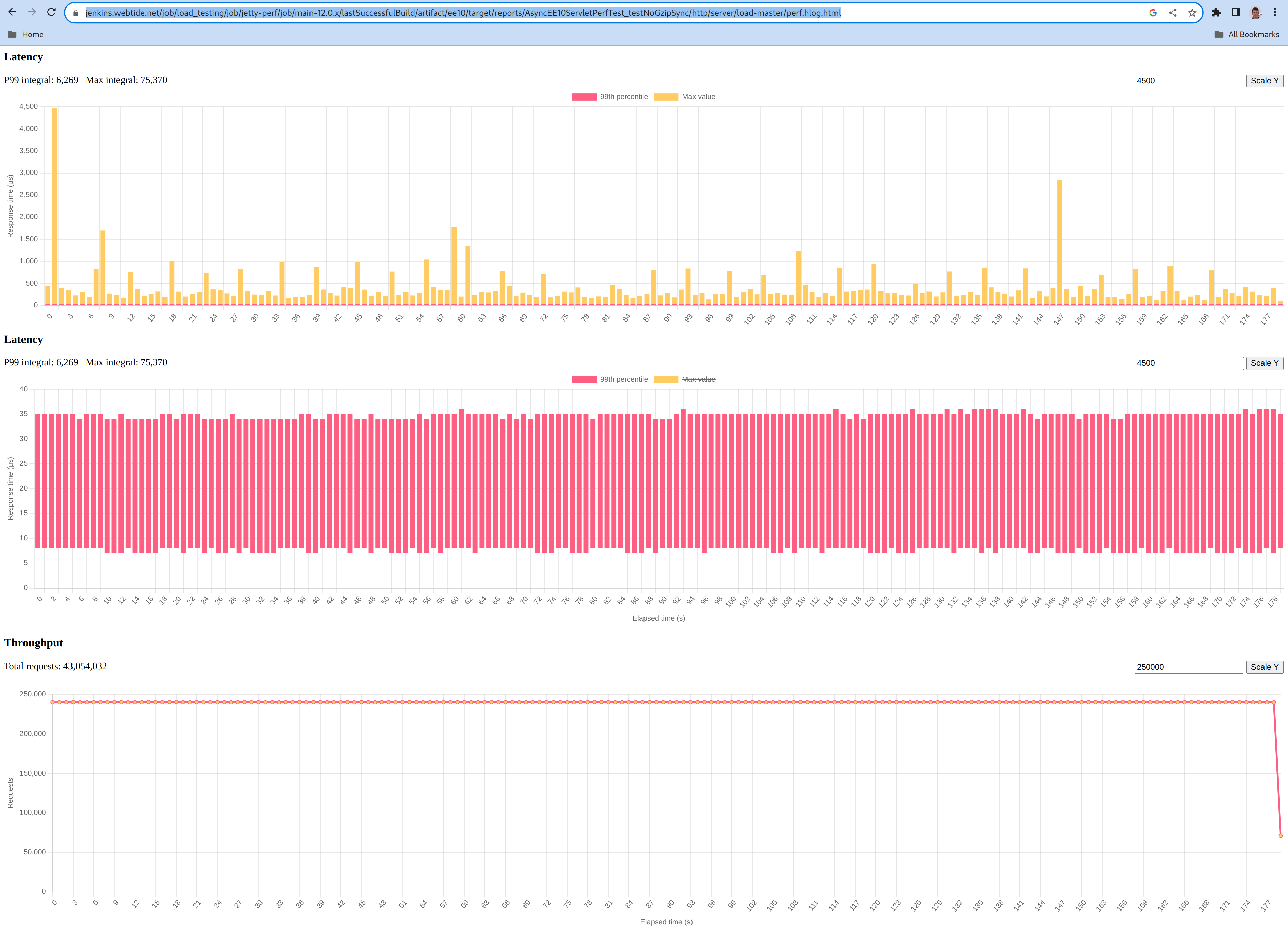
    The yellow graph shows a single early peak at 4500 µs, and then most peaks at less than 1000µs and an average sample peak of 434µs.

    The red graph shows a minimum processing time of 7 µs, a P99 processing time of 34.8 µs.

    core

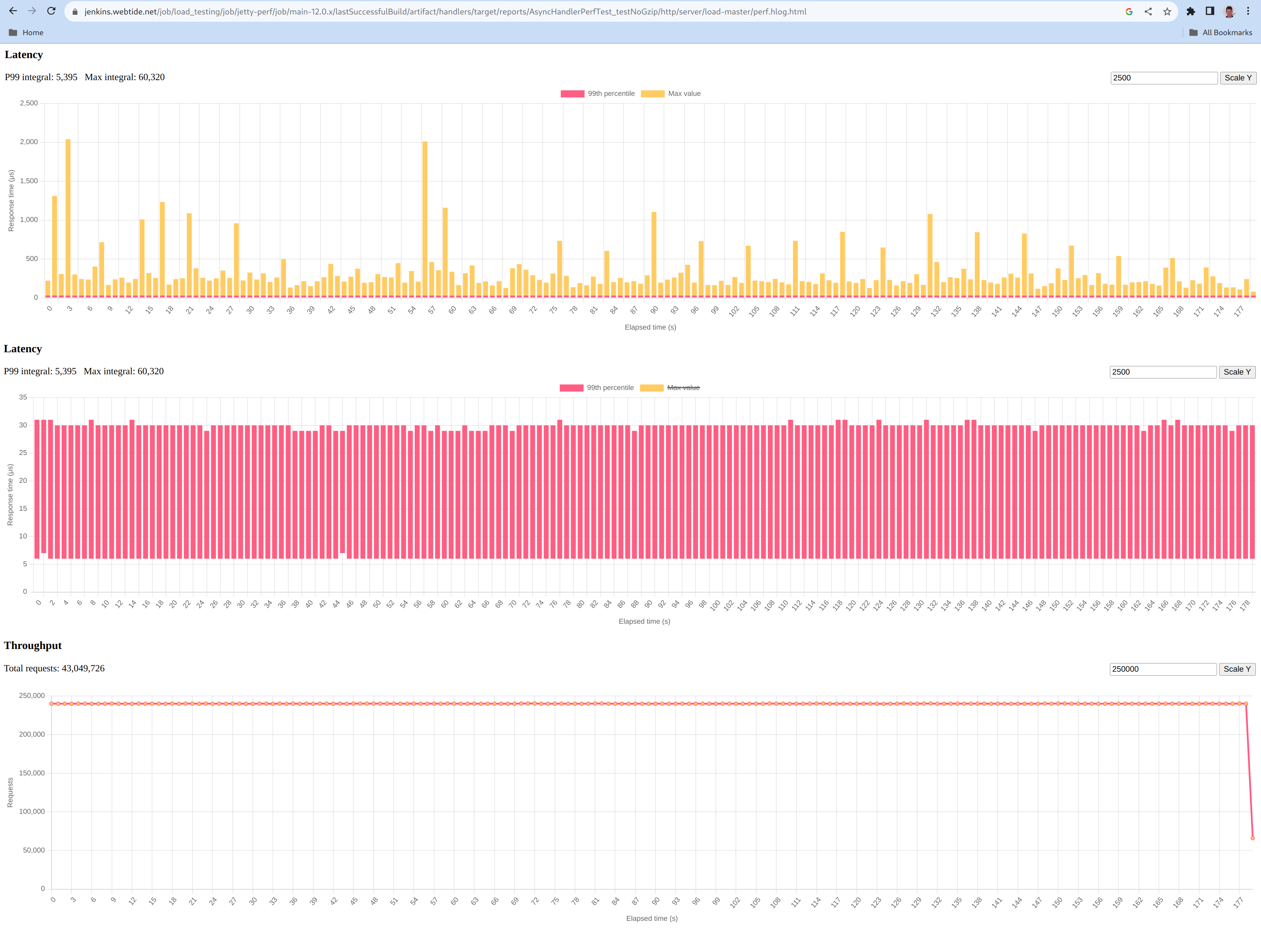
    The yellow graph shows a few peaks at a 2000 µs with the average sample peak being 335µs.

    The red graph shows a minimum processing time of 6 µs, a P99 processing time of 30.0 µs.

    Comparing to Jetty 11

    Comparing apples to apples required us to slightly modify our benchmark to:

    In the following benchmark, the CPU consumption of the server machine stayed around 40%, like with Jetty 12.

    Below are the same plots of the maximum (graph in yellow), minimum to P99 (graph in red) processing times for Jetty 11:

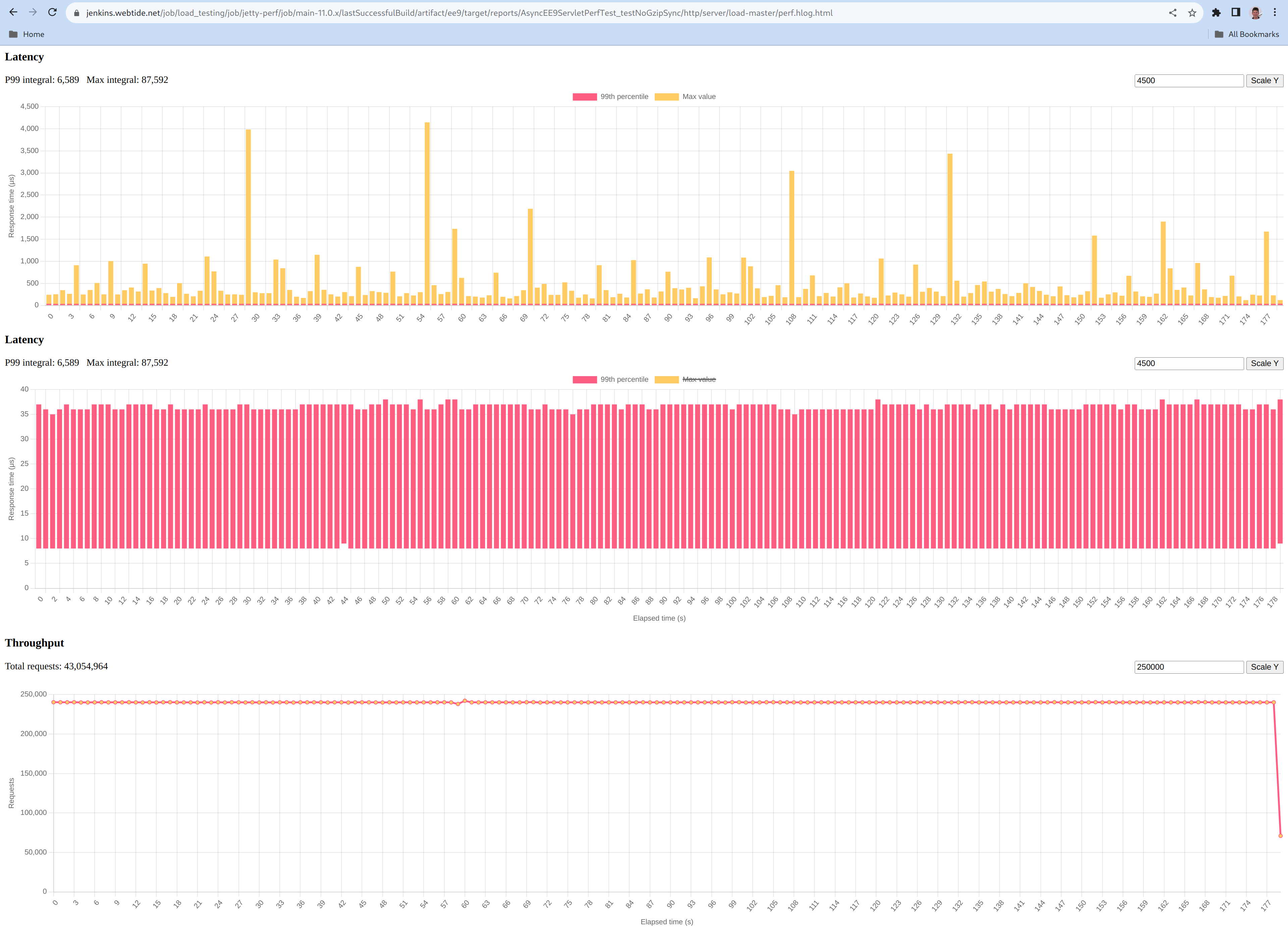
    The yellow graph shows a few peaks at a 4000µs with an average sample peak of 487µs.

    The red graph shows a minimum processing time of 8 µs, a P99 processing time of 36.6 µs.

  • The Jetty Performance Effort

    One can only improve what can be reliably measured. To assert that Jetty’s performance is as good as it can be, doesn’t degrade over time and to facilitate future optimization work, we need to be able to reliably measure its performance.

    The primary goal

    The Jetty project wanted an automated performance test suite. Every now and then some performance measurements were done, with some ad-hoc tools and a lot of manual steps. In the past few months an effort has been made to try to come up with an automated performance test suite that could help us with the above goals and more, like making it easy to better visualize the performance characteristics of the tested scenarios for instance.

    We have been working on and off such test suite over the past few months. The primary goal was to write a reliable, fully automated test that can be used over time to measure, understand and compare performance over time.

    A basic load-testing scenario

    A test must be stable over time, and the same is true for performance tests: these ought to report stable performance over time to be considered repeatable. Since this is already a challenge in itself, we decided to start with the simplest possible scenario that is limited in realism but easy to grasp and still useful to get a quick overview of the server’s overall performance.

    The basis of that scenario is a simple HTTPS (i.e.: HTTP/1.1 over TLS) GET on a single resource that returns a few bytes of in-memory hard-coded data. To avoid a lot of complexity, the test is going to run on dedicated physical machines that are hosted in an environment entirely under our control. This way, it is easy to assert what kind of performance they’re capable of, that the performance is repeatable, that those machines are not doing anything else, that the network between them is capable enough and not overloaded, and so on.

    Load, don’t strangle

    As recommended in the Jetty Load Generator documentation, to get meaningful measurements we want one machine running Jetty (the server), one generating a fixed 100 requests/s load (the probe) and four machines each generating a fixed 60K requests/s load (the loaders). This setup is going to load Jetty with around 240K (4 loaders doing 60K each) requests per second, which is a good figure given the hardware we have: it was chosen based on the fact that it is enough traffic to get the server machine to burn around 50% of its total CPU time, i.e.: loading but not strangling it. The way we found this figure simply was by trial and error.

    Choosing a load that will not push the server to constant 100% CPU is important: while running a test that tries to run the heaviest possible load does have its use, such test is not a load test but a limit test. A limit test is good for figuring out how a software behave under a load too heavy for the hardware it runs on, for instance to make sure that it degrades gracefully instead of crashing and burning into flames when a certain limit is reached. But such test is of very limited use to figure out how fast your software responds under a manageable (i.e.: normal) load, which is what we are most commonly interested in.

    Planning the scenario

    The server’s code is pretty easy since it’s just about setting up Jetty: configuring the connector, SSL context and test handler is basically all it takes. For the loaders, the Jetty Load Generator is meant just for that task so it’s again fairly easy to write this code by making use of that library. The same is also true for the probe as the Jetty Load Generator can be used for it too, and can be configured to record each request’s latency too. And say we want to do that for three minutes to get a somewhat realistic idea of how the server does behave under a flat load.

    Deploying and running a test over multiple machines can be a daunting task, which is why we wrote the Jetty Cluster Orchestrator whose job is to make it easy to write some java code to distribute, execute and control it on a set of machines, using only the SSH protocol. Thanks to this tool, getting some code to run on the six necessary machines can be done simply while writing a plain standard JUnit test.

    So we basically have these three methods that we get running over the six machines:

    void startServer() { ... }
    
    void runProbeGenerator() { ... }
    
    void runLoadGenerator() { ... }

    We also need a warmup phase during which the test runs but no recording is made. The Jetty Load Generator is configured with a duration, so the original three minutes duration has to grow by that warmup duration. We decided to go with one minute for that warmup, so the total load generation duration is now four minutes. So both runProbeGenerator() and runLoadGenerator() are going to run for four minutes each. After the first minute, a flag is flipped to indicate the end of the warmup phase and to make the recording start. Once runProbeGenerator() and runLoadGenerator() return the test is over and the server is stopped then the recordings are collected and analyzed.

    Summarizing the test

    Here’s a summary of the procedure the test is implementing:

    1. Start the Jetty server on one server machine: call startServer().
    2. Start the Jetty Load Generator with a 100/s throughput on one probe machine: call runProbeGenerator().
    3. Start the Jetty Load Generator with a 60K/s throughput on four load machines: call runLoadGenerator().
    4. Wait one minute for the warmup to be done.
    5. Start recording statistics on all six machines.
    6. Wait three minutes for the run to be done.
    7. Stop the Jetty server.
    8. Collect and process the recorded statistics.
    9. (Optional) Perform assertions based on the recorded statistics.

    Results

    It took some iterations to get to the above scenario, and to get it to run repeatably. Once we got confident the test’s reported performance figures could be trusted, we started seriously analyzing our latest release (Jetty 10.0.2 at that time) with it.

    We quickly found a performance problem with a stack trace generated on the fast path, thanks to the Async Profiler’s flame graph that is generated on each run for each machine. Issue #6157 was opened to track this problem that has been solved and made it to Jetty 10.0.4.

    After spending more time looking at the reported performance, we noticed that the ByteBuffer pool we use by default is heavily contended and reported as a major time consumer by the generated flame graphs. Issue #6379 was opened to track this issue. A quick investigation of that code proved that minor modifications could provide an appreciable performance boost that made it to Jetty 10.0.6.

    While working on our backlog of general cleanups and improvements, issue #6322 made it to the top of the pile. Investigating it, it became apparent that we could improve the ByteBuffer pool a step further by adopting the RetainableByteBuffer interface everywhere in the input path and slightly modifying its contract, in a way that enabled us to write a much more performant ByteBuffer pool. This work was released as part of Jetty 10.0.7.

    Current status of Jetty’s performance

    Here are a few figures to give you some idea of what Jetty can achieve: while our test server (powered by a 16 cores Intel Core i9-7960X) is under a 240.000 HTTPS requests per second load, the probe measured that most of the time, 99% of its own HTTPS requests were served in less than 1 millisecond, as can be seen on this graph.

    Thanks to the collected measurements, we could add performance-related assertions to the test and made it run regularly against 10.0.x and 11.0.x to make sure performance won’t unknowingly degrade over time for those branches. We are now also running the same test over HTTP/1.1 clear text and TLS as well as HTTP/2.0 clear text and TLS too.

    The test also works against the 9.4.x branch but we do not yet have assertions for that branch because it has a different performance profile, so a different load profile is needed and different performance figures are to be expected. This has yet to happen but that is in our todo list.

    More test scenarios are going to be added to the test suite over time as we see fit. For instance, to measure certain load scenarios we deem important, to cover certain aspects or features or any other reason why we’d want to measure performance and ensure its stability over time.

    In the end, making Jetty as performant as possible and continuously optimizing it has always been on Webtide’s mind and that trend will continue in the future!

  • A story about Unix, Unicode, Java, filesystems, internationalization and normalization

    Recently, I’ve been investigating some test failures that I only experienced on my own machine, which happens to run some flavor of Linux. Investigating those failures, I ran down a rabbit hole that involves Unix, Unicode, Java, filesystems, internationalization and normalization. Here is the story of what I found down at the very bottom.

    A story about Unix internationalization

    One test that was failing is testAccessUniCodeFile, with the following exception:

    java.nio.file.InvalidPathException: Malformed input or input contains unmappable characters: swedish-å.txt
    	at java.base/sun.nio.fs.UnixPath.encode(UnixPath.java:145)
    	at java.base/sun.nio.fs.UnixPath.(UnixPath.java:69)
    	at java.base/sun.nio.fs.UnixFileSystem.getPath(UnixFileSystem.java:279)
    	at java.base/java.nio.file.Path.resolve(Path.java:515)
    	at org.eclipse.jetty.util.resource.FileSystemResourceTest.testAccessUniCodeFile(FileSystemResourceTest.java:335)
    	...
    

    This test asserts that Jetty can read files with non-ASCII characters in their names. But the failure happens in Path.resolve, when trying to create the file, before any Jetty code is executed. But why?
    When accessing a file, the JVM has to deal with Unix system calls. The Unix system call typically used to create a new file or open an existing one is int open(const char *path, int oflag, …); which accepts the file name as its first argument.
    In this test, the file name is "swedish-å.txt" which is a Java String. But that String isn’t necessarily encoded in memory in a way that the Unix system call expects. After all, a Java String is not the same as a C const char * so some conversion needs to happen before the C function can be called.
    We know the Java String is represented by a UTF-8-encoded byte[] internally. But how is the C const char * actually is supposed to be represented? Well, that depends. The Unix spec specifies that internationalization depends on environment variables. So the encoding of the C const char * depends on the LANG, LC_CTYPE and LC_ALL environment variables and the JVM has to transform the Java String to a format determined by these environment variables.
    Let’s have a look at those in a terminal:

    $ echo "LANG=\"$LANG\" LC_CTYPE=\"$LC_CTYPE\" LC_ALL=\"$LC_ALL\""
    LANG="C" LC_CTYPE="" LC_ALL=""
    $
    

    C is interpreted as a synonym of ANSI_X3.4-1968 by the JVM which itself is a synonym of US-ASCII.
    I’ve explicitly set this variable in my environment as some commands use it for internationalization and I appreciate that all the command line tools I use strictly stick to English. For instance:

    $ sudo LANG=C apt-get remove calc
    ...
    Do you want to continue? [Y/n] n
    Abort.
    $ sudo LANG=fr_BE.UTF-8 apt-get remove calc
    Do you want to continue? [O/n] n
    Abort.
    $
    

    Notice the prompt to the question Do you want to continue? that is either [Y/n] (C locale) or [O/n] (Belgian-French locale) depending on the contents of this variable. Up until now, I didn’t know that it also impacted what files the JVM could create or open!
    Knowing that, it is now obvious why the file cannot be created: it is not possible to convert the "swedish-å.txt" Java String to an ASCII C const char * simply because there is no way to represent the å character in ASCII.
    Changing the LANG environment variable to en_US.UTF-8 allowed the JVM to successfully make that Java-to-C string conversion which allowed that test to pass.
    Our build has now been changed to force the LC_ALL environment variable (as it is the one that overrides the other ones) to en_US.UTF-8 before running our tests to make sure this test passes even on environments with non-unicode locales.

    A story about filesystem Unicode normalization

    There was an extra pair of failing tests, that reported the following error:

    java.lang.AssertionError:
    Expected: is <404>
         but: was <200>
    Expected :is <404>
    Actual   :<200>
    

    For the context, those tests are about creating a file with a non-ASCII name encoded in some way and trying to serve it over HTTP with a request to the same non-ASCII name encoded in a different way. This is needed because Unicode supports different forms of encoding, notably Normalization Form Canonical Composition (NFC) and Normalization Form Canonical Decomposition (NFD). For our example string “swedish-å.txt”, this means there are two ways to encode the letter “å”: either U+00e5 LATIN SMALL LETTER A WITH RING ABOVE (NFC) or U+0061 LATIN SMALL LETTER A followed by U+030a COMBINING RING ABOVE (NFD).
    Both are canonically equivalent, meaning that a unicode string with the letter “å” encoded either as NFC or NFD should be considered the same. Is that true in practice?
    The failing tests are about creating a file whose name is NFC-encoded then trying to serve it over HTTP with the file name encoded in the URL as NFD and vice-versa.
    When running those tests on MacOS on APFS, the encoding never matters and MacOS will find the file with a NFC-encoded filename when you try to open it with a NFD-encoded canonically equivalent filename and vice-versa.
    When running those tests on Linux on ext4 or Windows on NTFS, the encoding always matters and Linux/Windows will not find the file with a NFC-encoded filename when you try to open it with a NFD-encoded canonically equivalent filename and vice-versa.
    And this is exactly what the tests expect:

    if (OS.MAC.isCurrentOs())
      assertThat(response.getStatus(), is(HttpStatus.OK_200));
    else
      assertThat(response.getStatus(), is(HttpStatus.NOT_FOUND_404));
    

    What I discovered is that when running those tests on Linux on ZFS, the encoding sometimes matters and Linux may find the file with a NFC-encoded filename when you try to open it with a NFD-encoded canonically equivalent filename and vice-versa, depending upon the ZFS normalization property; quoting the manual:

    normalization = none | formC | formD | formKC | formKD
        Indicates whether the file system should perform a unicode normalization of file names whenever two file names are compared, and which normalization algorithm should be used. File names are always stored unmodified, names are normalized as part of any comparison process. If this property is set to a legal value other than none, and the utf8only property was left unspecified, the utf8only property is automatically set to on. The default value of the normalization property is none. This property cannot be changed after the file system is created.
    

    So if we check the normalization of the filesystem upon which the test is executed:

    $ zfs get normalization /
    NAME                      PROPERTY       VALUE          SOURCE
    rpool/ROOT/nabo5t         normalization  formD          -
    $
    

    we can understand why the tests fail: due to the normalization done by ZFS, Linux can open the file given canonically equivalent filenames, so the test mistakenly assumes that Linux cannot serve this file. But if we create a new filesystem with no normalization property:

    $ zfs get normalization /unnormalized/test/directory
    NAME                      PROPERTY       VALUE          SOURCE
    rpool/unnormalized        normalization  none           -
    $
    

    and run a copy of the tests from it, the tests succeed.
    So we’ve adapted both tests to make them detect if the filesystem supports canonical equivalence and basing the assertion on that detection instead of hardcoding which OS behaves in which way.

  • Object Pooling, Benchmarks, and Another Way

    Context

    The Jetty HTTP client internally uses a connection pool to recycle HTTP connections, as they are expensive to create and dispose of. This is a well-known pattern that has proved to work well.
    While this pattern brings great benefits, it’s not without its shortcomings. If the Jetty client is used by concurrent threads (like it’s meant to be) then one can start seeing some contention building up onto the pool as it is a central point that all threads have to go to to get a connection.
    Here’s a breakdown of what the client contains:

    HttpClient
      ConcurrentMap<Origin, HttpDestination>
    Origin
      scheme
      host
      port
    HttpDestination
      ConnectionPool
    

    The client contains a Map of Origin -> HttpDestination. The origin basically describes where the remote service is and the destination is a wrapper for the connection pool with bells and whistles.
    So, when you ask the client to do a GET on https://www.google.com/abc the client will use the connection pool contained in the destination keyed by “https|www.google.com|443”. Asking the client to GET https://www.google.com/xyz would make it use the exact same connection pool as the origins of both URLs are the same. Asking the same client to also do a GET on https://www.facebook.com/ would make it use a different connection pool as the origin this time around is “https|www.facebook.com|443”.
    It is quite common for a client to exchange with a handful, or sometimes even a single destination so it is expected that if multiple threads are using the client in parallel, they will all ask the same connection pool for a connection.
    There are three important implementations of the ConnectionPool interface:
    DuplexConnectionPool is the default. It guarantees that a connection will never be shared among threads, i.e.: when a connection is acquired by one thread, no other thread will be able to acquire it for as long as it hasn’t been released. It also tries to maximize re-use of the connections such as only a minimal amount of connections have to be kept open.
    MultiplexConnectionPool This one allows up to N threads (N being configurable) to acquire the exact same connection. While this is of no use for HTTP/1 connections as HTTP/1.1 does not allow running concurrent requests, HTTP/2 does so when the Jetty client connects to an HTTP/2 server; a single connection can be used to send multiple requests in parallel. Just like DuplexConnectionPool, it also tries to maximize the re-use of connections.
    RoundRobinConnectionPool Similar MultiplexConnectionPool as it allows multiple threads to share the connections. But unlike it, it does not try to maximize the re-use of connections. Instead, it tries to spread the load evenly across all of them. It can be configured to not multiplex the connections so that it can also be used with HTTP/1 connections.

    The Problem on the Surface

    Some users are heavily using the Jetty client with many concurrent threads, and they noticed that their threads were bottlenecked in the code that tries to get a connection from the connection pool. A quick investigation later revealed the problem comes from the fact that the connection pool implementations all use a java.util.Deque protected with a java.util.concurrent.locks.ReentrantLock. A single lock + multiple threads makes it rather obvious why this bottlenecks: all threads are contending on the lock which is easily provable with a simple microbenchmark ran under a profiler.
    Here is the benchmarked code:

    @Benchmark
    public void testPool()
    {
      Connection connection = pool.acquire(true);
      Blackhole.consumeCPU(ThreadLocalRandom.current().nextInt(10, 20));
      pool.release(connection);
    }
    

    And here is the report of the benchmark, running on a 12 cores CPU with 12 parallel threads and 12 connections in the pool:

    Benchmark                                 (POOL_TYPE)   Mode  Cnt        Score         Error  Units   CPU
    ConnectionPoolsBenchmark.testPool              duplex  thrpt    3  3168609.140 ± 1703378.453  ops/s   15%
    ConnectionPoolsBenchmark.testPool           multiplex  thrpt    3  2284937.900 ±  191568.815  ops/s   15%
    ConnectionPoolsBenchmark.testPool         round-robin  thrpt    3  1403693.845 ±  219405.841  ops/s   25%
    

    It was quite apparent that while the benchmark was running, the reported CPU consumption never reached anything close to 100% no matter how many threads were configured to use the connection pool in parallel.

    The Problem in Detail

    There are two fundamental problems. The most obvious one is the lock that protects all access to the connection pool. The second is more subtle, it’s the fact that a queue is an ill-suited data structure for writing performant concurrent algorithms.
    To be more precise: there are excellent concurrent queue algorithms out there that do a terrific job, and sometimes you have no choice but to use a queue to implement your logic correctly. But when you can write your concurrent code with a different data structure than a queue, you’re almost always going to win. And potentially win big.
    Here is an over-simplified explanation of why:

    Queue
    head           tail
    [c1]-[c2]-[c3]-[c4]
    c1-4 are the connection objects.
    

    All threads dequeue from the head and enqueue at the bottom, so that creates natural contention on these two spots. No matter how the queue is implemented, there is a natural set of data describing the head that must be read and modified concurrently by many threads so some form of mutual exclusion or Compare-And-Set retry loop has to be used to touch the head. Said differently: reading from a queue requires modifying the shape of the queue as you’re removing an entry from it. The same is true when writing to the queue.
    Both DuplexConnectionPool and MultiplexConnectionPool exacerbate the problem because they use the queue as a stack: the re-queuing is performed at the top of the queue as these two implementations want to maximize usage of the connections. RoundRobinConnectionPool mitigates that a bit by dequeuing from the head and re-queuing at the tail to maximize load spreading over all connections.

    The Solution

    The idea was to come up with a data structure that does not need to modify its shape when a connection is acquired or released. So instead of directly storing the connections in the data structure, let’s wrap it in some metadata holder object (let’s call its class Entry) that can tell if the connection is in use or not. Let’s pick a base data structure that is quick and easy to iterate, like an array.
    All threads iterate the array and try to reserve the visited connections up until one can be successfully reserved. The reservation is done by trying to flip the flag atomically which isn’t retried as a failure meaning you
    need to try the next connection. Because of multiplexing, the free/in-use flag actually has to be a counter that can go from 0 to configured max multiplex.

    Array
    [e1|e2|e3|e4]
     a1 a2 a3 a4
     c1 c2 c3 c4
    e1-4 are the Entry objects.
    a1-4 are the "acquired" counters.
    c1-4 are the connection objects.
    

    Both DuplexConnectionPool and MultiplexConnectionPool still have some form of contention as they always start iterating at the array’s index 0. This is unavoidable if you want to maximize the usage of connections.
    RoundRobinConnectionPool uses an atomic counter to figure out where to start iterating. This relieves the contention on the first elements in the array at the expense of contending on the atomic counter itself.
    The results of this algorithm are speaking for themselves:

    Benchmark                                 (POOL_TYPE)   Mode  Cnt         Score         Error  Units   CPU
    ConnectionPoolsBenchmark.testPool              duplex  thrpt    3  15661516.143 ±  104590.027  ops/s  100%
    ConnectionPoolsBenchmark.testPool           multiplex  thrpt    3   6172145.313 ±  459510.509  ops/s  100%
    ConnectionPoolsBenchmark.testPool         round-robin  thrpt    3  15446647.061 ± 3544105.965  ops/s  100%
    

    Clearly, this time we’re using all the CPU cycles we can. And we get 3 times more throughput for the multiplex pool, 5 times for the duplex pool, and 10 times for the round-robin pool.
    This is quite an improvement in itself, but we can still do better.

    Closing the Loop

    The above explanation describes the core algorithm that the new connection pools were built upon. But this is a bit of an over-simplification as reality is a bit more complex than that.

    • Entries count can change dynamically. So instead of an array, a CopyOnWriteArrayList is used so that entries can be added or removed at any time while the pool is being used.
    • Since the Jetty client creates connections asynchronously and the pool enforces a maximum size, the mechanism to add new connections works in two steps: reserve and enable, plus a counter to track the pending connections, i.e.: those that are reserved but not yet enabled. Since it is not expected that adding or removing connections is going to happen very often, the operations that modify the CopyOnWriteArrayList happen under a lock to simplify the implementation.
    • The pool provides a feature with which you can set how many times a connection can be used by the Jetty client before it has to be closed and a new one opened. This usage counter needs to be updated atomically with the multiplexing counter which makes the acquire/release finite state machine more complex.

    Extra #1: Caching

    There is one extra step we can take that can improve the performance of the duplex and multiplex connection pools even further. In an ideal case, there are as many connections in the pool as there are threads using them. What if we could make the threads stick to the same connection every time? This can be done by storing a reference to the successfully acquired connection into a thread-local variable which could then be reused the next time(s) a connection is acquired. This way, we could bypass both the iteration of the array and contention on the “acquired” counters. Of course, life isn’t always ideal so we would still need to keep the iteration and the counters as a fallback in case we drift away from the ideal case. But the closer the usage of the pool would be from the ideal case, the more this thread-local cache would avoid iterations and contention on the counters.
    Here are the results you get with this extra addition:

    Benchmark                                 (POOL_TYPE)   Mode  Cnt         Score           Error  Units   CPU
    ConnectionPoolsBenchmark.testPool       cached/duplex  thrpt    3  65338641.629 ±  42469231.542  ops/s  100%
    ConnectionPoolsBenchmark.testPool    cached/multiplex  thrpt    3  64245269.575 ± 142808539.722  ops/s  100%
    

    The duplex pool is over four times faster again, and the multiplex pool over 10 times faster. Again, the benchmark reflects the ideal case so this is really the best one can get but these improvements are certainly worth considering some tuning of the pool to try to get as much of those multipliers as possible.

    Extra #2: Iteration strategy

    All this logic has been moved to the org.eclipse.jetty.util.Pool class so that it can be re-used across all connection pool implementations, as well as potentially for pooling other objects. A good example is the server’s XmlConfiguration parser that uses expensive-to-create XML parsers. Another example is the Inflater and Deflater classes that are expensive to instantiate but are heavily used for compressing/decompressing requests and responses. Both are great candidates to pool objects and already are, using custom never-reused pooling code.
    So we could replace those two pools with the new pool created for the Jetty client’s HTTP connection pool. Except that none of those need to maximize re-use of the pooled objects, and they don’t need to rotate through them either, so none of the two iterations discussed above do the proper job, and both come with some overhead.
    Hence, StrategyType was introduced to tell the pool from where the iteration should start:

    public enum StrategyType
    {
     /**
      * A strategy that looks for an entry always starting from the first entry.
      * It will favour the early entries in the pool, but may contend on them more.
      */
      FIRST,
     /**
      * A strategy that looks for an entry by iterating from a random starting
      * index. No entries are favoured and contention is reduced.
      */
      RANDOM,
     /**
      * A strategy that uses the {@link Thread#getId()} of the current thread
      * to select a starting point for an entry search. Whilst not as performant as
      * using the {@link ThreadLocal} cache, it may be suitable when the pool is substantially smaller
      * than the number of available threads.
      * No entries are favoured and contention is reduced.
      */
      THREAD_ID,
     /**
      * A strategy that looks for an entry by iterating from a starting point
      * that is incremented on every search. This gives similar results to the
      * random strategy but with more predictable behaviour.
      * No entries are favoured and contention is reduced.
      */
      ROUND_ROBIN,
    }
    

    FIRST being the one used by duplex and multiplex connection pools and ROUND_ROBIN the one used, well, by the round-robin connection pool. The two new ones, RANDOM and THREAD_ID, are about spreading the load across all entries like ROUND_ROBIN, but unlike it, they use a cheap way to find that start index that does not require any form of contention.