Author: Lachlan Roberts

  • Google App Engine Performance Improvements

    Over the past few years, Webtide has been working closely with Google to improve the usage of Jetty in the App Engine Java Standard Runtime. We have updated the GAE Java21 Runtime to use Jetty 12 with support for both EE8 and EE10 environments. In addition, a new HttpConnector mode has been added to increase the performance of all Java Runtimes, this is expected to result in significant cost savings from less memory and CPU usage.

    Bypassing RPC Layer with HttpConnector Mode

    Recently, we implemented a new mode for the Java Runtimes which bypasses the legacy gRPC layer which was previously needed to support the GEN1 runtimes. This legacy code path allowed support of the GEN1 and GEN2 Runtimes simultaneously, but had significant overhead; it used two separate Jetty Servers, one for parsing HTTP requests and converting to RPC, and another using a custom Jetty Connector to allow RPC requests to be processed by Jetty. It also required the full request and response content to be buffered which further increased memory usage.

    The new HttpConnector mode completely bypasses this RPC layer, thereby avoiding the overhead of buffering full request and response contents. Additionally, it removes the necessity of starting a separate Jetty Server, further reducing overheads and streamlining the request-handling process.

    Benchmarks

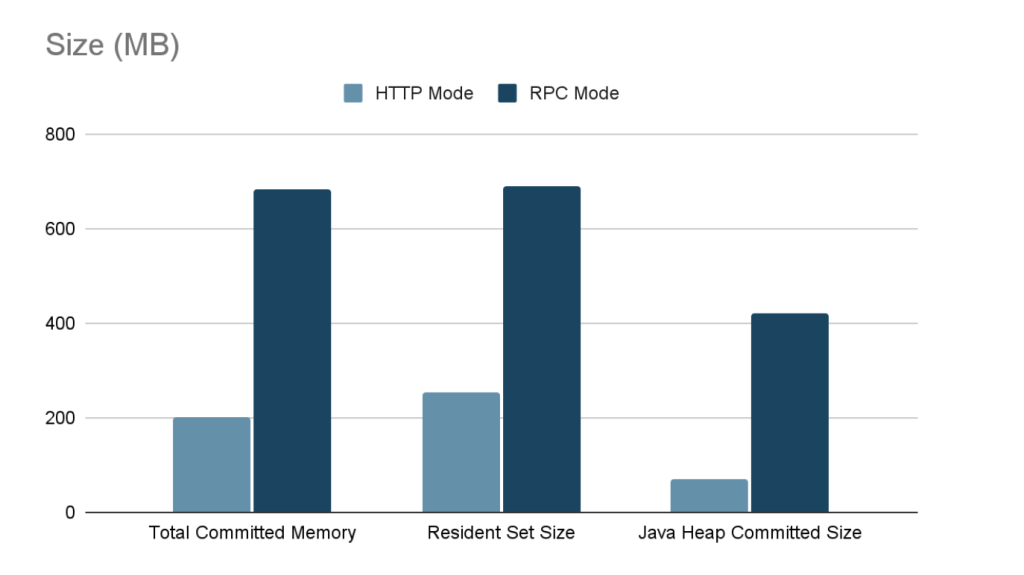
    Benchmarks conducted on the new HttpConnector mode have demonstrated significant performance improvements. Detailed results and documentation of these benchmarks can be found here.
    Usage

    To take advantage of the new HttpConnector mode, developers can set the appengine.use.HttpConnector system property in their appengine-web.xml file.

    <system-properties>
        <property name="appengine.use.httpconnector" value="true"/>
    </system-properties>

    By adopting this configuration, developers can leverage the enhanced performance and efficiency offered by the new HttpConnector mode. This is available for all Java Runtimes from Java8 to Java21.

    This mode is currently an optional configuration but future plans are to make this the default for all applications.

  • Fast MultiPart FormData

    Jetty’s venerable MultiPartInputStreamParser for parsing MultiPart form-data has been deprecated and replaced by the much more efficient MultiPartFormInputStream, based on a new MultiPartParser. This is much faster, but less forgiving of non-compliant format. So we have implemented a legacy mode to access the old parser, but with enhancements to make logging of compliance violations possible.

    Benchmarks

    We have achieved an order of magnitude speed-up in the parsing of large uploaded content and even small content is significantly faster.
    We performed a JMH benchmark of the (new) HTTP MultiPartFormInputStream vs the (old) UTIL MultiPartInputStreamParser. Our tests were:

    • testLargeGenerated:  parses a 10MB file of random binary data
    • testParser:  parses a series of small multipart forms captured by a browser

    Our results clearly show that the new multipart processing is superior in terms of speed to the old processing:

    # Run complete. Total time: 00:02:09
    Benchmark                              (parserType)  Mode  Cnt  Score   Error  Units
    MultiPartBenchmark.testLargeGenerated          UTIL  avgt   10  0.252 ± 0.025   s/op
    MultiPartBenchmark.testLargeGenerated          HTTP  avgt   10  0.035 ± 0.004   s/op
    MultiPartBenchmark.testParser                  UTIL  avgt   10  0.028 ± 0.005   s/op
    MultiPartBenchmark.testParser                  HTTP  avgt   10  0.015 ± 0.006   s/op
    

    How To Use

    By default in Jetty 9.4, the old MultiPartInputStreamParser will be used. The default will be switched to the new MultiPartInputStreamParser in jetty-10.  To use the new parser (available since release 9.4.10)  you can change the compliance mode in the server.ini file so that it defaults to using RFC7578 instead of the LEGACY mode.

    ## multipart/form-data compliance mode of: LEGACY(slow), RFC7578(fast)
    # jetty.httpConfig.multiPartFormDataCompliance=LEGACY

    This feature can also be used programmatically by setting the compliance mode through the HttpConfiguration instance which can be obtained through the HttpConnectionFactory in the connector.

    connector.getConnectionFactory(HttpConnectionFactory.class).getHttpConfiguration()
    .setMultiPartFormDataCompliance(MultiPartFormDataCompliance.RFC7578);
    

    Compliance Modes

    There are now two compliance modes for MultiPart form parsing:

    • LEGACY mode which uses the old MultiPartInputStreamParser in jetty-util, this will be slower but more forgiving in accepting formats that are non-compliant with RFC7578.
    • RFC7578 mode which uses the new MultiPartFormInputStream in jetty-http, this will perform faster than the LEGACY mode, however, there may be issues in receiving badly formatted MultiPart forms that were previously accepted.

    The default compliance mode is currently LEGACY, however, this will be changed to RFC7578 a future release.

    Legacy Mode Compliance Warnings

    When the old MultiPartInputStreamParser accepts a format non-compliant with the RFC, a violation is recorded as an attribute in the request. These violations include:

    The list of violations as Strings can be obtained from the request by accessing the attribute  HttpCompliance.VIOLATIONS_ATTR.

    (List<String>)request.getAttribute(HttpCompliance.VIOLATIONS_ATTR);

    Each violation string gives the name of the violation followed by a link to the RFC describing that particular violation.
    Here’s an example:
    CR_LINE_TERMINATION: https://tools.ietf.org/html/rfc2046#section-4.1.1
    NO_CRLF_AFTER_PREAMBLE: https://tools.ietf.org/html/rfc2046#section-5.1.1

    The Future

    The parser is async capable, so expect further innovations with non-blocking uploads and possibly reactive parts.