Author: admin

  • Getting Started With Websockets

    The WebSockets protocol and API is an emerging standard to provide better bidirectional communication between a browser (or other web client) and a server.  It is intended to eventually replace the comet techniques like long polling.   Jetty has supported the various websocket drafts in the 7.x and 8.x releases and this blog tells you how to get started with websockets.

    You don’t want to do this!

    This blog will show you how to use websockets from the lowest levels, but I would not advise that any application programmer should follow these examples to build and application.   WebSockets is not a silver bullet and on it’s own it will never be simple to use for non trivial applications (see Is WebSocket Chat Simpler?), so my recommendation is that application programmers look toward frameworks like cometd, that private a higher level of abstraction, hide the technicalities and allow either comet long polling or websockets to be used transparently.

    So instead this blog is aimed at framework developers who want to use websockets in their own frameworks and application developers who can’t stand not knowing what is under the hood.

    Test Client and Server

    The simplest way to get started is to download a jetty aggregate jar that comes complete with a test websocket client and server.  You can do this with a browser of with the following command line wgets:

    wget -O jetty-all.jar --user-agent=demo
      http://repo2.maven.org/maven2/org/eclipse/jetty/aggregate/jetty-all/7.4.0.v20110414/jetty-all-7.4.0.v20110414.jar
    wget --user-agent=demo
      http://repo2.maven.org/maven2/javax/servlet/servlet-api/2.5/servlet-api-2.5.jar

    To run a simple test server (use –help to see more options):

    java -cp jetty-all.jar:servlet-api-2.5.jar
      org.eclipse.jetty.websocket.TestServer
      --port 8080
      --docroot .
      --verbose

    You can test the server with the test client (use –help to see more options):

    java -cp jetty-all.jar:servlet-api-2.5.jar
      org.eclipse.jetty.websocket.TestClient
      --port 8080
      --protocol echo

    The output from the test client is similar to ping and you can use the options discovered by –help to try out different types of tests, including fragmentation and aggregation of websocket frames

    Using a Browser

    Using a java client is not much use, unless you want to write a desktop application that uses websocket (a viable use).  But most users of websocket will want to use the browser as a client.  So point your browser at the TestServer at http://localhost:8080.

    The Websocket TestServer also runs a HTTP file server at the directory given by –docroot, so in this case you should see in the browser a listing of the directory in which you ran the test server.

    To turn the browser into a websocket client, we will need to server some HTML and javascript that will execute in the browser and talk back to the server using websockets.  So create the file index.html in the same directory you ran the server from and put into it the following contents which you can download from here. This index file contains the HTML, CSS and javascript for a basic chat room.

    You should now be able to point your browser(s) at the test server and see a chat room and join it.  If your browser does not support websockets, you’ll be given a warning.

    How does the Client work?

    The initial HTML view has a prompt for a user name.  When a name is entered the join method is called, which creates the websocket to the server.  The URI for the websocket is derived from the documents location and call back functions are registered for open, message and close events.   There org.ietf.websocket.test-echo-broadcast sub protocol is specified as this echos all received messages to all other broadcast connections, giving use the semantic needed for a chat room:

    join: function(name) {
      this._username=name;
      var location = document.location.toString().replace('http://','ws://').replace('https://','wss://');
      this._ws=new WebSocket(location,"org.ietf.websocket.test-echo-broadcast");
      this._ws.onopen=this._onopen;
      this._ws.onmessage=this._onmessage;
      this._ws.onclose=this._onclose;
    },

    When the websocket is successful at connecting to the server, it calls the onopen callback, which we have implemented to change the appearance of the chat room to prompt for a chat message.  It also sends a message saying the user has joined the room:

    _onopen: function(){
      $('join').className='hidden';
      $('joined').className='';
      $('phrase').focus();
      room._send(room._username,'has joined!');
    },

    Sending of a message is done by simply formatting a string as “username:chat text” and calling the websocket send method:

    _send: function(user,message){
      user=user.replace(':','_');
      if (this._ws)
        this._ws.send(user+':'+message);
    },
    chat: function(text) {
      if (text != null && text.length>0 )
         room._send(room._username,text);
    },

    When the browser receives a websocket message over the connection the onmessage callback is called with a message object. Our implementation looks for  the username and colon, strips out any markup and then appends the message to the chat room:

    _onmessage: function(m) {
      if (m.data){
        var c=m.data.indexOf(':');
        var from=m.data.substring(0,c).replace('<','<').replace('>','>');
        var text=m.data.substring(c+1).replace('<','<').replace('>','>');
        var chat=$('chat');
        var spanFrom = document.createElement('span');
        spanFrom.className='from';
        spanFrom.innerHTML=from+': ';
        var spanText = document.createElement('span');
        spanText.className='text';
        spanText.innerHTML=text;
        var lineBreak = document.createElement('br');
        chat.appendChild(spanFrom);
        chat.appendChild(spanText);
        chat.appendChild(lineBreak);
        chat.scrollTop = chat.scrollHeight - chat.clientHeight;
      }
    },

    If the server closes the connection, or if the browser times it out, then the onclose callback is called.  This simply nulls out the chat room and reverts to the starting position:

    _onclose: function(m) {
      this._ws=null;
      $('join').className='';
      $('joined').className='hidden';
      $('username').focus();
      $('chat').innerHTML='';
    }

    How Does the Server Work?

    The server side code for  this chat room is using an embedded Jetty server and is written against the jetty websocket APIs that are not part of the websocket standard.  There is not yet even a proposed standard for serverside websocket APIs, but it is a topic for consideration with the servlet 3.1 JSR.

    The test server is an extension of an embedded Jetty server, and the constructor adds a connector at the required port, creates a WebSocketHandler and a ResourceHandler and chains them together:

    public TestServer(int port)
    {
        _connector = new SelectChannelConnector();
        _connector.setPort(port);
        addConnector(_connector);
        _wsHandler = new WebSocketHandler()
        {
            public WebSocket doWebSocketConnect(HttpServletRequest request, String protocol)
            {
                ...
                return _websocket;
            }
        };
        setHandler(_wsHandler);
        _rHandler=new ResourceHandler();
        _rHandler.setDirectoriesListed(true);
        _rHandler.setResourceBase(_docroot);
        _wsHandler.setHandler(_rHandler);
    }

    The resource handler is responsible for serving the static content like HTML and javascript.  The WebSocketHandler looks for WebSocket handshake request and handles them by calling the doWebSocketConnect method, which we have extended to create a WebSocket depending on the sub protocol passed:

    _wsHandler = new WebSocketHandler()
    {
        public WebSocket doWebSocketConnect(HttpServletRequest request, String protocol)
        {
            if ("org.ietf.websocket.test-echo".equals(protocol) || "echo".equals(protocol) || "lws-mirror-protocol".equals(protocol))
                _websocket = new TestEchoWebSocket();
            else if ("org.ietf.websocket.test-echo-broadcast".equals(protocol))
                _websocket = new TestEchoBroadcastWebSocket();
            else if ("org.ietf.websocket.test-echo-assemble".equals(protocol))
                _websocket = new TestEchoAssembleWebSocket();
            else if ("org.ietf.websocket.test-echo-fragment".equals(protocol))
                _websocket = new TestEchoFragmentWebSocket();
            else if (protocol==null)
                _websocket = new TestWebSocket();
            return _websocket;
        }
    };

    Below is a simplification of the test WebSocket from the test server, that excludes the shared code for the other protocols supported. Like the javascript API, there is an onOpen,onClose and onMessage callback. The onOpen callback is passed in a Connection instance that is used to send messages. The implementation of onOpen adds the websocket to a collection of all known websockets, and onClose is used to remove the websocket. The implementation of onMessage is to simply iterate through that collection and to send the received message to each websocket:

    ConcurrentLinkedQueue _broadcast =
        new ConcurrentLinkedQueue();
    class TestEchoBroadcastWebSocket implements WebSocket.OnTextMessage
    {
        protected Connection _connection;
        public void onOpen(Connection connection)
        {
            _connection=connection;
            _broadcast.add(this);
        }
        public void onClose(int code,String message)
        {
            _broadcast.remove(this);
        }
        public void onMessage(final String data)
        {
            for (TestEchoBroadcastWebSocket ws : _broadcast)
            {
                try
                {
                    ws._connection.sendMessage(data);
                }
                catch (IOException e)
                {
                    _broadcast.remove(ws);
                    e.printStackTrace();
                }
            }
        }
    }

    Don’t do it this way!

    Now you know the basics of how websockets works, I repeat my warning that you should not do it this way – unless you are a framework developer.   Even then, you are probably going to want to use the WebSocketServlet and a non embedded jetty, but the basic concepts are the same. Note the strength of the jetty solution is that it terminates both WebSocket connections and HTTP requests in the same environment, so that mixed frameworks and applications are easy to create.

    Application developers should really look to a framework like cometd rather than directly coding to websockets themselves.  It is not that the mechanics of websockets are hard, just that they don’t solve all of the problems that you will encounter in a real world comet application.


  • Jetty 7.4 new features

    A release candidate of Jetty 7.4 is now available as both Jetty@eclipse and Jetty-Hightide@codehaus distributions. This release contains a number of new features which I will briefly introduce now, and make the target of more detailed blogs, webinars and wiki pages over the next few weeks:

    Jetty Overlay Deployer

    Jetty now includes a deployer that is designed to allow a war file to be customised and deployed without modifying the original WAR  file, which is kept immutable or even signed so that you know it is exactly as delivered.   A WAR file is configured by applying a series of overlays, each of which may contain:

    • A web.xml fragment to modify or add filter, servlet and other web.xml configuration.
    • static content to add or replace static content in the war
    • Classes and Jars to be added to the classpath
    • Context configuration

    Overlays can be created that are application specific, node specific or instance specific and multiple instances of the same application will share the common war and overlays.  This sharing includes classloaders and static resource caches and greatly reduces the memory footprint of multi-tenanted deployments.

    Overlays also allow easy identification of what configuration has changed in a deployed WAR, so that an overlay can be applied to an updated WAR and the configuration changes will be preserved.

    Jetty Spring

    Since almost the beginning, Jetty has had it’s own dependency injection (aka IOC)  XML configuration format, which we often refer to as jetty.xml format. This is essentially equivalent to the more popular IOC frameworks like spring XML and Jetty has also been able to be configured and run with spring.  However that approach did not allow the context.xml and jetty-env.xml files to be written in spring format, so deployments still had a mix of IOC formats.    With Jetty 7.4, the jetty XML configuration format can now detect other formats and will use the java services mechanism to look for a provider for that format.  The Jetty-spring module now provides a SpringConfigurationProcessor so that anywhere that a Jetty XML Syntax file is expected, a spring XML file can be used.

    Jetty Reverse HTTP

    There is an increasing desire to server content of client machines or to run servers from behind restrictive firewalls.  An example of this is running a jetty server on an android phone, where the 3G network prevents inbound connections.

    Jetty Reverse HTTP uses comet long polling techniques to allow a jetty server to make an outbound connection to a gateway, over which it will receive inbound requests.

    Jetty Nested

    Jetty has some compelling features, but sometimes it just is not possible to deploy Jetty. Often this is due to non technical reasons such as a corporate policy that say that only allowable container is LogicalGlassSphere or similar.

    Jetty nested makes it possible to deploy jetty within another servlet container by adding a Jetty connector that takes requests/responses from the outer container and turns them into Jetty requests and responses.  If permissions allow, Jetty may also open other connectors on other ports, so that as well as outer container requests, jetty can directly serve async HTTP and/or Websockets.

    This allows your jetty application to be consumable by corporate policies and deployment procedures, while still giving you access to most of the feature set of Jetty. [ Currently the jetty nested connector does not support non blocking asynchronous requests, but it will eventually support that when deployed in servlet 3.0 containers. ]

    Half Close support

    Jetty has long used half close when sending content bounded by EOF to avoid the situation where intermediaries handle a TCP/IP RST by discarding all buffered data.   But since Jetty is also frequently used in a client and/or proxy role, it has become important that half close is supported inbound as well as outbound.  Jetty now supports inbound half closes without an immediate close, so that outbound data can  continue to be generated and flushed.    This is also integrated with SSL and Websocket closing hand shakes.

  • Is WebSocket Chat Simpler?

    A year ago I wrote an article asking Is WebSocket Chat Simple?, where I highlighted the deficiencies of this much touted protocol for implementing simple comet applications like chat. After a year of intense debate there have been many changes and there are new drafts of both the WebSocket protocol and WebSocket API. Thus I thought it worthwhile to update my article with comments to see how things have improved (or not) in the last year.

    The text in italics is my wishful thinking from a year ago
    The text in bold italics is my updated comments

    Is WebSocket Chat Simple (take II)?

    The WebSocket protocol has been touted as a great leap forward for bidirectional web applications like chat, promising a new era of simple Comet applications. Unfortunately there is no such thing as a silver bullet and this blog will walk through a simple chat room to see where WebSocket does and does not help with Comet applications. In a WebSocket world, there is even more need for frameworks like cometD.

    Simple Chat

    Chat is the “helloworld” application of web-2.0 and a simple WebSocket chat room is included with the jetty-7 which now supports WebSockets. The source of the simple chat can be seen in svn for the client-side and server-side.

    The key part of the client-side is to establish a WebSocket connection:

    join: function(name) {
       this._username=name;
       var location = document.location.toString()
           .replace('http:','ws:');
       this._ws=new WebSocket(location);
       this._ws.onopen=this._onopen;
       this._ws.onmessage=this._onmessage;
       this._ws.onclose=this._onclose;
    },

    It is then possible for the client to send a chat message to the server:

    _send: function(user,message){
       user=user.replace(':','_');
       if (this._ws)
           this._ws.send(user+':'+message);
    },

    and to receive a chat message from the server and to display it:

    _onmessage: function(m) {
       if (m.data){
           var c=m.data.indexOf(':');
           var from=m.data.substring(0,c)
               .replace('<','<')
               .replace('>','>');
           var text=m.data.substring(c+1)
               .replace('<','<')
               .replace('>','>');
           var chat=$('chat');
           var spanFrom = document.createElement('span');
           spanFrom.className='from';
           spanFrom.innerHTML=from+': ';
           var spanText = document.createElement('span');
           spanText.className='text';
           spanText.innerHTML=text;
           var lineBreak = document.createElement('br');
           chat.appendChild(spanFrom);
           chat.appendChild(spanText);
           chat.appendChild(lineBreak);
           chat.scrollTop = chat.scrollHeight - chat.clientHeight;
      }
    },

    For the server-side, we simply accept incoming connections as members:

    public void onConnect(Connection connection)
    {
        _connection=connection;
        _members.add(this);
    }

    and then for all messages received, we send them to all members:

    public void onMessage(byte frame, String data){
       for (ChatWebSocket member : _members){
       try{
           member._connection.sendMessage(data);
       }
       catch(IOException e){
           Log.warn(e);
       }
     }
    }

    So we are done, right? We have a working chat room – let’s deploy it and we’ll be the next Google GChat!! Unfortunately, reality is not that simple and this chat room is a long way short of the kinds of functionality that you expect from a chat room – even a simple one.

    Not So Simple Chat

    On Close?

    With a chat room, the standard use-case is that once you establish your presence in the room and it remains until you explicitly leave the room. In the context of webchat, that means that you can send receive a chat message until you close the browser or navigate away from the page. Unfortunately the simple chat example does not implement this semantic because the WebSocket protocol allows for an idle timeout of the connection. So if nothing is said in the chat room for a short while then the WebSocket connection will be closed, either by the client, the server or even an intermediary. The application will be notified of this event by the onClose method being called.

    So how should the chat room handle onClose? The obvious thing to do is for the client to simply call join again and open a new connection back to the server:

    _onclose: function() {
       this._ws=null;
       this.join(this.username);
    }

    This indeed maintains the user’s presence in the chat room, but is far from an ideal solution since every few idle minutes the user will leave the room and rejoin. For the short period between connections, they will miss any messages sent and will not be able to send any chat
    themselves.

    Keep-Alives

    In order to maintain presence, the chat application can send keep-alive messages on the WebSocket to prevent it from being closed due to an idle timeout. However, the application has no idea at all about what the idle timeouts are, so it will have to pick some arbitrary frequent period (e.g. 30s) to send keep-alives and hope that is less than any idle timeout on the path (more or less as long-polling does now).

    Ideally a future version of WebSocket will support timeout discovery, so it can either tell the application the period for keep-alive messages or it could even send the keep-alives on behalf of the application.

    The latest drafts of the websocket protocol do include control packets for ping and pong, which can effectively be used as messages to keep alive a connection. Unfortunately this mechanism is not actually usable because: a) there is no javascript API to send pings; b) there is no API to communicate to the infrastructure if the application wants the connection kept alive or not; c) the protocol does not require that pings are sent; d) neither the websocket infrastructure nor the application knows the frequency at which pings would need to be sent to keep alive the intermediaries and other end of the connection. There is a draft proposal to declare timeouts in headers, but it remains to be seen if that gathers any traction.

    Unfortunately keep-alives don’t avoid the need for onClose to initiate new WebSockets, because the internet is not a perfect place and especially with wifi and mobile clients, sometimes connections just drop. It is a standard part of HTTP that if a connection closes while being used, the GET requests are retried on new connections, so users are mostly insulated from transient connection failures. A WebSocket chat room needs to work with the same assumption and even with keep-alives, it needs to be prepared to reopen a connection when onClose is called.

    Queues

    With keep-alives, the WebSocket chat connection should be mostly be a long-lived entity, with only the occasional reconnect due to transient network problems or server restarts. Occasional loss of presence might not be seen to be a problem, unless you’re the dude that just typed a long chat message on the tiny keyboard of your vodafone360 app or instead of chat you are playing on chess.com and you don’t want to abandon a game due to transient network issues. So for any reasonable level of quality of service, the application is going to need to “pave over” any small gaps in connectivity by providing some kind of message queue in both client and server. If a message is sent during the period of time that there is no WebSocket connection, it needs to be queued until such time as the new connection is established.

    Timeouts

    Unfortunately, some failures are not transient and sometimes a new connection will not be established. We can’t allow queues to grow forever and pretend that a user is present long after their connection is gone. Thus both ends of the chat application will also need timeouts and the user will not be seen to have left the chat room until they have no connection for the period of the timeout or until an explicit leaving message is received.

    Ideally a future version of WebSocket will support an orderly close message so the application can distinguish between a network failure (and keep the user’s presence for a time) and an orderly close as the user leaves the page (and remove the user’s present).

    Both the protocol and API have been updated with the ability to distinguish an orderly close from a failed close. The WebSocket API now has a CloseEvent that is passed to the onclose method that does contain the close code and reason string that is sent with an orderly close and this will allow simpler handling in the endpoints and avoid pointless client retries.

    Message Retries

    Even with message queues, there is a race condition that makes it difficult to completely close the gaps between connections. If the onClose method is called very soon after a message is sent, then the application has no way to know if that close event happened before or after the message was delivered. If quality of service is important, then the application currently has no option but to have some kind of per message or periodic acknowledgment of message delivery.

    Ideally a future version of WebSocket will support orderly close, so that delivery can be known for non-failed connections and a complication of acknowledgements can be avoided unless the highest quality of service is required.

    Orderly close is now supported (see above.)

    Backoff

    With onClose handling, keep-alives, message queues, timeouts and retries, we finally will have a chat room that can maintain a user’s presence while they remain on the web page. But unfortunately the chat room is still not complete, because it needs to handle errors and non-transient failures. Some of the circumstances that need to be avoided include:

    • If the chat server is shut down, the client application is notified of this simply by a call to onClose rather than an onOpen call. In this case, onClose should not just reopen the connection as a 100% CPU busy loop with result. Instead the chat application has to infer that there was a connection problem and to at least pause a short while before trying again – potentially with a retry backoff algorithm to reduce retries over time.

      Ideally a future version of WebSocket will allow more access to connection errors, as the handling of no-route-to-host may be entirely different to handling of a 401 unauthorized response from the server.

      The WebSocket protocol is now full HTTP compliant before the 101 of the upgrade handshake, so responses like 401 can legally be sent. Also the WebSocket API now has an onerror call back, but unfortuantely it is not yet clear under what circumstances it is called, nor is there any indication that information like a 401 response or 302 redirect, would be available to the application.

    • If the user types a large chat message, then the WebSocket frame sent may exceed some resource level on the client, server or intermediary. Currently the WebSocket response to such resource issues is to simply close the connection. Unfortunately for the chat application, this may look like a transient network failure (coming after a successful onOpen call), so it may just reopen the connection and naively retry sending the message, which will again exceed the max message size and we can lather, rinse and repeat! Again it is important that any automatic retries performed by the application will be limited by a backoff timeout and/or max retries.

      Ideally a future version of WebSocket will be able to send an error status as something distinct from a network failure or idle timeout, so the application will know not to retry errors.

      While there is no general error control frame, there is now a reason code defined in the orderly close, so that for any errors serious enough to force the connection to be closed the following can be communicated: 1000 – normal closure; 1001 – shutdown or navigate away; 1002 – protocol error; 1003 data type cannot be handled; 1004 message is too large. These are a great improvement, but it would be better if such errors could be sent in control frames so that the connection does not need to be sacrificed in order to reject 1 large message or unknown type.

    Does it have to be so hard?

    The above scenario is not the only way that a robust chat room could be developed. With some compromises on quality of service and some good user interface design, it would certainly be possible to build a chat room with less complex usage of a WebSocket. However, the design decisions represented by the above scenario are not unreasonable even for chat and certainly are applicable to applications needing a better QoS that most chat rooms.

    What this blog illustrates is that there is no silver bullet and that WebSocket will not solve many of the complexities that need to be addressed when developing robust Comet web applications. Hopefully some features such as keep-alives, timeout negotiation, orderly close and error notification can be build into a future version of WebSocket, but it is not the role of WebSocket to provide the more advanced handling of queues, timeouts, reconnections, retries and backoffs. If you wish to have a high quality of service, then either your application or the framework that it uses will need to deal with these features.

    CometD with WebSocket

    CometD version 2 will soon be released with support for WebSocket as an alternative transport to the currently supported JSON long-polling and JSONP callback-polling. cometD supports all the features discussed in this blog and makes them available transparently to browsers with or without WebSocket support. We are hopeful that WebSocket usage will be able to give us even better throughput and latency for cometD than the already impressive results achieved with long-polling.

    Cometd 2 has been released and we now have even more impressive results Websocket support is build into both Jetty and cometd, but uptake has been somewhat hampered by the multiple versions of the protocol in the wild and patchy/changing browser support.

    Programming to a framework like cometd remains the easiest way to achieve a comet application as well as have portability over “old” techniques like long polling and emerging technologies like websockets.

  • Cometd with annotations

    Cometd 2.1 now supports annotations to define cometd services and clients.  Annotations greatly reduces the boiler plate code required to write a cometd service and also links well with new cometd 2.x features such as channel initializers and Authorizers, so that all the code for a service can be grouped in one POJO class rather than spread over several derived entities.  The annotation are some cometd specific ones, plus some standard spring annotations.

    Server Side

    This blog looks at the annotated ChatService example bundled with the 2.1.0 cometd release.

    Creating a Service

    A POJO (Plain Old Java Object) can be turned into a cometd service by the addition of the @Service class annotation:

    package org.cometd.examples;
    import
    org.cometd.java.annotation.Service;

    @Service(“chat”)
    public class
    ChatService { … }

    The service name passed is used in the services session ID, to assist with debugging.

    The annotated version of the CometdServlet then needs be used and to be told the classes that it should instantiate as services and scan for annotations. This is done with a coma separated list of class names in the “services” init-parameter in the web.xml (or similar) as follows:

    <servlet>
      <servlet-name>cometd</servlet-name>
      <servlet-class>org.cometd.java.annotation.AnnotationCometdServlet</servlet-class>
      ...
      <init-param>
        <param-name>services</param-name>
        <param-value>org.cometd.examples.ChatService</param-value>
      </init-param>
    </servlet>

    Configuring a Channel

    A service will frequently need to create, configure and Listen or subscribe to a channel. This can now be done atomically in cometd 2.x so that messages will not be recived before the channel is fully created and configured. For example the chat services configures 1 absolute channel and 2 wild card channel using the @Configure annotations:

    @Configure ({"/chat/**","/members/**"})
    protected void configureChatStarStar(ConfigurableServerChannel channel)
    {
        DataFilterMessageListener noMarkup = 
            new DataFilterMessageListener(_bayeux,new NoMarkupFilter(),new BadWordFilter());
        channel.addListener(noMarkup);
        channel.addAuthorizer(GrantAuthorizer.GRANT_ALL);
    }
    
    @Configure ("/service/members")
    protected void configureMembers(ConfigurableServerChannel channel)
    {
        channel.addAuthorizer(GrantAuthorizer.GRANT_PUBLISH);
        channel.setPersistent(true);
    }

    The @Configure annotation is roughly equivalent to calling the BayeuxServer#createIfAbsent method with the annotated method called as the Initializer and must take a ConfigurableServerChannel as an argument.  The @Configure annotation can also take two boolean arguments: errorIfExists and configureIfExists, to determine how to handle the channel if it already exists.

    The configuration methods for the chat service use the new Authorizer mechanism to define fine grained authorization of what clients can publish and subscribe to a channel. This is similar to the existing SecurityPolicy mechanism, but without the need for a centralized policy instance. An operation on a channel is permitted if it is granted by at least one Authorizer and denied by none, giving black/white list style semantics.

    The configuration of the chat wildcard channels installs DataFilterMessageListeners for all /chat/** and all /members/** channels.  These filters ensure that there is no markup or bad words published to these channels.  To construct the listener, an instance to the BayeuxServer is needed to be passed to the constructor (used only for logging in this case).  A service may obtain a reference to the BayeuxService using the @Inject annotation:

    @Inject
    private BayeuxServer _bayeux;

    Adding a ChannelListener

    A method of a service may be registered as a listener of a channel with the @Listener annotation:

    @Listener("/service/members")
    public void handleMembership(ServerSession client, ServerMessage message)
    {
        ...
    }

    The @Listener annotation may also be passed the boolean argument receiveOwnPublishes, to control if messages published by the service session are filtered out. Note that a Listener is different to a subscription in that the service does not subscribe to the channel, so it will not trigger any subscription listeners nor be counted as a subscriber. There is also a @Subscription annotation available, but it is not used by the ChatService (and is typically more applicable when applied to client side cometd annotations).

    Client Side

    Annotations can also be used on the client side, if the java BayeuxClient is used, either for service testing or for the creation of a rich non-browser client UI:

    @Service
    class MyClient
    {
        @Session
        private ClientSession session;
    
        @PostConstruct
        private void init()
        {
            ...
        }
        @PreDestroy
        private void destroy()
        {
            ...
        }
        @Listener("/meta/*")
        public void handleMetaMessage(Message connect)
        {
            ...
        }
        @Subscription("/foo")
        public void handeFoo(Message message)
        {
            ...
        }
    }

    Note the use of @Session to inject the session used by the service and @PostConstruct and @PreDestroy for lifecycle events.  These annotations are also available on the server side. On the client, the annotations are activated by an explicit call to an annotation processor:

    ClientAnnotationProcessor processor = new ClientAnnotationProcessor(bayeuxClient);
    ...
    MyClient mc = new MyClient();
    processor.process(mc);

    Conclusion

    Annotations have made Cometd services much simpler to create and much easier to understand.  Normally I’m not a big fan of annotations, as they frequently put too much configuration into the “code”, but in this case, they are a perfect match for the semantic needed.  In future, we’ll also look at making JAXB annotations work simply with the JSON mechanisms of cometd.

  • Webtide blogs @ Intalio

    The webtide blogs are moving to http://webtide.intalio.com.  All new postings from the jetty  & cometd team will be made here and over time we will move the content from the old site as well.

  • Cometd with Annotations


    Cometd 2.1 now supports annotations to define cometd services and clients.  Annotations greatly reduces the boiler plate code required to write a cometd service and also links well with new cometd 2.x features such as channel initializers and Authorizers, so that all the code for a service can be grouped in one POJO class rather than spread over several derived entities.  The annotation are some cometd specific ones, plus some standard spring annotations.

    Server Side

    This blog looks at the annotated ChatService example bundled with the 2.1.0 cometd release.

    Creating a Service

    A POJO (Plain Old Java Object) can be turned into a cometd service by the addition of the @Service class annotation:

    package org.cometd.examples;
    import org.cometd.java.annotation.Service;

    @Service("chat")
    public class ChatService
    {
    ...
    }

    The service name passed is used in the services session ID, to assist with debugging.

    The annotated version of the CometdServlet then needs be used and to be told the classes that it should instantiate as services and scan for annotations. This is done with a coma separated list of class names in the "services" init-parameter in the web.xml (or similar) as follows:

    <servlet>
      <servlet-name>cometd</servlet-name>
      <servlet-class>org.cometd.java.annotation.AnnotationCometdServlet</servlet-class>

    ...
      <init-param>
        <param-name>services</param-name>
        <param-value>org.cometd.examples.ChatService</param-value>
      </init-param>
    </servlet>

    Configuring a Channel

    A service will frequently need to create, configure and Listen or subscribe to a channel. This can now be done atomically in cometd 2.x so that messages will not be recived before the channel is fully created and configured. For example the chat services configures 1 absolute channel and 2 wild card channel using the @Configure annotations:

    @Configure ({"/chat/**","/members/**"})
    protected void configureChatStarStar(ConfigurableServerChannel channel)
    {
        DataFilterMessageListener noMarkup =

    new DataFilterMessageListener(_bayeux,new NoMarkupFilter(),new BadWordFilter());
        channel.addListener(noMarkup);
        channel.addAuthorizer(GrantAuthorizer.GRANT_ALL);
    }
    @Configure ("/service/members")
    protected void configureMembers(ConfigurableServerChannel channel)
    {
        channel.addAuthorizer(GrantAuthorizer.GRANT_PUBLISH);
        channel.setPersistent(true);
    }

    The @Configure annotation is roughly equivalent to calling the BayeuxServer#createIfAbsent method with the annotated method called as the Initializer and must take a ConfigurableServerChannel as an argument.  The @Configure annotation can also take two boolean arguments: errorIfExists and configureIfExists, to determine how to handle the channel if it already exists.

    The configuration methods for the chat service use the new Authorizer mechanism to define fine grained authorization of what clients can publish and subscribe to a channel. This is similar to the existing SecurityPolicy mechanism, but without the need for a centralized policy instance. An operation on a channel is permitted if it is granted by at least one Authorizer and denied by none, giving black/white list style semantics.

    The configuration of the chat wildcard channels installs DataFilterMessageListeners for all /chat/** and all /members/** channels.  These filters ensure that there is no markup or bad words published to these channels.  To construct the listener, an instance to the BayeuxServer is needed to be passed to the constructor (used only for logging in this case).  A service may obtain a reference to the BayeuxService using the @Inject annotation:

    @Inject
    private BayeuxServer _bayeux;

    Adding a ChannelListener

    A method of a service may be registered as a listener of a channel with the @Listener annotation:

    @Listener("/service/members")
    public void handleMembership(ServerSession client, ServerMessage message)
    {
    ...
    }

    The @Listener annotation may also be passed the boolean argument receiveOwnPublishes, to control if messages published by the service session are filtered out. Note that a Listener is different to a subscription in that the service does not
    subscribe to the channel, so it will not trigger any subscription
    listeners nor be counted as a subscriber. There is also a @Subscription annotation available, but it is not used by the ChatService (and is typically more applicable when applied to client side cometd annotations).

    Client Side

    Annotations can also be used on the client side, if the java BayeuxClient is used, either for service testing or for the creation of a rich non-browser client UI:

    @Service
    class MyClient
    {
        @Session
        private ClientSession session;

        @PostConstruct
        private void init()
        {

    ...
        }
        @PreDestroy
        private void destroy()
        {

    ...     }
        @Listener("/meta/*")
        public void handleMetaMessage(Message connect)
        {

    ...     }
        @Subscription("/foo")
        public void handeFoo(Message message)
        {

    ...     }
    }

    Note the use of @Session to inject the session used by the service and @PostConstruct and @PreDestroy for lifecycle events.  These annotations are also available on the server side. On the client, the annotations are activated by an explicit call to an annotation processor:

    ClientAnnotationProcessor processor = new ClientAnnotationProcessor(bayeuxClient);
    ...
    MyClient mc = new MyClient();
    processor.process(mc);

    Conclusion

    Annotations have made Cometd services much simpler to create and much easier to understand.  Normally I’m not a big fan of annotations, as they frequently put too much configuration into the "code", but in this case, they are a perfect match for the semantic needed.  In future, we’ll also look at making JAXB annotations work simply with the JSON mechanisms of cometd.

  • Jetty WTP Adaptor

    Not too long ago we had a contribution from Angelo Zerr that gave jetty a native WTP adaptor. We are happy to announce its availability now!
    Shockingly, there is some documentation for this plugin, based on the original documentation provided by Angelo…it was a model contribution, code _and_ docs.
    Jetty WTP Plugin Documentation
    The documentation contains installation instructions and we’ll have it available through the WTP Server Adaptor discovery mechanism soon hopefully.
    The plugin itself is largely based off of the tomcat version of the plugin with an addition of a websocket wizard of Angelo’s.
    Feedback on the plugin is welcome and we have a bugzilla component ‘wtp’ for the plugin which I encourage people to report issues to.
    Bugzilla
    We plan to add additional versions of the runtime over time and keep it up to date with the latest jetty releases

  • ITConversation podcast on Cometd and Push Technology

    Phil Windley of Tecnometria has recorded an interview with me on Cometd and Push Technology.  The podcast is available from ITConversations and provides an introduction to comet and cometd.


  • Cometd-2 Throughput vs Latency

    With the imminent release of cometd-2.0.0, it’s time to publish some of our own lies, damned lies and benchmarks. It has be over 2 years since we published the 20,000
    reasons that cometd scales
    and in that time we have completely reworked both the client side and server side of cometd, plus we have moved to Jetty 7.1.4 from eclipse as the main web server for cometd.

    Cometd is a publish subscribe framework that delivers events via comet server push techniques from a HTTP server to the browser. The cometd-1 was developed in parallel to the development of many of the ideas and techniques for comet, so the code base reflected some of the changed ideas and old thinking as was in need of a cleanup. Cometd-2 was a total redevelopment of all parts of the java and javascript codebase and provides:

    • Improved Java API for both client and server side interaction.
    • Improved concurrency in the server and client code base.
    • Fully pluggable transports
    • Support for a websocket transport (that works with latest chromium browsers).
    • Improved extensions
    • More comprehensive testing and examples.
    • More graceful degradation under extreme load.

    The results have been a dramatic increase in throughput while maintaining sub second latencies and great scalability.

    The chart above shows the preliminary results of recent benchmarking carried out by Simone Bordet for a 100 room chat server.  The test was done on Amazon EC2 nodes with 2 x amd64 CPUs and 8GB of memory, running ubuntu Linux 2.6.32 with Sun’s 1.6.0_20-b02 JVM. Simone did some tuning of the java heap and garbage collector, but the operating system was not customized other than to increase the file descriptor limits.  The test used the HTTP long polling transport. A single server machine was used and 4 identical machines were used to generate the load using the cometd java client that is bundled with the cometd release.

    It is worth remembering that the latencies/throughput measured include the time in the client load generator, each running the full HTTP/cometd stack for many thousands of clients when in a real deployment  each client would have a computer/browser. It is also noteworthy that the server is not just a dedicated comet server, but the fully featured Jetty Java Servlet container and the cometd messages are handled within the rich application context provided.

    It can be seen from the chart above, that message rate has been significantly improved from the 3800/s achieved in 2008. All scenarios tested were able to achieve 10,000 messages per second with excellent latency. Only with 20,000 clients did the average latency start to climb rapidly once the message rate exceeded 8000/s.  The top average  server CPU usage was 140/200 and for the most part latencies were under 100ms over the amazon network, which indicates that there is some additional capacity available for this server.  Our experience of cometd in the wild indicates that you can expect another 50 to 200ms network latency crossing the public internet, but that due to the asynchronous design of cometd, the extra latency does not reduce throughput.

    Below is an example of the raw output of one of the 4 load generators, which shows some of the capabilities of the java cometd client, which can be used to develop load generators specific for your own application:

    Statistics Started at Mon Jun 21 15:50:58 UTC 2010
    Operative System: Linux 2.6.32-305-ec2 amd64
    JVM : Sun Microsystems Inc. Java HotSpot(TM) 64-Bit Server VM runtime 16.3-b01 1.6.0_20-b02
    Processors: 2
    System Memory: 93.82409% used of 7.5002174 GiB
    Used Heap Size: 2453.7236 MiB
    Max Heap Size: 5895.0 MiB
    Young Generation Heap Size: 2823.0 MiB
    - - - - - - - - - - - - - - - - - - - -
    Testing 2500 clients in 100 rooms
    Sending 3000 batches of 1x50B messages every 8000
     
    
  • Lies, Damned Lies and Benchmarks

    Benchmarks like statistics can be incredibly misleading in ways that are only obvious with detailed analysis. Recently the apache HTTPCore project released some benchmark results whose headline results read as:

    Jetty
    HttpCore
    Linux BIO
    35,342
    56,185
    Linux NIO
    1,873
    25,970
    Windows BIO
    31,641
    29,438
    Windows NIO
    6,045
    13,076
    Looking at these results, you see that HttpCore has better throughput in all scenarios except bocking IO running on windows. More importantly, for Linux NIO the performance of Jetty is an order of magnitudes behind HttpCore!!
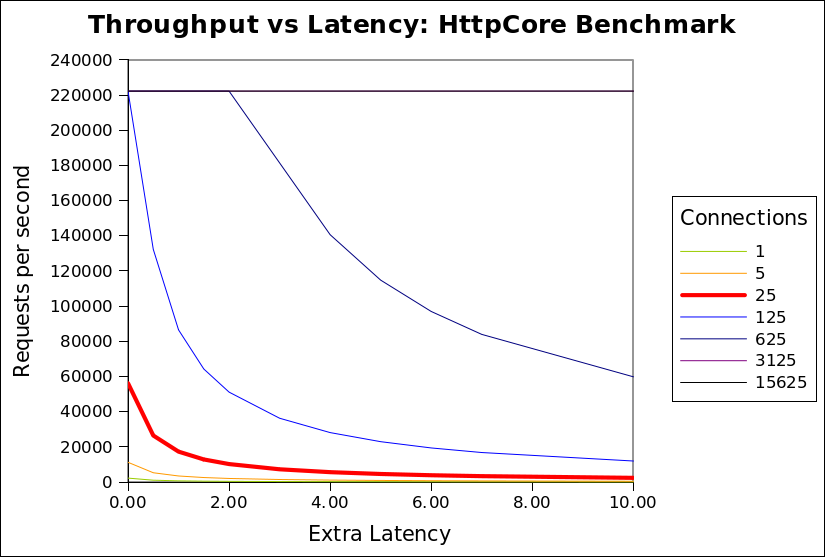
    So is HttpCore really an faster than Jetty and does Jetty NIO suck? For this particular benchmark, the answer is obviously YES and YES.   But the qualification “for this particular benchmark” is very important, since this benchmark is setup to places a huge penalty on  the kind of latency that jetty uses to dispatch requests. Normally latency can be traded off for throughput, but with this benchmark, adding 2ms of latency to a request is the difference between 56,000 requests/sec and 8000 requests/sec.   Jetty makes frequent latency vs throughput tradeoffs, is thus is severly penalized by this benchmark.
    [Note that I’m not saying the HttpCore team have done anything wrong and the “Lie, Damned Lies” head line is only a joking reference to the Mark Twain quote about the power of numbers to show almost anything. Our own benchmarks are biases towards our own sweet spots. This blog seeks only to explain the reasons for the results and not to criticize the HttpCore team].

    HTTP
    Server Throughput Limits

    Typically the throughput of a server is going to be limited by the minimum of one of the following factors:

    Network Bandwidth Limitations

    The total network capacity may limit the maximum throughput. If each response is 10KB in size and the network is only capable of 10MB/s, then 1024 requests per second will saturate that benchmark.  The HttpCore benchmark used 2048B messages of the localhost network, which essentially has no maximum throughput. So for the modelling of this benchmark, I have assumed a GB network, which would have a potential maximum through put of 524288 requests/sec, if it is not limited by other factors.

    CPU Limitations

    The number of request that can be processed may be limited by the available CPU power. If each request took 2ms of CPU time to process, then each CPU could only handle 500 requests per second. For the HttpCore benchmark, they had a 4 CPU box and they have very simple/efficient request handling that took less than 0.018ms per request, which results in potential maximum throughput of  4*1000/0.018 = 222,222 requests/sec, if
    it is not limited by other factors.

    Connection Limitations

    HTTP typically has 1 request outstanding per connection (except when pipelines are used (rarely)), thus the maximal throughput of the server may be limited by the sum of the maximal throughput of each connection. The maximal throughput of a HTTP connection is mostly governed by the round trip time of each request, for example if each request takes 10ms in it’s round trip, then a connection can only handle 100 requests per second. The HttpCore benchmark has requests that take 0.45ms round trip on 25 connections, which results in a potential maximum throughput of 25*1000/0.45ms = 56180 requests/second.

    HttpCore Throughput Limitation

    It can be seen from the analysis above that the HttpCore benchmark throughput is the limited at 56180 requests/second by the  number connections and the round trip time of a request over each connection. More importantly, this limit is numerically sensitive to the specific values chosen for the number of connections and latency.  The following chart shows the minimum of the 3 limitations for the HttpCore benchmark against the number of connections and additional request latency (either in network or the server):

    CPU’s 4
    CPU time per request (ms) 0.018
    Network latency (ms) 0.427
    Max requests/s by CPU 222222
    Request size 2048
    Network bandwidth (MB) 1024
    Max requests/s by bandwidth 524288

    It can be seen that the network bandwidth limitation (524288/s) is never the limiting factor. The CPU limitation (222222/s) is only applicable once the number of connections
    exceeds 125.  At the 25 connections used by the HttpCore benchmark, it can be seen that any extra latency results in a rapid reduction in throughput from almost 60000/s to less than 2000/s.

    The benchmark puts both Jetty and HttpCore on the red (25 connection) curve, but  HttpCore is on the absolute left hand side of the curve, while jetty is a few ms of latency to the right. Thus jetty, which uses extra latency (for good reasons described below), is heavily punished by this benchmark, because the benchmark happens to be on one of the steepest sections of that graph (although it looks like it could be worse at 125  connections, but I expect some other limitation would prevent HttpCore reaching 222222/s).

    Realistic Throughput limitations

    The configuration of the HttpCore benchmark do not well match the reality faced by most HTTP servers for which throughput is a concern. Specifically:

    • The localhost network has less than 1ms of round trip latency, when real internet applications must expect at least 10s if not 100s of ms of network latency.
    • A modern browser will open 6 connections to the same host, so 25 connections represent only 4 simultaneous users. The expectation for a loaded HTTP server is that it will see at least 100s if not 1000s of simultaneous connections.
    • Real connections are mostly idle and will hardly ever see a new request <1ms after a response is sent.
    • Java webservers are typically used for dynamic pages that will take more that 0.018ms to generate.  If the CPU time per request is increased to 0.15ms per request, then the CPU Limitation is reduced to 26667/s.

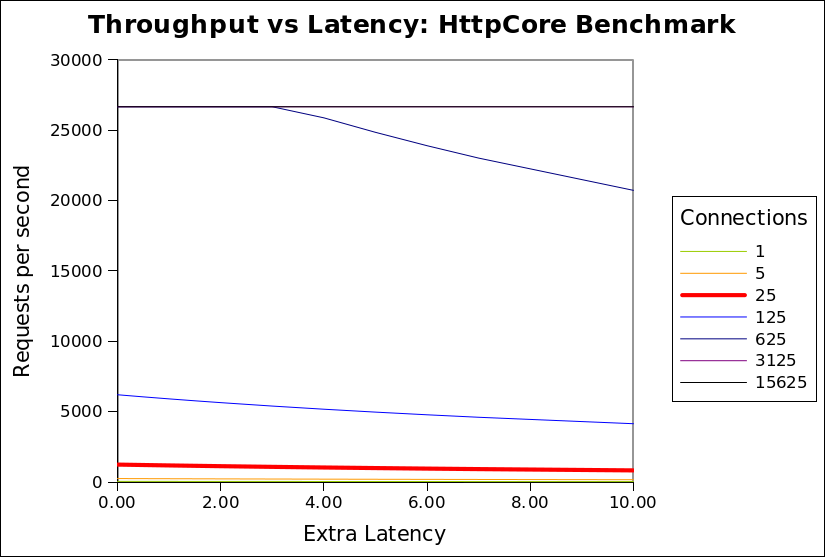
    The chart below is updated with these more realistic assumptions:


    CPU’s 4
    CPU time per request (ms) 0.150
    Network latency (ms) 20.000
    Max requests/s by CPU 26667
    Request size 2048
    Network bandwidth (MB) 100
    Max requests/s by bandwidth 51200
    This shows that when realistic assumptions are applied, the throughput is far less sensitive to additional latency. Above a 500 connections, the throughput is rapidly limited by available CPU and is unaffected by any extra latency in the handling of each request. Even at 125 connections, extra latency only slightly reduces throughput. This shows that there is little or no cost associated with increased latency and thus a server can consider using extra latency if it has a good reason to (see below).
    I invite you to download the spreadsheet used to generate these graphs and experiment with the assumptions, so that you can see that in many (if not most) scenarios, that throughput is not significantly sensitive to latency. It is only with the specific assumptions used by HttpCore that latency is a sensitive parameter.

    Why use Latency?

    I have demonstrated that in realistic scenarios (with many connections and some network latency), then additional latency in handling a request should not have a significant impact on throughput.   So why does Jetty have a higher latency per request than HttpCore?

    The HttpCore NIO server as configured for the benchmark used a single thread per CPU core, each allocated to a select set terminating a proportion of the connections. Each thread reads a request, writes the response and then loops back to the select set, looking for a the next connection to read the next available request. This is very efficient, but only if all requests can be handled without blocking.   If the handling the request blocks for any reason (eg writing response to slow client, waiting for DB, waiting for a synchronize lock, etc) then all the other requests from the same select set will also be blocked and throughput will be greatly reduced.   For a 4 CPU machine, it would only take 4 slow clients or 4 long DB queries to block the entire server and prevent any requests from being handled.  The HttpCore benchmark avoids this situation by having simple non blocking requests handlers and no slow clients, networks or databases etc.

    It is unacceptable in most real HTTP deployments to allow one request to block unrelated requests due to thread starvation. Thus most HTTP servers operate with at thread pool and dispatch the handling of each request to different thread from that handling the NIO select set.  Since each request is handled in a dedicated thread, then it may block without affecting other requests or reducing the throughput of the server.
    When a request is dispatched to a thread pool, it typically waits for a few ms in a job queue for a thread to be allocated to handle the request. For most realistic  scenarios this extra latency has little or no cost and significant benefit, but in the HttpCore benchmark this latency is heavily penalized as it delays the response, thus it delays the load generator sending the next request. Throughput is reduced because the client sends less requests, not because the server cannot handle them.
    Also the benchmark compared the raw HTTP components of HttpCore vs the rich servlet environment of Jetty.  Jetty will consume some extra CPU/latency to establish the servlet context which provides many benefits of functionality to the application developer. Jetty could also be configured as a simple HTTP handler and would thus use both less CPU and less latency.

    Conclusion

    The HttpCore benchmark is essentially comparing apples with oranges.  The benchmark is setup to mostly measure the raw speed of the HttpCore HTTP parsing/generating capabilities. and does not represent a realistic load test.  The Jetty configuration used has been optimized to be a general purpose application server and HTTP server for large numbers of mostly idle connections.  Given this disparity, I think it is great that Jetty was
    able to able to achieve similar and sometimes better performance in some of the scenarios. This shows that Jetty’s own HTTP parsing/generation is no slouch and that it would be interesting to compare jetty if it was stripped of it’s thread pool and servlet container.  If we find the time we may provide such a configuration.
    For anybody that really wants to know which server would be faster for them (and the different feature sets do not guide their selection), then they need to setup their own benchmark with a load generator that will produce a traffic profile as close as possible to what their real application will experience.