Author: admin

  • Asynchronous Rest with Jetty-9

    This blog is an update for jetty-9 of one published for Jetty 7 in 2008 as an example web application  that uses Jetty asynchronous HTTP client and the asynchronoous servlets 3.0 API, to call an eBay restful web service. The technique combines the Jetty asynchronous HTTP client with the Jetty servers ability to suspend servlet processing, so that threads are not held while waiting for rest responses. Thus threads can handle many more requests and web applications using this technique should obtain at least ten fold increases in performance.

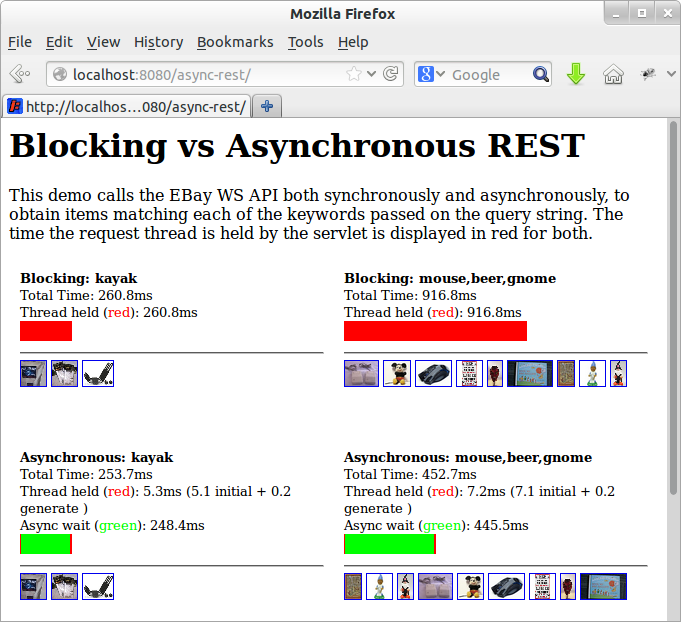
    Screenshot from 2013-04-19 09:15:19

    The screen shot above shows four iframes calling either a synchronous or the asynchronous demonstration servlet, with the following results:

    Synchronous Call, Single Keyword
    A request to lookup ebay auctions with the keyword “kayak” is handled by the synchronous implementation. The call takes 261ms and the servlet thread is blocked for the entire time. A server with a 100 threads in a pool would be able to handle 383 requests per second.
    Asynchronous Call, Single Keyword
    A request to lookup ebay auctions with the keyword “kayak” is handled by the asynchronous implementation. The call takes 254ms, but the servlet request is suspended so the request thread is held for only 5ms. A server with a 100 threads in a pool would be able to handle 20,000 requests per second (if not constrained by other limitations)
    Synchronous Call, Three Keywords
    A request to lookup ebay auctions with keywords “mouse”, “beer” and “gnome” is handled by the synchronous implementation. Three calls are made to ebay in series, each taking approx 306ms, with a total time of 917ms and the servlet thread is blocked for the entire time. A server with a 100 threads in a pool would be able to handle only 109 requests per second!
    Asynchronous Call, Three Keywords
    A request to lookup ebay auctions with keywords “mouse”, “beer” and “gnome” is handled by the asynchronous implementation. The three calls can be made to ebay in parallel, each taking approx 300ms, with a total time of 453ms and the servlet request is suspended, so the request thread is held for only 7ms. A server with a 100 threads in a pool would be able to handle 14,000 requests per second (if not constrained by other limitations).

    It can be seen by these results that asynchronous handling of restful requests can dramatically improve both the page load time and the capacity by avoiding thread starvation.
    The code for the example asynchronous servlet is available from jetty-9 examples and works as follows:

    1. The servlet is passed the request, which is detected as the first dispatch, so the request is suspended and a list to accumulate results is added as a request attribute:
      // If no results, this must be the first dispatch, so send the REST request(s)
      if (results==null) {
          final Queue> resultsQueue = new ConcurrentLinkedQueue<>();
          request.setAttribute(RESULTS_ATTR, results=resultsQueue);
          final AsyncContext async = request.startAsync();
          async.setTimeout(30000);
          ...
    2. After suspending, the servlet creates and sends an asynchronous HTTP exchange for each keyword:
      for (final String item:keywords) {
        _client.newRequest(restURL(item)).method(HttpMethod.GET).send(
          new AsyncRestRequest() {
            @Override
            void onAuctionFound(Map<String,String> auction) {
              resultsQueue.add(auction);
            }
            @Override
            void onComplete() {
              if (outstanding.decrementAndGet()<=0)
                async.dispatch();
            }
          });
      }
    3. All the rest requests are handled in parallel by the eBay servers and when each of them completes, the call back on the exchange object is called. The code (shown above) extracts auction information in the base class from the JSON response and adds it to the results list in the onAuctionFound method.  In the onComplete method, the count of expected responses is then decremented and when it reaches 0, the suspended request is resumed by a call to dispatch.
    4. After being resumed (dispatched), the request is re-dispatched to the servlet. This time the request is not initial and has results, so the results are retrieved from the request attribute and normal servlet style code is used to generate a response:
      List> results = (List>) request.getAttribute(CLIENT_ATTR);
      response.setContentType("text/html");
      PrintWriter out = response.getWriter();
      out.println("");
      for (Map m : results){
        out.print("");
      ...
      out.println("");
      
    5. The example does lack some error and timeout handling.

    This example shows how the Jetty asynchronous client can easily be combined with the asynchronous servlets of Jetty-9 (or the Continuations of Jetty-7) to produce very scalable web applications.

  • Jetty, SPDY, PHP and WordPress

    Having discussed the business case for Jetty 9 and SPDY, this blog presents a simple tutorial for runing PHP web applications like WordPress on Jetty with SPDY.

    Get Jetty

    First you’ll need a distribution of Jetty, which you can download, unpack and run with the following (I use wget to download from the command line, or you can just download with a browser from here):

    wget -U none http://repo1.maven.org/maven2/org/eclipse/jetty/jetty-distribution/9.0.2.v20130417/jetty-distribution-9.0.2.v20130417.zip
    unzip jetty-distribution-9.0.2.v20130417.zip
    cd jetty-distribution-9.0.2.v20130417
    java -jar start.jar

    You can point your browser at http://localhost:8080/ to verify that Jetty is running (Just ctrl-C jetty when you want to stop it).

    Configure SPDY

    Next you’ll need to download NPN (for SPDY protocol negotiation) from  here and save in the lib directory:

    wget -O lib/npn-boot-1.1.5.v20130313.jar
    -U none
    http://repo1.maven.org/maven2/org/mortbay/jetty/npn/npn-boot/1.1.5.v20130313/npn-boot-1.1.5.v20130313.jar

    To configure SPDY create the file start.d/spdy.ini with the following content:

    --exec
    -Xbootclasspath/p:lib/npn-boot-1.1.5.v20130313.jar
    OPTIONS=spdy
    jetty.spdy.port=8443
    jetty.secure.port=8443
    etc/jetty-ssl.xml
    etc/jetty-spdy.xml

    Restart jetty (java -jar start.jar) and you can now verify that you are running SPDY by pointing a recent Chrome or Firefox browser at https://localhost:8443/.  You may have to accept the security exception for the self signed certificate that is bundled with the jetty distro.    FF indicates that they are using SPDY with a little green lightening symbol in the address bar.

    Enable PHP

    There are several ways to PHP enable Jetty, but the one I’m using for this demonstration is php-java-bridge, which you can download in a complete WAR file from here.   To install and test in a context ready for wordpress:

    mkdir webapps/wordpress
    cd webapps/wordpress
    unzip /tmp/JavaBridgeTemplate621.war
    cd ../..
    java -jar start.jar

    You can then test that PHP is working by browsing to http://localhost:8080/wordpress/test.php and you can test that PHP is working under SPDY by browsing https://localhost:8443/wordpress/test.php.

    Install WordPress

    You now have a Jetty SPDY server serving PHP, so let’s install WordPress as an example of PHP webapplication. You can download WordPress from here and install it as follows:

    cd webapps
    rm index.php
    unzip /tmp/wordpress-3.5.1.zip
    cd ..
    java -jar start.jar

    You can browse to WordPress at http://localhost:8080/wordpress/ where you should see a screen inviting you to “Create a Configuration File”.   You’ll need a MYSQL database instance to proceed and 2 screens later you are running WordPress over HTTP.

    You’ll note that if you try immediately to access wordpress with SPDY, you get badly redirected back to the 8080 port with the https protocol!  This is just WordPress being a bit dumb when it comes to SSL and I suggest you google WordPress SSL and have a read of some of the configuration and plugin options available. Take special note of how you can easily lock yourself out of the admin pages!  Which you will do if you simply update the wordpress URL under general settings to https://localhost:8443/wordpress.   You’ll also need to read up on running WordPress on non standard ports, but this is not a blog about wordpress, so I wont go into the options here, other than to say that difficulties with the next few steps are the SPDY as they are for SSL (and that the wordpress guys should really read up on using the host header)!  If you want a quick demonstration, just change the home URI in general settings and you’ll be able to see the main site under SPDY at https://localhost:8443/wordpress/,  but will be locked out of the admin pages.

    Conclusion

    That’s it! A few simple steps are all you need to run a complex PHP site under Jetty with SPDY!        Of course if you want help with setting this up and tuning it, then please consider the Intalio’s migration, performance and/or production support services.

  • The Need For SPDY and why upgrade to Jetty 9?

    So you are not Google!  Your website is only taking a few 10’s or maybe 100’s of requests a second and your current server is handling it without a blip.  So you think you don’t need a faster server and it’s only something you need to consider when you have 10,000 or more simultaneous users!  WRONG!   All websites need to be concerned about speed in one form or another and this blog explains why and how Jetty with SPDY can help improve your  business no matter how large or small you are!

    TagMan conversion rate study for Glasses Direct

    Speed is Relative

    What does it mean to say your web site is fast? There are many different ways of measuring speed and while some websites are concerned with all of them, many if not most need only be concerned with some aspects of speed.

    Requests per Second

    The first measure of speed that many web developers think about is throughput, or how many requests per second can your web site handle?  For large web business with millions of users this is indeed a very important measure, but for many/most websites, requests per second is just not an issue.  Most servers will be able to handle thousands of requests per second, which represents 10’s of thousands of simultaneous users and far exceeds the client base and/or database transaction capacity of small to medium enterprises.     Thus having a server and/or protocol that will allow even greater requests per second is just not a significant concern for most  [ But if it is, then Jetty is still the server for you, but just not for the reasons this blog explains] .

    Request Latency

    Another speed measure is request latency, which is the time it takes a server to parse a request and generate a response.   This can range from a few milliseconds to many seconds depending on the type of the request and complexity of the application.  It can be a very important measure for some websites, specially web service or REST style servers that  handling a transaction per message.   But as an individual measure it is dominated by network latency (10-500 ms) and application processing (1-30000ms), then the time the server spends (1-5ms) handling a request/response is typically not an important driver when selecting a server.

    Page Load Speed

    The speed measure that is most apparent to users of your website is how long a page takes to load.  For a typical website, this involves fetching on average 85 resources (HTML, images, CSS, javascript, etc.) in many HTTP requests over multiple connections. Study summaries below, show that page load time is a metric that can greatly affect the effectiveness of a web site. Page load times have typically been primarily influenced by page design and the server had little ability to speed up page loads.  But with the SPDY protocol, there are now ways to greatly improve page load time, which we will see is a significant business advantage regardless of the size of your website and client base.

    The Business case for Page Load Speed

    The Book Of Speed presents the business benefits of reduced page load speed as determined by many studies summaries below:

    • A study at Microsofts live.com found that slowing page loads by 500ms reduced revenue per user by 1.2%. This increased to 2.8% at 1000ms delay and 4.3% at 2000ms, mostly because of a reduced click through rate.
    • Google found that the negative effect on business of slow pages got worse the longer users were exposed to a slow site.
    • Yahoo found that a slowdown of 400ms was enough to drop the completed page loads by between 5% and 9%. So users were clicking away from the page rather than waiting for it to load.
    • AOL’s studied several of its web properties and found a strong correlation between page load time and the number of page view per user visit. Faster sites retained their visitors for more pages.
    • When Mozilla improved the speed of their Internet Explorer landing page by 2.2s, they increase their rate of conversions by 15.4%
    • Shopzilla reduce their page loads from 6s to 1.2s and increased their sales conversion by 7-12% and also reduced their operation costs due to reduced infrastructure needs.

    These studies clearly show that page load speed should be a significant consideration for all web based businesses and they are backed up by many more such as:

    If that was not enough, Google have also confirmed that they use page load speed as one of the key factors when ranking search results to display.  Thus a slow page can do double damage of reducing the users that visit and reducing the conversion rate of those that do.

    Hopefully you are getting the message now, that page load speed is very important and the sooner you do something about it, the better it will be.   So what can you do about it?

    Web Optimization

    The traditional approach to improving has been to look at Web Performance Optimization, to improve the structure and technical implementation of your web pages using techniques including:

    • Cache Control
    • GZip components
    • Component ordering
    • Combine multiple CSS and javascript components
    • Minify CSS and javascript
    • Inline images, CSS Sprites and image maps
    • Content Delivery Networks
    • Reduce DOM elements in documents
    • Split content over domains
    • Reduce cookies

    These are all great things to do and many will provide significant speed ups.  However, most of these techniques are very intrusive and can be at odds with good software engineer; development speed and separation of concerns between designers and developers.    It can be a considerable disruption to a development effort to put in aggressive optimization goals along side functionality, design and time to market concerns.

    SPDY for Page Load Speed

    The SPDY protocol is being developed primarily by Google to replace HTTP with a particular focus on improving page load latency.  SPDY is already deployed on over 50% of browsers and is the basis of the first draft of the HTTP/2.0 specification being developed by the IETF.    Jetty was the first java server to implement SPDY and Jetty-9 has been re-architected specifically to better handle the multi protocol, TLS, push and multiplexing features of SPDY.

    Most importantly, because SPDY is an improvement in the network transport layer, it can greatly improve page load times without making any changes at all to a web application.  It is entirely transparent to the web developers and does not intrude into the design or development!

    SPDY Multiplexing

    One of the biggest contributors to web page load latency is the inability of the HTTP to efficiently use connection.  A HTTP connection can have only 1 outstanding request and browsers have a low limit (typically 6) to the number of connections that can be used in parallel.  This means that if your page requires 85 resources to render (which is the average), it can only fetch them 6 at a time and it will take at least 14 round trips over the network before the page is rendered.  With network round trip time often hundreds of ms, this can add seconds to page load times!

    SPDY resolves this issue by supporting multiplexed requests over a single connection with no limit on the number of parallel requests.  Thus if a page needs 85 resources to load, SPDY allows all 85 to be requested in parallel and thus only a single round trip latency imposed and content can be delivered at the network capacity.

    More over, because the single connection is used and reused, then the TCP/IP slow start window is rapidly expanded and the effective network capacity available to the browser is thus increased.

    SPDY Push

    Multiplexing is key to reducing round trips, but unfortunately it cannot remove them all because browser has to receive and parse the HTML before it knows the CSS resources to fetch; and those CSS resources have to be fetched and parsed before any image links in them are known and fetch.  Thus even with multiplexing, a page might take 2 or 3 network round trips just to identify all the resources associated with a page.

    But SPDY has another trick up it’s sleeve.  It allows a server to push resources to a browser in anticipation of requests that might come.  Jetty was the first server to implement this mechanism and uses relationships learnt from previous requests to create a map of associated resources so that when a page is requested, all it’s associated resources can immediately be pushed and no additional network round trips are incurred.

    SPDY Demo

    The following demonstration was given and Java One 2012 and clearly shows the SPDY page load latency improvements for a simple page with 25 images blocks over a simulated 200ms network:

    How do I get SPDY?

    To get the business benefits of speed for your web application, you simply need to deploy it on Jetty and enable SPDY with an SSL Certificate for your site.  Standard java web applications can be deployed without modification on Jetty and there are simple solutions to run sites built with PHP, Ruby, GWT etc on Jetty as well.

    If you want assistance setting up Jetty and SPDY, why not look at the affordable Jetty Migration Services available from Intalio.com and get the Jetty experts help power your web site.

  • Jetty comes 2nd in Plumbr Usage Analysis!

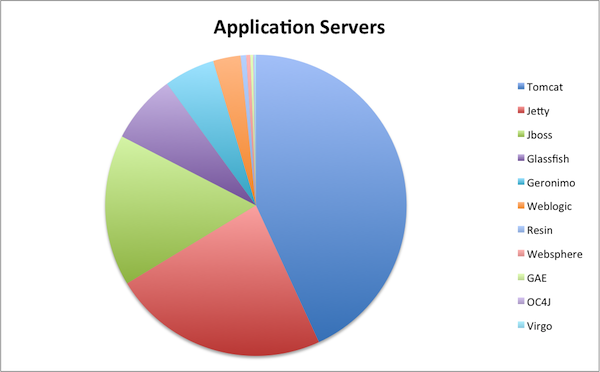
    The folks at Plumbr have done some interesting data harvesting from the anonymous phone home data provided by the free version of their memory leak detection system.  This has allowed them to determine the most popular application servers from their user base.
    From over a 1000 installations they were  able to to inspect the classpath in order to look for an application server and then to plot the results they found:
    application-servers
    So Tomcat is the expected market leader with 43%, but Jetty comes in a very respectable second with 23% beating Jboss with 16%.  Now this is not a hugely scientific study and the results are from a self selected sample of those that are concerned with memory foot print (and hence might be more favourable towards Jetty),  but it’s still great to see us up there!

  • Jetty 9.1 in Techempower benchmarks

    Jetty 9.1.0 has entered round 8 of the Techempower’s Web Framework Benchmarks. These benchmarks are a comparison of over 80 framework & server stacks in a variety of load tests. I’m the first one to complain about unrealistic benchmarks when Jetty does not do well, so before crowing about our good results I should firstly say that these benchmarks are primarily focused at frameworks and are unrealistic benchmarks for server performance as they suffer from many of the failings that I have highlighted previously (see Truth in Benchmarking and Lies, Damned Lies and Benchmarks).

    But I don’t want to bury the lead any more than I have already done, so I’ll firstly tell you how Jetty did before going into detail about what we did and what’s wrong with the benchmarks.

    What did Jetty do?

    Jetty has initially entered the JSON and Plaintext benchmarks:

    • Both tests are simple requests and trivial requests with just the string “Hello World” encode either as JSON or plain text.
    • The JSON test has a maximum concurrency of 256 connections with zero delay turn around between a response and the next request.
    • The plaintext test has a maximum concurrency of 16,384 and uses pipelining to run these connections at what can only be described as a pathological work load!

    How did Jetty go?

    At first glance at the results, Jetty look to have done reasonably well, but on deeper analysis I think we did awesomely well and an argument can be made that Jetty is the only server tested that has demonstrated truly scalable results.

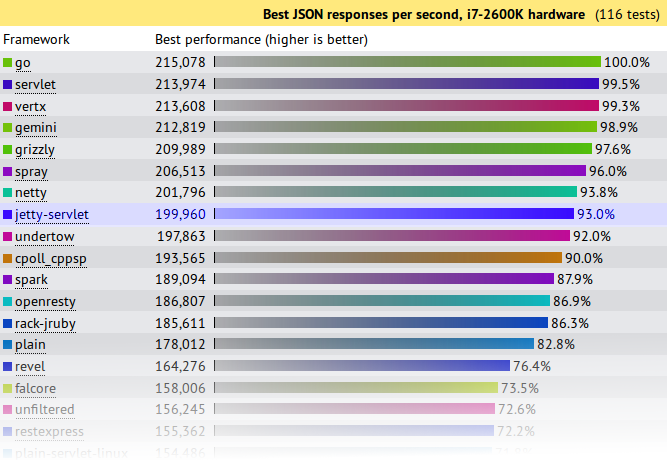
    JSON Results

    json-tp

    Jetty came 8th from 107 and achieved 93% (199,960 req/s) of the first place throughput.   A good result for Jetty, but not great. . . . until you plot out the results vs concurrency:

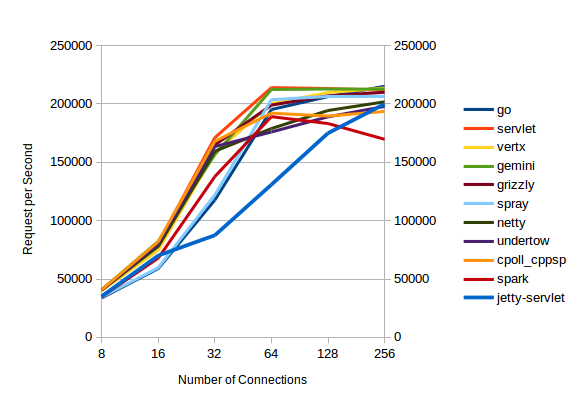
    json-trend

    All the servers with high throughputs have essentially maxed out at between 32 and 64 connections and the top  servers are actually decreasing their throughput as concurrency scales from 128 to 256 connections.

    Of the top throughput servlets, it is only Jetty that displays near linear throughput growth vs concurrency and if this test had been extended to 512 connections (or beyond) I think you would see Jetty coming out easily on top.  Jetty is investing a little more per connection, so that it can handle a lot more connections.

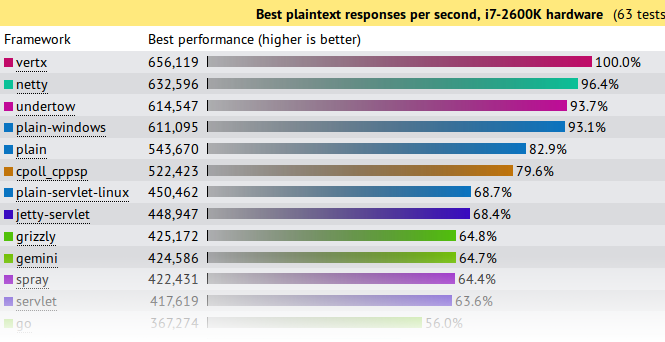
    Plaintext Results

    plain-tp

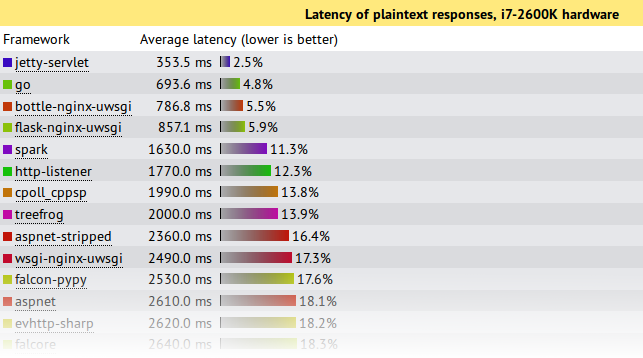
    First glance again is not so great and we look like we are best of the rest with only 68.4% of the seemingly awesome 600,000+ requests per second achieved by the top 4.    But throughput is not the only important metric in a benchmark and things look entirely different if you look at the latency results:

    plain-lat

    This shows that under this pathological load test, Jetty is the only server to send responses with an acceptable latency during the onslaught.  Jetty’s 353.5ms is a workable latency to receive a response, while the next best of 693ms is starting to get long enough for users to register frustration.  All the top throughput servers have average latencies  of 7s or more!, which is give up and go make a pot of coffee time for most users, specially as your average web pages needs >10 requests to display!

    Note also that these test runs were only over 15s, so servers with 7s average latency were effectively not serving any requests until the onslaught was over and then just sent all the responses in one great big batch.  Jetty is the only server to actually make a reasonable attempt at sending responses during the period that a pathological request load was being received.

    If your real world load is anything vaguely like this test, then Jetty is the only server represented in the test that can handle it!

    What did Jetty do?

    The jetty entry into these benchmarks has done nothing special.  It is out of the box configuration with trivial implementations based on the standard servlet API.  More efficient internal Jetty API  have not been used and there has been no fine tuning of the configuration for these tests.  The full source is available, but is presented in summary below:

    public class JsonServlet extends GenericServlet
    {
      private JSON json = new JSON();
      public void service(ServletRequest req, ServletResponse res)
        throws ServletException, IOException
      {
        HttpServletResponse response= (HttpServletResponse)res;
        response.setContentType("application/json");
        Map<String,String> map =
          Collections.singletonMap("message","Hello, World!");
        json.append(response.getWriter(),map);
      }
    }

    The JsonServlet uses the Jetty JSON mapper to convert the trivial instantiated map required of the tests.  Many of the other frameworks tested use Jackson which is now marginally faster than Jetty’s JSON, but we wanted to have our first round with entirely Jetty code.

    public class PlaintextServlet extends GenericServlet
    {
      byte[] helloWorld = "Hello, World!".getBytes(StandardCharsets.ISO_8859_1);
      public void service(ServletRequest req, ServletResponse res)
        throws ServletException, IOException
      {
        HttpServletResponse response= (HttpServletResponse)res;
        response.setContentType(MimeTypes.Type.TEXT_PLAIN.asString());
        response.getOutputStream().write(helloWorld);
      }
    }

    The PlaintextServlet makes a concession to performance by pre converting the string array to bytes, which is then simply written out the output stream for each response.

    public final class HelloWebServer
    {
      public static void main(String[] args) throws Exception
      {
        Server server = new Server(8080);
        ServerConnector connector = server.getBean(ServerConnector.class);
        HttpConfiguration config = connector.getBean(HttpConnectionFactory.class).getHttpConfiguration();
        config.setSendDateHeader(true);
        config.setSendServerVersion(true);
        ServletContextHandler context =
          new ServletContextHandler(ServletContextHandler.NO_SECURITY|ServletContextHandler.NO_SESSIONS);
        context.setContextPath("/");
        server.setHandler(context);
        context.addServlet(org.eclipse.jetty.servlet.DefaultServlet.class,"/");
        context.addServlet(JsonServlet.class,"/json");
        context.addServlet(PlaintextServlet.class,"/plaintext");
        server.start();
        server.join();
      }
    }

    The servlets are run by an embedded server.  The only configuration done to the server is to enable the headers required by the test and all other settings are the out-of-the-box defaults.

    What’s wrong with the Techempower Benchmarks?

    While Jetty has been kick-arse in these benchmarks, let’s not get carried away with ourselves because the tests are far from perfect, specially for  these two tests which are not testing framework performance (the primary goal of the techempower benchmarks) :

    • Both have simple requests that have no information in them that needs to be parsed other than a simple URL.  Realistic web loads often have session and security cookies as well as request parameters that need to be decoded.
    • Both have trivial responses that are just the string “Hello World” with minimal encoding. Realistic web load would have larger more complex responses.
    • The JSON test has a maximum concurrency of 256 connections with zero delay turn around between a response and the next request.  Realistic scalable web frameworks must deal with many more mostly idle connections.
    • The plaintext test has a maximum concurrency of 16,384 (which is a more realistic challenge), but uses pipelining to run these connections at what can only be described as a pathological work load! Pipelining is rarely used in real deployments.
    • The tests appear to run only for 15s. This is insufficient time to reach steady state and it is no good your framework performing well for 15s if it is immediately hit with a 10s garbage collection starting on the 16th second.

    But let me get off my benchmarking hobby-horse, as I’ve said it all before:  Truth in Benchmarking,  Lies, Damned Lies and Benchmarks.

    What’s good about the Techempower Benchmarks?

    • There are many frameworks and servers in the comparison and whatever the flaws are, then are the same for all.
    • The test appear to be well run on suitable hardware within a controlled, open and repeatable process.
    • Their primary goal is to test core mechanism of web frameworks, such as object persistence.  However, jetty does not provide direct support for such mechanisms so we have initially not entered all the benchmarks.

    Conclusion

    Both the JSON and plaintext tests are busy connection tests and the JSON test has only a few connections.  Jetty has always prioritized performance for the more realistic scenario of many mostly idle connections and this has shown that even under pathological loads, jetty is able to fairly and efficiently share resources between all connections.

    Thus it is an impressive result that even when tested far outside of it’s comfort zone, Jetty-9.1.0 has performed at the top end of this league table and provided results that if you look beyond the headline throughput figures, presents the best scalability results.   While the tested loads are far from realistic, the results do indicate that jetty has very good concurrency and low contention.

    Finally remember that this is a .0 release aimed at delivering the new features of Servlet 3.1 and we’ve hardly even started optimizing jetty 9.1.x

  • Jetty-9 goes fast with Mechanical Sympathy

    Since we discovered how to make Jetty-9 avoid parallel slowdown, we’ve been continuing to work with micro benchmarks and consideration of Mechanical Sympathy to further optimise Jetty-9.  As we now about to go to release candidate for Jetty-9, I thought I’d give a quick report on the excellent results we’ve had so far.

    False Sharing in Queues

    Queuing is a very important operation in servers like Jetty and our QueuedThreadPool is a key element to Jetty’s great performance.   While it implements the JVMs Executor interface, even the Jetty-8 implementations has far superior performance to the executors provided by the JVM.   This queue is based on our BlockingArrayQueue that separates the locks for the head and tail and only supports blocking for take operations.

    However because of the layout in memory of the class, it turned out that the head and tail pointers and locks were all within a single CPU cache row.  This is bad because when different threads running on different cores are trying to independently work on the head and tail, it turns out that they are both hitting the same area of memory and are thus repeatedly invalidating each others caches in a pattern called false sharing.

    The solution is to be aware of the memory layout of the class when considering what threads will be accessing which fields and to space them out so that you can avoid this false sharing of cache rows.  The results have given us a significant boost in our micro benchmarks (see below).

    Time and Space Efficient Trie

    Looking up string values is probably one of the most common activities in a HTTP server, as header lines are parsed and the semantic meaning interpreted from the text headers.  A simple hash map look up of a string can be moderately efficient in both space and time, but it assumes that you have a String instance in the first place.  When parsing HTTP, we just have bytes in a buffer and it is costly to have to create a String from these bytes just to lookup what string it is.  Furthermore we need case insensitivity, which is not well supported by the standard JVM hash maps.

    In Jetty-9 we introduced a Trie abstraction that allowed us to experiment with various implementations of string lookups which could operate directly from a slice of the IO buffers without any copies or object creation.

    For our well known string (eg. HTTP header names and values) we initially implemented a simple TreeTrie that stored each character as a node object in a tree.   This was moderately fast, but it suffered from poor locality of reference as each character had to look up a new object that could be located anywhere in the heap.

    Thus we developed an ArrayTrie implementation that stores the tree as index references within a large char[].  This had the huge benefit that once the a portion of the char[] was loaded into cache for one character in the lookup, it is highly likely that subsequent character lookups are already in the cache.  This again gave us a significant boost in our micro benchmarks! But we wanted more

    Look ahead Trie

    The Trie abstraction was initially just used for looking up known strings such as “Host”, “Content-Type”, “User-Agent”, “Connection”, “close” etc. which is very useful as you parse a HTTP header token by token.  However, HTTP is a very repetitive protocol and for a given client you will frequently see well known combinations of tokens such as:

    Connection: close
    Connection: keep-alive
    Accept-Encoding: gzip
    Accept: */*

    The simple parsing strategy is to look for ‘:’ and CRLF to identify tokens and then lookup those strings in the Trie.  But if you are able to look up the combinations of  tokens in a Trie, then the Trie you save effort parsing as well as being able to lookup shared instances of common fields (eg Connection: keep-alive).    Thus we modified our Trie interface to support a best match lookup that given the entire buffer will attempt to match an entire header line.

    For many well known fields combinations like the ones listed above, our ArrayTrie was a good solution. While it is a bit memory hungry, the number of field combinations is not large, is statically known and is shared between all connections to the server.  But unfortunately, not all fields are well known in advance and some of the longest repeated fields look like:

    User-Agent: Mozilla/5.0 (X11; Ubuntu; Linux x86_64; rv:18.0) Gecko/20100101 Firefox/18.0
    Cookie: __utma=1598342155.164253763.123423536.1359602604.1359611604.283; __utmz=12352155.135234604.383.483.utmcsr=google.com.au|utmccn=(referral)|utmcmd=referral|utmcct=/ig; __utmc=4234112; __utmb=4253.1.10.1423
    Accept-Language: en-US,en;q=0.5,it;q=0.45

    Such fields are not statically know but will frequently repeat, either from the same client or from a class of client for a give period of time while a particular version is current.  Thus having a static field Trie is insufficient and we needed to be able to create dynamic per connection Tries to lookup such repeated fields.   ArrayTrie worked, but is massively memory hungry and unsuitable to handle the hundreds of thousands of connections that Jetty can terminate.

    The theory of Tries suggested that a Ternary Tree is a good memory structure with regards to memory consumption, but the problem is that it gave up our locality of reference and worse still created a lot of node garbage as trees are built and discarded.   The solution is to combine the two approaches and we came up with our ArrayTernaryTrie, which is a ternary tree structure stored in a fixed size char[] (which also gives the benefit of protection from DOS attacks).  This data structure has proved quick to build, quick to lookup, efficient on memory and cheap to GC.  It’s another winner in the micro benchmarks.

    Branchless Code

    Supporting many versions of a protocol and the many different semantics that it can carry results in code with lots of if statements.  When a modern CPU encounters a conditional, it tries to guess which way the branch will go and fills the CPU pipeline with instructions from that branch.  This means you either want your branches to be predictable or you want to avoid branches altogether so as to avoid breaking the CPU pipeline.

    This can result in some very fast, but slightly unreadable code. The following branchless code:

    byte b = (byte)((c & 0x1f) + ((c >> 6) * 0x19) - 0x10);

    Converts a hex digit to an byte value without the need for branchful code like:

    if (c>='A' && c<='F')
      b=10+c-'A';
    ...

    Results

    The results have been great, albeit with my normal disclaimer that these are just micro benchmarks and don’t represent any realistic load and please wait for a full server benchmarks before getting too excited.

    For a single connection handling 1,000,000 pipelined requests, Jetty-8 achieved the following results:

    ========================================
    Statistics Started at Thu Jan 31 15:27:11 EST 2013
    Operative System: Linux 3.5.0-22-generic amd64
    JVM : Oracle Corporation Java HotSpot(TM) 64-Bit Server VM runtime 23.3-b01 1.7.0_07-b10
    Processors: 8
    System Memory: 97.034004% used of 7.7324257 GiB
    Used Heap Size: 5.117325 MiB
    Max Heap Size: 1023.25 MiB
    Young Generation Heap Size: 340.5625 MiB
    - - - - - - - - - - - - - - - - - - - -
    /stop/ Pipeline Requests 1000000 of 1000000
    - - - - - - - - - - - - - - - - - - - -
    Statistics Ended at Thu Jan 31 15:28:00 EST 2013
    Elapsed time: 48636 ms
        Time in JIT compilation: 1 ms
        Time in Young Generation GC: 7 ms (9 collections)
        Time in Old Generation GC: 0 ms (0 collections)
    Garbage Generated in Young Generation: 2914.1484 MiB
    Garbage Generated in Survivor Generation: 0.4375 MiB
    Garbage Generated in Old Generation: 0.046875 MiB
    Average CPU Load: 99.71873/800
    ----------------------------------------

    This style of benchmark is a reasonable test of:

    • The raw speed of the IO layer
    • The efficiency of the HTTP parsing and generating
    • The memory footprint of the server
    • The garbage produced by the server

    For the same benchmark, Jetty-9 achieved the following results:

    ========================================
    Statistics Started at Thu Jan 31 15:30:14 EST 2013
    Operative System: Linux 3.5.0-22-generic amd64
    JVM : Oracle Corporation Java HotSpot(TM) 64-Bit Server VM runtime 23.3-b01 1.7.0_07-b10
    Processors: 8
    System Memory: 94.26746% used of 7.7324257 GiB
    Used Heap Size: 5.7408752 MiB
    Max Heap Size: 1023.25 MiB
    Young Generation Heap Size: 340.5625 MiB
    - - - - - - - - - - - - - - - - - - - -
    /stop/ Pipeline Requests 1000000 of 1000000
    - - - - - - - - - - - - - - - - - - - -
    Statistics Ended at Thu Jan 31 15:30:47 EST 2013
    Elapsed time: 33523 ms
        Time in JIT compilation: 2 ms
        Time in Young Generation GC: 4 ms (4 collections)
        Time in Old Generation GC: 0 ms (0 collections)
    Garbage Generated in Young Generation: 1409.474 MiB
    Garbage Generated in Survivor Generation: 0.1875 MiB
    Garbage Generated in Old Generation: 0.046875 MiB
    Average CPU Load: 99.959854/800
    ----------------------------------------

    Thus for a small increase in static heap usage (0.5MB in the static Tries), jetty-9 out performs jetty-8 by 30% faster (33.5s vs 48.6s) and 50% less YG garbage (1409MB vs 2914MB) which trigger less than half the YG collections.

    Release Candidate 0 of Jetty-9 will be released in the next few days, so I hope you’ll join us and start giving it some more realistic loads and testing and report the results.

  • Avoiding Parallel Slowdown in Jetty-9 with CPU Cache analysis.

    How can the sum of fast parts be slower than the sum of slower parts?   This is one of the conundrums we faced as we have been benchmarking the latest Jetty-9 releases. The explanation is good insight into modern CPUs and an indication of how software engineers need to be somewhat aware of the hardware when creating high performance software that scales.

    Jetty-9 Performance Expectations

    With the development of Jetty-9, we have refactored and/or refined many of the core components to take advantage of newer JVMs, new protocols and more experience. The result has been that the IO layer, HTTP parser, HTTP generator, buffer pools and other components all micro-benchmark much better than their predecessors in Jetty-8.  They use less heap, produce less garbage, have less code and run faster.   For example a micro benchmark of the Jetty-8 HTTP Parser gave the following results:

    Jetty-8 HttpParser+HttpFields
    ========================================
    Operative System: Linux 3.5.0-19-generic amd64
    JVM : Java HotSpot(TM) 64-Bit Server 23.3-b01 1.7.0_07-b10
    Processors: 8
    System Memory: 89.56941% used of 7.7324257 GiB
    Used/Max Heap Size: 8.314537/981.375 MiB
    - - - - - - - - - - - - - - - - - - - -
    tests    10000000
    requests 10000000
    headers  60000000
    - - - - - - - - - - - - - - - - - - - -
    Elapsed time: 60600 ms
        Time in JIT compilation: 0 ms
        Time in Young Generation GC: 26 ms (26 collections)
        Time in Old Generation GC: 0 ms (0 collections)
    Garbage Generated in Young Generation: 7795.7827 MiB
    Garbage Generated in Survivor Generation: 0.28125 MiB
    Garbage Generated in Old Generation: 0.03125 MiB
    Average CPU Load: 99.933975/800
    ----------------------------------------

    The same task done by the Jetty-9 HTTP parser gave  better results as it executed faster and produced almost half the garbage:

    Jetty-9 HttpParser+HttpFields
    ========================================
    Operative System: Linux 3.5.0-19-generic amd64
    JVM : Java HotSpot(TM) 64-Bit Server 23.3-b01 1.7.0_07-b10
    Processors: 8
    System Memory: 88.25224% used of 7.7324257 GiB
    Used/Max Heap Size: 8.621246/981.375 MiB
    - - - - - - - - - - - - - - - - - - - -
    tests    10000000
    requests 10000000
    headers  60000000
    - - - - - - - - - - - - - - - - - - - -
    Statistics Ended at Mon Dec 17 10:00:04 EST 2012
    Elapsed time: 57701 ms
    	Time in JIT compilation: 0 ms
    	Time in Young Generation GC: 18 ms (15 collections)
    	Time in Old Generation GC: 0 ms (0 collections)
    Garbage Generated in Young Generation: 4716.9775 MiB
    Garbage Generated in Survivor Generation: 0.34375 MiB
    Garbage Generated in Old Generation: 0.0234375 MiB
    Average CPU Load: 99.92787/800
    ----------------------------------------

    Another example of an improved component in Jetty-9 is the IO layer. The following example is an test that simply echoes a 185 bytes HTTP message between the client and  server a million times:

    Jetty-8 Echo Connection Server
    ========================================
     Used/Max Heap Size: 20.490265/981.375 MiB
     - - - - - - - - - - - - - - - - - - - -
     Filled 185000000 bytes in 1000000 fills
     - - - - - - - - - - - - - - - - - - - -
     Elapsed time: 67778 ms
         Time in Young Generation GC: 12 ms (14 collections)
     Garbage Generated in Young Generation: 4169.701 MiB
     Average CPU Load: 118.37115/800
     ----------------------------------------
    Jetty-9 Echo Connection Server
    ========================================
    Used/Max Heap Size: 11.668541,981.375 MiB
    - - - - - - - - - - - - - - - - - - - -
    Filled 185000000 bytes in 1000000 fills
    - - - - - - - - - - - - - - - - - - - -
    Elapsed time: 66846 ms
        Time in Young Generation GC: 2 ms (2 collections)
    Garbage Generated in Young Generation: 653.2649 MiB
    Average CPU Load: 111.07558/800
    ----------------------------------------

    Jetty-9 is using half the heap, generating 85% less garbage, forcing less GCs, using less CPU and achieving the same throughput.  Surely the CPU and memory freed by such an improvement would be well used to improve the total performance of the server?

    Jetty-9 Disappointment

    Our expectation for the jetty-9 as a server built from a combination of these improved components, was that it would be much faster than jetty-8.

    Thus we were amazed to discover that for our initial benchmarks, jetty-9 was significantly slower and more resource hungry than jetty-8!!! The test this was most apparent in was a single connection driven with as many pipelined requests that could be fed to it (note that this is preciously the kind of non realistic benchmark load that I argue against in Truth in Benchmarking and Lies, DamnLies and Benchmarks, but so long as you know what you are testing the results are interesting none the less):

    jetty-8 pipeline:
    ========================================
    Used/Max Heap Size: 3.0077057/1023.625 MiB
    - - - - - - - - - - - - - - - - - - - -
    Pipeline Requests 1000000 of 1000000
    - - - - - - - - - - - - - - - - - - - -
    Elapsed time: 37696 ms
            Time in Young Generation GC: 7 ms (9 collections)
            Time in Old Generation GC: 0 ms (0 collections)
    Garbage Generated in Young Generation: 2886.1907 MiB
    Average CPU Load: 100.009384/800
    ----------------------------------------

    Jetty-8 achieves a healthy 26,525 requests per second on a single connection and core! Jetty-9 disappointed:

    jetty-9 pipeline:
    ========================================
    Used/Max Heap Size: 3.406746/1023.6875 MiB
    - - - - - - - - - - - - - - - - - - - -
    Pipeline Requests 1000000 of 1000000
    - - - - - - - - - - - - - - - - - - - -
    Elapsed time: 47212 ms
            Time in Young Generation GC: 6 ms (10 collections)
            Time in Old Generation GC: 0 ms (0 collections)
    Garbage Generated in Young Generation: 3225.3438 MiB
    Average CPU Load: 133.77675/800
    ----------------------------------------

    Only 21,181 requests per second and 1.3 cores were needed to produce those results! That’s 25% slower with 30% more CPU!?!?!? How could this be so?  All the jetty 9 components when tested individually were faster yet when run together, there were slower!

    Benchmark analysis – Parallel Slowdown.

    We profiled the benchmarks using various profiling tools, there were a few minor hot spots and garbage producers identified.  These were easily found and fixed (eg replaced StringMap usage with a new Trie implementation), but only gave us about a 10% improvement leaving another 15% to be found just to break even!

    But profiling revealed no really significant hot spots and no stand out methods that obviously needed to be improved and no tasks being done that were not done by jetty-8.  The 15% was not going to be found in a few methods, it looked like we had to find 0.015% from 1000 methods ie it looked like every bit of the code was running a little bit slower than it should do.

    The clue that helped us was that jetty-9 was using more than 1 core for a single connection.  Thus we started suspecting that it was an issue with how we were using threads and perhaps with CPU caches. Jetty-9 makes a fair bit more usage of Atomics than Jetty-8, in an effort to support even more asynchronous behaviour.  Investigating this led us to the excellent blog of Marc Brooker where he investigates the performance implications of CPU caching on integer incrementing.

    While it turned out that there is nothing wrong with our usage of Atomics, the analysis tools that Marc describes (linux perf) revealed our smoking gun.  The Linux perf tool gives access to the CPU and kernel performance counters so that you can glimpse what is going on within the hardware of a modern multicore machine.   For my i7 CPU I worked out that the following command gave the extra information needed:

    perf stat
     -e task-clock
     -e cycles
     -e instructions
     -e LLC-loads
     -e LLC-load-misses
     -e cache-references
     -e cache-misses
     -e L1-dcache-loads
     -e L1-dcache-load-misses
     -e L1-icache-loads
     -e L1-icache-load-misses
     --pid $JETTY_PID

    Running this against a warmed up Jetty-8 server for the entire pipeline test gave the following results:

    Performance counter stats for process id 'jetty-8':
       27751.967126 task-clock        #  0.867 CPUs utilized          
     53,963,171,579 cycles            #  1.944 GHz                     [28.67%]
     49,404,471,415 instructions      #  0.92  insns per cycle        
        204,217,265 LLC-loads         #  7.359 M/sec                   [36.56%]
         15,167,562 LLC-misses        #  7.43% of all LL-cache hits    [ 7.21%]
        567,593,065 cache-references  # 20.452 M/sec                   [14.50%]
         17,518,855 cache-misses      #  3.087 % of all cache refs     [21.66%]
     16,405,099,776 L1-dcache-loads   #591.133 M/sec                   [28.46%]
        782,601,144 L1-dcache-misses  #  4.77% of all L1-dcache hits   [28.41%]
     22,585,255,808 L1-icache-loads   #813.825 M/sec                   [28.57%]
      4,010,843,274 L1-icache-misses  # 17.76% of all L1-icache hits   [28.57%]

    The key number in all this gritty detail is the instructions per cycle figure.  In Jetty-8, the CPU was able to execute 0.92 instructions every clock tick, with the remainder of the time being spent waiting for data from slow memory to fill either the instruction or the data caches. The same test for jetty-9 reveals the full horror of what was going on:

    Performance counter stats for process id 'jetty-9-M3':
       77452.678481 task-clock        #  1.343 CPUs utilized          
    116,033,902,536 cycles            #  1.498 GHz                     [28.35%]
     62,939,323,536 instructions      #  0.54  insns per cycle        
        891,494,480 LLC-loads         # 11.510 M/sec                   [36.59%]
        124,466,009 LLC-misses        # 13.96% of all LL-cache hits    [ 6.97%]
      2,341,731,228 cache-references  # 30.234 M/sec                   [14.03%]
         29,223,747 cache-misses      #  1.248 % of all cache refs     [21.25%]
     20,644,743,623 L1-dcache-loads   #266.547 M/sec                   [28.39%]
      2,290,512,202 L1-dcache-misses  # 11.09% of all L1-dcache hits   [28.15%]
     34,515,836,027 L1-icache-loads   #445.638 M/sec                   [28.12%]
      6,685,624,757 L1-icache-misses  # 19.37% of all L1-icache hits   [28.34%]

    Jetty-9 was only able to execute 0.54 instructions per tick, so almost half the CPU time was spent waiting for data from memory.  Worse still, this caused so little load on the CPU that the power governor only felt the need to clock the CPU at 1.498GHz rather than the 1.944GHz achieve by jetty-8 (Note that some recommend to peg CPU frequencies during benchmarks, but I believe that unless you do that in your data centre and pay the extra power/cooling charges, then don’t do it in your benchmarks. Your code must be able to drive the CPU governors to dynamically increase the clock speed as needed).

    The cause of this extra time waiting for memory is revealed by the cache figures.  The L1 caches were being hit a little bit more often and missing a lot more often!  This flowed through to the LLC cache that had to do 4 times more loads with 8 times more cache misses! This is a classic symptom of Parallel Slowdown, because Jetty-9 was attempting to use multiple cores to handle a job best done by a single core (ie a serial sequence of requests on single connection), it was wasting more time in sharing data between cores than it was gaining by increased computing power.

    Where Jetty-9-M3 got it wrong!

    One of the changes that we had made in Jetty-9 was an attempt to better utilize the selector thread so to reduce unnecessary dispatches to the thread pool.   By default, we configure jetty with an NIO selector and selector thread for each available CPU core. In Jetty-8 when the selector detects a connection that is readable, it dispatched the endpoint to a thread from the pool, which would do the IO read, parse the HTTP request, call the servlet container and flush the response.

    In Jetty-9, we realized that it is only when calling the application in the servlet container that there is a possibility that the thread might block and that it would thus be safe to let the selector thread do the IO read and HTTP parsing without a dispatch to a thread.  Only once the HTTP parser had received an entire HTTP request, would a dispatch be done to an application handler to handle the request (probably via a servlet).  This seemed like a great idea at the time that at worst would cost nothing, but may save some dispatches for slow clients.

    Our retrospect-a-scope now tells us that is is a very bad idea to have a different thread do the HTTP parsing and the handling.  The issue is that once one thread had finished parsing a HTTP request, then it’s caches are full of all the information just parsed. The method, URI and request object holding them,  are all going to be in or near to the L1 cache.   Dispatching the handling to another thread just creates the possibility that another core will execute the thread and will need to fill it’s cache from main memory with all the parsed parts of the request.

    Luckily with the flexible architecture of jetty, we were able to quickly revert the dispatching model to dispatch on IO selection rather than HTTP request completion and we were instantly rewarded with another 10% performance gain.   But we were still a little slower than jetty-8 and still using 1.1 cores rather than 1.0.  Perf again revealed that we were still suffering from some parallel slowdown, which turned out to be the way Jetty-9 was handling pipelined requests.  Previously Jetty’s IO handling thread had looped until all read data was consumed or until an upgrade or request suspension was done.  Those “or”s made for a bit of complex code, so to simplify the code base, Jetty-9 always returned from the handling thread after handling a request and it was the completion callback that dispatched a new thread to handle any pipelined requests.  This new thread might then execute on a different core, requiring its cache to be loaded with the IO buffer and the connection, request and other objects before the next request can be parsed.

    Testing pipelines is more of an exercise for interest rather than handling something likely to be encountered in real productions, but it is worth while to handle them well if at least to deal with such simple unrealistic benchmarks.    Thus we have reverted to the previous behaviour and found another huge gain in performance.

    Jetty-9 getting it right

    With the refactored components, the minor optimizations found from profiling, and the reversion to the jetty-8 threading model, jetty-9 is now meeting our expectations and out performing jetty-8.  The perf numbers now look much better:

    Performance counter stats for process id 'jetty-9-SNAPSHOT':
       25495.319407 task-clock        #  0.928 CPUs utilized          
     62,342,095,246 cycles            #  2.445 GHz                     [33.50%]
     45,949,661,990 instructions      #  0.74  insns per cycle  
        349,576,707 LLC-loads         # 13.711 M/sec                   [42.14%]
         18,734,441 LLC-misses        #  5.36% of all LL-cache hits    [ 8.37%]
        946,308,800 cache-references  # 37.117 M/sec                   [16.79%]
         18,683,743 cache-misses      #  1.974 % of all cache refs     [25.14%]
     15,146,280,274 L1-dcache-loads   #594.081 M/sec                   [33.43%]
      1,313,578,215 L1-dcache-misses  #  8.67% of all L1-dcache hits   [33.31%]
     21,215,554,821 L1-icache-loads   #832.135 M/sec                   [33.27%]
      4,130,760,394 L1-icache-misses  # 19.47% of all L1-icache hits   [33.27%]

    The CPU is now executing 0.74 instructions per tick, not as good as jetty-8, but a good improvement.  Most importantly, the macro benchmark numbers now indicate that parallel slowdown is not having an effect and the improved jetty-9 components are now able to do their stuff and provide some excellent results:

    Jetty-9-SNAPSHOT Pipeline:
    ========================================
    Processors: 8
    Used/Max Heap Size: 4.152527,1023.6875 MiB
    - - - - - - - - - - - - - - - - - - - -
    Pipeline Requests 1000000 of 1000000
    - - - - - - - - - - - - - - - - - - - -
    Statistics Ended at Mon Dec 17 13:03:54 EST 2012
    Elapsed time: 29172 ms
        Time in Young Generation GC: 3 ms (4 collections)
        Time in Old Generation GC: 0 ms (0 collections)
    Garbage Generated in Young Generation: 1319.1224 MiB
    Average CPU Load: 99.955666/800
    ----------------------------------------

    This is 34,280 requests per second (29% better that Jetty-8), using only half the heap and generating 83% less garbage!     If this was in anyway a realistic benchmark working with a load profile in any way resembling a real world load, then these numbers would be absolutely AWESOME!

    But this is just a single connection pipeline test, nothing like the load profile that 99.999% of servers will encounter.  So while these results are very encouraging, I’ll wait until we do some tuning against some realistic load benchmarks before I get too excited.  Also I believe that the perf numbers are showing that there may also be room for even more improvement with jetty-9 and the same tools can also be used to get significant results by improving (or avoiding) branch prediction.

    The code for the benchmarks used is available at git@github.com:jetty-project/jetty-bench.git.
  • SPDY Push Demo from JavaOne 2012

    Simone Bordet and I spoke at JavaOne this year about the evolution of web protocol and how HTTP is being replaced by WebSocket (for new semantics) and by SPDY (for better efficiency).

    The demonstration of SPDY Push is particularly good at showing how SPDY can greatly improve the latency of serving your web applications.   The video of the demo is below:

    But SPDY is about more than improving load times for the user.  It also has some huge benefits for scalability on the server side.   To find out more, you can see the full presentation via the presentations link on webtide.com (which is already running SPDY so users of Chrome or the latest FF that follow that link will be making a SPDY request).

    SPDY is already available as a connector type in Jetty-7, 8 and 9.   For assistance getting your website SPDY enabled please contact info@webtide.com. Our software is free open source and we provide commercial developer advice and production support.

  • Jetty 9 – Features

    Jetty 9 milestone 0 has landed! We are very excited about getting this release of jetty out and into the hands of everyone. A lot of work as gone into reworking fundamentals and this is going to be the best version of jetty yet!

    Anyway, as promised a few weeks back, here is a list of some of the big features in jetty-9. By no means an authoritative list of things that have changed, these are many of the high points we think are worthy of a bit of initial focus in jetty-9. One of the features will land in a subsequent milestone releases (pluggable modules) as that is still being refined somewhat, but the rest of them are largely in place and working in our initial testing.
    We’ll blog in depth on some of these features over the course of the next couple of months. We are targeting a November official release of Jetty 9.0.0 so keep an eye out. The improved documentation is coming along well and we’ll introduce that shortly. In the meantime, give the initial milestones a whirl and give us feedback on the mailing lists, on twitter (#jettyserver hashtag pls) or directly at some of the conferences we’ll be attending over the next couple of months.
    Next Generation Protocols – SPDY, WebSockets, MUX and HTTP/2.0 are actively replacing the venerable HTTP/1.1 protocol. Jetty directly supports these protocols as equals and first class siblings to HTTP/1.1. This means a lighter faster container that is simpler and more flexible to deal with the rapidly changing mix of protocols currently being experienced as HTTP/1.1 is replaced.
    Content Push – SPDY v3 supporting including content push within both the client and server. This is a potentially huge optimization for websites that know what a browser will need in terms of javascript files or images, instead of waiting for a browser to ask first.
    Improved WebSocket Server and Client

    • Fast websocket implementation
    • Supporting classic Listener approach and @WebSocket annotations
    • Fully compliant to RFC6455 spec (validated via autobahn test suite http://autobahn.ws/testsuite)
    • Support for latest versions of Draft WebSocket extensions (permessage-compression, and fragment)

    Java 7 – We have removed some areas of abstraction within jetty in order to take advantage of improved APIs in the JVM regarding concurrency and nio, this leads to a leaner implementation and improved performance.
    Servlet 3.1 ready – We actively track this developing spec and will be with support, in fact much of the support is already in place.
    Asynchronous HTTP client – refactored to simplify API, while retaining the ability to run many thousands of simultaneous requests, used as a basis for much of our own testing and http client needs.
    Pluggable Modules – one distribution with integration with libraries, third party technologies, and web applications available for download through a simple command line interface
    Improved SSL Support – the proliferation of mobile devices that use SSL has manifested in many atypical client implementations, support for these edge cases in SSL has been thoroughly refactored such that support is now understandable and maintainable by humans
    Lightweight – Jetty continues its history of having a very small memory footprint while still being able to scale to many ten’s of thousands of connections on commodity hardware.
    Eminently Embeddable – Years of embedding support pays off in your own application, webapp, or testing. Use embedded jetty to unit test your web projects. Add a web server to your existing application. Bundle your web app as a standalone application.

  • Jetty 9 – it's coming!

    Development on Jetty-9 has been chugging along for quite some time now and it looks like we’ll start releasing milestones in around the end of September.  This is exciting because we have a lot of cool improvements and features coming that I’ll leave to others to blog about in specific on over the next couple of months and things come closer to release.
    What I wanted to highlight in this blog post are the plans moving forward for jetty version wise pinpointed with a bit of context where appropriate.

    • Jetty-9 will require java 1.7

    While Oracle has relented a couple of times now about when the EOL is of java 1.6, it looks like it will be over within the next few months and since native support for SPDY (more below) is one of the really big deals about jetty-9 and SPDY requires java 1.7 that is going to be the requirement.

    • Jetty-9 will be servlet-api 3.0

    We had planned on jetty-9 being servlet-api 3.1 but since that api release doesn’t appear to be coming anytime soon, the current plan is to just make jetty-9 support servlet 3.0 and once servlet-api 3.1 is released we’ll make a minor release update of jetty-9 to support it.  Most of the work for supporting servlet-api 3.1 already exists in the current versions of jetty anyway so it shouldn’t be a huge deal.

    • Jetty-7 and Jetty-8 will still be supported as ‘mature’ production releases

    Jetty-9 has some extremely important changes in the IO layers that make supporting it moving forward far easier then jetty 7 and 8.  For much of the life of Java 1.6 and Java 1.7 there have been annoying ‘issues’ in the jvm NIO implementation that we (well greg to be honest) have piled on work around after work around until some of the work arounds would start to act up once the underlying jvm issue were resolved.  Most of this has been addressed in jetty-7.6.x and jetty-8.1.x releases assuming the latest jvm’s are being used (basically make sure you avoid anything in the 1.6u20-29 range).  Anyway, jetty-9 contains a heavily refactored IO layer which should make it easier to respond to these situations in the future should they arise in a more…well…deterministic fashion. 🙂

    • Jetty-9 IO is a major overhaul

    This deserves it’s own blog entry which it will get eventually I am sure, however it can’t be overstated how much the inner workings of jetty have evolved with jetty-9. Since its inception jetty has always been a very modular or component oriented http server. The key being ‘http’ server, and with Jetty-9 that is changing. Jetty-9 has been rearchitected from the IO layer up to directly support the separation of wire protocol from semantic, so it is now possible to support HTTP over HTTP, HTTP over SPDY, Websocket over SPDY, multiplexing etc with all protocols being first class citizens and no need to mock out
    inappropriate interfaces. While these are mostly internal changes, they ripple out to give many benefits to users in the form of better performance, smaller software and simpler and more appropriate configuration. For example instead of having multiples of differennt connector types, each with unique SSL and/or SPDY variants, there is now a single connector into which various connections factories are configured to support SSL, HTTP, SPDY, Websocket etc. This means moving forward jetty will be able to adapt easily and quickly to new protocols as they come onto the scene.

    • Jetty-6…for the love of god, please update

    Jetty-5 used to hold the title for ‘venerable’ but that title is really shifting to jetty-6 at this point.  I am constantly amazed with folks on places like stack overflow starting a project using jetty-6.  The linux distributions really need to update, so if you work on those and need help, please ping us.  Many other projects that embed jetty really need to update as well, looking at you Google App Engine and GWT!  If you are a company and would like help updating your jetty version or are interested in taking advantage of the newer protocols, feel free to contact webtide and we can help you make it easier.  If you’re an open source project, reach out to us on the mailing lists and we can assist there as much as time allows.  But please…add migrating to 7, 8 or 9 to your TODO list!

    • No more split production versions

    One of our more confusing situations has been releasing both jetty 7 and jetty 8 as stable production versions.  The reasons for our doing this were many and varied but with servlet 3.0 being ‘live’ for a while now we are going to shift back to the singular supported production version moving forward.  The Servlet API is backwards compatible anyway so we’ll be hopefully reducing some of the confusion on which version of jetty to use moving forward.

    • Documentation

    Finally, our goal starting with jetty-9 moving forward will be to release versioned documentation (generated with docbook)  to a common url under the eclipse.org domain as well as bundling the html and pdf to fit in the new plugin architecture we are working with.  So the days of floundering around for documentation on jetty should be coming to an end soon.
    Lots of exciting things coming in Jetty-9 that you’ll hear about in the coming weeks! Feel free to follow @jmcconnell on twitter for release updates!